cvt NISSAN QASHQAI 2016 Owner´s Manual
[x] Cancel search | Manufacturer: NISSAN, Model Year: 2016, Model line: QASHQAI, Model: NISSAN QASHQAI 2016Pages: 338, PDF Size: 4.87 MB
Page 72 of 338
HOW TO USE THE VEHICLE
INFORMATION DISPLAY
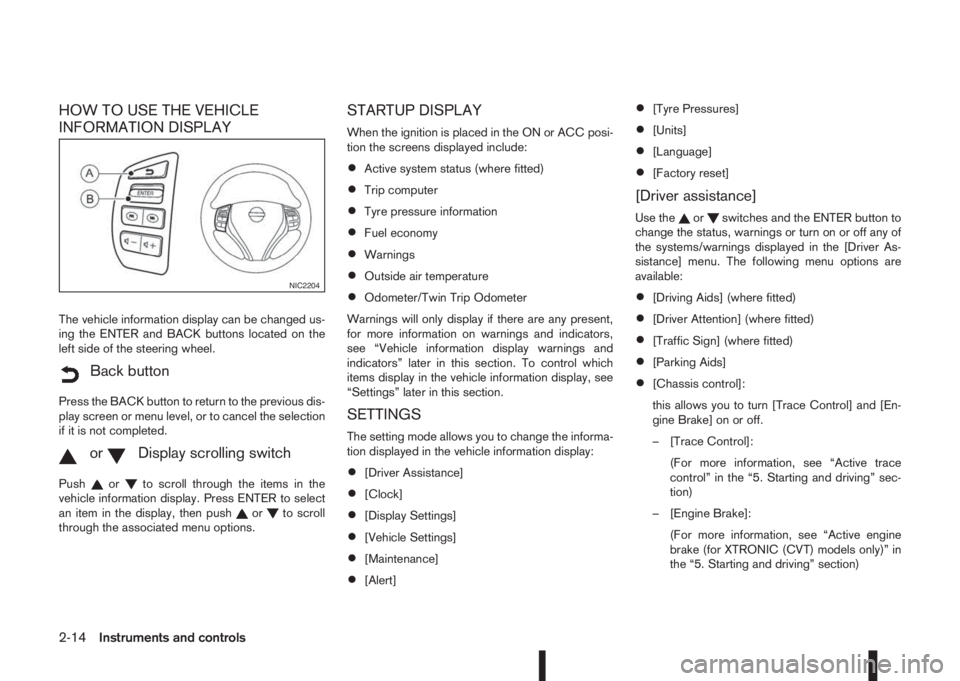
The vehicle information display can be changed us-
ing the ENTER and BACK buttons located on the
left side of the steering wheel.
mBack button
Press the BACK button to return to the previous dis-
play screen or menu level, or to cancel the selection
if it is not completed.
mormDisplay scrolling switch
Pushorto scroll through the items in the
vehicle information display. Press ENTER to select
an item in the display, then push
orto scroll
through the associated menu options.
STARTUP DISPLAY
When the ignition is placed in the ON or ACC posi-
tion the screens displayed include:
•Active system status (where fitted)
•Trip computer
•Tyre pressure information
•Fuel economy
•Warnings
•Outside air temperature
•Odometer/Twin Trip Odometer
Warnings will only display if there are any present,
for more information on warnings and indicators,
see “Vehicle information display warnings and
indicators” later in this section. To control which
items display in the vehicle information display, see
“Settings” later in this section.
SETTINGS
The setting mode allows you to change the informa-
tion displayed in the vehicle information display:
•[Driver Assistance]
•[Clock]
•[Display Settings]
•[Vehicle Settings]
•[Maintenance]
•[Alert]
•[Tyre Pressures]
•[Units]
•[Language]
•[Factory reset]
[Driver assistance]
Use theorswitches and the ENTER button to
change the status, warnings or turn on or off any of
the systems/warnings displayed in the [Driver As-
sistance] menu. The following menu options are
available:
•[Driving Aids] (where fitted)
•[Driver Attention] (where fitted)
•[Traffic Sign] (where fitted)
•[Parking Aids]
•[Chassis control]:
this allows you to turn [Trace Control] and [En-
gine Brake] on or off.
– [Trace Control]:
(For more information, see “Active trace
control” in the “5. Starting and driving” sec-
tion)
– [Engine Brake]:
(For more information, see “Active engine
brake (for XTRONIC (CVT) models only)” in
the “5. Starting and driving” section)
NIC2204
2-14Instruments and controls
Page 83 of 338
![NISSAN QASHQAI 2016 Owner´s Manual 25. [Reminder turn off headlights]
warning
This warning appears when the driver side door is
opened while the headlight switch is left ON and the
ignition switch is placed in the ACC, “OFF” or
LOC](/img/5/40324/w960_40324-82.png "NISSAN QASHQAI 2016 Owner´s Manual 25. [Reminder turn off headlights]
warning
This warning appears when the driver side door is
opened while the headlight switch is left ON and the
ignition switch is placed in the ACC, “OFF” or
LOC")
25. [Reminder turn off headlights]
warning
This warning appears when the driver side door is
opened while the headlight switch is left ON and the
ignition switch is placed in the ACC, “OFF” or
LOCK position. Place the headlight switch in “OFF”
or “AUTO” position. For additional information, see
“Headlight and turn signal switch” later in this sec-
tion.
26. [Time for a driver break?] indicator
This indicator appears when the set “TIMER” indi-
cator activates. You can set the time for up to 6
hours.
27. [Low outside temperature] warning
This warning appears if the outside temperature is
below 3°C (37°F). The warning can be set not to be
displayed. (See “[Clock] and [outside air
temperature]” later in this section or the separate
NissanConnect Owner’s manual.)
28. [Chassis control system fault]
warning
This warning appears if the chassis control module
detects an error in the Chassis Control System
(where fitted). Have the system checked by a
NISSAN dealer or qualified workshop. (See “Chas-
sis control” in the “5. Starting and driving” section.)
29. Cruise control indicator
This indicator shows the cruise control system sta-
tus. The status is shown by the colour.
See “Cruise control (where fitted)” in the “5. Start-
ing and driving” section for details.
30. Speed limiter indicator
This indicator shows the status of the speed limiter
system . If the system is in turned on and in use, the
speed that the speed limiter is set to is also dis-
played.
See “Speed limiter (where fitted)” in the “5. Starting
and driving” section for details.
31. Shift lever position indicator
This indicator shows the shift lever position.
See “Shift lever indicator (where fitted)” in the
“5. Starting and driving” section for further details.
32. [Tyre Pressure System Fault]
warning
This warning illuminates when there is a problem
with the Tyre Pressure Monitoring System (TPMS).
If this warning comes on, have the system checked
by a NISSAN dealer or qualified workshop. See
“Tyre Pressure Monitoring System (TPMS)” in the
“5. Starting and driving” section for further details.
33. [Resetting Tyre Pressure System]
indicator
This warning illuminates when the TPMS tempera-
ture calibration is in progress. See “TPMS tempera-
ture calibration” in the “5. Starting and driving” sec-
tion for further details.
34. [Parking Sensor System Fault]
warning (where fitted)
This warning illuminates when there is a problem
with the parking sensor system. If this warning
comes on, have the system checked by a NISSAN
dealer or qualified workshop.
35. [Vehicle Overheating Stop Vehicle]
warning
This warning illuminates is the engine coolant tem-
perature is too high, indicating that the engine is
overheating. See “Engine overheat” in the “6. In
case of emergency” section for further details.
36. [CVT System Fault] warning
(where fitted)
This warning illuminates when there is a problem
with the XTRONIC transmission (CVT) system. If
this warning comes on, have the system checked by
a NISSAN dealer or qualified workshop.
Instruments and controls2-25
Page 176 of 338
5Starting and drivingStarting and driving
Running-in schedule ................................................ 5-2
Before starting the engine ........................................ 5-2
Precautions when starting and driving ...................... 5-3
Exhaust gas (Carbon Monoxide) ......................... 5-3
Tyre Pressure Monitoring System (TPMS)................ 5-4
Meter information................................................ 5-7
Activation............................................................ 5-7
TPMS sensor ID and position recognition ........... 5-7
Adjusting TPMS target pressure ......................... 5-8
Tyre pressure units ............................................. 5-8
[Check cold tyre] message ................................. 5-8
TPMS temperature calibration............................. 5-8
On-pavement and off-road driving precautions ......... 5-9
Three-way catalyst (Petrol engine models)................ 5-9
To help prevent damage ..................................... 5-9
Turbocharger system (Diesel engine models) ........... 5-10
Care when driving ................................................... 5-10
Engine cold start period ...................................... 5-10
Loading luggage ................................................. 5-10
Driving on wet roads ........................................... 5-10
Driving under winter conditions ........................... 5-10
Ignition switch (where fitted) .................................... 5-11
Manual transmission ........................................... 5-11
XTRONIC transmission (CVT) ............................ 5-11
Steering lock ...................................................... 5-11
Key positions ...................................................... 5-11
NISSAN Anti-Theft System (NATS) (where
fitted).................................................................. 5-12
Push-button ignition switch (where fitted) ................. 5-12Precautions on push-button ignition switch
operation ............................................................ 5-12
Intelligent Key system ......................................... 5-12
Ignition switch positions ...................................... 5-13
Emergency engine shut off.................................. 5-14
Steering lock ...................................................... 5-14
Intelligent Key battery discharge.......................... 5-14
Starting engine ........................................................ 5-15
Models with Intelligent Key system ...................... 5-15
Models without Intelligent Key system ................. 5-16
Driving the vehicle.................................................... 5-17
Driving with manual transmission......................... 5-17
Driving with XTRONIC Transmission (CVT) ........ 5-18
Stop/Start System (where fitted) .............................. 5-22
Normal operation ................................................ 5-22
Precautions ........................................................ 5-24
Stop/Start System OFF switch ........................... 5-25
Environmental savings ........................................ 5-25
Four-wheel Drive (4WD) (where fitted)..................... 5-26
4WD mode operations........................................ 5-27
4WD shift tips .................................................... 5-27
4WD Mode indicator lights ................................. 5-28
Driving four-wheel drive (4WD) safely ................. 5-28
Blind Spot Warning (BSW) system (where fitted)..... 5-30
BSW system operation ....................................... 5-30
BSW driving situations ....................................... 5-32
BSW temporary disabled status.......................... 5-32
BSW automatic deactivation ............................... 5-33
BSW malfunction ............................................... 5-33
BSW camera unit maintenance ........................... 5-33
Page 177 of 338
Lane Departure Warning (LDW) system (where
fitted) ....................................................................... 5-33
LDW system operation ....................................... 5-34
LDW temporary disabled status .......................... 5-35
LDW automatic deactivation ............................... 5-35
LDW malfunction ................................................ 5-35
Multi-sensing camera unit maintenance ............... 5-35
Cruise control (where fitted) .................................... 5-36
Precautions on cruise control .............................. 5-36
Cruise control system operations ........................ 5-37
Speed limiter (where fitted) ...................................... 5-38
Speed limiter operations ..................................... 5-39
Forward emergency braking system (where fitted) ... 5-40
System operation ................................................ 5-41
Parking .................................................................... 5-43
Ultrasonic Parking Sensors (where fitted)................. 5-45
Operation ........................................................... 5-45
Intelligent Parking Assist (IPA) (where fitted) ............ 5-46
Deactivation of the IPA system ............................ 5-47
Parking procedure using the IPA system ............. 5-48
Operating tips..................................................... 5-52
Trailer towing ........................................................... 5-54
Operating precautions ........................................ 5-54
Maximum load limits (for Australia) ...................... 5-55
Tyre pressure ..................................................... 5-55
Safety chains ...................................................... 5-55
Trailer brakes...................................................... 5-55
Trailer detection (where fitted) ............................ 5-56Installation of coupling device (except for
Australia) ............................................................ 5-56
Vehicle security........................................................ 5-57
Electric power steering system ................................ 5-57
Brake system ........................................................... 5-58
Brake precautions .............................................. 5-58
Anti-lock Braking System (ABS)............................... 5-59
Using system ...................................................... 5-59
Self-test feature .................................................. 5-59
Normal operation ................................................ 5-60
Electronic Stability Programme (ESP) system
(where fitted) ........................................................... 5-60
Electronic Stability Programme (ESP) OFF
switch................................................................. 5-61
Chassis control........................................................ 5-62
Active trace control ............................................. 5-62
Active engine brake (for XTRONIC (CVT)
models only) ....................................................... 5-63
Active ride control ............................................... 5-64
Hill Start Assist (HSA) system .................................. 5-64
ECO mode system (where fitted) ............................. 5-65
Cold weather driving................................................ 5-66
Battery ............................................................... 5-66
Engine coolant .................................................... 5-66
Tyre equipment ................................................... 5-66
Special winter equipment.................................... 5-67
Corrosion protection ........................................... 5-67
Page 187 of 338
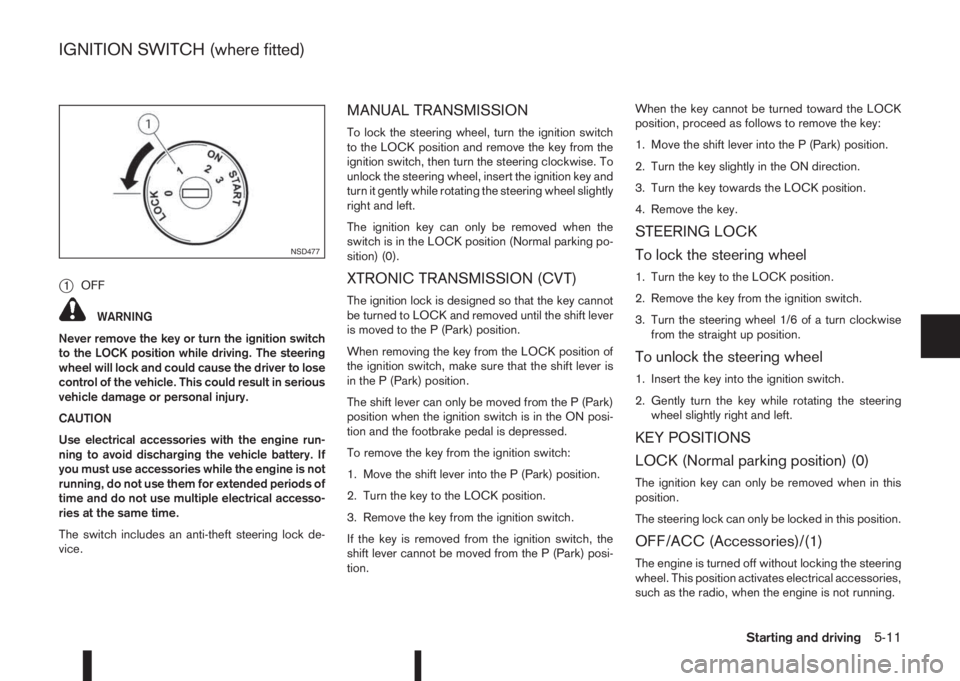
j1OFF
WARNING
Never remove the key or turn the ignition switch
to the LOCK position while driving. The steering
wheel will lock and could cause the driver to lose
control of the vehicle. This could result in serious
vehicle damage or personal injury.
CAUTION
Use electrical accessories with the engine run-
ning to avoid discharging the vehicle battery. If
you must use accessories while the engine is not
running, do not use them for extended periods of
time and do not use multiple electrical accesso-
ries at the same time.
The switch includes an anti-theft steering lock de-
vice.
MANUAL TRANSMISSION
To lock the steering wheel, turn the ignition switch
to the LOCK position and remove the key from the
ignition switch, then turn the steering clockwise. To
unlock the steering wheel, insert the ignition key and
turn it gently while rotating the steering wheel slightly
right and left.
The ignition key can only be removed when the
switch is in the LOCK position (Normal parking po-
sition) (0).
XTRONIC TRANSMISSION (CVT)
The ignition lock is designed so that the key cannot
be turned to LOCK and removed until the shift lever
is moved to the P (Park) position.
When removing the key from the LOCK position of
the ignition switch, make sure that the shift lever is
in the P (Park) position.
The shift lever can only be moved from the P (Park)
position when the ignition switch is in the ON posi-
tion and the footbrake pedal is depressed.
To remove the key from the ignition switch:
1. Move the shift lever into the P (Park) position.
2. Turn the key to the LOCK position.
3. Remove the key from the ignition switch.
If the key is removed from the ignition switch, the
shift lever cannot be moved from the P (Park) posi-
tion.When the key cannot be turned toward the LOCK
position, proceed as follows to remove the key:
1. Move the shift lever into the P (Park) position.
2. Turn the key slightly in the ON direction.
3. Turn the key towards the LOCK position.
4. Remove the key.
STEERING LOCK
To lock the steering wheel
1. Turn the key to the LOCK position.
2. Remove the key from the ignition switch.
3. Turn the steering wheel 1/6 of a turn clockwise
from the straight up position.
To unlock the steering wheel
1. Insert the key into the ignition switch.
2. Gently turn the key while rotating the steering
wheel slightly right and left.
KEY POSITIONS
LOCK (Normal parking position) (0)
The ignition key can only be removed when in this
position.
The steering lock can only be locked in this position.
OFF/ACC (Accessories)/(1)
The engine is turned off without locking the steering
wheel. This position activates electrical accessories,
such as the radio, when the engine is not running.
NSD477
IGNITION SWITCH (where fitted)
Starting and driving5-11
Page 188 of 338
ON (Normal operating position) (2)
This position turns on the ignition system and elec-
trical accessories.
START (3)
The engine starter activates and the engine will start.
As soon as the engine has started, release the key
immediately. It will return to the ON position.
NOTE
For vehicles fitted with Stop/Start System:
When the engine is automatically stopped by the
Stop/Start System the ignition switch can still be
operated as usual.
At the end of a journey turn the ignition OFF to
avoid a flat battery. The Stop/Start System does
not automatically turn ignition off.
NISSAN ANTI-THEFT SYSTEM (NATS)
(where fitted)
The NISSAN Anti Theft System (NATS)* will stop
the engine if someone tries to start the engine with-
out using the registered NATS key.
* Immobilizer
If you failed to start the engine using the NATS Key,
turn the ignition knob to the LOCK position, wait for
5 seconds and turn the key to the START position
again to start the engine.
For additional information, see “NISSAN Anti-Theft
System (NATS)” in the “3. Pre-driving checks and
adjustments” section.
PRECAUTIONS ON PUSH-BUTTON
IGNITION SWITCH OPERATION
WARNING
Do not operate the push-button ignition switch
while driving the vehicle except in an emergency.
(The engine will stop when the ignition switch is
pushed 3 consecutive times in quick succession
or the ignition switch is pushed and held for more
than 2 seconds.) If the engine stops while the
vehicle is being driven, this could lead to a crash
and serious injury.
Before operating the push-button ignition switch:
•Move the shift lever to the N (Neutral) position or
depress the clutch pedal (for Manual Transmis-
sion (MT) models).
•Move the shift lever to the P (Park) position (for
XTRONIC transmission (CVT) models).
INTELLIGENT KEY SYSTEM
The Intelligent Key system can operate the ignition
switch without taking the key out from your pocket
or bag. The operating environment and/or condi-
tions may affect the Intelligent Key system opera-
tion.
CAUTION
•Be sure to carry the Intelligent Key with you
when operating the vehicle.
•Never leave the Intelligent Key inside the ve-
hicle when you leave the vehicle.
•If the Intelligent Key is too far away from the
driver, the vehicle may not start.
•If the vehicle battery is discharged, the igni-
tion switch cannot be switched from the
“LOCK” position, and if the steering lock is
engaged, the steering wheel cannot be
moved. Charge the battery as soon as pos-
sible (See “Jump-starting” in the “6. In case of
emergency” section.)
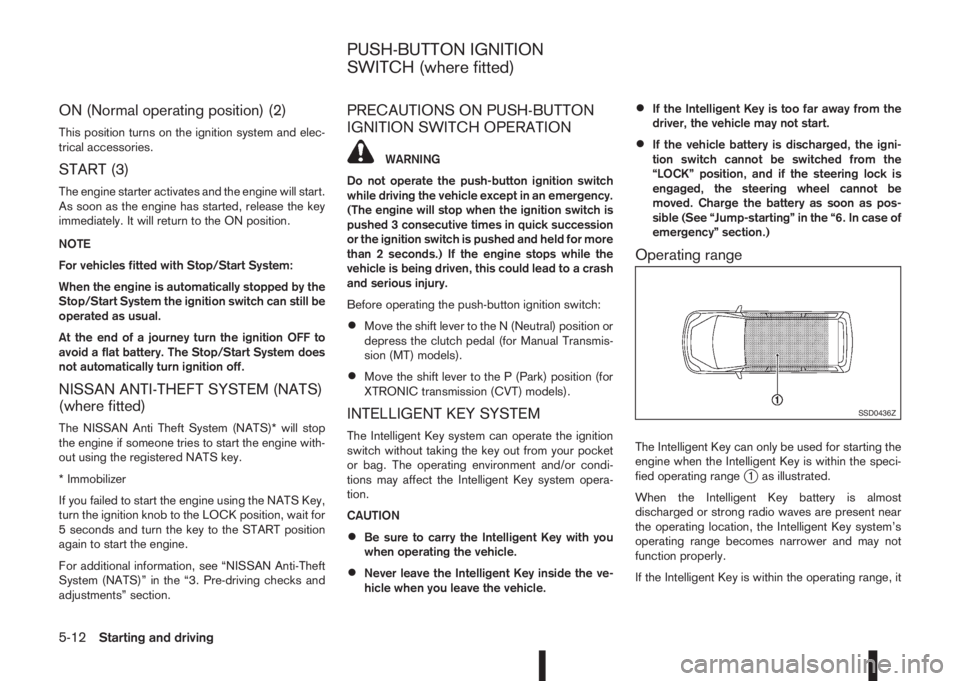
Operating range
The Intelligent Key can only be used for starting the
engine when the Intelligent Key is within the speci-
fied operating range
j1 as illustrated.
When the Intelligent Key battery is almost
discharged or strong radio waves are present near
the operating location, the Intelligent Key system’s
operating range becomes narrower and may not
function properly.
If the Intelligent Key is within the operating range, it
SSD0436Z
PUSH-BUTTON IGNITION
SWITCH (where fitted)
5-12Starting and driving
Page 191 of 338
After step 4 is performed, when the ignition switch
is pushed without depressing the brake pedal, the
ignition switch position will change to “ACC”.
NOTE
•When the ignition switch is pushed to the
“ACC” or “ON” position or the engine is started
by the above procedures, the Intelligent Key
system warning light may blink in yellow (on
the meter) even if the Intelligent Key is inside
the vehicle. This is not a malfunction. To stop
the warning light from blinking, touch the ig-
nition switch with the Intelligent Key again.
•If the Intelligent Key system warning light in
the meter is blinking in green, replace the bat-
tery as soon as possible. (See “Integrated
keyfob/Intelligent Key battery replacement” in
the “8. Maintenance and do-it-yourself” sec-
tion.)
MODELS WITH INTELLIGENT KEY
SYSTEM
1. Apply the parking brake. For additional informa-
tion, see “Parking brake switch” in the “3. Pre-
driving checks and adjustments” section.
2.Manual transmission models:
Move the shift lever to the N (Neutral) position,
and depress the clutch pedal to the floor while
starting the engine.
XTRONIC transmission (CVT) models:
Move the shift lever to the P (Park) or N (Neutral)
position. (P position is preferred).
The starter is designed to operate only when
the shift lever is in the proper position.
The Intelligent Key (where fitted) must be car-
ried while inside the vehicle when operating
the ignition switch.
3. To start the engine:
•MT models – keep the clutch pedal
depressed and/or depress the brake pedal
then push the ignition switch to the “ON” po-
sition.
•XTRONIC transmission models – depress the
brake pedal then push the ignition switch to
the “ON” position.
NOTE
•To start the engine immediately, push and
release the ignition switch while depress-ing the brake pedal or clutch pedal with
the ignition switch in any position.
•For diesel engine models: In cold condi-
tions there may be a delay for a few sec-
onds before the engine cranks. This is due
to the glow plugs heating to ensure ad-
equate engine starting conditions. The
glow indicator light (
) will illuminate
during this delay, then the engine will start.
4. Immediately release the ignition switch when the
engine starts. If the engine starts, but fails to run,
repeat the above procedures.
NOTE
Petrol engine models:
•If the engine is very hard to start in ex-
tremely cold weather or when restarting,
depress the accelerator pedal a little (ap-
proximately 1/3 of the way to the floor)
and hold it and then crank the engine. Re-
lease the ignition switch and the accelera-
tor pedal when the engine starts.
•If the engine is very hard to start because
it is flooded, depress the accelerator pedal
all the way to the floor and hold it. Crank
the engine for 5-6 seconds. After cranking
the engine, release the accelerator pedal.
Crank the engine with your foot off the ac-
celerator pedal by turning the ignition
switch to START. Release the switch when
the engine starts. If the engine starts, but
fails to run, repeat the above procedure.
STARTING ENGINE
Starting and driving5-15
Page 192 of 338
CAUTION
•As soon as the engine has started, release
the ignition switch immediately.
•Do not operate the starter for more than
15 seconds at a time. If the engine does
not start, turn the ignition switch to the
“OFF” position and wait 10 seconds (Petrol
engine models) or 20 seconds (Diesel en-
gine models) before cranking again, oth-
erwise the starter could be damaged.
•If it becomes necessary to start the engine
with a booster battery and jumper cables,
the instructions and cautions contained in
the “6. In case of emergency” section
should be carefully followed.
5. After starting, allow the engine to idle for at least
30 seconds to warm-up. Drive at moderate
speeds for a short distance first, especially in
cold weather.
CAUTION
Do not leave the vehicle unattended while the
engine is warming up.
6. To stop the engine:
– Manual transmission models: apply the park-
ing brake and push the ignition switch to the
“OFF” position.
– XTRONIC transmission models: move the
shift lever to the P (Park) position, apply the
parking brake and push the switch to the
“OFF” position.7. The steering wheel lock engages when ignition
is off and a door is opened or closed.
MODELS WITHOUT INTELLIGENT
KEY SYSTEM
1. Apply the parking brake. For additional informa-
tion, see “Parking brake switch” in the “3. Pre-
driving checks and adjustments” section.
2.Manual transmission models:
Move the shift lever to the N (Neutral) position,
and depress the clutch pedal to the floor while
starting the engine.
XTRONIC transmission (CVT) models:
Move the shift lever to the P (Park) or N (Neutral)
position. (P position is preferred).
The starter is designed to operate only when
the shift lever is in the proper position.
3. Rotate the steering wheel left to right to release
the ignition lock whilst turning the ignition switch
to the ON position.
4. For diesel engine models: Wait until the glow
indicator light (
) goes out.
5. With your foot on the brake pedal,not on the
accelerator pedal, crank the engine by turning
the ignition switch to START.
6. Immediately release the ignition switch when the
engine starts. If the engine starts, but fails to run,
repeat the above procedures.NOTE
Petrol engine models:
•If the engine is very hard to start in ex-
tremely cold weather or when restarting,
depress the accelerator pedal a little (ap-
proximately 1/3 of the way to the floor)
and hold it and then crank the engine. Re-
lease the ignition switch and the accelera-
tor pedal when the engine starts.
•If the engine is very hard to start because
it is flooded, depress the accelerator pedal
all the way to the floor and hold it. Crank
the engine for 5-6 seconds. After cranking
the engine, release the accelerator pedal.
Crank the engine with your foot off the ac-
celerator pedal by turning the ignition
switch to START. Release the switch when
the engine starts. If the engine starts, but
fails to run, repeat the above procedure.
CAUTION
•As soon as the engine has started, release
the ignition switch immediately.
•Do not operate the starter for more than
15 seconds at a time. If the engine does
not start, turn the ignition switch to the
“OFF” position and wait 10 seconds (Petrol
engine models) or 20 seconds (Diesel en-
gine models) before cranking again, oth-
erwise the starter could be damaged.
5-16Starting and driving
Page 194 of 338
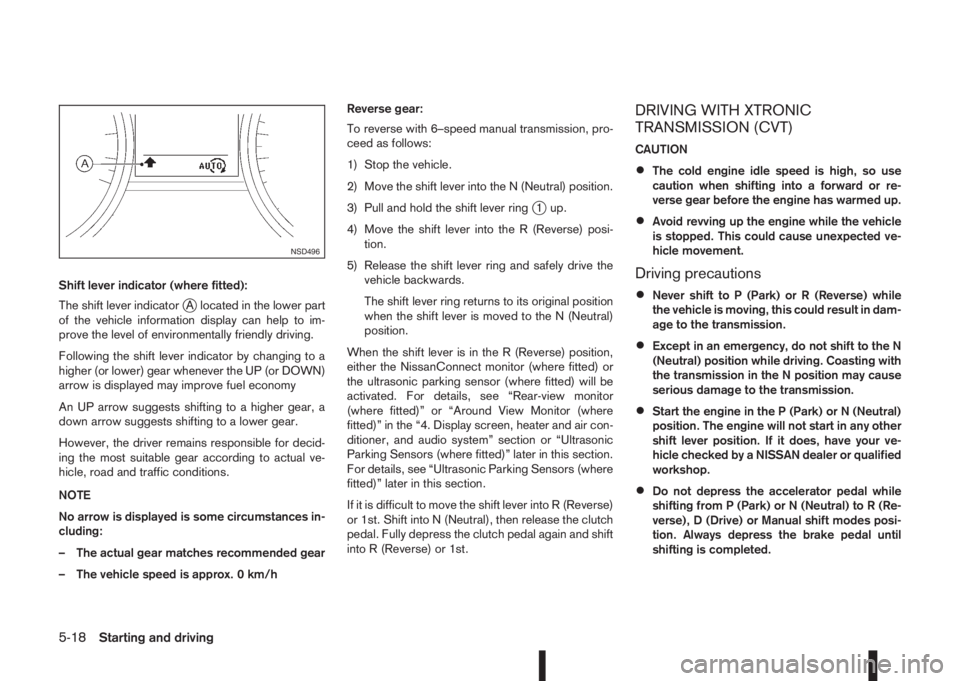
Shift lever indicator (where fitted):
The shift lever indicator
jA located in the lower part
of the vehicle information display can help to im-
prove the level of environmentally friendly driving.
Following the shift lever indicator by changing to a
higher (or lower) gear whenever the UP (or DOWN)
arrow is displayed may improve fuel economy
An UP arrow suggests shifting to a higher gear, a
down arrow suggests shifting to a lower gear.
However, the driver remains responsible for decid-
ing the most suitable gear according to actual ve-
hicle, road and traffic conditions.
NOTE
No arrow is displayed is some circumstances in-
cluding:
– The actual gear matches recommended gear
– The vehicle speed is approx. 0 km/hReverse gear:
To reverse with 6–speed manual transmission, pro-
ceed as follows:
1) Stop the vehicle.
2) Move the shift lever into the N (Neutral) position.
3) Pull and hold the shift lever ring
j1 up.
4) Move the shift lever into the R (Reverse) posi-
tion.
5) Release the shift lever ring and safely drive the
vehicle backwards.
The shift lever ring returns to its original position
when the shift lever is moved to the N (Neutral)
position.
When the shift lever is in the R (Reverse) position,
either the NissanConnect monitor (where fitted) or
the ultrasonic parking sensor (where fitted) will be
activated. For details, see “Rear-view monitor
(where fitted)” or “Around View Monitor (where
fitted)” in the “4. Display screen, heater and air con-
ditioner, and audio system” section or “Ultrasonic
Parking Sensors (where fitted)” later in this section.
For details, see “Ultrasonic Parking Sensors (where
fitted)” later in this section.
If it is difficult to move the shift lever into R (Reverse)
or 1st. Shift into N (Neutral), then release the clutch
pedal. Fully depress the clutch pedal again and shift
into R (Reverse) or 1st.
DRIVING WITH XTRONIC
TRANSMISSION (CVT)
CAUTION
•The cold engine idle speed is high, so use
caution when shifting into a forward or re-
verse gear before the engine has warmed up.
•Avoid revving up the engine while the vehicle
is stopped. This could cause unexpected ve-
hicle movement.
Driving precautions
•Never shift to P (Park) or R (Reverse) while
the vehicle is moving, this could result in dam-
age to the transmission.
•Except in an emergency, do not shift to the N
(Neutral) position while driving. Coasting with
the transmission in the N position may cause
serious damage to the transmission.
•Start the engine in the P (Park) or N (Neutral)
position. The engine will not start in any other
shift lever position. If it does, have your ve-
hicle checked by a NISSAN dealer or qualified
workshop.
•Do not depress the accelerator pedal while
shifting from P (Park) or N (Neutral) to R (Re-
verse), D (Drive) or Manual shift modes posi-
tion. Always depress the brake pedal until
shifting is completed.
NSD496
5-18Starting and driving
Page 219 of 338
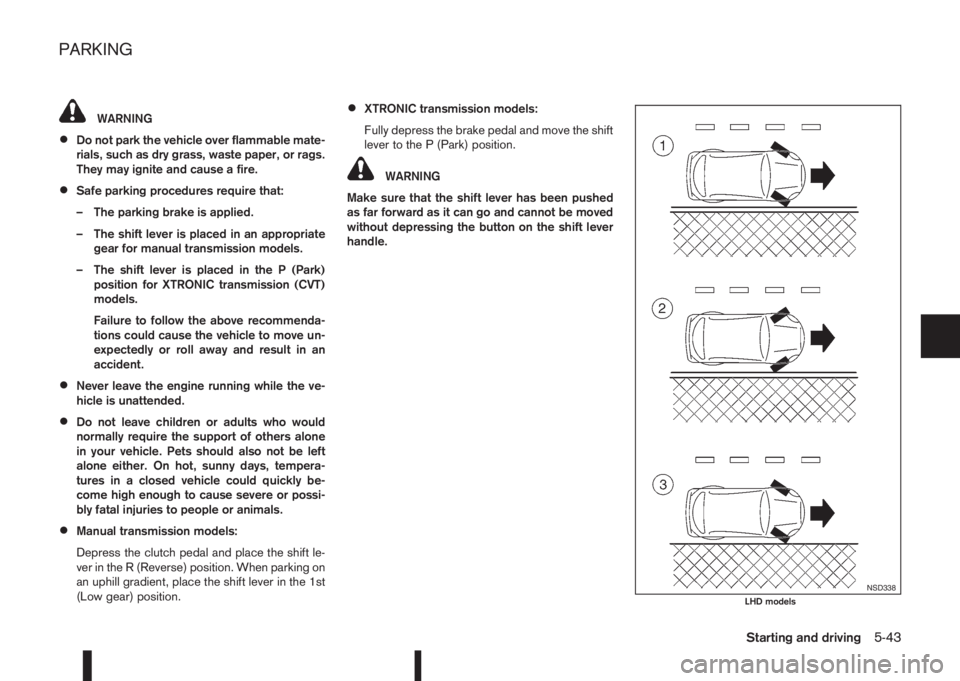
WARNING
•Do not park the vehicle over flammable mate-
rials, such as dry grass, waste paper, or rags.
They may ignite and cause a fire.
•Safe parking procedures require that:
– The parking brake is applied.
– The shift lever is placed in an appropriate
gear for manual transmission models.
– The shift lever is placed in the P (Park)
position for XTRONIC transmission (CVT)
models.
Failure to follow the above recommenda-
tions could cause the vehicle to move un-
expectedly or roll away and result in an
accident.
•Never leave the engine running while the ve-
hicle is unattended.
•Do not leave children or adults who would
normally require the support of others alone
in your vehicle. Pets should also not be left
alone either. On hot, sunny days, tempera-
tures in a closed vehicle could quickly be-
come high enough to cause severe or possi-
bly fatal injuries to people or animals.
•Manual transmission models:
Depress the clutch pedal and place the shift le-
ver in the R (Reverse) position. When parking on
an uphill gradient, place the shift lever in the 1st
(Low gear) position.
•XTRONIC transmission models:
Fully depress the brake pedal and move the shift
lever to the P (Park) position.
WARNING
Make sure that the shift lever has been pushed
as far forward as it can go and cannot be moved
without depressing the button on the shift lever
handle.
NSD338LHD models
PARKING
Starting and driving5-43