electric parking brake NISSAN QASHQAI 2016 Owner´s Manual
[x] Cancel search | Manufacturer: NISSAN, Model Year: 2016, Model line: QASHQAI, Model: NISSAN QASHQAI 2016Pages: 338, PDF Size: 4.87 MB
Page 12 of 338
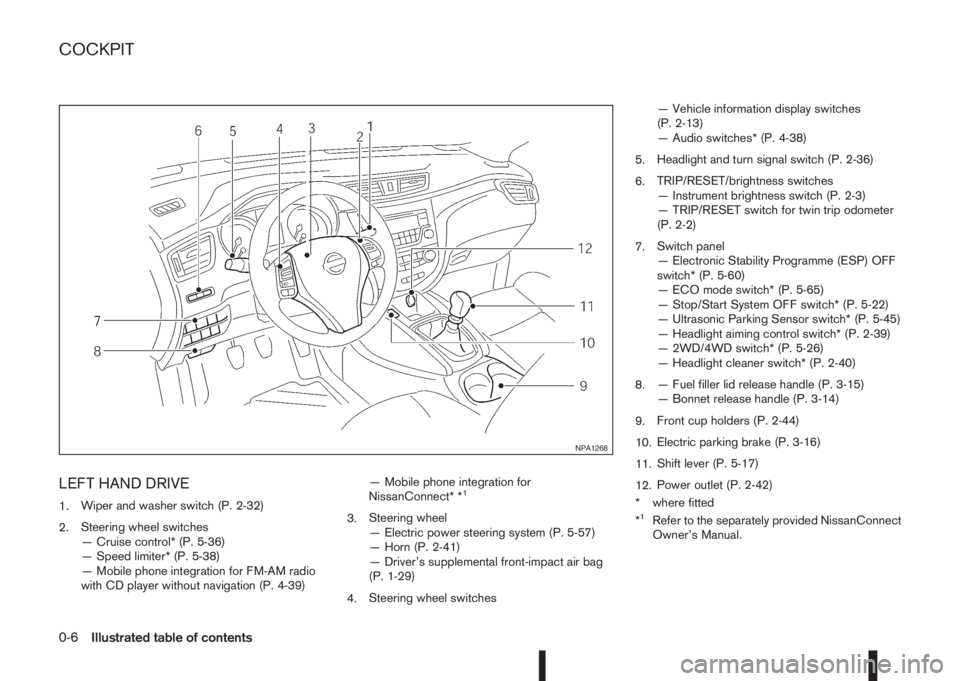
LEFT HAND DRIVE
1.Wiper and washer switch (P. 2-32)
2.Steering wheel switches
— Cruise control* (P. 5-36)
— Speed limiter* (P. 5-38)
— Mobile phone integration for FM-AM radio
with CD player without navigation (P. 4-39)— Mobile phone integration for
NissanConnect* *1
3.Steering wheel
— Electric power steering system (P. 5-57)
— Horn (P. 2-41)
— Driver’s supplemental front-impact air bag
(P. 1-29)
4.Steering wheel switches— Vehicle information display switches
(P. 2-13)
— Audio switches* (P. 4-38)
5.Headlight and turn signal switch (P. 2-36)
6.TRIP/RESET/brightness switches
— Instrument brightness switch (P. 2-3)
— TRIP/RESET switch for twin trip odometer
(P. 2-2)
7.Switch panel
— Electronic Stability Programme (ESP) OFF
switch* (P. 5-60)
— ECO mode switch* (P. 5-65)
— Stop/Start System OFF switch* (P. 5-22)
— Ultrasonic Parking Sensor switch* (P. 5-45)
— Headlight aiming control switch* (P. 2-39)
— 2WD/4WD switch* (P. 5-26)
— Headlight cleaner switch* (P. 2-40)
8.— Fuel filler lid release handle (P. 3-15)
— Bonnet release handle (P. 3-14)
9.Front cup holders (P. 2-44)
10.Electric parking brake (P. 3-16)
11.Shift lever (P. 5-17)
12.Power outlet (P. 2-42)
* where fitted
*1Refer to the separately provided NissanConnect
Owner’s Manual.
NPA1268
COCKPIT
0-6Illustrated table of contents
Page 13 of 338
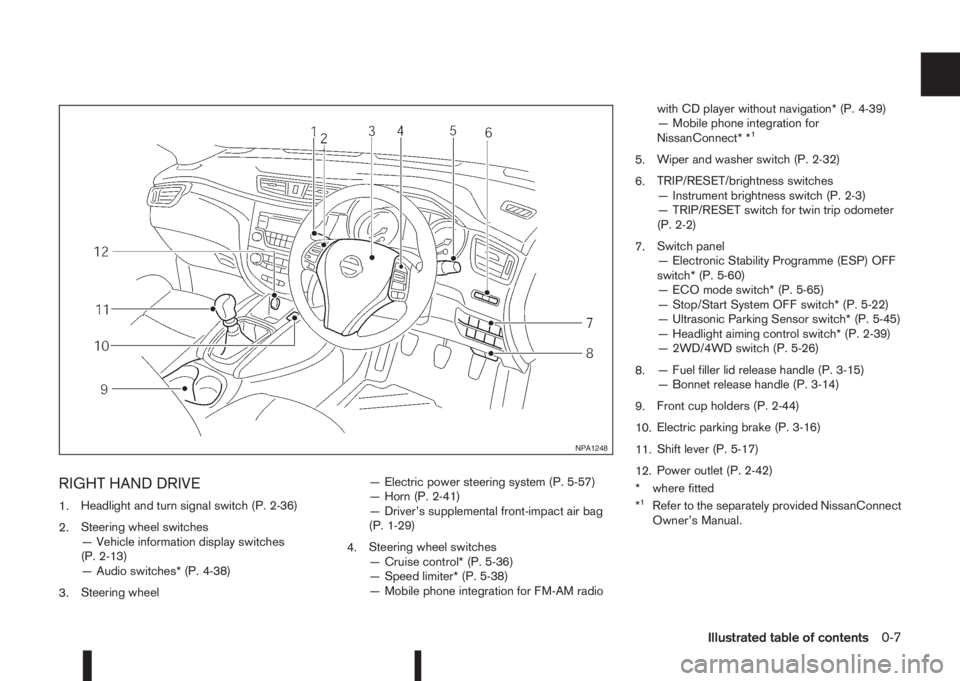
RIGHT HAND DRIVE
1.Headlight and turn signal switch (P. 2-36)
2.Steering wheel switches
— Vehicle information display switches
(P. 2-13)
— Audio switches* (P. 4-38)
3.Steering wheel— Electric power steering system (P. 5-57)
— Horn (P. 2-41)
— Driver’s supplemental front-impact air bag
(P. 1-29)
4.Steering wheel switches
— Cruise control* (P. 5-36)
— Speed limiter* (P. 5-38)
— Mobile phone integration for FM-AM radiowith CD player without navigation* (P. 4-39)
— Mobile phone integration for
NissanConnect* *
1
5.Wiper and washer switch (P. 2-32)
6.TRIP/RESET/brightness switches
— Instrument brightness switch (P. 2-3)
— TRIP/RESET switch for twin trip odometer
(P. 2-2)
7.Switch panel
— Electronic Stability Programme (ESP) OFF
switch* (P. 5-60)
— ECO mode switch* (P. 5-65)
— Stop/Start System OFF switch* (P. 5-22)
— Ultrasonic Parking Sensor switch* (P. 5-45)
— Headlight aiming control switch* (P. 2-39)
— 2WD/4WD switch (P. 5-26)
8.— Fuel filler lid release handle (P. 3-15)
— Bonnet release handle (P. 3-14)
9.Front cup holders (P. 2-44)
10.Electric parking brake (P. 3-16)
11.Shift lever (P. 5-17)
12.Power outlet (P. 2-42)
* where fitted
*
1Refer to the separately provided NissanConnect
Owner’s Manual.
NPA1248
Illustrated table of contents0-7
Page 62 of 338
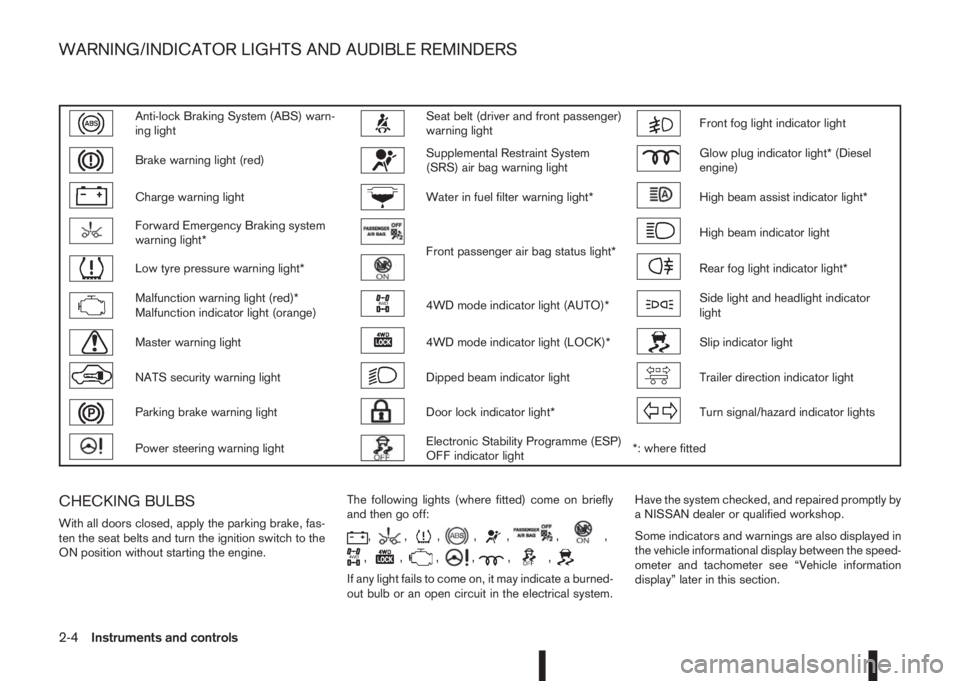
Anti-lock Braking System (ABS) warn-
ing lightSeat belt (driver and front passenger)
warning lightFront fog light indicator light
Brake warning light (red)Supplemental Restraint System
(SRS) air bag warning lightGlow plug indicator light* (Diesel
engine)
Charge warning lightWater in fuel filter warning light*High beam assist indicator light*
Forward Emergency Braking system
warning light*
Front passenger air bag status light*
High beam indicator light
Low tyre pressure warning light*Rear fog light indicator light*
Malfunction warning light (red)*
Malfunction indicator light (orange)4WD mode indicator light (AUTO)*Side light and headlight indicator
light
Master warning light4WD mode indicator light (LOCK)*Slip indicator light
NATS security warning lightDipped beam indicator lightTrailer direction indicator light
Parking brake warning lightDoor lock indicator light*Turn signal/hazard indicator lights
Power steering warning lightElectronic Stability Programme (ESP)
OFF indicator light*: where fitted
CHECKING BULBS
With all doors closed, apply the parking brake, fas-
ten the seat belts and turn the ignition switch to the
ON position without starting the engine.The following lights (where fitted) come on briefly
and then go off:,,,,,,,
,,,,,,
If any light fails to come on, it may indicate a burned-
out bulb or an open circuit in the electrical system.Have the system checked, and repaired promptly by
a NISSAN dealer or qualified workshop.
Some indicators and warnings are also displayed in
the vehicle informational display between the speed-
ometer and tachometer see “Vehicle information
display” later in this section.
WARNING/INDICATOR LIGHTS AND AUDIBLE REMINDERS
2-4Instruments and controls
Page 67 of 338
Low brake fluid warning light:
When the ignition switch is in the ON position, the
light warns of a low brake fluid level. If this warning
light illuminates, the Electronic Stability Programme
(ESP) warning light and the brake system warning
light (yellow) also illuminate. If the light illuminates
while the ignition switch is in the ON position with
the parking brake not applied, stop the vehicle and
perform the following steps:
1. Check the brake fluid level. If brake fluid level is
low, add fluid and have the system checked by a
NISSAN dealer or qualified workshop. See
“Brake and clutch fluid” in the “8. Maintenance
and do-it-yourself” section.
2. If the brake fluid level is correct, have the warn-
ing system checked by a NISSAN dealer or quali-
fied workshop.
WARNING
•Your brake system may not be working prop-
erly if the warning light is on. Driving could be
dangerous. If you judge the brake system to
be safe, drive carefully to the nearest service
station for repairs. Otherwise, have your ve-
hicle towed because driving it could be dan-
gerous.
•Pressing the brake pedal when the ignition
switch is not in the ON position and/or when
the brake fluid level is low may increase the
stopping distance and braking will require
greater pedal effort as well as pedal travel.
•If the brake fluid level is below the minimum
or MIN mark on the brake fluid reservoir, do
not drive until the brake system has been
checked at a NISSAN dealer or qualified work-
shop.
For further parking brake operation information see
“Parking brake switch” in the “8. Pre-driving checks
and adjustments” section.
Power steering warning light
WARNING
•If the engine is not running or is turned off
while driving, the power assist for the steer-
ing will not work. Steering will be harder to
operate.
•When the power steering warning light illumi-
nates with the engine running, there will be
no power assist for the steering. You will still
have control of the vehicle but the steering
will be harder to operate. Have the power
steering system checked by a NISSAN dealer
or qualified workshop.
When the ignition switch is placed in the ON posi-
tion, the power steering warning light illuminates.
After starting the engine, the power steering warn-
ing light turns off. This indicates that the electric
power steering system is operational.
If the power steering warning light illuminates while
the engine is running, it may indicate the power
steering system is not functioning properly and mayneed servicing. Have the electric power steering
system checked by a NISSAN dealer or qualified
workshop. See “Electric power steering system” in
the “5. Starting and driving” section.
Seat belt (driver and front
passenger) warning light
The seat belt warning light reminds you to fasten
your seat belts. The light illuminates whenever the
ignition switch is placed in the ON or START posi-
tion and remains illuminated until the driver’s and/or
front passenger’s seat belt is fastened. At the same
time, the chime sounds for about 6 seconds unless
the driver’s and/or front passenger’s seat belt is
securely fastened see “Seat belt reminder chime”
later in this section. The seat belt warning light may
also illuminate if the front passenger’s seat belt is
not fastened when the front passenger’s seat is oc-
cupied. For 7 seconds after the ignition switch is
placed in the ON position, the system does not acti-
vate the warning light for the front passenger. See
“Seat belts” in the “1. Safety — Seats, Seat belts
and Supplemental Restraint System” section for
precautions on seat belt usage.
Supplemental Restraint System
(SRS) air bag warning light
WARNING
If the supplemental air bag warning light is on, it
could mean that the front air bag, side air bag
(where fitted), curtain air bag (where fitted) and/
or pre-tensioner systems will not operate in an
Instruments and controls2-9
Page 126 of 338
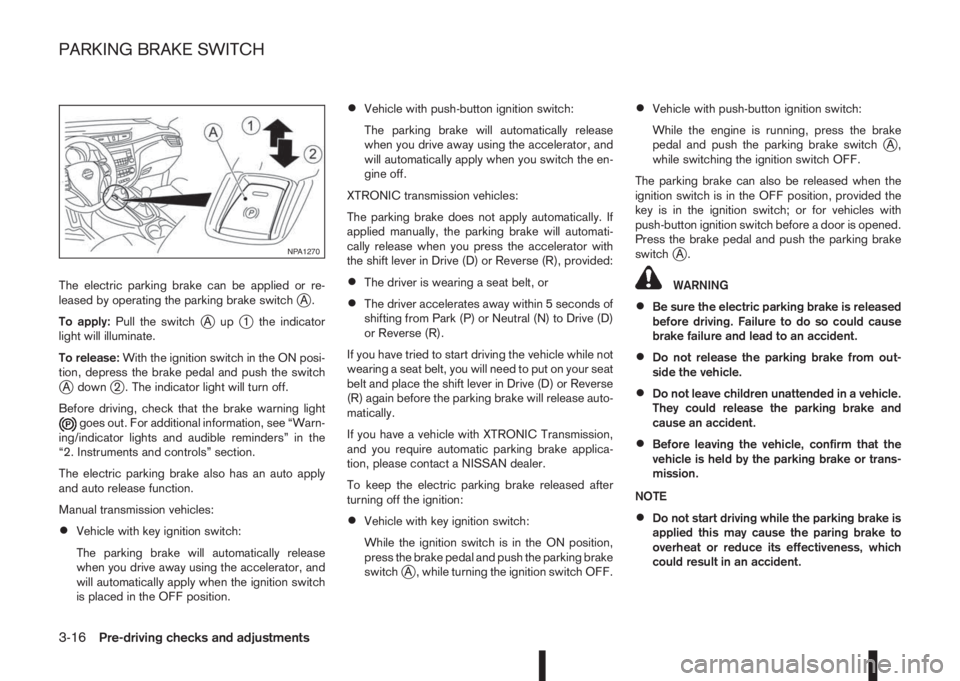
The electric parking brake can be applied or re-
leased by operating the parking brake switchjA.
To apply:Pull the switch
jAupj1 the indicator
light will illuminate.
To release:With the ignition switch in the ON posi-
tion, depress the brake pedal and push the switch
jA downj2 . The indicator light will turn off.
Before driving, check that the brake warning light
goes out. For additional information, see “Warn-
ing/indicator lights and audible reminders” in the
“2. Instruments and controls” section.
The electric parking brake also has an auto apply
and auto release function.
Manual transmission vehicles:
•Vehicle with key ignition switch:
The parking brake will automatically release
when you drive away using the accelerator, and
will automatically apply when the ignition switch
is placed in the OFF position.
•Vehicle with push-button ignition switch:
The parking brake will automatically release
when you drive away using the accelerator, and
will automatically apply when you switch the en-
gine off.
XTRONIC transmission vehicles:
The parking brake does not apply automatically. If
applied manually, the parking brake will automati-
cally release when you press the accelerator with
the shift lever in Drive (D) or Reverse (R), provided:
•The driver is wearing a seat belt, or
•The driver accelerates away within 5 seconds of
shifting from Park (P) or Neutral (N) to Drive (D)
or Reverse (R).
If you have tried to start driving the vehicle while not
wearing a seat belt, you will need to put on your seat
belt and place the shift lever in Drive (D) or Reverse
(R) again before the parking brake will release auto-
matically.
If you have a vehicle with XTRONIC Transmission,
and you require automatic parking brake applica-
tion, please contact a NISSAN dealer.
To keep the electric parking brake released after
turning off the ignition:
•Vehicle with key ignition switch:
While the ignition switch is in the ON position,
press the brake pedal and push the parking brake
switch
jA , while turning the ignition switch OFF.
•Vehicle with push-button ignition switch:
While the engine is running, press the brake
pedal and push the parking brake switch
jA,
while switching the ignition switch OFF.
The parking brake can also be released when the
ignition switch is in the OFF position, provided the
key is in the ignition switch; or for vehicles with
push-button ignition switch before a door is opened.
Press the brake pedal and push the parking brake
switch
jA.
WARNING
•Be sure the electric parking brake is released
before driving. Failure to do so could cause
brake failure and lead to an accident.
•Do not release the parking brake from out-
side the vehicle.
•Do not leave children unattended in a vehicle.
They could release the parking brake and
cause an accident.
•Before leaving the vehicle, confirm that the
vehicle is held by the parking brake or trans-
mission.
NOTE
•Do not start driving while the parking brake is
applied this may cause the paring brake to
overheat or reduce its effectiveness, which
could result in an accident.
NPA1270
PARKING BRAKE SWITCH
3-16Pre-driving checks and adjustments
Page 127 of 338
•A buzzer will sound if the vehicle is driven
without releasing the parking brake. See “Au-
dible reminders” in the “2. Instruments and
controls” section.
•While the electric parking brake is applied or
released, an operating sound is heard from
the lower side of the rear seat. This is normal
and does not indicate a malfunction.
•When the electric parking brake is frequently
applied and released in a short period of time,
the parking brake may not operate in order to
prevent the parking brake system from over-
heating. If this occurs, operate the electric
parking brake switch again after waiting ap-
proximately 1 minute.
•The electric parking brake can only be re-
leased with the ignition switch in the ON posi-
tion.
•If the electric parking brake must be applied
while driving in an emergency, pull up and
hold the parking brake switch. When you re-
lease the parking brake switch, the parking
brake will be released.
•While pulling up the electric parking brake
switch while driving, the parking brake is ap-
plied and a chime sounds. The parking brake
indicator light in the meter and in the parking
brake switch illuminate. This does not indi-
cate a malfunction. The electric parking brake
indicator lights in the meter and in the parking
brake switch turn off when the parking brake
is released.
•Pull up the electric parking brake switch twice
so that the maximum electric parking brake
force is applied to the vehicle.
•When pulling the electric parking brake switch
up with the ignition switch in the OFF or ACC
position, the parking brake switch indicator
light will continue to illuminate for a short pe-
riod of time.
CAUTION
To park the vehicle in cold climates place the
shift lever in 1st (1) or Reverse (R) (or in Park (P)
for automatic (AT) vehicles), and place suitable
chocks at both the front and back of a wheel with
the electric parking brake released. If the electric
parking brake is applied in cold climates, the
brake may become frozen and cannot be re-
leased.
DRIVING AWAY WHEN TOWING A
TRAILER
Please note the following points to prevent the ve-
hicle from rolling back unintentionally on a gradient.
•Pull and hold the parking brake switch and press
the accelerator. The parking brake will remain
engaged and prevent any tendency to roll back
down the slope.
•You can release the parking brake switch as
soon as the engine is delivering enough power
to the wheels.
Depending on the weight of the vehicle and trailer
and the steepness of the slope, there may be a ten-dency to roll back downhill when driving away from
a standstill. You can prevent this by pulling up the
parking brake switch as you press the accelerator
(in the same way as with a conventional handbrake).
Pre-driving checks and adjustments3-17
Page 177 of 338
Lane Departure Warning (LDW) system (where
fitted) ....................................................................... 5-33
LDW system operation ....................................... 5-34
LDW temporary disabled status .......................... 5-35
LDW automatic deactivation ............................... 5-35
LDW malfunction ................................................ 5-35
Multi-sensing camera unit maintenance ............... 5-35
Cruise control (where fitted) .................................... 5-36
Precautions on cruise control .............................. 5-36
Cruise control system operations ........................ 5-37
Speed limiter (where fitted) ...................................... 5-38
Speed limiter operations ..................................... 5-39
Forward emergency braking system (where fitted) ... 5-40
System operation ................................................ 5-41
Parking .................................................................... 5-43
Ultrasonic Parking Sensors (where fitted)................. 5-45
Operation ........................................................... 5-45
Intelligent Parking Assist (IPA) (where fitted) ............ 5-46
Deactivation of the IPA system ............................ 5-47
Parking procedure using the IPA system ............. 5-48
Operating tips..................................................... 5-52
Trailer towing ........................................................... 5-54
Operating precautions ........................................ 5-54
Maximum load limits (for Australia) ...................... 5-55
Tyre pressure ..................................................... 5-55
Safety chains ...................................................... 5-55
Trailer brakes...................................................... 5-55
Trailer detection (where fitted) ............................ 5-56Installation of coupling device (except for
Australia) ............................................................ 5-56
Vehicle security........................................................ 5-57
Electric power steering system ................................ 5-57
Brake system ........................................................... 5-58
Brake precautions .............................................. 5-58
Anti-lock Braking System (ABS)............................... 5-59
Using system ...................................................... 5-59
Self-test feature .................................................. 5-59
Normal operation ................................................ 5-60
Electronic Stability Programme (ESP) system
(where fitted) ........................................................... 5-60
Electronic Stability Programme (ESP) OFF
switch................................................................. 5-61
Chassis control........................................................ 5-62
Active trace control ............................................. 5-62
Active engine brake (for XTRONIC (CVT)
models only) ....................................................... 5-63
Active ride control ............................................... 5-64
Hill Start Assist (HSA) system .................................. 5-64
ECO mode system (where fitted) ............................. 5-65
Cold weather driving................................................ 5-66
Battery ............................................................... 5-66
Engine coolant .................................................... 5-66
Tyre equipment ................................................... 5-66
Special winter equipment.................................... 5-67
Corrosion protection ........................................... 5-67
Page 187 of 338
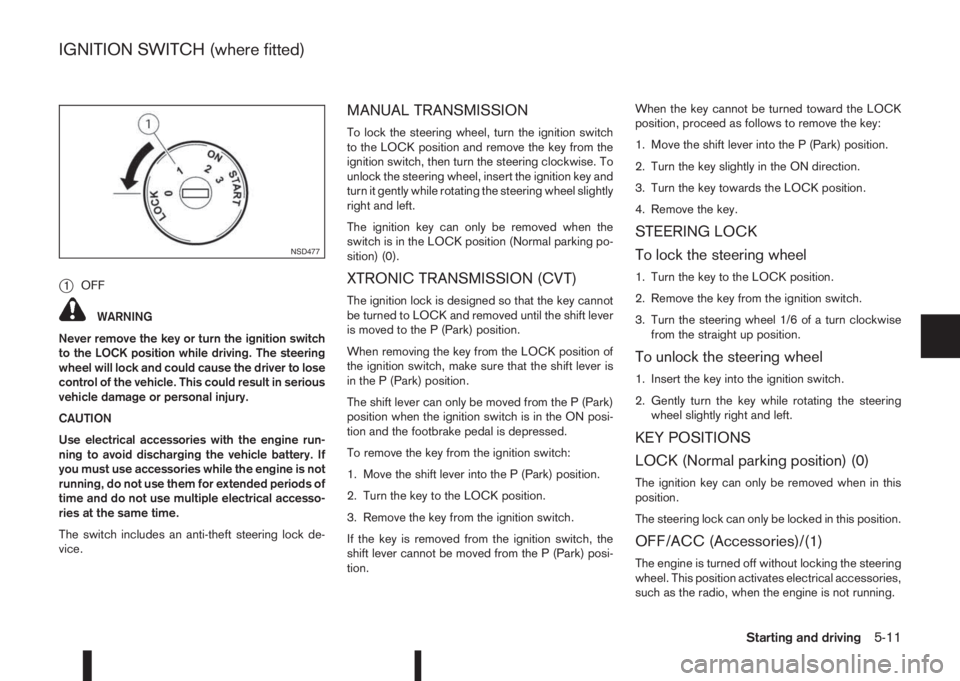
j1OFF
WARNING
Never remove the key or turn the ignition switch
to the LOCK position while driving. The steering
wheel will lock and could cause the driver to lose
control of the vehicle. This could result in serious
vehicle damage or personal injury.
CAUTION
Use electrical accessories with the engine run-
ning to avoid discharging the vehicle battery. If
you must use accessories while the engine is not
running, do not use them for extended periods of
time and do not use multiple electrical accesso-
ries at the same time.
The switch includes an anti-theft steering lock de-
vice.
MANUAL TRANSMISSION
To lock the steering wheel, turn the ignition switch
to the LOCK position and remove the key from the
ignition switch, then turn the steering clockwise. To
unlock the steering wheel, insert the ignition key and
turn it gently while rotating the steering wheel slightly
right and left.
The ignition key can only be removed when the
switch is in the LOCK position (Normal parking po-
sition) (0).
XTRONIC TRANSMISSION (CVT)
The ignition lock is designed so that the key cannot
be turned to LOCK and removed until the shift lever
is moved to the P (Park) position.
When removing the key from the LOCK position of
the ignition switch, make sure that the shift lever is
in the P (Park) position.
The shift lever can only be moved from the P (Park)
position when the ignition switch is in the ON posi-
tion and the footbrake pedal is depressed.
To remove the key from the ignition switch:
1. Move the shift lever into the P (Park) position.
2. Turn the key to the LOCK position.
3. Remove the key from the ignition switch.
If the key is removed from the ignition switch, the
shift lever cannot be moved from the P (Park) posi-
tion.When the key cannot be turned toward the LOCK
position, proceed as follows to remove the key:
1. Move the shift lever into the P (Park) position.
2. Turn the key slightly in the ON direction.
3. Turn the key towards the LOCK position.
4. Remove the key.
STEERING LOCK
To lock the steering wheel
1. Turn the key to the LOCK position.
2. Remove the key from the ignition switch.
3. Turn the steering wheel 1/6 of a turn clockwise
from the straight up position.
To unlock the steering wheel
1. Insert the key into the ignition switch.
2. Gently turn the key while rotating the steering
wheel slightly right and left.
KEY POSITIONS
LOCK (Normal parking position) (0)
The ignition key can only be removed when in this
position.
The steering lock can only be locked in this position.
OFF/ACC (Accessories)/(1)
The engine is turned off without locking the steering
wheel. This position activates electrical accessories,
such as the radio, when the engine is not running.
NSD477
IGNITION SWITCH (where fitted)
Starting and driving5-11
Page 189 of 338
is possible for anyone, even someone who does not
carry the Intelligent Key, to push the ignition switch
to start the engine.
•The luggage room area is not included in the
operating range, but the Intelligent Key may func-
tion.
•If the Intelligent Key is placed on the instrument
panel, inside the glove box, door pocket or the
corner of the interior compartment, the Intelli-
gent Key may not function.
•If the Intelligent Key is placed near the door or
window outside the vehicle, the Intelligent Key
may function.
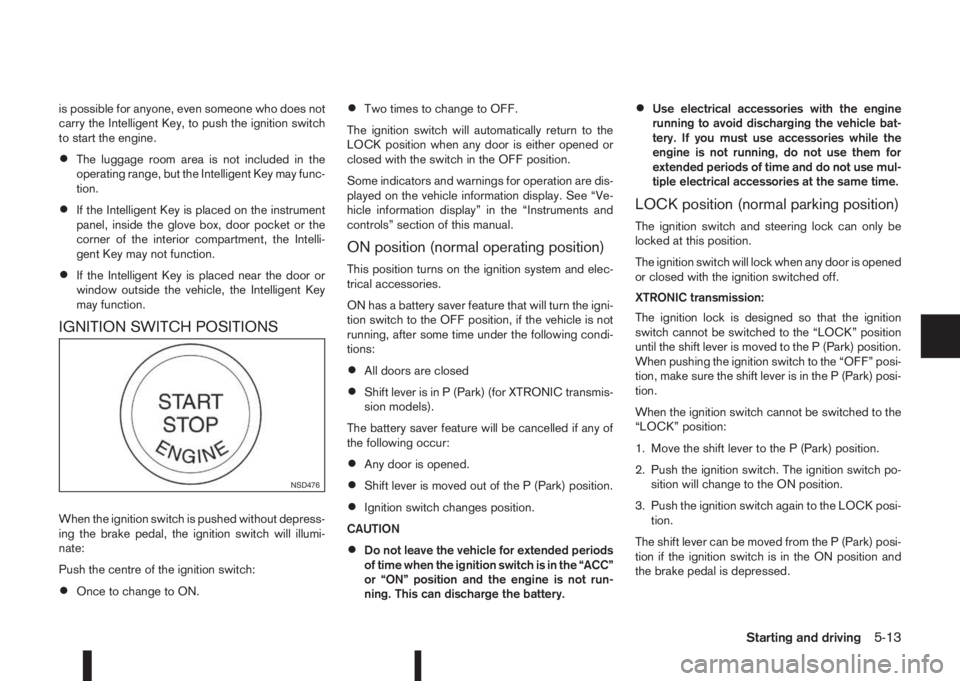
IGNITION SWITCH POSITIONS
When the ignition switch is pushed without depress-
ing the brake pedal, the ignition switch will illumi-
nate:
Push the centre of the ignition switch:
•Once to change to ON.
•Two times to change to OFF.
The ignition switch will automatically return to the
LOCK position when any door is either opened or
closed with the switch in the OFF position.
Some indicators and warnings for operation are dis-
played on the vehicle information display. See “Ve-
hicle information display” in the “Instruments and
controls” section of this manual.
ON position (normal operating position)
This position turns on the ignition system and elec-
trical accessories.
ON has a battery saver feature that will turn the igni-
tion switch to the OFF position, if the vehicle is not
running, after some time under the following condi-
tions:
•All doors are closed
•Shift lever is in P (Park) (for XTRONIC transmis-
sion models).
The battery saver feature will be cancelled if any of
the following occur:
•Any door is opened.
•Shift lever is moved out of the P (Park) position.
•Ignition switch changes position.
CAUTION
•Do not leave the vehicle for extended periods
of time when the ignition switch is in the “ACC”
or “ON” position and the engine is not run-
ning. This can discharge the battery.
•Use electrical accessories with the engine
running to avoid discharging the vehicle bat-
tery. If you must use accessories while the
engine is not running, do not use them for
extended periods of time and do not use mul-
tiple electrical accessories at the same time.
LOCK position (normal parking position)
The ignition switch and steering lock can only be
locked at this position.
The ignition switch will lock when any door is opened
or closed with the ignition switched off.
XTRONIC transmission:
The ignition lock is designed so that the ignition
switch cannot be switched to the “LOCK” position
until the shift lever is moved to the P (Park) position.
When pushing the ignition switch to the “OFF” posi-
tion, make sure the shift lever is in the P (Park) posi-
tion.
When the ignition switch cannot be switched to the
“LOCK” position:
1. Move the shift lever to the P (Park) position.
2. Push the ignition switch. The ignition switch po-
sition will change to the ON position.
3. Push the ignition switch again to the LOCK posi-
tion.
The shift lever can be moved from the P (Park) posi-
tion if the ignition switch is in the ON position and
the brake pedal is depressed.
NSD476
Starting and driving5-13
Page 234 of 338
You may hear a sound when the steering wheel
is operated quickly. However, this is not a mal-
function.
If the electric power steering warning light
illu-
minates while the engine is running, it may indicate
the electric power steering system is not functioning
properly and may need servicing. Have the electric
power steering system checked by a NISSAN dealer
or qualified workshop. (See “ Power steering warn-
ing light” in the “2. Instruments and controls” sec-
tion.)
When the electric power steering warning light illu-
minates with the engine running, the power assis-
tance for the steering will cease operation. You will
still have control of the vehicle. However, greater
steering effort is needed, especially in sharp turns
and at low speeds.The brake system has two separate hydraulic cir-
cuits. If one circuit malfunctions, two wheels will still
have braking ability.BRAKE PRECAUTIONS
Vacuum assisted brake
The brake booster aids braking by using engine
vacuum or vacuum from an engine-driven pump. If
the engine stops or the drive belt is broken, you can
stop the vehicle by depressing the brake pedal.
However, greater foot pressure on the brake pedal
will be required to stop the vehicle and the stopping
distance will be longer.
Wet brakes
When the vehicle is washed or driven through wa-
ter, the brakes may get wet. As a result, your brak-
ing distance will be longer and the vehicle may pull
to one side during braking.
To dry brakes, drive the vehicle at a safe speed
while lightly pressing the brake pedal to heat up the
brakes. Do this until the brakes return to normal.
Avoid driving the vehicle at high speeds until the
brakes function correctly.
Using the brakes
Avoid resting your foot on the brake pedal while
driving. This will overheat the brakes, wear out the
brake linings and pads faster and reduce fuel
economy performance.
To help reduce brake wear and to prevent the brakes
from overheating, reduce speed and shift to a lower
gear before going down a slope or long downhillgradient. Overheated brakes may reduce braking
performance and could result in loss of vehicle con-
trol.
CAUTION
While driving on a slippery surface, be careful
when braking, accelerating or downshifting.
Abrupt braking actions or sudden acceleration
could cause the wheels to skid and result in an
accident.
Be aware that brakes will fade if repeated heavy
brake applications are made.
Driving uphill
When starting on a steep gradient, it is sometimes
difficult to operate the brake or both the brake and
clutch (MT models). Use the parking brake to hold
the vehicle. Do not slip the clutch (MT models).
When ready to start, make sure that the shift lever is
in an appropriate forward or reverse driving posi-
tion, slowly release the parking brake while depress-
ing the accelerator pedal and releasing the clutch
(MT models) or depressing the accelerator pedal
(XTRONIC transmission models). If your vehicle has
an electric parking brake, this will automatically re-
lease when you depress the accelerator pedal and
release the clutch (MT models) or depress the ac-
celerator pedal (XTRONIC transmission models).
BRAKE SYSTEM
5-58Starting and driving