lock NISSAN QASHQAI 2017 Owner´s Manual
[x] Cancel search | Manufacturer: NISSAN, Model Year: 2017, Model line: QASHQAI, Model: NISSAN QASHQAI 2017Pages: 508, PDF Size: 2.68 MB
Page 312 of 508
SPA2331
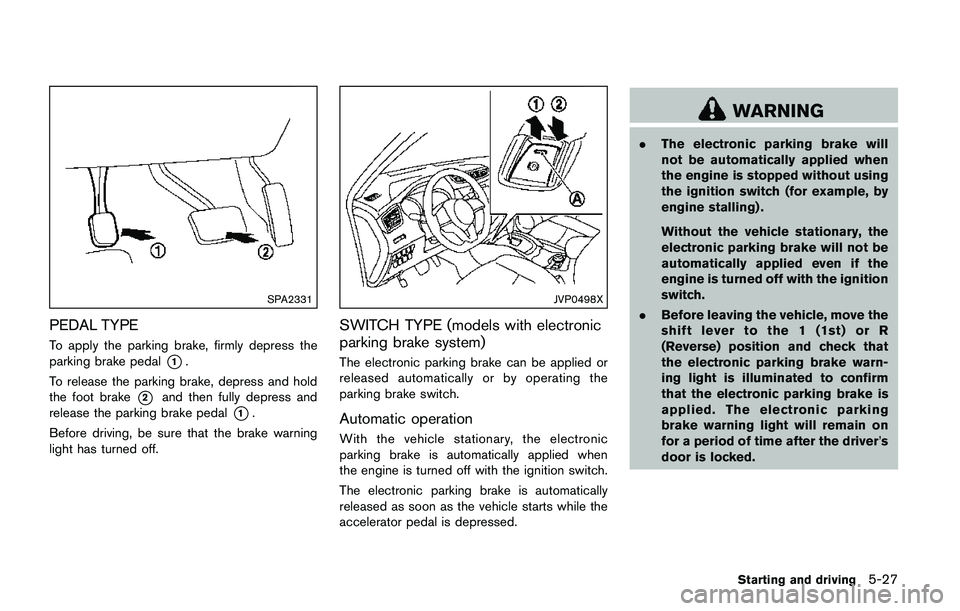
PEDAL TYPE
To apply the parking brake, firmly depress the
parking brake pedal
*1.
To release the parking brake, depress and hold
the foot brake
*2and then fully depress and
release the parking brake pedal
*1.
Before driving, be sure that the brake warning
light has turned off.
JVP0498X
SWITCH TYPE (models with electronic
parking brake system)
The electronic parking brake can be applied or
released automatically or by operating the
parking brake switch.
Automatic operation
With the vehicle stationary, the electronic
parking brake is automatically applied when
the engine is turned off with the ignition switch.
The electronic parking brake is automatically
released as soon as the vehicle starts while the
accelerator pedal is depressed.
WARNING
.The electronic parking brake will
not be automatically applied when
the engine is stopped without using
the ignition switch (for example, by
engine stalling) .
Without the vehicle stationary, the
electronic parking brake will not be
automatically applied even if the
engine is turned off with the ignition
switch.
.Before leaving the vehicle, move the
shift lever to the 1 (1st) or R
(Reverse) position and check that
the electronic parking brake warn-
ing light is illuminated to confirm
that the electronic parking brake is
applied. The electronic parking
brake warning light will remain on
for a period of time after the driver’s
door is locked.
Starting and driving5-27
Page 313 of 508
5-28Starting and driving
CAUTION
When parking in an area where the
outside temperature is below 328F
(08C) , do not apply the parking brake
to prevent it from freezing.
For safe parking, place the shift lever in
the 1 (1st) or R (Reverse) position and
securely block the wheels.
NOTE:
.To keep the electronic parking brake
released after the engine is turned off,
place the ignition switch in the OFF
position, depress the brake pedal and
push down the parking brake switch
before opening the driver’s door.
.If a malfunction occurs in the electric
parking brake system (for example, due
to battery discharge) , it is recom-
mended to contact a NISSAN dealer.
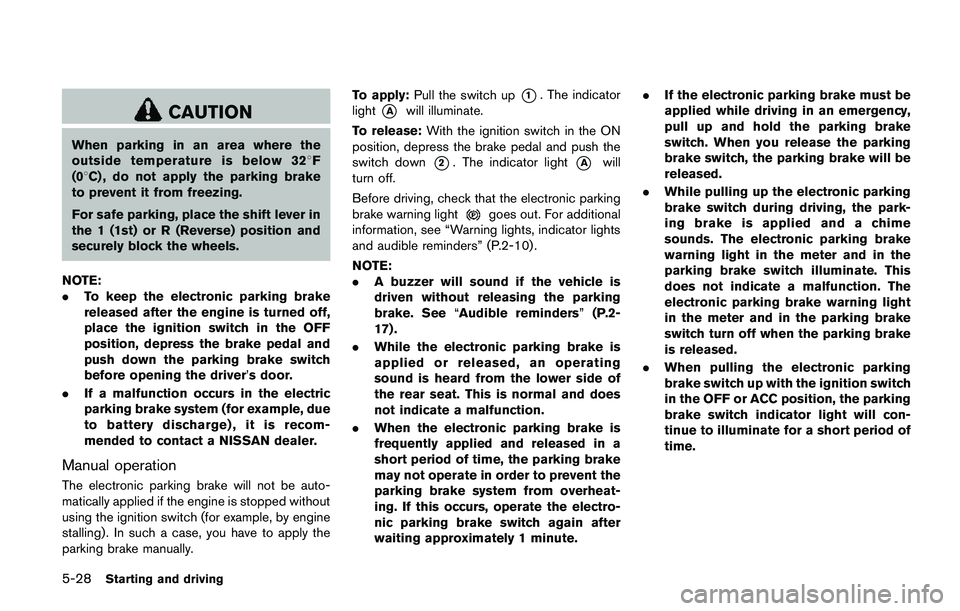
Manual operation
The electronic parking brake will not be auto-
matically applied if the engine is stopped without
using the ignition switch (for example, by engine
stalling) . In such a case, you have to apply the
parking brake manually.To apply:Pull the switch up
*1. The indicator
light
*Awill illuminate.
To release:With the ignition switch in the ON
position, depress the brake pedal and push the
switch down
*2. The indicator light*Awill
turn off.
Before driving, check that the electronic parking
brake warning light
goes out. For additional
information, see “Warning lights, indicator lights
and audible reminders” (P.2-10) .
NOTE:
.A buzzer will sound if the vehicle is
driven without releasing the parking
brake. See“Audible reminders”(P.2-
17) .
.While the electronic parking brake is
applied or released, an operating
sound is heard from the lower side of
the rear seat. This is normal and does
not indicate a malfunction.
.When the electronic parking brake is
frequently applied and released in a
short period of time, the parking brake
may not operate in order to prevent the
parking brake system from overheat-
ing. If this occurs, operate the electro-
nic parking brake switch again after
waiting approximately 1 minute..If the electronic parking brake must be
applied while driving in an emergency,
pull up and hold the parking brake
switch. When you release the parking
brake switch, the parking brake will be
released.
.While pulling up the electronic parking
brake switch during driving, the park-
ing brake is applied and a chime
sounds. The electronic parking brake
warning light in the meter and in the
parking brake switch illuminate. This
does not indicate a malfunction. The
electronic parking brake warning light
in the meter and in the parking brake
switch turn off when the parking brake
is released.
.When pulling the electronic parking
brake switch up with the ignition switch
in the OFF or ACC position, the parking
brake switch indicator light will con-
tinue to illuminate for a short period of
time.
Page 334 of 508

JVS1090X
*1Vehicle information display
SYSTEM TEMPORARILY UNAVAIL-
ABLE
When radar blockage is detected, the BSW
system will be turned off automatically, a chime
will sound and the “Unavailable: Side Radar
Obstruction” warning message will appear in thevehicle information display
*1.
The system is not available until the conditions
no longer exist.
The radar sensors may be blocked by temporary
ambient conditions such as splashing water,
mist or fog. The blocked condition may also be
caused by objects such as ice, frost or dirtobstructing the radar sensors.
NOTE:
If the BSW system stops working, the
RCTA system will also stop working.
Action to take:
When the above conditions no longer exist, the
system will resume automatically.
If the “Unavailable: Side Radar Obstruction”
warning message continues to appear, have the
system checked. It is recommended that you
visit a NISSAN dealer for this service.
SYSTEM MALFUNCTION
When the BSW system malfunctions, it will be
turned off automatically and the system mal-
function warning message will appear in the
vehicle information display.
NOTE:
If the BSW system stops working, the
RCTA system will also stop working.
Action to take:
Stop the vehicle in a safe location, turn the
engine off and restart the engine. If the message
continues to appear, have the BSW system
checked. It is recommended that you visit a
NISSAN dealer for this service.
Starting and driving5-49
Page 335 of 508

5-50Starting and driving
JVS0649X
SYSTEM MAINTENANCE
The two radar sensors*1for the BSW system
are located near the rear bumper. Always keep
the area near the radar sensors clean.
The radar sensors may be blocked by temporary
ambient conditions such as splashing water,
mist or fog.
The blocked condition may also be caused by
objects such as ice, frost or dirt obstructing the
radar sensors.
Check for and remove objects obstructing the
area around the radar sensors.
Do not attach stickers (including transparent
material) , install accessories or apply additionalpaint near the radar sensors.
Do not strike or damage the area around the
radar sensors.
See a NISSAN dealer or other authorized repair
shop if the area around the radar sensors is
damaged due to a collision.
Radio frequency statement
For USA
FCC : OAYSRR3B
This device complies with part 15 of the
FCC Rules. Operation is subject to the
following two conditions:
(1) This device may not cause harmful
interference, and (2) this device must
accept any interference received, including
interference that may cause undesired
operation.
FCC Warning
Changes or modifications not expressly
approved by the party responsible for
compliance could void the user’s authority
to operate the equipment
For Canada
Applicable law: Canada 310
This device complies with Industry Canada
licence-exempt RSS standard(s) . Opera-
tion is subject to the following two condi-tions: (1) this device may not cause
interference, and (2) this device must
accept any interference, including interfer-
ence that may cause undesired operation
of the device.
Frequency bands: 24.05 – 24.25GHz
Output power: less than 20 milliwatts
Page 341 of 508
5-56Starting and driving
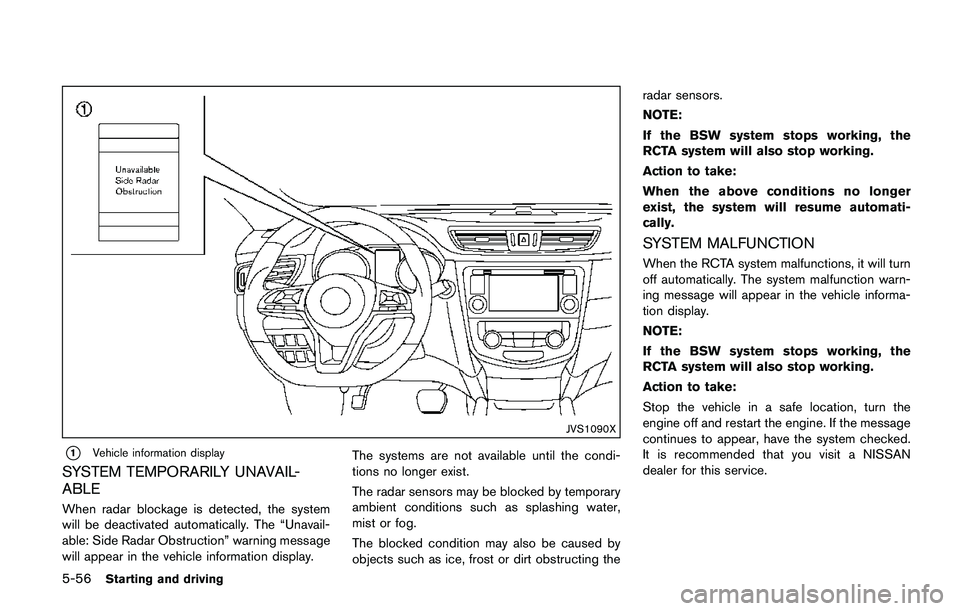
JVS1090X
*1Vehicle information display
SYSTEM TEMPORARILY UNAVAIL-
ABLE
When radar blockage is detected, the system
will be deactivated automatically. The “Unavail-
able: Side Radar Obstruction” warning message
will appear in the vehicle information display.The systems are not available until the condi-
tions no longer exist.
The radar sensors may be blocked by temporary
ambient conditions such as splashing water,
mist or fog.
The blocked condition may also be caused by
objects such as ice, frost or dirt obstructing theradar sensors.
NOTE:
If the BSW system stops working, the
RCTA system will also stop working.
Action to take:
When the above conditions no longer
exist, the system will resume automati-
cally.
SYSTEM MALFUNCTION
When the RCTA system malfunctions, it will turn
off automatically. The system malfunction warn-
ing message will appear in the vehicle informa-
tion display.
NOTE:
If the BSW system stops working, the
RCTA system will also stop working.
Action to take:
Stop the vehicle in a safe location, turn the
engine off and restart the engine. If the message
continues to appear, have the system checked.
It is recommended that you visit a NISSAN
dealer for this service.
Page 342 of 508
JVS0649X
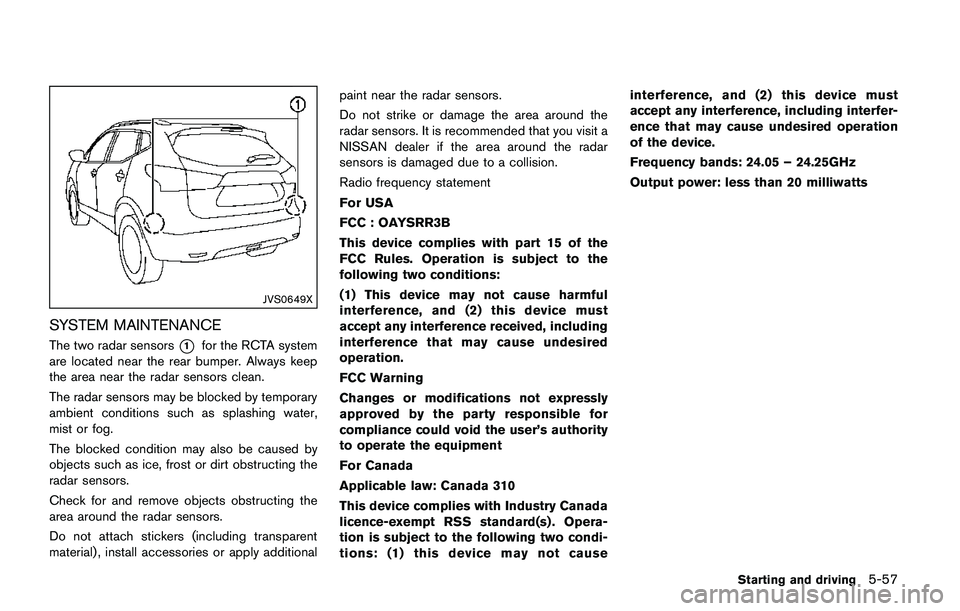
SYSTEM MAINTENANCE
The two radar sensors*1for the RCTA system
are located near the rear bumper. Always keep
the area near the radar sensors clean.
The radar sensors may be blocked by temporary
ambient conditions such as splashing water,
mist or fog.
The blocked condition may also be caused by
objects such as ice, frost or dirt obstructing the
radar sensors.
Check for and remove objects obstructing the
area around the radar sensors.
Do not attach stickers (including transparent
material) , install accessories or apply additionalpaint near the radar sensors.
Do not strike or damage the area around the
radar sensors. It is recommended that you visit a
NISSAN dealer if the area around the radar
sensors is damaged due to a collision.
Radio frequency statement
For USA
FCC : OAYSRR3B
This device complies with part 15 of the
FCC Rules. Operation is subject to the
following two conditions:
(1) This device may not cause harmful
interference, and (2) this device must
accept any interference received, including
interference that may cause undesired
operation.
FCC Warning
Changes or modifications not expressly
approved by the party responsible for
compliance could void the user’s authority
to operate the equipment
For Canada
Applicable law: Canada 310
This device complies with Industry Canada
licence-exempt RSS standard(s) . Opera-
tion is subject to the following two condi-
tions: (1) this device may not causeinterference, and (2) this device must
accept any interference, including interfer-
ence that may cause undesired operation
of the device.
Frequency bands: 24.05 – 24.25GHz
Output power: less than 20 milliwatts
Starting and driving5-57
Page 376 of 508
or a shaded area or lightning
flashes.)
— The poor contrast of a person to
the background, such as having
clothing color or pattern which
is similar to the background.
— The pedestrian’s profile is par-
tially obscured or unidentifiable
due to the pedestrian transport-
ing cargo, wearing bulky or very
loose-fitting clothing or acces-
sories.
.The system performance may de-
grade in the following conditions:
— The vehicle is driven on a slip-
pery road.
— The vehicle is driven on a slope.
— Excessively heavy baggage is
loaded in the rear seat or the
cargo area of your vehicle.
.The system is designed to automa-
tically check the sensor (radar and
camera)’s functionality, within cer-
tain limitations. The system may not
detect blockage of sensor areas
covered by ice, snow or stickers,
for example. In these cases, thesystem may not be able to warn
the driver properly. Be sure that you
check, clean and clear sensor areas
regularly.
.In some road and traffic conditions,
the FEB system may unexpectedly
apply partial braking. When accel-
eration is necessary, depress the
accelerator pedal to override the
system.
.The FEB system may react a road-
side object (traffic sign, guard rail
etc.)
.Braking distances increase on slip-
pery surfaces.
.Excessive noise will interfere with
the warning chime sound, and the
chime may not be heard.
Starting and driving5-91
Page 383 of 508
5-98Starting and driving
ble. It is recommended that you visit
a NISSAN dealer for this service.
.If the “AWD Error” warning appears
while driving, there may be a mal-
function in the AWD system.
Reduce the vehicle speed and have
your vehicle checked as soon as
possible. It is recommended that
you visit a NISSAN dealer for this
service.
.Never drive on dry, hard surface
roads in the LOCK mode, as this
will overload the powertrain and
may cause a serious malfunction.
JVS1024X
AWD LOCK SWITCH OPERATIONS
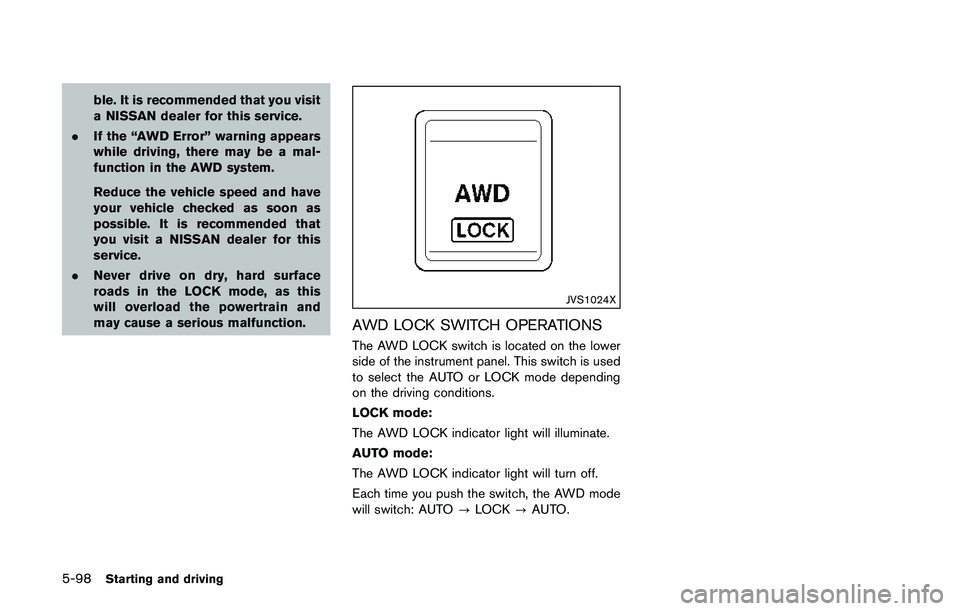
The AWD LOCK switch is located on the lower
side of the instrument panel. This switch is used
to select the AUTO or LOCK mode depending
on the driving conditions.
LOCK mode:
The AWD LOCK indicator light will illuminate.
AUTO mode:
The AWD LOCK indicator light will turn off.
Each time you push the switch, the AWD mode
will switch: AUTO?LOCK?AUTO.
Page 384 of 508
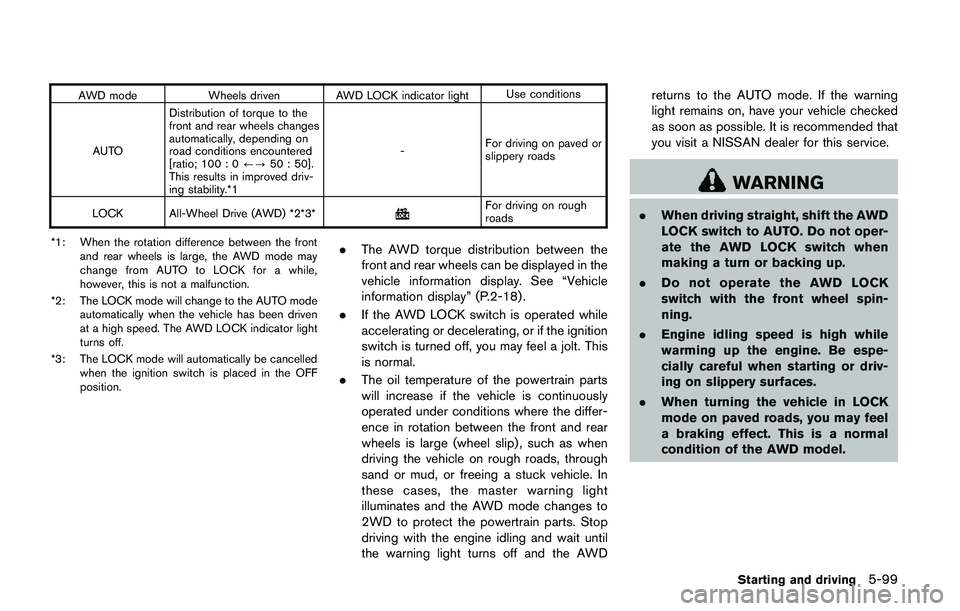
AWD mode Wheels driven AWD LOCK indicator lightUse conditions
AUTODistribution of torque to the
front and rear wheels changes
automatically, depending on
road conditions encountered
[ratio; 100 : 0/?50 : 50].
This results in improved driv-
ing stability.*1-For driving on paved or
slippery roads
LOCK All-Wheel Drive (AWD) *2*3*
For driving on rough
roads
*1: When the rotation difference between the front
and rear wheels is large, the AWD mode may
change from AUTO to LOCK for a while,
however, this is not a malfunction.
*2: The LOCK mode will change to the AUTO mode
automatically when the vehicle has been driven
at a high speed. The AWD LOCK indicator light
turns off.
*3: The LOCK mode will automatically be cancelled
when the ignition switch is placed in the OFF
position.
.The AWD torque distribution between the
front and rear wheels can be displayed in the
vehicle information display. See “Vehicle
information display” (P.2-18) .
.If the AWD LOCK switch is operated while
accelerating or decelerating, or if the ignition
switch is turned off, you may feel a jolt. This
is normal.
.The oil temperature of the powertrain parts
will increase if the vehicle is continuously
operated under conditions where the differ-
ence in rotation between the front and rear
wheels is large (wheel slip) , such as when
driving the vehicle on rough roads, through
sand or mud, or freeing a stuck vehicle. In
these cases, the master warning light
illuminates and the AWD mode changes to
2WD to protect the powertrain parts. Stop
driving with the engine idling and wait until
the warning light turns off and the AWDreturns to the AUTO mode. If the warning
light remains on, have your vehicle checked
as soon as possible. It is recommended that
you visit a NISSAN dealer for this service.
WARNING
.When driving straight, shift the AWD
LOCK switch to AUTO. Do not oper-
ate the AWD LOCK switch when
making a turn or backing up.
.Do not operate the AWD LOCK
switch with the front wheel spin-
ning.
.Engine idling speed is high while
warming up the engine. Be espe-
cially careful when starting or driv-
ing on slippery surfaces.
.When turning the vehicle in LOCK
mode on paved roads, you may feel
a braking effect. This is a normal
condition of the AWD model.
Starting and driving5-99
Page 386 of 508
wheel gently touches the curb.
.HEADED UPHILL WITH CURB:*2
Turn the wheels away from the curb and
move the vehicle back until the curb side
wheel gently touches the curb.
.HEADED UPHILL OR DOWNHILL, NO
CURB:
*3
Turn the wheels toward the side of the
road so the vehicle will move away from
the center of the road if it moves.
4.Models with Intelligent Key system:
Place the ignition switch in the OFF position.
Models without Intelligent Key system:
Place the ignition switch in the LOCK
position and remove the key.
WARNING
.If the engine is not running or is
turned off while driving, the power
assist for the steering will not work.
Steering will be harder to operate.
.When the electric power steering
warning light illuminates with the
engine running, the power assist for
the steering will cease operation.
You will still have control of the
vehicle but the steering will be
harder to operate.
The electric power steering is designed to
provide power assist while driving to operate
the steering wheel with light force.
When the steering wheel is operated repeatedly
or continuously while parking or driving at a very
low speed, the power assist for the steering
wheel will be reduced. This is to prevent
overheating of the electric power steering and
protect it from getting damaged. While the
power assist is reduced, steering wheel opera-
tion will become heavy. When the temperature
of the electric power steering goes down, the
power assist level will return to normal. Avoid
repeating such steering wheel operations thatcould cause the electric power steering to
overheat.
You may hear a noise when the steering wheel is
operated quickly. However, this is not a mal-
function.
If the electric power steering warning light
illuminates while the engine is running, it may
indicate the electric power steering is not
functioning properly and may need servicing.
Have the electric power steering checked. It is
recommended that you visit a NISSAN dealer for
this service. (See “Electric power steering
warning light” (P.2-12).)
When the electric power steering warning light
illuminates with the engine running, the power
assist for the steering will cease operation. You
will still have control of the vehicle. However,
greater steering effort is needed, especially in
sharp turns and at low speeds.
The mode of the Power Steering can be
changed to:
.NORMAL
.SPORT
For more information, see “Vehicle information
display” (P.2-18) .
Starting and driving5-101
ELECTRIC POWER STEERING