lock NISSAN QASHQAI 2017 Owner´s Manual
[x] Cancel search | Manufacturer: NISSAN, Model Year: 2017, Model line: QASHQAI, Model: NISSAN QASHQAI 2017Pages: 508, PDF Size: 2.68 MB
Page 156 of 508
JVP0308X
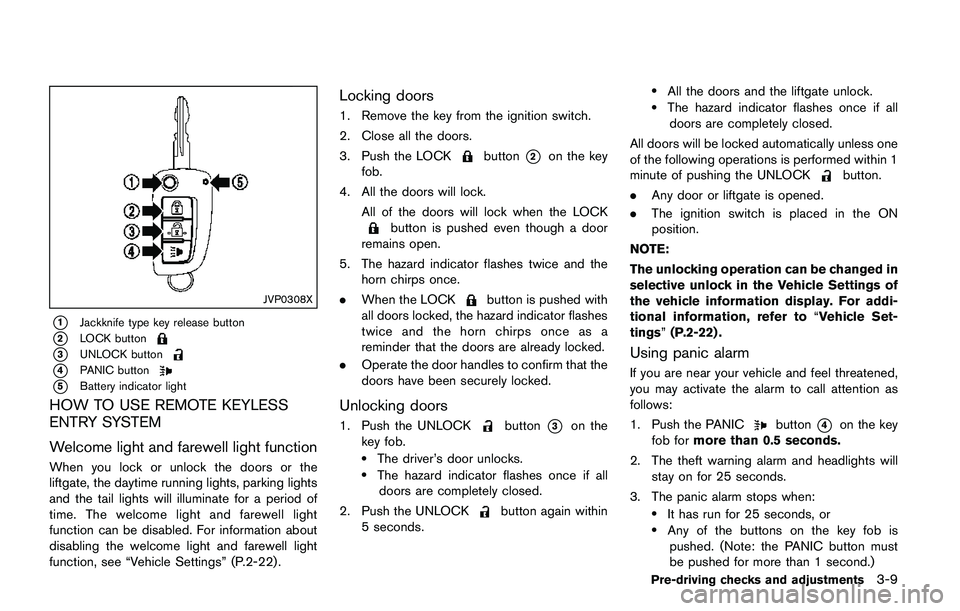
*1Jackknife type key release button
*2LOCK button
*3UNLOCK button
*4PANIC button
*5Battery indicator light
HOW TO USE REMOTE KEYLESS
ENTRY SYSTEM
Welcome light and farewell light function
When you lock or unlock the doors or the
liftgate, the daytime running lights, parking lights
and the tail lights will illuminate for a period of
time. The welcome light and farewell light
function can be disabled. For information about
disabling the welcome light and farewell light
function, see “Vehicle Settings” (P.2-22).
Locking doors
1. Remove the key from the ignition switch.
2. Close all the doors.
3. Push the LOCK
button*2on the key
fob.
4. All the doors will lock.
All of the doors will lock when the LOCK
button is pushed even though a door
remains open.
5. The hazard indicator flashes twice and the
horn chirps once.
.When the LOCK
button is pushed with
all doors locked, the hazard indicator flashes
twice and the horn chirps once as a
reminder that the doors are already locked.
.Operate the door handles to confirm that the
doors have been securely locked.
Unlocking doors
1. Push the UNLOCKbutton*3on the
key fob.
.The driver’s door unlocks..The hazard indicator flashes once if all
doors are completely closed.
2. Push the UNLOCK
button again within
5 seconds.
.All the doors and the liftgate unlock..The hazard indicator flashes once if all
doors are completely closed.
All doors will be locked automatically unless one
of the following operations is performed within 1
minute of pushing the UNLOCK
button.
.Any door or liftgate is opened.
.The ignition switch is placed in the ON
position.
NOTE:
The unlocking operation can be changed in
selective unlock in the Vehicle Settings of
the vehicle information display. For addi-
tional information, refer to“Vehicle Set-
tings”(P.2-22) .
Using panic alarm
If you are near your vehicle and feel threatened,
you may activate the alarm to call attention as
follows:
1. Push the PANIC
button*4on the key
fob formore than 0.5 seconds.
2. The theft warning alarm and headlights will
stay on for 25 seconds.
3. The panic alarm stops when:
.It has run for 25 seconds, or.Any of the buttons on the key fob is
pushed. (Note: the PANIC button must
be pushed for more than 1 second.)
Pre-driving checks and adjustments3-9
Page 157 of 508
3-10Pre-driving checks and adjustments
Battery indicator light
The battery indicator light*5illuminates when
you push any button. If the light does not
illuminate, the battery is weak or needs replace-
ment. For information regarding replacement of
a battery, see “Key fob battery replacement”
(P.8-21) .
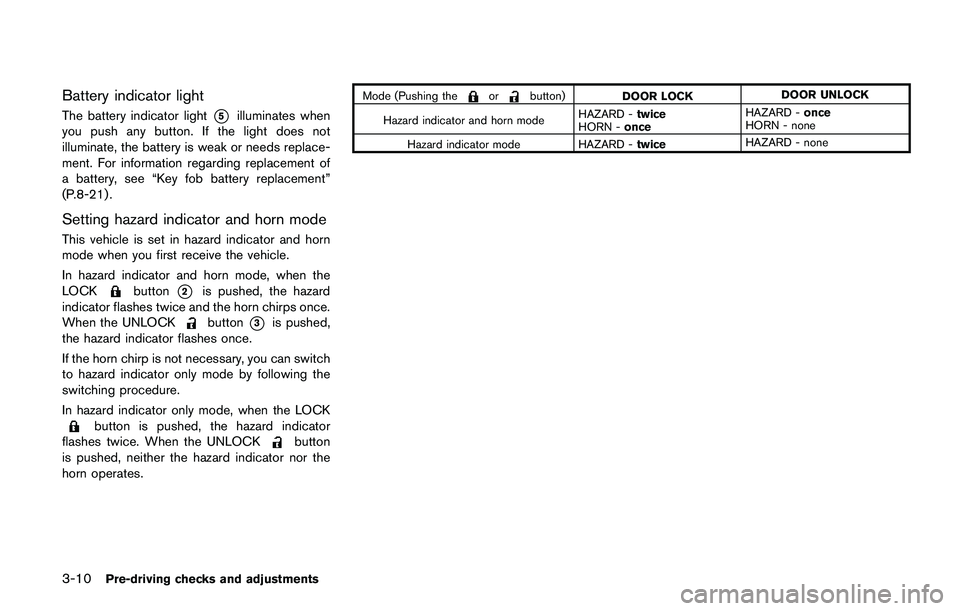
Setting hazard indicator and horn mode
This vehicle is set in hazard indicator and horn
mode when you first receive the vehicle.
In hazard indicator and horn mode, when the
LOCK
button*2is pushed, the hazard
indicator flashes twice and the horn chirps once.
When the UNLOCK
button*3is pushed,
the hazard indicator flashes once.
If the horn chirp is not necessary, you can switch
to hazard indicator only mode by following the
switching procedure.
In hazard indicator only mode, when the LOCK
button is pushed, the hazard indicator
flashes twice. When the UNLOCKbutton
is pushed, neither the hazard indicator nor the
horn operates.
Mode (Pushing theorbutton)
DOOR LOCKDOOR UNLOCK
Hazard indicator and horn modeHAZARD -twice
HORN -onceHAZARD -once
HORN - none
Hazard indicator mode HAZARD -twiceHAZARD - none
Page 158 of 508
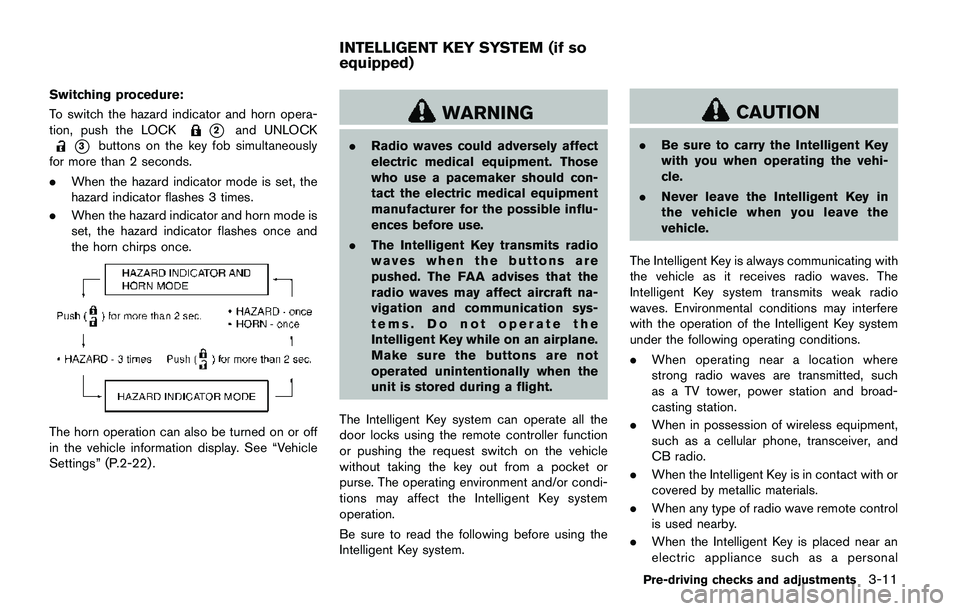
Switching procedure:
To switch the hazard indicator and horn opera-
tion, push the LOCK
*2and UNLOCK
*3buttons on the key fob simultaneously
for more than 2 seconds.
.When the hazard indicator mode is set, the
hazard indicator flashes 3 times.
.When the hazard indicator and horn mode is
set, the hazard indicator flashes once and
the horn chirps once.
The horn operation can also be turned on or off
in the vehicle information display. See “Vehicle
Settings” (P.2-22) .
WARNING
.Radio waves could adversely affect
electric medical equipment. Those
who use a pacemaker should con-
tact the electric medical equipment
manufacturer for the possible influ-
ences before use.
.The Intelligent Key transmits radio
waves when the buttons are
pushed. The FAA advises that the
radio waves may affect aircraft na-
vigation and communication sys-
tems. Do not operate the
Intelligent Key while on an airplane.
Make sure the buttons are not
operated unintentionally when the
unit is stored during a flight.
The Intelligent Key system can operate all the
door locks using the remote controller function
or pushing the request switch on the vehicle
without taking the key out from a pocket or
purse. The operating environment and/or condi-
tions may affect the Intelligent Key system
operation.
Be sure to read the following before using the
Intelligent Key system.
CAUTION
.Be sure to carry the Intelligent Key
with you when operating the vehi-
cle.
.Never leave the Intelligent Key in
the vehicle when you leave the
vehicle.
The Intelligent Key is always communicating with
the vehicle as it receives radio waves. The
Intelligent Key system transmits weak radio
waves. Environmental conditions may interfere
with the operation of the Intelligent Key system
under the following operating conditions.
.When operating near a location where
strong radio waves are transmitted, such
as a TV tower, power station and broad-
casting station.
.When in possession of wireless equipment,
such as a cellular phone, transceiver, and
CB radio.
.When the Intelligent Key is in contact with or
covered by metallic materials.
.When any type of radio wave remote control
is used nearby.
.When the Intelligent Key is placed near an
electric appliance such as a personal
Pre-driving checks and adjustments3-11
INTELLIGENT KEY SYSTEM (if so
equipped)
Page 160 of 508
SPA2074
INTELLIGENT KEY OPERATING
RANGE
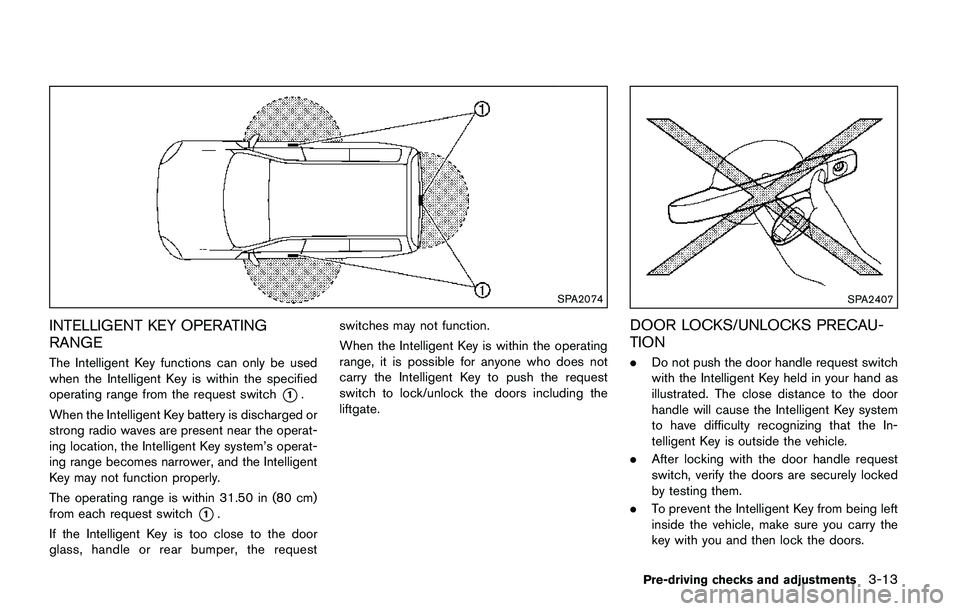
The Intelligent Key functions can only be used
when the Intelligent Key is within the specified
operating range from the request switch
*1.
When the Intelligent Key battery is discharged or
strong radio waves are present near the operat-
ing location, the Intelligent Key system’s operat-
ing range becomes narrower, and the Intelligent
Key may not function properly.
The operating range is within 31.50 in (80 cm)
from each request switch
*1.
If the Intelligent Key is too close to the door
glass, handle or rear bumper, the requestswitches may not function.
When the Intelligent Key is within the operating
range, it is possible for anyone who does not
carry the Intelligent Key to push the request
switch to lock/unlock the doors including the
liftgate.
SPA2407
DOOR LOCKS/UNLOCKS PRECAU-
TION
.Do not push the door handle request switch
with the Intelligent Key held in your hand as
illustrated. The close distance to the door
handle will cause the Intelligent Key system
to have difficulty recognizing that the In-
telligent Key is outside the vehicle.
.After locking with the door handle request
switch, verify the doors are securely locked
by testing them.
.To prevent the Intelligent Key from being left
inside the vehicle, make sure you carry the
key with you and then lock the doors.
Pre-driving checks and adjustments3-13
Page 161 of 508
3-14Pre-driving checks and adjustments
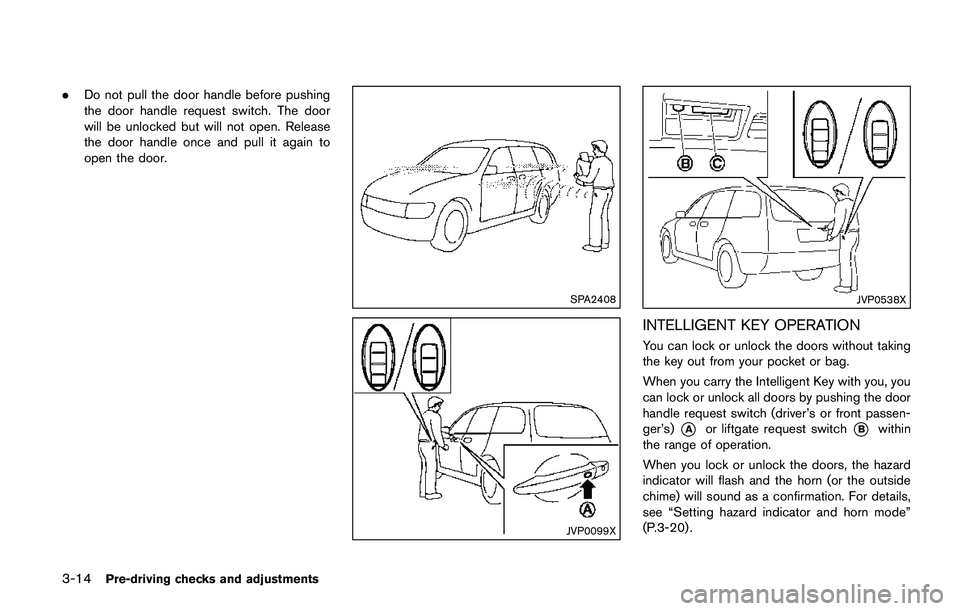
.Do not pull the door handle before pushing
the door handle request switch. The door
will be unlocked but will not open. Release
the door handle once and pull it again to
open the door.
SPA2408
JVP0099X
JVP0538X
INTELLIGENT KEY OPERATION
You can lock or unlock the doors without taking
the key out from your pocket or bag.
When you carry the Intelligent Key with you, you
can lock or unlock all doors by pushing the door
handle request switch (driver’s or front passen-
ger’s)
*Aor liftgate request switch*Bwithin
the range of operation.
When you lock or unlock the doors, the hazard
indicator will flash and the horn (or the outside
chime) will sound as a confirmation. For details,
see “Setting hazard indicator and horn mode”
(P.3-20) .
Page 162 of 508
Welcome light and farewell light function
When you lock or unlock the doors or the
liftgate, the daytime running lights, parking lights
and the tail lights will illuminate for a period of
time. The welcome light and farewell light
function can be disabled. For information about
disabling the welcome light and farewell light
function, see “Vehicle Settings” (P.2-22).
Locking doors
1. Move the shift lever to the P (Park) position
(Continuously Variable Transmission (CVT)
models) , or the shift lever in the N (Neutral)
position (Manual Transmission (MT) mod-
els) , place the ignition switch in the OFF
position and make sure you carry the
Intelligent Key with you.
2. Close all doors.
3. Push any door handle request switch while
carrying the Intelligent Key with you.
4. All doors and the liftgate will lock.
5. The hazard indicator lights flash twice and
the outside buzzer sounds twice.
NOTE:
.Request switches for all doors and the
liftgate can be deactivated when the I-
Key Door Lock setting is turned off in
the Vehicle Settings of the vehicle
information display. For additional in-formation, see“Vehicle Settings”(P.2-
22) .
.Doors lock with the door handle re-
quest switch while the ignition switch
is not in the LOCK position.
.Doors do not lock by pushing the door
handle request switch while any door is
open. However, doors lock with the
mechanical key even if any door is
open.
.Doors do not lock with the door handle
request switch with the Intelligent Key
inside the vehicle and a beep sounds to
warn you. However, when an Intelligent
Key is inside the vehicle, doors can be
locked with another Intelligent Key.
CAUTION
.After locking the doors using the
request switch, make sure that the
doors have been securely locked by
operating the door handles or the
liftgate opener switch.
.When locking the doors using the
request switch, make sure to have
the Intelligent Key in your posses-
sion before operating the request
switch to prevent the Intelligent Keyfrom being left in the vehicle.
.The request switch is operational
only when the Intelligent Key has
been detected by the Intelligent Key
system.
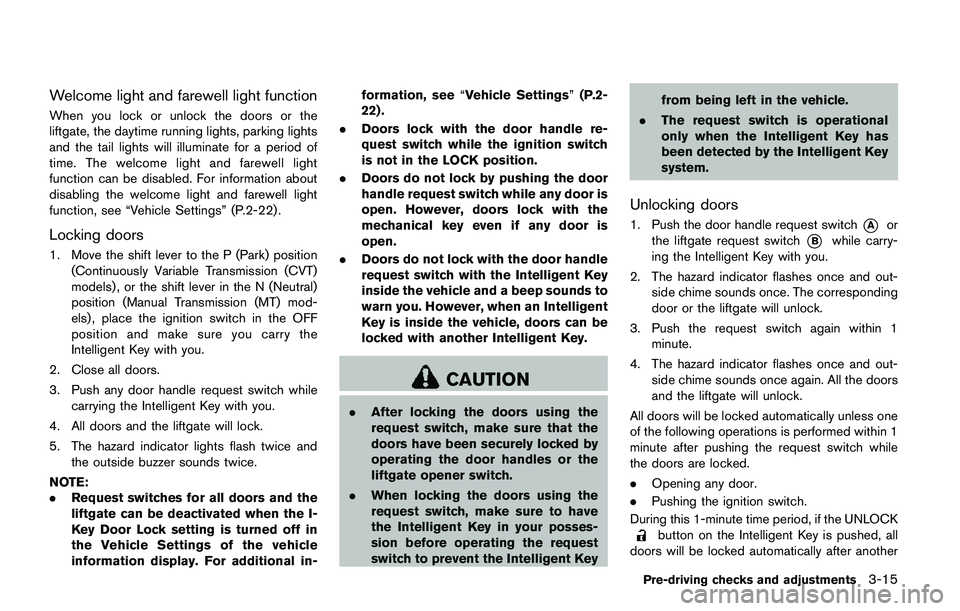
Unlocking doors
1. Push the door handle request switch*Aor
the liftgate request switch
*Bwhile carry-
ing the Intelligent Key with you.
2. The hazard indicator flashes once and out-
side chime sounds once. The corresponding
door or the liftgate will unlock.
3. Push the request switch again within 1
minute.
4. The hazard indicator flashes once and out-
side chime sounds once again. All the doors
and the liftgate will unlock.
All doors will be locked automatically unless one
of the following operations is performed within 1
minute after pushing the request switch while
the doors are locked.
.Opening any door.
.Pushing the ignition switch.
During this 1-minute time period, if the UNLOCK
button on the Intelligent Key is pushed, all
doors will be locked automatically after another
Pre-driving checks and adjustments3-15
Page 163 of 508
3-16Pre-driving checks and adjustments
1 minute.
NOTE:
The unlocking operation can be changed in
selective unlock in the Vehicle Settings of
the vehicle information display. For addi-
tional information, see“Vehicle Settings”
(P.2-22) .
Opening liftgate
1. Carry the Intelligent Key.
2. Push the liftgate opener switch
*C.
3. The liftgate will unlock.
BATTERY SAVER SYSTEM
When all the following conditions are met for a
period of time, the battery saver system will cut
off the power supply to prevent battery dis-
charge.
.The ignition switch is in the ON position.
(See “Push-button ignition switch positions”
(P.5-16) .)
.All doors are closed, and
.The shift lever is in the P (Park) position
(CVT model) or N (Neutral) position (MT
model) .
WARNING LIGHTS AND AUDIBLE
REMINDERS
To help prevent the vehicle from moving
unexpectedly by erroneous operation of the
Intelligent Key listed on the following chart or
to help prevent the vehicle from being stolen,
chime or beep sounds inside and outside the
vehicle and the warning display appears on the
vehicle information display.
When a chime or beep sounds or the warning
display appears, be sure to check the vehicle
and Intelligent Key.
See “Troubleshooting guide” (P.3-17) and
“Vehicle information display” (P.2-18) .
Page 164 of 508
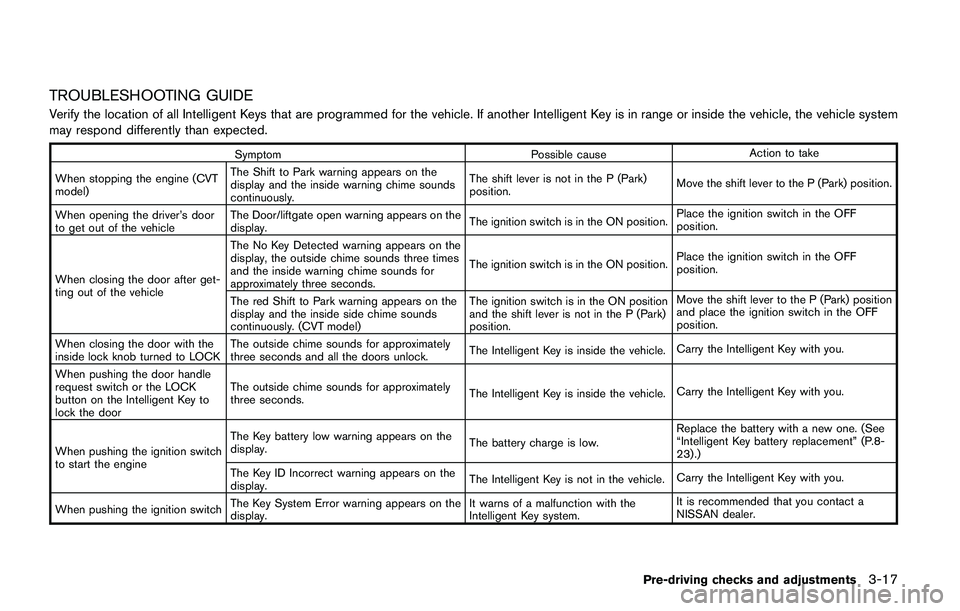
TROUBLESHOOTING GUIDE
Verify the location of all Intelligent Keys that are programmed for the vehicle. If another Intelligent Key is in range or inside the vehicle, the vehicle system
may respond differently than expected.
Symptom Possible causeAction to take
When stopping the engine (CVT
model)The Shift to Park warning appears on the
display and the inside warning chime sounds
continuously.The shift lever is not in the P (Park)
position.Move the shift lever to the P (Park) position.
When opening the driver’s door
to get out of the vehicleThe Door/liftgate open warning appears on the
display.The ignition switch is in the ON position.Place the ignition switch in the OFF
position.
When closing the door after get-
ting out of the vehicleThe No Key Detected warning appears on the
display, the outside chime sounds three times
and the inside warning chime sounds for
approximately three seconds.The ignition switch is in the ON position.Place the ignition switch in the OFF
position.
The red Shift to Park warning appears on the
display and the inside side chime sounds
continuously. (CVT model)The ignition switch is in the ON position
and the shift lever is not in the P (Park)
position.Move the shift lever to the P (Park) position
and place the ignition switch in the OFF
position.
When closing the door with the
inside lock knob turned to LOCKThe outside chime sounds for approximately
three seconds and all the doors unlock.The Intelligent Key is inside the vehicle.Carry the Intelligent Key with you.
When pushing the door handle
request switch or the LOCK
button on the Intelligent Key to
lock the doorThe outside chime sounds for approximately
three seconds.The Intelligent Key is inside the vehicle.Carry the Intelligent Key with you.
When pushing the ignition switch
to start the engineThe Key battery low warning appears on the
display.The battery charge is low.Replace the battery with a new one. (See
“Intelligent Key battery replacement” (P.8-
23) .)
The Key ID Incorrect warning appears on the
display.The Intelligent Key is not in the vehicle.Carry the Intelligent Key with you.
When pushing the ignition switchThe Key System Error warning appears on the
display.It warns of a malfunction with the
Intelligent Key system.It is recommended that you contact a
NISSAN dealer.
Pre-driving checks and adjustments3-17
Page 165 of 508
3-18Pre-driving checks and adjustments
HOW TO USE REMOTE KEYLESS
ENTRY FUNCTION
WARNING
.Radio waves could adversely affect
electric medical equipment. Those
who use a pacemaker should con-
tact the electric medical equipment
manufacturer for the possible influ-
ences before use.
.The Intelligent Key transmits radio
waves when the buttons are
pushed. The FAA advises that the
radio waves may affect aircraft na-
vigation and communication sys-
tems. Do not operate the
Intelligent Key while on an airplane.
Make sure the buttons are not
operated unintentionally when the
unit is stored during a flight.
CAUTION
.Do not allow the Intelligent Key,
which contains electrical compo-
nents, to come into contact with
water or salt water. This could affectthe system function.
.Do not drop the Intelligent Key.
.Do not strike the Intelligent Key
sharply against another object.
.Do not change or modify the Intel-
ligent Key.
.Wetting may damage the Intelligent
Key. If the Intelligent Key gets wet,
immediately wipe until it is comple-
tely dry.
.If the outside temperature is below
148F (-108C) degrees, the battery of
the Intelligent Key may not function
properly.
.Do not place the Intelligent Key for
an extended period in an area where
temperatures exceed 1408F (608C) .
.Do not attach the Intelligent Key
with a key holder that contains a
magnet.
.Do not place the Intelligent Key near
equipment that produces a mag-
netic field, such as a TV, audio
equipment, personal computers or
cellular phone.
The remote keyless entry function can operate
all door locks using the remote keyless entryfunction of the Intelligent Key. The remote
keyless entry function can operate at a distance
of approximately 33 ft (10 m) from the vehicle.
(The operating distance depends upon the
conditions around the vehicle.)
The remote keyless entry function will not
operate:
.When the Intelligent Key is not within the
operational range.
.When the doors are open or not closed
securely.
.When the Intelligent Key battery is dis-
charged.
The remote keyless entry function can also
operate the vehicle alarm.
Page 166 of 508
JVP0541X
Type A
JVP0542XType B
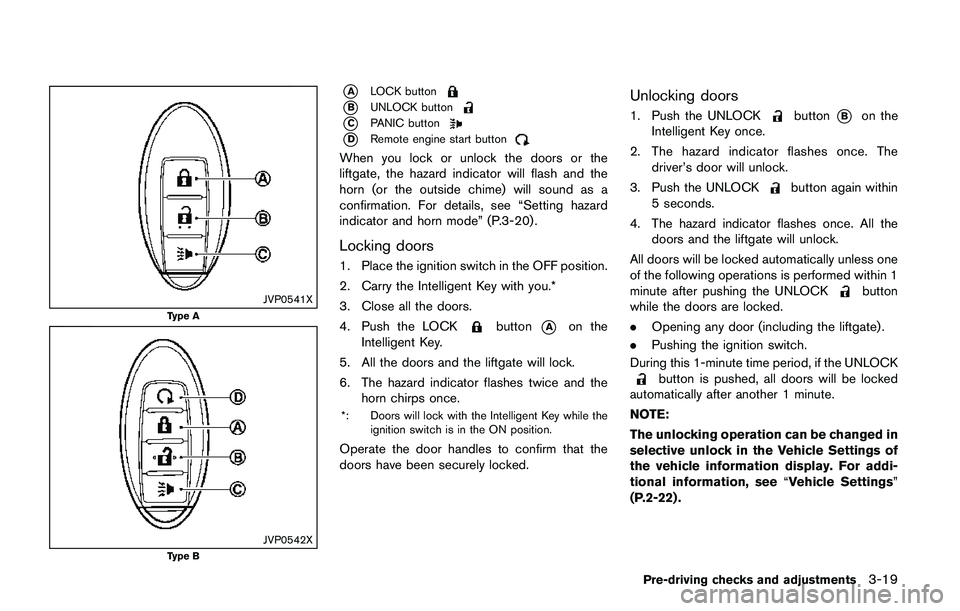
*ALOCK button
*BUNLOCK button
*CPANIC button
*DRemote engine start button
When you lock or unlock the doors or the
liftgate, the hazard indicator will flash and the
horn (or the outside chime) will sound as a
confirmation. For details, see “Setting hazard
indicator and horn mode” (P.3-20) .
Locking doors
1. Place the ignition switch in the OFF position.
2. Carry the Intelligent Key with you.*
3. Close all the doors.
4. Push the LOCK
button*Aon the
Intelligent Key.
5. All the doors and the liftgate will lock.
6. The hazard indicator flashes twice and the
horn chirps once.
*: Doors will lock with the Intelligent Key while the
ignition switch is in the ON position.
Operate the door handles to confirm that the
doors have been securely locked.
Unlocking doors
1. Push the UNLOCKbutton*Bon the
Intelligent Key once.
2. The hazard indicator flashes once. The
driver’s door will unlock.
3. Push the UNLOCK
button again within
5 seconds.
4. The hazard indicator flashes once. All the
doors and the liftgate will unlock.
All doors will be locked automatically unless one
of the following operations is performed within 1
minute after pushing the UNLOCK
button
while the doors are locked.
.Opening any door (including the liftgate) .
.Pushing the ignition switch.
During this 1-minute time period, if the UNLOCK
button is pushed, all doors will be locked
automatically after another 1 minute.
NOTE:
The unlocking operation can be changed in
selective unlock in the Vehicle Settings of
the vehicle information display. For addi-
tional information, see“Vehicle Settings”
(P.2-22) .
Pre-driving checks and adjustments3-19