audio NISSAN QASHQAI 2017 Owner´s Manual
[x] Cancel search | Manufacturer: NISSAN, Model Year: 2017, Model line: QASHQAI, Model: NISSAN QASHQAI 2017Pages: 508, PDF Size: 2.68 MB
Page 281 of 508
4-100Heater, air conditioner, audio and phone systems
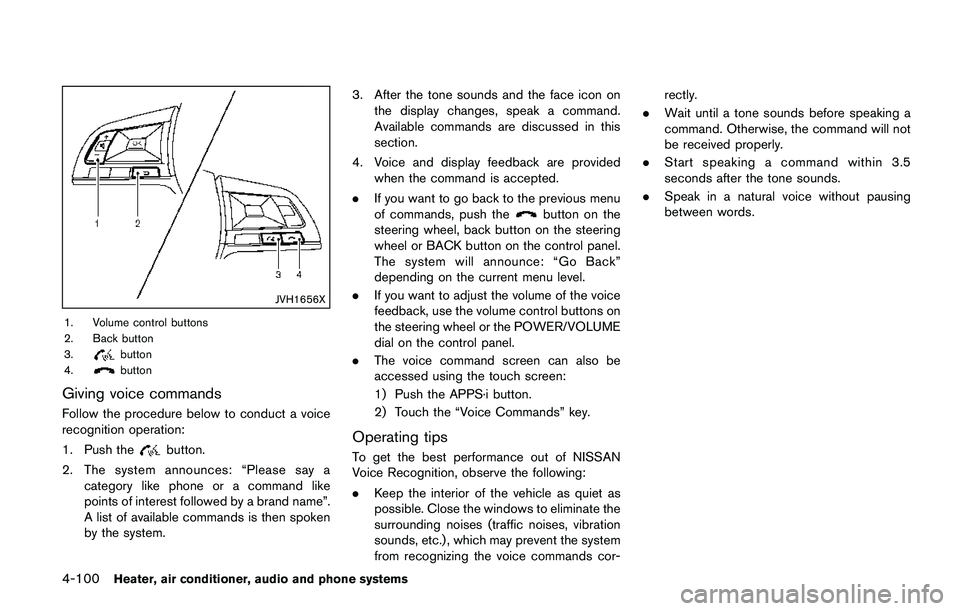
JVH1656X
1. Volume control buttons
2. Back button
3.
button
4.button
Giving voice commands
Follow the procedure below to conduct a voice
recognition operation:
1. Push the
button.
2. The system announces: “Please say a
category like phone or a command like
points of interest followed by a brand name”.
A list of available commands is then spoken
by the system.3. After the tone sounds and the face icon on
the display changes, speak a command.
Available commands are discussed in this
section.
4. Voice and display feedback are provided
when the command is accepted.
.If you want to go back to the previous menu
of commands, push the
button on the
steering wheel, back button on the steering
wheel or BACK button on the control panel.
The system will announce: “Go Back”
depending on the current menu level.
.If you want to adjust the volume of the voice
feedback, use the volume control buttons on
the steering wheel or the POWER/VOLUME
dial on the control panel.
.The voice command screen can also be
accessed using the touch screen:
1) Push the APPS·i button.
2) Touch the “Voice Commands” key.
Operating tips
To get the best performance out of NISSAN
Voice Recognition, observe the following:
.Keep the interior of the vehicle as quiet as
possible. Close the windows to eliminate the
surrounding noises (traffic noises, vibration
sounds, etc.) , which may prevent the system
from recognizing the voice commands cor-rectly.
.Wait until a tone sounds before speaking a
command. Otherwise, the command will not
be received properly.
.Start speaking a command within 3.5
seconds after the tone sounds.
.Speak in a natural voice without pausing
between words.
Page 282 of 508
JVH1687X
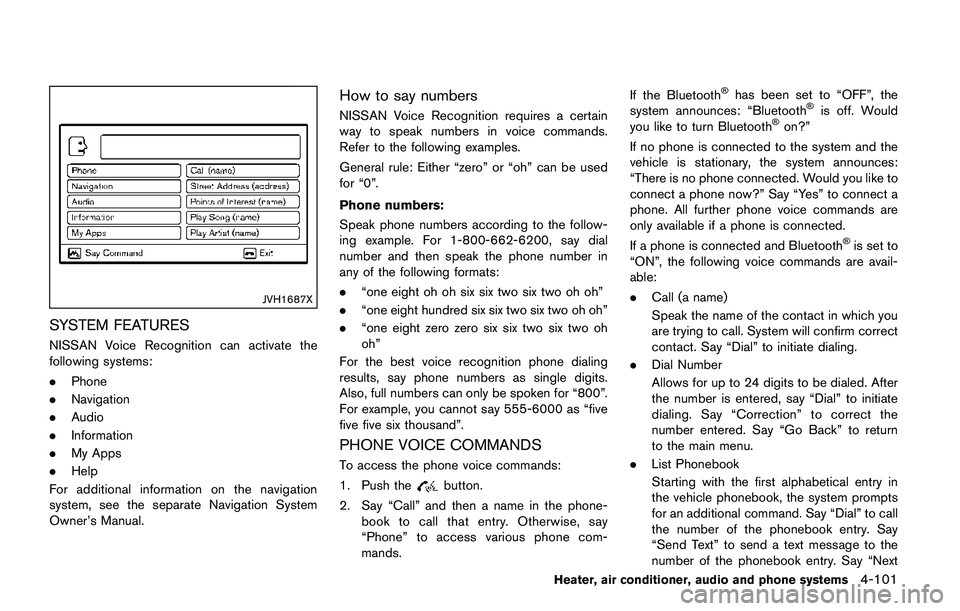
SYSTEM FEATURES
NISSAN Voice Recognition can activate the
following systems:
.Phone
.Navigation
.Audio
.Information
.My Apps
.Help
For additional information on the navigation
system, see the separate Navigation System
Owner’s Manual.
How to say numbers
NISSAN Voice Recognition requires a certain
way to speak numbers in voice commands.
Refer to the following examples.
General rule: Either “zero” or “oh” can be used
for “0”.
Phone numbers:
Speak phone numbers according to the follow-
ing example. For 1-800-662-6200, say dial
number and then speak the phone number in
any of the following formats:
.“one eight oh oh six six two six two oh oh”
.“one eight hundred six six two six two oh oh”
.“one eight zero zero six six two six two oh
oh”
For the best voice recognition phone dialing
results, say phone numbers as single digits.
Also, full numbers can only be spoken for “800”.
For example, you cannot say 555-6000 as “five
five five six thousand”.
PHONE VOICE COMMANDS
To access the phone voice commands:
1. Push the
button.
2. Say “Call” and then a name in the phone-
book to call that entry. Otherwise, say
“Phone” to access various phone com-
mands.If the Bluetooth
Šhas been set to “OFF”, the
system announces: “BluetoothŠis off. Would
you like to turn BluetoothŠon?”
If no phone is connected to the system and the
vehicle is stationary, the system announces:
“There is no phone connected. Would you like to
connect a phone now?” Say “Yes” to connect a
phone. All further phone voice commands are
only available if a phone is connected.
If a phone is connected and Bluetooth
Šis set to
“ON”, the following voice commands are avail-
able:
.Call (a name)
Speak the name of the contact in which you
are trying to call. System will confirm correct
contact. Say “Dial” to initiate dialing.
.Dial Number
Allows for up to 24 digits to be dialed. After
the number is entered, say “Dial” to initiate
dialing. Say “Correction” to correct the
number entered. Say “Go Back” to return
to the main menu.
.List Phonebook
Starting with the first alphabetical entry in
the vehicle phonebook, the system prompts
for an additional command. Say “Dial” to call
the number of the phonebook entry. Say
“Send Text” to send a text message to the
number of the phonebook entry. Say “Next
Heater, air conditioner, audio and phone systems4-101
Page 283 of 508
4-102Heater, air conditioner, audio and phone systems
Entry” to skip to the next alphabetical entry
in the vehicle phonebook, where the same
options will then be available.
.Recent Calls
The system prompts for an additional
command. Say “Missed Calls”, “Incoming
Calls” or “Outgoing Calls” to display a list of
such calls on the screen.
Speak the number of the entry displayed on
the screen to dial that number or say “Next
Page” to view entries on the next page (if
available) .
.Redial
Redials the last called number.
.Read Text (if so equipped)
Reads an incoming text message. For more
information about text messaging with the
Bluetooth
ŠHands-Free Phone System, see
“Text messaging” (P.4-96).
.Send Text (if so equipped)
Sends a text message. For more information
about text messaging with the Bluetooth
Š
Hands-Free Phone System, see “Text mes-
saging” (P.4-96) .
.Select Phone
The system replies “Please use manual
controls to continue”. Use manual controls
to change the active phone from among the
listed phones connected to the vehicle..Siri (if so equipped)
Siri
ŠEyes Free function can be activated.
See “SiriŠEyes Free” (P.4-78) for details.
For more information about the BluetoothŠ
Hands-Free Phone System, see “BluetoothŠ
Hands-Free Phone System (models with navi-
gation system)” (P.4-92) .
NAVIGATION SYSTEM VOICE COM-
MANDS
The following voice commands are available for
the Navigation System:
.Street Address (address)
.Points of Interest (name)
.POI by Category
.Home
.Address Book
.Previous Destinations
.Enter Address in Steps
.Cancel Route
For more information about these commands,
see the separate Navigation System Owner’s
Manual.
AUDIO SYSTEM VOICE COMMANDS
To access the audio system voice commands:
1. Push the
button.
2. Say “Audio”.
3. Speak a command from the following
available commands:
.Play (AM, FM, etc.)
Allows user to select radio band
.Tune AM (number)
Allows user to tune directly to a desired AM
frequency
.Tune FM (number)
Allows user to tune directly to a desired FM
frequency
.SXM Channel (number)
Allows user to tune directly to a desired
SXM channel (if so equipped)
.CD Track (number)
Allows user to select track to be played
.Play Song (name)
Allows user to select song name to be
played
.Play Artist (name)
Allows user to select artist to be played
.Play Album (name)
Allows user to select album name to be
played
Page 284 of 508
For more information about the audio system,
see “FM-AM-SAT radio with Compact Disc (CD)
player (Type B)” (P.4-63) .
INFORMATION VOICE COMMANDS
The following voice commands are available for
the information functions of the Navigation
System:
.Traffic
.Fuel Prices
.Sports
.Stocks
.Movie Listings
.Current Weather
.Weather Map
.5-day Forecast
.6-hour Forecast
.Connect To Voice Menu (if so equipped)
For more information about these commands,
see the separate Navigation System Owner’s
Manual.
MY APPS VOICE COMMANDS
Many Apps can be accessed using this voice
command. For information about smartphone
integration, “NissanConnect
SMMobile Apps
smartphone integration” (P.4-76) .
HELP VOICE COMMANDS
The following voice commands can be spoken
to have the system provide instructions and tips
for using the NISSAN Voice Recognition sys-
tem.
.List Commands
.What Can I Say?
.General Help
.Quit
.Exit
.Help
TROUBLESHOOTING GUIDE
The system should respond correctly to all voice
commands without difficulty. If problems are
encountered, follow the solutions given in this
guide for the appropriate error. Where the
solutions are listed by number, try each solution
in turn, starting with number one, until the
problem is resolved.
Heater, air conditioner, audio and phone systems4-103
Page 285 of 508
4-104Heater, air conditioner, audio and phone systems
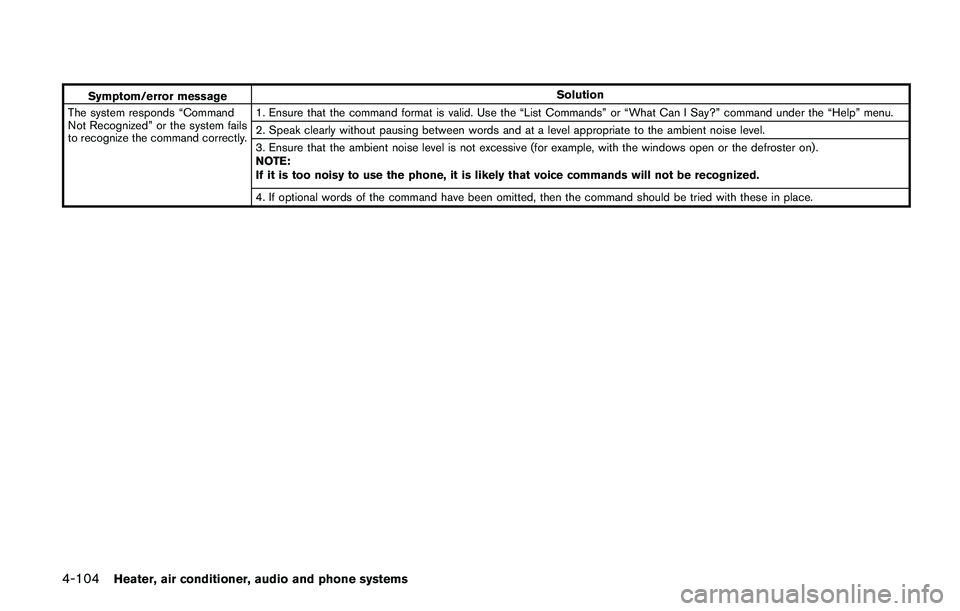
Symptom/error messageSolution
The system responds “Command
Not Recognized” or the system fails
to recognize the command correctly.1. Ensure that the command format is valid. Use the “List Commands” or “What Can I Say?” command under the “Help” menu.
2. Speak clearly without pausing between words and at a level appropriate to the ambient noise level.
3. Ensure that the ambient noise level is not excessive (for example, with the windows open or the defroster on) .
NOTE:
If it is too noisy to use the phone, it is likely that voice commands will not be recognized.
4. If optional words of the command have been omitted, then the command should be tried with these in place.
Page 301 of 508
5-16Starting and driving
PUSH-BUTTON IGNITION SWITCH
POSITIONS
LOCK (Normal parking position)
The ignition switch can only be locked at this
position.
The ignition switch will lock when any door is
opened or closed with the ignition switched off.
ON (Normal operating position)
The ignition system and the electrical accessory
power activate at this position without the
engine turned on.
The ON position has a battery saver feature that
will place the ignition switch in the OFF position,
if the vehicle is not running, after some time
under the following conditions:
.all doors are closed.
.shift lever is in P (Park) position (CVT model)
or N (Neutral) position (MT model) .
The battery saver feature will be cancelled if any
of the following occur:
.any door is opened.
.shift lever is moved out of the P (Park)
position (CVT model) .
.ignition switch changes position.
OFF position
The engine is turned off in this position.
Auto ACC position
With the vehicle in the P (Park) position (CVT
models) or the N (Neutral) position (MT models) ,
the Intelligent Key with you and the ignition
placed from ON to OFF, the radio can still be
used for a period of time, or until the driver’s
door is opened. After a period of time, functions
such as radio, navigation (if so equipped) , and
Bluetooth
ŠHands-Free Phone System may be
restarted by turning on the audio system (See
“Audio system” (P.4-38) in this manual) , or by
the UNLOCK button on the Intelligent Key for up
to a total of 30 minutes.
EMERGENCY ENGINE SHUT OFF
To shut off the engine in an emergency situation
while driving, perform the following procedure:
.Rapidly push the push-button ignition switch
3 consecutive times in less than 1.5
seconds, or
.Push and hold the push-button ignition
switch for more than 2 seconds.
JVS0404X
INTELLIGENT KEY BATTERY DIS-
CHARGE
If the battery of the Intelligent Key is discharged,
or environmental conditions interfere with the
Intelligent Key operation, start the engine
according to the following procedure:
1. Move the shift lever to the P (Park) position
(for CVT models) or the shift lever to the N
(Neutral) position (for MT models) .
2. Firmly apply the foot brake.
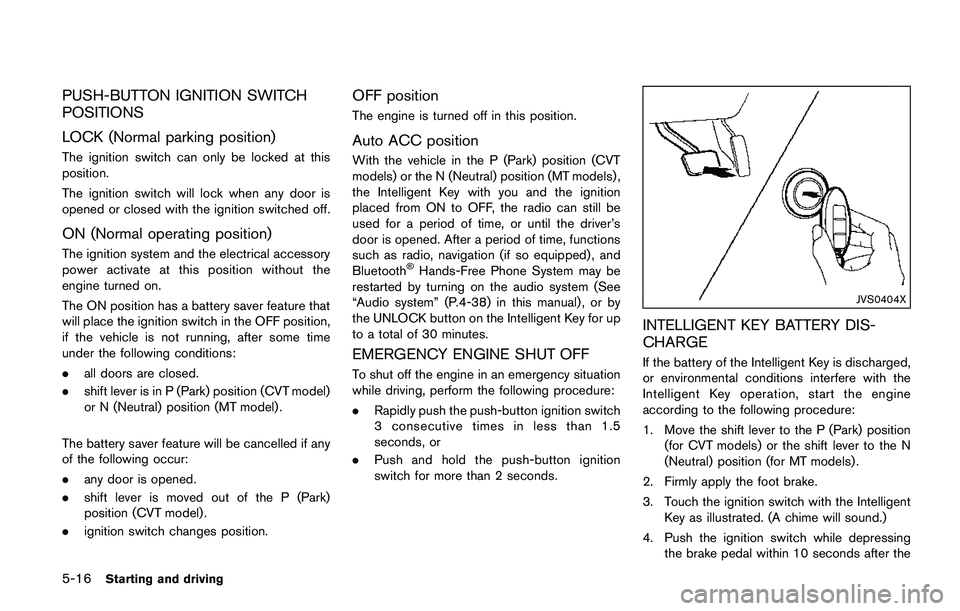
3. Touch the ignition switch with the Intelligent
Key as illustrated. (A chime will sound.)
4. Push the ignition switch while depressing
the brake pedal within 10 seconds after the
Page 330 of 508

BSW SYSTEM LIMITATIONS
WARNING
Listed below are the system limitations
for the BSW system. Failure to operate
the vehicle in accordance with these
system limitations could result in ser-
ious injury or death.
.The BSW system cannot detect all
vehicles under all conditions.
.The radar sensors may not be able
to detect and activate BSW when
certain objects are present such as:
— Pedestrians, bicycles, animals.
— Vehicles such as motorcycles,
low height vehicles, or high
ground clearance vehicles.
— Oncoming vehicles.
— Vehicles remaining in the detec-
tion zone when you accelerate
from a stop.
— A vehicle merging into an adja-
cent lane at a speed approxi-
mately the same as your vehicle.— A vehicle approaching rapidly
from behind.
— A vehicle which your vehicle
overtakes rapidly.
— A vehicle that passes through
the detection zone quickly.
— When overtaking several vehi-
cles in a row, the vehicles after
the first vehicle may not be
detected if they are traveling
close together.
.The radar sensor’s detection zone is
designed based on a standard lane
width. When driving in a wider lane,
the radar sensors may not detect
vehicles in an adjacent lane. When
driving in a narrow lane, the radar
sensors may detect vehicles driving
two lanes away.
.The radar sensors are designed to
ignore most stationary objects,
however objects such as guardrails,
walls, foliage and parked vehicles
may occasionally be detected. This
is a normal operation condition.
.The following conditions may re-
duce the ability of the radar to
detect other vehicles:— Severe weather
— Road spray
— Ice/frost/dirt build-up on the
vehicle
.Do not attach stickers (including
transparent material) , install acces-
sories or apply additional paint near
the radar sensors. These conditions
may reduce the ability of the radar
to detect other vehicles.
.Excessive noise (for example, audio
system volume, open vehicle win-
dow) will interfere with the chime
sound, and it may not be heard.
Starting and driving5-45
Page 340 of 508

— Illustration*e: When the angle
formed by your vehicle and ap-
proaching vehicle is small
.The following conditions may re-
duce the ability of the radar to
detect other vehicles:
— Severe weather
— Road spray
— Ice/frost/dirt build-up on the
vehicle
.Do not attach stickers (including
transparent material) , install acces-
sories or apply additional paint near
the radar sensors. These conditions
may reduce the ability of the radar
to detect other vehicles
.Excessive noise (e.g. audio system
volume, open vehicle window) will
interfere with the chime sound, and
it may not be heard.
JVS0172X
Illustration 1
JVS0173XIllustration 2
NOTE:
In the case of several vehicles approaching
in a row (Illustration 1) or in the opposite
direction (Illustration 2) , a chime may not
be sounded by the RCTA system after the
first vehicle passes the sensors.
Starting and driving5-55
Page 500 of 508
11 Index
A
ABS (Anti-lock Braking System) ......................... 5-102
Active Engine Brake ............................................... 5-107
Active Ride Control ................................................. 5-108
Active Trace Control ............................................... 5-106
Advanced air bag system ......................................... 1-45
Air bag system
Advanced air bag system .................................. 1-45
Front passenger air bag and status light ...... 1-47
Front-seat mounted side-impact
supplemental air bag system ............................ 1-53
Roof-mounted curtain side-impact
supplemental air bag system ............................ 1-53
Air bag warning labels .............................................. 1-55
Air bag warning light ..................................... 1-56, 2-15
Air cleaner housing filter ........................................... 8-14
Air conditioner
Air conditioner operation ................................... 4-30
Air conditioner service ....................................... 4-37
Air conditioner specification label ................. 10-10
Air conditioning system refrigerant and
lubricant recommendations .................... 4-37, 10-6
Alarm, How to stop alarm (see vehicle
security system) .......................................................... 2-38
Alcohol, drugs and driving ....................................... 5-10
All-wheel drive (AWD) .............................................. 5-96
Antenna ......................................................................... 4-75
Anti-lock Braking System (ABS) ......................... 5-102
Anti-lock braking system (ABS) warning light .... 2-10
Appearance care
Exterior appearance care ..................................... 7-2
Interior appearance care ....................................... 7-4
Application download ................................................ 4-77
Armrest ............................................................................ 1-6Around View
ŠMonitor .............................................. 4-14
Audible reminders ...................................................... 2-17
Audio operation precautions ................................... 4-38
Audio system ............................................................... 4-38
Steering wheel audio controls ......................... 4-74
Autolight system ......................................................... 2-43
Automatic
Door locks ................................................................ 3-7
Automatic air conditioner ......................................... 4-34
AUX (Auxiliary) input jack ......................................... 4-73
Average speed ............................................................ 2-34
Avoiding collision and rollover .................................. 5-8
B
Battery ........................................................................... 8-11
Battery replacement, Intelligent Key ............... 8-23
Battery replacement, Key fob ........................... 8-21
Battery saver system .......................................... 2-47
Variable voltage control system ....................... 8-13
Before starting the engine ....................................... 5-17
Blind Spot Warning (BSW) .................................... 5-42
Bluetooth
ŠHands-Free Phone System .... 4-82, 4-92
Booster seats .............................................................. 1-35
Brake
Anti-lock Braking System (ABS) ................... 5-102
Brake and clutch fluid ........................................... 8-9
Brake system ...................................................... 5-102
Electronic parking brake system
warning light ......................................................... 2-12
Parking brake ........................................................ 5-26
Press Brake Pedal warning (for electronic
parking brake equipped models) .................... 2-32
Warning light ........................................................ 2-11
Break-in schedule ....................................................... 5-95Brightness control
Instrument panel ..................................................... 2-9
Bulb check/instrument panel ................................... 2-10
Bulb replacement ....................................................... 8-25
C
Capacities and
recommended fluids/lubricants ............................... 10-2
Car phone or CB radio ............................................. 4-82
Card holder .................................................................. 2-57
Cargo area ................................................................... 2-55
Catalytic converter, Three way catalyst .................. 5-5
CD/USB memory care and cleaning ..................... 4-76
Chassis and body maintenance ............................. 9-11
Chassis control ............................................. 2-35, 5-106
Child restraints ............................................................ 1-19
Booster seats ....................................................... 1-35
LATCH system ..................................................... 1-21
Precautions on child restraints ........................ 1-19
Child safety .................................................................. 1-17
Child safety rear door lock ........................................ 3-7
Chimes, Audible reminders ...................................... 2-17
Circuit breaker, Fusible link ..................................... 8-19
Cleaning exterior and interior ........................... 7-2, 7-4
Clock ............................................................................. 2-36
Clutch fluid ..................................................................... 8-9
Cockpit ............................................................................ 2-3
Cold weather driving .............................................. 5-110
Console box ................................................................. 2-56
Console light ............................................................... 2-66
Continuously Variable Transmission (CVT) fluid ... 8-9
Continuously Variable Transmission (CVT)
position indicator .......................................................... 2-9
Control buttons and function .................................... 4-3
Controls, Steering wheel audio controls .............. 4-74
Page 503 of 508
11-4
Indicator lights ...................................................... 2-16
Interior lights ......................................................... 2-65
Map lights .............................................................. 2-66
Replacement ......................................................... 8-25
Room light ............................................................. 2-67
Vanity mirror lights ............................................... 2-67
Warning/indicator lights and
audible reminders ................................................ 2-10
Lights, Exterior and interior light replacement .... 8-27
Loading information (See vehicle
loading information) ................................................ 10-11
Lock
Automatic door locks ............................................ 3-7
Door locks ................................................................ 3-5
Power door lock ..................................................... 3-5
Loose fuel cap warning ............................................ 3-29
Low tire pressure warning ....................................... 2-29
Low tire pressure warning (Low tire pressure) .... 2-29
Low tire pressure warning light .............................. 2-13
Low tire pressure warning system (See Tire
Pressure Monitoring System (TPMS)) .................... 5-5
Luggage hooks ........................................................... 2-58
M
Maintenance
Battery .................................................................... 8-11
General maintenance ............................................ 9-2
Inside the vehicle .................................................... 9-3
Maintenance log .................................................. 9-14
Maintenance precautions ..................................... 8-2
Maintenance requirements ................................... 9-2
Maintenance schedules ........................................ 9-6
Maintenance under severe
driving conditions ................................................ 9-13
Outside the vehicle ................................................ 9-2
Seat belt maintenance ....................................... 1-16Standard maintenance .......................................... 9-7
Maintenance schedules .............................................. 9-6
Malfunction indicator light (MIL) ............................. 2-16
Manual air conditioner and heater ......................... 4-31
Manual front seat adjustment .................................... 1-3
Manual Transmission (MT) ....................................... 5-13
Map lights ..................................................................... 2-66
Master warning light .................................................. 2-14
Mechanical key (Intelligent Key system) ................. 3-4
Mechanical key (NISSAN Vehicle
Immobilizer System) ..................................................... 3-3
Meters and gauges ...................................................... 2-5
Instrument brightness control .............................. 2-9
Mirror
Inside mirror .......................................................... 3-31
Outside mirrors .................................................... 3-31
Vanity mirror .......................................................... 3-33
Moonroof ...................................................................... 2-63
Moving Object Detection (MOD) ........................... 4-25
MR20DD engine model .............................................. 8-4
N
Navigation system voice commands .................. 4-102
New vehicle break-in ................................................. 5-95
NISSAN Vehicle Immobilizer System .................... 2-38
NISSAN Vehicle Immobilizer System key ............... 3-2
NISSAN Voice Recognition system ....................... 4-99
NissanConnect Mobile Apps
smartphone integration ............................................. 4-76
O
Odometer ....................................................................... 2-6
Off-road recovery ......................................................... 5-9Oil
Capacities and
recommended fluids/lubricants ........................ 10-2
Changing engine oil and filter ............................. 8-6
Checking engine oil level ..................................... 8-6
Engine oil .................................................................. 8-6
Engine oil viscosity .............................................. 10-6
One Shot Call ................................................. 4-86, 4-94
Outside air temperature ............................................ 2-36
Outside mirrors ........................................................... 3-31
Overheat, If your vehicle overheats ....................... 6-11
Owner’s Manual/Service Manual
order information ...................................................... 10-19
P
Panic alarm ......................................................... 3-9, 3-20
Parcel shelf .................................................................. 2-58
Parking
Brake break-in .................................................... 5-102
Parking brake ........................................................ 5-26
Parking on hills ................................................... 5-100
Parking brake
Electronic parking brake warning light ........... 2-12
Phone
Car phone or CB radio ...................................... 4-82
Phone and Bluetooth
Šsettings .............................. 4-98
Phone settings ............................................................ 4-98
Power
Electric power steering .................................... 5-101
Power door lock ..................................................... 3-5
Power outlet .......................................................... 2-53
Power windows .................................................... 2-61
Power moonroof ......................................................... 2-63
Precautions
Audio operation .................................................... 4-38
Braking precautions .......................................... 5-102