brakes NISSAN QASHQAI 2017 Owner´s Manual
[x] Cancel search | Manufacturer: NISSAN, Model Year: 2017, Model line: QASHQAI, Model: NISSAN QASHQAI 2017Pages: 508, PDF Size: 2.68 MB
Page 347 of 508
5-62Starting and driving
JVS1068X
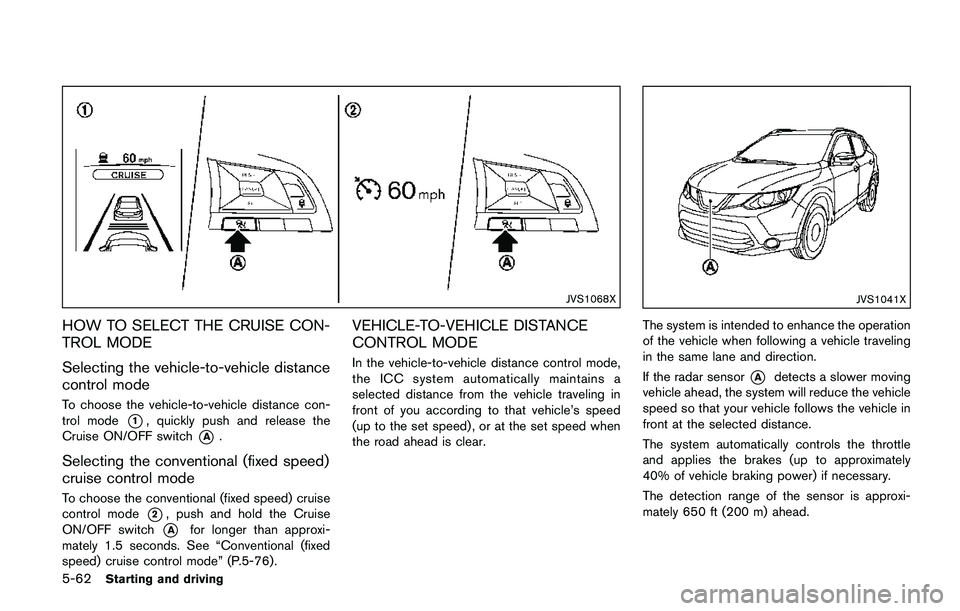
HOW TO SELECT THE CRUISE CON-
TROL MODE
Selecting the vehicle-to-vehicle distance
control mode
To choose the vehicle-to-vehicle distance con-
trol mode
*1, quickly push and release the
Cruise ON/OFF switch
*A.
Selecting the conventional (fixed speed)
cruise control mode
To choose the conventional (fixed speed) cruise
control mode
*2, push and hold the Cruise
ON/OFF switch
*Afor longer than approxi-
mately 1.5 seconds. See “Conventional (fixed
speed) cruise control mode” (P.5-76) .
VEHICLE-TO-VEHICLE DISTANCE
CONTROL MODE
In the vehicle-to-vehicle distance control mode,
the ICC system automatically maintains a
selected distance from the vehicle traveling in
front of you according to that vehicle’s speed
(up to the set speed) , or at the set speed when
the road ahead is clear.
JVS1041X
The system is intended to enhance the operation
of the vehicle when following a vehicle traveling
in the same lane and direction.
If the radar sensor
*Adetects a slower moving
vehicle ahead, the system will reduce the vehicle
speed so that your vehicle follows the vehicle in
front at the selected distance.
The system automatically controls the throttle
and applies the brakes (up to approximately
40% of vehicle braking power) if necessary.
The detection range of the sensor is approxi-
mately 650 ft (200 m) ahead.
Page 351 of 508
5-66Starting and driving
JVS1071X
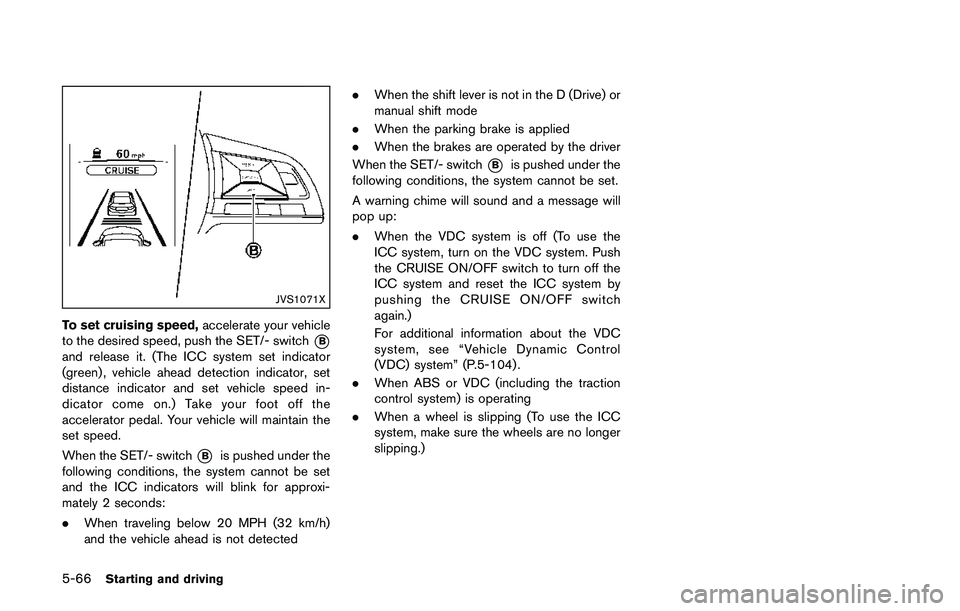
To set cruising speed,accelerate your vehicle
to the desired speed, push the SET/- switch
*B
and release it. (The ICC system set indicator
(green) , vehicle ahead detection indicator, set
distance indicator and set vehicle speed in-
dicator come on.) Take your foot off the
accelerator pedal. Your vehicle will maintain the
set speed.
When the SET/- switch
*Bis pushed under the
following conditions, the system cannot be set
and the ICC indicators will blink for approxi-
mately 2 seconds:
.When traveling below 20 MPH (32 km/h)
and the vehicle ahead is not detected.When the shift lever is not in the D (Drive) or
manual shift mode
.When the parking brake is applied
.When the brakes are operated by the driver
When the SET/- switch
*Bis pushed under the
following conditions, the system cannot be set.
A warning chime will sound and a message will
pop up:
.When the VDC system is off (To use the
ICC system, turn on the VDC system. Push
the CRUISE ON/OFF switch to turn off the
ICC system and reset the ICC system by
pushing the CRUISE ON/OFF switch
again.)
For additional information about the VDC
system, see “Vehicle Dynamic Control
(VDC) system” (P.5-104) .
.When ABS or VDC (including the traction
control system) is operating
.When a wheel is slipping (To use the ICC
system, make sure the wheels are no longer
slipping.)
Page 352 of 508
JVS1072X
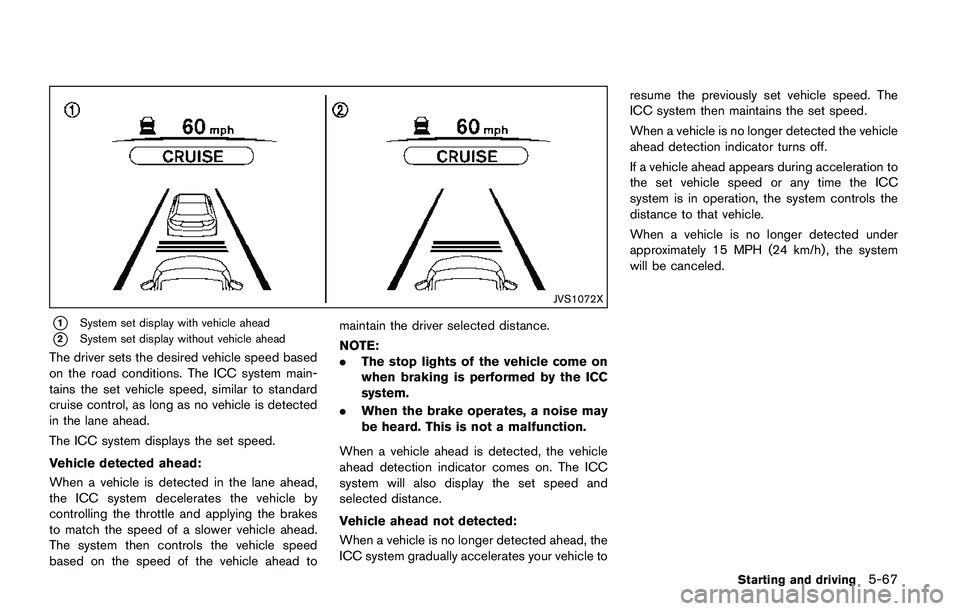
*1System set display with vehicle ahead
*2System set display without vehicle ahead
The driver sets the desired vehicle speed based
on the road conditions. The ICC system main-
tains the set vehicle speed, similar to standard
cruise control, as long as no vehicle is detected
in the lane ahead.
The ICC system displays the set speed.
Vehicle detected ahead:
When a vehicle is detected in the lane ahead,
the ICC system decelerates the vehicle by
controlling the throttle and applying the brakes
to match the speed of a slower vehicle ahead.
The system then controls the vehicle speed
based on the speed of the vehicle ahead tomaintain the driver selected distance.
NOTE:
.The stop lights of the vehicle come on
when braking is performed by the ICC
system.
.When the brake operates, a noise may
be heard. This is not a malfunction.
When a vehicle ahead is detected, the vehicle
ahead detection indicator comes on. The ICC
system will also display the set speed and
selected distance.
Vehicle ahead not detected:
When a vehicle is no longer detected ahead, the
ICC system gradually accelerates your vehicle toresume the previously set vehicle speed. The
ICC system then maintains the set speed.
When a vehicle is no longer detected the vehicle
ahead detection indicator turns off.
If a vehicle ahead appears during acceleration to
the set vehicle speed or any time the ICC
system is in operation, the system controls the
distance to that vehicle.
When a vehicle is no longer detected under
approximately 15 MPH (24 km/h) , the system
will be canceled.
Starting and driving5-67
Page 356 of 508
rain, fog, or other bad weather.
Decelerate the vehicle speed by
depressing the brake pedal, de-
pending on the distance to the
vehicle ahead and the surrounding
circumstances in order to maintain a
safe distance between vehicles.
.If the vehicle ahead comes to a stop,
the vehicle decelerates to a stand-
still within the limitations of the
system. The system will cancel once
it judges that the vehicle has come
to a standstill and sound a warning
chime. To prevent the vehicle from
moving, the driver must depress the
brake pedal.
.Always pay attention to the opera-
tion of the vehicle and be ready to
manually control the proper follow-
ing distance. The vehicle-to-vehicle
distance control mode of the ICC
system may not be able to maintain
the selected distance between ve-
hicles (following distance) or se-
lected vehicle speed under some
circumstances.
.The system may not detect the
vehicle in front of you in certain
road or weather conditions. To avoidaccidents, never use the ICC system
under the following conditions:
— On roads where the traffic is
heavy or there are sharp curves
— On slippery road surfaces such
as on ice or snow, etc.
— During bad weather (rain, fog,
snow, etc.)
— When rain, snow or dirt adhere
to the system sensor
— On steep downhill roads (the
vehicle may go beyond the set
vehicle speed and frequent
braking may result in overheat-
ing the brakes)
— On repeated uphill and downhill
roads
— When traffic conditions make it
difficult to keep a proper dis-
tance between vehicles because
of frequent acceleration or de-
celeration
— Interference by other radar
sources.
.In some road or traffic conditions, a
vehicle or object can unexpectedlycome into the sensor detection
zone and cause automatic braking.
You may need to control the dis-
tance from other vehicles using the
accelerator pedal. Always stay alert
and avoid using the ICC system
when it is not recommended in this
section.
The radar sensor will not detect the following
objects:
.Stationary and slow moving vehicles
.Pedestrians or objects in the roadway
.Oncoming vehicles in the same lane
.Motorcycles traveling offset in the travel lane
The sensor generally detects the signals re-
turned from the vehicle ahead. Therefore, if the
sensor cannot detect the reflection from the
vehicle ahead, the ICC system may not maintain
the selected distance.
The following are some conditions in which the
sensor cannot detect the signals:
.When the snow or road spray from traveling
vehicles reduces the sensor’s visibility
.When excessively heavy baggage is loaded
in the rear seat or the cargo area of your
vehicle
The ICC system is designed to automatically
Starting and driving5-71
Page 366 of 508
JVS1117X
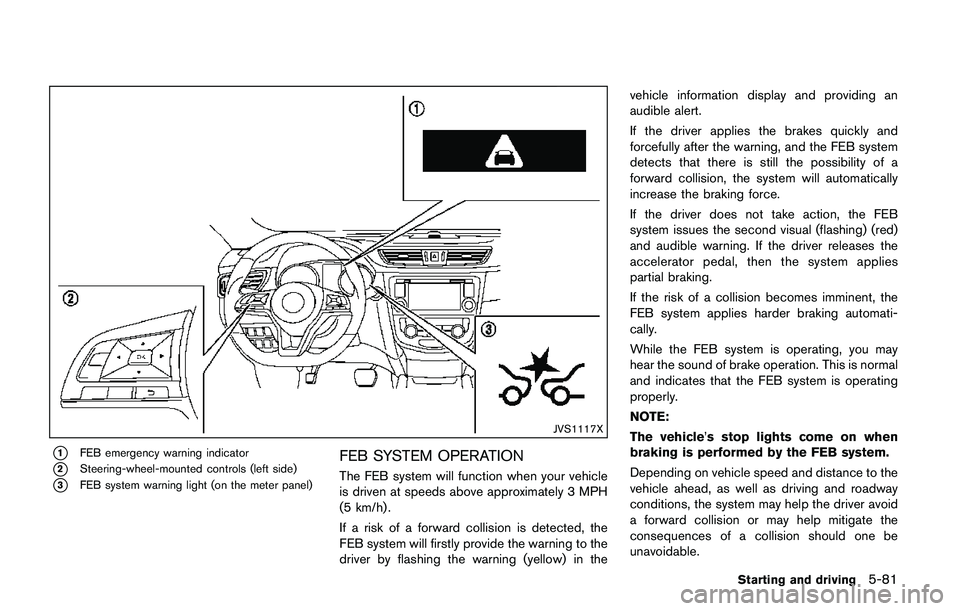
*1FEB emergency warning indicator
*2Steering-wheel-mounted controls (left side)
*3FEB system warning light (on the meter panel)
FEB SYSTEM OPERATION
The FEB system will function when your vehicle
is driven at speeds above approximately 3 MPH
(5 km/h) .
If a risk of a forward collision is detected, the
FEB system will firstly provide the warning to the
driver by flashing the warning (yellow) in thevehicle information display and providing an
audible alert.
If the driver applies the brakes quickly and
forcefully after the warning, and the FEB system
detects that there is still the possibility of a
forward collision, the system will automatically
increase the braking force.
If the driver does not take action, the FEB
system issues the second visual (flashing) (red)
and audible warning. If the driver releases the
accelerator pedal, then the system applies
partial braking.
If the risk of a collision becomes imminent, the
FEB system applies harder braking automati-
cally.
While the FEB system is operating, you may
hear the sound of brake operation. This is normal
and indicates that the FEB system is operating
properly.
NOTE:
The vehicle’s stop lights come on when
braking is performed by the FEB system.
Depending on vehicle speed and distance to the
vehicle ahead, as well as driving and roadway
conditions, the system may help the driver avoid
a forward collision or may help mitigate the
consequences of a collision should one be
unavoidable.
Starting and driving5-81
Page 367 of 508
5-82Starting and driving
If the driver is handling the steering wheel,
accelerating or braking, the FEB system will
function later or will not function.
The automatic braking will cease under the
following conditions:
.When the steering wheel is turned as far as
necessary to avoid a collision.
.When the accelerator pedal is depressed.
.When there is no longer a vehicle detected
ahead.
If the FEB system has stopped the vehicle, the
vehicle will remain at a standstill for approxi-
mately 2 seconds before the brakes are
released.
JVS0971X
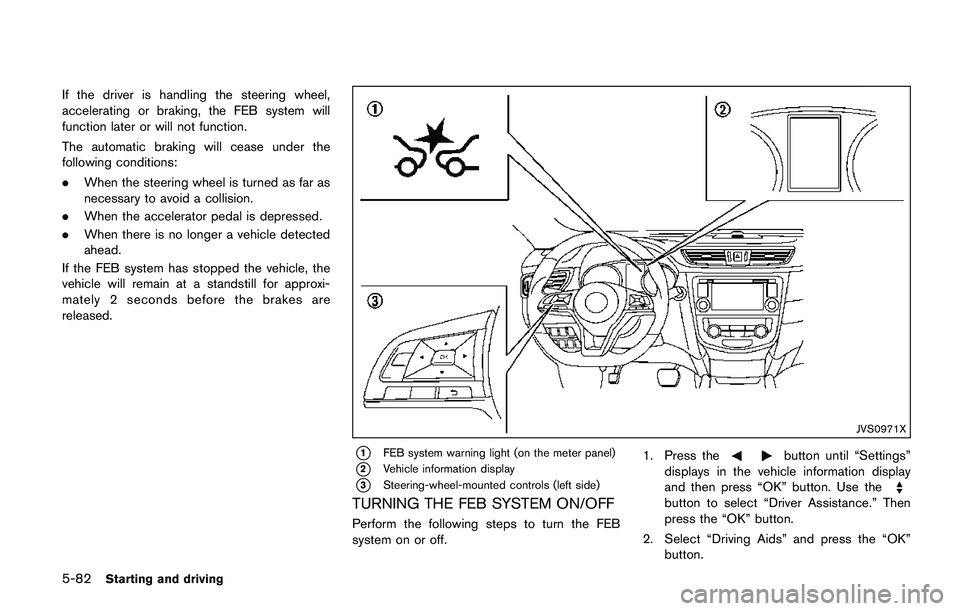
*1FEB system warning light (on the meter panel)
*2Vehicle information display
*3Steering-wheel-mounted controls (left side)
TURNING THE FEB SYSTEM ON/OFF
Perform the following steps to turn the FEB
system on or off.1. Press the
button until “Settings”
displays in the vehicle information display
and then press “OK” button. Use the
button to select “Driver Assistance.” Then
press the “OK” button.
2. Select “Driving Aids” and press the “OK”
button.
Page 373 of 508
5-88Starting and driving
speeds between 6 – 37 MPH (10 – 60 km/h) .
If a risk of a forward collision is detected, the
FEB with pedestrian detection system will firstly
provide the warning to the driver by flashing the
warning (yellow) in the vehicle information dis-
play and providing an audible alert.
If the driver applies the brakes quickly and
forcefully after the warning, and the FEB with
pedestrian detection system detects that there
is still the possibility of a forward collision, the
system will automatically increase the braking
force.
If the driver does not take action, the FEB with
pedestrian detection system issues the second
visual (flashing) (red) and audible warning. If the
driver releases the accelerator pedal, then the
system applies partial braking.
If the risk of a collision becomes imminent, the
FEB with pedestrian detection system applies
harder braking automatically.
While the FEB with pedestrian detection system
is operating, you may hear the sound of brake
operation. This is normal and indicates that the
FEB with pedestrian detection system is oper-
ating properly.
NOTE:
The vehicle’s stop lights come on when
braking is performed by the FEB withpedestrian detection system.
Depending on vehicle speed and distance to the
vehicle or pedestrian ahead, as well as driving
and roadway conditions, the system may help
the driver avoid a forward collision or may help
mitigate the consequences of a collision should
one be unavoidable.
If the driver is handling the steering wheel,
accelerating or braking, the FEB with pedestrian
detection system will function later or will not
function.
The automatic braking will cease under the
following conditions:
.When the steering wheel is turned as far as
necessary to avoid a collision.
.When the accelerator pedal is depressed.
.When there is no longer a vehicle or
pedestrian detected ahead.
If the FEB with pedestrian detection system has
stopped the vehicle, the vehicle will remain at a
standstill for approximately 2 seconds before the
brakes are released.
Page 387 of 508
5-102Starting and driving
BRAKING PRECAUTIONS
The brake system has two separate hydraulic
circuits. If one circuit malfunctions, you will still
have braking at two wheels.
Vacuum assisted brakes
The brake booster aids braking by using engine
vacuum. If the engine stops, you can stop the
vehicle by depressing the brake pedal. However,
greater foot pressure on the brake pedal will be
required to stop the vehicle and the stopping
distance will be longer.
Using the brakes
Avoid resting your foot on the brake pedal while
driving. This will cause overheating of the
brakes, wearing out the brake pads faster and
reduce gas mileage.
To help reduce brake wear and to prevent the
brakes from overheating, reduce speed and
downshift to a lower gear before going down a
slope or long grade. Overheated brakes may
reduce braking performance and could result in
loss of vehicle control.
WARNING
.While driving on a slippery surface,
be careful when braking, accelerat-ing or downshifting. Abrupt braking
or accelerating could cause the
wheels to skid and result in an
accident.
.If the engine is not running or is
turned off while driving, the power
assist for the brakes will not work.
Braking will be harder.
Wet brakes
When the vehicle is washed or driven through
water, the brakes may get wet. As a result, your
braking distance will be longer and the vehicle
may pull to one side during braking.
To dry brakes, drive the vehicle at a safe speed
while lightly tapping the brake pedal to heat-up
the brakes. Do this until the brakes return to
normal. Avoid driving the vehicle at high speeds
until the brakes function correctly.
Parking brake break-in
Break in the parking brake shoes whenever the
stopping effect of the parking brake is weakened
or whenever the parking brake shoes and/or
drums/rotors are replaced, in order to assure the
best braking performance.
This procedure is described in the vehicle
service manual. It is recommended you visit a
NISSAN dealer for this service.
BRAKE ASSIST
When the force applied to the brake pedal
exceeds a certain level, the Brake Assist is
activated generating greater braking force than a
conventional brake booster even with light pedal
force.
WARNING
The Brake Assist is only an aid to assist
braking operation and is not a collision
warning or avoidance device. It is the
driver’s responsibility to stay alert, drive
safely and be in control of the vehicle at
all times.
ANTI-LOCK BRAKING SYSTEM (ABS)
WARNING
.The Anti-lock Braking System (ABS)
is a sophisticated device, but it
cannot prevent accidents resulting
from careless or dangerous driving
techniques. It can help maintain
vehicle control during braking on
slippery surfaces. Remember that
stopping distances on slippery sur-
faces will be longer than on normal
BRAKE SYSTEM BRAKE ASSIST
Page 388 of 508
surfaces even with ABS. Stopping
distances may also be longer on
rough, gravel or snow covered
roads, or if you are using tire chains.
Always maintain a safe distance
from the vehicle in front of you.
Ultimately, the driver is responsible
for safety.
.Tire type and condition may also
affect braking effectiveness.
— When replacing tires, install the
specified size of tires on all four
wheels.
— When installing a spare tire,
make sure that it is the proper
size and type as specified on the
Tire and Loading Information
label. See“Tire and Loading
Information label”(P.10-10) of
this manual.
— For detailed information, see
“Wheels and tires”(P.8-29) of
this manual.
The Anti-lock Braking System (ABS) controls
the brakes so the wheels do not lock during hard
braking or when braking on slippery surfaces.
The system detects the rotation speed at eachwheel and varies the brake fluid pressure to
prevent each wheel from locking and sliding. By
preventing each wheel from locking, the system
helps the driver maintain steering control and
helps to minimize swerving and spinning on
slippery surfaces.
Using the system
Depress the brake pedal and hold it down.
Depress the brake pedal with firm steady
pressure, but do not pump the brakes. The
ABS will operate to prevent the wheels from
locking up. Steer the vehicle to avoid obstacles.
WARNING
Do not pump the brake pedal. Doing so
may result in increased stopping dis-
tances.
Self-test feature
The ABS includes electronic sensors, electric
pumps, hydraulic solenoids and a computer. The
computer has a built-in diagnostic feature that
tests the system each time you start the engine
and move the vehicle at a low speed in forward
or reverse. When the self-test occurs, you may
hear a “clunk” noise and/or feel a pulsation in the
brake pedal. This is normal and does notindicate a malfunction. If the computer senses
a malfunction, it switches the ABS off and
illuminates the ABS warning light on the
instrument panel. The brake system then oper-
ates normally, but without anti-lock assistance.
If the ABS warning light illuminates during the
self-test or while driving, have the vehicle
checked. It is recommended you visit a NISSAN
dealer for this service.
Normal operation
The ABS operates at speeds above 3 to 6 MPH
(5 to 10 km/h) . The speed varies according to
road conditions.
When the ABS senses that one or more wheels
are close to locking up, the actuator rapidly
applies and releases hydraulic pressure. This
action is similar to pumping the brakes very
quickly. You may feel a pulsation in the brake
pedal and hear a noise from under the hood or
feel a vibration from the actuator when it is
operating. This is normal and indicates that the
ABS is operating properly. However, the pulsa-
tion may indicate that road conditions are
hazardous and extra care is required while
driving.
Starting and driving5-103
Page 394 of 508
WARNING
.Never rely solely on the hill start
assist system to prevent the vehicle
from moving backward on a hill.
Always drive carefully and atten-
tively. Depress the brake pedal
when the vehicle is stopped on a
steep hill. Be especially careful
when stopped on a hill on frozen
or muddy roads. Failure to prevent
the vehicle from rolling backwards
may result in a loss of control of the
vehicle and possible serious injury
or death.
.The hill start assist system is not
designed to hold the vehicle at a
standstill on a hill. Depress the
brake pedal when the vehicle is
stopped on a steep hill. Failure to
do so may cause the vehicle to roll
backwards and may result in a
collision or serious personal injury.
.The hill start assist system may not
prevent the vehicle from rolling
backwards on a hill under all load
or road conditions. Always be pre-
pared to depress the brake pedal toprevent the vehicle from rolling
backwards. Failure to do so may
result in a collision or serious per-
sonal injury.
The hill start assist system automatically keeps
the brakes applied to help prevent the vehicle
from rolling backwards in the time it takes the
driver to release the brake pedal and apply the
accelerator when the vehicle is stopped on a hill.
The hill start assist system will operate auto-
matically under the following conditions:
.The transmission is shifted to a forward or
reverse gear.
.The vehicle is stopped completely on a hill
by applying the brake.
The maximum holding time is 2 seconds. After 2
seconds the vehicle will begin to roll back and
the hill start assist system will stop operating
completely.
The hill start assist system will not operate when
the transmission is shifted to the N (Neutral) or P
(Park) position (CVT models) or on a flat and
level road.
When the Vehicle Dynamic Control (VDC)
warning light illuminates in the meter, the hill
start assist system will not operate. (See
“Vehicle Dynamic Control (VDC) warning light”(P.2-15) .)
Starting and driving5-109
HILL START ASSIST SYSTEM