check engine light NISSAN QASHQAI 2017 Owner´s Manual
[x] Cancel search | Manufacturer: NISSAN, Model Year: 2017, Model line: QASHQAI, Model: NISSAN QASHQAI 2017Pages: 508, PDF Size: 2.68 MB
Page 111 of 508
2-32Instruments and controls
Check to see if the sensor area of the front
bumper is blocked. If the sensor area of the front
bumper is blocked, remove the blocking materi-
al. Restart the engine. If the warning light
continues to illuminate, have the Forward
Emergency Braking (FEB) system checked. It
is recommended that you visit a NISSAN dealer
for this service.
For more details, see “Forward Emergency
Braking (FEB)” (P.5-80) , “Forward Emergency
Braking (FEB) with pedestrian detection sys-
tem” (P.5-86) or “Intelligent Cruise Control
(ICC)” (P.5-60) .
37. Unavailable: Side Radar Obstruction
warning (if so equipped)
This warning appears when the Blind Spot
Warning (BSW)/Rear Cross Traffic Alert (RCTA)
system becomes unavailable because a radar
blockage is detected. (See “Blind Spot Warning
(BSW)” (P.5-42) or “Rear Cross Traffic Alert
(RCTA)” (P.5-51) .)
38. Press Brake Pedal warning (for
electronic parking brake equipped mod-
els)
This indicator appears in the following situa-
tions:.The driver tries to release the electronic
parking brake manually without depressing
the brake pedal.
.The vehicle is stopped on a steep hill and
there is a possibility of moving backward,
even if the electronic parking brake is
applied.
Page 129 of 508
2-50Instruments and controls
WARNING
Do not use or allow occupants to use
the seat heater if you or the occupants
cannot monitor elevated seat tempera-
tures or have an inability to feel pain in
body parts that contact the seat. Use of
the seat heater by such people could
result in serious injury.
CAUTION
.The battery could run down if the
seat heater is operated while the
engine is not running.
.Do not use the seat heater for
extended periods or when no one
is using the seat.
.Do not put anything on the seat
which insulates heat, such as a
blanket, cushion, seat cover, etc.
Otherwise, the seat may become
overheated.
.Do not place anything hard or heavy
on the seat or pierce it with a pin or
similar object. This may result indamage to the heater.
.Any liquid spilled on the heated seat
should be removed immediately
with a dry cloth.
.When cleaning the seat, never use
gasoline, thinner, or any similar
materials.
.If any malfunctions are found or the
heated seat does not operate, turn
the switch off and have the system
checked. It is recommended you
visit a NISSAN dealer for this ser-
vice.
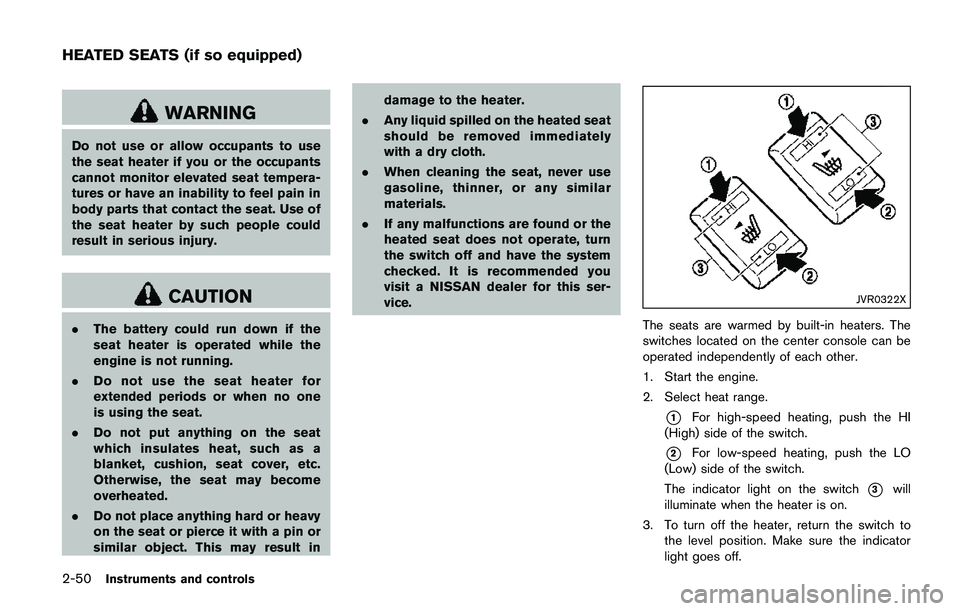
JVR0322X
The seats are warmed by built-in heaters. The
switches located on the center console can be
operated independently of each other.
1. Start the engine.
2. Select heat range.
*1For high-speed heating, push the HI
(High) side of the switch.
*2For low-speed heating, push the LO
(Low) side of the switch.
The indicator light on the switch
*3will
illuminate when the heater is on.
3. To turn off the heater, return the switch to
the level position. Make sure the indicator
light goes off.
HEATED SEATS (if so equipped)
Page 144 of 508
a malfunction, push and hold the moonroof
switch to the close position
*1.
Depending on the environment or driving
conditions, the auto reverse function may
be activated if an impact or load similar to
something being caught in the moonroof
occurs.
If the moonroof does not operate
If the moonroof does not operate properly,
perform the following procedure to initialize the
moonroof operation system.
1. If the moonroof is open, close it fully by
repeatedly pushing the moonroof switch to
the close position
*1to tilt the moonroof
up.
2. Push and hold the switch to the close
position
*1.
3. Release the moonroof switch after the
moonroof moves slightly up and down.
4. Push and hold the switch to the open
position
*2to fully tilt the moonroof down.
5. Check if the moonroof switch operates
normally.
If the moonroof does not operate properly after
performing the procedure above, have your
moonroof checked and repaired. It is recom-
mended you visit a NISSAN dealer for thisservice.
CAUTION
.Do not leave the light switch on
when the engine is not running for
extended periods of time to prevent
the battery from being discharged.
.Turn off the lights when you leave
the vehicle.
Instruments and controls2-65
INTERIOR LIGHTS
Page 148 of 508
3 Pre-driving checks and adjustments
Keys .............................................................................................. 3-2
NISSAN Vehicle Immobilizer System key (if
so equipped) ........................................................................ 3-2
Intelligent Key (if so equipped) ........................................ 3-3
Doors ............................................................................................ 3-5
Locking with key .................................................................. 3-5
Locking with inside lock knob .......................................... 3-6
Locking with power door lock switch ............................ 3-7
Automatic door locks ......................................................... 3-7
Child safety rear door lock ............................................... 3-7
Remote keyless entry system (if so equipped) ................. 3-8
How to use remote keyless entry system ..................... 3-9
Intelligent Key system (if so equipped) ............................ 3-11
Intelligent Key operating range ..................................... 3-13
Door locks/unlocks precaution ..................................... 3-13
Intelligent Key operation ................................................. 3-14
Battery saver system ....................................................... 3-16
Warning lights and audible reminders ........................ 3-16
Troubleshooting guide ..................................................... 3-17
How to use remote keyless entry function ................ 3-18Remote engine start (if so equipped) .............................. 3-22
Remote engine start operating range ....................... 3-22
Remote starting the engine ......................................... 3-22
Extending engine run time ........................................... 3-23
Canceling a remote start ............................................. 3-23
Conditions the remote engine start will
not work ............................................................................ 3-23
Hood ......................................................................................... 3-24
Liftgate ..................................................................................... 3-25
Liftgate release lever ..................................................... 3-26
Fuel-filler door ........................................................................ 3-27
Opening the fuel-filler door ......................................... 3-27
Fuel-filler cap .................................................................. 3-27
Tilt/telescopic steering ......................................................... 3-29
Tilt or telescopic operation .......................................... 3-30
Sun visors ................................................................................ 3-30
Mirrors ..................................................................................... 3-31
Inside mirror ..................................................................... 3-31
Outside mirrors ............................................................... 3-31
Vanity mirror ..................................................................... 3-33
Page 167 of 508
3-20Pre-driving checks and adjustments
Using panic alarm
If you are near your vehicle and feel threatened,
you may activate the alarm to call attention as
follows:
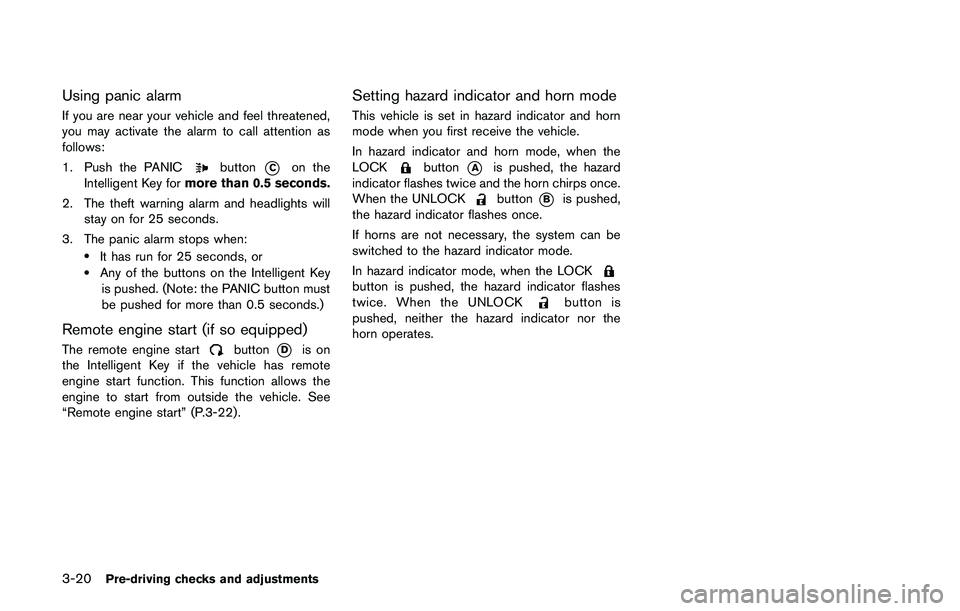
1. Push the PANIC
button*Con the
Intelligent Key formore than 0.5 seconds.
2. The theft warning alarm and headlights will
stay on for 25 seconds.
3. The panic alarm stops when:
.It has run for 25 seconds, or.Any of the buttons on the Intelligent Key
is pushed. (Note: the PANIC button must
be pushed for more than 0.5 seconds.)
Remote engine start (if so equipped)
The remote engine startbutton*Dis on
the Intelligent Key if the vehicle has remote
engine start function. This function allows the
engine to start from outside the vehicle. See
“Remote engine start” (P.3-22) .
Setting hazard indicator and horn mode
This vehicle is set in hazard indicator and horn
mode when you first receive the vehicle.
In hazard indicator and horn mode, when the
LOCK
button*Ais pushed, the hazard
indicator flashes twice and the horn chirps once.
When the UNLOCK
button*Bis pushed,
the hazard indicator flashes once.
If horns are not necessary, the system can be
switched to the hazard indicator mode.
In hazard indicator mode, when the LOCK
button is pushed, the hazard indicator flashes
twice. When the UNLOCKbutton is
pushed, neither the hazard indicator nor the
horn operates.
Page 169 of 508
3-22Pre-driving checks and adjustments
WARNING
To avoid risk of injury or death, do not
use the remote engine start function
when the vehicle is in an enclosed area
such as a garage.
JVP0446X
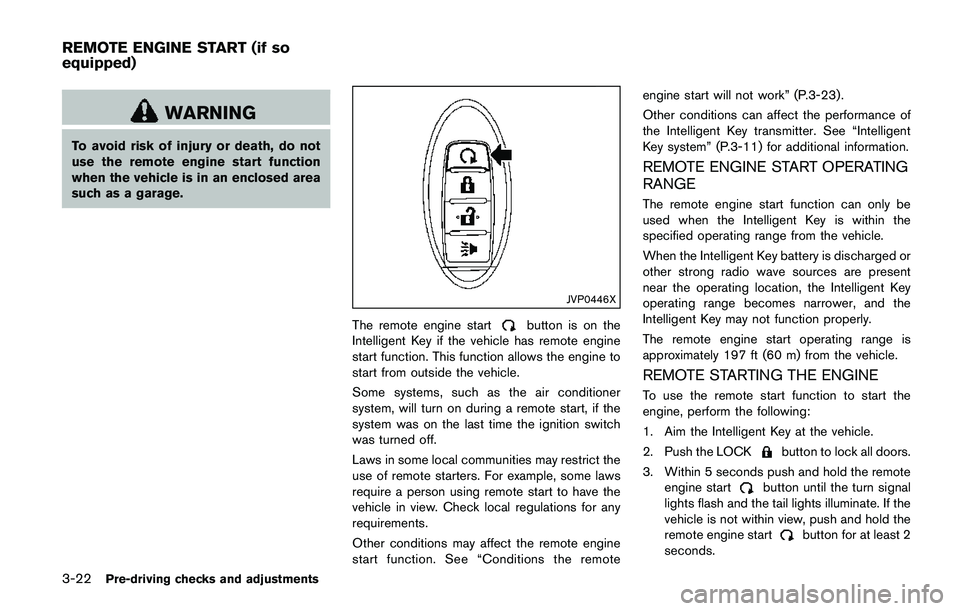
The remote engine startbutton is on the
Intelligent Key if the vehicle has remote engine
start function. This function allows the engine to
start from outside the vehicle.
Some systems, such as the air conditioner
system, will turn on during a remote start, if the
system was on the last time the ignition switch
was turned off.
Laws in some local communities may restrict the
use of remote starters. For example, some laws
require a person using remote start to have the
vehicle in view. Check local regulations for any
requirements.
Other conditions may affect the remote engine
start function. See “Conditions the remoteengine start will not work” (P.3-23) .
Other conditions can affect the performance of
the Intelligent Key transmitter. See “Intelligent
Key system” (P.3-11) for additional information.
REMOTE ENGINE START OPERATING
RANGE
The remote engine start function can only be
used when the Intelligent Key is within the
specified operating range from the vehicle.
When the Intelligent Key battery is discharged or
other strong radio wave sources are present
near the operating location, the Intelligent Key
operating range becomes narrower, and the
Intelligent Key may not function properly.
The remote engine start operating range is
approximately 197 ft (60 m) from the vehicle.
REMOTE STARTING THE ENGINE
To use the remote start function to start the
engine, perform the following:
1. Aim the Intelligent Key at the vehicle.
2. Push the LOCK
button to lock all doors.
3. Within 5 seconds push and hold the remote
engine start
button until the turn signal
lights flash and the tail lights illuminate. If the
vehicle is not within view, push and hold the
remote engine start
button for at least 2
seconds.
REMOTE ENGINE START (if so
equipped)
Page 170 of 508
The following events will occur when the engine
starts:
.The front parking lights will turn on and
remain on as long as the engine is running.
.The doors will be locked and the air
conditioner system may turn on.
.The engine will continue to run for about 10
minutes. Repeat the steps to extend the time
for an additional 10 minutes. See “Extending
engine run time” (P.3-23) .
Depress and hold the brake pedal, then place
the ignition switch in the ON position before
driving. For further instructions, see “Driving the
vehicle” (P.5-20) .
EXTENDING ENGINE RUN TIME
The remote engine start function can be
extended one time by performing the steps
listed in “Remote starting the engine” (P.3-22) .
Run time will be calculated as follows:
.The first 10 minute run time will start when
the remote engine start function is per-
formed.
.The second 10 minutes will start immedi-
ately when the remote engine start function
is performed. For example, if the engine has
been running for 5 minutes, and 10 minutes
are added, the engine will run for a total of
15 minutes..Extending engine run time will count to-
wards the two remote start limit.
A maximum of two remote starts, or a single start
with an extension, are allowed between ignition
cycles.
The ignition switch must be cycled to the ON
position and then back to the OFF position
before the remote engine start procedure can be
used again.
CANCELING A REMOTE START
To cancel a remote start, perform one of the
following:
.Aim the Intelligent Key at the vehicle and
push and hold the remote engine start
button until the front parking lights turn off.
.Turn on the hazard indicator flashers.
.Cycle the ignition switch ON and then OFF.
.The extended engine run time has expired.
.The first 10 minute timer has expired.
.The engine hood has been opened.
.The shift lever is moved out of the P (Park)
position.
.The theft alarm sounds due to illegal entry
into the vehicle.
.The ignition switch is pushed without an
Intelligent Key in the vehicle..The ignition switch is pushed with an
Intelligent Key in the vehicle but the brake
pedal is not depressed.
CONDITIONS THE REMOTE ENGINE
START WILL NOT WORK
The remote engine start will not operate if any of
the following conditions are present:
.The ignition switch is placed in the ON
position.
.The hood is not securely closed.
.The hazard indicator flashers are on.
.The engine is still running. The engine must
be completely stopped. Wait at least 6
seconds if the engine goes from running to
off. This is not applicable when extending
engine run time.
.The remote engine start
button is not
pushed and held for at least 2 seconds.
.The remote engine start
button is not
pushed and held within 5 seconds of
pushing the LOCK
button.
.The brake pedal is depressed.
.The doors are not closed and locked.
.The liftgate is open.
.The Key System Error warning message
remains on in the vehicle information display.
.An Intelligent Key is left inside the vehicle.
Pre-driving checks and adjustments3-23
Page 175 of 508
3-28Pre-driving checks and adjustments
WARNING
.Gasoline is extremely flammable
and highly explosive under certain
conditions. You could be burned or
seriously injured if it is misused or
mishandled. Always stop engine
and do not smoke or allow open
flames or sparks near the vehicle
when refueling.
.Do not attempt to top off the fuel
tank after the fuel pump nozzle
shuts off automatically. Continued
refueling may cause fuel overflow,
resulting in fuel spray and possibly
a fire.
.Use only an original equipment type
fuel-filler cap as a replacement. It
has a built-in safety valve needed
for proper operation of the fuel
system and emission control sys-
tem. An incorrect cap can result in a
serious malfunction and possible
injury. It could also cause the mal-
function indicator light to come on.
.Never pour fuel into the throttle
body to attempt to start your vehi-
cle..Do not fill a portable fuel container
in the vehicle or trailer. Static elec-
tricity can cause an explosion of
flammable liquid, vapor or gas in
any vehicle or trailer. To reduce the
risk of serious injury or death when
filling portable fuel containers:
— Always place the container on
the ground when filling.
— Do not use electronic devices
when filling.
— Keep the pump nozzle in contact
with the container while you are
filling it.
— Use only approved portable fuel
containers for flammable liquid.
CAUTION
.If fuel is spilled on the vehicle body,
flush it away with water to avoid
paint damage.
.Insert the cap straight into the fuel-
filler tube, then tighten until the
fuel-filler cap clicks. Failure to tight-
en the fuel-filler cap properly maycause the
malfunction indicator
light (MIL) to illuminate. If the
light illuminates because the fuel-
filler cap is loose or missing, tighten
or install the cap and continue to
drive the vehicle. The
light
should turn off after a few driving
trips. If the
light does not turn
off after a few driving trips, have the
vehicle inspected. It is recom-
mended you visit a NISSAN dealer
for this service.
For additional information, see
“Malfunction Indicator Light (MIL)”
(P.2-16) .
.The LOOSE FUEL CAP warning
message will be displayed if the
fuel-filler cap is not properly tigh-
tened. It may take a few driving trips
for the message to be displayed.
Failure to tighten the fuel-filler cap
properly after the LOOSE FUEL CAP
warning message is displayed may
cause the
Malfunction Indicator
Light (MIL) to illuminate.
Page 302 of 508
chime sounds. The engine will start.
After step 3 is performed, when the ignition
switch is pushed without depressing the brake
pedal, the ignition switch position will change to
ACC.
NOTE:
.When the ignition switch is pushed to
the ON position or the engine is started
by the above procedures, the“Key
Battery Low”warning appears (on the
Vehicle information display) even if the
Intelligent Key is inside the vehicle.
This is not a malfunction. To turn off the
warning, touch the ignition switch with
the Intelligent Key again.
.If the“Key Battery Low”warning ap-
pears (on the Vehicle information dis-
play) , replace the battery as soon as
possible. (See“Intelligent Key battery
replacement”(P.8-23) .).Make sure the area around the vehicle is
clear.
.Check fluid levels such as engine oil, cool-
ant, brake fluid, and window washer fluid as
frequently as possible, or at least whenever
you refuel.
.Check that all windows and lights are clean.
.Visually inspect tires for their appearance
and condition. Also check tires for proper
inflation.
.Lock all doors.
.Position seat and adjust head restraints.
.Adjust inside and outside mirrors.
.Fasten seat belts and ask all passengers to
do likewise.
.Check the operation of warning lights when
the ignition switch is placed in the ON
position. (See “Warning lights, indicator
lights and audible reminders” (P.2-10) .)1. Apply the parking brake.
2.Continuously Variable Transmission
(CVT) model:
Move the shift lever to the P (Park) or N
(Neutral) position. (P is recommended.)
The starter is designed so that it does not
operate unless the shift lever is in either of
the above positions.
Manual Transmission (MT) model:
Move the shift lever to the N (Neutral)
position, and depress the clutch pedal to
the floor while starting the engine.
3. Crank the enginewith your foot off the
accelerator pedalby turning the ignition
switch to START. Release the switch when
the engine starts. If the engine starts, but
fails to run, repeat the above procedure.
.If the engine is very hard to start in
extremely cold weather or when restart-
ing, depress the accelerator pedal a little
(approximately 1/3 to the floor) and hold
it and then crank the engine. Release the
accelerator pedal when the engine starts.
.If the engine is very hard to start because
it is flooded, depress the accelerator
pedal all the way to the floor and hold it.
Crank the engine for 5 - 6 seconds. After
cranking the engine, release the accel-
Starting and driving5-17
BEFORE STARTING THE ENGINESTARTING THE ENGINE (model
without Intelligent Key system)
Page 308 of 508
High fluid temperature protection mode
This transmission has a high fluid temperature
protection mode. If the fluid temperature be-
comes too high (for example, when climbing
steep grades in high temperature with heavy
loads) , engine power and, under some condi-
tions, vehicle speed will be decreased auto-
matically to reduce the chance of transmission
damage. Vehicle speed can be controlled with
the accelerator pedal, but the engine and vehicle
speed may be limited.
Fail-safe
If the vehicle is driven under extreme
conditions, such as excessive wheel spin-
ning and subsequent hard braking, the
fail-safe system may be activated. The MIL
may illuminate to indicate the fail-safe
mode is activated. (See “Malfunction In-
dicator Light (MIL)” (P.2-16) .) This will
occur even if all electrical circuits are
functioning properly. In this case, place
the ignition switch in the OFF position and
wait for 10 seconds. Then turn the switch
back to the ON position. The vehicle
should return to its normal operating
condition. If it does not return to its normal
operating condition, have the transmission
checked and repaired, if necessary. It is
recommended you visit a NISSAN dealerfor this service.
WARNING
When the high fluid temperature pro-
tection mode or fail-safe operation
occurs, vehicle speed may be gradually
reduced. The reduced speed may be
lower than other traffic, which could
increase the chance of a collision. Be
especially careful when driving. If ne-
cessary, pull to the side of the road at a
safe place and allow the transmission
to return to normal operation, or have it
repaired if necessary.
Adaptive Shift Control (ASC)
The Adaptive Shift Control automatically oper-
ates when the transmission is in the “D” (Drive)
position and selects an appropriate gear de-
pending on the road conditions such as uphill or
downhill.
Control on uphill and curving roads:
A low gear is maintained that suits the degree of
the slope to allow smooth driving with a small
number of shifts.Control on downhill roads:
The Adaptive Shift Control shifts to a low gear
that suits the degree of the slope when the
accelerator pedal is depressed, and uses the
engine braking to help driving in the downhill.
Control on winding roads:
A low gear is maintained on continuous curves
that involve repeated acceleration and decelera-
tion, so that smooth acceleration is available
instantly when the accelerator pedal is de-
pressed.
NOTE:
.Adaptive Shift Control may not operate
when the transmission oil temperature
is low immediately after the start of
driving or when it is very hot.
.During some driving situations, hard
braking for example, the Adaptive Shift
Control may automatically operate. The
transmission may automatically shift to
a lower gear for engine braking. This
increases engine speed but not vehicle
speed. Vehicle speed is controlled by
the accelerator pedal when the vehicle
is in the Adaptive Shift Control mode.
.When the Adaptive Shift Control oper-
ates, the transmission sometimes
maintains a lower gear for a longer
period of time than when Adaptive
Starting and driving5-23