clock NISSAN QASHQAI 2017 Owner´s Manual
[x] Cancel search | Manufacturer: NISSAN, Model Year: 2017, Model line: QASHQAI, Model: NISSAN QASHQAI 2017Pages: 508, PDF Size: 2.68 MB
Page 230 of 508
operation” (P.4-53).
.Bass, Treble, Balance and Fade
Controls the sound of the audio system.
Balance adjusts the sound between the left
and right speakers. Fade adjusts the sound
between the front and rear speakers.
Select the “Bass”, “Treble”, “Balance” or
“Fade” using the ENTER SETTING/
TUNE·FOLDER dial, and then push the
ENTER SETTING/TUNE·FOLDER dial. Turn
the ENTER SETTING/TUNE·FOLDER dial to
adjust the bass, treble, balance and fade of
the screen to the preferred level. Push the
ENTER SETTING/TUNE·FOLDER dial to
apply the setting.
.Brightness and Contrast
Adjust the brightness and contrast of the
screen.
Select “Brightness” or “Contrast” using the
ENTER SETTING/TUNE·FOLDER dial and
then push the ENTER SETTING/
TUNE·FOLDER dial. Turn the ENTER
SETTING/TUNE·FOLDER dial to adjust the
brightness and contrast of the screen to the
preferred level. Push the ENTER SETTING/
TUNE·FOLDER dial to apply the setting.
.Clock Adjust
Adjust the clock according to the following
procedure.1) Select “Clock Adjust” using the ENTER
SETTING/TUNE·FOLDER dial and then
push the ENTER SETTING/
TUNE·FOLDER dial.
2) Adjust the hour with the ENTER
SETTING/TUNE·FOLDER dial and then
push the ENTER SETTING/
TUNE·FOLDER dial.
3) Adjust the minute with the ENTER
SETTING/TUNE·FOLDER dial and then
push the ENTER SETTING/
TUNE·FOLDER dial.
24 hour clock is not available.
.On-Screen Clock
When this item is turned on, a clock is
always displayed in the upper right corner of
the screen.
Select the “On-Screen Clock” using the
ENTER SETTING/TUNE·FOLDER dial and
then push the ENTER SETTING/
TUNE·FOLDER dial. You can toggle be-
tween “ON” and “OFF” using the ENTER
SETTING/TUNE·FOLDER dial. Push the
ENTER SETTING/TUNE·FOLDER dial to
apply the setting.
.RDS Display
RDS (radio data system) information can be
shown on the display. Select “RDS Display”
using the ENTER SETTING/TUNE·FOLDERdial and then push the ENTER SETTING/
TUNE·FOLDER dial. You can toggle be-
tween “ON” and “OFF” using the ENTER
SETTING/TUNE·FOLDER dial. Push the
ENTER SETTING/TUNE·FOLDER dial to
apply the setting.
.Speed Sensitive Vol.
Select the “Speed Sensitive Vol.” using the
ENTER SETTING/TUNE·FOLDER dial and
then push the ENTER SETTING/
TUNE·FOLDER dial. To change the Speed
Sensitive Volume (Speed Sensitive Vol.)
level from off (0) to 5, turn the ENTER
SETTING/TUNE·FOLDER dial. Push the
ENTER SETTING/TUNE·FOLDER dial to
apply the setting.
.AUX Vol.
Controls the volume level of incoming sound
when an auxiliary device is connected to the
system. Select the “AUX Vol.” using the
ENTER SETTING/TUNE·FOLDER dial and
then push the ENTER SETTING/
TUNE·FOLDER dial. Choose a setting be-
tween +1 and +3 or choose 0 to disable the
feature entirely. Push the ENTER SETTING/
TUNE·FOLDER dial to apply the setting.
.Language Select
The language settings can be changed.
Select “Language Select” using the ENTER
Heater, air conditioner, audio and phone systems4-49
Page 237 of 508
4-56Heater, air conditioner, audio and phone systems
Audio main operation
The audio system operates when the ignition
switch is placed in the ACC or ON position.
Head unit:
The auto loudness circuit enhances the low and
high frequency ranges automatically.
Power/VOL dial:
Push the Power/VOL dial to turn on and off the
audio system.
Turn the Power/VOL dial to adjust the volume.
Audio settings:
The settings screen will appear when pushing
the ENTER SETTING/TUNE·SCROLL dial.
The following items are available in the settings
screen.
.Bluetooth
It is possible to set the Bluetooth
Šsettings.
For details of the BluetoothŠaudio player
operation, see “BluetoothŠaudio player
operation” (P.4-61).
.Bass, Treble, Balance and Fade
Controls the sound of the audio system.
Balance adjusts the sound between the left
and right speakers. Fade adjusts the sound
between the front and rear speakers.
Select the “Bass”, “Treble”, “Balance” or
“Fade” using the ENTER SETTING/TU-NE·SCROLL dial and then push the ENTER
SETTING/TUNE·SCROLL dial. Turn the
ENTER SETTING/TUNE·SCROLL dial to
adjust the bass, treble, balance and fade of
the screen to the preferred level. Push the
ENTER SETTING/TUNE·SCROLL dial to
apply the setting.
.Brightness and Contrast
Adjust the brightness and contrast of the
screen.
Select the “Brightness” or “Contrast” using
the ENTER SETTING/TUNE·SCROLL dial
and then push the ENTER SETTING/TU-
NE·SCROLL dial. Turn the ENTER
SETTING/TUNE·SCROLL dial to adjust the
brightness and contrast of the screen to the
preferred level. Push the ENTER SETTING/
TUNE·SCROLL dial to apply the setting.
.Clock Adjust
Adjust the clock according to the following
procedure.
1) Select “Clock Adjust” using the ENTER
SETTING/TUNE·SCROLL dial and then
push the ENTER SETTING/TUNE·SC-
ROLL dial.
2) Adjust the hour with the ENTER
SETTING/TUNE·SCROLL dial and then
push the ENTER SETTING/TUNE·SC-
ROLL dial.3) Adjust the minute with the ENTER
SETTING/TUNE·SCROLL dial and then
push the ENTER SETTING/TUNE·SC-
ROLL dial.
24 hour clock is not available.
.On-Screen Clock
When this item is turned on, a clock is
always displayed in the upper right corner of
the screen.
Select the “On-Screen Clock” using the
ENTER SETTING/TUNE·SCROLL dial and
then push the ENTER SETTING/TUNE·SC-
ROLL dial. You can toggle between “ON”
and “OFF” using the ENTER SETTING/
TUNE·SCROLL dial. Push the ENTER
SETTING/TUNE·FOLDER dial to apply the
setting.
.RDS Display
RDS (radio data system) information can be
shown on the display. Select “RDS Display”
using the ENTER SETTING/TUNE·SCROLL
dial and then push the ENTER SETTING/
TUNE·SCROLL dial. You can toggle be-
tween “ON” and “OFF” using the ENTER
SETTING/TUNE·SCROLL dial. Push the
ENTER SETTING/TUNE·SCROLL dial to
apply the setting.
.Speed Sensitive Vol.
Select the “Speed Sensitive Vol.” using the
Page 256 of 508
SXM operation (if so equipped) :
.Push the
/button for less than 1.5
seconds to select the next or the previous
preset channel.
.Push the
/button for more than 1.5
seconds to go to the next or previous
category.
CD, iPod
Š, USB memory or BluetoothŠ
audio:
.Push the
/button for less than 1.5
seconds to select the next or the previous
track.
.Push the
/button for more than 1.5
seconds to fast forward or rewind the track
being played.
Back button (models with navigation
system)
Push the back button to return to previous
screen or cancel the current selection.
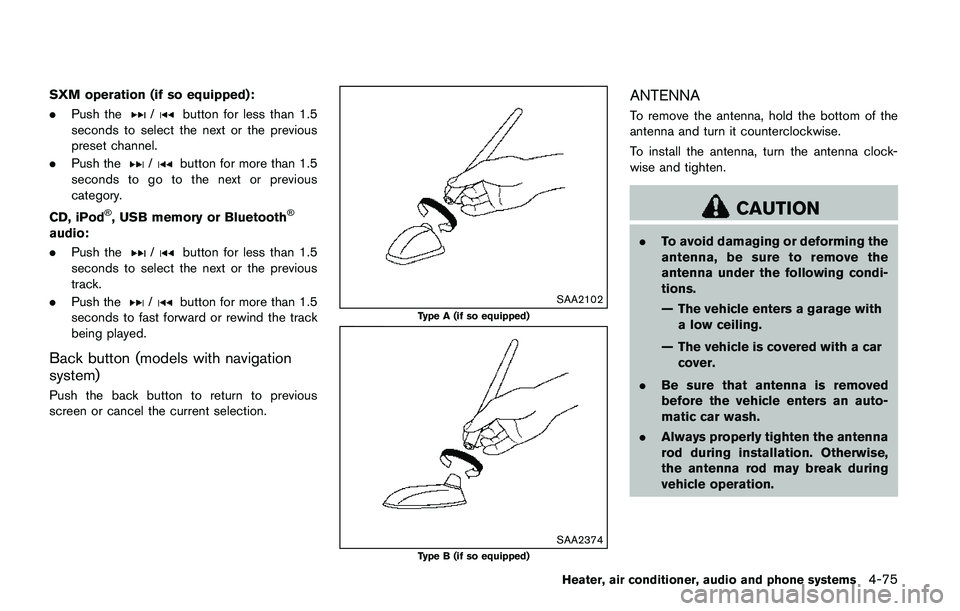
SAA2102
Type A (if so equipped)
SAA2374Type B (if so equipped)
ANTENNA
To remove the antenna, hold the bottom of the
antenna and turn it counterclockwise.
To install the antenna, turn the antenna clock-
wise and tighten.
CAUTION
.To avoid damaging or deforming the
antenna, be sure to remove the
antenna under the following condi-
tions.
— The vehicle enters a garage with
a low ceiling.
— The vehicle is covered with a car
cover.
.Be sure that antenna is removed
before the vehicle enters an auto-
matic car wash.
.Always properly tighten the antenna
rod during installation. Otherwise,
the antenna rod may break during
vehicle operation.
Heater, air conditioner, audio and phone systems4-75
Page 404 of 508
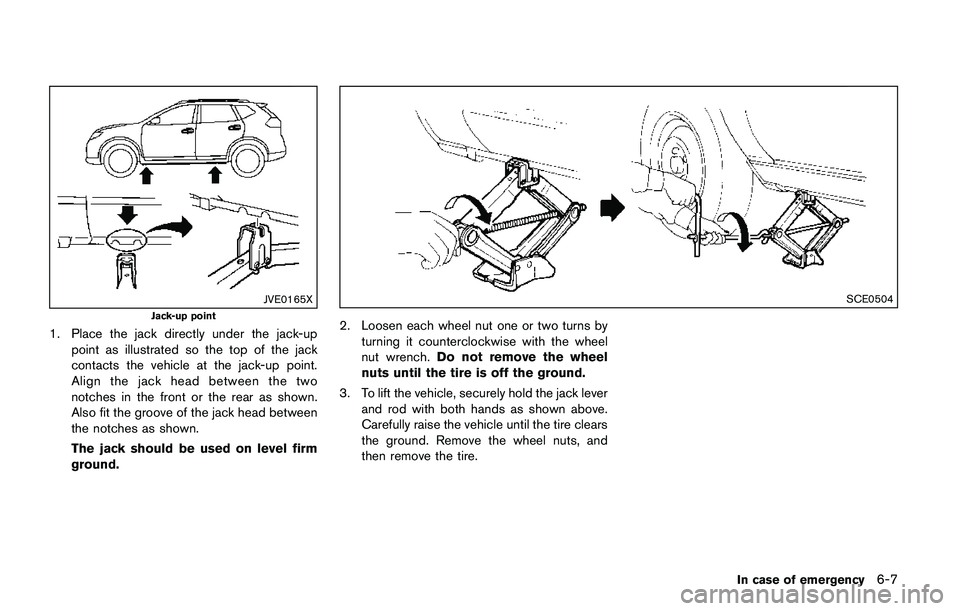
JVE0165X
Jack-up point
1. Place the jack directly under the jack-up
point as illustrated so the top of the jack
contacts the vehicle at the jack-up point.
Align the jack head between the two
notches in the front or the rear as shown.
Also fit the groove of the jack head between
the notches as shown.
The jack should be used on level firm
ground.
SCE0504
2. Loosen each wheel nut one or two turns by
turning it counterclockwise with the wheel
nut wrench.Do not remove the wheel
nuts until the tire is off the ground.
3. To lift the vehicle, securely hold the jack lever
and rod with both hands as shown above.
Carefully raise the vehicle until the tire clears
the ground. Remove the wheel nuts, and
then remove the tire.
In case of emergency6-7
Page 431 of 508
8-8Do-it-yourself
JVM0421X
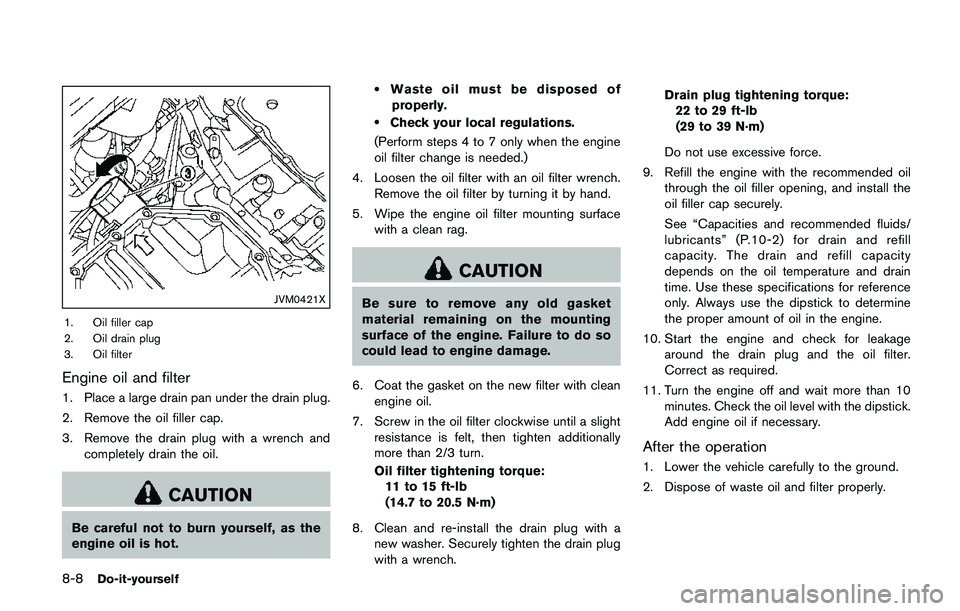
1. Oil filler cap
2. Oil drain plug
3. Oil filter
Engine oil and filter
1. Place a large drain pan under the drain plug.
2. Remove the oil filler cap.
3. Remove the drain plug with a wrench and
completely drain the oil.
CAUTION
Be careful not to burn yourself, as the
engine oil is hot.
.Waste oil must be disposed of
properly.
.Check your local regulations.
(Perform steps 4 to 7 only when the engine
oil filter change is needed.)
4. Loosen the oil filter with an oil filter wrench.
Remove the oil filter by turning it by hand.
5. Wipe the engine oil filter mounting surface
with a clean rag.
CAUTION
Be sure to remove any old gasket
material remaining on the mounting
surface of the engine. Failure to do so
could lead to engine damage.
6. Coat the gasket on the new filter with clean
engine oil.
7. Screw in the oil filter clockwise until a slight
resistance is felt, then tighten additionally
more than 2/3 turn.
Oil filter tightening torque:
11 to 15 ft-lb
(14.7 to 20.5 N·m)
8. Clean and re-install the drain plug with a
new washer. Securely tighten the drain plug
with a wrench.Drain plug tightening torque:
22 to 29 ft-lb
(29 to 39 N·m)
Do not use excessive force.
9. Refill the engine with the recommended oil
through the oil filler opening, and install the
oil filler cap securely.
See “Capacities and recommended fluids/
lubricants” (P.10-2) for drain and refill
capacity. The drain and refill capacity
depends on the oil temperature and drain
time. Use these specifications for reference
only. Always use the dipstick to determine
the proper amount of oil in the engine.
10. Start the engine and check for leakage
around the drain plug and the oil filter.
Correct as required.
11. Turn the engine off and wait more than 10
minutes. Check the oil level with the dipstick.
Add engine oil if necessary.
After the operation
1. Lower the vehicle carefully to the ground.
2. Dispose of waste oil and filter properly.
Page 449 of 508
8-26Do-it-yourself
Replacing
LED headlight model:
If LED headlight replacement is required, it is
recommended that you visit a NISSAN dealer for
this service.
Halogen headlight model:
The headlight is a semi-sealed beam type which
uses a replaceable headlight (halogen) bulb.
CAUTION
.Do not leave the bulb out of the
headlight reflector for a long period
of time. Dust, moisture, smoke, etc.
entering the headlight body may
affect bulb performance.
.High pressure halogen gas is sealed
inside the halogen bulb. The bulb
may break if the glass envelope is
scratched or the bulb is dropped.
.Only touch the base when handling
the bulb. Never touch the glass
envelope. Touching the glass envel-
ope could significantly affect bulb
life and/or headlight performance.
.Aiming is not necessary after repla-
cing the bulb. When aiming adjust-ment is necessary, it is
recommended you visit a NISSAN
dealer for this service.
Use the same number and wattage as originally
installed as shown in the chart.
JVM0395X
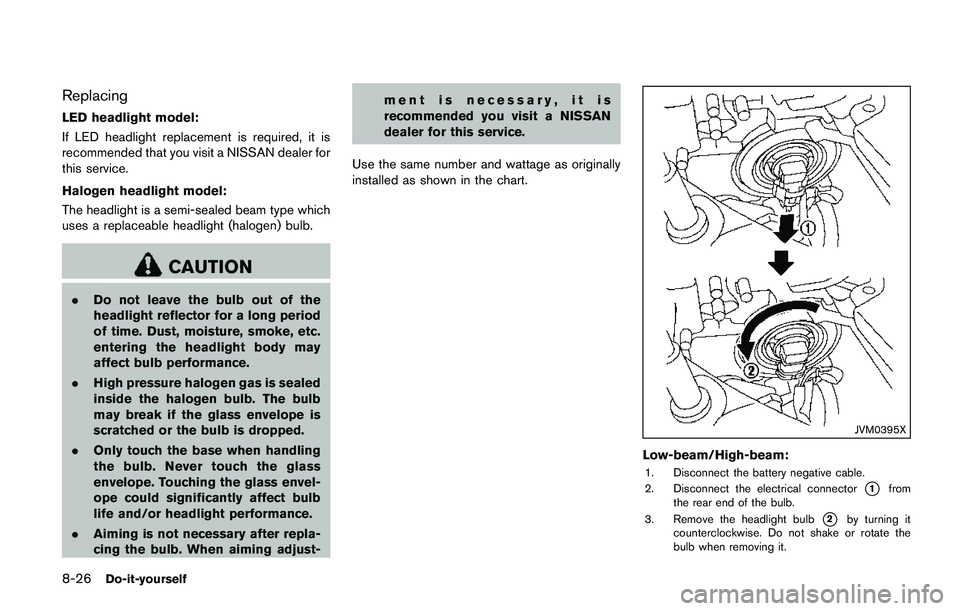
Low-beam/High-beam:
1. Disconnect the battery negative cable.
2. Disconnect the electrical connector
*1from
the rear end of the bulb.
3. Remove the headlight bulb
*2by turning it
counterclockwise. Do not shake or rotate the
bulb when removing it.
Page 500 of 508
11 Index
A
ABS (Anti-lock Braking System) ......................... 5-102
Active Engine Brake ............................................... 5-107
Active Ride Control ................................................. 5-108
Active Trace Control ............................................... 5-106
Advanced air bag system ......................................... 1-45
Air bag system
Advanced air bag system .................................. 1-45
Front passenger air bag and status light ...... 1-47
Front-seat mounted side-impact
supplemental air bag system ............................ 1-53
Roof-mounted curtain side-impact
supplemental air bag system ............................ 1-53
Air bag warning labels .............................................. 1-55
Air bag warning light ..................................... 1-56, 2-15
Air cleaner housing filter ........................................... 8-14
Air conditioner
Air conditioner operation ................................... 4-30
Air conditioner service ....................................... 4-37
Air conditioner specification label ................. 10-10
Air conditioning system refrigerant and
lubricant recommendations .................... 4-37, 10-6
Alarm, How to stop alarm (see vehicle
security system) .......................................................... 2-38
Alcohol, drugs and driving ....................................... 5-10
All-wheel drive (AWD) .............................................. 5-96
Antenna ......................................................................... 4-75
Anti-lock Braking System (ABS) ......................... 5-102
Anti-lock braking system (ABS) warning light .... 2-10
Appearance care
Exterior appearance care ..................................... 7-2
Interior appearance care ....................................... 7-4
Application download ................................................ 4-77
Armrest ............................................................................ 1-6Around View
ŠMonitor .............................................. 4-14
Audible reminders ...................................................... 2-17
Audio operation precautions ................................... 4-38
Audio system ............................................................... 4-38
Steering wheel audio controls ......................... 4-74
Autolight system ......................................................... 2-43
Automatic
Door locks ................................................................ 3-7
Automatic air conditioner ......................................... 4-34
AUX (Auxiliary) input jack ......................................... 4-73
Average speed ............................................................ 2-34
Avoiding collision and rollover .................................. 5-8
B
Battery ........................................................................... 8-11
Battery replacement, Intelligent Key ............... 8-23
Battery replacement, Key fob ........................... 8-21
Battery saver system .......................................... 2-47
Variable voltage control system ....................... 8-13
Before starting the engine ....................................... 5-17
Blind Spot Warning (BSW) .................................... 5-42
Bluetooth
ŠHands-Free Phone System .... 4-82, 4-92
Booster seats .............................................................. 1-35
Brake
Anti-lock Braking System (ABS) ................... 5-102
Brake and clutch fluid ........................................... 8-9
Brake system ...................................................... 5-102
Electronic parking brake system
warning light ......................................................... 2-12
Parking brake ........................................................ 5-26
Press Brake Pedal warning (for electronic
parking brake equipped models) .................... 2-32
Warning light ........................................................ 2-11
Break-in schedule ....................................................... 5-95Brightness control
Instrument panel ..................................................... 2-9
Bulb check/instrument panel ................................... 2-10
Bulb replacement ....................................................... 8-25
C
Capacities and
recommended fluids/lubricants ............................... 10-2
Car phone or CB radio ............................................. 4-82
Card holder .................................................................. 2-57
Cargo area ................................................................... 2-55
Catalytic converter, Three way catalyst .................. 5-5
CD/USB memory care and cleaning ..................... 4-76
Chassis and body maintenance ............................. 9-11
Chassis control ............................................. 2-35, 5-106
Child restraints ............................................................ 1-19
Booster seats ....................................................... 1-35
LATCH system ..................................................... 1-21
Precautions on child restraints ........................ 1-19
Child safety .................................................................. 1-17
Child safety rear door lock ........................................ 3-7
Chimes, Audible reminders ...................................... 2-17
Circuit breaker, Fusible link ..................................... 8-19
Cleaning exterior and interior ........................... 7-2, 7-4
Clock ............................................................................. 2-36
Clutch fluid ..................................................................... 8-9
Cockpit ............................................................................ 2-3
Cold weather driving .............................................. 5-110
Console box ................................................................. 2-56
Console light ............................................................... 2-66
Continuously Variable Transmission (CVT) fluid ... 8-9
Continuously Variable Transmission (CVT)
position indicator .......................................................... 2-9
Control buttons and function .................................... 4-3
Controls, Steering wheel audio controls .............. 4-74