front camera NISSAN QASHQAI 2017 Owner´s Manual
[x] Cancel search | Manufacturer: NISSAN, Model Year: 2017, Model line: QASHQAI, Model: NISSAN QASHQAI 2017Pages: 508, PDF Size: 2.68 MB
Page 320 of 508
detection range.
— When rain, snow, dirt or object
adheres to the windshield in
front of the lane camera unit.
— When the headlights are not
bright due to dirt on the lens or
if the aiming is not adjusted
properly.
— When strong light enters the
lane camera unit. (For example,
the light directly shines on the
front of the vehicle at sunrise or
sunset.)
— When a sudden change in
brightness occurs. (For example,
when the vehicle enters or exits
a tunnel or under a bridge.)
SYSTEM TEMPORARILY UNAVAIL-
ABLE
Condition A:
If the vehicle is parked in direct sunlight under
high temperature conditions (over approximately
1048F (408C)) and then started, the LDW
system may be deactivated automatically, the
LDW indicator will flash and the following
message will appear in the vehicle informationdisplay. - “Unavailable: High Cabin Tempera-
ture”
When the interior temperature is reduced, the
LDW system will resume operating automatically
and the LDW indicator will stop flashing.
Condition B:
The warning function of the LDW system is not
designed to work under the following condi-
tions:
.When you operate the lane change signal
and change traveling lanes in the direction of
the signal. (The LDW system will become
operable again approximately 2 seconds
after the lane change signal is turned off.)
.When the vehicle speed lowers to less than
approximately 37 MPH (60 km/h) .
Action to take:
After the above conditions have finished and the
necessary operating conditions are satisfied, the
LDW system will resume.SYSTEM MALFUNCTION
If the LDW system malfunctions, it will cancel
automatically and “Malfunction” will appear in
the vehicle information display. If “Malfunction”
appears in the vehicle information display, pull
off the road to a safe location and stop the
vehicle. Place the ignition switch in the OFF
position and restart the engine. If “Malfunction”continues to appear in the vehicle information
display, have the system checked. It is recom-
mended that you visit a NISSAN dealer for this
service.
Starting and driving5-35
Page 324 of 508
LDP SYSTEM LIMITATIONS
WARNING
Listed below are the system limitations
for the LDP system. Failure to follow
the warnings and instructions for prop-
er use of the LDP system could result in
serious injury or death.
.The LDP system may activate if you
change lanes without first activating
your turn signal or, for example, if a
construction zone directs traffic to
cross an existing lane marker. If this
occurs you may need to apply cor-
rective steering to complete your
lane change.
.Because the LDP may not activate
under the road, weather, and lane
marker conditions described in this
section, it may not activate every
time your vehicle begins to leave its
lane and you will need to apply
corrective steering.
.The LDP system will not operate at
speeds below approximately 37
MPH (60 km/h) or if it cannot detect
lane markers..Do not use the LDP system under
the following conditions as it may
not function properly:
— During bad weather (rain, fog,
snow, etc.) .
— When driving on slippery roads,
such as on ice or snow.
— When driving on winding or
uneven roads.
— When there is a lane closure due
to road repairs.
— When driving in a makeshift or
temporary lane.
— When driving on roads where
the lane width is too narrow.
— When driving without normal
tire conditions (for example, tire
wear, low tire pressure, installa-
tion of spare tire, tire chains,
non-standard wheels) .
— When the vehicle is equipped
with non-original brake parts or
suspension parts.
.The system may not function prop-
erly under the following conditions:— On roads where there are multi-
ple parallel lane markers; lane
markers that are faded or not
painted clearly; yellow painted
lane markers; non-standard lane
markers; or lane markers cov-
ered with water, dirt, snow, etc.
— On roads where discontinued
lane markers are still detect-
able.
— On roads where there are sharp
curves.
— On roads where there are shar-
ply contrasting objects, such as
shadows, snow, water, wheel
ruts, seams or lines remaining
after road repairs. (The LDP
system could detect these items
as lane markers.)
— On roads where the traveling
lane merges or separates.
— When the vehicle’s traveling di-
rection does not align with the
lane marker.
— When traveling close to the
vehicle in front of you, which
obstructs the lane camera unit
Starting and driving5-39
Page 325 of 508
5-40Starting and driving
detection range.
— When rain, snow or dirt adheres
to the windshield in front of the
lane camera unit.
— When the headlights are not
bright due to dirt on the lens or
if the aiming is not adjusted
properly.
— When strong light enters the
lane camera unit. (For example,
the light directly shines on the
front of the vehicle at sunrise or
sunset.)
— When a sudden change in
brightness occurs. (For example,
when the vehicle enters or exits
a tunnel or under a bridge.)
.Excessive noise will interfere with
the warning chime sound, and the
chime may not be heard.
While the LDP system is operating, you
may hear a sound of brake operation.
This is normal and indicates that the
LDP system is operating properly.SYSTEM TEMPORARILY UNAVAIL-
ABLE
Condition A:
The warning and assist functions of the LDP
system are not designed to work under the
following conditions:
.When you operate the lane change signal
and change the traveling lanes in the
direction of the signal. (The LDP system will
be deactivated for approximately 2 seconds
after the lane change signal is turned off.)
.When the vehicle speed lowers to less than
approximately 37 MPH (60 km/h) .
Action to take:
After the above conditions have finished and the
necessary operating conditions are satisfied, the
warning and assist functions will resume.
Condition B:
The assist function of the LDP system is not
designed to work under the following conditions
(warning is still functional):
.When the brake pedal is depressed.
.When the steering wheel is turned as far as
necessary for the vehicle to change lanes.
.When the vehicle is accelerated during the
LDP system operation..When the Intelligent Cruise Control (ICC)
approach warning occurs (if so equipped) .
.When the hazard warning flashers are
operated.
.When driving on a curve at high speed.
Action to take:
After the above conditions have finished and the
necessary operating conditions are satisfied, the
LDP system application of the brakes will
resume.
Condition C:
If the following messages appear in the vehicle
information display, a chime will sound and the
LDP system will be turned off automatically.
.“Not available: Poor Road Conditions”:
When the VDC system (except Traction
Control System (TCS) function) or ABS
operates.
.“Currently unavailable”:
When the VDC system is turned off.
Action to take:
When the above conditions no longer exist, turn
off the LDP system. Push the LDP switch again
to turn the LDP system back on.
Page 372 of 508
JVS1042X
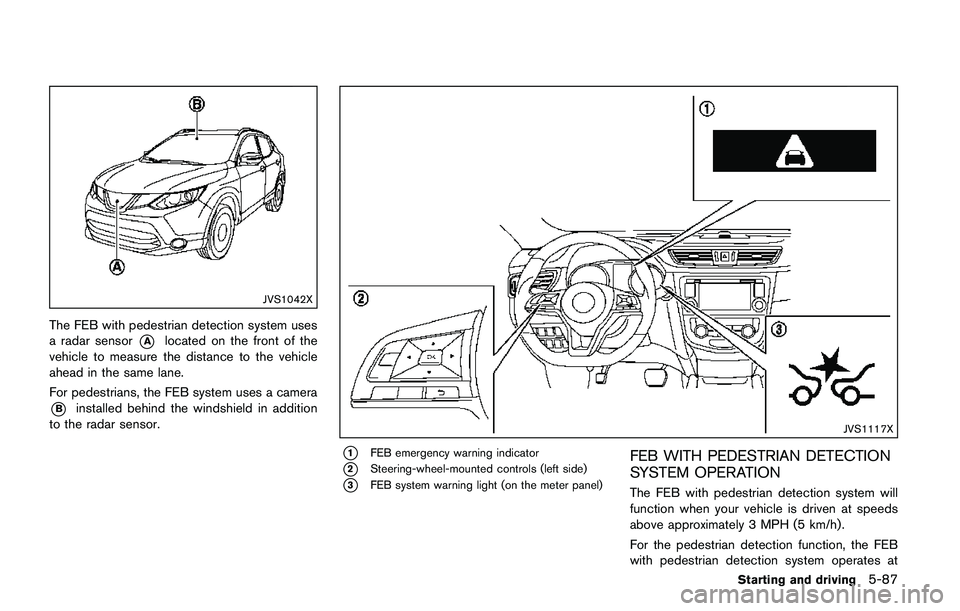
The FEB with pedestrian detection system uses
a radar sensor
*Alocated on the front of the
vehicle to measure the distance to the vehicle
ahead in the same lane.
For pedestrians, the FEB system uses a camera
*Binstalled behind the windshield in addition
to the radar sensor.
JVS1117X
*1FEB emergency warning indicator
*2Steering-wheel-mounted controls (left side)
*3FEB system warning light (on the meter panel)
FEB WITH PEDESTRIAN DETECTION
SYSTEM OPERATION
The FEB with pedestrian detection system will
function when your vehicle is driven at speeds
above approximately 3 MPH (5 km/h) .
For the pedestrian detection function, the FEB
with pedestrian detection system operates at
Starting and driving5-87
Page 375 of 508
5-90Starting and driving
— Small pedestrians (including
small children) , animals and cy-
clists.
— Pedestrians in wheelchairs or
using mobile transport such as
scooters, child-operated toys, or
skateboards.
— Pedestrians who are seated or
otherwise not in a full upright
standing or walking position.
— Obstacles on the roadway
— Oncoming vehicles
— Crossing vehicles
— Obstacles on the roadside
.The FEB with pedestrian detection
system has some performance lim-
itations.
— If a stationary vehicle is in the
vehicle’s path, the FEB with
pedestrian detection system will
not function when the vehicle is
driven at speeds over approxi-
mately 50 MPH (80 km/h) .
— For pedestrian detection, the
FEB with pedestrian detection
system will not function whenthe vehicle is driven at speeds
over approximately 37 MPH (60
km/h) or below approximately 6
MPH (10 km/h) .
.The FEB with pedestrian detection
system may not function for pedes-
trians in darkness or in tunnels,
even if there is street lighting in
the area.
.For pedestrians, the FEB with pe-
destrian detection system will not
issue the first warning.
.The FEB with pedestrian detection
system may not function if the
vehicle ahead is narrow (for exam-
ple a motorcycle) .
.The FEB with pedestrian detection
system may not function if speed
difference between the two vehicles
is too small.
.The radar sensor may not function
properly or detect a vehicle ahead in
the following conditions:
— Poor visibility (conditions such
as rain, snow, fog, dust storms,
sandstorms, and road spray
from other vehicles)— Driving on a steep downhill
slope or roads with sharp
curves.
— Driving on a bumpy road sur-
face, such as an uneven dirt
road.
— If dirt, ice, snow or other materi-
al is covering the radar sensor
area.
— Interference by other radar
sources.
.The camera may not function prop-
erly or detect a vehicle ahead in the
following conditions:
— The camera area of windshield
is fogged up, or covered with
dirt, water drops, ice, snow, etc.
— Strong light (for example, sun-
light or high beams from on-
coming vehicles) enters the
front camera. Strong light
causes the area around the
pedestrian to be cast in a sha-
dow, making it difficult to see.
— A sudden change in brightness
occurs. (For example, when the
vehicle enters or exits a tunnel
Page 377 of 508
5-92Starting and driving
SSD0253
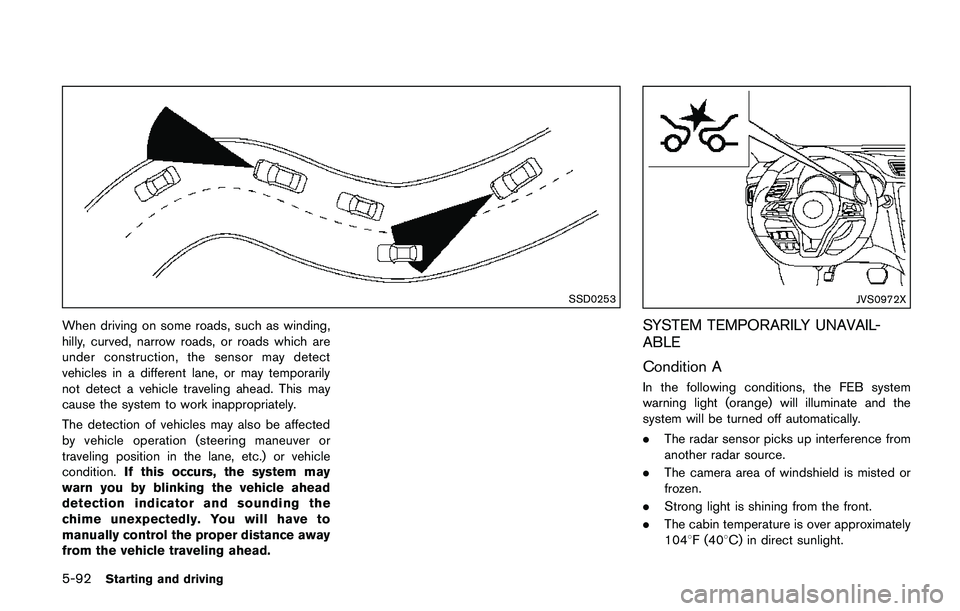
When driving on some roads, such as winding,
hilly, curved, narrow roads, or roads which are
under construction, the sensor may detect
vehicles in a different lane, or may temporarily
not detect a vehicle traveling ahead. This may
cause the system to work inappropriately.
The detection of vehicles may also be affected
by vehicle operation (steering maneuver or
traveling position in the lane, etc.) or vehicle
condition.If this occurs, the system may
warn you by blinking the vehicle ahead
detection indicator and sounding the
chime unexpectedly. You will have to
manually control the proper distance away
from the vehicle traveling ahead.
JVS0972X
SYSTEM TEMPORARILY UNAVAIL-
ABLE
Condition A
In the following conditions, the FEB system
warning light (orange) will illuminate and the
system will be turned off automatically.
.The radar sensor picks up interference from
another radar source.
.The camera area of windshield is misted or
frozen.
.Strong light is shining from the front.
.The cabin temperature is over approximately
1048F (408C) in direct sunlight.
Page 378 of 508
.The camera area of windshield glass is
continuously covered with dirt, etc.
Action to take:
When the above conditions no longer exist, the
FEB with pedestrian detection system will
resume automatically.
NOTE:
When the inside of the windshield on
camera area is misted or frozen, it will
take a period of time to remove it after air
conditioner turns on. If dirt appears on this
area, it is recommended you visit a
NISSAN dealer.
Condition B
In the following condition, the FEB system
warning light (orange) will illuminate and the
“Unavailable: Front Radar Obstruction” warning
message will appear in the vehicle information
display.
.The sensor area of the front of the vehicle is
covered with dirt or is obstructed
Action to take:
If the warning light (orange) comes on, stop the
vehicle in a safe place and turn the engine off.
Clean the radar cover on the front of the vehicle
with a soft cloth, and restart the engine. If the
warning light continues to illuminate, have the
FEB with pedestrian detection system checked.It is recommended that you visit a NISSAN
dealer for this service.
.When driving on roads with limited road
structures or buildings (for example, long
bridges, deserts, snow fields, driving next to
long walls) .
Action to take:
When the above conditions no longer exist, the
FEB with pedestrian detection system will
resume automatically.
Condition C
When VDC system is OFF, the FEB brake will
not operate. In this case only visible and audible
warning operates. The FEB system warning light
(orange) will illuminate.
Action to take:
When VDC system is ON, the FEB with
pedestrian detection system will resume auto-
matically.
SYSTEM MALFUNCTION
If the FEB with pedestrian detection system
malfunctions, it will be turned off automatically, a
chime will sound, the FEB system warning light
will (orange) will illuminate and the warning
message “Malfunction” will appear in the vehicle
information display.Action to take:
If the warning light (orange) comes on, stop the
vehicle in a safe location. Turn the engine off and
restart the engine. If the warning light continues
to illuminate, have the FEB with pedestrian
detection system checked. It is recommended
that you visit a NISSAN dealer for this service.
Starting and driving5-93
Page 379 of 508
5-94Starting and driving
JVS1042X
SYSTEM MAINTENANCE
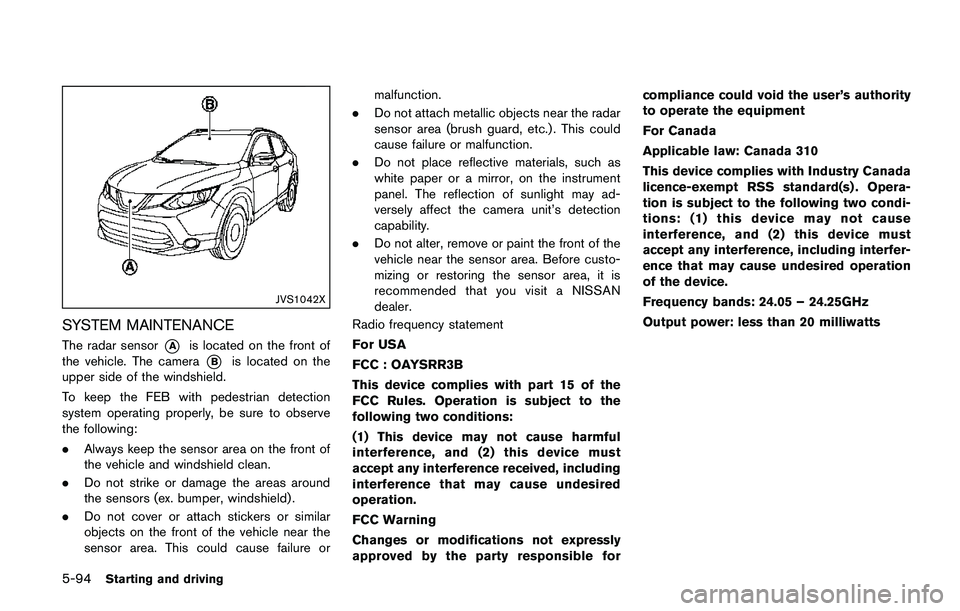
The radar sensor*Ais located on the front of
the vehicle. The camera
*Bis located on the
upper side of the windshield.
To keep the FEB with pedestrian detection
system operating properly, be sure to observe
the following:
.Always keep the sensor area on the front of
the vehicle and windshield clean.
.Do not strike or damage the areas around
the sensors (ex. bumper, windshield) .
.Do not cover or attach stickers or similar
objects on the front of the vehicle near the
sensor area. This could cause failure ormalfunction.
.Do not attach metallic objects near the radar
sensor area (brush guard, etc.) . This could
cause failure or malfunction.
.Do not place reflective materials, such as
white paper or a mirror, on the instrument
panel. The reflection of sunlight may ad-
versely affect the camera unit’s detection
capability.
.Do not alter, remove or paint the front of the
vehicle near the sensor area. Before custo-
mizing or restoring the sensor area, it is
recommended that you visit a NISSAN
dealer.
Radio frequency statement
For USA
FCC : OAYSRR3B
This device complies with part 15 of the
FCC Rules. Operation is subject to the
following two conditions:
(1) This device may not cause harmful
interference, and (2) this device must
accept any interference received, including
interference that may cause undesired
operation.
FCC Warning
Changes or modifications not expressly
approved by the party responsible forcompliance could void the user’s authority
to operate the equipment
For Canada
Applicable law: Canada 310
This device complies with Industry Canada
licence-exempt RSS standard(s) . Opera-
tion is subject to the following two condi-
tions: (1) this device may not cause
interference, and (2) this device must
accept any interference, including interfer-
ence that may cause undesired operation
of the device.
Frequency bands: 24.05 – 24.25GHz
Output power: less than 20 milliwatts