front camera NISSAN QASHQAI 2017 Owner´s Manual
[x] Cancel search | Manufacturer: NISSAN, Model Year: 2017, Model line: QASHQAI, Model: NISSAN QASHQAI 2017Pages: 508, PDF Size: 2.68 MB
Page 12 of 508
JVC1065X
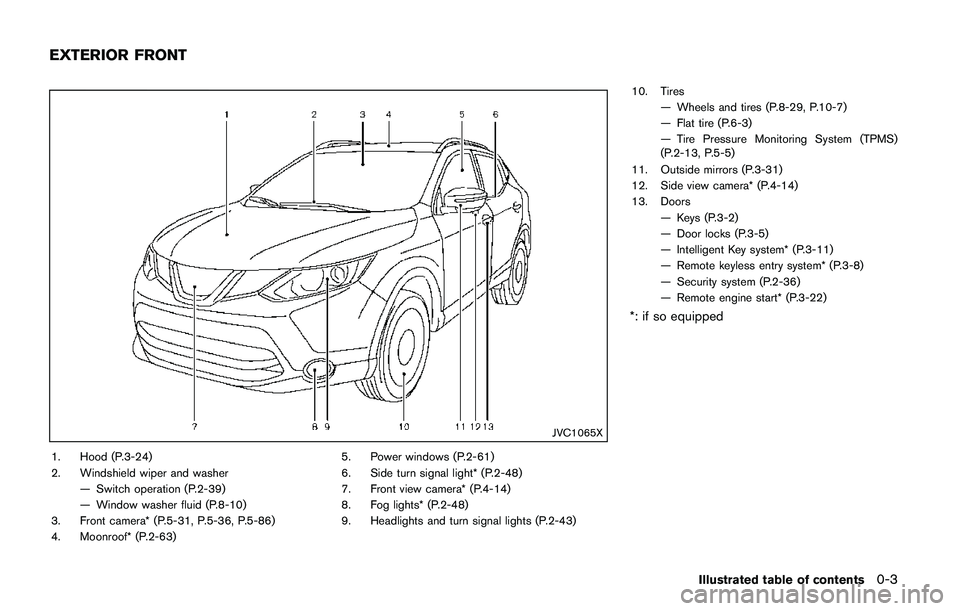
1. Hood (P.3-24)
2. Windshield wiper and washer
— Switch operation (P.2-39)
— Window washer fluid (P.8-10)
3. Front camera* (P.5-31, P.5-36, P.5-86)
4. Moonroof* (P.2-63)5. Power windows (P.2-61)
6. Side turn signal light* (P.2-48)
7. Front view camera* (P.4-14)
8. Fog lights* (P.2-48)
9. Headlights and turn signal lights (P.2-43)10. Tires
— Wheels and tires (P.8-29, P.10-7)
— Flat tire (P.6-3)
— Tire Pressure Monitoring System (TPMS)
(P.2-13, P.5-5)
11. Outside mirrors (P.3-31)
12. Side view camera* (P.4-14)
13. Doors
— Keys (P.3-2)
— Door locks (P.3-5)
— Intelligent Key system* (P.3-11)
— Remote keyless entry system* (P.3-8)
— Security system (P.2-36)
— Remote engine start* (P.3-22)
*: if so equipped
Illustrated table of contents0-3
EXTERIOR FRONT
Page 189 of 508
4-8Heater, air conditioner, audio and phone systems
HOW TO USE BRIGHTNESS CON-
TROL BUTTON
Push thebutton to change the display
brightness between the Auto mode and the
Night mode. The brightness control bar will also
be displayed. While the brightness control bar is
being displayed, the brightness can be adjusted
using the ENTER AUDIO/TUNE·SCROLL dial.
Push and hold the
button to turn the display
off. Push the button again to turn the display on.
HOW TO USE THE POWER/VOLUME
DIAL
Push the POWER/VOLUME dial to turn the
audio function on and off. Turn the POWER/
VOLUME dial to adjust the volume. (See “FM-
AM-SAT radio with Compact Disc (CD) player
(Type B)” (P.4-63)
HOW TO USE THE ENTER AUDIO/
TUNE·SCROLL DIAL
Turn the ENTER AUDIO/TUNE·SCROLL dial to
select items on the screen and to adjust the
levels of setting items. Push the dial to confirm
the selected item or setting. (See “FM-AM-SAT
radio with Compact Disc (CD) player (Type B)”
(P.4-63)
WARNING
.Failure to follow the warnings and
instructions for proper use of the
RearView Monitor could result in
serious injury or death.
.RearView Monitor is a convenience
feature and is not a substitute for
proper backing. Always turn and
look out the windows, and check
mirrors to be sure that it is safe to
move before operating the vehicle.
Always back up slowly.
.The system is designed as an aid to
the driver in showing large station-
ary objects directly behind the vehi-
cle, to help avoid damaging the
vehicle.
.The distance guide line and the
vehicle width line should be used
as a reference only when the vehicle
is on a level paved surface. The
distance viewed on the monitor is
for reference only and may be
different than the actual distance
between the vehicle and displayed
objects.
CAUTION
Do not scratch the camera lens when
cleaning dirt or snow from the front of
the camera.
The RearView Monitor system automatically
shows a rear view of the vehicle when the shift
lever is placed in the R (Reverse) position.
The radio can still be heard while the RearView
Monitor is active.
REARVIEW MONITOR (if so
equipped)
Page 195 of 508
4-14Heater, air conditioner, audio and phone systems
JVH1587X
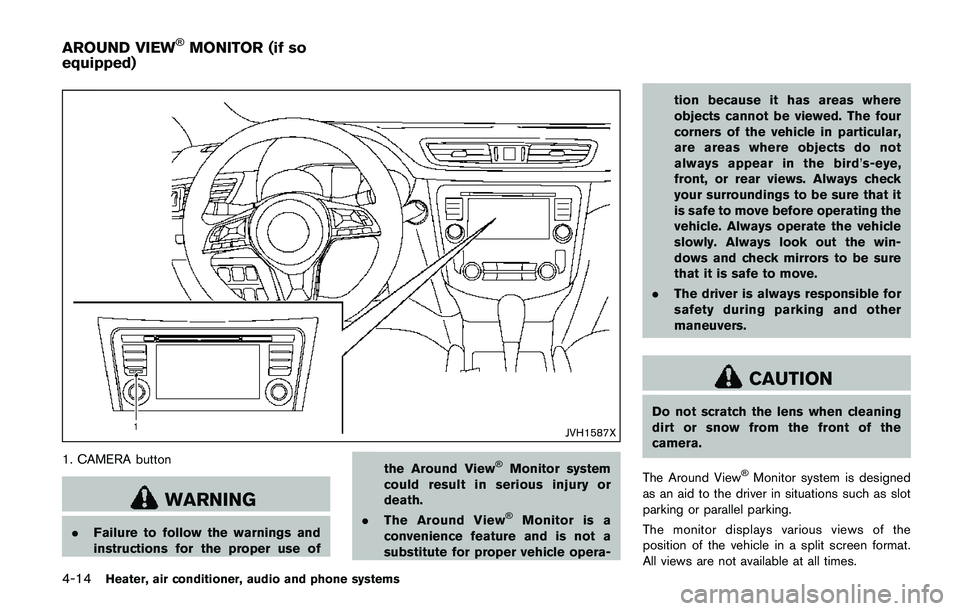
1. CAMERA button
WARNING
.Failure to follow the warnings and
instructions for the proper use ofthe Around View
ŠMonitor system
could result in serious injury or
death.
.The Around View
ŠMonitor is a
convenience feature and is not a
substitute for proper vehicle opera-tion because it has areas where
objects cannot be viewed. The four
corners of the vehicle in particular,
are areas where objects do not
always appear in the bird’s-eye,
front, or rear views. Always check
your surroundings to be sure that it
is safe to move before operating the
vehicle. Always operate the vehicle
slowly. Always look out the win-
dows and check mirrors to be sure
that it is safe to move.
.The driver is always responsible for
safety during parking and other
maneuvers.
CAUTION
Do not scratch the lens when cleaning
dirt or snow from the front of the
camera.
The Around View
ŠMonitor system is designed
as an aid to the driver in situations such as slot
parking or parallel parking.
The monitor displays various views of the
position of the vehicle in a split screen format.
All views are not available at all times.
AROUND VIEWŠMONITOR (if so
equipped)
Page 196 of 508
Available views:
.Bird’s-eye view
The surrounding views of the vehicle from
above.
.Front-side view
The view around and ahead of the front
passenger’s side wheel.
.Front view
An approximately 150–degree view of the
front of the vehicle.
.Rear view
An approximately 150–degree view of the
rear of the vehicle.
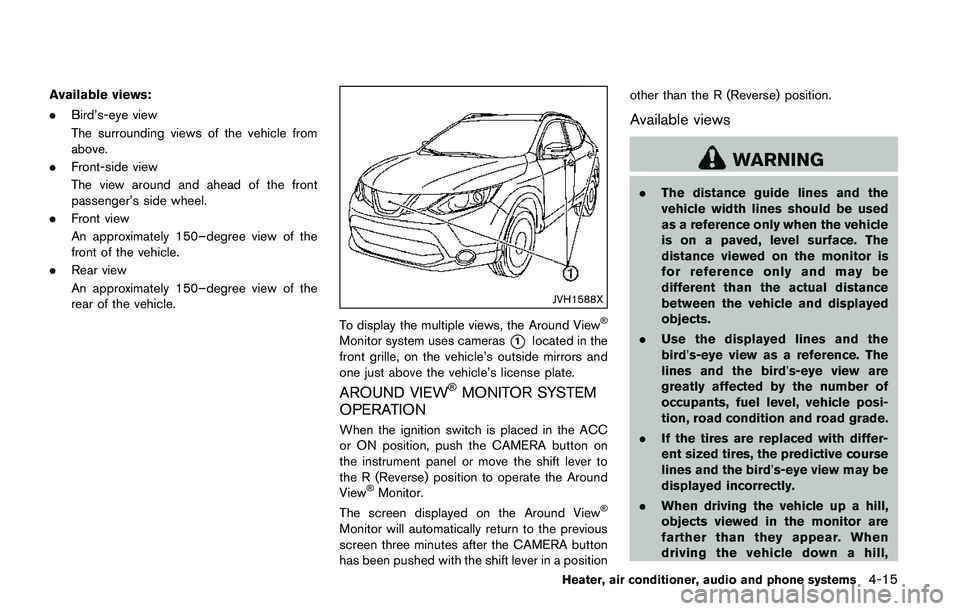
JVH1588X
To display the multiple views, the Around ViewŠ
Monitor system uses cameras*1located in the
front grille, on the vehicle’s outside mirrors and
one just above the vehicle’s license plate.
AROUND VIEWŠMONITOR SYSTEM
OPERATION
When the ignition switch is placed in the ACC
or ON position, push the CAMERA button on
the instrument panel or move the shift lever to
the R (Reverse) position to operate the Around
View
ŠMonitor.
The screen displayed on the Around ViewŠ
Monitor will automatically return to the previous
screen three minutes after the CAMERA button
has been pushed with the shift lever in a positionother than the R (Reverse) position.
Available views
WARNING
.The distance guide lines and the
vehicle width lines should be used
as a reference only when the vehicle
is on a paved, level surface. The
distance viewed on the monitor is
for reference only and may be
different than the actual distance
between the vehicle and displayed
objects.
.Use the displayed lines and the
bird’s-eye view as a reference. The
lines and the bird’s-eye view are
greatly affected by the number of
occupants, fuel level, vehicle posi-
tion, road condition and road grade.
.If the tires are replaced with differ-
ent sized tires, the predictive course
lines and the bird’s-eye view may be
displayed incorrectly.
.When driving the vehicle up a hill,
objects viewed in the monitor are
farther than they appear. When
driving the vehicle down a hill,
Heater, air conditioner, audio and phone systems4-15
Page 197 of 508
4-16Heater, air conditioner, audio and phone systems
objects viewed in the monitor are
closer than they appear.
.Objects in the monitor will appear
visually opposite compared to when
viewed in the rearview and outside
mirrors.
.Use the mirrors or actually look to
properly judge distances to other
objects.
.The distance between objects
viewed in the rear view differs from
actual distance because a wide-
angle lens is used.
.On a snow-covered or slippery road,
there may be a difference between
the predictive course line and the
actual course line.
.The vehicle width and predictive
course lines are wider than the
actual width and course.
.The displayed lines on the rear view
will appear slightly off to the right
because the rear view camera is not
installed in the rear center of the
vehicle.
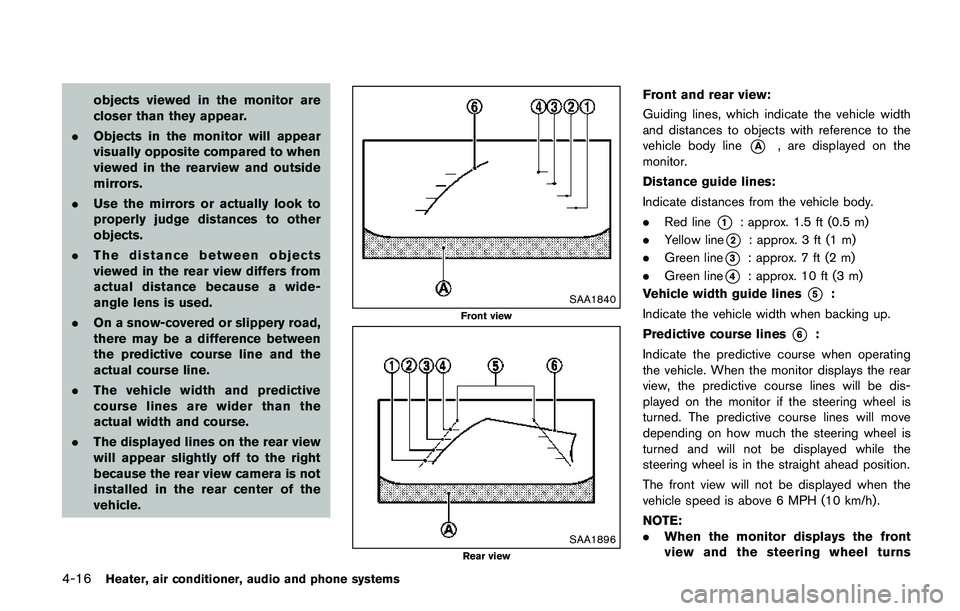
SAA1840
Front view
SAA1896Rear view
Front and rear view:
Guiding lines, which indicate the vehicle width
and distances to objects with reference to the
vehicle body line
*A, are displayed on the
monitor.
Distance guide lines:
Indicate distances from the vehicle body.
.Red line
*1: approx. 1.5 ft (0.5 m)
.Yellow line
*2: approx. 3 ft (1 m)
.Green line
*3: approx. 7 ft (2 m)
.Green line
*4: approx. 10 ft (3 m)
Vehicle width guide lines
*5:
Indicate the vehicle width when backing up.
Predictive course lines
*6:
Indicate the predictive course when operating
the vehicle. When the monitor displays the rear
view, the predictive course lines will be dis-
played on the monitor if the steering wheel is
turned. The predictive course lines will move
depending on how much the steering wheel is
turned and will not be displayed while the
steering wheel is in the straight ahead position.
The front view will not be displayed when the
vehicle speed is above 6 MPH (10 km/h) .
NOTE:
.When the monitor displays the front
view and the steering wheel turns
Page 202 of 508
5. When the vehicle is parked in the space
completely, move the shift lever to the P
(Park) position and apply the parking brake.
HOW TO SWITCH THE DISPLAY
With the ignition switch placed in the ACC or
ON position, push the CAMERA button or move
the shift lever to the R (Reverse) position to
operate the Around View
ŠMonitor.
The Around ViewŠMonitor displays different
split screen views depending on the position of
the shift lever. Push the CAMERA button to
switch between the available views.
If the shift lever is in the R (Reverse) position, the
available views are:
.Rear view/bird’s-eye view split screen
.Rear view/front-side view split screen
.Rear view
If the shift lever is in the P (Park) position, the
available views are:
.Front view/bird’s-eye view split screen
.Front view/front-side view split screen
The display will switch from the Around View
Š
Monitor screen when:
.The shift lever is in the D (Drive) position and
the vehicle speed increases above approxi-
mately 6 MPH (10 km/h) ..A different screen is selected.
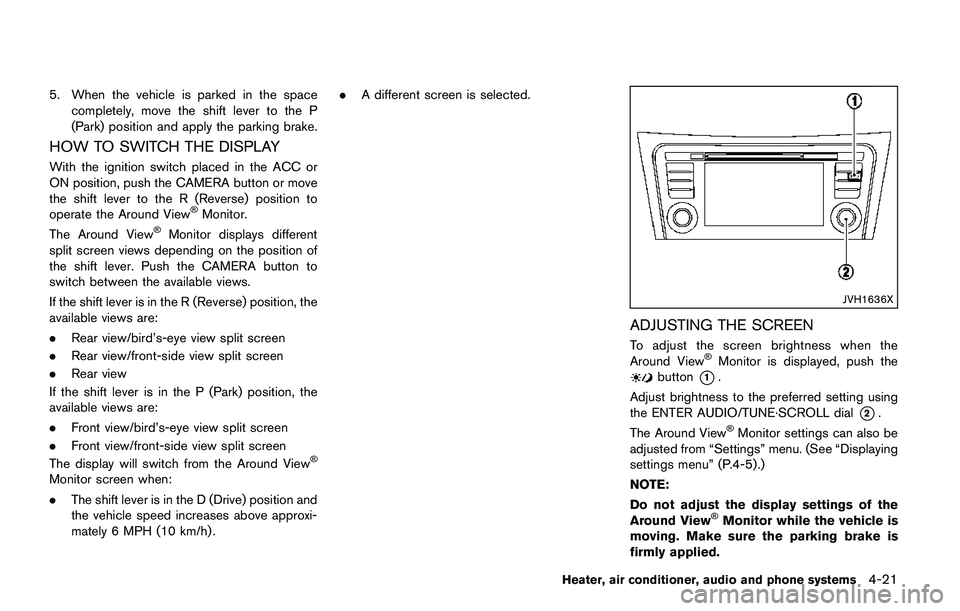
JVH1636X
ADJUSTING THE SCREEN
To adjust the screen brightness when the
Around ViewŠMonitor is displayed, push thebutton*1.
Adjust brightness to the preferred setting using
the ENTER AUDIO/TUNE·SCROLL dial
*2.
The Around ViewŠMonitor settings can also be
adjusted from “Settings” menu. (See “Displaying
settings menu” (P.4-5) .)
NOTE:
Do not adjust the display settings of the
Around View
ŠMonitor while the vehicle is
moving. Make sure the parking brake is
firmly applied.
Heater, air conditioner, audio and phone systems4-21
Page 203 of 508
4-22Heater, air conditioner, audio and phone systems
AROUND VIEWŠMONITOR SYSTEM
LIMITATIONS
WARNING
Listed below are the system limitations
for Around ViewŠMonitor. Failure to
operate the vehicle in accordance with
these system limitations could result in
serious injury or death.
.Do not use the Around View
ŠMoni-
tor with the outside mirrors in the
stored position, and make sure that
the liftgate is securely closed when
operating the vehicle using the
Around View
ŠMonitor.
.The distance between objects
viewed on the Around View
ŠMoni-
tor differs from the actual distance.
.The cameras are installed above the
front grille, the outside mirrors and
above the rear license plate. Do not
put anything on the cameras.
.When washing the vehicle with
highpressure water, be sure not to
spray it around the cameras. Other-
wise, water may enter the camera
unit causing water condensation onthe lens, a malfunction, fire or an
electric shock.
.Do not strike the cameras. They are
precision instruments. Doing so
could cause a malfunction or cause
damage resulting in a fire or an
electric shock.
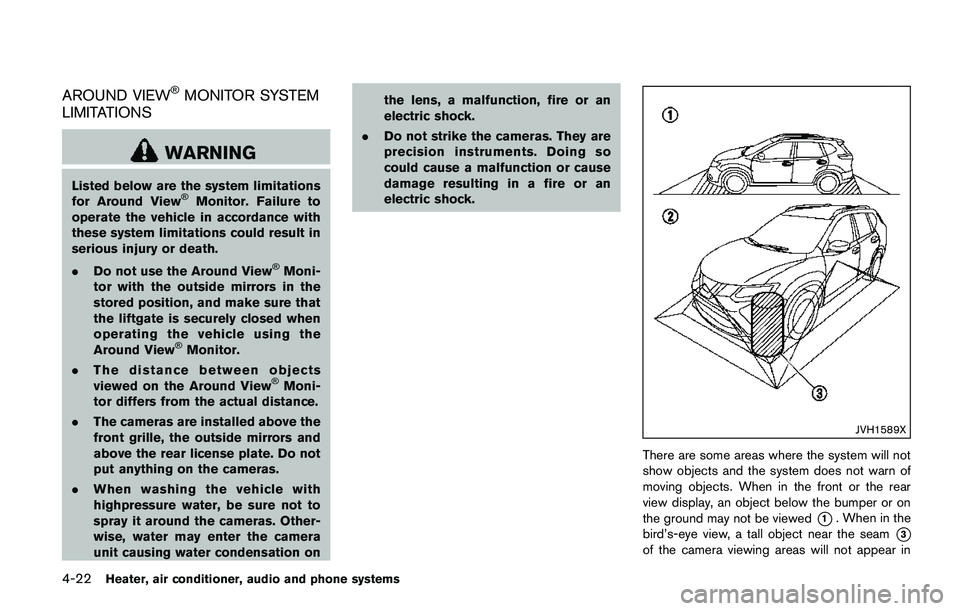
JVH1589X
There are some areas where the system will not
show objects and the system does not warn of
moving objects. When in the front or the rear
view display, an object below the bumper or on
the ground may not be viewed
*1. When in the
bird’s-eye view, a tall object near the seam
*3
of the camera viewing areas will not appear in
Page 207 of 508
4-26Heater, air conditioner, audio and phone systems
MOD SYSTEM OPERATION
The MOD system will turn on automatically
under the following conditions:
.When the shift lever is in the R (Reverse)
position.
.When the CAMERA button is pushed to
switch to the camera view on the display.
.When vehicle speed decreases below
approximately 5 MPH (8 km/h) .
The MOD system operates in the following
conditions when the camera view is displayed:
.When the shift lever is in the P (Park) or N
(Neutral) position and the vehicle is
stopped, the MOD system detects the
moving objects in the bird’s-eye view. The
MOD system will not operate if either door is
opened. If outside mirrors are folded, MOD
may not operate properly.
.When the shift lever is in the D (Drive)
position, and the vehicle speed is below
approximately 5 MPH (8 km/h) , the MOD
system detects moving objects in the front
view.
.When the shift lever is in the R (Reverse)
position and the vehicle speed is below
approximately 5 MPH (8 km/h) , the MOD
system detects moving objects in the rear
view. The MOD system will not operate if the
liftgate is open.The MOD system does not detect moving
objects in the front-side view. The MOD icon
is not displayed on the screen when in this view.
When the MOD system detects a moving object
near the vehicle, the yellow frame will be
displayed on the view where the object is
detected and a chime will sound once. While
the MOD system continues to detect moving
objects, the yellow frame continues to be
displayed.
NOTE:
While the RCTA chime (if so equipped) is
beeping, the MOD system does not chime.
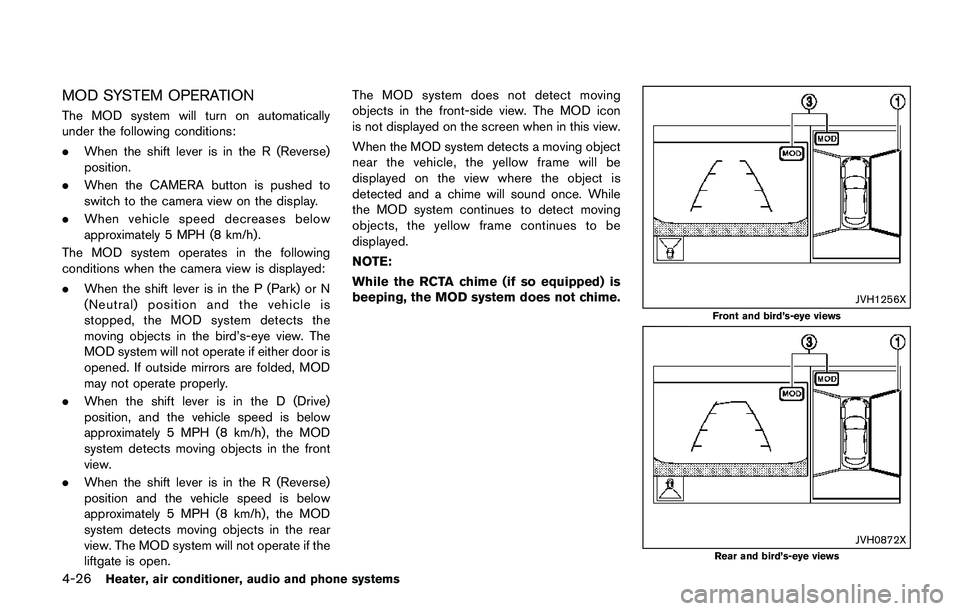
JVH1256X
Front and bird’s-eye views
JVH0872XRear and bird’s-eye views
Page 208 of 508
JVH1257X
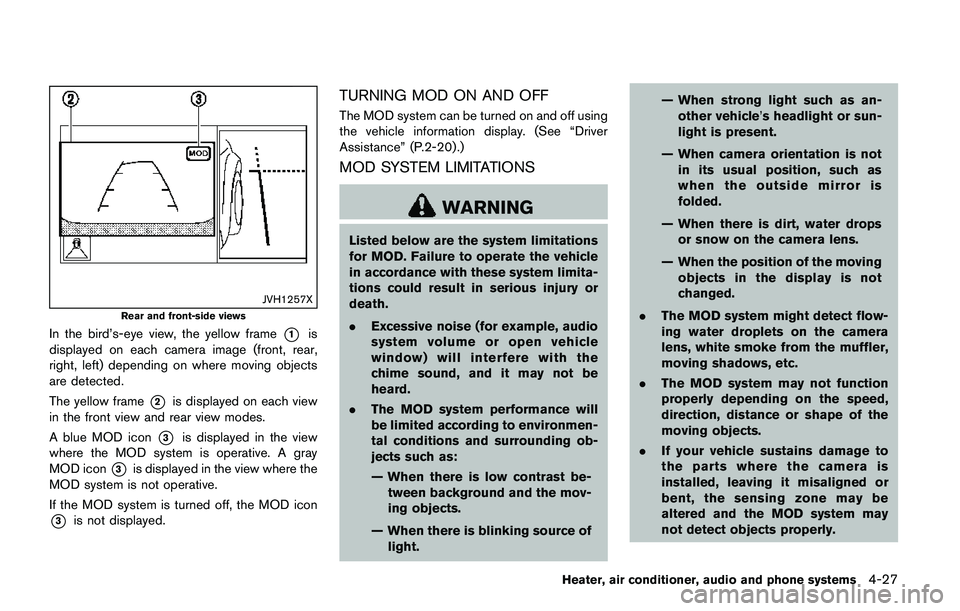
Rear and front-side views
In the bird’s-eye view, the yellow frame*1is
displayed on each camera image (front, rear,
right, left) depending on where moving objects
are detected.
The yellow frame
*2is displayed on each view
in the front view and rear view modes.
A blue MOD icon
*3is displayed in the view
where the MOD system is operative. A gray
MOD icon
*3is displayed in the view where the
MOD system is not operative.
If the MOD system is turned off, the MOD icon
*3is not displayed.
TURNING MOD ON AND OFF
The MOD system can be turned on and off using
the vehicle information display. (See “Driver
Assistance” (P.2-20) .)
MOD SYSTEM LIMITATIONS
WARNING
Listed below are the system limitations
for MOD. Failure to operate the vehicle
in accordance with these system limita-
tions could result in serious injury or
death.
.Excessive noise (for example, audio
system volume or open vehicle
window) will interfere with the
chime sound, and it may not be
heard.
.The MOD system performance will
be limited according to environmen-
tal conditions and surrounding ob-
jects such as:
— When there is low contrast be-
tween background and the mov-
ing objects.
— When there is blinking source of
light.— When strong light such as an-
other vehicle’s headlight or sun-
light is present.
— When camera orientation is not
in its usual position, such as
when the outside mirror is
folded.
— When there is dirt, water drops
or snow on the camera lens.
— When the position of the moving
objects in the display is not
changed.
.The MOD system might detect flow-
ing water droplets on the camera
lens, white smoke from the muffler,
moving shadows, etc.
.The MOD system may not function
properly depending on the speed,
direction, distance or shape of the
moving objects.
.If your vehicle sustains damage to
the parts where the camera is
installed, leaving it misaligned or
bent, the sensing zone may be
altered and the MOD system may
not detect objects properly.
Heater, air conditioner, audio and phone systems4-27
Page 319 of 508
5-34Starting and driving
3. Use thebuttons to navigate in the menu
and use the “OK” button to select or change
an item:
.Select “Lane” and press the “OK” button.
Use the “OK” button to check/uncheck
the box for “Warning”.
NOTE:
If you disable the LDW system, the system
will remain disabled the next time you start
the vehicle’s engine.
LDW SYSTEM LIMITATIONS
WARNING
Listed below are the system limitations
for the LDW system. Failure to follow
the warnings and instructions for prop-
er use of the LDW system could result in
serious injury or death.
.The system will not operate at
speeds below approximately 37
MPH (60 km/h) or if it cannot detect
lane markers.
.Excessive noise will interfere with
the warning chime sound, and the
chime may not be heard..Do not use the LDW system under
the following conditions as it may
not function properly:
— During bad weather (rain, fog,
snow, etc.) .
— When driving on slippery roads,
such as on ice or snow.
— When driving on winding or
uneven roads.
— When there is a lane closure due
to road repairs.
— When driving in a makeshift or
temporary lane.
— When driving on roads where
the lane width is too narrow.
— When driving without normal
tire conditions (for example, tire
wear, low tire pressure, installa-
tion of spare tire, tire chains,
non-standard wheels) .
— When the vehicle is equipped
with non-original brake parts or
suspension parts.
.The system may not function prop-
erly under the following conditions:— On roads where there are multi-
ple parallel lane markers; lane
markers that are faded or not
painted clearly; yellow painted
lane markers; non-standard lane
markers; or lane markers cov-
ered with water, dirt, snow, etc.
— On roads where discontinued
lane markers are still detect-
able.
— On roads where there are sharp
curves.
— On roads where there are shar-
ply contrasting objects, such as
shadows, snow, water, wheel
ruts, seams or lines remaining
after road repairs. (The LDW
system could detect these items
as lane markers.)
— On roads where the traveling
lane merges or separates.
— When the vehicle’s traveling di-
rection does not align with the
lane marker.
— When traveling close to the
vehicle in front of you, which
obstructs the lane camera unit