key battery NISSAN QASHQAI 2017 Owner´s Manual
[x] Cancel search | Manufacturer: NISSAN, Model Year: 2017, Model line: QASHQAI, Model: NISSAN QASHQAI 2017Pages: 508, PDF Size: 2.68 MB
Page 163 of 508
3-16Pre-driving checks and adjustments
1 minute.
NOTE:
The unlocking operation can be changed in
selective unlock in the Vehicle Settings of
the vehicle information display. For addi-
tional information, see“Vehicle Settings”
(P.2-22) .
Opening liftgate
1. Carry the Intelligent Key.
2. Push the liftgate opener switch
*C.
3. The liftgate will unlock.
BATTERY SAVER SYSTEM
When all the following conditions are met for a
period of time, the battery saver system will cut
off the power supply to prevent battery dis-
charge.
.The ignition switch is in the ON position.
(See “Push-button ignition switch positions”
(P.5-16) .)
.All doors are closed, and
.The shift lever is in the P (Park) position
(CVT model) or N (Neutral) position (MT
model) .
WARNING LIGHTS AND AUDIBLE
REMINDERS
To help prevent the vehicle from moving
unexpectedly by erroneous operation of the
Intelligent Key listed on the following chart or
to help prevent the vehicle from being stolen,
chime or beep sounds inside and outside the
vehicle and the warning display appears on the
vehicle information display.
When a chime or beep sounds or the warning
display appears, be sure to check the vehicle
and Intelligent Key.
See “Troubleshooting guide” (P.3-17) and
“Vehicle information display” (P.2-18) .
Page 164 of 508
TROUBLESHOOTING GUIDE
Verify the location of all Intelligent Keys that are programmed for the vehicle. If another Intelligent Key is in range or inside the vehicle, the vehicle system
may respond differently than expected.
Symptom Possible causeAction to take
When stopping the engine (CVT
model)The Shift to Park warning appears on the
display and the inside warning chime sounds
continuously.The shift lever is not in the P (Park)
position.Move the shift lever to the P (Park) position.
When opening the driver’s door
to get out of the vehicleThe Door/liftgate open warning appears on the
display.The ignition switch is in the ON position.Place the ignition switch in the OFF
position.
When closing the door after get-
ting out of the vehicleThe No Key Detected warning appears on the
display, the outside chime sounds three times
and the inside warning chime sounds for
approximately three seconds.The ignition switch is in the ON position.Place the ignition switch in the OFF
position.
The red Shift to Park warning appears on the
display and the inside side chime sounds
continuously. (CVT model)The ignition switch is in the ON position
and the shift lever is not in the P (Park)
position.Move the shift lever to the P (Park) position
and place the ignition switch in the OFF
position.
When closing the door with the
inside lock knob turned to LOCKThe outside chime sounds for approximately
three seconds and all the doors unlock.The Intelligent Key is inside the vehicle.Carry the Intelligent Key with you.
When pushing the door handle
request switch or the LOCK
button on the Intelligent Key to
lock the doorThe outside chime sounds for approximately
three seconds.The Intelligent Key is inside the vehicle.Carry the Intelligent Key with you.
When pushing the ignition switch
to start the engineThe Key battery low warning appears on the
display.The battery charge is low.Replace the battery with a new one. (See
“Intelligent Key battery replacement” (P.8-
23) .)
The Key ID Incorrect warning appears on the
display.The Intelligent Key is not in the vehicle.Carry the Intelligent Key with you.
When pushing the ignition switchThe Key System Error warning appears on the
display.It warns of a malfunction with the
Intelligent Key system.It is recommended that you contact a
NISSAN dealer.
Pre-driving checks and adjustments3-17
Page 165 of 508
3-18Pre-driving checks and adjustments
HOW TO USE REMOTE KEYLESS
ENTRY FUNCTION
WARNING
.Radio waves could adversely affect
electric medical equipment. Those
who use a pacemaker should con-
tact the electric medical equipment
manufacturer for the possible influ-
ences before use.
.The Intelligent Key transmits radio
waves when the buttons are
pushed. The FAA advises that the
radio waves may affect aircraft na-
vigation and communication sys-
tems. Do not operate the
Intelligent Key while on an airplane.
Make sure the buttons are not
operated unintentionally when the
unit is stored during a flight.
CAUTION
.Do not allow the Intelligent Key,
which contains electrical compo-
nents, to come into contact with
water or salt water. This could affectthe system function.
.Do not drop the Intelligent Key.
.Do not strike the Intelligent Key
sharply against another object.
.Do not change or modify the Intel-
ligent Key.
.Wetting may damage the Intelligent
Key. If the Intelligent Key gets wet,
immediately wipe until it is comple-
tely dry.
.If the outside temperature is below
148F (-108C) degrees, the battery of
the Intelligent Key may not function
properly.
.Do not place the Intelligent Key for
an extended period in an area where
temperatures exceed 1408F (608C) .
.Do not attach the Intelligent Key
with a key holder that contains a
magnet.
.Do not place the Intelligent Key near
equipment that produces a mag-
netic field, such as a TV, audio
equipment, personal computers or
cellular phone.
The remote keyless entry function can operate
all door locks using the remote keyless entryfunction of the Intelligent Key. The remote
keyless entry function can operate at a distance
of approximately 33 ft (10 m) from the vehicle.
(The operating distance depends upon the
conditions around the vehicle.)
The remote keyless entry function will not
operate:
.When the Intelligent Key is not within the
operational range.
.When the doors are open or not closed
securely.
.When the Intelligent Key battery is dis-
charged.
The remote keyless entry function can also
operate the vehicle alarm.
Page 169 of 508
3-22Pre-driving checks and adjustments
WARNING
To avoid risk of injury or death, do not
use the remote engine start function
when the vehicle is in an enclosed area
such as a garage.
JVP0446X
The remote engine startbutton is on the
Intelligent Key if the vehicle has remote engine
start function. This function allows the engine to
start from outside the vehicle.
Some systems, such as the air conditioner
system, will turn on during a remote start, if the
system was on the last time the ignition switch
was turned off.
Laws in some local communities may restrict the
use of remote starters. For example, some laws
require a person using remote start to have the
vehicle in view. Check local regulations for any
requirements.
Other conditions may affect the remote engine
start function. See “Conditions the remoteengine start will not work” (P.3-23) .
Other conditions can affect the performance of
the Intelligent Key transmitter. See “Intelligent
Key system” (P.3-11) for additional information.
REMOTE ENGINE START OPERATING
RANGE
The remote engine start function can only be
used when the Intelligent Key is within the
specified operating range from the vehicle.
When the Intelligent Key battery is discharged or
other strong radio wave sources are present
near the operating location, the Intelligent Key
operating range becomes narrower, and the
Intelligent Key may not function properly.
The remote engine start operating range is
approximately 197 ft (60 m) from the vehicle.
REMOTE STARTING THE ENGINE
To use the remote start function to start the
engine, perform the following:
1. Aim the Intelligent Key at the vehicle.
2. Push the LOCK
button to lock all doors.
3. Within 5 seconds push and hold the remote
engine start
button until the turn signal
lights flash and the tail lights illuminate. If the
vehicle is not within view, push and hold the
remote engine start
button for at least 2
seconds.
REMOTE ENGINE START (if so
equipped)
Page 173 of 508
3-26Pre-driving checks and adjustments
CAUTION
Do not use accessory carriers that
attach to the liftgate. Doing so will
cause damage to the vehicle.
JVP0396X
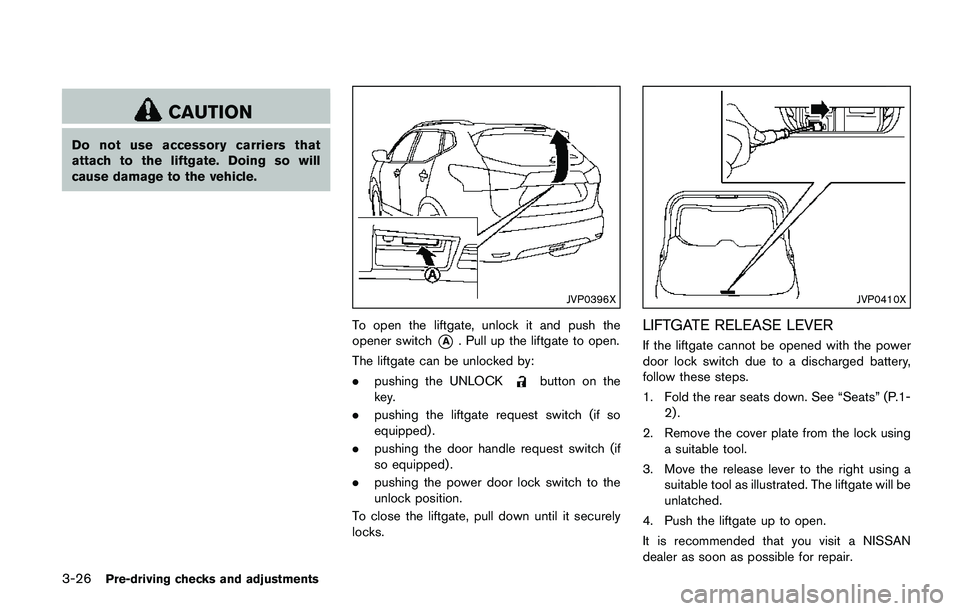
To open the liftgate, unlock it and push the
opener switch
*A. Pull up the liftgate to open.
The liftgate can be unlocked by:
.pushing the UNLOCK
button on the
key.
.pushing the liftgate request switch (if so
equipped) .
.pushing the door handle request switch (if
so equipped) .
.pushing the power door lock switch to the
unlock position.
To close the liftgate, pull down until it securely
locks.
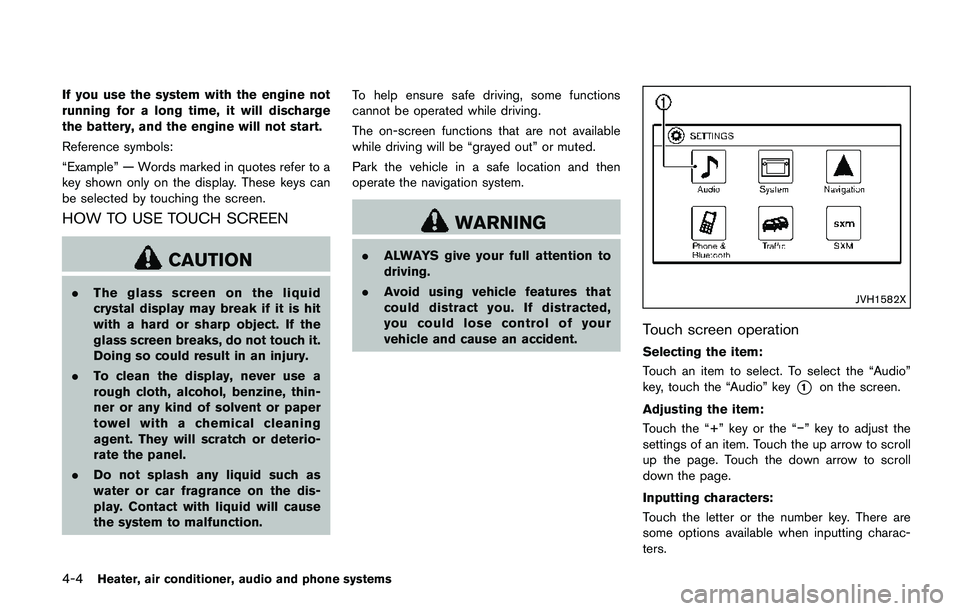
JVP0410X
LIFTGATE RELEASE LEVER
If the liftgate cannot be opened with the power
door lock switch due to a discharged battery,
follow these steps.
1. Fold the rear seats down. See “Seats” (P.1-
2) .
2. Remove the cover plate from the lock using
a suitable tool.
3. Move the release lever to the right using a
suitable tool as illustrated. The liftgate will be
unlatched.
4. Push the liftgate up to open.
It is recommended that you visit a NISSAN
dealer as soon as possible for repair.
Page 185 of 508
4-4Heater, air conditioner, audio and phone systems
If you use the system with the engine not
running for a long time, it will discharge
the battery, and the engine will not start.
Reference symbols:
“Example” — Words marked in quotes refer to a
key shown only on the display. These keys can
be selected by touching the screen.
HOW TO USE TOUCH SCREEN
CAUTION
.The glass screen on the liquid
crystal display may break if it is hit
with a hard or sharp object. If the
glass screen breaks, do not touch it.
Doing so could result in an injury.
.To clean the display, never use a
rough cloth, alcohol, benzine, thin-
ner or any kind of solvent or paper
towel with a chemical cleaning
agent. They will scratch or deterio-
rate the panel.
.Do not splash any liquid such as
water or car fragrance on the dis-
play. Contact with liquid will cause
the system to malfunction.To help ensure safe driving, some functions
cannot be operated while driving.
The on-screen functions that are not available
while driving will be “grayed out” or muted.
Park the vehicle in a safe location and then
operate the navigation system.
WARNING
.ALWAYS give your full attention to
driving.
.Avoid using vehicle features that
could distract you. If distracted,
you could lose control of your
vehicle and cause an accident.
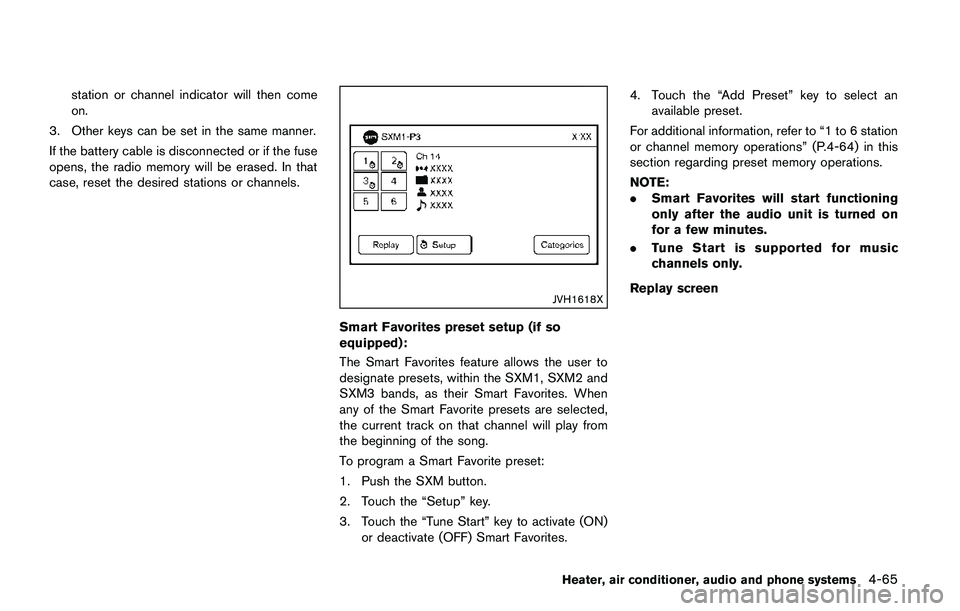
JVH1582X
Touch screen operation
Selecting the item:
Touch an item to select. To select the “Audio”
key, touch the “Audio” key
*1on the screen.
Adjusting the item:
Touch the “+” key or the “í” key to adjust the
settings of an item. Touch the up arrow to scroll
up the page. Touch the down arrow to scroll
down the page.
Inputting characters:
Touch the letter or the number key. There are
some options available when inputting charac-
ters.
Page 246 of 508
station or channel indicator will then come
on.
3. Other keys can be set in the same manner.
If the battery cable is disconnected or if the fuse
opens, the radio memory will be erased. In that
case, reset the desired stations or channels.
JVH1618X
Smart Favorites preset setup (if so
equipped):
The Smart Favorites feature allows the user to
designate presets, within the SXM1, SXM2 and
SXM3 bands, as their Smart Favorites. When
any of the Smart Favorite presets are selected,
the current track on that channel will play from
the beginning of the song.
To program a Smart Favorite preset:
1. Push the SXM button.
2. Touch the “Setup” key.
3. Touch the “Tune Start” key to activate (ON)
or deactivate (OFF) Smart Favorites.4. Touch the “Add Preset” key to select an
available preset.
For additional information, refer to “1 to 6 station
or channel memory operations” (P.4-64) in this
section regarding preset memory operations.
NOTE:
.Smart Favorites will start functioning
only after the audio unit is turned on
for a few minutes.
.Tune Start is supported for music
channels only.
Replay screen
Heater, air conditioner, audio and phone systems4-65
Page 249 of 508
4-68Heater, air conditioner, audio and phone systems
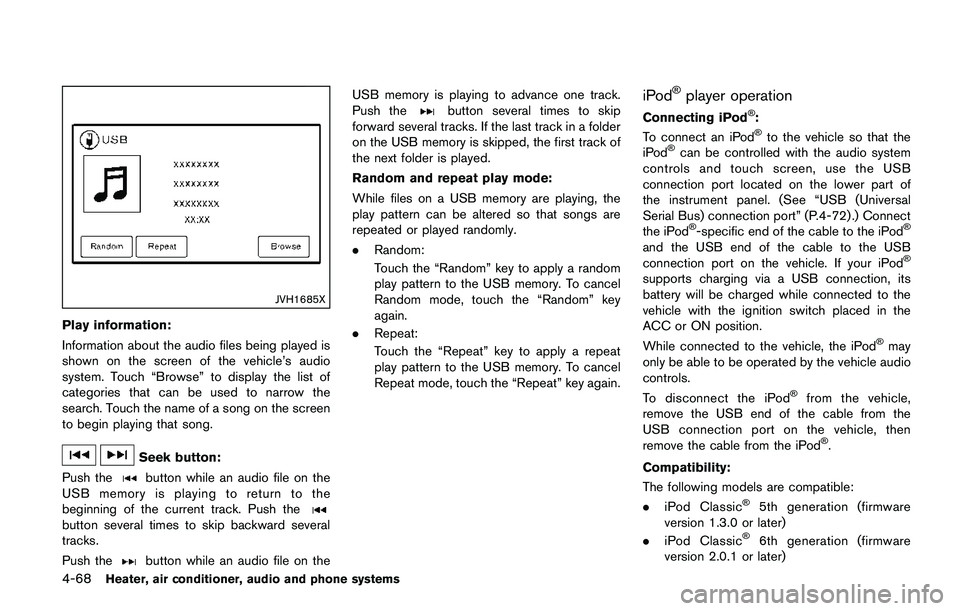
JVH1685X
Play information:
Information about the audio files being played is
shown on the screen of the vehicle’s audio
system. Touch “Browse” to display the list of
categories that can be used to narrow the
search. Touch the name of a song on the screen
to begin playing that song.
Seek button:
Push the
button while an audio file on the
USB memory is playing to return to the
beginning of the current track. Push the
button several times to skip backward several
tracks.
Push the
button while an audio file on theUSB memory is playing to advance one track.
Push the
button several times to skip
forward several tracks. If the last track in a folder
on the USB memory is skipped, the first track of
the next folder is played.
Random and repeat play mode:
While files on a USB memory are playing, the
play pattern can be altered so that songs are
repeated or played randomly.
.Random:
Touch the “Random” key to apply a random
play pattern to the USB memory. To cancel
Random mode, touch the “Random” key
again.
.Repeat:
Touch the “Repeat” key to apply a repeat
play pattern to the USB memory. To cancel
Repeat mode, touch the “Repeat” key again.iPodŠplayer operation
Connecting iPodŠ:
To connect an iPodŠto the vehicle so that the
iPodŠcan be controlled with the audio system
controls and touch screen, use the USB
connection port located on the lower part of
the instrument panel. (See “USB (Universal
Serial Bus) connection port” (P.4-72).) Connect
the iPod
Š-specific end of the cable to the iPodŠ
and the USB end of the cable to the USB
connection port on the vehicle. If your iPodŠ
supports charging via a USB connection, its
battery will be charged while connected to the
vehicle with the ignition switch placed in the
ACC or ON position.
While connected to the vehicle, the iPod
Šmay
only be able to be operated by the vehicle audio
controls.
To disconnect the iPod
Šfrom the vehicle,
remove the USB end of the cable from the
USB connection port on the vehicle, then
remove the cable from the iPod
Š.
Compatibility:
The following models are compatible:
.iPod Classic
Š5th generation (firmware
version 1.3.0 or later)
.iPod Classic
Š6th generation (firmware
version 2.0.1 or later)
Page 286 of 508
5 Starting and driving
Precautions when starting and driving ................................ 5-4
Exhaust gas (carbon monoxide) ...................................... 5-4
Three-way catalyst .............................................................. 5-5
Tire Pressure Monitoring System (TPMS) .................... 5-5
Avoiding collision and rollover ......................................... 5-8
On-pavement and off-road driving precautions .......... 5-8
Off-road recovery ................................................................ 5-9
Rapid air pressure loss ...................................................... 5-9
Drinking alcohol/drugs and driving .............................. 5-10
Driving safety precautions .............................................. 5-10
Ignition switch (models without Intelligent
Key system) ............................................................................. 5-12
Continuously Variable Transmission (CVT) ................ 5-13
Manual Transmission (MT) ............................................. 5-13
Key positions ..................................................................... 5-14
Push-button ignition switch (model with Intelligent
Key system) ............................................................................. 5-14
Operating range for engine start function ................. 5-14
Push-button ignition switch operation ........................ 5-15
Push-button ignition switch positions ......................... 5-16
Emergency engine shut off ............................................ 5-16
Intelligent Key battery discharge .................................. 5-16
Before starting the engine ................................................... 5-17
Starting the engine (model without Intelligent
Key system) ............................................................................. 5-17Starting the engine (model with Intelligent
Key system) ............................................................................ 5-18
Remote engine start (if so equipped) ...................... 5-19
Driving the vehicle ................................................................. 5-20
Continuously Variable Transmission (CVT) ............. 5-20
Manual Transmission (MT) ........................................... 5-25
Parking brake .......................................................................... 5-26
Pedal type ........................................................................ 5-27
Switch type (models with electronic parking
brake system) ................................................................. 5-27
ECO mode system ............................................................... 5-29
ECO Pedal Guide function ......................................... 5-29
Ambient ECO .................................................................. 5-30
ECO Drive Report ......................................................... 5-31
Lane Departure Warning (LDW) (if so equipped) ....... 5-31
LDW system operation ................................................. 5-32
How to enable/disable the LDW system ................. 5-33
LDW system limitations ................................................ 5-34
System temporarily unavailable .................................. 5-35
System malfunction ....................................................... 5-35
System maintenance ..................................................... 5-36
Lane Departure Prevention (LDP) (if so equipped) ..... 5-36
LDP system operation .................................................. 5-37
How to enable/disable the LDP system .................. 5-38
LDP system limitations ................................................. 5-39
Page 299 of 508
5-14Starting and driving
KEY POSITIONS
LOCK: Normal parking position (0)
OFF: (Not used) (1)
This position activates electrical accessories
such as the radio when the engine is not
running.
ON: Normal operating position (2)
This position turns on the ignition system and
the electrical accessories.
START: (3)
This position starts the engine. As soon as the
engine has started, release the key. It auto-
matically returns to the ON position.
WARNING
Do not operate the push-button ignition
switch while driving the vehicle except
in an emergency. (The engine will stop
when the ignition switch is pushed 3
consecutive times or the ignition switch
is pushed and held for more than 2
seconds.) If the engine stops while the
vehicle is being driven, this could lead
to a crash and serious injury.
Before operating the push-button ignition
switch, be sure to move the shift lever to the P
(Park) position (for Continuously Variable Trans-
mission (CVT) models) or the shift lever to the N
(Neutral) position (for Manual Transmission (MT)
models) .
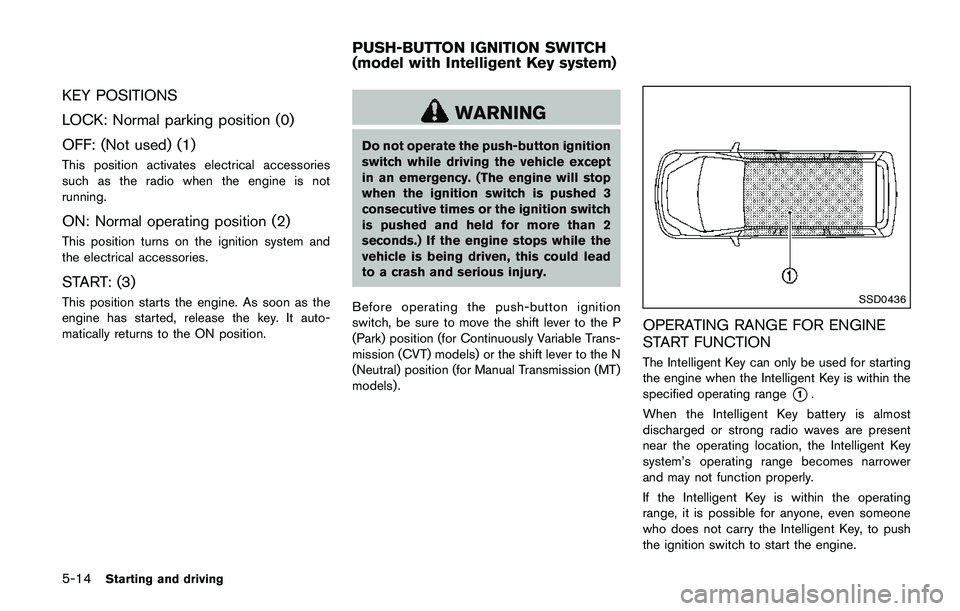
SSD0436
OPERATING RANGE FOR ENGINE
START FUNCTION
The Intelligent Key can only be used for starting
the engine when the Intelligent Key is within the
specified operating range
*1.
When the Intelligent Key battery is almost
discharged or strong radio waves are present
near the operating location, the Intelligent Key
system’s operating range becomes narrower
and may not function properly.
If the Intelligent Key is within the operating
range, it is possible for anyone, even someone
who does not carry the Intelligent Key, to push
the ignition switch to start the engine.
PUSH-BUTTON IGNITION SWITCH
(model with Intelligent Key system)