transmission NISSAN QASHQAI 2017 Owner´s Manual
[x] Cancel search | Manufacturer: NISSAN, Model Year: 2017, Model line: QASHQAI, Model: NISSAN QASHQAI 2017Pages: 508, PDF Size: 2.68 MB
Page 110 of 508
29. Continuously Variable Transmission
(CVT) position indicator (CVT models)
This indicator shows the automatic shift position.
In the manual shift mode, when the transmission
does not shift to the selected gear due to a
transmission protection mode, the CVT position
indicator will blink and a chime will sound.
See “Continuously Variable Transmission (CVT)”
(P.5-20) for further details.
30. CVT Error: See Owner’s Manual
warning (CVT models)
This warning appears when there is a malfunc-
tion with the CVT system. If this warning comes
on, have the system checked. It is recommended
that you visit a NISSAN dealer for this service.
31. Malfunction warning (if so equipped)
This warning appears when the following
systems malfunction.
.Lane Departure Warning (LDW)
.Lane Departure Prevention (LDP)
.Blind Spot Warning (BSW)
.Rear Cross Traffic Alert (RCTA)
.Forward Emergency Braking (FEB)
.Forward Emergency Braking (FEB) with
pedestrian detection
For more details, see “Lane Departure Warning(LDW)” (P.5-31) , “Lane Departure Prevention
(LDP)” (P.5-36) , “Blind Spot Warning (BSW)”
(P.5-42) , “Rear Cross Traffic Alert (RCTA)” (P.5-
51) , “Forward Emergency Braking (FEB)” (P.5-
80) or “Forward Emergency Braking (FEB) with
pedestrian detection system” (P.5-86) .
32. ECO mode indicator
The ECO mode indicator appears when the
ECO mode system is turned on.
(See “ECO mode system” (P.5-29) .)
33. Unavailable: High Cabin Tempera-
ture warning (if so equipped)
This warning appears if the interior temperature
of the vehicle has reached such a high
temperature that the sensor for the Lane
Departure Warning (LDW) or Lane Departure
Prevention (LDP) systems can no longer func-
tion reliably. Once the interior temperature has
reached normal levels, the warning should
disappear.
If the warning continues to display, have the
system checked. It is recommended that you
visit a NISSAN dealer for this service.
For additional information, refer to “Lane De-
parture Warning (LDW)” (P.5-31) or “Lane
Departure Prevention (LDP)” (P.5-36).
34. Not Available: Poor Road Conditions
warning (if so equipped)
This message appears when the Lane Departure
Prevention (LDP) system becomes unavailable
because the road is slippery. For additional
information, refer to “Lane Departure Prevention
(LDP)” (P.5-36) .
35. Currently unavailable warning (if so
equipped)
This message appears when the Lane Departure
Prevention (LDP) system becomes unavailable
because the VDC is turned off. For additional
information, refer to “Lane Departure Prevention
(LDP)” (P.5-36) .
36. Unavailable: Front Radar Obstruction
warning (if so equipped)
If the sensor area of the front bumper is covered
with dirt or obstructed, making it impossible to
detect a vehicle ahead, the Forward Emergency
Braking (FEB) system, Forward Emergency
Braking (FEB) with pedestrian detection system
or Intelligent Cruise Control (ICC) system is
automatically turned off. The Forward Emer-
gency Braking (FEB) system warning light
(orange) will illuminate and the warning message
will appear in the vehicle information display. If
the warning message appears, park the vehicle
in a safe location and turn the engine off.
Instruments and controls2-31
Page 114 of 508
— Reset the elapsed time and trip od-
ometer.
.All
— Reset all items of “Average Speed”,
“Elapsed time and trip odometer” and
“Fuel economy.”
Once the “Elapsed time and trip odometer 1” is
displayed, you can use
*2buttons to
switch between the “Elapsed time and trip
odometer 1” and “Elapsed time and trip
odometer 2.”
4-5. Fuel economy 1 and 2 (MPG, l
(litre)/100 km or km/l(litre))
Current fuel consumption:
The current fuel consumption mode shows the
current fuel consumption.
Average fuel consumption:
The average fuel consumption 1 mode shows
the average fuel consumption since the last
reset. The average fuel consumption 2 mode
shows the average fuel consumption since the
time the ignition switch was placed in the ON
position. The average fuel consumption 2 is
automatically reset each time the ignition is
placed in the OFF position.
Resetting is done by pushing the OK
*1button.
When the OK
*1button is pushed, the
following menu items are displayed..Cancel
— Return to the previous screen without
resetting.
.Fuel Economy
— Reset the fuel economy.
.All
— Reset all items of “Average Speed”,
“Elapsed time and trip odometer” and
“Fuel economy”.
Once the “Fuel economy 1” is displayed, you
can use
*2buttons to switch between the
“Fuel economy 1” and “Fuel economy 2”.
The display is updated every 30 seconds. For
about the first 1/3 mile (500 m) after a reset, the
display shows “——”.
6. Audio
The audio mode shows the status of audio
information.
7. Navigation (if so equipped)
When the route guidance is set in the navigation
system, this item shows the navigation route
information.
8. Compass (if so equipped)
This display indicates the heading direction of
the vehicle.
9. “4x4-i” display (if so equipped)
When the “4x4-i” display is selected, you can
view the distribution ratio of the transmission
torque to the front and rear wheels during
driving.
10. Chassis control
When Active Trace Control, Active Engine Brake
(Continuously Variable Transmission (CVT)
models) or Active Ride Control system is
operated, it shows the operating condition. It
also shows operating condition of Hill Start
Assist. See “Active Trace Control” (P.5-106) ,
“Active Engine Brake (Continuously Variable
Transmission (CVT) models)” (P.5-107) , “Active
Ride Control” (P.5-108) or “Hill Start Assist
system” (P.5-109)for more details.
11. Tire Pressures
The tire pressure mode shows the pressure of all
four tires while the vehicle is driven.
When the Tire Pressure Low — Add Air warning
appears, the display can be switched to the tire
pressure mode by pushing the OK
*1button to
reveal additional details on the displayed warn-
ing.
Instruments and controls2-35
Page 162 of 508
Welcome light and farewell light function
When you lock or unlock the doors or the
liftgate, the daytime running lights, parking lights
and the tail lights will illuminate for a period of
time. The welcome light and farewell light
function can be disabled. For information about
disabling the welcome light and farewell light
function, see “Vehicle Settings” (P.2-22).
Locking doors
1. Move the shift lever to the P (Park) position
(Continuously Variable Transmission (CVT)
models) , or the shift lever in the N (Neutral)
position (Manual Transmission (MT) mod-
els) , place the ignition switch in the OFF
position and make sure you carry the
Intelligent Key with you.
2. Close all doors.
3. Push any door handle request switch while
carrying the Intelligent Key with you.
4. All doors and the liftgate will lock.
5. The hazard indicator lights flash twice and
the outside buzzer sounds twice.
NOTE:
.Request switches for all doors and the
liftgate can be deactivated when the I-
Key Door Lock setting is turned off in
the Vehicle Settings of the vehicle
information display. For additional in-formation, see“Vehicle Settings”(P.2-
22) .
.Doors lock with the door handle re-
quest switch while the ignition switch
is not in the LOCK position.
.Doors do not lock by pushing the door
handle request switch while any door is
open. However, doors lock with the
mechanical key even if any door is
open.
.Doors do not lock with the door handle
request switch with the Intelligent Key
inside the vehicle and a beep sounds to
warn you. However, when an Intelligent
Key is inside the vehicle, doors can be
locked with another Intelligent Key.
CAUTION
.After locking the doors using the
request switch, make sure that the
doors have been securely locked by
operating the door handles or the
liftgate opener switch.
.When locking the doors using the
request switch, make sure to have
the Intelligent Key in your posses-
sion before operating the request
switch to prevent the Intelligent Keyfrom being left in the vehicle.
.The request switch is operational
only when the Intelligent Key has
been detected by the Intelligent Key
system.
Unlocking doors
1. Push the door handle request switch*Aor
the liftgate request switch
*Bwhile carry-
ing the Intelligent Key with you.
2. The hazard indicator flashes once and out-
side chime sounds once. The corresponding
door or the liftgate will unlock.
3. Push the request switch again within 1
minute.
4. The hazard indicator flashes once and out-
side chime sounds once again. All the doors
and the liftgate will unlock.
All doors will be locked automatically unless one
of the following operations is performed within 1
minute after pushing the request switch while
the doors are locked.
.Opening any door.
.Pushing the ignition switch.
During this 1-minute time period, if the UNLOCK
button on the Intelligent Key is pushed, all
doors will be locked automatically after another
Pre-driving checks and adjustments3-15
Page 286 of 508
5 Starting and driving
Precautions when starting and driving ................................ 5-4
Exhaust gas (carbon monoxide) ...................................... 5-4
Three-way catalyst .............................................................. 5-5
Tire Pressure Monitoring System (TPMS) .................... 5-5
Avoiding collision and rollover ......................................... 5-8
On-pavement and off-road driving precautions .......... 5-8
Off-road recovery ................................................................ 5-9
Rapid air pressure loss ...................................................... 5-9
Drinking alcohol/drugs and driving .............................. 5-10
Driving safety precautions .............................................. 5-10
Ignition switch (models without Intelligent
Key system) ............................................................................. 5-12
Continuously Variable Transmission (CVT) ................ 5-13
Manual Transmission (MT) ............................................. 5-13
Key positions ..................................................................... 5-14
Push-button ignition switch (model with Intelligent
Key system) ............................................................................. 5-14
Operating range for engine start function ................. 5-14
Push-button ignition switch operation ........................ 5-15
Push-button ignition switch positions ......................... 5-16
Emergency engine shut off ............................................ 5-16
Intelligent Key battery discharge .................................. 5-16
Before starting the engine ................................................... 5-17
Starting the engine (model without Intelligent
Key system) ............................................................................. 5-17Starting the engine (model with Intelligent
Key system) ............................................................................ 5-18
Remote engine start (if so equipped) ...................... 5-19
Driving the vehicle ................................................................. 5-20
Continuously Variable Transmission (CVT) ............. 5-20
Manual Transmission (MT) ........................................... 5-25
Parking brake .......................................................................... 5-26
Pedal type ........................................................................ 5-27
Switch type (models with electronic parking
brake system) ................................................................. 5-27
ECO mode system ............................................................... 5-29
ECO Pedal Guide function ......................................... 5-29
Ambient ECO .................................................................. 5-30
ECO Drive Report ......................................................... 5-31
Lane Departure Warning (LDW) (if so equipped) ....... 5-31
LDW system operation ................................................. 5-32
How to enable/disable the LDW system ................. 5-33
LDW system limitations ................................................ 5-34
System temporarily unavailable .................................. 5-35
System malfunction ....................................................... 5-35
System maintenance ..................................................... 5-36
Lane Departure Prevention (LDP) (if so equipped) ..... 5-36
LDP system operation .................................................. 5-37
How to enable/disable the LDP system .................. 5-38
LDP system limitations ................................................. 5-39
Page 288 of 508
Active Engine Brake (Continuously Variable
Transmission (CVT) models) ...................................... 5-107
Active Ride Control ...................................................... 5-108
Hill Start Assist system ..................................................... 5-109
Cold weather driving .......................................................... 5-110
Freeing a frozen door lock .......................................... 5-110
Anti-freeze ....................................................................... 5-110Battery ............................................................................ 5-110
Draining of coolant water .......................................... 5-110
Tire equipment ............................................................. 5-110
Special winter equipment ......................................... 5-110
Driving on snow or ice .............................................. 5-110
Page 296 of 508
.If your engine stalls or you cannot
make it to the top of a steep hill,
never attempt to turn around. Your
vehicle could tip or roll over. Always
back straight down in R (Reverse)
range. Never back down in N (Neu-
tral) , using only the brake, as this
could cause loss of control.
.Heavy braking going down a hill
could cause your brakes to overheat
and fade, resulting in loss of control
and an accident. Apply brakes
lightly and use a low range to
control your speed.
.Unsecured cargo can be thrown
around when driving over rough
terrain. Properly secure all cargo
so it will not be thrown forward
and cause injury to you or your
passengers.
.To avoid raising the center of gravity
excessively, do not exceed the rated
capacity of the roof rail (if so
equipped) and evenly distribute the
load. Secure heavy loads in the
cargo area as far forward and as
low as possible. Do not equip the
vehicle with tires larger than speci-
fied in this manual. This could causeyour vehicle to roll over.
.Do not grip the inside or spokes of
the steering wheel when driving off-
road. The steering wheel could
move suddenly and injure your
hands. Instead drive with your fin-
gers and thumbs on the outside of
the rim.
.Before operating the vehicle, ensure
that the driver and all passengers
have their seat belts fastened.
.Always drive with the floor mats in
place as the floor may became hot.
.Lower your speed when encounter-
ing strong crosswinds. With a higher
center of gravity, your vehicle is
more affected by strong side winds.
Slower speeds ensure better vehicle
control.
.Do not drive beyond the perfor-
mance capability of the tires, even
with AWD engaged.
.For AWD equipped vehicles, do not
attempt to raise two wheels off the
ground and shift the transmission to
any drive or reverse position with
the engine running. Doing so may
result in drivetrain damage or un-expected vehicle movement which
could result in serious vehicle da-
mage or personal injury.
.Do not attempt to test an AWD
equipped vehicle on a 2-wheel dy-
namometer (such as the dynam-
ometers used by some states for
emissions testing) , or similar equip-
ment even if the other two wheels
are raised off the ground. Make sure
you inform test facility personnel
that your vehicle is equipped with
AWD before it is placed on a
dynamometer. Using the wrong test
equipment may result in drivetrain
damage or unexpected vehicle
movement which could result in
serious vehicle damage or personal
injury.
.When a wheel is off the ground due
to an unlevel surface, do not spin
the wheel excessively (AWD model) .
.Accelerating quickly, sharp steering
maneuvers or sudden braking may
cause loss of control.
.If at all possible, avoid sharp turning
maneuvers, particularly at high
speeds. Your vehicle has a higher
center of gravity than a conventional
Starting and driving5-11
Page 298 of 508
JVS1067X
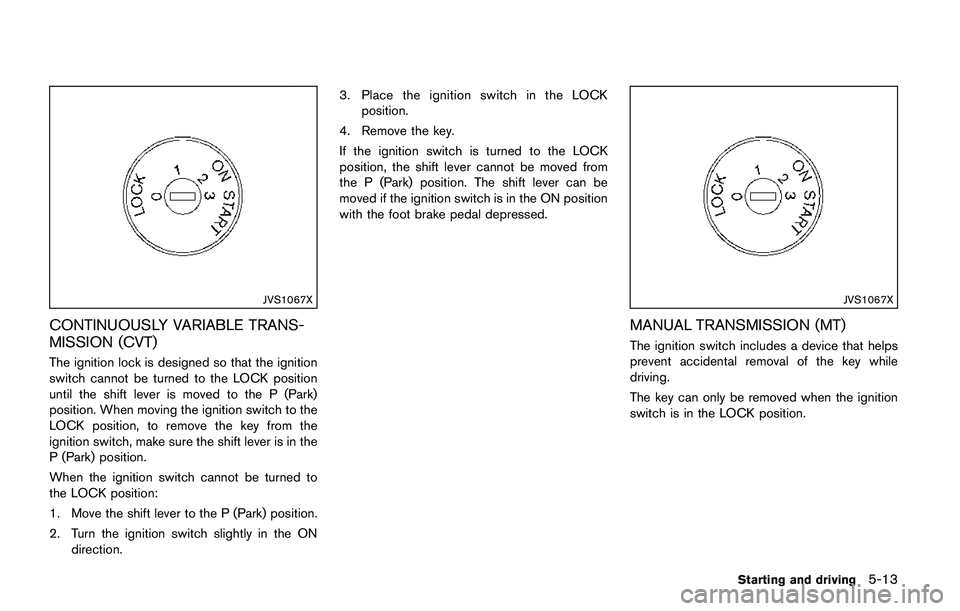
CONTINUOUSLY VARIABLE TRANS-
MISSION (CVT)
The ignition lock is designed so that the ignition
switch cannot be turned to the LOCK position
until the shift lever is moved to the P (Park)
position. When moving the ignition switch to the
LOCK position, to remove the key from the
ignition switch, make sure the shift lever is in the
P (Park) position.
When the ignition switch cannot be turned to
the LOCK position:
1. Move the shift lever to the P (Park) position.
2. Turn the ignition switch slightly in the ON
direction.3. Place the ignition switch in the LOCK
position.
4. Remove the key.
If the ignition switch is turned to the LOCK
position, the shift lever cannot be moved from
the P (Park) position. The shift lever can be
moved if the ignition switch is in the ON position
with the foot brake pedal depressed.
JVS1067X
MANUAL TRANSMISSION (MT)
The ignition switch includes a device that helps
prevent accidental removal of the key while
driving.
The key can only be removed when the ignition
switch is in the LOCK position.
Starting and driving5-13
Page 299 of 508
5-14Starting and driving
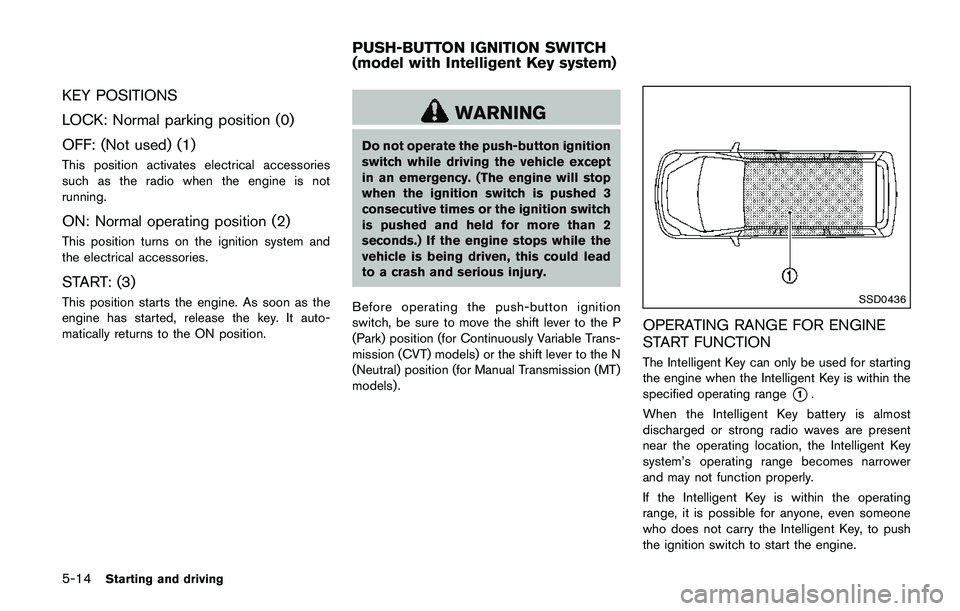
KEY POSITIONS
LOCK: Normal parking position (0)
OFF: (Not used) (1)
This position activates electrical accessories
such as the radio when the engine is not
running.
ON: Normal operating position (2)
This position turns on the ignition system and
the electrical accessories.
START: (3)
This position starts the engine. As soon as the
engine has started, release the key. It auto-
matically returns to the ON position.
WARNING
Do not operate the push-button ignition
switch while driving the vehicle except
in an emergency. (The engine will stop
when the ignition switch is pushed 3
consecutive times or the ignition switch
is pushed and held for more than 2
seconds.) If the engine stops while the
vehicle is being driven, this could lead
to a crash and serious injury.
Before operating the push-button ignition
switch, be sure to move the shift lever to the P
(Park) position (for Continuously Variable Trans-
mission (CVT) models) or the shift lever to the N
(Neutral) position (for Manual Transmission (MT)
models) .
SSD0436
OPERATING RANGE FOR ENGINE
START FUNCTION
The Intelligent Key can only be used for starting
the engine when the Intelligent Key is within the
specified operating range
*1.
When the Intelligent Key battery is almost
discharged or strong radio waves are present
near the operating location, the Intelligent Key
system’s operating range becomes narrower
and may not function properly.
If the Intelligent Key is within the operating
range, it is possible for anyone, even someone
who does not carry the Intelligent Key, to push
the ignition switch to start the engine.
PUSH-BUTTON IGNITION SWITCH
(model with Intelligent Key system)
Page 300 of 508
.The cargo room area is not included in the
operating range but the Intelligent Key may
function.
.If the Intelligent Key is placed on the
instrument panel, inside the glove box or
door pocket, the Intelligent Key may not
function.
.If the Intelligent Key is placed near the door
or window outside the vehicle, the Intelligent
Key may function.
PUSH-BUTTON IGNITION SWITCH
OPERATION
CAUTION
.Do not leave the vehicle for ex-
tended periods of time when the
ignition switch is in the ON position
and the engine is not running. This
can discharge the battery.
.Use electrical accessories with the
engine running to avoid discharging
the vehicle battery. If you must use
accessories while the engine is not
running, do not use them for ex-
tended periods of time and do not
use multiple electrical accessories
at the same time.
JVS0937X
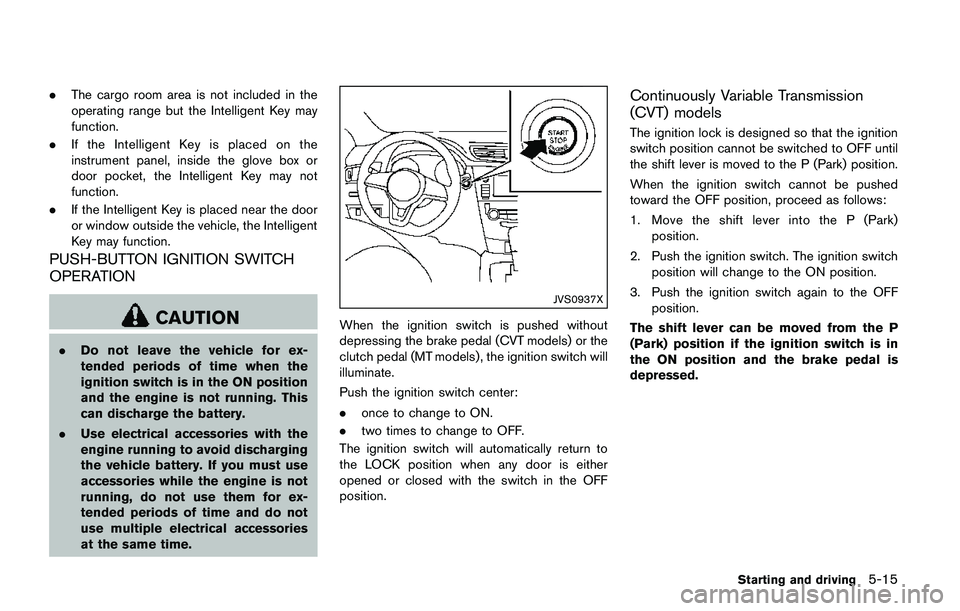
When the ignition switch is pushed without
depressing the brake pedal (CVT models) or the
clutch pedal (MT models) , the ignition switch will
illuminate.
Push the ignition switch center:
.once to change to ON.
.two times to change to OFF.
The ignition switch will automatically return to
the LOCK position when any door is either
opened or closed with the switch in the OFF
position.
Continuously Variable Transmission
(CVT) models
The ignition lock is designed so that the ignition
switch position cannot be switched to OFF until
the shift lever is moved to the P (Park) position.
When the ignition switch cannot be pushed
toward the OFF position, proceed as follows:
1. Move the shift lever into the P (Park)
position.
2. Push the ignition switch. The ignition switch
position will change to the ON position.
3. Push the ignition switch again to the OFF
position.
The shift lever can be moved from the P
(Park) position if the ignition switch is in
the ON position and the brake pedal is
depressed.
Starting and driving5-15
Page 302 of 508
chime sounds. The engine will start.
After step 3 is performed, when the ignition
switch is pushed without depressing the brake
pedal, the ignition switch position will change to
ACC.
NOTE:
.When the ignition switch is pushed to
the ON position or the engine is started
by the above procedures, the“Key
Battery Low”warning appears (on the
Vehicle information display) even if the
Intelligent Key is inside the vehicle.
This is not a malfunction. To turn off the
warning, touch the ignition switch with
the Intelligent Key again.
.If the“Key Battery Low”warning ap-
pears (on the Vehicle information dis-
play) , replace the battery as soon as
possible. (See“Intelligent Key battery
replacement”(P.8-23) .).Make sure the area around the vehicle is
clear.
.Check fluid levels such as engine oil, cool-
ant, brake fluid, and window washer fluid as
frequently as possible, or at least whenever
you refuel.
.Check that all windows and lights are clean.
.Visually inspect tires for their appearance
and condition. Also check tires for proper
inflation.
.Lock all doors.
.Position seat and adjust head restraints.
.Adjust inside and outside mirrors.
.Fasten seat belts and ask all passengers to
do likewise.
.Check the operation of warning lights when
the ignition switch is placed in the ON
position. (See “Warning lights, indicator
lights and audible reminders” (P.2-10) .)1. Apply the parking brake.
2.Continuously Variable Transmission
(CVT) model:
Move the shift lever to the P (Park) or N
(Neutral) position. (P is recommended.)
The starter is designed so that it does not
operate unless the shift lever is in either of
the above positions.
Manual Transmission (MT) model:
Move the shift lever to the N (Neutral)
position, and depress the clutch pedal to
the floor while starting the engine.
3. Crank the enginewith your foot off the
accelerator pedalby turning the ignition
switch to START. Release the switch when
the engine starts. If the engine starts, but
fails to run, repeat the above procedure.
.If the engine is very hard to start in
extremely cold weather or when restart-
ing, depress the accelerator pedal a little
(approximately 1/3 to the floor) and hold
it and then crank the engine. Release the
accelerator pedal when the engine starts.
.If the engine is very hard to start because
it is flooded, depress the accelerator
pedal all the way to the floor and hold it.
Crank the engine for 5 - 6 seconds. After
cranking the engine, release the accel-
Starting and driving5-17
BEFORE STARTING THE ENGINESTARTING THE ENGINE (model
without Intelligent Key system)