ESP NISSAN QASHQAI 2017 Owner´s Manual
[x] Cancel search | Manufacturer: NISSAN, Model Year: 2017, Model line: QASHQAI, Model: NISSAN QASHQAI 2017Pages: 508, PDF Size: 2.68 MB
Page 271 of 508
4-90Heater, air conditioner, audio and phone systems
.Send Text.Next Entry.Previous Entry
For more information about these options,
see “Voice commands” (P.4-86).
5. Once a recipient is chosen, the system
prompts for which message to send. Five
predefined messages are available as well
as three custom messages. To choose one
of the predefined messages, speak one of
the following:
.“Driving, can’t text”.“Call me”.“On my way”.“Running late”.“Okay”.“Yes”.“No”.“Where are you?”.“When?”.“Custom Messages”
To send one of the custom messages, say
“Custom Messages”. If more than one
custom message is stored, the system will
prompt for the number of the desired
custom message. For more information on
setting and managing custom text mes-
sages, see “Bluetooth
Šsettings” (P.4-91) .Reading a received text message:
1. Push the
button.
2. Say “Phone”.
3. Say “Read Text”.
The text message, sender and delivery time are
shown on the screen. Use the menu control
buttons on the steering wheel to scroll through
all text messages if more than one are available.
Push the
button to exit the text message
screen. Push thebutton to access the
following options for replying to the text mes-
sage:
.Call Back
Speak this command to call the sender of
the text message using the Bluetooth
Š
Hands-Free Phone System.
.Send Text
Speak this command to send a text mes-
sage response to the sender of the text
message.
.Read Text
Speak this command to read the text
message again.
.Previous Text
Speak this command to move to the
previous text message (if available) ..Next Text
Speak this command to move to the next
text message (if available) .
NOTE:
.Text messages are only displayed if the
vehicle speed is less than 5 MPH (8
km/h) .
.iPhone
Šcan only send text messages
via SiriŠEyes Free.
Making custom messages with Siri
ŠEyes
Free:
If a connected iPhone
Šis equipped with SiriŠ,it
can also be used to create custom messages.
(See “Siri
ŠEyes Free” (P.4-78).)
Page 278 of 508
.“Driving, can’t text”.“Call me”.“On my way”.“Running late”.“Okay”.“Yes”.“No”.“Where are you?”.“When?”.“Custom Messages”
To send one of the custom messages, say
“Custom Messages”. If more than one
custom message is stored, the system will
prompt for the number of the desired
custom message. For more information on
setting and managing custom text mes-
sages, see “Phone settings” (P.4-98) .
NOTE:
iPhone
Šcan only send text messages via
SiriŠEyes Free. (See“SiriŠEyes Free”(P.4-
78) .)
Reading a received text message
1. Push thebutton on the steering wheel.
2. Say “Phone” after the tone.
3. Say “Read Text” after the tone.
The text message, sender and delivery time are
shown on the screen. Use the menu control
buttons to scroll through all text messages ifmore than one are available. Push the
button to exit the text message screen. Push thebutton to access the following options for
replying to the text message:
.Call Back
Speak this command to call the sender of
the text message using the Bluetooth
Š
Hands-Free Phone System.
.Send Text
Speak this command to send a text mes-
sage response to the sender of the text
message.
.Read Text
Speak this command to read the text
message again.
.Previous Text
Speak this command to move to the
previous text message (if available) .
.Next Text
Speak this command to move to the next
text message (if available) .
NOTE:
Text messages are only displayed if the
vehicle speed is less than 5 MPH (8 km/h) .
Making custom messages with SiriŠ
Eyes Free
If a connected iPhoneŠis equipped with SiriŠ,it
can also be used to create custom messages.
(See “Siri
ŠEyes Free” (P.4-78).)
Heater, air conditioner, audio and phone systems4-97
Page 280 of 508
cations shown in the vehicle information
display. Touch “Both” to have text notifica-
tions shown in both the vehicle information
display and the touch screen. Touch “OFF”
to turn off all text notifications.
.Auto Reply (if so equipped):
Touch to toggle the auto reply functionality
on or off.
.Auto Reply Message (if so equipped):
Touch to indicate preferred message to be
sent when “Auto Reply” function is acti-
vated.
.Use Vehicle’s Signature (if so equipped):
Touch to toggle on or off the addition of the
vehicle signature to outgoing messages
.Custom Text Messages (if so equipped):
Touch this option to select a custom
message to edit. There are several custom
message slots available.The NISSAN Voice Recognition system allows
hands-free operation of the systems equipped
on this vehicle, such as the phone and naviga-
tion systems.
To operate NISSAN Voice Recognition, push the
button located on the steering wheel.
When prompted, speak the command for the
system you wish to activate. The command given
is picked up by the microphone and performed
when it is properly recognized. NISSAN Voice
Recognition will provide a voice response as
well as a message in the touch screen to inform
you of the command results.
USING THE SYSTEM
Initialization
When the ignition switch is placed in the ACC
or ON position, NISSAN Voice Recognition is
initialized, which takes a few seconds. When
completed, the system is ready to accept voice
commands. If the
button is pushed before
the initialization completes, the system will
announce: “Voice Recognition System not
ready. Please wait.”
Heater, air conditioner, audio and phone systems4-99
NISSAN VOICE RECOGNITION
SYSTEM (models with navigation
system)
Page 284 of 508
For more information about the audio system,
see “FM-AM-SAT radio with Compact Disc (CD)
player (Type B)” (P.4-63) .
INFORMATION VOICE COMMANDS
The following voice commands are available for
the information functions of the Navigation
System:
.Traffic
.Fuel Prices
.Sports
.Stocks
.Movie Listings
.Current Weather
.Weather Map
.5-day Forecast
.6-hour Forecast
.Connect To Voice Menu (if so equipped)
For more information about these commands,
see the separate Navigation System Owner’s
Manual.
MY APPS VOICE COMMANDS
Many Apps can be accessed using this voice
command. For information about smartphone
integration, “NissanConnect
SMMobile Apps
smartphone integration” (P.4-76) .
HELP VOICE COMMANDS
The following voice commands can be spoken
to have the system provide instructions and tips
for using the NISSAN Voice Recognition sys-
tem.
.List Commands
.What Can I Say?
.General Help
.Quit
.Exit
.Help
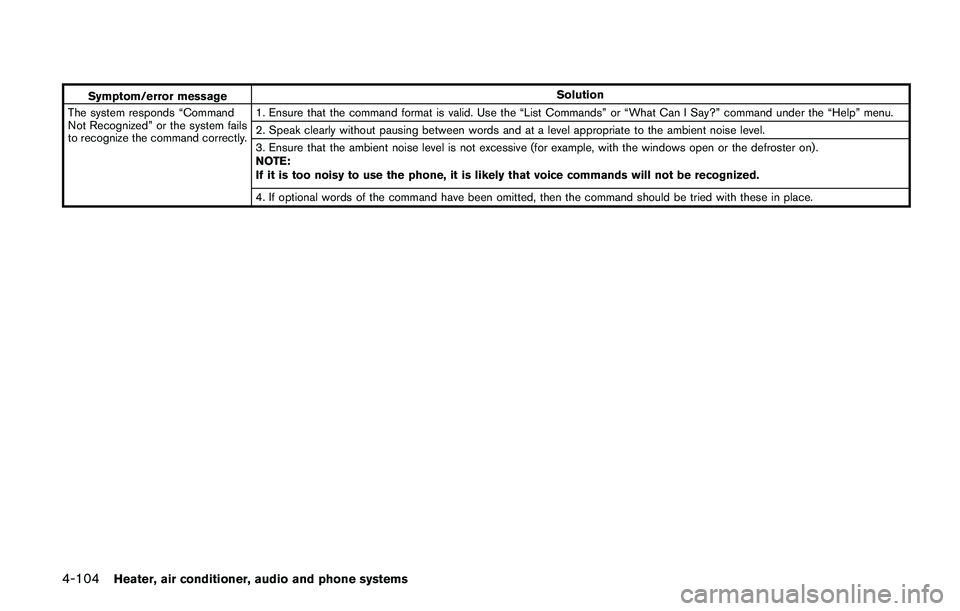
TROUBLESHOOTING GUIDE
The system should respond correctly to all voice
commands without difficulty. If problems are
encountered, follow the solutions given in this
guide for the appropriate error. Where the
solutions are listed by number, try each solution
in turn, starting with number one, until the
problem is resolved.
Heater, air conditioner, audio and phone systems4-103
Page 285 of 508
4-104Heater, air conditioner, audio and phone systems
Symptom/error messageSolution
The system responds “Command
Not Recognized” or the system fails
to recognize the command correctly.1. Ensure that the command format is valid. Use the “List Commands” or “What Can I Say?” command under the “Help” menu.
2. Speak clearly without pausing between words and at a level appropriate to the ambient noise level.
3. Ensure that the ambient noise level is not excessive (for example, with the windows open or the defroster on) .
NOTE:
If it is too noisy to use the phone, it is likely that voice commands will not be recognized.
4. If optional words of the command have been omitted, then the command should be tried with these in place.
Page 290 of 508
THREE-WAY CATALYST
The three-way catalyst is an emission control
device installed in the exhaust system. Exhaust
gases in the three-way catalyst are burned at
high temperatures to help reduce pollutants.
WARNING
.The exhaust gas and the exhaust
system are very hot. Keep people,
animals and flammable materials
away from the exhaust system com-
ponents.
.Do not stop or park the vehicle over
flammable materials such as dry
grass, wastepaper or rags. They
may ignite and cause a fire.
CAUTION
.Do not use leaded gasoline. Depos-
its from leaded gasoline will ser-
iously reduce the three-way
catalyst’s ability to help reduce ex-
haust pollutants.
.Keep your engine tuned up. Mal-
functions in the ignition, fuel injec-tion, or electrical systems can cause
overrich fuel flow into the three-way
catalyst, causing it to overheat. Do
not keep driving if the engine mis-
fires, or if noticeable loss of perfor-
mance or other unusual operating
conditions are detected. Have the
vehicle inspected. It is recom-
mended you visit a NISSAN dealer
for this service.
.Avoid driving with an extremely low
fuel level. Running out of fuel could
cause the engine to misfire, dama-
ging the three-way catalyst.
.Do not race the engine while warm-
ing it up.
.Do not push or tow your vehicle to
start the engine.
TIRE PRESSURE MONITORING SYS-
TEM (TPMS)
Each tire, including the spare (if provided) ,
should be checked monthly when cold and
inflated to the inflation pressure recommended
by the vehicle manufacturer on the vehicle
placard or tire inflation pressure label. (If your
vehicle has tires of a different size than the size
indicated on the vehicle placard or tire inflation
pressure label, you should determine the propertire inflation pressure for those tires.)
As an added safety feature, your vehicle has
been equipped with a Tire Pressure Monitoring
System (TPMS) that illuminates a low tire
pressure telltale when one or more of your tires
is significantly under-inflated. Accordingly, when
the low tire pressure telltale illuminates, you
should stop and check your tires as soon as
possible, and inflate them to the proper pres-
sure. Driving on a significantly under-inflated tire
causes the tire to overheat and can lead to tire
failure. Under-inflation also reduces fuel effi-
ciency and tire tread life, and may affect the
vehicle’s handling and stopping ability.
Please note that the TPMS is not a substitute for
proper tire maintenance, and it is the driver’s
responsibility to maintain correct tire pressure,
even if under-inflation has not reached the level
to trigger illumination of the TPMS low tire
pressure telltale.
Your vehicle has also been equipped with a
TPMS malfunction indicator to indicate when the
system is not operating properly. The TPMS
malfunction indicator is combined with the low
tire pressure telltale. When the system detects a
malfunction, the telltale will flash for approxi-
mately one minute and then remain continuously
illuminated. This sequence will continue upon
subsequent vehicle start-ups as long as the
Starting and driving5-5
Page 292 of 508
for approximately 1 minute. The
light will remain on after 1 minute.
Have your tires replaced and/or
TPMS system reset as soon as
possible. It is recommended you
visit a NISSAN dealer for these
services.
.Replacing tires with those not ori-
ginally specified by NISSAN could
affect the proper operation of the
TPMS.
.Do not inject any tire liquid or
aerosol tire sealant into the tires,
as this may cause a malfunction of
the tire pressure sensors.
CAUTION
.The TPMS may not function properly
when the wheels are equipped with
tire chains or the wheels are buried
in snow.
.Do not place metalized film or any
metal parts (antenna, etc.) on the
windows. This may cause poor re-
ception of the signals from the tire
pressure sensors, and the TPMS willnot function properly.
Some devices and transmitters may temporarily
interfere with the operation of the TPMS and
cause the low tire pressure warning light to
illuminate. Some examples are:
.Facilities or electric devices using similar
radio frequencies are near the vehicle.
.If a transmitter set to similar frequencies is
being used in or near the vehicle.
.If a computer (or similar equipment) or a DC/
AC converter is being used in or near the
vehicle.
Low tire pressure warning light may illuminate in
the following cases.
.If the vehicle is equipped with a wheel and
tire without TPMS.
.If the TPMS has been replaced and the ID
has not been registered.
.If the wheel is not originally specified by
NISSAN.
FCC Notice:
For USA:
This device complies with Part 15 of the
FCC Rules. Operation is subject to the
following two conditions: (1) This device
may not cause harmful interference, and
(2) this device must accept any interfer-ence received, including interference that
may cause undesired operation.
Note: Changes or modifications not ex-
pressly approved by the party responsible
for compliance could void the user’s
authority to operate the equipment.
For Canada:
This device complies with Industry Canada
licence-exempt RSS standard(s) . Opera-
tion is subject to the following two condi-
tions: (1) this device may not cause
interference, and (2) this device must
accept any interference, including interfer-
ence that may cause undesired operation
of the device.
TPMS with Easy Fill Tire Alert
When adding air to an under-inflated tire, the
TPMS with Easy Fill Tire Alert provides visual
and audible signals outside the vehicle to help
you inflate the tires to the recommended COLD
tire pressure.
Vehicle set-up:
1. Park the vehicle in a safe and level place.
2. Apply the parking brake and place the shift
lever in the P (Park) position (CVT model) or
N (Neutral) position (MT model) .
Starting and driving5-7
Page 294 of 508
cars any more than low-slung sports cars are
designed to perform satisfactorily under off-road
conditions. If at all possible, avoid sharp turns or
abrupt maneuvers, particularly at high speeds.
As with other vehicles of this type, failure to
operate this vehicle correctly may result in loss
of control or vehicle rollover. Seat belts help
reduce the risk of injury in collisions and
rollovers. In a rollover crash, an unbelted or
improperly belted person is significantly more
likely to be injured or killed than a person
properly wearing a seat belt.
Be sure to read “Driving safety precautions”
(P.5-10) .
OFF-ROAD RECOVERY
If the right side or left side wheels leave the road
surface, maintain control of the vehicle by
following the procedure below. Please note that
this procedure is only a general guide. The
vehicle must be driven as appropriate based on
the conditions of the vehicle, road and traffic.
1. Remain calm and do not overreact.
2. Do not apply the brakes.
3. Maintain a firm grip on the steering wheel
with both hands and try to hold a straight
course.
4. When appropriate, slowly release the accel-
erator pedal to gradually slow the vehicle.5. If there is nothing in the way, steer the
vehicle to follow the road while the vehicle
speed is reduced. Do not attempt to drive
the vehicle back onto the road surface until
vehicle speed is reduced.
6. When it is safe to do so, gradually turn the
steering wheel until both tires return to the
road surface. When all tires are on the road
surface, steer the vehicle to stay in the
appropriate driving lane.
.If you decide that it is not safe to return
the vehicle to the road surface based on
vehicle, road or traffic conditions, gradu-
ally slow the vehicle to a stop in a safe
place off the road.
RAPID AIR PRESSURE LOSS
Rapid air pressure loss or a “blow-out” can
occur if the tire is punctured or is damaged due
to hitting a curb or pothole. Rapid air pressure
loss can also be caused by driving on under-
inflated tires.
Rapid air pressure loss can affect the handling
and stability of the vehicle, especially at highway
speeds.
Help prevent rapid air pressure loss by main-
taining the correct air pressure and visually
inspect the tires for wear and damage. See
“Wheels and tires” (P.8-29) of this manual.If a tire rapidly loses air pressure or “blows-out”
while driving, maintain control of the vehicle by
following the procedure below. Please note that
this procedure is only a general guide. The
vehicle must be driven as appropriate based on
the conditions of the vehicle, road and traffic.
WARNING
The following actions can increase the
chance of losing control of the vehicle if
there is a sudden loss of tire air
pressure. Losing control of the vehicle
may cause a collision and result in
personal injury.
.The vehicle generally moves or pulls
in the direction of the flat tire.
.Do not rapidly apply the brakes.
.Do not rapidly release the accelera-
tor pedal.
.Do not rapidly turn the steering
wheel.
1. Remain calm and do not overreact.
2. Maintain a firm grip on the steering wheel
with both hands and try to hold a straight
course.
Starting and driving5-9
Page 303 of 508
5-18Starting and driving
erator pedal. Crank the enginewith your
foot off the accelerator pedalby
turning the ignition switch to START.
Release the ignition switch when the
engine starts. If the engine starts, but fails
to run, repeat the above procedure.
CAUTION
Do not operate the starter for more
than 15 seconds at a time. If the engine
does not start, turn the ignition switch
off and wait 10 seconds before cranking
again, otherwise the starter could be
damaged.
Do not turn the ignition switch to the
START position unless the engine and
starter have stopped moving. Attempt-
ing to start the engine while the engine
or starter is moving may cause damage.
4.Warm-up
Allow the engine to idle for at least 30
seconds after starting. Do not race the
engine while warming it up. Drive at
moderate speed for a short distance first,
especially in cold weather. In cold weather,
keep the engine running for a minimum of 2 -
3 minutes before shutting it off. Starting andstopping the engine over a short period of
time may make the vehicle more difficult to
start.
5. To stop the engine, shift the shift lever to the
P (Park) position (CVT model) or N (Neutral)
position (MT model) and turn the ignition
switch to the OFF position.
NOTE:
Care should be taken to avoid situations
that can lead to potential battery discharge
and potential no-start conditions such as:
1.Installation or extended use of electro-
nic accessories that consume battery
power when the engine is not running
(Phone chargers, GPS, DVD players,
etc.)
2.Vehicle is not driven regularly and/or
only driven short distances.
In these cases, the battery may need to be
charged to maintain battery health.1. Apply the parking brake.
2.Continuously Variable Transmission
(CVT) model:
Move the shift lever to the P (Park) or N
(Neutral) position. (P is recommended.)
The starter is designed not to operate unless
the shift lever is in either of the above
positions.
Manual Transmission (MT) model:
Move the shift lever to the N (Neutral)
position. Depress the clutch pedal fully to
the floor.
The starter is designed not to operate unless
the clutch pedal is fully depressed.
The Intelligent Key must be carried
when operating the ignition switch.
3. Push the ignition switch to the ON position.
Depress the brake pedal (CVT models) or
the clutch pedal (MT models) and push the
ignition switch to start the engine.
To start the engine immediately, push and
release the ignition switch while depressing
the brake pedal (CVT models) or the clutch
pedal (MT models) with the ignition switch in
any position.
.If the engine is very hard to start in
extremely cold weather or when restart-
ing, depress the accelerator pedal a little
STARTING THE ENGINE (model with
Intelligent Key system)
Page 304 of 508
(approximately 1/3 to the floor) and while
holding, crank the engine. Release the
accelerator pedal when the engine starts.
.If the engine is very hard to start because
it is flooded, depress the accelerator
pedal all the way to the floor and hold it.
Push the ignition switch to the ON
position to start cranking the engine.
After 5 or 6 seconds, stop cranking by
pushing the ignition switch to OFF. After
cranking the engine, release the accel-
erator pedal. Crank the enginewith your
foot off the accelerator pedalby
depressing the brake pedal and pushing
the push-button ignition switch to start
the engine. If the engine starts, but fails
to run, repeat the above procedure.
CAUTION
Do not operate the starter for more
than 15 seconds at a time. If the engine
does not start, push the ignition switch
to OFF and wait 10 seconds before
cranking again, otherwise the starter
could be damaged.
4.Warm-up
Allow the engine to idle for at least 30seconds after starting. Do not race the
engine while warming it up. Drive at
moderate speed for a short distance first,
especially in cold weather. In cold weather,
keep the engine running for a minimum of 2 -
3 minutes before shutting it off. Starting and
stopping the engine over a short period of
time may make the vehicle more difficult to
start.
When racing the engine up to 4,000 rpm or
more under no load condition, the engine
will enter the fuel cut mode.
5. To stop the engine, move the shift lever to
the P (Park) position (CVT models) or move
the shift lever to the N (Neutral) position (MT
models) , and push the ignition switch to the
OFF position.
NOTE:
Care should be taken to avoid situations
that can lead to potential battery discharge
and potential no-start conditions such as:
1.Installation or extended use of electro-
nic accessories that consume battery
power when the engine is not running
(Phone chargers, GPS, DVD players,
etc.)
2.Vehicle is not driven regularly and/or
only driven short distances.In these cases, the battery may need to be
charged to maintain battery health.
REMOTE ENGINE START (if so
equipped)
Vehicles started with the remote engine start
function require the ignition switch to be placed
in the ON position before the shift lever can be
moved from the P (Park) position. To place the
ignition switch in the ON position, perform the
following steps:
1. Make sure that the Intelligent Key is carried
with you.
2. Depress the brake pedal.
3. Push the ignition switch once to the ON
position.
For additional information about the remote
engine start function, see “Remote engine start”
(P.3-22) .
Starting and driving5-19