ESP NISSAN QASHQAI 2017 Owner´s Manual
[x] Cancel search | Manufacturer: NISSAN, Model Year: 2017, Model line: QASHQAI, Model: NISSAN QASHQAI 2017Pages: 508, PDF Size: 2.68 MB
Page 308 of 508
High fluid temperature protection mode
This transmission has a high fluid temperature
protection mode. If the fluid temperature be-
comes too high (for example, when climbing
steep grades in high temperature with heavy
loads) , engine power and, under some condi-
tions, vehicle speed will be decreased auto-
matically to reduce the chance of transmission
damage. Vehicle speed can be controlled with
the accelerator pedal, but the engine and vehicle
speed may be limited.
Fail-safe
If the vehicle is driven under extreme
conditions, such as excessive wheel spin-
ning and subsequent hard braking, the
fail-safe system may be activated. The MIL
may illuminate to indicate the fail-safe
mode is activated. (See “Malfunction In-
dicator Light (MIL)” (P.2-16) .) This will
occur even if all electrical circuits are
functioning properly. In this case, place
the ignition switch in the OFF position and
wait for 10 seconds. Then turn the switch
back to the ON position. The vehicle
should return to its normal operating
condition. If it does not return to its normal
operating condition, have the transmission
checked and repaired, if necessary. It is
recommended you visit a NISSAN dealerfor this service.
WARNING
When the high fluid temperature pro-
tection mode or fail-safe operation
occurs, vehicle speed may be gradually
reduced. The reduced speed may be
lower than other traffic, which could
increase the chance of a collision. Be
especially careful when driving. If ne-
cessary, pull to the side of the road at a
safe place and allow the transmission
to return to normal operation, or have it
repaired if necessary.
Adaptive Shift Control (ASC)
The Adaptive Shift Control automatically oper-
ates when the transmission is in the “D” (Drive)
position and selects an appropriate gear de-
pending on the road conditions such as uphill or
downhill.
Control on uphill and curving roads:
A low gear is maintained that suits the degree of
the slope to allow smooth driving with a small
number of shifts.Control on downhill roads:
The Adaptive Shift Control shifts to a low gear
that suits the degree of the slope when the
accelerator pedal is depressed, and uses the
engine braking to help driving in the downhill.
Control on winding roads:
A low gear is maintained on continuous curves
that involve repeated acceleration and decelera-
tion, so that smooth acceleration is available
instantly when the accelerator pedal is de-
pressed.
NOTE:
.Adaptive Shift Control may not operate
when the transmission oil temperature
is low immediately after the start of
driving or when it is very hot.
.During some driving situations, hard
braking for example, the Adaptive Shift
Control may automatically operate. The
transmission may automatically shift to
a lower gear for engine braking. This
increases engine speed but not vehicle
speed. Vehicle speed is controlled by
the accelerator pedal when the vehicle
is in the Adaptive Shift Control mode.
.When the Adaptive Shift Control oper-
ates, the transmission sometimes
maintains a lower gear for a longer
period of time than when Adaptive
Starting and driving5-23
Page 310 of 508
MANUAL TRANSMISSION (MT)
WARNING
.Do not downshift abruptly on slip-
pery roads. This may cause a loss of
control.
.Do not over-rev the engine when
shifting to a lower gear. This may
cause a loss of control or engine
damage.
.When the high fluid temperature
protection mode or fail-safe opera-
tion occurs, vehicle speed may be
gradually reduced. The reduced
speed may be lower than other
traffic, which could increase the
chance of a collision. Be especially
careful when driving. If necessary,
pull to the side of the road at a safe
place and allow the transmission to
return to normal operation, or have
it repaired if necessary.
CAUTION
.Do not rest your foot on the clutch
pedal while driving. This may da-
mage the clutch.
.Fully depress the clutch pedal be-
fore shifting to help prevent trans-
mission damage.
.Stop your vehicle completely before
shifting into R (Reverse) .
.When the vehicle is stopped for a
period of time, for example at a stop
light, shift to N (Neutral) and release
the clutch pedal with the foot brake
applied.
SSD0552
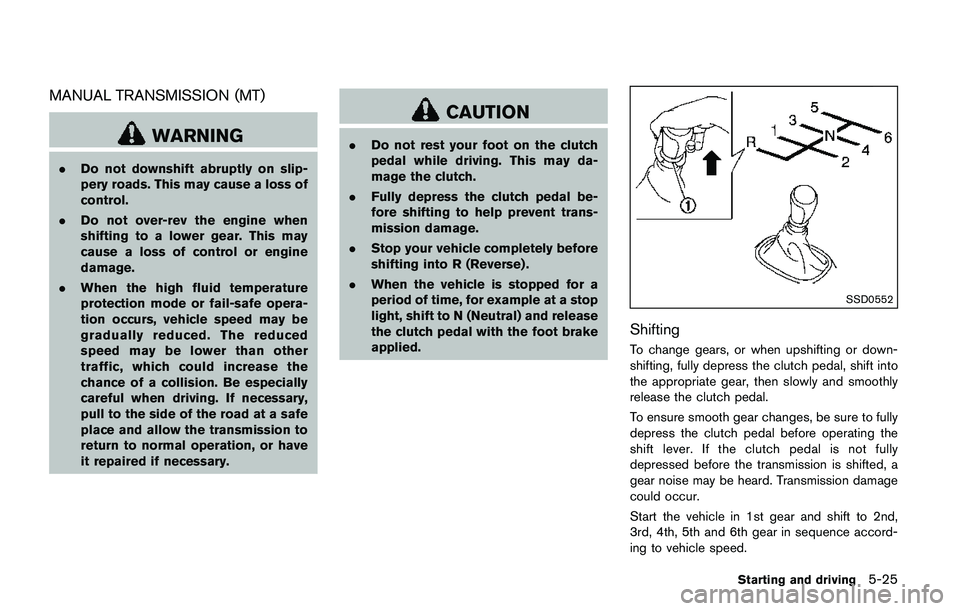
Shifting
To change gears, or when upshifting or down-
shifting, fully depress the clutch pedal, shift into
the appropriate gear, then slowly and smoothly
release the clutch pedal.
To ensure smooth gear changes, be sure to fully
depress the clutch pedal before operating the
shift lever. If the clutch pedal is not fully
depressed before the transmission is shifted, a
gear noise may be heard. Transmission damage
could occur.
Start the vehicle in 1st gear and shift to 2nd,
3rd, 4th, 5th and 6th gear in sequence accord-
ing to vehicle speed.
Starting and driving5-25
Page 316 of 508
JVS1083X
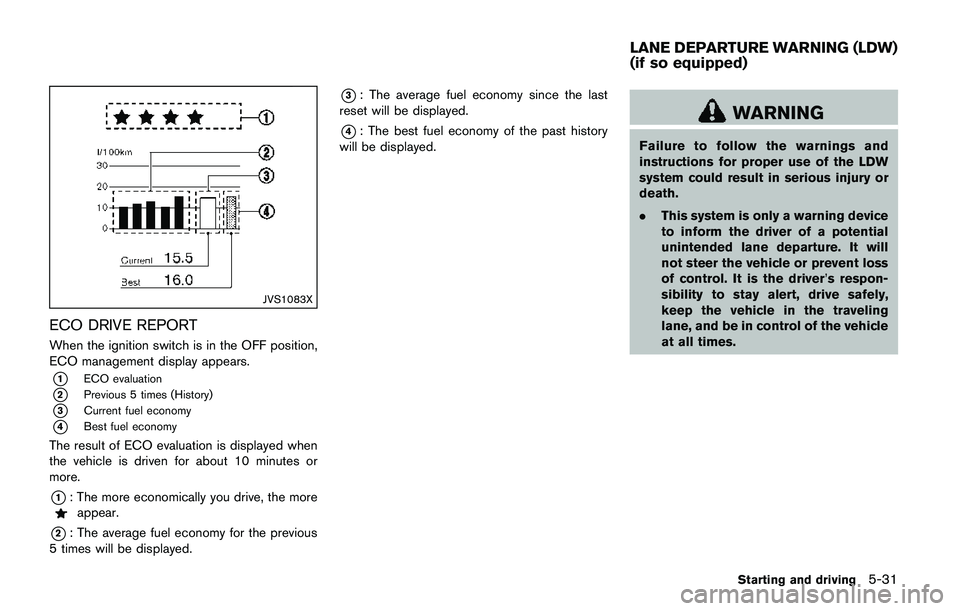
ECO DRIVE REPORT
When the ignition switch is in the OFF position,
ECO management display appears.
*1ECO evaluation
*2Previous 5 times (History)
*3Current fuel economy
*4Best fuel economy
The result of ECO evaluation is displayed when
the vehicle is driven for about 10 minutes or
more.
*1: The more economically you drive, the moreappear.
*2: The average fuel economy for the previous
5 times will be displayed.
*3: The average fuel economy since the last
reset will be displayed.
*4: The best fuel economy of the past history
will be displayed.WARNING
Failure to follow the warnings and
instructions for proper use of the LDW
system could result in serious injury or
death.
.This system is only a warning device
to inform the driver of a potential
unintended lane departure. It will
not steer the vehicle or prevent loss
of control. It is the driver’s respon-
sibility to stay alert, drive safely,
keep the vehicle in the traveling
lane, and be in control of the vehicle
at all times.
Starting and driving5-31
LANE DEPARTURE WARNING (LDW)
(if so equipped)
Page 321 of 508

5-36Starting and driving
JVS1079X
SYSTEM MAINTENANCE
The lane camera unit*Afor the LDW system is
located above the inside mirror.
To keep the proper operation of the LDW
system and prevent a system malfunction, be
sure to observe the following:
.Always keep the windshield clean.
.Do not attach a sticker (including transpar-
ent material) or install an accessory near the
camera unit.
.Do not place reflective materials, such as
white paper or a mirror, on the instrument
panel. The reflection of sunlight may ad-
versely affect the camera unit’s capability ofdetecting the lane markers.
.Do not strike or damage the areas around
the camera unit. Do not touch the camera
lens or remove the screw located on the
camera unit. If the camera unit is damaged
due to an accident, it is recommended that
you visit a NISSAN dealer.
WARNING
Failure to follow the warnings and
instructions for proper use of the LDP
system could result in serious injury or
death.
.The LDP system will not steer the
vehicle or prevent loss of control. It
is the driver’s responsibility to stay
alert, drive safely, keep the vehicle
in the traveling lane, and be in
control of the vehicle at all times.
.The LDP system is primarily in-
tended for use on well-developed
freeways or highways. It may not
detect the lane markers in certain
road, weather, or driving conditions.
LANE DEPARTURE PREVENTION
(LDP) (if so equipped)
Page 335 of 508

5-50Starting and driving
JVS0649X
SYSTEM MAINTENANCE
The two radar sensors*1for the BSW system
are located near the rear bumper. Always keep
the area near the radar sensors clean.
The radar sensors may be blocked by temporary
ambient conditions such as splashing water,
mist or fog.
The blocked condition may also be caused by
objects such as ice, frost or dirt obstructing the
radar sensors.
Check for and remove objects obstructing the
area around the radar sensors.
Do not attach stickers (including transparent
material) , install accessories or apply additionalpaint near the radar sensors.
Do not strike or damage the area around the
radar sensors.
See a NISSAN dealer or other authorized repair
shop if the area around the radar sensors is
damaged due to a collision.
Radio frequency statement
For USA
FCC : OAYSRR3B
This device complies with part 15 of the
FCC Rules. Operation is subject to the
following two conditions:
(1) This device may not cause harmful
interference, and (2) this device must
accept any interference received, including
interference that may cause undesired
operation.
FCC Warning
Changes or modifications not expressly
approved by the party responsible for
compliance could void the user’s authority
to operate the equipment
For Canada
Applicable law: Canada 310
This device complies with Industry Canada
licence-exempt RSS standard(s) . Opera-
tion is subject to the following two condi-tions: (1) this device may not cause
interference, and (2) this device must
accept any interference, including interfer-
ence that may cause undesired operation
of the device.
Frequency bands: 24.05 – 24.25GHz
Output power: less than 20 milliwatts
Page 342 of 508
JVS0649X
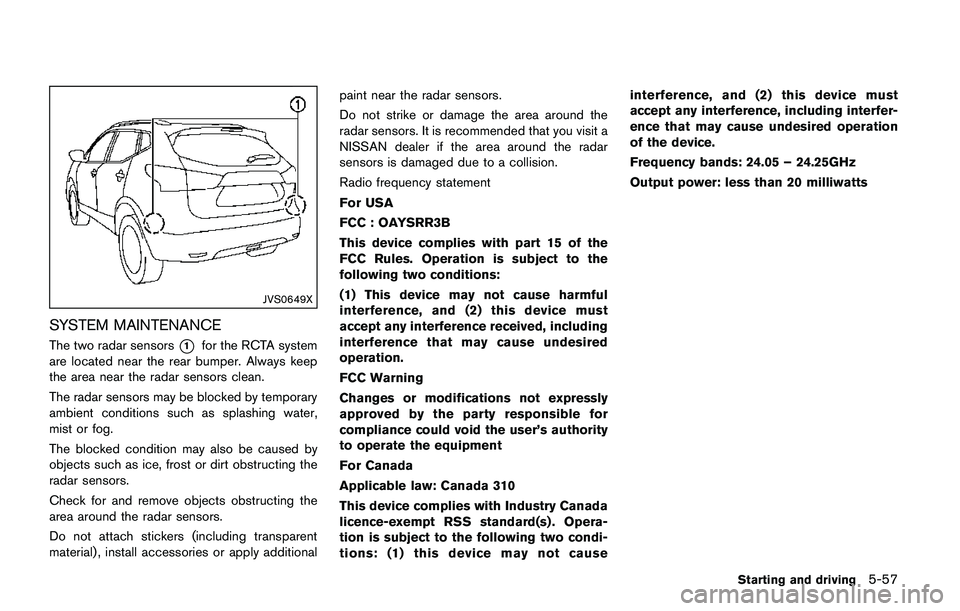
SYSTEM MAINTENANCE
The two radar sensors*1for the RCTA system
are located near the rear bumper. Always keep
the area near the radar sensors clean.
The radar sensors may be blocked by temporary
ambient conditions such as splashing water,
mist or fog.
The blocked condition may also be caused by
objects such as ice, frost or dirt obstructing the
radar sensors.
Check for and remove objects obstructing the
area around the radar sensors.
Do not attach stickers (including transparent
material) , install accessories or apply additionalpaint near the radar sensors.
Do not strike or damage the area around the
radar sensors. It is recommended that you visit a
NISSAN dealer if the area around the radar
sensors is damaged due to a collision.
Radio frequency statement
For USA
FCC : OAYSRR3B
This device complies with part 15 of the
FCC Rules. Operation is subject to the
following two conditions:
(1) This device may not cause harmful
interference, and (2) this device must
accept any interference received, including
interference that may cause undesired
operation.
FCC Warning
Changes or modifications not expressly
approved by the party responsible for
compliance could void the user’s authority
to operate the equipment
For Canada
Applicable law: Canada 310
This device complies with Industry Canada
licence-exempt RSS standard(s) . Opera-
tion is subject to the following two condi-
tions: (1) this device may not causeinterference, and (2) this device must
accept any interference, including interfer-
ence that may cause undesired operation
of the device.
Frequency bands: 24.05 – 24.25GHz
Output power: less than 20 milliwatts
Starting and driving5-57
Page 345 of 508
5-60Starting and driving
WARNING
Failure to follow the warnings and
instructions for proper use of the ICC
system could result in serious injury or
death.
.ICC is not a collision avoidance or
warning device. For highway use
only and it is not intended for
congested areas or city driving. Fail-
ure to apply the brakes could result
in an accident.
.The ICC system is only an aid to
assist the driver. It is the driver’s
responsibility to stay alert, drive
safely, and be in control of the
vehicle at all times.
.Always observe posted speed limits
and do not set the speed over them.
.Always drive carefully and atten-
tively when using either cruise con-
trol mode. Read and understand the
Owner’s Manual thoroughly before
using the cruise control. To avoid
serious injury or death, do not rely
on the system to prevent accidents
or to control the vehicle’s speed inemergency situations. Do not use
cruise control except in appropriate
road and traffic conditions.
.In the conventional (fixed speed)
cruise control mode, a warning
chime will not sound to warn you if
you are too close to the vehicle
ahead. Pay special attention to the
distance between your vehicle and
the vehicle ahead of you or a
collision could occur.
The ICC system maintains a selected distance
from the vehicle in front of you within the speed
range of 0 to 90 MPH (0 to 144 km/h) up to the
set speed.
The set speed can be selected by the driver
between 20 to 90 MPH (32 to 144 km/h) .
The vehicle travels at a set speed when the road
ahead is clear.
The ICC system can be set to one of two cruise
control modes.
.Vehicle-to-vehicle distance control mode:
For maintaining a selected distance be-
tween your vehicle and the vehicle in front
of you up to the preset speed..Conventional (fixed speed) cruise control
mode:
For cruising at a preset speed.
INTELLIGENT CRUISE CONTROL
(ICC) (if so equipped)
Page 360 of 508
dealer for this service.
JVS1041X
System maintenance
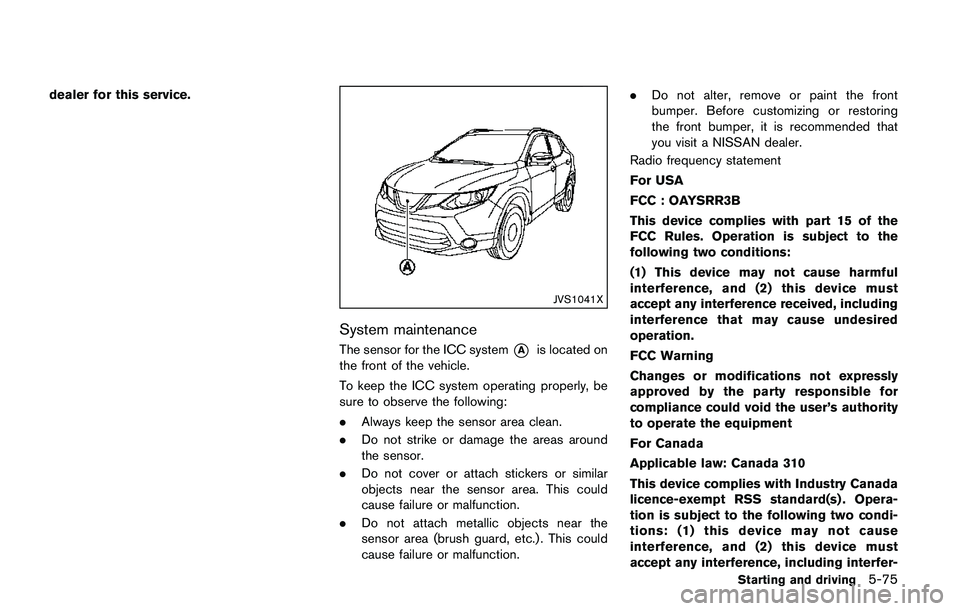
The sensor for the ICC system*Ais located on
the front of the vehicle.
To keep the ICC system operating properly, be
sure to observe the following:
.Always keep the sensor area clean.
.Do not strike or damage the areas around
the sensor.
.Do not cover or attach stickers or similar
objects near the sensor area. This could
cause failure or malfunction.
.Do not attach metallic objects near the
sensor area (brush guard, etc.) . This could
cause failure or malfunction..Do not alter, remove or paint the front
bumper. Before customizing or restoring
the front bumper, it is recommended that
you visit a NISSAN dealer.
Radio frequency statement
For USA
FCC : OAYSRR3B
This device complies with part 15 of the
FCC Rules. Operation is subject to the
following two conditions:
(1) This device may not cause harmful
interference, and (2) this device must
accept any interference received, including
interference that may cause undesired
operation.
FCC Warning
Changes or modifications not expressly
approved by the party responsible for
compliance could void the user’s authority
to operate the equipment
For Canada
Applicable law: Canada 310
This device complies with Industry Canada
licence-exempt RSS standard(s) . Opera-
tion is subject to the following two condi-
tions: (1) this device may not cause
interference, and (2) this device must
accept any interference, including interfer-
Starting and driving5-75
Page 365 of 508
5-80Starting and driving
WARNING
Failure to follow the warnings and
instructions for proper use of the FEB
system could result in serious personal
injury or death.
.The FEB system is a supplemental
aid to the driver. It is not a replace-
ment for the driver’s attention to
traffic conditions or responsibility to
drive safely. It cannot prevent acci-
dents due to carelessness or dan-
gerous driving techniques.
.The FEB system does not function in
all driving, traffic, weather and road
conditions.
The FEB system can assist the driver when there
is a risk of a forward collision with the vehicle
ahead in the traveling lane.
JVS1041X
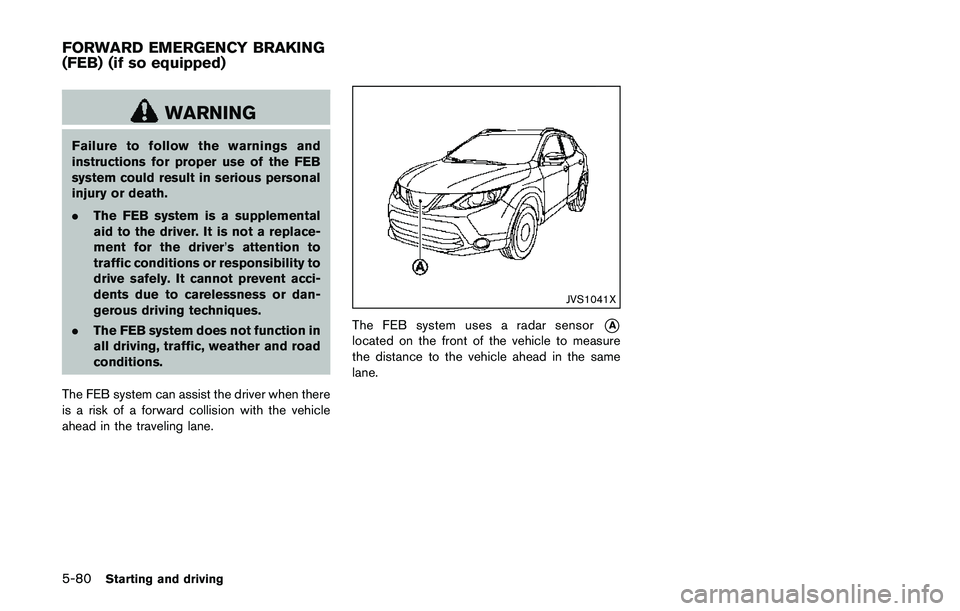
The FEB system uses a radar sensor*A
located on the front of the vehicle to measure
the distance to the vehicle ahead in the same
lane.
FORWARD EMERGENCY BRAKING
(FEB) (if so equipped)
Page 371 of 508
5-86Starting and driving
.Do not attach metallic objects near the
sensor area (brush guard, etc.) . This could
cause failure or malfunction.
.Do not alter, remove or paint the front of the
vehicle near the sensor area. Before custo-
mizing or restoring the sensor area, it is
recommended that you visit a NISSAN
dealer.
Radio frequency statement
For USA
FCC : OAYSRR3B
This device complies with part 15 of the
FCC Rules. Operation is subject to the
following two conditions:
(1) This device may not cause harmful
interference, and (2) this device must
accept any interference received, including
interference that may cause undesired
operation.
FCC Warning
Changes or modifications not expressly
approved by the party responsible for
compliance could void the user’s authority
to operate the equipment
For Canada
Applicable law: Canada 310
This device complies with Industry Canadalicence-exempt RSS standard(s) . Opera-
tion is subject to the following two condi-
tions: (1) this device may not cause
interference, and (2) this device must
accept any interference, including interfer-
ence that may cause undesired operation
of the device.
Frequency bands: 24.05 – 24.25GHz
Output power: less than 20 milliwatts*: if so equipped
WARNING
Failure to follow the warnings and
instructions for proper use of the FEB
with pedestrian detection system could
result in serious injury or death.
.The FEB with pedestrian detection
system is a supplemental aid to the
driver. It is not a replacement for the
driver’s attention to traffic condi-
tions or responsibility to drive
safely. It cannot prevent accidents
due to carelessness or dangerous
driving techniques.
.The FEB with pedestrian detection
system does not function in all
driving, traffic, weather and road
conditions.
The FEB with pedestrian detection system can
assist the driver when there is a risk of a forward
collision with the vehicle ahead in the traveling
lane or with a pedestrian.
FORWARD EMERGENCY BRAKING
(FEB) WITH PEDESTRIAN
DETECTION SYSTEM*