buttons NISSAN QASHQAI 2017 Owner´s Manual
[x] Cancel search | Manufacturer: NISSAN, Model Year: 2017, Model line: QASHQAI, Model: NISSAN QASHQAI 2017Pages: 508, PDF Size: 2.68 MB
Page 238 of 508
ENTER SETTING/TUNE·SCROLL dial and
then push the ENTER SETTING/TUNE·SC-
ROLL dial. To change the Speed Sensitive
Volume (Speed Sensitive Vol.) level from off
(0) to 5, turn the ENTER SETTING/TU-
NE·SCROLL dial. Push the ENTER
SETTING/TUNE·SCROLL dial to apply the
setting.
.AUX Vol.
Controls the volume level of incoming sound
when an auxiliary device is connected to the
system. Select the “AUX Vol.” using the
ENTER SETTING/TUNE·SCROLL dial and
then push the ENTER SETTING/TUNE·SC-
ROLL dial. Choose a setting between +1
and +3 or choose 0 to disable the feature
entirely. Push the ENTER SETTING/TU-
NE·SCROLL dial to apply the setting.
.Language Select
The language settings can be changed.
Select “Language Select” using the ENTER
SETTING/TUNE·SCROLL dial and then
push the ENTER SETTING/TUNE·SCROLL
dial. Use the ENTER SETTING/TUNE·SC-
ROLL dial to select the preferred language.
Push the ENTER SETTING/TUNE·SCROLL
dial to apply the setting.DISP button:
Display of the screen can be canceled by
pushing the
button. You can still listen to
music that is being played back even while the
screen display is turned off. If you want to
display the screen again, push the
button
once more. Pushing some of the audio source
buttons will also turn the screen back on and
display the screens of the corresponding
sources.
MEDIA button:
Pushing the
button will switch the audio
source as follows:
CD?USB/iPod?Bluetooth Audio?AUX?
CD
FM-AM-SAT Radio operation
radio (FM·AM) band select:
Pushing the
button will change the band as
follows:
AM?FM1?FM2?AM
The FM stereo indicator (STEREO) is shown on
the screen during FM stereo reception. When
the stereo broadcast signal is weak, the radio
automatically changes from stereo to monaural
reception.
radio (SAT) band select:
Pushing the XM button will change the band as
follows:
XM1?XM2?XM3?XM1 (satellite, if so
equipped)
When the XM button is pushed while the ignition
switch is placed in the ACC or ON position, the
radio will come on at the channel last played.
The last channel played will also come on when
the Power/VOL dial is pushed to turn the audio
system power on.
The satellite radio is not available in Alaska,
Hawaii and Guam.
If another audio source is playing when the XM
button is pushed, the audio source will auto-
matically be turned off and the last radio channel
played will come on.
When the stereo broadcast signal is weak, the
radio will automatically change from stereo to
monaural reception.
TUNE (Tuning):
.For AM and FM radio
Turn the radio ENTER SETTING/TUNE·SC-
ROLL dial for manual tuning.
.For SiriusXM Satellite Radio (if so equipped)
Turn the radio ENTER SETTING/TUNE·SC-
ROLL dial to seek channels from all of the
Heater, air conditioner, audio and phone systems4-57
Page 239 of 508
4-58Heater, air conditioner, audio and phone systems
categories when any category is not se-
lected.
Radio Data System (RDS):
RDS stands for Radio Data System, and is a
data information service transmitted by some
radio stations on the FM band (not AM band)
encoded within a regular radio broadcast.
Currently, most RDS stations are in large cities,
but many stations are now considering broad-
casting RDS data.
The station name, such as “The Groove”, is
displayed on the display.
SEEK tuning/CAT (category):
.For AM and FM radio
Push the
orbutton to tune from low
to high or high to low frequencies and to
stop at the next broadcasting station.
.For SiriusXM Satellite Radio
Push the
orbutton to tune to the
first channel of the next or previous category.
SCAN tuning:
Push the
button to tune from low to high
frequencies and stop at each broadcasting
station for several seconds. Pushing the
button again during this several seconds period
will stop SCAN tuning and the radio will remaintuned to that station.
If the
button is not pushed within five
seconds, SCAN tuning moves to the next
station.
toStation memory operations:
6 stations can be set for the AM band. 12
stations can be set for the FM band (6 for FM1,
6 for FM2) . 18 channels can be set for the
satellite radio (6 for XM1, 6 for XM2, 6 for XM3) .
1. Choose the radio band using the
or XM
button.
2. Tune to the desired station or channel.
3. Push and hold the desired station or channel
preset button
tountil beep sounds.
4. The station or channel indicator will then
come on. Memorizing is now complete.
5. Other buttons can be set in the same
manner.
If the battery cable is disconnected, or if the fuse
opens, the station memory will be erased. In that
case, reset the desired stations or channels.
CD player operation
Place the ignition switch in the ACC or ON
position, and insert the Compact Disc (CD) into
the slot with the label side facing up. The CD will
be guided automatically into the slot and start
playing.
After loading the CD, the number of tracks on
the CD and the play time will appear on the
display.
If another audio source is already operating, it
will automatically turn off and the CD will play.
If the system was turned off while the CD was
playing, pushing the Power/VOL dial will start
the CD.
PLAY:
With a CD loaded, push the
button until the
CD mode is displayed on the screen.
CD/MP3 display mode:
While listening to an MP3/WMA CD, certain text
may be displayed on the screen if the CD has
been encoded with text information. Depending
on how the MP3/WMA CD is encoded,
information such as Artist, Song and Folder will
be displayed. The track number and the total
number of tracks in the current folder or on the
current disc are displayed on the screen as well.
Page 255 of 508
4-74Heater, air conditioner, audio and phone systems
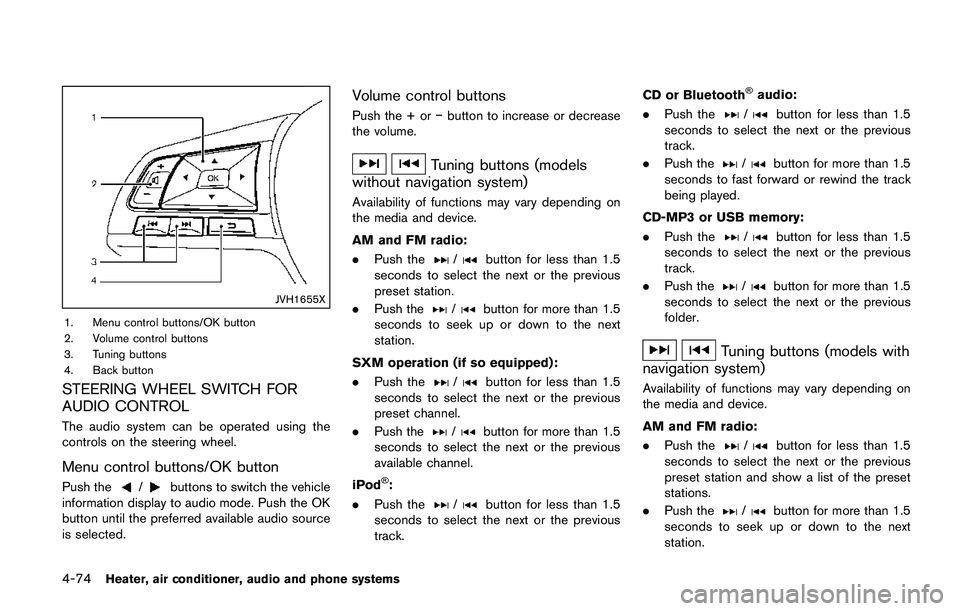
JVH1655X
1. Menu control buttons/OK button
2. Volume control buttons
3. Tuning buttons
4. Back button
STEERING WHEEL SWITCH FOR
AUDIO CONTROL
The audio system can be operated using the
controls on the steering wheel.
Menu control buttons/OK button
Push the/buttons to switch the vehicle
information display to audio mode. Push the OK
button until the preferred available audio source
is selected.
Volume control buttons
Push the + oríbutton to increase or decrease
the volume.
Tuning buttons (models
without navigation system)
Availability of functions may vary depending on
the media and device.
AM and FM radio:
.Push the
/button for less than 1.5
seconds to select the next or the previous
preset station.
.Push the
/button for more than 1.5
seconds to seek up or down to the next
station.
SXM operation (if so equipped) :
.Push the
/button for less than 1.5
seconds to select the next or the previous
preset channel.
.Push the
/button for more than 1.5
seconds to select the next or the previous
available channel.
iPod
Š:
.Push the
/button for less than 1.5
seconds to select the next or the previous
track.CD or Bluetooth
Šaudio:
.Push the
/button for less than 1.5
seconds to select the next or the previous
track.
.Push the
/button for more than 1.5
seconds to fast forward or rewind the track
being played.
CD-MP3 or USB memory:
.Push the
/button for less than 1.5
seconds to select the next or the previous
track.
.Push the
/button for more than 1.5
seconds to select the next or the previous
folder.
Tuning buttons (models with
navigation system)
Availability of functions may vary depending on
the media and device.
AM and FM radio:
.Push the
/button for less than 1.5
seconds to select the next or the previous
preset station and show a list of the preset
stations.
.Push the
/button for more than 1.5
seconds to seek up or down to the next
station.
Page 262 of 508
TROUBLESHOOTING GUIDE
Symptom Cause and Countermeasure
Cannot access SiriŠEyes Free from the switch on
the steering wheelCheck if a BluetoothŠconnection is established between the iPhoneŠand the system.
Check if SiriŠis enabled on the device. On your phone, go to SiriŠsetting.
Check that SiriŠcan be accessed from the device lock screen. This can be set in the settings menu of your phone.
Check the settings for SiriŠEyes Free activation on the vehicle audio system. If the setting is “Long Press”, you must
push and hold thebutton on the steering wheel for more than 1.5 seconds to start SiriŠEyes Free. If the setting is
“Short Press”, a short push and release of the button should start SiriŠEyes Free.
Audio source does not change automatically to
iPod
Šor BluetoothŠAudio modeFor best results, use the native music app. Performance of music control function while using Podcasts, Audiobook or
other third party music apps may vary.
For best results, play media already stored on your device. Streaming music or playback from cloud storage may
degrade performance.
Models with navigation system:
Switch the source manually by pushing the AUX button on the vehicle audio system or the menu control buttons/OK
button on the steering wheel.
Models without navigation system:
Switch the source manually by pushing the
orbutton on the vehicle audio system or the menu control
buttons/OK button on the steering wheel.
Play, pause, next track, previous track or play timer
does not workFor best results, use the native music app. Performance of music control function while using Podcasts, Audiobook or
other third party music apps may vary and is controlled by the device.
Cannot hear any music/audio being played back
from a connected iPhone
ŠCheck that the audio source is set to BluetoothŠAudio or iPodŠmode. A USB connection is required for iPodŠmode.
Cannot hear map turn-by-turn direction guidance
from a connected iPhone
ŠCheck that the audio source is set to BluetoothŠAudio or iPodŠmode. A USB connection is required for iPodŠmode.
Cannot receive text message notifications on the
vehicle audio systemCheck if “Show Notifications” is enabled on your phone. On your phone, go to Bluetooth
Šsettings. Find the device
name, like “My Car”. Touch theicon on your phone. Turn on “Show Notifications”.
Cannot reply to text message notifications using
Siri
ŠEyes FreeAfter receiving an incoming text message, follow the on-screen guidance. Push or push and hold thebutton on the
steering wheel for SiriŠEyes Free. After SiriŠEyes Free starts, say “Text Message”.
Heater, air conditioner, audio and phone systems4-81
Page 265 of 508
4-84Heater, air conditioner, audio and phone systems
IC Regulatory information
.Operation is subject to the following two
conditions: (1) this device may not cause
interference, and (2) this device must accept
any interference, including interference that
may cause undesired operation of the
device.
.This Class B digital apparatus meets all
requirements of the Canadian Interference-
Causing Equipment Regulations.
BluetoothŠtrademark
BluetoothŠis a trademark owned
by Bluetooth SIG, Inc., and
licensed to Visteon Corporation.
USING THE SYSTEM
The voice recognition system allows hands-free
operation of the BluetoothŠHands-Free Phone
System.
If the vehicle is in motion, some commands may
not be available so full attention may be given to
vehicle operation.
JVH1627X
Control buttons and microphone
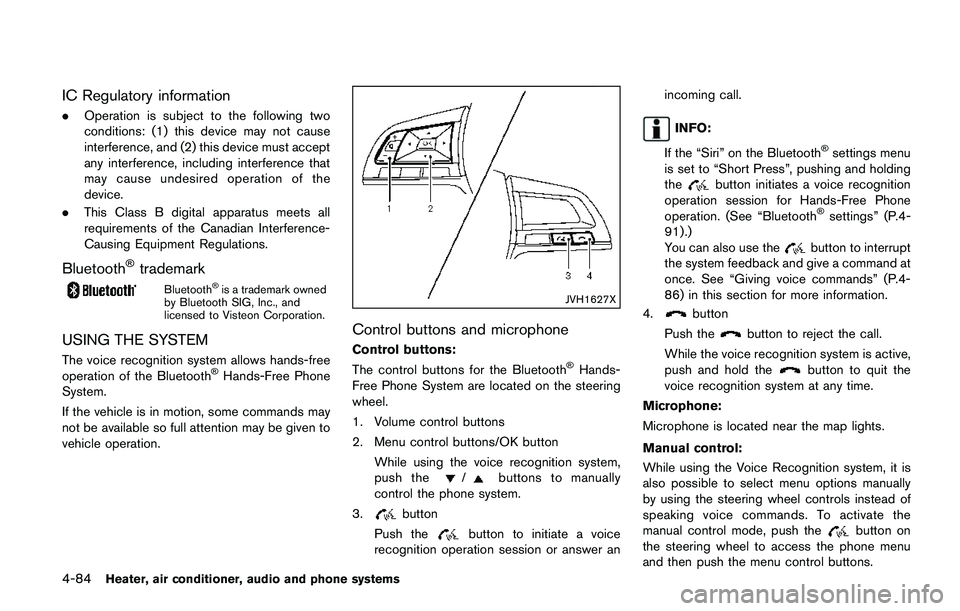
Control buttons:
The control buttons for the BluetoothŠHands-
Free Phone System are located on the steering
wheel.
1. Volume control buttons
2. Menu control buttons/OK button
While using the voice recognition system,
push the
/buttons to manually
control the phone system.
3.
button
Push the
button to initiate a voice
recognition operation session or answer anincoming call.
INFO:
If the “Siri” on the Bluetooth
Šsettings menu
is set to “Short Press”, pushing and holding
the
button initiates a voice recognition
operation session for Hands-Free Phone
operation. (See “Bluetooth
Šsettings” (P.4-
91) .)
You can also use the
button to interrupt
the system feedback and give a command at
once. See “Giving voice commands” (P.4-
86) in this section for more information.
4.
button
Push the
button to reject the call.
While the voice recognition system is active,
push and hold the
button to quit the
voice recognition system at any time.
Microphone:
Microphone is located near the map lights.
Manual control:
While using the Voice Recognition system, it is
also possible to select menu options manually
by using the steering wheel controls instead of
speaking voice commands. To activate the
manual control mode, push the
button on
the steering wheel to access the phone menu
and then push the menu control buttons.
Page 266 of 508
The manual control mode does not allow dialing
a phone number by digits. The user may select
an entry from the Phonebook or Recent Calls
lists. To reactivate Voice Recognition, exit the
manual control mode by pushing and holding the
button. At that time, pushing thebutton
will start the BluetoothŠHands-Free Phone
System.
Choosing a language
You can interact with the BluetoothŠHands-
Free Phone System using several languages
that are available. For operations to change the
language, see “Audio main operation” (P.4-48)
or “Audio main operation” (P.4-56) .
Changing voice feedback volume
If you want to adjust the volume of the voice
feedback, push the volume control buttons on
the steering wheel while being provided with
feedback. You can also use the Power/VOL dial
on the control panel.
Initialization
When the ignition switch is placed in the ACC
or ON position, voice recognition is initialized,
which takes a few seconds. If the
button is
pushed before the initialization completes, the
system will announce “Hands-free phone sys-
tem not ready” and will not react to voice
commands.
Connecting procedure:
NOTE:
The connecting procedure must be per-
formed when the vehicle is stationary. If
the vehicle starts moving during the pro-
cedure, the procedure will be cancelled.
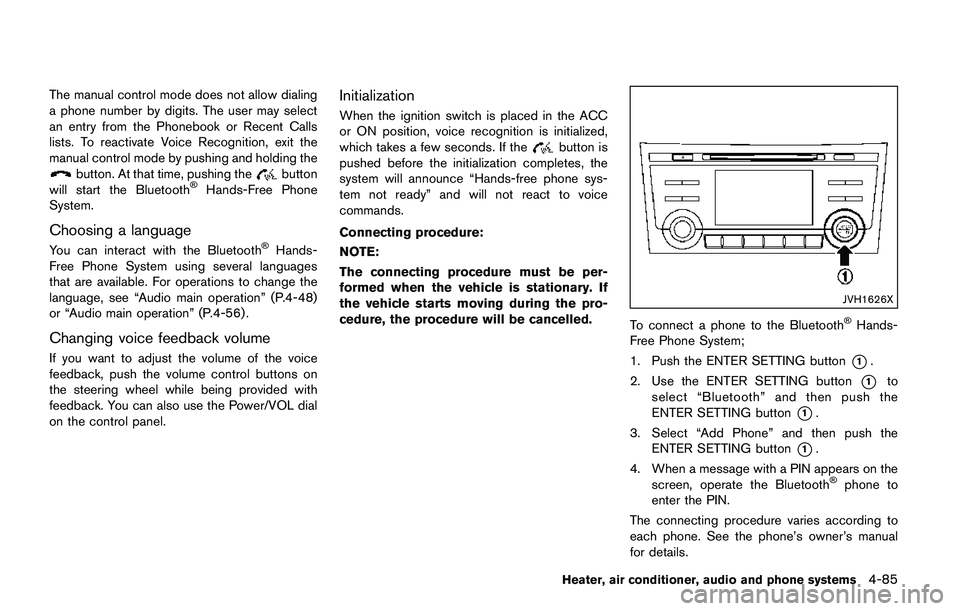
JVH1626X
To connect a phone to the BluetoothŠHands-
Free Phone System;
1. Push the ENTER SETTING button
*1.
2. Use the ENTER SETTING button
*1to
select “Bluetooth” and then push the
ENTER SETTING button
*1.
3. Select “Add Phone” and then push the
ENTER SETTING button
*1.
4. When a message with a PIN appears on the
screen, operate the Bluetooth
Šphone to
enter the PIN.
The connecting procedure varies according to
each phone. See the phone’s owner’s manual
for details.
Heater, air conditioner, audio and phone systems4-85
Page 267 of 508
4-86Heater, air conditioner, audio and phone systems
Giving voice commands
To operate voice recognition, push and release
thebutton located on the steering wheel.
After the tone sounds, speak a command.
The command given is picked up by the
microphone, and voice feedback is given when
the command is accepted.
.If you need to hear the available commands
for the current menu again, say “Help” and
the system will repeat them.
.If a command is not recognized, the system
announces, “Command not recognized.
Please try again.” Make sure the command
is said exactly as prompted by the system
and repeat the command in a clear voice.
.If you want to go back to the previous
command, you can say “Go back” or
“Correction” any time the system is waiting
for a response.
.You can cancel a command when the
system is waiting for a response by saying,
“Cancel” or “Quit”. The system announces
“Cancel” or “Quit” and ends the voice
recognition operation session. You can also
push and hold the
button on the
steering wheel at any time to end the voice
recognition operation session. Whenever
the voice recognition operation session is
cancelled, a double beep is played toindicate you have exited the system.
.If you want to adjust the volume of the voice
feedback, push the volume control buttons
on the steering wheel while being provided
with feedback. You can also use the Power/
VOL dial on the control panel.
Voice Prompt Interrupt:
In most cases you can interrupt the voice
feedback to speak the next command by
pushing the
button on the steering wheel.
After interrupting the system, wait for a beep
before speaking your command.
One Shot Call:
To use the system faster, you may speak the
second level commands with the main menu
command on the main menu. For example, push
the
button and after the tone say, “Call
Redial”.
Operating tips:
To get the best performance out of the voice
recognition system, observe the following:
.Keep the interior of the vehicle as quiet as
possible. Close the windows to eliminate
surrounding noises (traffic noises, vibration
sounds, etc.) , which may prevent the system
from recognizing voice commands correctly..Wait until the tone sounds before speaking a
command. Otherwise, the command will not
be received properly.
.Start speaking a command within five
seconds after the tone sounds.
.Speak in a natural voice without pausing
between words.
Voice commands
Voice commands can be used to operate the
BluetoothŠHands-Free Phone System. Push
thebutton to bring up the phone command
menu. The available options are:
.Call
.Phonebook
.Recent Calls
.Messaging (if available)
.Select Phone
Call:
For more information on the “Call” command,
see “Making a call” (P.4-88).
Phonebook:
The following commands are available under
“Phonebook”:
.(A Name)
Say a name in the phonebook to bring up a
list of options for that phonebook entry. The
system will say the name it interpreted
Page 271 of 508
4-90Heater, air conditioner, audio and phone systems
.Send Text.Next Entry.Previous Entry
For more information about these options,
see “Voice commands” (P.4-86).
5. Once a recipient is chosen, the system
prompts for which message to send. Five
predefined messages are available as well
as three custom messages. To choose one
of the predefined messages, speak one of
the following:
.“Driving, can’t text”.“Call me”.“On my way”.“Running late”.“Okay”.“Yes”.“No”.“Where are you?”.“When?”.“Custom Messages”
To send one of the custom messages, say
“Custom Messages”. If more than one
custom message is stored, the system will
prompt for the number of the desired
custom message. For more information on
setting and managing custom text mes-
sages, see “Bluetooth
Šsettings” (P.4-91) .Reading a received text message:
1. Push the
button.
2. Say “Phone”.
3. Say “Read Text”.
The text message, sender and delivery time are
shown on the screen. Use the menu control
buttons on the steering wheel to scroll through
all text messages if more than one are available.
Push the
button to exit the text message
screen. Push thebutton to access the
following options for replying to the text mes-
sage:
.Call Back
Speak this command to call the sender of
the text message using the Bluetooth
Š
Hands-Free Phone System.
.Send Text
Speak this command to send a text mes-
sage response to the sender of the text
message.
.Read Text
Speak this command to read the text
message again.
.Previous Text
Speak this command to move to the
previous text message (if available) ..Next Text
Speak this command to move to the next
text message (if available) .
NOTE:
.Text messages are only displayed if the
vehicle speed is less than 5 MPH (8
km/h) .
.iPhone
Šcan only send text messages
via SiriŠEyes Free.
Making custom messages with Siri
ŠEyes
Free:
If a connected iPhone
Šis equipped with SiriŠ,it
can also be used to create custom messages.
(See “Siri
ŠEyes Free” (P.4-78).)
Page 275 of 508
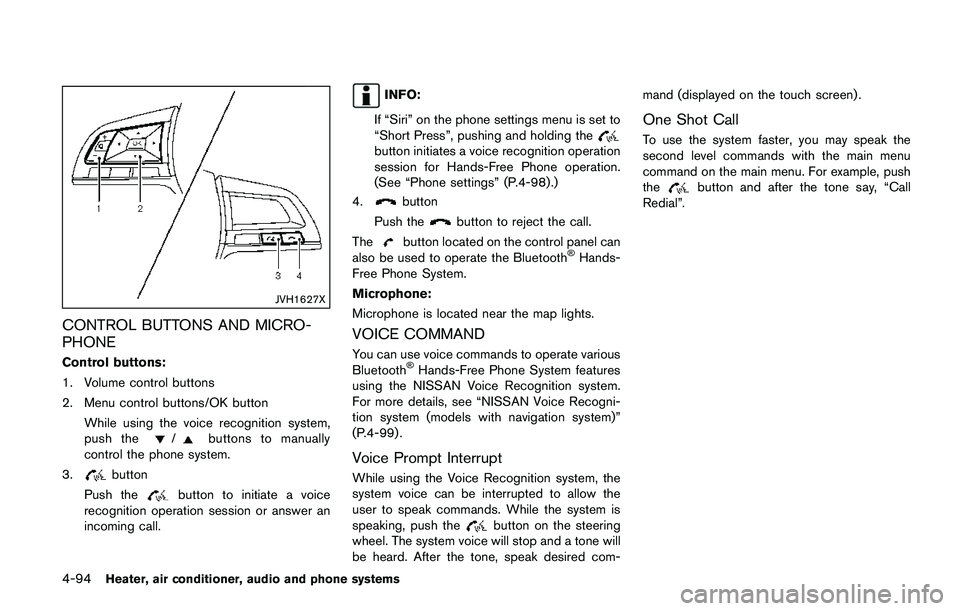
4-94Heater, air conditioner, audio and phone systems
JVH1627X
CONTROL BUTTONS AND MICRO-
PHONE
Control buttons:
1. Volume control buttons
2. Menu control buttons/OK button
While using the voice recognition system,
push the
/buttons to manually
control the phone system.
3.
button
Push the
button to initiate a voice
recognition operation session or answer an
incoming call.
INFO:
If “Siri” on the phone settings menu is set to
“Short Press”, pushing and holding the
button initiates a voice recognition operation
session for Hands-Free Phone operation.
(See “Phone settings” (P.4-98) .)
4.
button
Push the
button to reject the call.
The
button located on the control panel can
also be used to operate the BluetoothŠHands-
Free Phone System.
Microphone:
Microphone is located near the map lights.
VOICE COMMAND
You can use voice commands to operate various
BluetoothŠHands-Free Phone System features
using the NISSAN Voice Recognition system.
For more details, see “NISSAN Voice Recogni-
tion system (models with navigation system)”
(P.4-99) .
Voice Prompt Interrupt
While using the Voice Recognition system, the
system voice can be interrupted to allow the
user to speak commands. While the system is
speaking, push the
button on the steering
wheel. The system voice will stop and a tone will
be heard. After the tone, speak desired com-mand (displayed on the touch screen) .
One Shot Call
To use the system faster, you may speak the
second level commands with the main menu
command on the main menu. For example, push
the
button and after the tone say, “Call
Redial”.
Page 278 of 508
.“Driving, can’t text”.“Call me”.“On my way”.“Running late”.“Okay”.“Yes”.“No”.“Where are you?”.“When?”.“Custom Messages”
To send one of the custom messages, say
“Custom Messages”. If more than one
custom message is stored, the system will
prompt for the number of the desired
custom message. For more information on
setting and managing custom text mes-
sages, see “Phone settings” (P.4-98) .
NOTE:
iPhone
Šcan only send text messages via
SiriŠEyes Free. (See“SiriŠEyes Free”(P.4-
78) .)
Reading a received text message
1. Push thebutton on the steering wheel.
2. Say “Phone” after the tone.
3. Say “Read Text” after the tone.
The text message, sender and delivery time are
shown on the screen. Use the menu control
buttons to scroll through all text messages ifmore than one are available. Push the
button to exit the text message screen. Push thebutton to access the following options for
replying to the text message:
.Call Back
Speak this command to call the sender of
the text message using the Bluetooth
Š
Hands-Free Phone System.
.Send Text
Speak this command to send a text mes-
sage response to the sender of the text
message.
.Read Text
Speak this command to read the text
message again.
.Previous Text
Speak this command to move to the
previous text message (if available) .
.Next Text
Speak this command to move to the next
text message (if available) .
NOTE:
Text messages are only displayed if the
vehicle speed is less than 5 MPH (8 km/h) .
Making custom messages with SiriŠ
Eyes Free
If a connected iPhoneŠis equipped with SiriŠ,it
can also be used to create custom messages.
(See “Siri
ŠEyes Free” (P.4-78).)
Heater, air conditioner, audio and phone systems4-97