display NISSAN QASHQAI 2017 Owner´s Manual
[x] Cancel search | Manufacturer: NISSAN, Model Year: 2017, Model line: QASHQAI, Model: NISSAN QASHQAI 2017Pages: 508, PDF Size: 2.68 MB
Page 104 of 508
Tire Pressures
The settings in the “Tire pressures” menu are all
related to the Tire Pressure Monitoring System
(TPMS) . (See “Tire Pressure Monitoring System
(TPMS)” (P.5-5) , “Tire Pressure Monitoring
System (TPMS)” (P.6-3) , “Tire Pressure Mon-
itoring System (TPMS)” (P.8-29) .)
Tire Pressure Unit:
The unit for tire pressure that displays in the
vehicle information display can be changed to:
.psi
.kPa
.bar
.Kgf/cm
2
Use thebutton*2and the OK button*1
to select and change the unit.
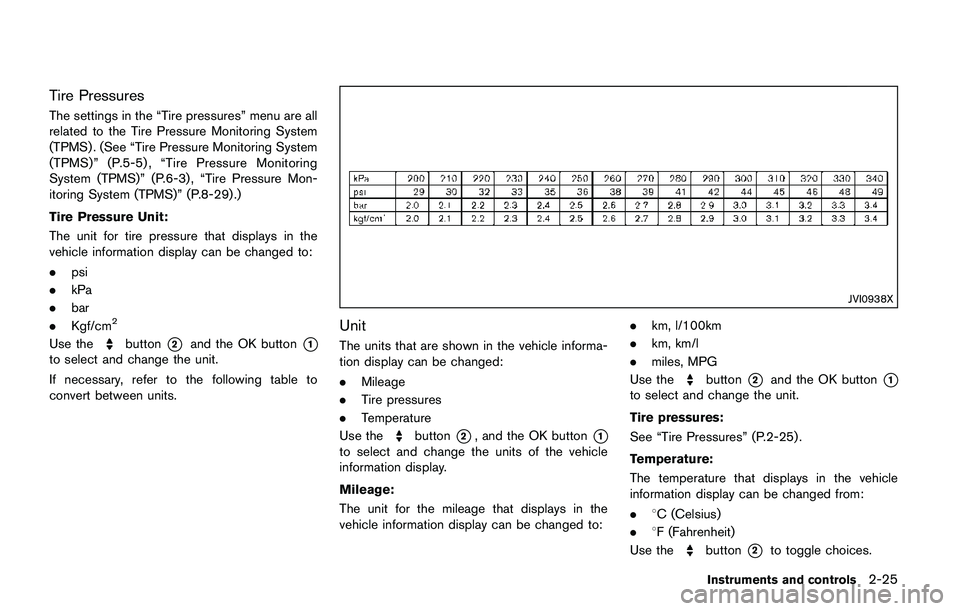
If necessary, refer to the following table to
convert between units.
JVI0938X
Unit
The units that are shown in the vehicle informa-
tion display can be changed:
.Mileage
.Tire pressures
.Temperature
Use the
button*2, and the OK button*1
to select and change the units of the vehicle
information display.
Mileage:
The unit for the mileage that displays in the
vehicle information display can be changed to:.km, l/100km
.km, km/l
.miles, MPG
Use the
button*2and the OK button*1
to select and change the unit.
Tire pressures:
See “Tire Pressures” (P.2-25) .
Temperature:
The temperature that displays in the vehicle
information display can be changed from:
.8C (Celsius)
.8F (Fahrenheit)
Use the
button*2to toggle choices.
Instruments and controls2-25
Page 105 of 508
2-26Instruments and controls
Language
The language of the vehicle information display
can be changed.
Use the
button*2, and the OK button*1
to select and change the language of the vehicle
information display.
Factory Reset
The settings in the vehicle information display
can be reset back to the factory default. To reset
the vehicle information display:
1. Select “Factory Reset” using the
button
*2and press the OK button*1.
2. Select “YES” to return all settings back to
default by pressing the OK button
*1.
Page 107 of 508
2-28Instruments and controls
VEHICLE INFORMATION DISPLAY
WARNINGS AND INDICATORS
1. Engine start operation indicator (for
Continuously Variable Transmission
(CVT) models)
This indicator appears when the shift lever is in
the P (Park) position.
This indicator means that the engine will start by
pushing the ignition switch with the brake pedal
depressed. You can start the engine directly in
any position of the ignition switch.
2. Engine start operation indicator (for
Manual Transmission (MT) models)
This indicator means that the engine will start by
pushing the ignition switch with the clutch pedal
depressed. You can start the engine directly in
any position of the ignition switch.
You can also start the engine by pushing the
ignition switch with the brake pedal depressed
when the shift lever is in the N (Neutral) position.
3. No Key detected warning (if so
equipped)
This warning appears when the door is closed
with the Intelligent Key left outside the vehicle
and the ignition switch in the ON position. Make
sure that the Intelligent Key is inside the vehicle.See “Intelligent Key system” (P.3-11) for more
details.
4. Shift to Park warning (CVT models) (if
so equipped)
This warning appears when the ignition switch is
pushed to stop the engine with the shift lever in
any position except the P (Park) position.
If this warning appears, move the shift lever to
the P (Park) position or place the ignition switch
in the ON position.
An inside warning chime will also sound. (See
“Intelligent Key system” (P.3-11) .)
5. Key battery low warning (if so
equipped)
This warning appears when the Intelligent Key
battery is running out of power.
If this indicator appears, replace the battery with
a new one. See “Intelligent Key battery replace-
ment” (P.8-23) .
6. Engine start operation for Intelligent
Key system indicator (if so equipped)
This indicator appears when the Intelligent Key
battery is running out of power and when the
Intelligent Key system and vehicle are not
communicating normally.
If this indicator appears, touch the ignitionswitch with the Intelligent Key while depressing
the brake pedal. (See “Intelligent Key battery
discharge” (P.5-16).)
7. Key ID incorrect warning (if so
equipped)
This warning appears when the ignition switch is
placed from the LOCK position and the Intelli-
gent Key cannot be recognized by the system.
You cannot start the engine with an unregistered
key. Use the registered Intelligent Key.
See “Intelligent Key system” (P.3-11) .
8. Release Parking Brake warning
This warning appears when the vehicle speed is
above 4 MPH (7 km/h) (models not equipped
with electronic parking brake) or 2 MPH (4
km/h) (models equipped with electronic parking
brake) and the parking brake is applied. Stop the
vehicle and release the parking brake.
9. Low fuel level warning
This warning appears when the fuel level in the
fuel tank is getting low. Refuel as soon as it is
convenient, preferably before the fuel gauge
reaches 0 (Empty) . There will be a small reserve
of fuel in the tank when the fuel gauge needle
reaches 0 (Empty) .
Page 108 of 508
10. Low Washer Fluid warning (if so
equipped)
This warning appears when the window washer
fluid is at a low level. Add window washer fluid
as necessary. For additional information, refer to
“Window washer fluid” (P.8-10) .
11. Door/liftgate open warning
This warning appears if any of the doors and/or
the liftgate are open or not closed securely. The
vehicle icon indicates which door or the liftgate
is open on the display.
12. Key System Error: See Owner’s
Manual warning (if so equipped)
This warning appears if there is a malfunction in
the Intelligent Key system.
If this warning appears while the engine is
stopped, the engine cannot be started. If this
warning appears while the engine is running, the
vehicle can be driven. However, it is recom-
mended that you visit a NISSAN dealer for repair
as soon as possible.
13. Loose Fuel Cap warning
This warning appears when the fuel-filler cap is
not tightened correctly after the vehicle has
been refueled. For additional information, refer to
“Fuel-filler cap” (P.3-27) .
14. Tire Pressure Low — Add Air
warning
This warning appears when the low tire pressure
warning light in the meter illuminates and low tire
pressure is detected. The warning appears each
time the ignition switch is placed in the ON
position as long as the low tire pressure warning
light remains illuminated. If this warning appears,
stop the vehicle and adjust the pressure to the
recommended COLD tire pressure shown on
the Tire and Loading Information label. (See
“Low tire pressure warning light” (P.2-13) and
“Tire Pressure Monitoring System (TPMS)” (P.5-
5) .)
15. Low Oil Pressure Stop Vehicle
warning
This warning appears if low engine oil pressure
is detected. If the warning appears during
normal driving, pull off the road in a safe area
and stop the engine immediately. It is recom-
mended that you call a NISSAN dealer.
The low oil pressure warning is not designed to
indicate a low oil level. Use the dipstick to checkthe oil level. (See “Engine oil” (P.8-6) .)
CAUTION
Running the engine with the engine oil
pressure warning displayed could
cause serious damage to the engine.
16. AWD Error: See Owner’s Manual
warning (if so equipped)
This warning appears when the All-Wheel Drive
(AWD) system is not functioning properly while
the engine is running. Reduce vehicle speed and
have the system checked. It is recommended
that you visit a NISSAN dealer for this service.
See “All-Wheel Drive (AWD)” (P.5-96) .
17. AWD High Temp. Stop vehicle
warning (if so equipped)
This warning may appear while trying to free a
stuck vehicle due to increased oil temperature.
The driving mode may change to Two-Wheel
Drive (2WD) . If this warning is displayed, stop
the vehicle with the engine idling, as soon as it is
safe to do so. Then if the warning turns off, you
can continue driving. See “All-Wheel Drive
(AWD)” (P.5-96) .
Instruments and controls2-29
Page 110 of 508
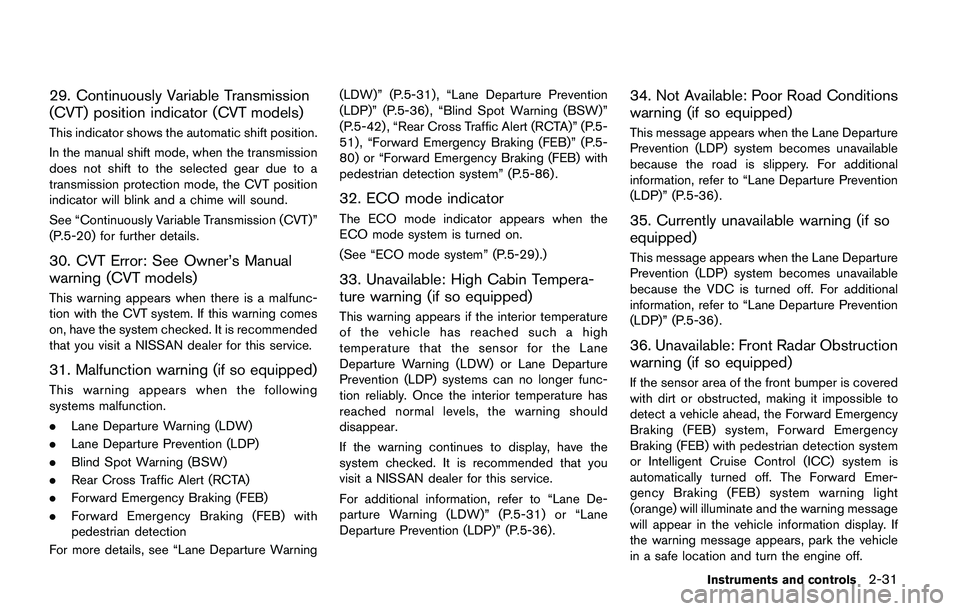
29. Continuously Variable Transmission
(CVT) position indicator (CVT models)
This indicator shows the automatic shift position.
In the manual shift mode, when the transmission
does not shift to the selected gear due to a
transmission protection mode, the CVT position
indicator will blink and a chime will sound.
See “Continuously Variable Transmission (CVT)”
(P.5-20) for further details.
30. CVT Error: See Owner’s Manual
warning (CVT models)
This warning appears when there is a malfunc-
tion with the CVT system. If this warning comes
on, have the system checked. It is recommended
that you visit a NISSAN dealer for this service.
31. Malfunction warning (if so equipped)
This warning appears when the following
systems malfunction.
.Lane Departure Warning (LDW)
.Lane Departure Prevention (LDP)
.Blind Spot Warning (BSW)
.Rear Cross Traffic Alert (RCTA)
.Forward Emergency Braking (FEB)
.Forward Emergency Braking (FEB) with
pedestrian detection
For more details, see “Lane Departure Warning(LDW)” (P.5-31) , “Lane Departure Prevention
(LDP)” (P.5-36) , “Blind Spot Warning (BSW)”
(P.5-42) , “Rear Cross Traffic Alert (RCTA)” (P.5-
51) , “Forward Emergency Braking (FEB)” (P.5-
80) or “Forward Emergency Braking (FEB) with
pedestrian detection system” (P.5-86) .
32. ECO mode indicator
The ECO mode indicator appears when the
ECO mode system is turned on.
(See “ECO mode system” (P.5-29) .)
33. Unavailable: High Cabin Tempera-
ture warning (if so equipped)
This warning appears if the interior temperature
of the vehicle has reached such a high
temperature that the sensor for the Lane
Departure Warning (LDW) or Lane Departure
Prevention (LDP) systems can no longer func-
tion reliably. Once the interior temperature has
reached normal levels, the warning should
disappear.
If the warning continues to display, have the
system checked. It is recommended that you
visit a NISSAN dealer for this service.
For additional information, refer to “Lane De-
parture Warning (LDW)” (P.5-31) or “Lane
Departure Prevention (LDP)” (P.5-36).
34. Not Available: Poor Road Conditions
warning (if so equipped)
This message appears when the Lane Departure
Prevention (LDP) system becomes unavailable
because the road is slippery. For additional
information, refer to “Lane Departure Prevention
(LDP)” (P.5-36) .
35. Currently unavailable warning (if so
equipped)
This message appears when the Lane Departure
Prevention (LDP) system becomes unavailable
because the VDC is turned off. For additional
information, refer to “Lane Departure Prevention
(LDP)” (P.5-36) .
36. Unavailable: Front Radar Obstruction
warning (if so equipped)
If the sensor area of the front bumper is covered
with dirt or obstructed, making it impossible to
detect a vehicle ahead, the Forward Emergency
Braking (FEB) system, Forward Emergency
Braking (FEB) with pedestrian detection system
or Intelligent Cruise Control (ICC) system is
automatically turned off. The Forward Emer-
gency Braking (FEB) system warning light
(orange) will illuminate and the warning message
will appear in the vehicle information display. If
the warning message appears, park the vehicle
in a safe location and turn the engine off.
Instruments and controls2-31
Page 113 of 508
2-34Instruments and controls
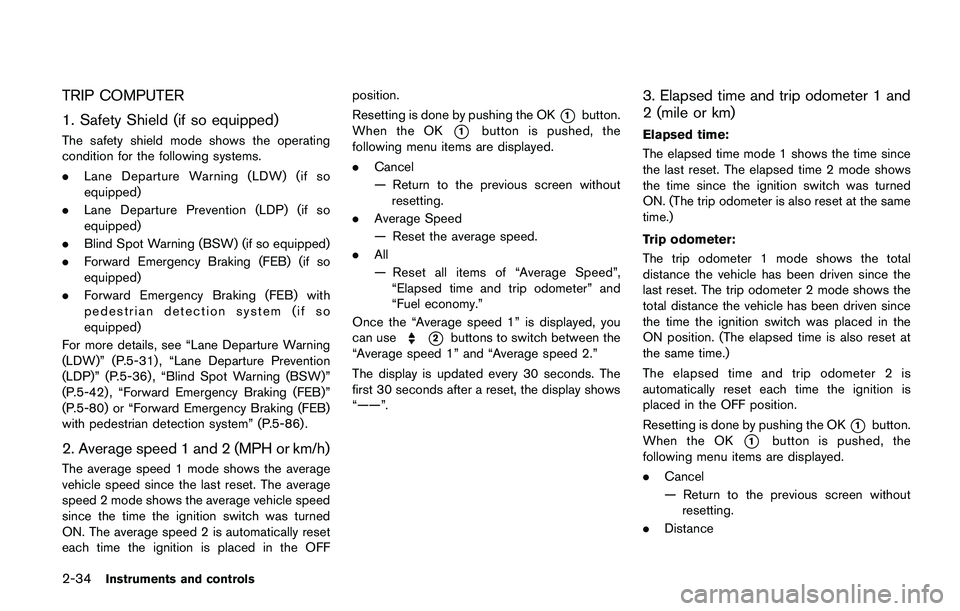
TRIP COMPUTER
1. Safety Shield (if so equipped)
The safety shield mode shows the operating
condition for the following systems.
.Lane Departure Warning (LDW) (if so
equipped)
.Lane Departure Prevention (LDP) (if so
equipped)
.Blind Spot Warning (BSW) (if so equipped)
.Forward Emergency Braking (FEB) (if so
equipped)
.Forward Emergency Braking (FEB) with
pedestrian detection system (if so
equipped)
For more details, see “Lane Departure Warning
(LDW)” (P.5-31) , “Lane Departure Prevention
(LDP)” (P.5-36) , “Blind Spot Warning (BSW)”
(P.5-42) , “Forward Emergency Braking (FEB)”
(P.5-80) or “Forward Emergency Braking (FEB)
with pedestrian detection system” (P.5-86) .
2. Average speed 1 and 2 (MPH or km/h)
The average speed 1 mode shows the average
vehicle speed since the last reset. The average
speed 2 mode shows the average vehicle speed
since the time the ignition switch was turned
ON. The average speed 2 is automatically reset
each time the ignition is placed in the OFFposition.
Resetting is done by pushing the OK
*1button.
When the OK
*1button is pushed, the
following menu items are displayed.
.Cancel
— Return to the previous screen without
resetting.
.Average Speed
— Reset the average speed.
.All
— Reset all items of “Average Speed”,
“Elapsed time and trip odometer” and
“Fuel economy.”
Once the “Average speed 1” is displayed, you
can use
*2buttons to switch between the
“Average speed 1” and “Average speed 2.”
The display is updated every 30 seconds. The
first 30 seconds after a reset, the display shows
“——”.
3. Elapsed time and trip odometer 1 and
2 (mile or km)
Elapsed time:
The elapsed time mode 1 shows the time since
the last reset. The elapsed time 2 mode shows
the time since the ignition switch was turned
ON. (The trip odometer is also reset at the same
time.)
Trip odometer:
The trip odometer 1 mode shows the total
distance the vehicle has been driven since the
last reset. The trip odometer 2 mode shows the
total distance the vehicle has been driven since
the time the ignition switch was placed in the
ON position. (The elapsed time is also reset at
the same time.)
The elapsed time and trip odometer 2 is
automatically reset each time the ignition is
placed in the OFF position.
Resetting is done by pushing the OK
*1button.
When the OK
*1button is pushed, the
following menu items are displayed.
.Cancel
— Return to the previous screen without
resetting.
.Distance
Page 114 of 508
— Reset the elapsed time and trip od-
ometer.
.All
— Reset all items of “Average Speed”,
“Elapsed time and trip odometer” and
“Fuel economy.”
Once the “Elapsed time and trip odometer 1” is
displayed, you can use
*2buttons to
switch between the “Elapsed time and trip
odometer 1” and “Elapsed time and trip
odometer 2.”
4-5. Fuel economy 1 and 2 (MPG, l
(litre)/100 km or km/l(litre))
Current fuel consumption:
The current fuel consumption mode shows the
current fuel consumption.
Average fuel consumption:
The average fuel consumption 1 mode shows
the average fuel consumption since the last
reset. The average fuel consumption 2 mode
shows the average fuel consumption since the
time the ignition switch was placed in the ON
position. The average fuel consumption 2 is
automatically reset each time the ignition is
placed in the OFF position.
Resetting is done by pushing the OK
*1button.
When the OK
*1button is pushed, the
following menu items are displayed..Cancel
— Return to the previous screen without
resetting.
.Fuel Economy
— Reset the fuel economy.
.All
— Reset all items of “Average Speed”,
“Elapsed time and trip odometer” and
“Fuel economy”.
Once the “Fuel economy 1” is displayed, you
can use
*2buttons to switch between the
“Fuel economy 1” and “Fuel economy 2”.
The display is updated every 30 seconds. For
about the first 1/3 mile (500 m) after a reset, the
display shows “——”.
6. Audio
The audio mode shows the status of audio
information.
7. Navigation (if so equipped)
When the route guidance is set in the navigation
system, this item shows the navigation route
information.
8. Compass (if so equipped)
This display indicates the heading direction of
the vehicle.
9. “4x4-i” display (if so equipped)
When the “4x4-i” display is selected, you can
view the distribution ratio of the transmission
torque to the front and rear wheels during
driving.
10. Chassis control
When Active Trace Control, Active Engine Brake
(Continuously Variable Transmission (CVT)
models) or Active Ride Control system is
operated, it shows the operating condition. It
also shows operating condition of Hill Start
Assist. See “Active Trace Control” (P.5-106) ,
“Active Engine Brake (Continuously Variable
Transmission (CVT) models)” (P.5-107) , “Active
Ride Control” (P.5-108) or “Hill Start Assist
system” (P.5-109)for more details.
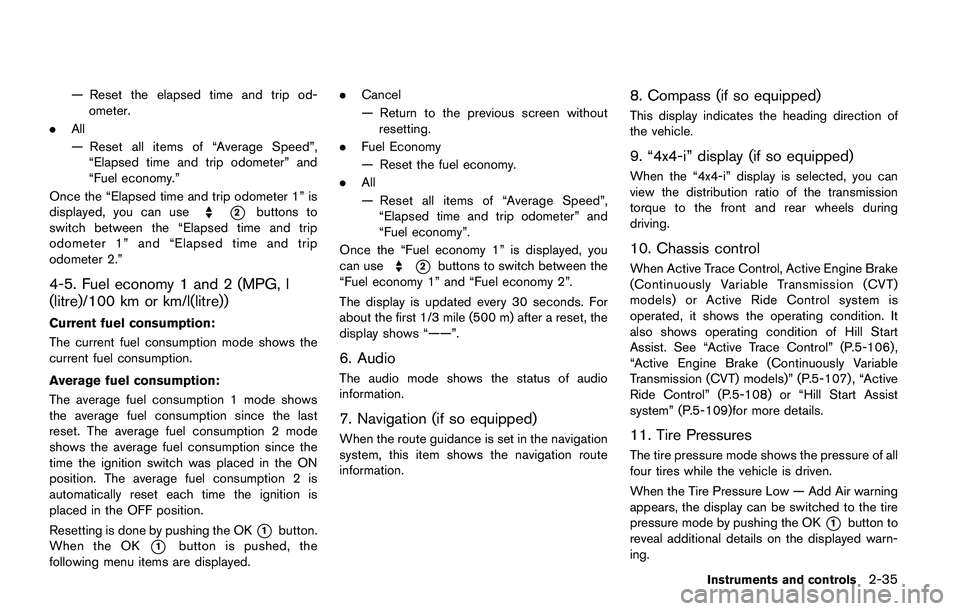
11. Tire Pressures
The tire pressure mode shows the pressure of all
four tires while the vehicle is driven.
When the Tire Pressure Low — Add Air warning
appears, the display can be switched to the tire
pressure mode by pushing the OK
*1button to
reveal additional details on the displayed warn-
ing.
Instruments and controls2-35
Page 115 of 508
2-36Instruments and controls
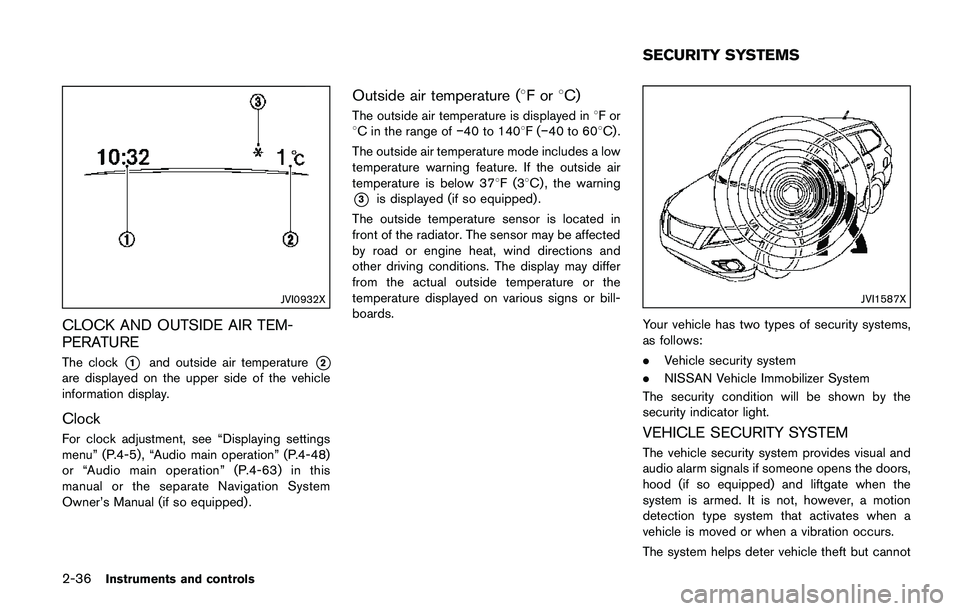
JVI0932X
CLOCK AND OUTSIDE AIR TEM-
PERATURE
The clock*1and outside air temperature*2
are displayed on the upper side of the vehicle
information display.
Clock
For clock adjustment, see “Displaying settings
menu” (P.4-5) , “Audio main operation” (P.4-48)
or “Audio main operation” (P.4-63) in this
manual or the separate Navigation System
Owner’s Manual (if so equipped) .
Outside air temperature (8For8C)
The outside air temperature is displayed in8For
8C in the range ofí40 to 1408F(í40 to 608C) .
The outside air temperature mode includes a low
temperature warning feature. If the outside air
temperature is below 378F(38C) , the warning
*3is displayed (if so equipped) .
The outside temperature sensor is located in
front of the radiator. The sensor may be affected
by road or engine heat, wind directions and
other driving conditions. The display may differ
from the actual outside temperature or the
temperature displayed on various signs or bill-
boards.
JVI1587X
Your vehicle has two types of security systems,
as follows:
.Vehicle security system
.NISSAN Vehicle Immobilizer System
The security condition will be shown by the
security indicator light.
VEHICLE SECURITY SYSTEM
The vehicle security system provides visual and
audio alarm signals if someone opens the doors,
hood (if so equipped) and liftgate when the
system is armed. It is not, however, a motion
detection type system that activates when a
vehicle is moved or when a vibration occurs.
The system helps deter vehicle theft but cannot
SECURITY SYSTEMS
Page 119 of 508
2-40Instruments and controls
reservoir tank. Do not use the
window washer reservoir tank to
mix the washer fluid concentrate
and water.
If the windshield wiper operation is inter-
rupted by snow or ice, the wiper may stop
moving to protect its motor. If this occurs,
turn the wiper switch to the OFF position
and remove the snow or ice that is on and
around the wiper arms. In approximately 1
minute, turn the switch on again to operate
the wiper.
JVI0863X
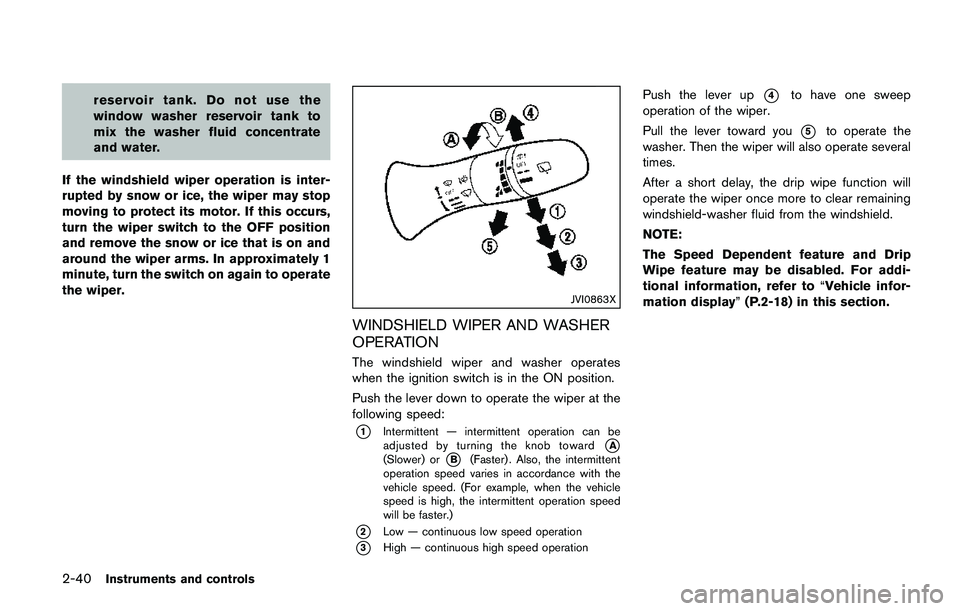
WINDSHIELD WIPER AND WASHER
OPERATION
The windshield wiper and washer operates
when the ignition switch is in the ON position.
Push the lever down to operate the wiper at the
following speed:
*1Intermittent — intermittent operation can be
adjusted by turning the knob toward*A(Slower) or*B(Faster) . Also, the intermittent
operation speed varies in accordance with the
vehicle speed. (For example, when the vehicle
speed is high, the intermittent operation speed
will be faster.)
*2Low — continuous low speed operation
*3High — continuous high speed operation
Push the lever up*4to have one sweep
operation of the wiper.
Pull the lever toward you
*5to operate the
washer. Then the wiper will also operate several
times.
After a short delay, the drip wipe function will
operate the wiper once more to clear remaining
windshield-washer fluid from the windshield.
NOTE:
The Speed Dependent feature and Drip
Wipe feature may be disabled. For addi-
tional information, refer to“Vehicle infor-
mation display”(P.2-18) in this section.
Page 121 of 508
2-42Instruments and controls
NOTE:
The Reverse Link feature may be disabled.
For additional information, refer to“Vehi-
cle information display”(P.2-18) .
Wiper drip wipe system:
The wiper will also operate once about 3
seconds after the washer and wiper are
operated. This operation is to wipe washer fluid
that has dripped on the windshield.
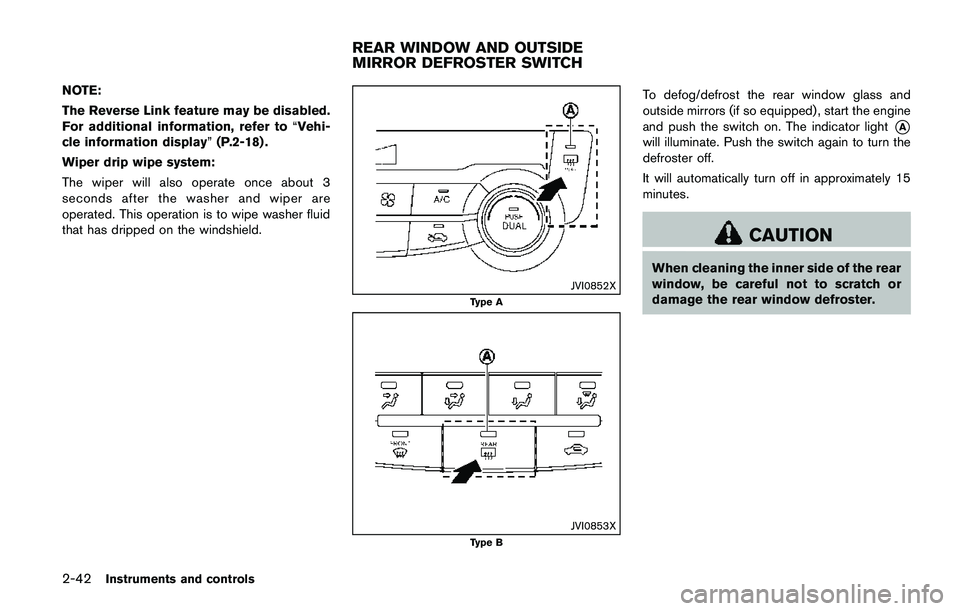
JVI0852XType A
JVI0853X
Type B
To defog/defrost the rear window glass and
outside mirrors (if so equipped) , start the engine
and push the switch on. The indicator light
*A
will illuminate. Push the switch again to turn the
defroster off.
It will automatically turn off in approximately 15
minutes.
CAUTION
When cleaning the inner side of the rear
window, be careful not to scratch or
damage the rear window defroster.
REAR WINDOW AND OUTSIDE
MIRROR DEFROSTER SWITCH