navigation system NISSAN QASHQAI 2017 Owner´s Manual
[x] Cancel search | Manufacturer: NISSAN, Model Year: 2017, Model line: QASHQAI, Model: NISSAN QASHQAI 2017Pages: 508, PDF Size: 2.68 MB
Page 256 of 508
SXM operation (if so equipped) :
.Push the
/button for less than 1.5
seconds to select the next or the previous
preset channel.
.Push the
/button for more than 1.5
seconds to go to the next or previous
category.
CD, iPod
Š, USB memory or BluetoothŠ
audio:
.Push the
/button for less than 1.5
seconds to select the next or the previous
track.
.Push the
/button for more than 1.5
seconds to fast forward or rewind the track
being played.
Back button (models with navigation
system)
Push the back button to return to previous
screen or cancel the current selection.
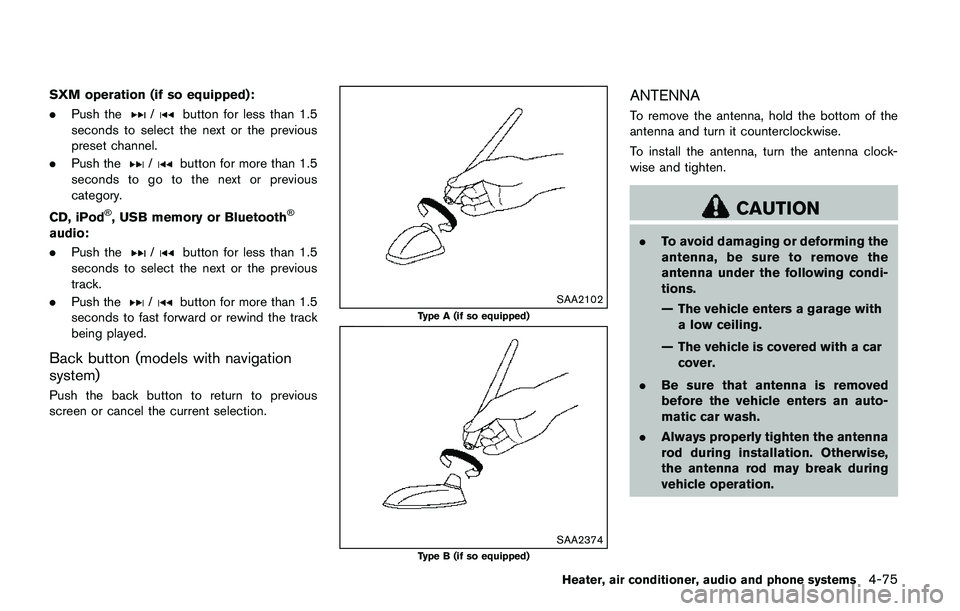
SAA2102
Type A (if so equipped)
SAA2374Type B (if so equipped)
ANTENNA
To remove the antenna, hold the bottom of the
antenna and turn it counterclockwise.
To install the antenna, turn the antenna clock-
wise and tighten.
CAUTION
.To avoid damaging or deforming the
antenna, be sure to remove the
antenna under the following condi-
tions.
— The vehicle enters a garage with
a low ceiling.
— The vehicle is covered with a car
cover.
.Be sure that antenna is removed
before the vehicle enters an auto-
matic car wash.
.Always properly tighten the antenna
rod during installation. Otherwise,
the antenna rod may break during
vehicle operation.
Heater, air conditioner, audio and phone systems4-75
Page 258 of 508
www.nissan.ca/nissanconnect/fr (French)
CONNECT PHONE
To use this feature, a compatible smartphone
must be connected via BluetoothŠor USB
connection port to the vehicle. For more
information on connecting your phone, see
“Bluetooth
ŠHands-Free Phone System (models
with navigation system)” (P.4-92) .
NOTE:
.For iPhone
Š, NissanConnectSMMobile
Apps REQUIRES the phone to be
plugged in via USB connection port.
.For Android phones, NissanConnect
SM
Mobile Apps REQUIRES the phone to
be paired via BluetoothŠ.
APPLICATION DOWNLOAD
Once connected, the NissanConnectSMMobile
Apps will search your phone to determine which
compatible applications are currently installed.
The user will then choose which apps they want
to bring into their vehicle from the list of apps
within the “Manage My Apps” section of the
NissanConnect
SMMobile Apps on their smart-
phone. The vehicle will then download the in-
vehicle interface for each of these compatible
applications. Once downloaded, the user can
access their selected smartphone applications
through the vehicle touch screen. For moreinformation on application availability see Nis-
sanConnect
SMwebsite.
NissanConnectSMwebsite:
For U.S.
www.nissanusa.com/connect/
For Canada
www.nissan.ca/nissanconnect (English)
www.nissan.ca/nissanconnect/fr (French)NissanConnect
SMServices is a suite of tele-
matics tools that provide emergency prepared-
ness, remote access, customizable alerts and
convenience services. This feature is an option
on navigation system equipped vehicles. For
additional information, refer to the separate
Navigation System Owner’s Manual.
Heater, air conditioner, audio and phone systems4-77
NISSANCONNECTSMSERVICES (if
so equipped)
Page 260 of 508
settings menu. (See “Changing SiriŠEyes
Free Settings (models with navigation sys-
tem)” (P.4-79) or “Changing Siri
ŠEyes Free
Settings (models without navigation sys-
tem)” (P.4-79).)
OPERATING SIRIŠEYES FREE
1. Push or push and hold thebutton.
2. Speak your command and then listen to the
Siri
ŠEyes Free reply.
After starting SiriŠEyes Free, push thebutton again within five seconds of the end of
the SiriŠEyes Free announcement to extend the
session.
Example 1 - Playing music
1. Push or push and hold the
button.
2. Say “Play (artist name, song name, etc.)”.
3. Your vehicle will automatically change to
Bluetooth
Šaudio or iPodŠmode* when the
music starts playing. Mode selection is
determined by the phone.
*: If the iPhone
Šis also connected with the
USB cable.
If the audio track does not start playing
automatically after Siri
ŠEyes Free ends, try
changing the track or audio source to resume
playback.NOTE:
For best results, use the native music app.
Performance of music control function
while using Podcasts, Audiobook or other
third party music apps may vary and is
controlled by the iPhone
Š.
Example 2 - Replying to text messages
1. If a compatible iPhone
Šis connected and
“Show Notifications” of the iPhoneŠsettings
is enabled, the vehicle will display a notifica-
tion for new incoming text messages.
2. After reading the message, push or push
and hold the
button to reply using SiriŠ
Eyes Free.
3. After a beep sounds, say “Text message” or
a similar command to reply using Siri
ŠEyes
Free.
CHANGING SIRIŠEYES FREE SET-
TINGS (models with navigation system)
Settings for SiriŠEyes Free can be found in the
BluetoothŠsettings menu.
1. Push the APPS·i button.
2. Touch the “Settings” key.
3. Touch the “Phone & Bluetooth” key.
4. Touch the “Phone settings” key.
5. Touch the “Start Siri by” key.6. Select “Short Press” or “Long Press” to set
the activation.
CHANGING SIRIŠEYES FREE SET-
TINGS (models without navigation sys-
tem)
Settings for SiriŠEyes Free can be found in the
BluetoothŠsettings menu.
Heater, air conditioner, audio and phone systems4-79
Page 262 of 508
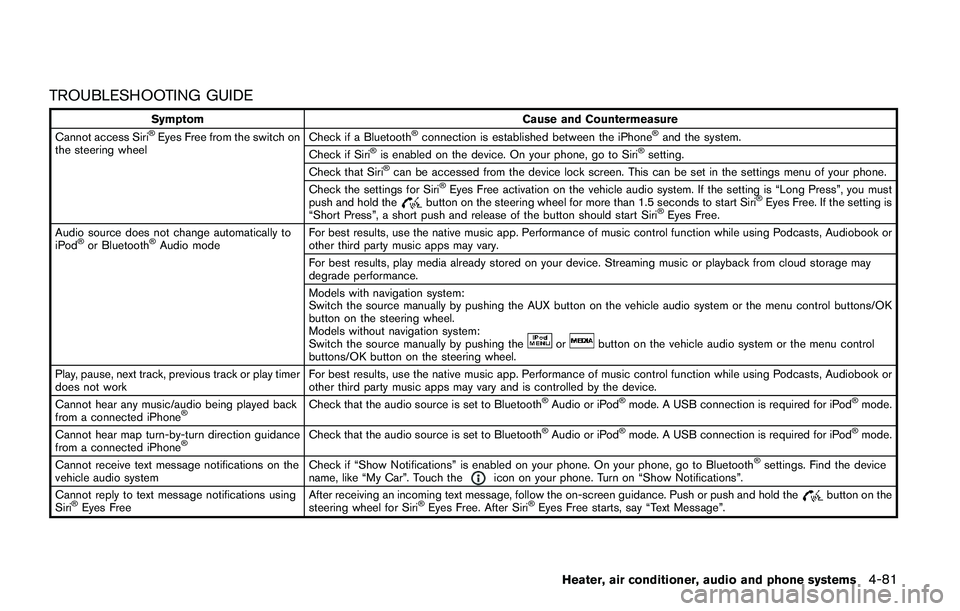
TROUBLESHOOTING GUIDE
Symptom Cause and Countermeasure
Cannot access SiriŠEyes Free from the switch on
the steering wheelCheck if a BluetoothŠconnection is established between the iPhoneŠand the system.
Check if SiriŠis enabled on the device. On your phone, go to SiriŠsetting.
Check that SiriŠcan be accessed from the device lock screen. This can be set in the settings menu of your phone.
Check the settings for SiriŠEyes Free activation on the vehicle audio system. If the setting is “Long Press”, you must
push and hold thebutton on the steering wheel for more than 1.5 seconds to start SiriŠEyes Free. If the setting is
“Short Press”, a short push and release of the button should start SiriŠEyes Free.
Audio source does not change automatically to
iPod
Šor BluetoothŠAudio modeFor best results, use the native music app. Performance of music control function while using Podcasts, Audiobook or
other third party music apps may vary.
For best results, play media already stored on your device. Streaming music or playback from cloud storage may
degrade performance.
Models with navigation system:
Switch the source manually by pushing the AUX button on the vehicle audio system or the menu control buttons/OK
button on the steering wheel.
Models without navigation system:
Switch the source manually by pushing the
orbutton on the vehicle audio system or the menu control
buttons/OK button on the steering wheel.
Play, pause, next track, previous track or play timer
does not workFor best results, use the native music app. Performance of music control function while using Podcasts, Audiobook or
other third party music apps may vary and is controlled by the device.
Cannot hear any music/audio being played back
from a connected iPhone
ŠCheck that the audio source is set to BluetoothŠAudio or iPodŠmode. A USB connection is required for iPodŠmode.
Cannot hear map turn-by-turn direction guidance
from a connected iPhone
ŠCheck that the audio source is set to BluetoothŠAudio or iPodŠmode. A USB connection is required for iPodŠmode.
Cannot receive text message notifications on the
vehicle audio systemCheck if “Show Notifications” is enabled on your phone. On your phone, go to Bluetooth
Šsettings. Find the device
name, like “My Car”. Touch theicon on your phone. Turn on “Show Notifications”.
Cannot reply to text message notifications using
Siri
ŠEyes FreeAfter receiving an incoming text message, follow the on-screen guidance. Push or push and hold thebutton on the
steering wheel for SiriŠEyes Free. After SiriŠEyes Free starts, say “Text Message”.
Heater, air conditioner, audio and phone systems4-81
Page 263 of 508
4-82Heater, air conditioner, audio and phone systems
When installing a car phone or a CB radio in
your vehicle, be sure to observe the following
precautions, otherwise the new equipment may
adversely affect the electronic control modules
and electronic control system harness.
WARNING
.A cellular phone should not be used
for any purpose while driving so full
attention may be given to vehicle
operation. Some jurisdictions prohi-
bit the use of cellular phones while
driving.
.If you must make a call while your
vehicle is in motion, the hands-free
cellular phone operational mode (if
so equipped) is highly recom-
mended. Exercise extreme caution
at all times so full attention may be
given to vehicle operation.
.If a conversation in a moving vehicle
requires you to take notes, pull off
the road to a safe location and stop
your vehicle before doing so.
CAUTION
.Keep the antenna as far away as
possible from the electronic control
modules.
.Keep the antenna wire more than 8
in (20 cm) away from the electronic
control system harness. Do not
route the antenna wire next to any
harness.
.Adjust the antenna standing-wave
ratio as recommended by the man-
ufacturer.
.Connect the ground wire from the
CB radio chassis to the body.
.For details, it is recommended you
visit a NISSAN dealer.
WARNING
.Use a phone after stopping your
vehicle in a safe location. If you
have to use a phone while driving,
exercise extreme caution at all
times so full attention may be given
to vehicle operation.
.If you are unable to devote full
attention to vehicle operation while
talking on the phone, pull off the
road to a safe location and stop
your vehicle.
CAUTION
To avoid draining the vehicle battery,
use a phone after starting the engine.
Your vehicle is equipped with the Bluetooth
Š
Hands-Free Phone System. If you have a
compatible BluetoothŠenabled cellular phone,
you can set up the wireless connection between
your cellular phone and the in-vehicle phone
module. With Bluetooth
Šwireless technology,
you can make or receive a hands-free telephone
call with your cellular phone in the vehicle.
CAR PHONE OR CB RADIOBluetooth
ŠHANDS-FREE PHONE
SYSTEM (models without
navigation system)
Page 272 of 508
JVH1626X
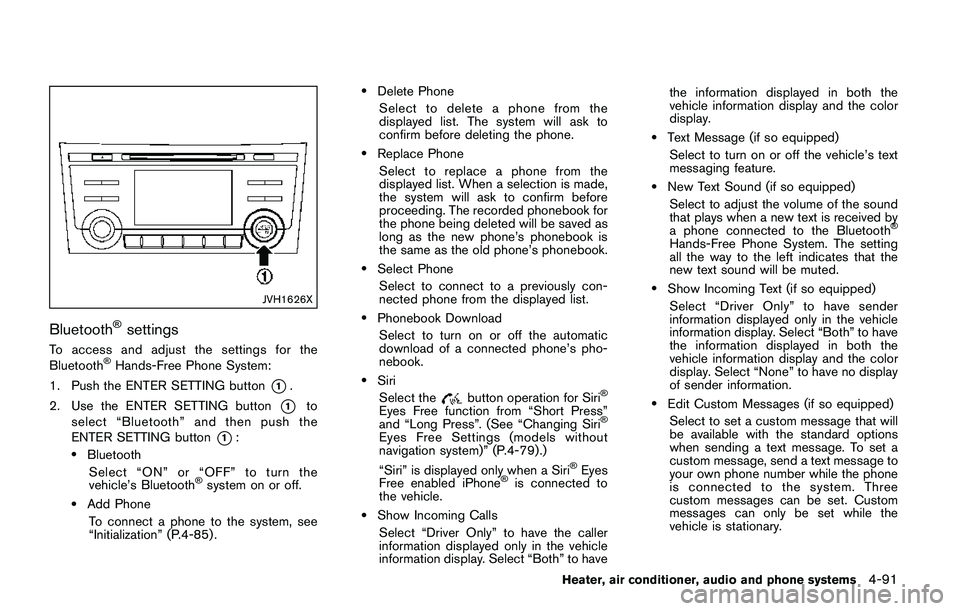
BluetoothŠsettings
To access and adjust the settings for the
BluetoothŠHands-Free Phone System:
1. Push the ENTER SETTING button
*1.
2. Use the ENTER SETTING button
*1to
select “Bluetooth” and then push the
ENTER SETTING button
*1:.Bluetooth
Select “ON” or “OFF” to turn the
vehicle’s Bluetooth
Šsystem on or off.
.Add Phone
To connect a phone to the system, see
“Initialization” (P.4-85) .
.Delete Phone
Select to delete a phone from the
displayed list. The system will ask to
confirm before deleting the phone.
.Replace Phone
Select to replace a phone from the
displayed list. When a selection is made,
the system will ask to confirm before
proceeding. The recorded phonebook for
the phone being deleted will be saved as
long as the new phone’s phonebook is
the same as the old phone’s phonebook.
.Select Phone
Select to connect to a previously con-
nected phone from the displayed list.
.Phonebook Download
Select to turn on or off the automatic
download of a connected phone’s pho-
nebook.
.Siri
Select the
button operation for SiriŠ
Eyes Free function from “Short Press”
and “Long Press”. (See “Changing SiriŠ
Eyes Free Settings (models without
navigation system)” (P.4-79) .)
“Siri” is displayed only when a Siri
ŠEyes
Free enabled iPhoneŠis connected to
the vehicle.
.Show Incoming Calls
Select “Driver Only” to have the caller
information displayed only in the vehicle
information display. Select “Both” to havethe information displayed in both the
vehicle information display and the color
display.
.Text Message (if so equipped)
Select to turn on or off the vehicle’s text
messaging feature.
.New Text Sound (if so equipped)
Select to adjust the volume of the sound
that plays when a new text is received by
a phone connected to the Bluetooth
Š
Hands-Free Phone System. The setting
all the way to the left indicates that the
new text sound will be muted.
.Show Incoming Text (if so equipped)
Select “Driver Only” to have sender
information displayed only in the vehicle
information display. Select “Both” to have
the information displayed in both the
vehicle information display and the color
display. Select “None” to have no display
of sender information.
.Edit Custom Messages (if so equipped)
Select to set a custom message that will
be available with the standard options
when sending a text message. To set a
custom message, send a text message to
your own phone number while the phone
is connected to the system. Three
custom messages can be set. Custom
messages can only be set while the
vehicle is stationary.
Heater, air conditioner, audio and phone systems4-91
Page 273 of 508
4-92Heater, air conditioner, audio and phone systems
.Auto Reply (if so equipped)
Select to turn on or off the Auto Reply
function. When enabled, the vehicle will
automatically send a predefined text
message to the sender when a text
message is received while driving.
.Auto Reply Message (if so equipped)
Select to choose the message that is
sent when the Auto Reply function is
enabled. Choose from “I’m Driving” or
one of the three custom messages
stored in the system.
.Vehicle Signature On/Off (if so equipped)
Select to choose whether or not the
vehicle signature is added to outgoing
text messages from the vehicle. This
message cannot be changed or custo-
mized.
WARNING
.Use a phone after stopping your
vehicle in a safe location. If you
have to use a phone while driving,
exercise extreme caution at all
times so full attention may be given
to vehicle operation.
.If you are unable to devote full
attention to vehicle operation while
talking on the phone, pull off the
road to a safe location and stop
your vehicle.
CAUTION
To avoid discharging the vehicle bat-
tery, use a phone after starting the
engine.
Your vehicle is equipped with the Bluetooth
Š
Hands-Free Phone System. If you have a
compatible BluetoothŠenabled cellular phone,
you can set up the wireless connection between
your cellular phone and the in-vehicle phone
module. With Bluetooth
Šwireless technology,
you can make or receive a hands-free telephonecall with your cellular phone in the vehicle.
Once your cellular phone is connected to the in-
vehicle phone module, no other phone connect-
ing procedure is required. Your phone is
automatically connected with the in-vehicle
phone module when the ignition switch is
placed in the ON position with the connected
cellular phone turned on and carried in the
vehicle.
You can register up to five different Bluetooth
Š
cellular phones to the in-vehicle phone module.
However, you can talk on only one cellular phone
at a time.
NISSAN Voice Recognition system supports the
phone commands, so dialing a phone number
using your voice is possible. For more details,
see “NISSAN Voice Recognition system (mod-
els with navigation system)” (P.4-99).
Before using the Bluetooth
ŠHands-Free Phone
System, refer to the following notes.
.Set up the wireless connection between a
cellular phone and the in-vehicle phone
module before using the Hands-Free Phone
System.
.Some Bluetooth
Šenabled cellular phones
may not be recognized by the in-vehicle
phone module. Please visit www.nissanusa.
com/bluetooth or www.nissan.ca/bluetooth
for a recommended phone list and connect-
BluetoothŠHANDS-FREE PHONE
SYSTEM (models with navigation
system)
Page 275 of 508
4-94Heater, air conditioner, audio and phone systems
JVH1627X
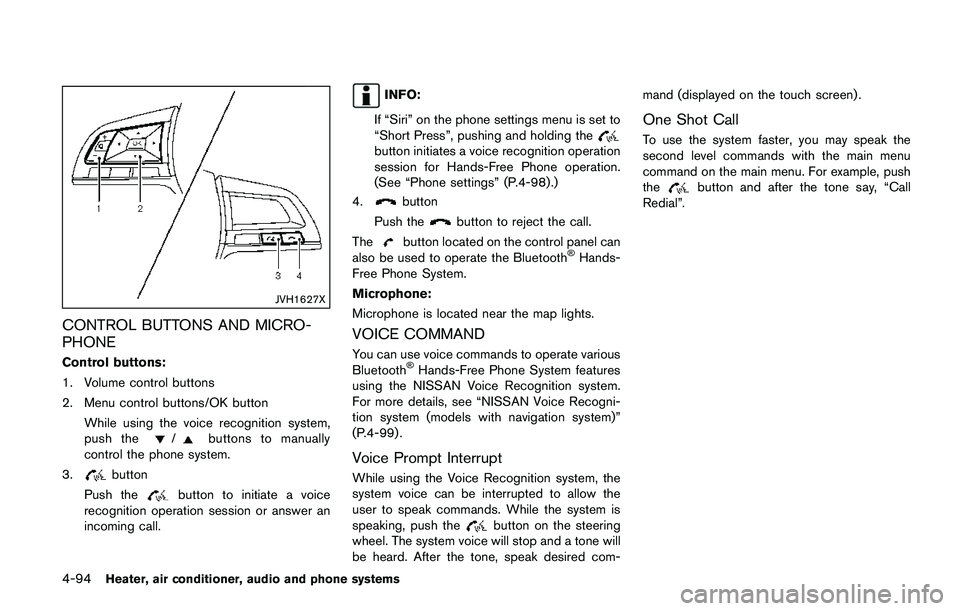
CONTROL BUTTONS AND MICRO-
PHONE
Control buttons:
1. Volume control buttons
2. Menu control buttons/OK button
While using the voice recognition system,
push the
/buttons to manually
control the phone system.
3.
button
Push the
button to initiate a voice
recognition operation session or answer an
incoming call.
INFO:
If “Siri” on the phone settings menu is set to
“Short Press”, pushing and holding the
button initiates a voice recognition operation
session for Hands-Free Phone operation.
(See “Phone settings” (P.4-98) .)
4.
button
Push the
button to reject the call.
The
button located on the control panel can
also be used to operate the BluetoothŠHands-
Free Phone System.
Microphone:
Microphone is located near the map lights.
VOICE COMMAND
You can use voice commands to operate various
BluetoothŠHands-Free Phone System features
using the NISSAN Voice Recognition system.
For more details, see “NISSAN Voice Recogni-
tion system (models with navigation system)”
(P.4-99) .
Voice Prompt Interrupt
While using the Voice Recognition system, the
system voice can be interrupted to allow the
user to speak commands. While the system is
speaking, push the
button on the steering
wheel. The system voice will stop and a tone will
be heard. After the tone, speak desired com-mand (displayed on the touch screen) .
One Shot Call
To use the system faster, you may speak the
second level commands with the main menu
command on the main menu. For example, push
the
button and after the tone say, “Call
Redial”.
Page 280 of 508
cations shown in the vehicle information
display. Touch “Both” to have text notifica-
tions shown in both the vehicle information
display and the touch screen. Touch “OFF”
to turn off all text notifications.
.Auto Reply (if so equipped):
Touch to toggle the auto reply functionality
on or off.
.Auto Reply Message (if so equipped):
Touch to indicate preferred message to be
sent when “Auto Reply” function is acti-
vated.
.Use Vehicle’s Signature (if so equipped):
Touch to toggle on or off the addition of the
vehicle signature to outgoing messages
.Custom Text Messages (if so equipped):
Touch this option to select a custom
message to edit. There are several custom
message slots available.The NISSAN Voice Recognition system allows
hands-free operation of the systems equipped
on this vehicle, such as the phone and naviga-
tion systems.
To operate NISSAN Voice Recognition, push the
button located on the steering wheel.
When prompted, speak the command for the
system you wish to activate. The command given
is picked up by the microphone and performed
when it is properly recognized. NISSAN Voice
Recognition will provide a voice response as
well as a message in the touch screen to inform
you of the command results.
USING THE SYSTEM
Initialization
When the ignition switch is placed in the ACC
or ON position, NISSAN Voice Recognition is
initialized, which takes a few seconds. When
completed, the system is ready to accept voice
commands. If the
button is pushed before
the initialization completes, the system will
announce: “Voice Recognition System not
ready. Please wait.”
Heater, air conditioner, audio and phone systems4-99
NISSAN VOICE RECOGNITION
SYSTEM (models with navigation
system)
Page 282 of 508
JVH1687X
SYSTEM FEATURES
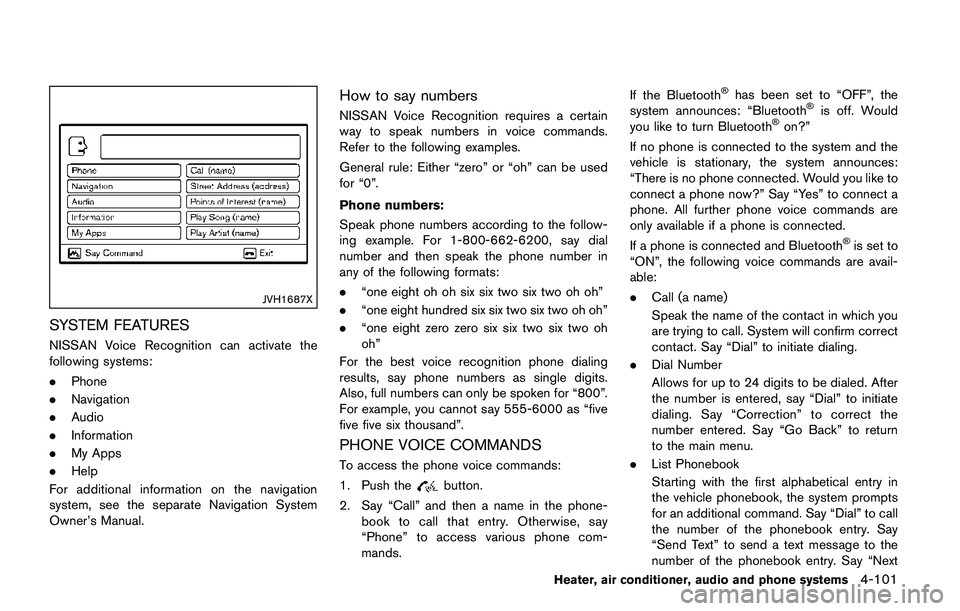
NISSAN Voice Recognition can activate the
following systems:
.Phone
.Navigation
.Audio
.Information
.My Apps
.Help
For additional information on the navigation
system, see the separate Navigation System
Owner’s Manual.
How to say numbers
NISSAN Voice Recognition requires a certain
way to speak numbers in voice commands.
Refer to the following examples.
General rule: Either “zero” or “oh” can be used
for “0”.
Phone numbers:
Speak phone numbers according to the follow-
ing example. For 1-800-662-6200, say dial
number and then speak the phone number in
any of the following formats:
.“one eight oh oh six six two six two oh oh”
.“one eight hundred six six two six two oh oh”
.“one eight zero zero six six two six two oh
oh”
For the best voice recognition phone dialing
results, say phone numbers as single digits.
Also, full numbers can only be spoken for “800”.
For example, you cannot say 555-6000 as “five
five five six thousand”.
PHONE VOICE COMMANDS
To access the phone voice commands:
1. Push the
button.
2. Say “Call” and then a name in the phone-
book to call that entry. Otherwise, say
“Phone” to access various phone com-
mands.If the Bluetooth
Šhas been set to “OFF”, the
system announces: “BluetoothŠis off. Would
you like to turn BluetoothŠon?”
If no phone is connected to the system and the
vehicle is stationary, the system announces:
“There is no phone connected. Would you like to
connect a phone now?” Say “Yes” to connect a
phone. All further phone voice commands are
only available if a phone is connected.
If a phone is connected and Bluetooth
Šis set to
“ON”, the following voice commands are avail-
able:
.Call (a name)
Speak the name of the contact in which you
are trying to call. System will confirm correct
contact. Say “Dial” to initiate dialing.
.Dial Number
Allows for up to 24 digits to be dialed. After
the number is entered, say “Dial” to initiate
dialing. Say “Correction” to correct the
number entered. Say “Go Back” to return
to the main menu.
.List Phonebook
Starting with the first alphabetical entry in
the vehicle phonebook, the system prompts
for an additional command. Say “Dial” to call
the number of the phonebook entry. Say
“Send Text” to send a text message to the
number of the phonebook entry. Say “Next
Heater, air conditioner, audio and phone systems4-101