radio NISSAN QASHQAI 2017 Owner´s Manual
[x] Cancel search | Manufacturer: NISSAN, Model Year: 2017, Model line: QASHQAI, Model: NISSAN QASHQAI 2017Pages: 508, PDF Size: 2.68 MB
Page 246 of 508
station or channel indicator will then come
on.
3. Other keys can be set in the same manner.
If the battery cable is disconnected or if the fuse
opens, the radio memory will be erased. In that
case, reset the desired stations or channels.
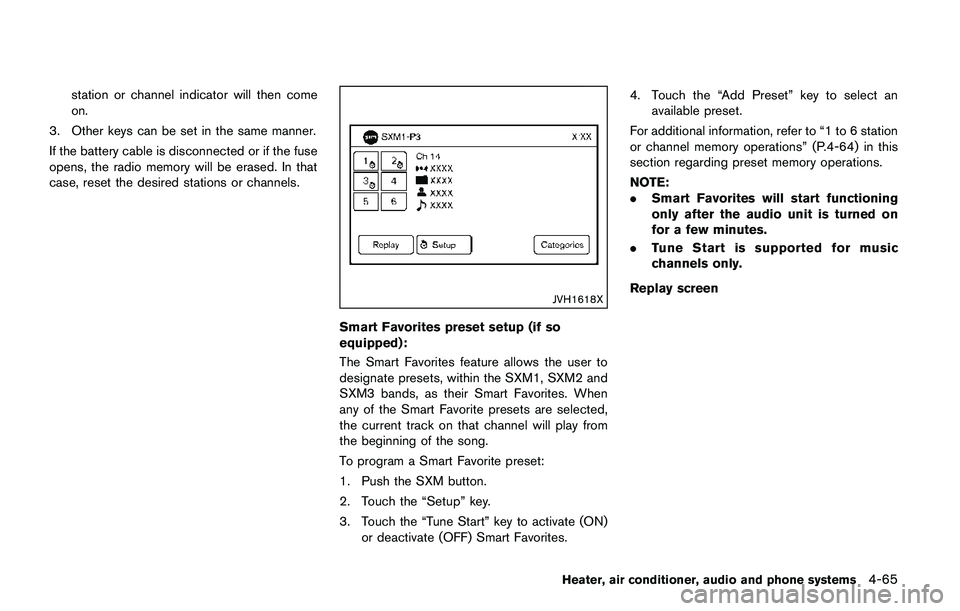
JVH1618X
Smart Favorites preset setup (if so
equipped):
The Smart Favorites feature allows the user to
designate presets, within the SXM1, SXM2 and
SXM3 bands, as their Smart Favorites. When
any of the Smart Favorite presets are selected,
the current track on that channel will play from
the beginning of the song.
To program a Smart Favorite preset:
1. Push the SXM button.
2. Touch the “Setup” key.
3. Touch the “Tune Start” key to activate (ON)
or deactivate (OFF) Smart Favorites.4. Touch the “Add Preset” key to select an
available preset.
For additional information, refer to “1 to 6 station
or channel memory operations” (P.4-64) in this
section regarding preset memory operations.
NOTE:
.Smart Favorites will start functioning
only after the audio unit is turned on
for a few minutes.
.Tune Start is supported for music
channels only.
Replay screen
Heater, air conditioner, audio and phone systems4-65
Page 247 of 508
4-66Heater, air conditioner, audio and phone systems
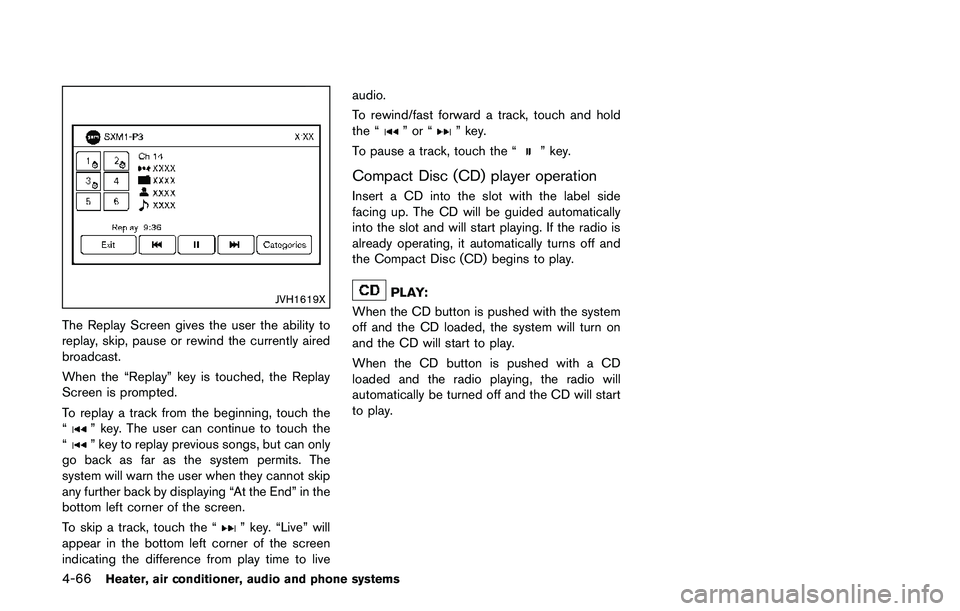
JVH1619X
The Replay Screen gives the user the ability to
replay, skip, pause or rewind the currently aired
broadcast.
When the “Replay” key is touched, the Replay
Screen is prompted.
To replay a track from the beginning, touch the
“
” key. The user can continue to touch the
“” key to replay previous songs, but can only
go back as far as the system permits. The
system will warn the user when they cannot skip
any further back by displaying “At the End” in the
bottom left corner of the screen.
To skip a track, touch the “
” key. “Live” will
appear in the bottom left corner of the screen
indicating the difference from play time to liveaudio.
To rewind/fast forward a track, touch and hold
the “
”or“” key.
To pause a track, touch the “
” key.
Compact Disc (CD) player operation
Insert a CD into the slot with the label side
facing up. The CD will be guided automatically
into the slot and will start playing. If the radio is
already operating, it automatically turns off and
the Compact Disc (CD) begins to play.
PLAY:
When the CD button is pushed with the system
off and the CD loaded, the system will turn on
and the CD will start to play.
When the CD button is pushed with a CD
loaded and the radio playing, the radio will
automatically be turned off and the CD will start
to play.
Page 255 of 508
4-74Heater, air conditioner, audio and phone systems
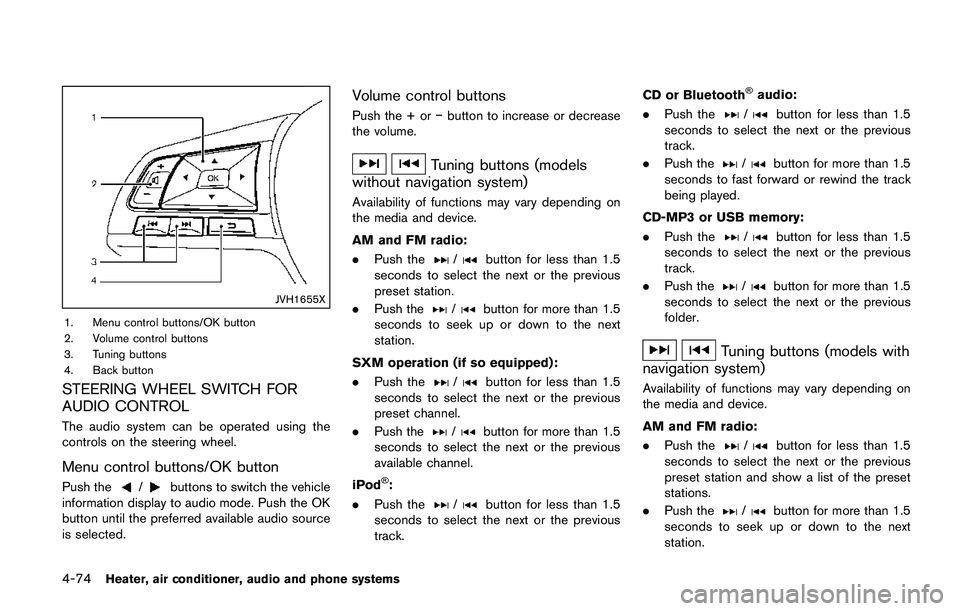
JVH1655X
1. Menu control buttons/OK button
2. Volume control buttons
3. Tuning buttons
4. Back button
STEERING WHEEL SWITCH FOR
AUDIO CONTROL
The audio system can be operated using the
controls on the steering wheel.
Menu control buttons/OK button
Push the/buttons to switch the vehicle
information display to audio mode. Push the OK
button until the preferred available audio source
is selected.
Volume control buttons
Push the + oríbutton to increase or decrease
the volume.
Tuning buttons (models
without navigation system)
Availability of functions may vary depending on
the media and device.
AM and FM radio:
.Push the
/button for less than 1.5
seconds to select the next or the previous
preset station.
.Push the
/button for more than 1.5
seconds to seek up or down to the next
station.
SXM operation (if so equipped) :
.Push the
/button for less than 1.5
seconds to select the next or the previous
preset channel.
.Push the
/button for more than 1.5
seconds to select the next or the previous
available channel.
iPod
Š:
.Push the
/button for less than 1.5
seconds to select the next or the previous
track.CD or Bluetooth
Šaudio:
.Push the
/button for less than 1.5
seconds to select the next or the previous
track.
.Push the
/button for more than 1.5
seconds to fast forward or rewind the track
being played.
CD-MP3 or USB memory:
.Push the
/button for less than 1.5
seconds to select the next or the previous
track.
.Push the
/button for more than 1.5
seconds to select the next or the previous
folder.
Tuning buttons (models with
navigation system)
Availability of functions may vary depending on
the media and device.
AM and FM radio:
.Push the
/button for less than 1.5
seconds to select the next or the previous
preset station and show a list of the preset
stations.
.Push the
/button for more than 1.5
seconds to seek up or down to the next
station.
Page 263 of 508
4-82Heater, air conditioner, audio and phone systems
When installing a car phone or a CB radio in
your vehicle, be sure to observe the following
precautions, otherwise the new equipment may
adversely affect the electronic control modules
and electronic control system harness.
WARNING
.A cellular phone should not be used
for any purpose while driving so full
attention may be given to vehicle
operation. Some jurisdictions prohi-
bit the use of cellular phones while
driving.
.If you must make a call while your
vehicle is in motion, the hands-free
cellular phone operational mode (if
so equipped) is highly recom-
mended. Exercise extreme caution
at all times so full attention may be
given to vehicle operation.
.If a conversation in a moving vehicle
requires you to take notes, pull off
the road to a safe location and stop
your vehicle before doing so.
CAUTION
.Keep the antenna as far away as
possible from the electronic control
modules.
.Keep the antenna wire more than 8
in (20 cm) away from the electronic
control system harness. Do not
route the antenna wire next to any
harness.
.Adjust the antenna standing-wave
ratio as recommended by the man-
ufacturer.
.Connect the ground wire from the
CB radio chassis to the body.
.For details, it is recommended you
visit a NISSAN dealer.
WARNING
.Use a phone after stopping your
vehicle in a safe location. If you
have to use a phone while driving,
exercise extreme caution at all
times so full attention may be given
to vehicle operation.
.If you are unable to devote full
attention to vehicle operation while
talking on the phone, pull off the
road to a safe location and stop
your vehicle.
CAUTION
To avoid draining the vehicle battery,
use a phone after starting the engine.
Your vehicle is equipped with the Bluetooth
Š
Hands-Free Phone System. If you have a
compatible BluetoothŠenabled cellular phone,
you can set up the wireless connection between
your cellular phone and the in-vehicle phone
module. With Bluetooth
Šwireless technology,
you can make or receive a hands-free telephone
call with your cellular phone in the vehicle.
CAR PHONE OR CB RADIOBluetooth
ŠHANDS-FREE PHONE
SYSTEM (models without
navigation system)
Page 264 of 508
Once your cellular phone is connected to the in-
vehicle phone module, no other phone connect-
ing procedure is required. Your phone is
automatically connected with the in-vehicle
phone module when the ignition switch is
placed in the ACC or ON position with the
previously connected cellular phone turned on
and carried in the vehicle.
NOTE:
Some devices require the user to accept
connections to other Bluetooth
Šdevices. If
your phone does not connect automatic
ally to the system, consult the phone’s
owner’s manual for details on device
operation.
You can connect up to five different Bluetooth
Š
cellular phones to the in-vehicle phone module.
However, you can talk on only one cellular phone
at a time.
Before using the Bluetooth
ŠHands-Free Phone
System, refer to the following notes.
.Set up the wireless connection between a
compatible cellular phone and the in-vehicle
phone module before using the Hands-Free
Phone System.
.Some Bluetooth
Šenabled cellular phones
may not be recognized by the in-vehicle
phone module. Please visit www.nissanusa.
com/bluetooth or www.nissan.ca/bluetoothfor a recommended phone list.
.You will not be able to use a hands-free
phone under the following conditions:
— Your vehicle is outside of the cellular
service area.
— Your vehicle is in an area where it is
difficult to receive a cellular signal; such
as in a tunnel, in an underground parking
garage, near a tall building or in a
mountainous area.
— Your cellular phone is locked to prevent it
from being dialed.
.When the radio wave condition is not ideal
or ambient sound is too loud, it may be
difficult to hear the other person’s voice
during a call.
.Do not place the cellular phone in an area
surrounded by metal or far away from the in-
vehicle phone module to prevent tone quality
degradation and wireless connection dis-
ruption.
.While a cellular phone is connected through
the Bluetooth
Šwireless connection, the
battery power of the cellular phone may
discharge quicker than usual. The Blue-
tooth
ŠHands-Free Phone System cannot
charge cellular phones.
.If the Bluetooth
ŠHands-Free Phone System
seems to be malfunctioning, visit www.nissanusa.com/bluetooth or www.nissan.
ca/bluetooth for troubleshooting help.
.Some cellular phones or other devices may
cause interference or a buzzing noise to
come from the audio system speakers.
Storing the device in a different location
may reduce or eliminate the noise.
.Refer to the cellular phone owner’s manual
regarding the telephone charges, cellular
phone antenna and body, etc.
REGULATORY INFORMATION
FCC Regulatory information
.CAUTION: To maintain compliance with
FCC’s RF exposure guidelines, use only
the supplied antenna. Unauthorized antenna,
modification, or attachments could damage
the transmitter and may violate FCC regula-
tions.
.Operation is subject to the following two
conditions:
1) this device may not cause interference
and
2) this device must accept any interference,
including interference that may cause
undesired operation of the device.
Heater, air conditioner, audio and phone systems4-83
Page 274 of 508
ing.
.You will not be able to use a hands-free
phone under the following conditions:
— Your vehicle is outside of the cellular
service area.
— Your vehicle is in an area where it is
difficult to receive cellular signal; such as
in a tunnel, in an underground parking
garage, near a tall building or in a
mountainous area.
— Your cellular phone is locked to prevent it
from being dialed.
.When the radio wave condition is not ideal
or ambient sound is too loud, it may be
difficult to hear the other person’s voice
during a call.
.Immediately after the ignition switch is
placed in the ON position, it may be
impossible to receive a call for a short
period of time.
.Do not place the cellular phone in an area
surrounded by metal or far away from the in-
vehicle phone module to prevent tone quality
degradation and wireless connection dis-
ruption.
.While a cellular phone is connected through
the Bluetooth
Šwireless connection, the
battery power of the cellular phone may
discharge quicker than usual. The Blue-tooth
ŠHands-Free Phone System cannot
charge cellular phones.
.If the Bluetooth
ŠHands-Free Phone System
seems to be malfunctioning, visit www.
nissanusa.com/bluetooth or www.nissan.
ca/bluetooth for troubleshooting help.
.Some cellular phones or other devices may
cause interference or a buzzing noise to
come from the audio system speakers.
Storing the device in a different location
may reduce or eliminate the noise.
.Refer to the cellular phone owner’s manual
regarding the telephone charges, cellular
phone antenna and body, etc.
.The signal strength display on the monitor
will not coincide with the signal strength
display of some cellular phones.
REGULATORY INFORMATION
FCC Regulatory information
.CAUTION: To maintain compliance with
FCC’s RF exposure guidelines, use only
the supplied antenna. Unauthorized antenna,
modification, or attachments could damage
the transmitter and may violate FCC regula-
tions..Operation is subject to the following two
conditions:
1) This device may not cause interference
and
2) This device must accept any interfer-
ence, including interference that may
cause undesired operation of the device.
IC Regulatory information
.Operation is subject to the following two
conditions: (1) this device may not cause
interference, and (2) this device must accept
any interference, including interference that
may cause undesired operation of the
device.
.This Class B digital apparatus meets all
requirements of the Canadian Interference-
Causing Equipment Regulations.
BluetoothŠis a trademark
owned by Bluetooth SIG, Inc.
and licensed to Robert Bosch
GmbH.
Heater, air conditioner, audio and phone systems4-93
Page 283 of 508
4-102Heater, air conditioner, audio and phone systems
Entry” to skip to the next alphabetical entry
in the vehicle phonebook, where the same
options will then be available.
.Recent Calls
The system prompts for an additional
command. Say “Missed Calls”, “Incoming
Calls” or “Outgoing Calls” to display a list of
such calls on the screen.
Speak the number of the entry displayed on
the screen to dial that number or say “Next
Page” to view entries on the next page (if
available) .
.Redial
Redials the last called number.
.Read Text (if so equipped)
Reads an incoming text message. For more
information about text messaging with the
Bluetooth
ŠHands-Free Phone System, see
“Text messaging” (P.4-96).
.Send Text (if so equipped)
Sends a text message. For more information
about text messaging with the Bluetooth
Š
Hands-Free Phone System, see “Text mes-
saging” (P.4-96) .
.Select Phone
The system replies “Please use manual
controls to continue”. Use manual controls
to change the active phone from among the
listed phones connected to the vehicle..Siri (if so equipped)
Siri
ŠEyes Free function can be activated.
See “SiriŠEyes Free” (P.4-78) for details.
For more information about the BluetoothŠ
Hands-Free Phone System, see “BluetoothŠ
Hands-Free Phone System (models with navi-
gation system)” (P.4-92) .
NAVIGATION SYSTEM VOICE COM-
MANDS
The following voice commands are available for
the Navigation System:
.Street Address (address)
.Points of Interest (name)
.POI by Category
.Home
.Address Book
.Previous Destinations
.Enter Address in Steps
.Cancel Route
For more information about these commands,
see the separate Navigation System Owner’s
Manual.
AUDIO SYSTEM VOICE COMMANDS
To access the audio system voice commands:
1. Push the
button.
2. Say “Audio”.
3. Speak a command from the following
available commands:
.Play (AM, FM, etc.)
Allows user to select radio band
.Tune AM (number)
Allows user to tune directly to a desired AM
frequency
.Tune FM (number)
Allows user to tune directly to a desired FM
frequency
.SXM Channel (number)
Allows user to tune directly to a desired
SXM channel (if so equipped)
.CD Track (number)
Allows user to select track to be played
.Play Song (name)
Allows user to select song name to be
played
.Play Artist (name)
Allows user to select artist to be played
.Play Album (name)
Allows user to select album name to be
played
Page 284 of 508
For more information about the audio system,
see “FM-AM-SAT radio with Compact Disc (CD)
player (Type B)” (P.4-63) .
INFORMATION VOICE COMMANDS
The following voice commands are available for
the information functions of the Navigation
System:
.Traffic
.Fuel Prices
.Sports
.Stocks
.Movie Listings
.Current Weather
.Weather Map
.5-day Forecast
.6-hour Forecast
.Connect To Voice Menu (if so equipped)
For more information about these commands,
see the separate Navigation System Owner’s
Manual.
MY APPS VOICE COMMANDS
Many Apps can be accessed using this voice
command. For information about smartphone
integration, “NissanConnect
SMMobile Apps
smartphone integration” (P.4-76) .
HELP VOICE COMMANDS
The following voice commands can be spoken
to have the system provide instructions and tips
for using the NISSAN Voice Recognition sys-
tem.
.List Commands
.What Can I Say?
.General Help
.Quit
.Exit
.Help
TROUBLESHOOTING GUIDE
The system should respond correctly to all voice
commands without difficulty. If problems are
encountered, follow the solutions given in this
guide for the appropriate error. Where the
solutions are listed by number, try each solution
in turn, starting with number one, until the
problem is resolved.
Heater, air conditioner, audio and phone systems4-103
Page 292 of 508
for approximately 1 minute. The
light will remain on after 1 minute.
Have your tires replaced and/or
TPMS system reset as soon as
possible. It is recommended you
visit a NISSAN dealer for these
services.
.Replacing tires with those not ori-
ginally specified by NISSAN could
affect the proper operation of the
TPMS.
.Do not inject any tire liquid or
aerosol tire sealant into the tires,
as this may cause a malfunction of
the tire pressure sensors.
CAUTION
.The TPMS may not function properly
when the wheels are equipped with
tire chains or the wheels are buried
in snow.
.Do not place metalized film or any
metal parts (antenna, etc.) on the
windows. This may cause poor re-
ception of the signals from the tire
pressure sensors, and the TPMS willnot function properly.
Some devices and transmitters may temporarily
interfere with the operation of the TPMS and
cause the low tire pressure warning light to
illuminate. Some examples are:
.Facilities or electric devices using similar
radio frequencies are near the vehicle.
.If a transmitter set to similar frequencies is
being used in or near the vehicle.
.If a computer (or similar equipment) or a DC/
AC converter is being used in or near the
vehicle.
Low tire pressure warning light may illuminate in
the following cases.
.If the vehicle is equipped with a wheel and
tire without TPMS.
.If the TPMS has been replaced and the ID
has not been registered.
.If the wheel is not originally specified by
NISSAN.
FCC Notice:
For USA:
This device complies with Part 15 of the
FCC Rules. Operation is subject to the
following two conditions: (1) This device
may not cause harmful interference, and
(2) this device must accept any interfer-ence received, including interference that
may cause undesired operation.
Note: Changes or modifications not ex-
pressly approved by the party responsible
for compliance could void the user’s
authority to operate the equipment.
For Canada:
This device complies with Industry Canada
licence-exempt RSS standard(s) . Opera-
tion is subject to the following two condi-
tions: (1) this device may not cause
interference, and (2) this device must
accept any interference, including interfer-
ence that may cause undesired operation
of the device.
TPMS with Easy Fill Tire Alert
When adding air to an under-inflated tire, the
TPMS with Easy Fill Tire Alert provides visual
and audible signals outside the vehicle to help
you inflate the tires to the recommended COLD
tire pressure.
Vehicle set-up:
1. Park the vehicle in a safe and level place.
2. Apply the parking brake and place the shift
lever in the P (Park) position (CVT model) or
N (Neutral) position (MT model) .
Starting and driving5-7
Page 299 of 508
5-14Starting and driving
KEY POSITIONS
LOCK: Normal parking position (0)
OFF: (Not used) (1)
This position activates electrical accessories
such as the radio when the engine is not
running.
ON: Normal operating position (2)
This position turns on the ignition system and
the electrical accessories.
START: (3)
This position starts the engine. As soon as the
engine has started, release the key. It auto-
matically returns to the ON position.
WARNING
Do not operate the push-button ignition
switch while driving the vehicle except
in an emergency. (The engine will stop
when the ignition switch is pushed 3
consecutive times or the ignition switch
is pushed and held for more than 2
seconds.) If the engine stops while the
vehicle is being driven, this could lead
to a crash and serious injury.
Before operating the push-button ignition
switch, be sure to move the shift lever to the P
(Park) position (for Continuously Variable Trans-
mission (CVT) models) or the shift lever to the N
(Neutral) position (for Manual Transmission (MT)
models) .
SSD0436
OPERATING RANGE FOR ENGINE
START FUNCTION
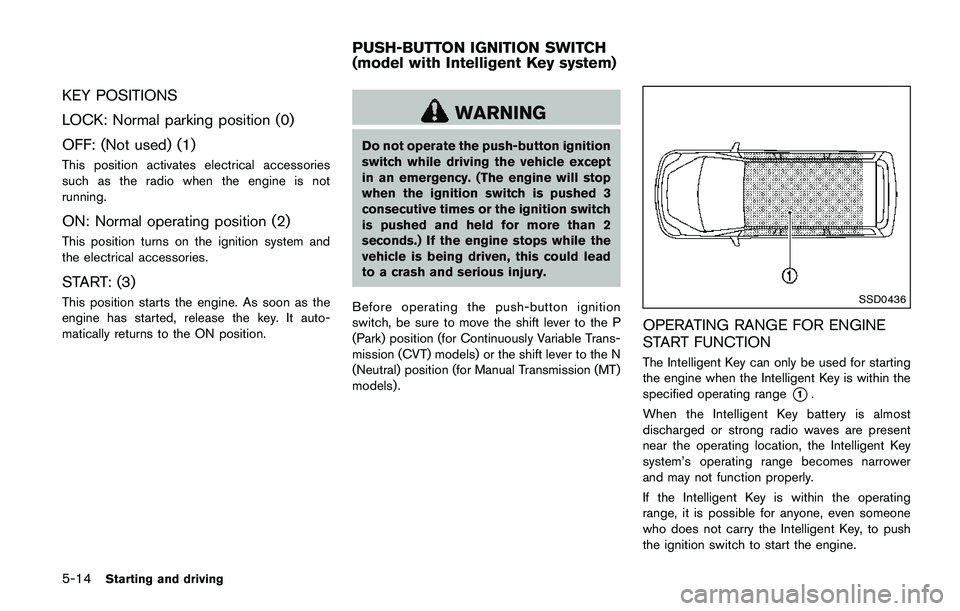
The Intelligent Key can only be used for starting
the engine when the Intelligent Key is within the
specified operating range
*1.
When the Intelligent Key battery is almost
discharged or strong radio waves are present
near the operating location, the Intelligent Key
system’s operating range becomes narrower
and may not function properly.
If the Intelligent Key is within the operating
range, it is possible for anyone, even someone
who does not carry the Intelligent Key, to push
the ignition switch to start the engine.
PUSH-BUTTON IGNITION SWITCH
(model with Intelligent Key system)