service NISSAN QASHQAI 2017 Owner´s Manual
[x] Cancel search | Manufacturer: NISSAN, Model Year: 2017, Model line: QASHQAI, Model: NISSAN QASHQAI 2017Pages: 508, PDF Size: 2.68 MB
Page 94 of 508
.Unavailable: Side Radar Obstruction warn-
ing (if so equipped)
.Other warning
See “Vehicle information display” (P.2-18) .
Seat belt warning light
The light and chime remind you to fasten seat
belts. The light illuminates whenever the ignition
switch is placed in the ON or START position,
and will remain illuminated until the driver’s seat
belt is fastened. At the same time, the chime will
sound for about 6 seconds unless the driver’s
seat belt is securely fastened.
The seat belt warning light for the front
passenger will illuminate if the seat belt is not
fastened when the front passenger’s seat is
occupied.
See “Seat belts” (P.1-10) for precautions on
seat belt usage.
Supplemental air bag warning light
After placing the ignition switch in the ON or
START position, the supplemental air bag
warning light will illuminate. The supplemental
air bag warning light will turn off after about 7
seconds if the supplemental front air bag and
supplemental side air bag, curtain air bag
systems and/or pretensioner seat belt are
operational.If any of the following conditions occur, the front
air bag, side air bag, curtain air bag and
pretensioner systems need servicing.
.The supplemental air bag warning light
remains on after approximately 7 seconds.
.The supplemental air bag warning light
flashes intermittently.
.The supplemental air bag warning light does
not illuminate at all.
It is recommended you visit a NISSAN dealer for
these services.
Unless checked and repaired, the Supplemental
Restraint Systems and/or the pretensioners may
not function properly.
For additional information, see “Supplemental
Restraint System (SRS)” (P.1-39) .
WARNING
If the supplemental air bag warning
light is on, it could mean that the front
air bag, side air bag, curtain air bag
and/or pretensioner systems will not
operate in an accident. To help avoid
injury to yourself or others, have your
vehicle checked. It is recommended you
visit a NISSAN dealer for this service.
Vehicle Dynamic Control (VDC)
warning light
When the ignition switch is in the ON position,
the Vehicle Dynamic Control (VDC) warning
light illuminates and then turns off.
The light will blink when the Vehicle Dynamic
Control (VDC) system or the traction control
system is operating, thus alerting the driver that
the vehicle is nearing its traction limits. The road
surface may be slippery.
If the VDC warning light illuminates while the
VDC system is on, this light alerts the driver to
the fact that the VDC system’s fail-safe mode is
operating, for example the VDC system may not
be functioning properly. Have the system
checked. It is recommended you visit a NISSAN
dealer for this service. If a malfunction occurs in
the system, the VDC system function will be
canceled but the vehicle is still driveable. For
additional information, see “Vehicle Dynamic
Control (VDC) system” (P.5-104) of this manual.
Instruments and controls2-15
Page 96 of 508
appears in the vehicle information display. If
the fuel-filler cap is loose or missing, tighten
or install the cap and continue to drive the
vehicle. The
light should turn off after a
few driving trips. If thelight does not
turn off after a few driving trips, have the
vehicle inspected. It is recommended you
visit a NISSAN dealer for this service. You
do not need to have your vehicle towed to
the dealer.
.Malfunction indicator light blinking — An
engine misfire has been detected which may
damage the emission control system.
To reduce or avoid emission control system
damage:
1) Do not drive at speeds above 45 MPH
(72 km/h) .
2) Avoid hard acceleration or deceleration.
3) Avoid steep uphill grades.
4) If possible, reduce the amount of cargo
being hauled or towed.
The malfunction indicator light may stop
blinking and remain on.
Have the vehicle inspected. It is recom-
mended you visit a NISSAN dealer for this
service. You do not need to have your
vehicle towed to the dealer.
CAUTION
Continued vehicle operation without
having the emission control system
and/or CVT system checked and re-
paired as necessary could lead to poor
driveability, reduced fuel economy, and
possible damage to the emission con-
trol system.
Security indicator light
The light blinks when the ignition switch is in the
OFF or LOCK position. This function indicates
the security system equipped on the vehicle is
operational.
If the security system is malfunctioning, this light
will remain on while the ignition switch is in the
ON position. For additional information, see
“Security systems” (P.2-36) .
Turn signal/hazard indicator lights
The light flashes when the turn signal switch
lever or hazard switch is turned on.
Vehicle Dynamic Control (VDC) off
indicator light
When the ignition switch is in the ON position,
the Vehicle Dynamic Control (VDC) off indicator
light illuminates and then turns off.
The light comes on when the Vehicle Dynamic
Control (VDC) off switch is pushed to OFF. This
indicates that the VDC system and traction
control system are not operating.
AUDIBLE REMINDERS
Key reminder chime
Models with Intelligent Key:
A chime sounds if the driver’s door is opened
while the ignition switch is placed in the OFF
position with the Intelligent Key left in the
vehicle.
Make sure the ignition switch is placed in the
LOCK position, and carry it with you when
leaving the vehicle.
Models without Intelligent Key:
A chime sounds if the driver’s side door is
opened while the key is left in the ignition switch
and the ignition switch is in the OFF or LOCK
position. Be sure to remove the key and carry it
with you when you leave the vehicle.
Instruments and controls2-17
Page 108 of 508
10. Low Washer Fluid warning (if so
equipped)
This warning appears when the window washer
fluid is at a low level. Add window washer fluid
as necessary. For additional information, refer to
“Window washer fluid” (P.8-10) .
11. Door/liftgate open warning
This warning appears if any of the doors and/or
the liftgate are open or not closed securely. The
vehicle icon indicates which door or the liftgate
is open on the display.
12. Key System Error: See Owner’s
Manual warning (if so equipped)
This warning appears if there is a malfunction in
the Intelligent Key system.
If this warning appears while the engine is
stopped, the engine cannot be started. If this
warning appears while the engine is running, the
vehicle can be driven. However, it is recom-
mended that you visit a NISSAN dealer for repair
as soon as possible.
13. Loose Fuel Cap warning
This warning appears when the fuel-filler cap is
not tightened correctly after the vehicle has
been refueled. For additional information, refer to
“Fuel-filler cap” (P.3-27) .
14. Tire Pressure Low — Add Air
warning
This warning appears when the low tire pressure
warning light in the meter illuminates and low tire
pressure is detected. The warning appears each
time the ignition switch is placed in the ON
position as long as the low tire pressure warning
light remains illuminated. If this warning appears,
stop the vehicle and adjust the pressure to the
recommended COLD tire pressure shown on
the Tire and Loading Information label. (See
“Low tire pressure warning light” (P.2-13) and
“Tire Pressure Monitoring System (TPMS)” (P.5-
5) .)
15. Low Oil Pressure Stop Vehicle
warning
This warning appears if low engine oil pressure
is detected. If the warning appears during
normal driving, pull off the road in a safe area
and stop the engine immediately. It is recom-
mended that you call a NISSAN dealer.
The low oil pressure warning is not designed to
indicate a low oil level. Use the dipstick to checkthe oil level. (See “Engine oil” (P.8-6) .)
CAUTION
Running the engine with the engine oil
pressure warning displayed could
cause serious damage to the engine.
16. AWD Error: See Owner’s Manual
warning (if so equipped)
This warning appears when the All-Wheel Drive
(AWD) system is not functioning properly while
the engine is running. Reduce vehicle speed and
have the system checked. It is recommended
that you visit a NISSAN dealer for this service.
See “All-Wheel Drive (AWD)” (P.5-96) .
17. AWD High Temp. Stop vehicle
warning (if so equipped)
This warning may appear while trying to free a
stuck vehicle due to increased oil temperature.
The driving mode may change to Two-Wheel
Drive (2WD) . If this warning is displayed, stop
the vehicle with the engine idling, as soon as it is
safe to do so. Then if the warning turns off, you
can continue driving. See “All-Wheel Drive
(AWD)” (P.5-96) .
Instruments and controls2-29
Page 109 of 508
2-30Instruments and controls
18. Tire Size Incorrect: See Owner’s
Manual warning (if so equipped)
This warning may appear if there is a large
difference between the diameters of the front
and rear wheels and tires. Pull off the road in a
safe area, with the engine idling. Check that all
the tire sizes are the same, that the tire pressure
is correct and that the tires are not excessively
worn. See “All-Wheel Drive (AWD)” (P.5-96) .
19. Battery Voltage Low Charge Battery
warning
This warning appears when the battery voltage
is low and the battery needs to be charged.
20. Shipping Mode On Push Storage
Fuse warning
This warning may appear if the extended storage
fuse switch is not pushed in (switched on) .
When this warning appears, push in (switch on)
the extended storage fuse switch to turn off the
warning. For more information, see “Extended
storage fuse switch” (P.8-21) .
21. Power will turn off to save the battery
warning
This warning appears after the ignition switch is
in the ON position for a certain period of time.
22. Power turned off to save the battery
warning
This warning appears after the ignition switch is
automatically turned OFF to save the battery.
23. Reminder: Turn OFF Headlights
warning
This warning appears when the driver side door
is opened with the headlight switch is left ON
and the ignition switch is placed in the OFF or
LOCK position. Place the headlight switch in
OFF or AUTO (if so equipped) position. For
additional information, see “Headlight and turn
signal switch” (P.2-43) .
24. Headlight System Error: See Own-
er’s Manual warning (if so equipped)
This warning appears if the LED headlights are
malfunctioning. Have the system checked. It is
recommended that you visit a NISSAN dealer for
this service.
25. Timer Alert — Time for a driver
break? indicator
This indicator appears when the set “Time for a
driver break?” indicator activates. You can set
the time for up to 6 hours.
26. Chassis Control System Error: See
Owner’s Manual warning
This warning appears if the chassis control
module detects an error in the chassis control
system. Have the system checked. It is recom-
mended that you visit a NISSAN dealer for this
service. (See “Chassis control” (P.5-106) .)
27. Cruise control indicator (if so
equipped)
This indicator shows the cruise control system
status. The status is shown by the color.
See “Cruise control” (P.5-58) for details.
28. Intelligent Cruise Control (ICC)
indicator (if so equipped)
This indicator shows the Intelligent Cruise
Control (ICC) system status. The status is
shown by the color. (See “Intelligent Cruise
Control (ICC)” (P.5-60) .)
Page 110 of 508
29. Continuously Variable Transmission
(CVT) position indicator (CVT models)
This indicator shows the automatic shift position.
In the manual shift mode, when the transmission
does not shift to the selected gear due to a
transmission protection mode, the CVT position
indicator will blink and a chime will sound.
See “Continuously Variable Transmission (CVT)”
(P.5-20) for further details.
30. CVT Error: See Owner’s Manual
warning (CVT models)
This warning appears when there is a malfunc-
tion with the CVT system. If this warning comes
on, have the system checked. It is recommended
that you visit a NISSAN dealer for this service.
31. Malfunction warning (if so equipped)
This warning appears when the following
systems malfunction.
.Lane Departure Warning (LDW)
.Lane Departure Prevention (LDP)
.Blind Spot Warning (BSW)
.Rear Cross Traffic Alert (RCTA)
.Forward Emergency Braking (FEB)
.Forward Emergency Braking (FEB) with
pedestrian detection
For more details, see “Lane Departure Warning(LDW)” (P.5-31) , “Lane Departure Prevention
(LDP)” (P.5-36) , “Blind Spot Warning (BSW)”
(P.5-42) , “Rear Cross Traffic Alert (RCTA)” (P.5-
51) , “Forward Emergency Braking (FEB)” (P.5-
80) or “Forward Emergency Braking (FEB) with
pedestrian detection system” (P.5-86) .
32. ECO mode indicator
The ECO mode indicator appears when the
ECO mode system is turned on.
(See “ECO mode system” (P.5-29) .)
33. Unavailable: High Cabin Tempera-
ture warning (if so equipped)
This warning appears if the interior temperature
of the vehicle has reached such a high
temperature that the sensor for the Lane
Departure Warning (LDW) or Lane Departure
Prevention (LDP) systems can no longer func-
tion reliably. Once the interior temperature has
reached normal levels, the warning should
disappear.
If the warning continues to display, have the
system checked. It is recommended that you
visit a NISSAN dealer for this service.
For additional information, refer to “Lane De-
parture Warning (LDW)” (P.5-31) or “Lane
Departure Prevention (LDP)” (P.5-36).
34. Not Available: Poor Road Conditions
warning (if so equipped)
This message appears when the Lane Departure
Prevention (LDP) system becomes unavailable
because the road is slippery. For additional
information, refer to “Lane Departure Prevention
(LDP)” (P.5-36) .
35. Currently unavailable warning (if so
equipped)
This message appears when the Lane Departure
Prevention (LDP) system becomes unavailable
because the VDC is turned off. For additional
information, refer to “Lane Departure Prevention
(LDP)” (P.5-36) .
36. Unavailable: Front Radar Obstruction
warning (if so equipped)
If the sensor area of the front bumper is covered
with dirt or obstructed, making it impossible to
detect a vehicle ahead, the Forward Emergency
Braking (FEB) system, Forward Emergency
Braking (FEB) with pedestrian detection system
or Intelligent Cruise Control (ICC) system is
automatically turned off. The Forward Emer-
gency Braking (FEB) system warning light
(orange) will illuminate and the warning message
will appear in the vehicle information display. If
the warning message appears, park the vehicle
in a safe location and turn the engine off.
Instruments and controls2-31
Page 111 of 508
2-32Instruments and controls
Check to see if the sensor area of the front
bumper is blocked. If the sensor area of the front
bumper is blocked, remove the blocking materi-
al. Restart the engine. If the warning light
continues to illuminate, have the Forward
Emergency Braking (FEB) system checked. It
is recommended that you visit a NISSAN dealer
for this service.
For more details, see “Forward Emergency
Braking (FEB)” (P.5-80) , “Forward Emergency
Braking (FEB) with pedestrian detection sys-
tem” (P.5-86) or “Intelligent Cruise Control
(ICC)” (P.5-60) .
37. Unavailable: Side Radar Obstruction
warning (if so equipped)
This warning appears when the Blind Spot
Warning (BSW)/Rear Cross Traffic Alert (RCTA)
system becomes unavailable because a radar
blockage is detected. (See “Blind Spot Warning
(BSW)” (P.5-42) or “Rear Cross Traffic Alert
(RCTA)” (P.5-51) .)
38. Press Brake Pedal warning (for
electronic parking brake equipped mod-
els)
This indicator appears in the following situa-
tions:.The driver tries to release the electronic
parking brake manually without depressing
the brake pedal.
.The vehicle is stopped on a steep hill and
there is a possibility of moving backward,
even if the electronic parking brake is
applied.
Page 118 of 508
SIC2045
Security indicator light
The security indicator light blinks whenever the
ignition switch is placed in the OFF or LOCK
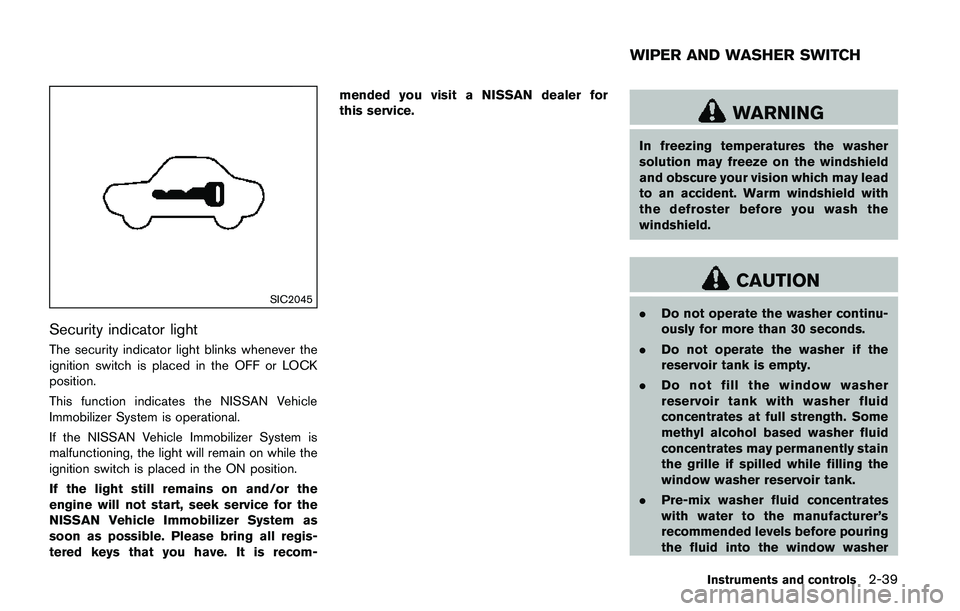
position.
This function indicates the NISSAN Vehicle
Immobilizer System is operational.
If the NISSAN Vehicle Immobilizer System is
malfunctioning, the light will remain on while the
ignition switch is placed in the ON position.
If the light still remains on and/or the
engine will not start, seek service for the
NISSAN Vehicle Immobilizer System as
soon as possible. Please bring all regis-
tered keys that you have. It is recom-mended you visit a NISSAN dealer for
this service.
WARNING
In freezing temperatures the washer
solution may freeze on the windshield
and obscure your vision which may lead
to an accident. Warm windshield with
the defroster before you wash the
windshield.
CAUTION
.Do not operate the washer continu-
ously for more than 30 seconds.
.Do not operate the washer if the
reservoir tank is empty.
.Do not fill the window washer
reservoir tank with washer fluid
concentrates at full strength. Some
methyl alcohol based washer fluid
concentrates may permanently stain
the grille if spilled while filling the
window washer reservoir tank.
.Pre-mix washer fluid concentrates
with water to the manufacturer’s
recommended levels before pouring
the fluid into the window washer
Instruments and controls2-39
WIPER AND WASHER SWITCH
Page 144 of 508
a malfunction, push and hold the moonroof
switch to the close position
*1.
Depending on the environment or driving
conditions, the auto reverse function may
be activated if an impact or load similar to
something being caught in the moonroof
occurs.
If the moonroof does not operate
If the moonroof does not operate properly,
perform the following procedure to initialize the
moonroof operation system.
1. If the moonroof is open, close it fully by
repeatedly pushing the moonroof switch to
the close position
*1to tilt the moonroof
up.
2. Push and hold the switch to the close
position
*1.
3. Release the moonroof switch after the
moonroof moves slightly up and down.
4. Push and hold the switch to the open
position
*2to fully tilt the moonroof down.
5. Check if the moonroof switch operates
normally.
If the moonroof does not operate properly after
performing the procedure above, have your
moonroof checked and repaired. It is recom-
mended you visit a NISSAN dealer for thisservice.
CAUTION
.Do not leave the light switch on
when the engine is not running for
extended periods of time to prevent
the battery from being discharged.
.Turn off the lights when you leave
the vehicle.
Instruments and controls2-65
INTERIOR LIGHTS
Page 175 of 508
3-28Pre-driving checks and adjustments
WARNING
.Gasoline is extremely flammable
and highly explosive under certain
conditions. You could be burned or
seriously injured if it is misused or
mishandled. Always stop engine
and do not smoke or allow open
flames or sparks near the vehicle
when refueling.
.Do not attempt to top off the fuel
tank after the fuel pump nozzle
shuts off automatically. Continued
refueling may cause fuel overflow,
resulting in fuel spray and possibly
a fire.
.Use only an original equipment type
fuel-filler cap as a replacement. It
has a built-in safety valve needed
for proper operation of the fuel
system and emission control sys-
tem. An incorrect cap can result in a
serious malfunction and possible
injury. It could also cause the mal-
function indicator light to come on.
.Never pour fuel into the throttle
body to attempt to start your vehi-
cle..Do not fill a portable fuel container
in the vehicle or trailer. Static elec-
tricity can cause an explosion of
flammable liquid, vapor or gas in
any vehicle or trailer. To reduce the
risk of serious injury or death when
filling portable fuel containers:
— Always place the container on
the ground when filling.
— Do not use electronic devices
when filling.
— Keep the pump nozzle in contact
with the container while you are
filling it.
— Use only approved portable fuel
containers for flammable liquid.
CAUTION
.If fuel is spilled on the vehicle body,
flush it away with water to avoid
paint damage.
.Insert the cap straight into the fuel-
filler tube, then tighten until the
fuel-filler cap clicks. Failure to tight-
en the fuel-filler cap properly maycause the
malfunction indicator
light (MIL) to illuminate. If the
light illuminates because the fuel-
filler cap is loose or missing, tighten
or install the cap and continue to
drive the vehicle. The
light
should turn off after a few driving
trips. If the
light does not turn
off after a few driving trips, have the
vehicle inspected. It is recom-
mended you visit a NISSAN dealer
for this service.
For additional information, see
“Malfunction Indicator Light (MIL)”
(P.2-16) .
.The LOOSE FUEL CAP warning
message will be displayed if the
fuel-filler cap is not properly tigh-
tened. It may take a few driving trips
for the message to be displayed.
Failure to tighten the fuel-filler cap
properly after the LOOSE FUEL CAP
warning message is displayed may
cause the
Malfunction Indicator
Light (MIL) to illuminate.
Page 183 of 508
Steering wheel switch for audio control .................... 4-74
Antenna ............................................................................... 4-75
CD/USB memory care and cleaning .......................... 4-76
NissanConnect
SMMobile Apps smartphone integration
(if so equipped) ...................................................................... 4-76
Registering with NissanConnect
SMMobile Apps ..... 4-76
Connect phone ................................................................. 4-77
Application download ...................................................... 4-77
NissanConnect
SMServices (if so equipped) .................. 4-77
SiriŠEyes Free ....................................................................... 4-78
General Information ......................................................... 4-78
Requirements .................................................................... 4-78
Siri
ŠEyes Free Activation .............................................. 4-78
Operating SiriŠEyes Free ............................................. 4-79
Changing SiriŠEyes Free Settings (models with
navigation system) ........................................................... 4-79
Changing Siri
ŠEyes Free Settings (models without
navigation system) ........................................................... 4-79
Troubleshooting guide ..................................................... 4-81
Car phone or CB radio ........................................................ 4-82
Bluetooth
ŠHands-Free Phone System (models without
navigation system) ................................................................. 4-82
Regulatory information .................................................... 4-83
Using the system .............................................................. 4-84Bluetooth
ŠHands-Free Phone System (models with
navigation system) ................................................................ 4-92
Regulatory information .................................................. 4-93
Control buttons and microphone ............................... 4-94
Voice command .............................................................. 4-94
Connecting procedure .................................................. 4-95
Vehicle phonebook ........................................................ 4-95
Making a call ................................................................... 4-95
Receiving a call .............................................................. 4-95
During a call .................................................................... 4-96
Ending a call ................................................................... 4-96
Text messaging (if so equipped) ............................... 4-96
Phone and Bluetooth
Šsettings .................................. 4-98
NISSAN Voice Recognition system (models with
navigation system) ................................................................ 4-99
Using the system ........................................................... 4-99
System features ........................................................... 4-101
Phone voice commands ............................................ 4-101
Navigation system voice commands ...................... 4-102
Audio system voice commands ............................... 4-102
Information voice commands ................................... 4-103
My APPS voice commands ...................................... 4-103
Help voice commands ............................................... 4-103
Troubleshooting guide ............................................... 4-103