turn signal NISSAN QASHQAI 2017 Owner´s Manual
[x] Cancel search | Manufacturer: NISSAN, Model Year: 2017, Model line: QASHQAI, Model: NISSAN QASHQAI 2017Pages: 508, PDF Size: 2.68 MB
Page 325 of 508
5-40Starting and driving
detection range.
— When rain, snow or dirt adheres
to the windshield in front of the
lane camera unit.
— When the headlights are not
bright due to dirt on the lens or
if the aiming is not adjusted
properly.
— When strong light enters the
lane camera unit. (For example,
the light directly shines on the
front of the vehicle at sunrise or
sunset.)
— When a sudden change in
brightness occurs. (For example,
when the vehicle enters or exits
a tunnel or under a bridge.)
.Excessive noise will interfere with
the warning chime sound, and the
chime may not be heard.
While the LDP system is operating, you
may hear a sound of brake operation.
This is normal and indicates that the
LDP system is operating properly.SYSTEM TEMPORARILY UNAVAIL-
ABLE
Condition A:
The warning and assist functions of the LDP
system are not designed to work under the
following conditions:
.When you operate the lane change signal
and change the traveling lanes in the
direction of the signal. (The LDP system will
be deactivated for approximately 2 seconds
after the lane change signal is turned off.)
.When the vehicle speed lowers to less than
approximately 37 MPH (60 km/h) .
Action to take:
After the above conditions have finished and the
necessary operating conditions are satisfied, the
warning and assist functions will resume.
Condition B:
The assist function of the LDP system is not
designed to work under the following conditions
(warning is still functional):
.When the brake pedal is depressed.
.When the steering wheel is turned as far as
necessary for the vehicle to change lanes.
.When the vehicle is accelerated during the
LDP system operation..When the Intelligent Cruise Control (ICC)
approach warning occurs (if so equipped) .
.When the hazard warning flashers are
operated.
.When driving on a curve at high speed.
Action to take:
After the above conditions have finished and the
necessary operating conditions are satisfied, the
LDP system application of the brakes will
resume.
Condition C:
If the following messages appear in the vehicle
information display, a chime will sound and the
LDP system will be turned off automatically.
.“Not available: Poor Road Conditions”:
When the VDC system (except Traction
Control System (TCS) function) or ABS
operates.
.“Currently unavailable”:
When the VDC system is turned off.
Action to take:
When the above conditions no longer exist, turn
off the LDP system. Push the LDP switch again
to turn the LDP system back on.
Page 328 of 508

JVS1091X
*1Side indicator light
*2Vehicle information display
*3Steering-wheel-mounted controls (left side)
*4Blind Spot Warning (BSW) switch (for models
without LDP system)
BSW SYSTEM OPERATION
The BSW system operates above approximately
20 MPH (32 km/h) .
If the radar sensors detect a vehicle in the
detection zone, the side indicator light
*1
illuminates.If the turn signal is then activated, the system
chimes (twice) and the side indicator light
flashes. The side indicator light continues to
flash until the detected vehicle leaves the
detection zone.
The side indicator light illuminates for a few
seconds when the ignition switch is placed in
the ON position.
The brightness of the side indicator light is
adjusted automatically depending on the bright-
ness of the ambient light.
If a vehicle comes into the detection zone after
the driver activates the turn signal, then only the
side indicator light flashes and no chime sounds.
For additional information, refer to “BSW driving
situations” (P.5-46).
Starting and driving5-43
Page 331 of 508

5-46Starting and driving
BSW DRIVING SITUATIONS
Indicator on
Indicator off
Indicator flashing
JVS0737X
Illustration 1 – Approaching from behind
Another vehicle approaching from be-
hind
Illustration 1: The side indicator light illuminates
if a vehicle enters the detection zone from
behind in an adjacent lane.
JVS0738X
Illustration 2 – Approaching from behind
Illustration 2: If the driver activates the turn
signal while another vehicle is in the detection
zone, then the system chimes (twice) and the
side indicator light flashes.
NOTE:
.The radar sensors may not detect
vehicles which are approaching rapidly
from behind.
.If the driver activates the turn signal
before a vehicle enters the detection
zone, the side indicator light will flash
but no chime will sound when the other
vehicle is detected.
Page 332 of 508

JVS0739X
Illustration 3 – Overtaking another vehicle
Overtaking another vehicle
Illustration 3: The side indicator light illuminates
if you overtake a vehicle and that vehicle stays in
the detection zone for approximately 2 seconds.
JVS0740X
Illustration 4 – Overtaking another vehicle
Illustration 4: If the driver activates the turn
signal while another vehicle is in the detection
zone, then the system chimes (twice) and the
side indicator light flashes.
NOTE:
.When overtaking several vehicles in a
row, the vehicles after the first vehicle
may not be detected if they are travel-
ing close together.
.The radar sensors may not detect
slower moving vehicles if they are
passed quickly.
.If the driver activates the turn signal
before a vehicle enters the detectionzone, the side indicator light will flash
but no chime will sound when the other
vehicle is detected.
Starting and driving5-47
Page 333 of 508

5-48Starting and driving
JVS0741X
Illustration 5 – Entering from the side
Entering from the side
Illustration 5: The side indicator light illuminates
if a vehicle enters the detection zone from either
side.
JVS0742X
Illustration 6 – Entering from the side
Illustration 6: If the driver activates the turn
signal while another vehicle is in the detection
zone, then the system chimes (twice) and the
side indicator light flashes.
NOTE:
.The radar sensors may not detect a
vehicle which is traveling at about the
same speed as your vehicle when it
enters the detection zone.
.If the driver activates the turn signal
before a vehicle enters the detection
zone, the side indicator light will flash
but no chime will sound when the other
vehicle is detected.
Page 355 of 508
5-70Starting and driving
.The chime sounds.
.The vehicle ahead detection indicator blinks.
The warning chime may not sound in some
cases when there is a short distance between
vehicles. Some examples are:
.When the vehicles are traveling at the same
speed and the distance between vehicles is
not changing
.When the vehicle ahead is traveling faster
and the distance between vehicles is
increasing
.When a vehicle cuts in near your vehicle
The warning chime will not sound when:
.Your vehicle approaches other vehicles that
are parked or moving slowly.
.The accelerator pedal is depressed, over-
riding the system.
NOTE:
The approach warning chime may sound
and the system display may blink when the
radar sensor detects objects on the side of
the vehicle or on the side of the road. This
may cause the ICC system to decelerate or
accelerate the vehicle. The radar sensor
may detect these objects when the vehicle
is driven on winding roads, narrow roads,
hilly roads or when entering or exiting a
curve. In these cases you will have tomanually control the proper distance
ahead of your vehicle.
Also, the sensor sensitivity can be affected by
vehicle operation (steering maneuver or driving
position in the lane) or traffic or vehicle condition
(for example, if a vehicle is being driven with
some damage) .
Automatic cancellation
A chime sounds under the following conditions
and the control is automatically canceled.
.When the vehicle ahead is not detected and
your vehicle is traveling below the speed of
15 MPH (24 km/h)
.When the system judges the vehicle is at
standstill
.When the shift lever is not in the D (Drive)
position or manual shift mode
.When the parking brake is applied
.When the VDC system is turned off
.When VDC (including the traction control
system) operates
.When distance measurement becomes im-
paired due to adhesion of dirt or obstruction
to the sensor
.When a wheel slips
.When the radar signal is temporarily inter-
rupted
Vehicle-to-vehicle distance control mode
limitations
WARNING
Listed below are the system limitations
for the ICC system. Failure to operate
the vehicle in accordance with these
system limitations could result in ser-
ious injury or death.
.The system is primarily intended for
use on straight, dry, open roads with
light traffic. It is not advisable to use
the system in city traffic or con-
gested areas.
.This system will not adapt automa-
tically to road conditions. This sys-
tem should be used in evenly
flowing traffic. Do not use the
system on roads with sharp curves,
or on icy roads, in heavy rain or in
fog.
.As there is a performance limit to
the distance control function, never
rely solely on the ICC system. This
system does not correct careless,
inattentive or absent-minded driv-
ing, or overcome poor visibility in
Page 356 of 508
rain, fog, or other bad weather.
Decelerate the vehicle speed by
depressing the brake pedal, de-
pending on the distance to the
vehicle ahead and the surrounding
circumstances in order to maintain a
safe distance between vehicles.
.If the vehicle ahead comes to a stop,
the vehicle decelerates to a stand-
still within the limitations of the
system. The system will cancel once
it judges that the vehicle has come
to a standstill and sound a warning
chime. To prevent the vehicle from
moving, the driver must depress the
brake pedal.
.Always pay attention to the opera-
tion of the vehicle and be ready to
manually control the proper follow-
ing distance. The vehicle-to-vehicle
distance control mode of the ICC
system may not be able to maintain
the selected distance between ve-
hicles (following distance) or se-
lected vehicle speed under some
circumstances.
.The system may not detect the
vehicle in front of you in certain
road or weather conditions. To avoidaccidents, never use the ICC system
under the following conditions:
— On roads where the traffic is
heavy or there are sharp curves
— On slippery road surfaces such
as on ice or snow, etc.
— During bad weather (rain, fog,
snow, etc.)
— When rain, snow or dirt adhere
to the system sensor
— On steep downhill roads (the
vehicle may go beyond the set
vehicle speed and frequent
braking may result in overheat-
ing the brakes)
— On repeated uphill and downhill
roads
— When traffic conditions make it
difficult to keep a proper dis-
tance between vehicles because
of frequent acceleration or de-
celeration
— Interference by other radar
sources.
.In some road or traffic conditions, a
vehicle or object can unexpectedlycome into the sensor detection
zone and cause automatic braking.
You may need to control the dis-
tance from other vehicles using the
accelerator pedal. Always stay alert
and avoid using the ICC system
when it is not recommended in this
section.
The radar sensor will not detect the following
objects:
.Stationary and slow moving vehicles
.Pedestrians or objects in the roadway
.Oncoming vehicles in the same lane
.Motorcycles traveling offset in the travel lane
The sensor generally detects the signals re-
turned from the vehicle ahead. Therefore, if the
sensor cannot detect the reflection from the
vehicle ahead, the ICC system may not maintain
the selected distance.
The following are some conditions in which the
sensor cannot detect the signals:
.When the snow or road spray from traveling
vehicles reduces the sensor’s visibility
.When excessively heavy baggage is loaded
in the rear seat or the cargo area of your
vehicle
The ICC system is designed to automatically
Starting and driving5-71
Page 358 of 508
SSD0253
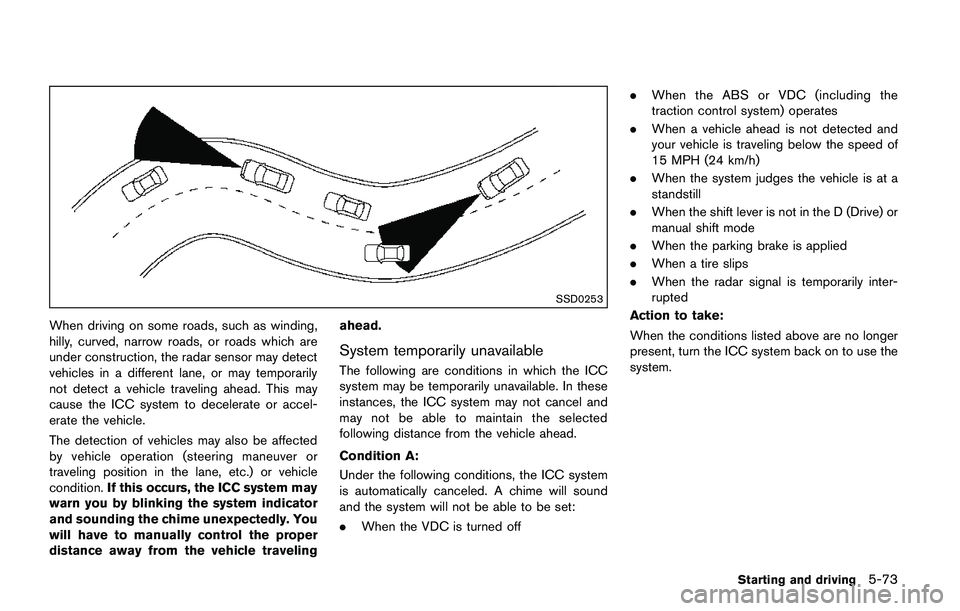
When driving on some roads, such as winding,
hilly, curved, narrow roads, or roads which are
under construction, the radar sensor may detect
vehicles in a different lane, or may temporarily
not detect a vehicle traveling ahead. This may
cause the ICC system to decelerate or accel-
erate the vehicle.
The detection of vehicles may also be affected
by vehicle operation (steering maneuver or
traveling position in the lane, etc.) or vehicle
condition.If this occurs, the ICC system may
warn you by blinking the system indicator
and sounding the chime unexpectedly. You
will have to manually control the proper
distance away from the vehicle travelingahead.
System temporarily unavailable
The following are conditions in which the ICC
system may be temporarily unavailable. In these
instances, the ICC system may not cancel and
may not be able to maintain the selected
following distance from the vehicle ahead.
Condition A:
Under the following conditions, the ICC system
is automatically canceled. A chime will sound
and the system will not be able to be set:
.When the VDC is turned off.When the ABS or VDC (including the
traction control system) operates
.When a vehicle ahead is not detected and
your vehicle is traveling below the speed of
15 MPH (24 km/h)
.When the system judges the vehicle is at a
standstill
.When the shift lever is not in the D (Drive) or
manual shift mode
.When the parking brake is applied
.When a tire slips
.When the radar signal is temporarily inter-
rupted
Action to take:
When the conditions listed above are no longer
present, turn the ICC system back on to use the
system.
Starting and driving5-73
Page 359 of 508
5-74Starting and driving
JVS1074X
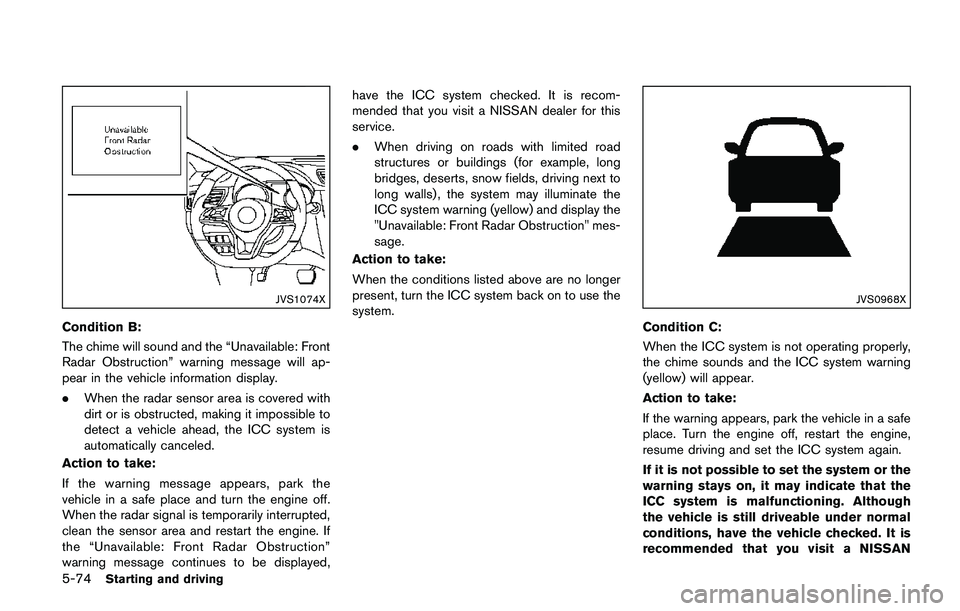
Condition B:
The chime will sound and the “Unavailable: Front
Radar Obstruction” warning message will ap-
pear in the vehicle information display.
.When the radar sensor area is covered with
dirt or is obstructed, making it impossible to
detect a vehicle ahead, the ICC system is
automatically canceled.
Action to take:
If the warning message appears, park the
vehicle in a safe place and turn the engine off.
When the radar signal is temporarily interrupted,
clean the sensor area and restart the engine. If
the “Unavailable: Front Radar Obstruction”
warning message continues to be displayed,have the ICC system checked. It is recom-
mended that you visit a NISSAN dealer for this
service.
.When driving on roads with limited road
structures or buildings (for example, long
bridges, deserts, snow fields, driving next to
long walls) , the system may illuminate the
ICC system warning (yellow) and display the
"Unavailable: Front Radar Obstruction" mes-
sage.
Action to take:
When the conditions listed above are no longer
present, turn the ICC system back on to use the
system.
JVS0968X
Condition C:
When the ICC system is not operating properly,
the chime sounds and the ICC system warning
(yellow) will appear.
Action to take:
If the warning appears, park the vehicle in a safe
place. Turn the engine off, restart the engine,
resume driving and set the ICC system again.
If it is not possible to set the system or the
warning stays on, it may indicate that the
ICC system is malfunctioning. Although
the vehicle is still driveable under normal
conditions, have the vehicle checked. It is
recommended that you visit a NISSAN
Page 399 of 508
6-2In case of emergency
SIC2574
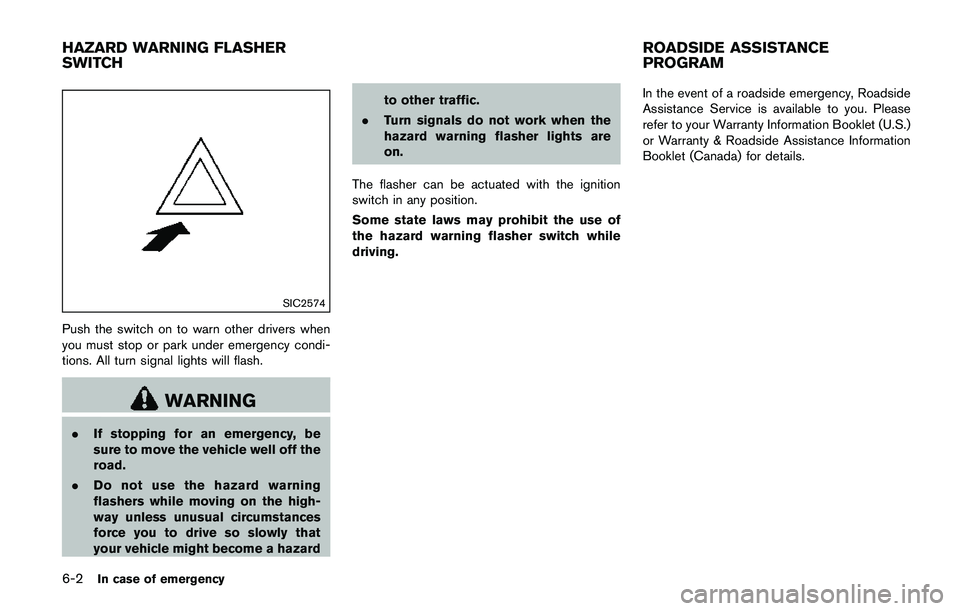
Push the switch on to warn other drivers when
you must stop or park under emergency condi-
tions. All turn signal lights will flash.
WARNING
.If stopping for an emergency, be
sure to move the vehicle well off the
road.
.Do not use the hazard warning
flashers while moving on the high-
way unless unusual circumstances
force you to drive so slowly that
your vehicle might become a hazardto other traffic.
.Turn signals do not work when the
hazard warning flasher lights are
on.
The flasher can be actuated with the ignition
switch in any position.
Some state laws may prohibit the use of
the hazard warning flasher switch while
driving.In the event of a roadside emergency, Roadside
Assistance Service is available to you. Please
refer to your Warranty Information Booklet (U.S.)
or Warranty & Roadside Assistance Information
Booklet (Canada) for details.
HAZARD WARNING FLASHER
SWITCHROADSIDE ASSISTANCE
PROGRAM