brake sensor NISSAN QASHQAI 2017 Owner´s Manual
[x] Cancel search | Manufacturer: NISSAN, Model Year: 2017, Model line: QASHQAI, Model: NISSAN QASHQAI 2017Pages: 508, PDF Size: 2.68 MB
Page 111 of 508
2-32Instruments and controls
Check to see if the sensor area of the front
bumper is blocked. If the sensor area of the front
bumper is blocked, remove the blocking materi-
al. Restart the engine. If the warning light
continues to illuminate, have the Forward
Emergency Braking (FEB) system checked. It
is recommended that you visit a NISSAN dealer
for this service.
For more details, see “Forward Emergency
Braking (FEB)” (P.5-80) , “Forward Emergency
Braking (FEB) with pedestrian detection sys-
tem” (P.5-86) or “Intelligent Cruise Control
(ICC)” (P.5-60) .
37. Unavailable: Side Radar Obstruction
warning (if so equipped)
This warning appears when the Blind Spot
Warning (BSW)/Rear Cross Traffic Alert (RCTA)
system becomes unavailable because a radar
blockage is detected. (See “Blind Spot Warning
(BSW)” (P.5-42) or “Rear Cross Traffic Alert
(RCTA)” (P.5-51) .)
38. Press Brake Pedal warning (for
electronic parking brake equipped mod-
els)
This indicator appears in the following situa-
tions:.The driver tries to release the electronic
parking brake manually without depressing
the brake pedal.
.The vehicle is stopped on a steep hill and
there is a possibility of moving backward,
even if the electronic parking brake is
applied.
Page 126 of 508
If the ambient image sensor is damaged due to
an accident, it is recommended you contact a
NISSAN dealer.
Battery saver system
.When the headlight switch is in theorposition while the ignition switch is in
the ON position, the lights will automatically
turn off within a period of time after the
ignition switch has been placed in the OFF
position.
.When the headlight switch remains in the
orposition after the lights auto-
matically turn off, the lights will turn on when
the ignition switch is placed in the ON
position.
CAUTION
.When you turn on the headlight
switch again after the lights auto-
matically turn off, the lights will not
turn off automatically. Be sure to
turn the light switch to the OFF
position when you leave the vehicle
for extended periods of time, other-
wise the battery will be discharged.
.Never leave the light switch on
when the engine is not running forextended periods of time even if the
headlights turn off automatically.
Daytime Running Light (DRL) system
The LED portion of the headlights automatically
illuminate at 100% intensity when the engine is
started and the parking brake released. The LED
Daytime Running Light (DRL) operate with the
headlight switch in the OFF position or in the
position. When you turn the headlight
switch to theposition for full illumination,
the LED lights switch from LED DRL to the park
function.
If the parking brake is applied before the engine
is started, the LED DRL do not illuminate. The
LED DRL illuminate when the parking brake is
released. The LED DRL will remain on until the
ignition switch is placed in the OFF position.
It is necessary at dusk to turn the headlight
switch ON for interior controls and switches to
illuminate, as those remain OFF while the switch
is in the OFF position.
WARNING
When the LED DRL system is active, tail
lights on your vehicle are not on. It is
necessary at dusk to turn on yourheadlights. Failure to do so could cause
an accident injuring yourself and
others.
Instruments and controls2-47
Page 292 of 508
for approximately 1 minute. The
light will remain on after 1 minute.
Have your tires replaced and/or
TPMS system reset as soon as
possible. It is recommended you
visit a NISSAN dealer for these
services.
.Replacing tires with those not ori-
ginally specified by NISSAN could
affect the proper operation of the
TPMS.
.Do not inject any tire liquid or
aerosol tire sealant into the tires,
as this may cause a malfunction of
the tire pressure sensors.
CAUTION
.The TPMS may not function properly
when the wheels are equipped with
tire chains or the wheels are buried
in snow.
.Do not place metalized film or any
metal parts (antenna, etc.) on the
windows. This may cause poor re-
ception of the signals from the tire
pressure sensors, and the TPMS willnot function properly.
Some devices and transmitters may temporarily
interfere with the operation of the TPMS and
cause the low tire pressure warning light to
illuminate. Some examples are:
.Facilities or electric devices using similar
radio frequencies are near the vehicle.
.If a transmitter set to similar frequencies is
being used in or near the vehicle.
.If a computer (or similar equipment) or a DC/
AC converter is being used in or near the
vehicle.
Low tire pressure warning light may illuminate in
the following cases.
.If the vehicle is equipped with a wheel and
tire without TPMS.
.If the TPMS has been replaced and the ID
has not been registered.
.If the wheel is not originally specified by
NISSAN.
FCC Notice:
For USA:
This device complies with Part 15 of the
FCC Rules. Operation is subject to the
following two conditions: (1) This device
may not cause harmful interference, and
(2) this device must accept any interfer-ence received, including interference that
may cause undesired operation.
Note: Changes or modifications not ex-
pressly approved by the party responsible
for compliance could void the user’s
authority to operate the equipment.
For Canada:
This device complies with Industry Canada
licence-exempt RSS standard(s) . Opera-
tion is subject to the following two condi-
tions: (1) this device may not cause
interference, and (2) this device must
accept any interference, including interfer-
ence that may cause undesired operation
of the device.
TPMS with Easy Fill Tire Alert
When adding air to an under-inflated tire, the
TPMS with Easy Fill Tire Alert provides visual
and audible signals outside the vehicle to help
you inflate the tires to the recommended COLD
tire pressure.
Vehicle set-up:
1. Park the vehicle in a safe and level place.
2. Apply the parking brake and place the shift
lever in the P (Park) position (CVT model) or
N (Neutral) position (MT model) .
Starting and driving5-7
Page 347 of 508
5-62Starting and driving
JVS1068X
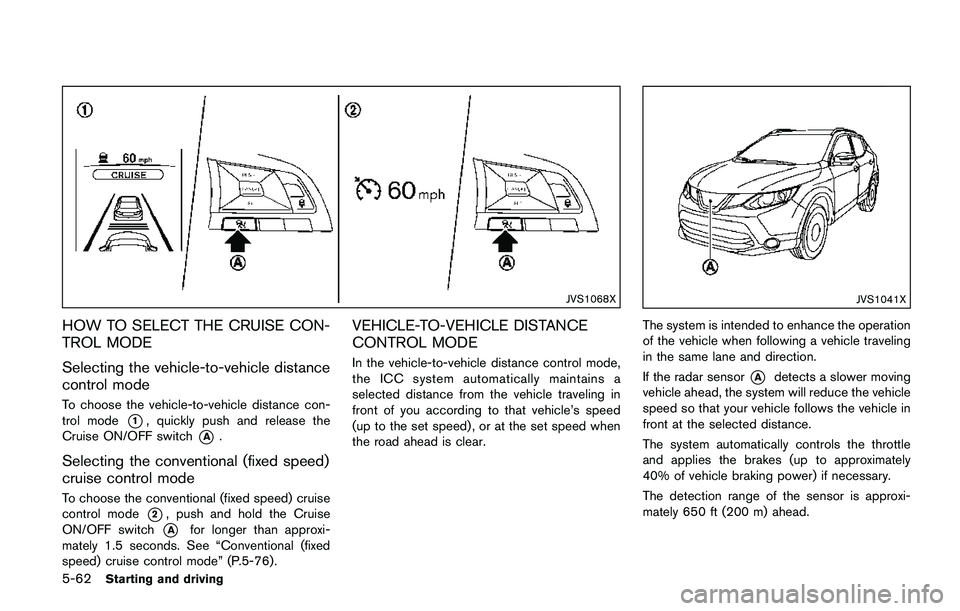
HOW TO SELECT THE CRUISE CON-
TROL MODE
Selecting the vehicle-to-vehicle distance
control mode
To choose the vehicle-to-vehicle distance con-
trol mode
*1, quickly push and release the
Cruise ON/OFF switch
*A.
Selecting the conventional (fixed speed)
cruise control mode
To choose the conventional (fixed speed) cruise
control mode
*2, push and hold the Cruise
ON/OFF switch
*Afor longer than approxi-
mately 1.5 seconds. See “Conventional (fixed
speed) cruise control mode” (P.5-76) .
VEHICLE-TO-VEHICLE DISTANCE
CONTROL MODE
In the vehicle-to-vehicle distance control mode,
the ICC system automatically maintains a
selected distance from the vehicle traveling in
front of you according to that vehicle’s speed
(up to the set speed) , or at the set speed when
the road ahead is clear.
JVS1041X
The system is intended to enhance the operation
of the vehicle when following a vehicle traveling
in the same lane and direction.
If the radar sensor
*Adetects a slower moving
vehicle ahead, the system will reduce the vehicle
speed so that your vehicle follows the vehicle in
front at the selected distance.
The system automatically controls the throttle
and applies the brakes (up to approximately
40% of vehicle braking power) if necessary.
The detection range of the sensor is approxi-
mately 650 ft (200 m) ahead.
Page 355 of 508
5-70Starting and driving
.The chime sounds.
.The vehicle ahead detection indicator blinks.
The warning chime may not sound in some
cases when there is a short distance between
vehicles. Some examples are:
.When the vehicles are traveling at the same
speed and the distance between vehicles is
not changing
.When the vehicle ahead is traveling faster
and the distance between vehicles is
increasing
.When a vehicle cuts in near your vehicle
The warning chime will not sound when:
.Your vehicle approaches other vehicles that
are parked or moving slowly.
.The accelerator pedal is depressed, over-
riding the system.
NOTE:
The approach warning chime may sound
and the system display may blink when the
radar sensor detects objects on the side of
the vehicle or on the side of the road. This
may cause the ICC system to decelerate or
accelerate the vehicle. The radar sensor
may detect these objects when the vehicle
is driven on winding roads, narrow roads,
hilly roads or when entering or exiting a
curve. In these cases you will have tomanually control the proper distance
ahead of your vehicle.
Also, the sensor sensitivity can be affected by
vehicle operation (steering maneuver or driving
position in the lane) or traffic or vehicle condition
(for example, if a vehicle is being driven with
some damage) .
Automatic cancellation
A chime sounds under the following conditions
and the control is automatically canceled.
.When the vehicle ahead is not detected and
your vehicle is traveling below the speed of
15 MPH (24 km/h)
.When the system judges the vehicle is at
standstill
.When the shift lever is not in the D (Drive)
position or manual shift mode
.When the parking brake is applied
.When the VDC system is turned off
.When VDC (including the traction control
system) operates
.When distance measurement becomes im-
paired due to adhesion of dirt or obstruction
to the sensor
.When a wheel slips
.When the radar signal is temporarily inter-
rupted
Vehicle-to-vehicle distance control mode
limitations
WARNING
Listed below are the system limitations
for the ICC system. Failure to operate
the vehicle in accordance with these
system limitations could result in ser-
ious injury or death.
.The system is primarily intended for
use on straight, dry, open roads with
light traffic. It is not advisable to use
the system in city traffic or con-
gested areas.
.This system will not adapt automa-
tically to road conditions. This sys-
tem should be used in evenly
flowing traffic. Do not use the
system on roads with sharp curves,
or on icy roads, in heavy rain or in
fog.
.As there is a performance limit to
the distance control function, never
rely solely on the ICC system. This
system does not correct careless,
inattentive or absent-minded driv-
ing, or overcome poor visibility in
Page 356 of 508
rain, fog, or other bad weather.
Decelerate the vehicle speed by
depressing the brake pedal, de-
pending on the distance to the
vehicle ahead and the surrounding
circumstances in order to maintain a
safe distance between vehicles.
.If the vehicle ahead comes to a stop,
the vehicle decelerates to a stand-
still within the limitations of the
system. The system will cancel once
it judges that the vehicle has come
to a standstill and sound a warning
chime. To prevent the vehicle from
moving, the driver must depress the
brake pedal.
.Always pay attention to the opera-
tion of the vehicle and be ready to
manually control the proper follow-
ing distance. The vehicle-to-vehicle
distance control mode of the ICC
system may not be able to maintain
the selected distance between ve-
hicles (following distance) or se-
lected vehicle speed under some
circumstances.
.The system may not detect the
vehicle in front of you in certain
road or weather conditions. To avoidaccidents, never use the ICC system
under the following conditions:
— On roads where the traffic is
heavy or there are sharp curves
— On slippery road surfaces such
as on ice or snow, etc.
— During bad weather (rain, fog,
snow, etc.)
— When rain, snow or dirt adhere
to the system sensor
— On steep downhill roads (the
vehicle may go beyond the set
vehicle speed and frequent
braking may result in overheat-
ing the brakes)
— On repeated uphill and downhill
roads
— When traffic conditions make it
difficult to keep a proper dis-
tance between vehicles because
of frequent acceleration or de-
celeration
— Interference by other radar
sources.
.In some road or traffic conditions, a
vehicle or object can unexpectedlycome into the sensor detection
zone and cause automatic braking.
You may need to control the dis-
tance from other vehicles using the
accelerator pedal. Always stay alert
and avoid using the ICC system
when it is not recommended in this
section.
The radar sensor will not detect the following
objects:
.Stationary and slow moving vehicles
.Pedestrians or objects in the roadway
.Oncoming vehicles in the same lane
.Motorcycles traveling offset in the travel lane
The sensor generally detects the signals re-
turned from the vehicle ahead. Therefore, if the
sensor cannot detect the reflection from the
vehicle ahead, the ICC system may not maintain
the selected distance.
The following are some conditions in which the
sensor cannot detect the signals:
.When the snow or road spray from traveling
vehicles reduces the sensor’s visibility
.When excessively heavy baggage is loaded
in the rear seat or the cargo area of your
vehicle
The ICC system is designed to automatically
Starting and driving5-71
Page 358 of 508
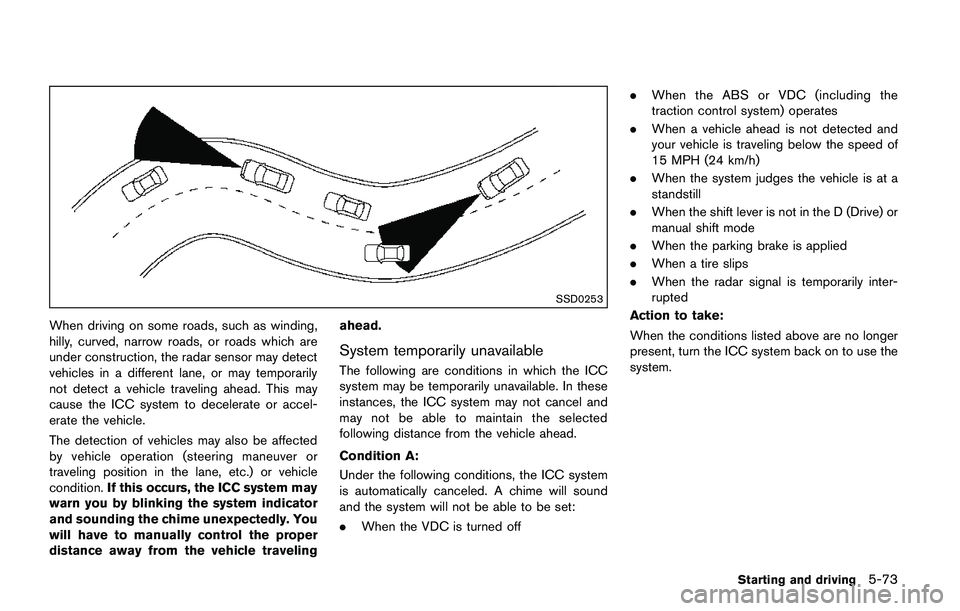
SSD0253
When driving on some roads, such as winding,
hilly, curved, narrow roads, or roads which are
under construction, the radar sensor may detect
vehicles in a different lane, or may temporarily
not detect a vehicle traveling ahead. This may
cause the ICC system to decelerate or accel-
erate the vehicle.
The detection of vehicles may also be affected
by vehicle operation (steering maneuver or
traveling position in the lane, etc.) or vehicle
condition.If this occurs, the ICC system may
warn you by blinking the system indicator
and sounding the chime unexpectedly. You
will have to manually control the proper
distance away from the vehicle travelingahead.
System temporarily unavailable
The following are conditions in which the ICC
system may be temporarily unavailable. In these
instances, the ICC system may not cancel and
may not be able to maintain the selected
following distance from the vehicle ahead.
Condition A:
Under the following conditions, the ICC system
is automatically canceled. A chime will sound
and the system will not be able to be set:
.When the VDC is turned off.When the ABS or VDC (including the
traction control system) operates
.When a vehicle ahead is not detected and
your vehicle is traveling below the speed of
15 MPH (24 km/h)
.When the system judges the vehicle is at a
standstill
.When the shift lever is not in the D (Drive) or
manual shift mode
.When the parking brake is applied
.When a tire slips
.When the radar signal is temporarily inter-
rupted
Action to take:
When the conditions listed above are no longer
present, turn the ICC system back on to use the
system.
Starting and driving5-73
Page 368 of 508
3. Use the “OK” button to check/uncheck the
box for “Emergency Brake.”
When the FEB system is turned off, the FEB
system warning light (orange)
*1illuminates.
NOTE:
The FEB system will be automatically
turned ON when the engine is restarted.
FEB SYSTEM LIMITATIONS
WARNING
Listed below are the system limitations
for the FEB system. Failure to operate
the vehicle in accordance with these
system limitations could result in ser-
ious injury or death.
.The FEB system cannot detect all
vehicles under all conditions.
.The radar sensor does not detect
the following objects:
— Pedestrians, animals or obsta-
cles in the roadway
— Oncoming vehicles
— Crossing vehicles
.The radar sensor has some perfor-
mance limitations. If a stationaryvehicle is in the vehicle’s path, the
FEB system will not function when
the vehicle is driven at speeds over
approximately 50 MPH (80 km/h) .
.The radar sensor may not detect a
vehicle ahead in the following con-
ditions:
— Dirt, ice, snow or other material
covering the radar sensor.
— Interference by other radar
sources.
— Snow or road spray from travel-
ing vehicles.
— If the vehicle ahead is narrow
(e.g. motorcycle)
— When driving on a steep down-
hill slope or roads with sharp
curves.
.In some road or traffic conditions,
the FEB system may unexpectedly
apply partial braking. When accel-
eration is necessary, continue to
depress the accelerator pedal to
override the system.
.The FEB system may react to a
roadside object (traffic sign, guard
rail etc.) ..Braking distances increase on slip-
pery surfaces.
.The system is designed to automa-
tically check the sensor’s function-
ality, within certain limitations. The
system may not detect some forms
of obstruction of the sensor area
such as ice, snow, stickers, for
example. In these cases, the system
may not be able to warn the driver
properly. Be sure that you check,
clean and clear the sensor area
regularly.
.Excessive noise will interfere with
the warning chime sound, and the
chime may not be heard.
Starting and driving5-83
Page 370 of 508
warning light (orange) will illuminate and the
“Unavailable: Front Radar Obstruction” warning
message will appear in the vehicle information
display.
.The sensor area on the front of the vehicle is
covered with dirt or is obstructed.
Action to take
If the warning light (orange) comes on, stop the
vehicle in a safe place and turn the engine off.
Clean the radar cover on the front of the vehicle
with a soft cloth, and restart the engine. If the
warning light continues to illuminate, have the
FEB system checked. It is recommended that
you visit a NISSAN dealer for this service.
.When driving on roads with limited road
structures or buildings (for example, long
bridges, deserts, snow fields, driving next to
long walls) .
Action to take
When the above conditions no longer exist, the
FEB system will resume automatically.
Condition C
When the Vehicle Dynamic Control (VDC)
system is OFF, the FEB brake will not operate.
In this case only visible and audible warning
operates. The FEB system warning light (or-
ange) will illuminate.
Action to takeWhen the VDC system is ON, the FEB system
will resume automatically.
SYSTEM MALFUNCTION
If the FEB system malfunctions, it will be turned
off automatically, a chime will sound, the FEB
system warning light (orange) will illuminate and
the “Malfunction” warning message will appear
in the vehicle information display.
Action to take:
If the FEB system warning light (orange) comes
on, stop the vehicle in a safe location. Turn the
engine off and restart the engine. If the warning
light continues to illuminate, have the FEB
system checked. It is recommended that you
visit a NISSAN dealer for this service.
JVS1041X
SYSTEM MAINTENANCE
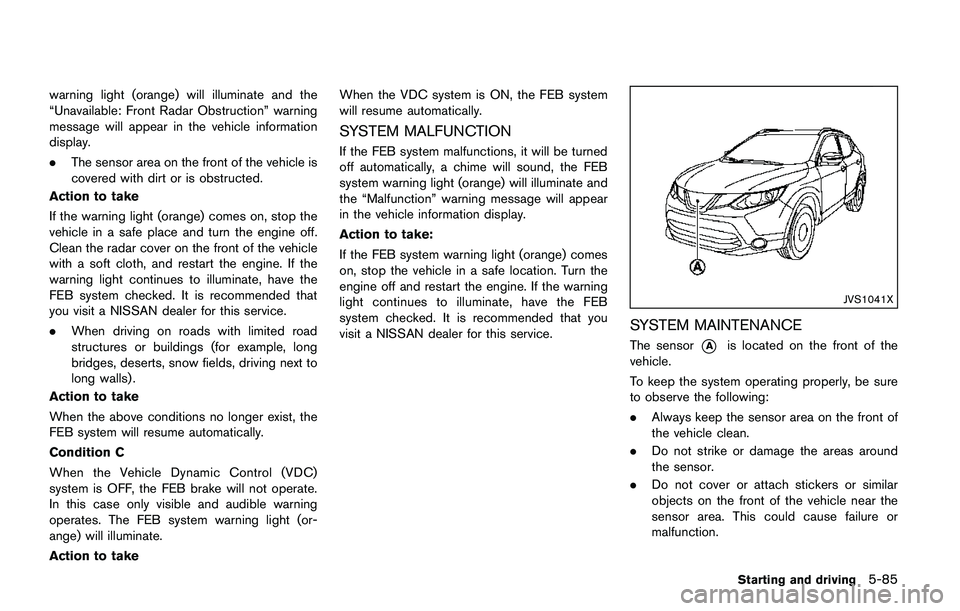
The sensor*Ais located on the front of the
vehicle.
To keep the system operating properly, be sure
to observe the following:
.Always keep the sensor area on the front of
the vehicle clean.
.Do not strike or damage the areas around
the sensor.
.Do not cover or attach stickers or similar
objects on the front of the vehicle near the
sensor area. This could cause failure or
malfunction.
Starting and driving5-85
Page 378 of 508
.The camera area of windshield glass is
continuously covered with dirt, etc.
Action to take:
When the above conditions no longer exist, the
FEB with pedestrian detection system will
resume automatically.
NOTE:
When the inside of the windshield on
camera area is misted or frozen, it will
take a period of time to remove it after air
conditioner turns on. If dirt appears on this
area, it is recommended you visit a
NISSAN dealer.
Condition B
In the following condition, the FEB system
warning light (orange) will illuminate and the
“Unavailable: Front Radar Obstruction” warning
message will appear in the vehicle information
display.
.The sensor area of the front of the vehicle is
covered with dirt or is obstructed
Action to take:
If the warning light (orange) comes on, stop the
vehicle in a safe place and turn the engine off.
Clean the radar cover on the front of the vehicle
with a soft cloth, and restart the engine. If the
warning light continues to illuminate, have the
FEB with pedestrian detection system checked.It is recommended that you visit a NISSAN
dealer for this service.
.When driving on roads with limited road
structures or buildings (for example, long
bridges, deserts, snow fields, driving next to
long walls) .
Action to take:
When the above conditions no longer exist, the
FEB with pedestrian detection system will
resume automatically.
Condition C
When VDC system is OFF, the FEB brake will
not operate. In this case only visible and audible
warning operates. The FEB system warning light
(orange) will illuminate.
Action to take:
When VDC system is ON, the FEB with
pedestrian detection system will resume auto-
matically.
SYSTEM MALFUNCTION
If the FEB with pedestrian detection system
malfunctions, it will be turned off automatically, a
chime will sound, the FEB system warning light
will (orange) will illuminate and the warning
message “Malfunction” will appear in the vehicle
information display.Action to take:
If the warning light (orange) comes on, stop the
vehicle in a safe location. Turn the engine off and
restart the engine. If the warning light continues
to illuminate, have the FEB with pedestrian
detection system checked. It is recommended
that you visit a NISSAN dealer for this service.
Starting and driving5-93