warning NISSAN QASHQAI 2017 Owner´s Manual
[x] Cancel search | Manufacturer: NISSAN, Model Year: 2017, Model line: QASHQAI, Model: NISSAN QASHQAI 2017Pages: 508, PDF Size: 2.68 MB
Page 74 of 508
electrical equipment. Unauthorized
electrical test equipment and prob-
ing devices should not be used on
the pretensioner system.
.If you need to dispose of a preten-
sioner or scrap the vehicle, it is
recommended you visit a NISSAN
dealer for this service. Correct pre-
tensioner disposal procedures are
set forth in the appropriate NISSAN
Service Manual. Incorrect disposal
procedures could cause personal
injury.
The pretensioner system may activate with the
supplemental air bag system in certain types of
collisions. Working with the seat belt retractor, it
helps tighten the seat belt when the vehicle
becomes involved in certain types of collisions,
helping to restrain front seat occupants.
The pretensioner is encased with the seat belt
retractor. These seat belts are used the same
way as conventional seat belts.
When a pretensioner activates, smoke is re-
leased and a loud noise may be heard. The
smoke is not harmful and does not indicate a
fire. Care should be taken not to inhale it, as it
may cause irritation and choking. Those with a
history of a breathing condition should get freshair promptly.
After pretensioner activation, load limiters allow
the seat belt to release webbing (if necessary) to
reduce forces against the chest.
The supplemental air bag warning light
is
used to indicate malfunctions in the pretensioner
system. See “Supplemental air bag warning
light” (P.1-56). If the operation of the supple-
mental air bag warning light indicates there is a
malfunction, have the system checked. It is
recommended you visit a NISSAN dealer for this
service.
When selling your vehicle, we request that you
inform the buyer about the pretensioner system
and guide the buyer to the appropriate sections
in this Owner’s Manual.
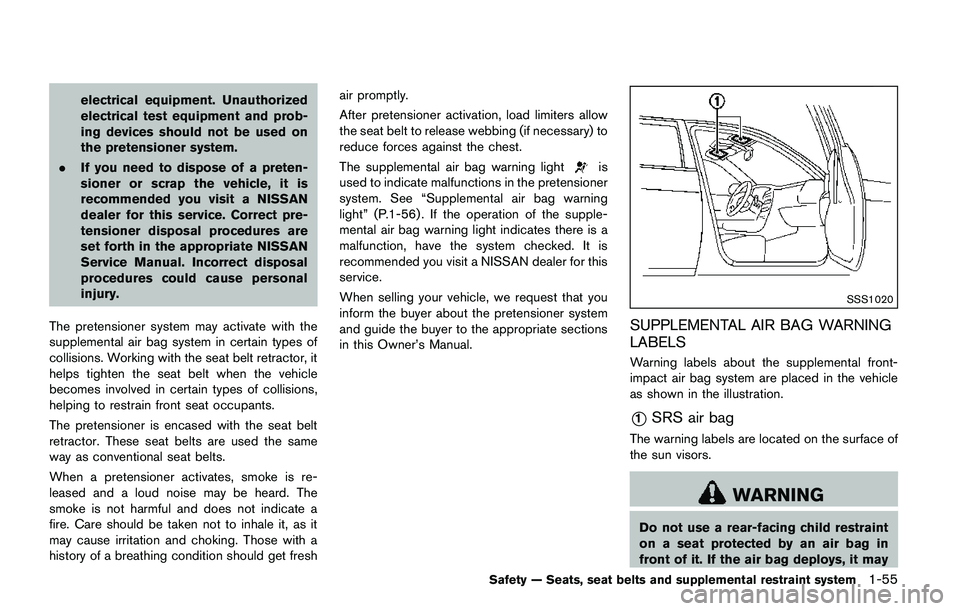
SSS1020
SUPPLEMENTAL AIR BAG WARNING
LABELS
Warning labels about the supplemental front-
impact air bag system are placed in the vehicle
as shown in the illustration.
*1SRS air bag
The warning labels are located on the surface of
the sun visors.
WARNING
Do not use a rear-facing child restraint
on a seat protected by an air bag in
front of it. If the air bag deploys, it may
Safety — Seats, seat belts and supplemental restraint system1-55
Page 75 of 508
1-56Safety — Seats, seat belts and supplemental restraint system
cause serious injury or death.
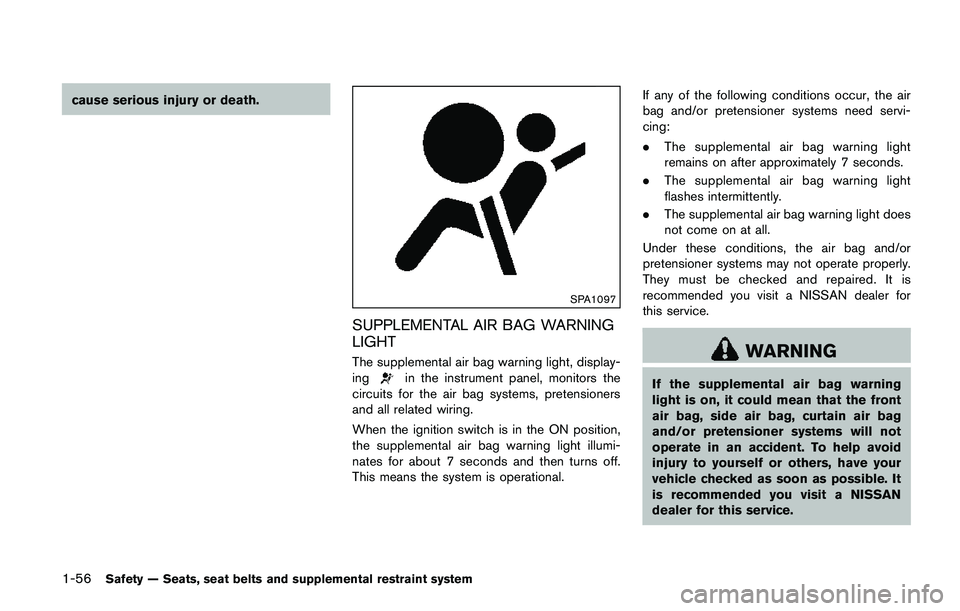
SPA1097
SUPPLEMENTAL AIR BAG WARNING
LIGHT
The supplemental air bag warning light, display-
ingin the instrument panel, monitors the
circuits for the air bag systems, pretensioners
and all related wiring.
When the ignition switch is in the ON position,
the supplemental air bag warning light illumi-
nates for about 7 seconds and then turns off.
This means the system is operational.If any of the following conditions occur, the air
bag and/or pretensioner systems need servi-
cing:
.The supplemental air bag warning light
remains on after approximately 7 seconds.
.The supplemental air bag warning light
flashes intermittently.
.The supplemental air bag warning light does
not come on at all.
Under these conditions, the air bag and/or
pretensioner systems may not operate properly.
They must be checked and repaired. It is
recommended you visit a NISSAN dealer for
this service.
WARNING
If the supplemental air bag warning
light is on, it could mean that the front
air bag, side air bag, curtain air bag
and/or pretensioner systems will not
operate in an accident. To help avoid
injury to yourself or others, have your
vehicle checked as soon as possible. It
is recommended you visit a NISSAN
dealer for this service.
Page 76 of 508
REPAIR AND REPLACEMENT PRO-
CEDURE
The front air bags, side air bags, curtain air bags
and pretensioners are designed to activate on a
one-time-only basis. As a reminder, unless it is
damaged, the supplemental air bag warning light
will remain illuminated after inflation has oc-
curred. These systems should be repaired and/
or replaced as soon as possible. It is recom-
mended you visit a NISSAN dealer for this
service.
When maintenance work is required on the
vehicle, the front air bags, side air bags, curtain
air bags and pretensioners and related parts
should be pointed out to the person performing
the maintenance. The ignition switch should
always be in the LOCK position when working
under the hood or inside the vehicle.
WARNING
.Once a front air bag, side air bag or
curtain air bag has inflated, the air
bag module will not function again
and must be replaced. Additionally,
the activated pretensioners must
also be replaced. The air bag mod-
ule and pretensioner should be
replaced. It is recommended youvisit a NISSAN dealer for this ser-
vice. However, the air bag modules
and pretensioner system cannot be
repaired.
.The front air bag, side air bag and
curtain air bag systems, and preten-
sioner system should be inspected
if there is any damage to the front
end or side portion of the vehicle. It
is recommended you visit a NISSAN
dealer for this service.
.If you need to dispose of a supple-
mental air bag or pretensioner or
scrap the vehicle, it is recommended
you visit a NISSAN dealer. Correct
supplemental air bag and preten-
sioner system disposal procedures
are set forth in the appropriate
NISSAN Service Manual. Incorrect
disposal procedures could cause
personal injury.
.If there is an impact to your vehicle
from any direction, your Occupant
Classification Sensor (OCS) should
be checked to verify it is still
functioning correctly. It is recom-
mended that you visit a NISSAN
dealer for this service. The OCS
should be checked even if no airbags deploy as a result of the
impact. Failure to verify proper
OCS function may result in an
improper air bag deployment result-
ing in injury or death.
Safety — Seats, seat belts and supplemental restraint system1-57
Page 80 of 508
2 Instruments and controls
Cockpit ........................................................................................ 2-3
Instrument panel ........................................................................ 2-4
Meters and gauges ................................................................... 2-5
Speedometer and odometer ............................................ 2-6
Tachometer ........................................................................... 2-7
Engine coolant temperature gauge ................................ 2-7
Fuel gauge ............................................................................ 2-8
Instrument brightness control .......................................... 2-9
Continuously Variable Transmission (CVT) position
indicator (if so equipped) .................................................. 2-9
Warning lights, indicator lights and
audible reminders ................................................................... 2-10
Checking lights ................................................................. 2-10
Warning lights ................................................................... 2-10
Indicator lights ................................................................... 2-16
Audible reminders ............................................................ 2-17
Vehicle information display .................................................. 2-18
How to use the vehicle information display .............. 2-19
Startup display .................................................................. 2-19
Settings ............................................................................... 2-19
Vehicle information display warnings
and indicators .................................................................... 2-28
Trip computer .................................................................... 2-34
Clock and outside air temperature .............................. 2-36Security systems ................................................................... 2-36
Vehicle Security System ............................................... 2-36
NISSAN Vehicle Immobilizer System ........................ 2-38
Wiper and washer switch ................................................... 2-39
Windshield wiper and washer operation ................. 2-40
Rear window wiper and washer switch .......................... 2-41
Rear window and outside mirror defroster switch ....... 2-42
Headlight and turn signal switch ....................................... 2-43
Headlight switch ............................................................ 2-43
Turn signal switch .......................................................... 2-48
Fog light switch (if so equipped) .............................. 2-48
Horn .......................................................................................... 2-49
Heated steering wheel (if so equipped) ......................... 2-49
Heated seats (if so equipped) ........................................... 2-50
Lane Departure Prevention (LDP) switch (if
so equipped) .......................................................................... 2-51
Blind Spot Warning (BSW) switch (if so equipped) ..... 2-51
Vehicle Dynamic Control (VDC) off switch .................... 2-52
All-wheel drive (AWD) lock switch (if so equipped) ..... 2-52
ECO mode switch ................................................................ 2-52
Power outlet ............................................................................ 2-53
Storage .................................................................................... 2-54
Cup holders ..................................................................... 2-54
Soft bottle holders ......................................................... 2-54
Cargo area (if so equipped) ....................................... 2-55
Page 82 of 508
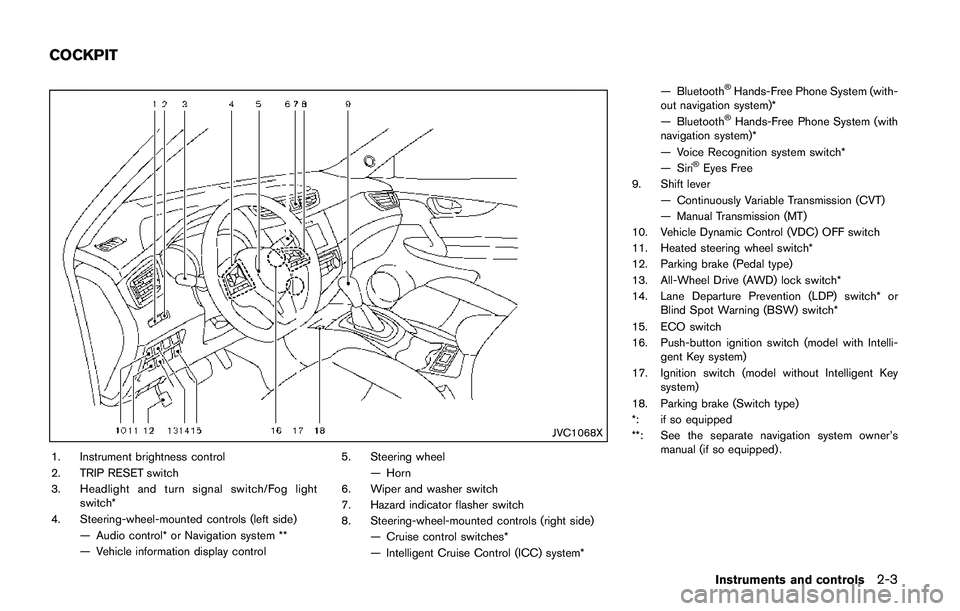
JVC1068X
1. Instrument brightness control
2. TRIP RESET switch
3. Headlight and turn signal switch/Fog light
switch*
4. Steering-wheel-mounted controls (left side)
— Audio control* or Navigation system **
— Vehicle information display control5. Steering wheel
— Horn
6. Wiper and washer switch
7. Hazard indicator flasher switch
8. Steering-wheel-mounted controls (right side)
— Cruise control switches*
— Intelligent Cruise Control (ICC) system*— Bluetooth
ŠHands-Free Phone System (with-
out navigation system)*
— Bluetooth
ŠHands-Free Phone System (with
navigation system)*
— Voice Recognition system switch*
— Siri
ŠEyes Free
9. Shift lever
— Continuously Variable Transmission (CVT)
— Manual Transmission (MT)
10. Vehicle Dynamic Control (VDC) OFF switch
11. Heated steering wheel switch*
12. Parking brake (Pedal type)
13. All-Wheel Drive (AWD) lock switch*
14. Lane Departure Prevention (LDP) switch* or
Blind Spot Warning (BSW) switch*
15. ECO switch
16. Push-button ignition switch (model with Intelli-
gent Key system)
17. Ignition switch (model without Intelligent Key
system)
18. Parking brake (Switch type)
*: if so equipped
**: See the separate navigation system owner’s
manual (if so equipped) .
Instruments and controls2-3
COCKPIT
Page 84 of 508
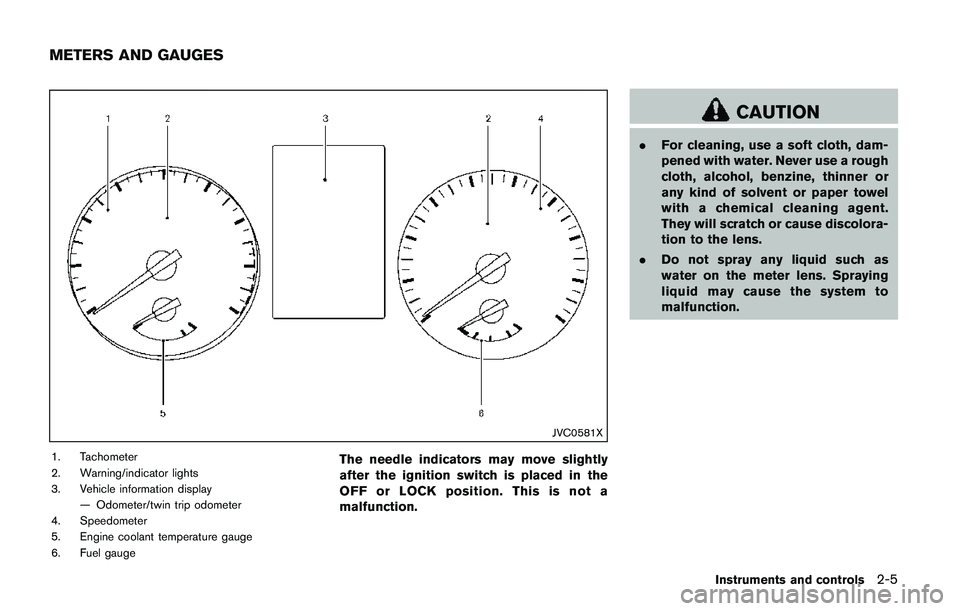
JVC0581X
1. Tachometer
2. Warning/indicator lights
3. Vehicle information display
— Odometer/twin trip odometer
4. Speedometer
5. Engine coolant temperature gauge
6. Fuel gaugeThe needle indicators may move slightly
after the ignition switch is placed in the
OFF or LOCK position. This is not a
malfunction.
CAUTION
.For cleaning, use a soft cloth, dam-
pened with water. Never use a rough
cloth, alcohol, benzine, thinner or
any kind of solvent or paper towel
with a chemical cleaning agent.
They will scratch or cause discolora-
tion to the lens.
.Do not spray any liquid such as
water on the meter lens. Spraying
liquid may cause the system to
malfunction.
Instruments and controls2-5
METERS AND GAUGES
Page 85 of 508
2-6Instruments and controls
JVI1006X
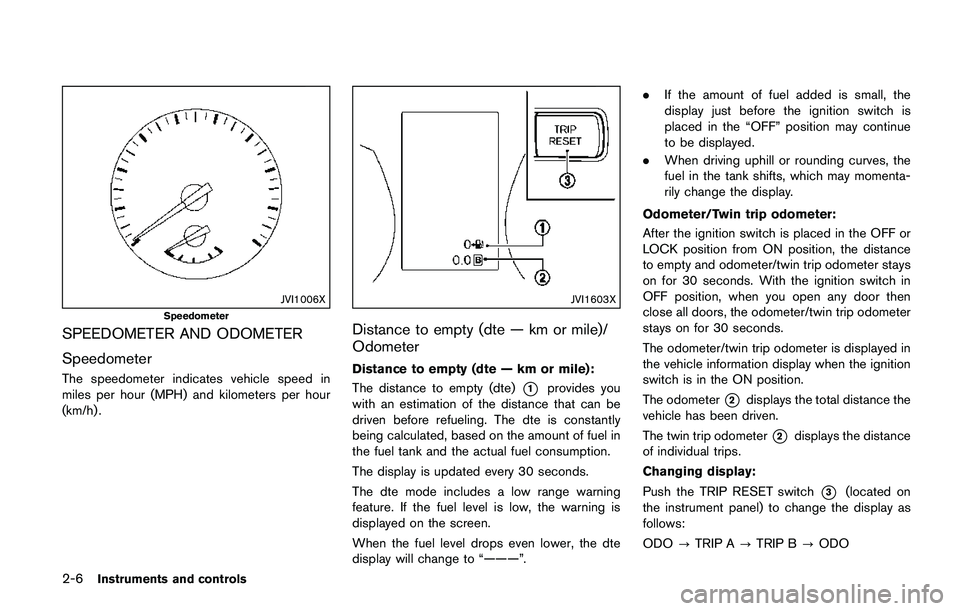
Speedometer
SPEEDOMETER AND ODOMETER
Speedometer
The speedometer indicates vehicle speed in
miles per hour (MPH) and kilometers per hour
(km/h) .
JVI1603X
Distance to empty (dte — km or mile)/
Odometer
Distance to empty (dte — km or mile):
The distance to empty (dte)
*1provides you
with an estimation of the distance that can be
driven before refueling. The dte is constantly
being calculated, based on the amount of fuel in
the fuel tank and the actual fuel consumption.
The display is updated every 30 seconds.
The dte mode includes a low range warning
feature. If the fuel level is low, the warning is
displayed on the screen.
When the fuel level drops even lower, the dte
display will change to “———”..If the amount of fuel added is small, the
display just before the ignition switch is
placed in the “OFF” position may continue
to be displayed.
.When driving uphill or rounding curves, the
fuel in the tank shifts, which may momenta-
rily change the display.
Odometer/Twin trip odometer:
After the ignition switch is placed in the OFF or
LOCK position from ON position, the distance
to empty and odometer/twin trip odometer stays
on for 30 seconds. With the ignition switch in
OFF position, when you open any door then
close all doors, the odometer/twin trip odometer
stays on for 30 seconds.
The odometer/twin trip odometer is displayed in
the vehicle information display when the ignition
switch is in the ON position.
The odometer*2displays the total distance the
vehicle has been driven.
The twin trip odometer
*2displays the distance
of individual trips.
Changing display:
Push the TRIP RESET switch
*3(located on
the instrument panel) to change the display as
follows:
ODO?TRIP A?TRIP B?ODO
Page 87 of 508
2-8Instruments and controls
CAUTION
.If the gauge indicates the engine
coolant temperature is near the hot
(H) end of the normal range, reduce
vehicle speed to decrease the tem-
perature.
.If the gauge is over the normal
range, stop the vehicle as soon as
safely possible and let the engine
idle.
.If the engine is overheated, contin-
ued operation of the vehicle may
seriously damage the engine. (See
“If your vehicle overheats” (P.6-11)
for immediate action required.)
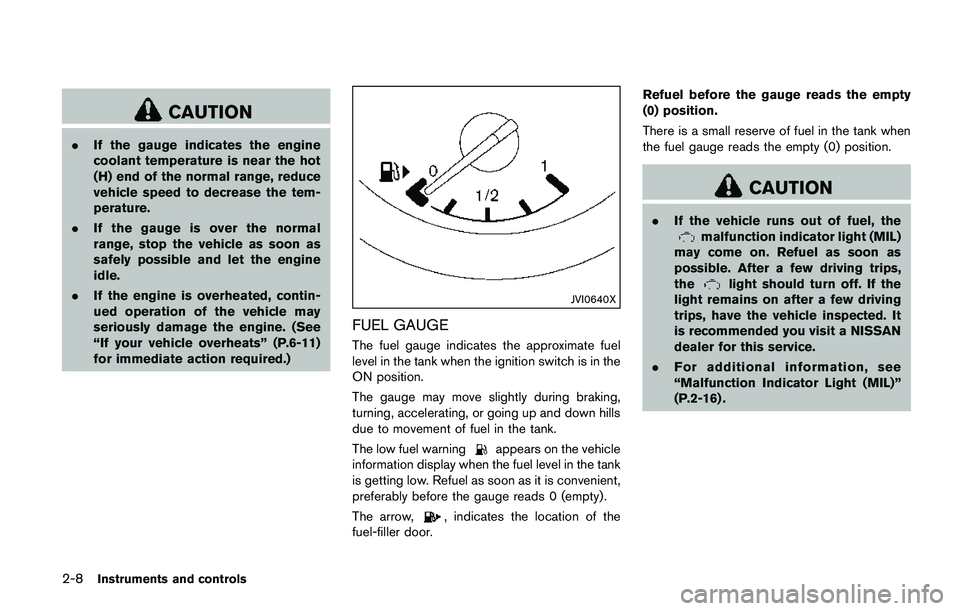
JVI0640X
FUEL GAUGE
The fuel gauge indicates the approximate fuel
level in the tank when the ignition switch is in the
ON position.
The gauge may move slightly during braking,
turning, accelerating, or going up and down hills
due to movement of fuel in the tank.
The low fuel warning
appears on the vehicle
information display when the fuel level in the tank
is getting low. Refuel as soon as it is convenient,
preferably before the gauge reads 0 (empty) .
The arrow,
, indicates the location of the
fuel-filler door.Refuel before the gauge reads the empty
(0) position.
There is a small reserve of fuel in the tank when
the fuel gauge reads the empty (0) position.
CAUTION
.If the vehicle runs out of fuel, themalfunction indicator light (MIL)
may come on. Refuel as soon as
possible. After a few driving trips,
the
light should turn off. If the
light remains on after a few driving
trips, have the vehicle inspected. It
is recommended you visit a NISSAN
dealer for this service.
.For additional information, see
“Malfunction Indicator Light (MIL)”
(P.2-16) .
Page 89 of 508
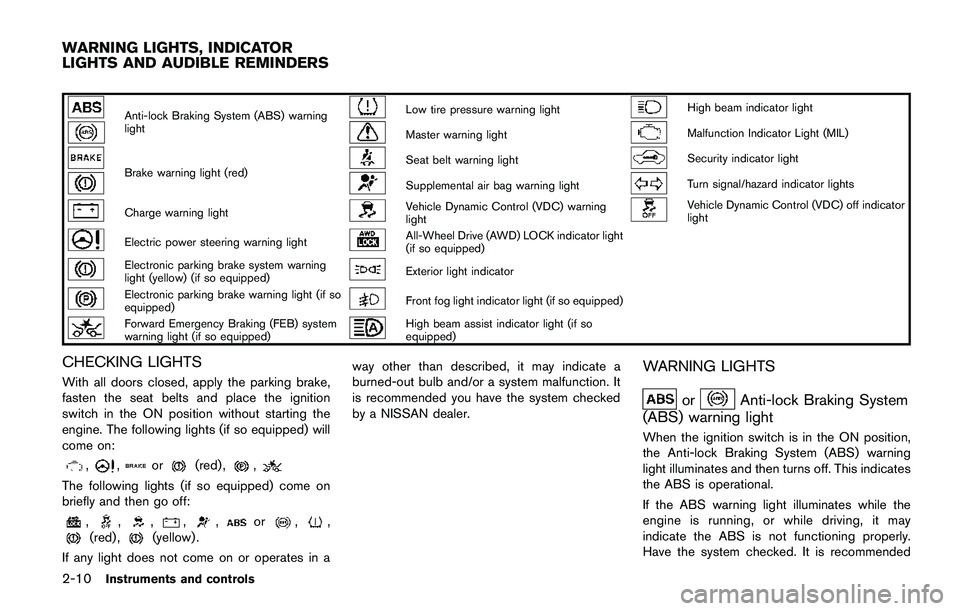
2-10Instruments and controls
Anti-lock Braking System (ABS) warning
lightLow tire pressure warning lightHigh beam indicator light
Master warning lightMalfunction Indicator Light (MIL)
Brake warning light (red)Seat belt warning lightSecurity indicator light
Supplemental air bag warning lightTurn signal/hazard indicator lights
Charge warning lightVehicle Dynamic Control (VDC) warning
lightVehicle Dynamic Control (VDC) off indicator
light
Electric power steering warning lightAll-Wheel Drive (AWD) LOCK indicator light
(if so equipped)
Electronic parking brake system warning
light (yellow) (if so equipped)Exterior light indicator
Electronic parking brake warning light (if so
equipped)Front fog light indicator light (if so equipped)
Forward Emergency Braking (FEB) system
warning light (if so equipped)High beam assist indicator light (if so
equipped)
CHECKING LIGHTS
With all doors closed, apply the parking brake,
fasten the seat belts and place the ignition
switch in the ON position without starting the
engine. The following lights (if so equipped) will
come on:
,,or(red) ,,
The following lights (if so equipped) come on
briefly and then go off:
,,,,,or,,(red) ,(yellow) .
If any light does not come on or operates in away other than described, it may indicate a
burned-out bulb and/or a system malfunction. It
is recommended you have the system checked
by a NISSAN dealer.
WARNING LIGHTS
orAnti-lock Braking System
(ABS) warning light
When the ignition switch is in the ON position,
the Anti-lock Braking System (ABS) warning
light illuminates and then turns off. This indicates
the ABS is operational.
If the ABS warning light illuminates while the
engine is running, or while driving, it may
indicate the ABS is not functioning properly.
Have the system checked. It is recommended
WARNING LIGHTS, INDICATOR
LIGHTS AND AUDIBLE REMINDERS
Page 90 of 508
you visit a NISSAN dealer for this service.
If an ABS malfunction occurs, the anti-lock
function is turned off. The brake system then
operates normally, but without anti-lock assis-
tance. (See “Brake system” (P.5-102) .)
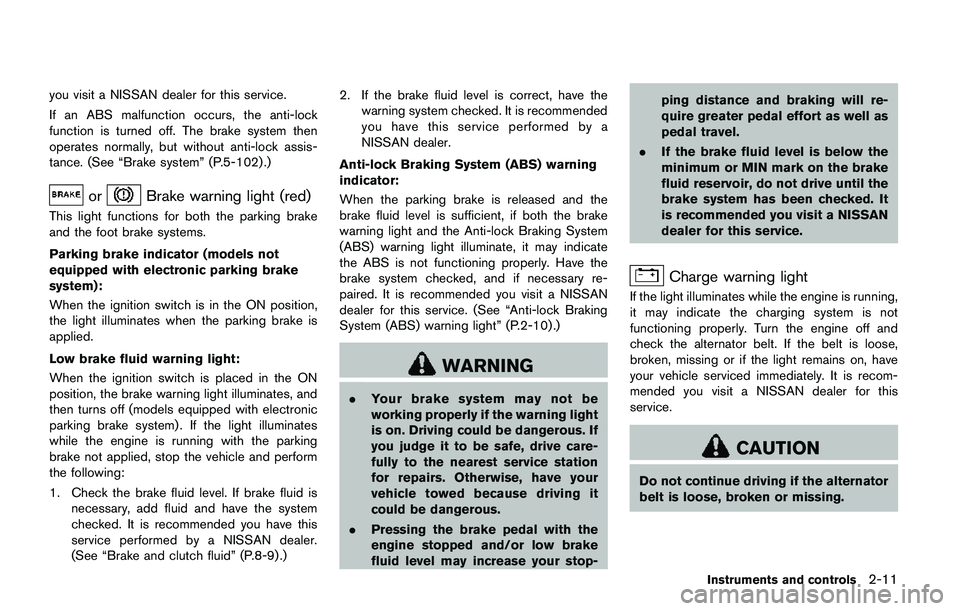
orBrake warning light (red)
This light functions for both the parking brake
and the foot brake systems.
Parking brake indicator (models not
equipped with electronic parking brake
system):
When the ignition switch is in the ON position,
the light illuminates when the parking brake is
applied.
Low brake fluid warning light:
When the ignition switch is placed in the ON
position, the brake warning light illuminates, and
then turns off (models equipped with electronic
parking brake system) . If the light illuminates
while the engine is running with the parking
brake not applied, stop the vehicle and perform
the following:
1. Check the brake fluid level. If brake fluid is
necessary, add fluid and have the system
checked. It is recommended you have this
service performed by a NISSAN dealer.
(See “Brake and clutch fluid” (P.8-9) .)2. If the brake fluid level is correct, have the
warning system checked. It is recommended
you have this service performed by a
NISSAN dealer.
Anti-lock Braking System (ABS) warning
indicator:
When the parking brake is released and the
brake fluid level is sufficient, if both the brake
warning light and the Anti-lock Braking System
(ABS) warning light illuminate, it may indicate
the ABS is not functioning properly. Have the
brake system checked, and if necessary re-
paired. It is recommended you visit a NISSAN
dealer for this service. (See “Anti-lock Braking
System (ABS) warning light” (P.2-10) .)
WARNING
.Your brake system may not be
working properly if the warning light
is on. Driving could be dangerous. If
you judge it to be safe, drive care-
fully to the nearest service station
for repairs. Otherwise, have your
vehicle towed because driving it
could be dangerous.
.Pressing the brake pedal with the
engine stopped and/or low brake
fluid level may increase your stop-ping distance and braking will re-
quire greater pedal effort as well as
pedal travel.
.If the brake fluid level is below the
minimum or MIN mark on the brake
fluid reservoir, do not drive until the
brake system has been checked. It
is recommended you visit a NISSAN
dealer for this service.
Charge warning light
If the light illuminates while the engine is running,
it may indicate the charging system is not
functioning properly. Turn the engine off and
check the alternator belt. If the belt is loose,
broken, missing or if the light remains on, have
your vehicle serviced immediately. It is recom-
mended you visit a NISSAN dealer for this
service.
CAUTION
Do not continue driving if the alternator
belt is loose, broken or missing.
Instruments and controls2-11