warning light NISSAN QASHQAI 2017 Owner´s Manual
[x] Cancel search | Manufacturer: NISSAN, Model Year: 2017, Model line: QASHQAI, Model: NISSAN QASHQAI 2017Pages: 508, PDF Size: 2.68 MB
Page 326 of 508

Temporary disabled status at high tem-
perature:
If the vehicle is parked in direct sunlight under
high temperature conditions (over approximately
1048F (408C)) and then the LDP system is
turned on, the LDP system may be deactivated
automatically and the following message will
appear on the vehicle information display:
“Unavailable: High Cabin Temperature.” When
the interior temperature is reduced, the system
will resume operating automatically.
SYSTEM MALFUNCTION
If the LDP system malfunctions, it will cancel
automatically. The LDP indicator (orange) will
illuminate and the “Malfunction” warning mes-
sage appear in the display.
If the LDP indicator (orange) illuminates in the
display, pull off the road to a safe location. Turn
the engine off and restart the engine. If the LDP
indicator (orange) continues to illuminate, have
the LDP system checked. It is recommended
that you visit a NISSAN dealer for this service.JVS1079X
SYSTEM MAINTENANCE
The lane camera unit*Afor the LDP system is
located above the inside mirror. To keep the
proper operation of the LDP system and prevent
a system malfunction, be sure to observe the
following:
.Always keep the windshield clean.
.Do not attach a sticker (including transpar-
ent material) or install an accessory near the
camera unit.
.Do not place reflective materials, such as
white paper or a mirror, on the instrument
panel. The reflection of sunlight may ad-
versely affect the camera unit’s capability of
detecting the lane markers..Do not strike or damage the areas around
the camera unit. Do not touch the camera
lens or remove the screw located on the
camera unit. If the camera unit is damaged
due to an accident, it is recommended that
you visit a NISSAN dealer.
Starting and driving5-41
Page 328 of 508

JVS1091X
*1Side indicator light
*2Vehicle information display
*3Steering-wheel-mounted controls (left side)
*4Blind Spot Warning (BSW) switch (for models
without LDP system)
BSW SYSTEM OPERATION
The BSW system operates above approximately
20 MPH (32 km/h) .
If the radar sensors detect a vehicle in the
detection zone, the side indicator light
*1
illuminates.If the turn signal is then activated, the system
chimes (twice) and the side indicator light
flashes. The side indicator light continues to
flash until the detected vehicle leaves the
detection zone.
The side indicator light illuminates for a few
seconds when the ignition switch is placed in
the ON position.
The brightness of the side indicator light is
adjusted automatically depending on the bright-
ness of the ambient light.
If a vehicle comes into the detection zone after
the driver activates the turn signal, then only the
side indicator light flashes and no chime sounds.
For additional information, refer to “BSW driving
situations” (P.5-46).
Starting and driving5-43
Page 336 of 508

WARNING
Failure to follow the warnings and
instructions for proper use of the RCTA
system could result in serious injury or
death.
.The RCTA system is not a replace-
ment for proper driving procedures
and is not designed to prevent
contact with vehicles or objects.
When backing out of a parking
space, always use the side and rear
mirrors and turn and look in the
direction your vehicle will move.
Never rely solely on the RCTA sys-
tem.
The RCTA system will assist you when backing
out from a parking space. When the vehicle is in
reverse, the system is designed to detect other
vehicles approaching from the right or left of the
vehicle. If the system detects cross traffic, it will
alert you.
JVS0953X
*1Side indicator light
*2Vehicle information display
*3Steering-wheel-mounted controls (left side)
RCTA SYSTEM OPERATION
The RCTA system can help alert the driver of an
approaching vehicle when the driver is backing
out of a parking space.
When the shift position is in R (Reverse) and the
vehicle speed is less than approximately 5 MPH
(8 km/h) , the RCTA system is operational.
Starting and driving5-51
REAR CROSS TRAFFIC ALERT
(RCTA) (if so equipped)
Page 355 of 508
5-70Starting and driving
.The chime sounds.
.The vehicle ahead detection indicator blinks.
The warning chime may not sound in some
cases when there is a short distance between
vehicles. Some examples are:
.When the vehicles are traveling at the same
speed and the distance between vehicles is
not changing
.When the vehicle ahead is traveling faster
and the distance between vehicles is
increasing
.When a vehicle cuts in near your vehicle
The warning chime will not sound when:
.Your vehicle approaches other vehicles that
are parked or moving slowly.
.The accelerator pedal is depressed, over-
riding the system.
NOTE:
The approach warning chime may sound
and the system display may blink when the
radar sensor detects objects on the side of
the vehicle or on the side of the road. This
may cause the ICC system to decelerate or
accelerate the vehicle. The radar sensor
may detect these objects when the vehicle
is driven on winding roads, narrow roads,
hilly roads or when entering or exiting a
curve. In these cases you will have tomanually control the proper distance
ahead of your vehicle.
Also, the sensor sensitivity can be affected by
vehicle operation (steering maneuver or driving
position in the lane) or traffic or vehicle condition
(for example, if a vehicle is being driven with
some damage) .
Automatic cancellation
A chime sounds under the following conditions
and the control is automatically canceled.
.When the vehicle ahead is not detected and
your vehicle is traveling below the speed of
15 MPH (24 km/h)
.When the system judges the vehicle is at
standstill
.When the shift lever is not in the D (Drive)
position or manual shift mode
.When the parking brake is applied
.When the VDC system is turned off
.When VDC (including the traction control
system) operates
.When distance measurement becomes im-
paired due to adhesion of dirt or obstruction
to the sensor
.When a wheel slips
.When the radar signal is temporarily inter-
rupted
Vehicle-to-vehicle distance control mode
limitations
WARNING
Listed below are the system limitations
for the ICC system. Failure to operate
the vehicle in accordance with these
system limitations could result in ser-
ious injury or death.
.The system is primarily intended for
use on straight, dry, open roads with
light traffic. It is not advisable to use
the system in city traffic or con-
gested areas.
.This system will not adapt automa-
tically to road conditions. This sys-
tem should be used in evenly
flowing traffic. Do not use the
system on roads with sharp curves,
or on icy roads, in heavy rain or in
fog.
.As there is a performance limit to
the distance control function, never
rely solely on the ICC system. This
system does not correct careless,
inattentive or absent-minded driv-
ing, or overcome poor visibility in
Page 366 of 508
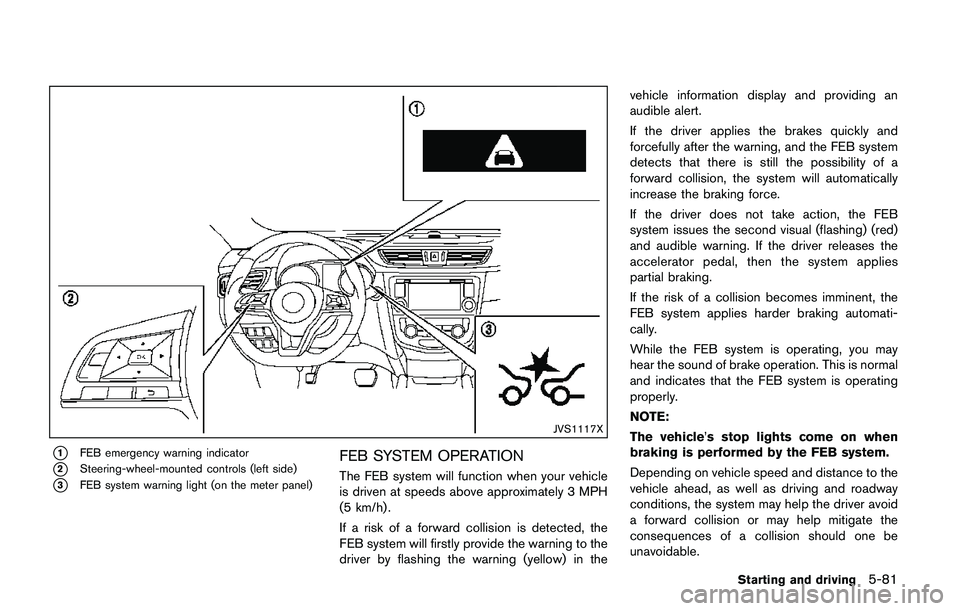
JVS1117X
*1FEB emergency warning indicator
*2Steering-wheel-mounted controls (left side)
*3FEB system warning light (on the meter panel)
FEB SYSTEM OPERATION
The FEB system will function when your vehicle
is driven at speeds above approximately 3 MPH
(5 km/h) .
If a risk of a forward collision is detected, the
FEB system will firstly provide the warning to the
driver by flashing the warning (yellow) in thevehicle information display and providing an
audible alert.
If the driver applies the brakes quickly and
forcefully after the warning, and the FEB system
detects that there is still the possibility of a
forward collision, the system will automatically
increase the braking force.
If the driver does not take action, the FEB
system issues the second visual (flashing) (red)
and audible warning. If the driver releases the
accelerator pedal, then the system applies
partial braking.
If the risk of a collision becomes imminent, the
FEB system applies harder braking automati-
cally.
While the FEB system is operating, you may
hear the sound of brake operation. This is normal
and indicates that the FEB system is operating
properly.
NOTE:
The vehicle’s stop lights come on when
braking is performed by the FEB system.
Depending on vehicle speed and distance to the
vehicle ahead, as well as driving and roadway
conditions, the system may help the driver avoid
a forward collision or may help mitigate the
consequences of a collision should one be
unavoidable.
Starting and driving5-81
Page 367 of 508
5-82Starting and driving
If the driver is handling the steering wheel,
accelerating or braking, the FEB system will
function later or will not function.
The automatic braking will cease under the
following conditions:
.When the steering wheel is turned as far as
necessary to avoid a collision.
.When the accelerator pedal is depressed.
.When there is no longer a vehicle detected
ahead.
If the FEB system has stopped the vehicle, the
vehicle will remain at a standstill for approxi-
mately 2 seconds before the brakes are
released.
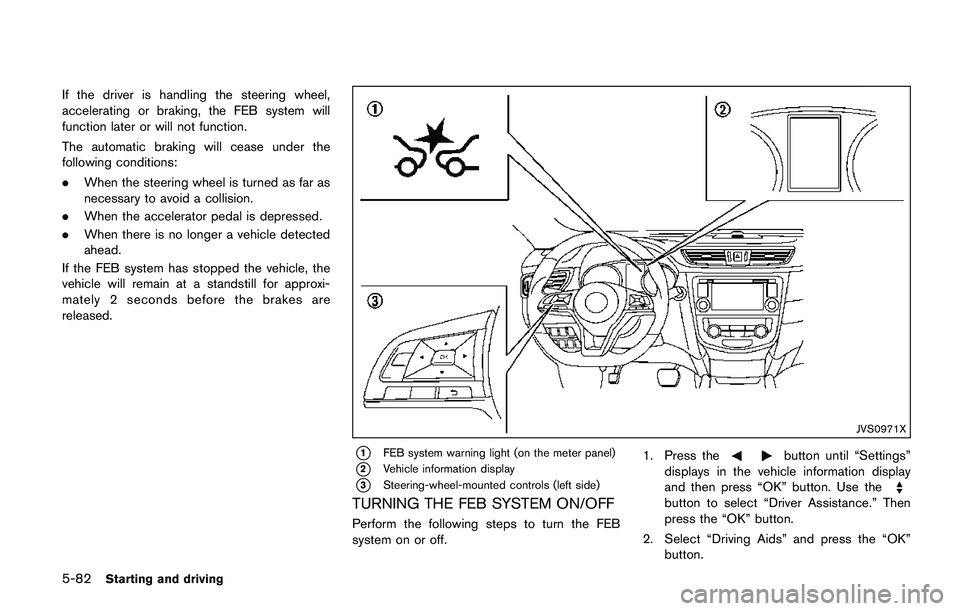
JVS0971X
*1FEB system warning light (on the meter panel)
*2Vehicle information display
*3Steering-wheel-mounted controls (left side)
TURNING THE FEB SYSTEM ON/OFF
Perform the following steps to turn the FEB
system on or off.1. Press the
button until “Settings”
displays in the vehicle information display
and then press “OK” button. Use the
button to select “Driver Assistance.” Then
press the “OK” button.
2. Select “Driving Aids” and press the “OK”
button.
Page 368 of 508
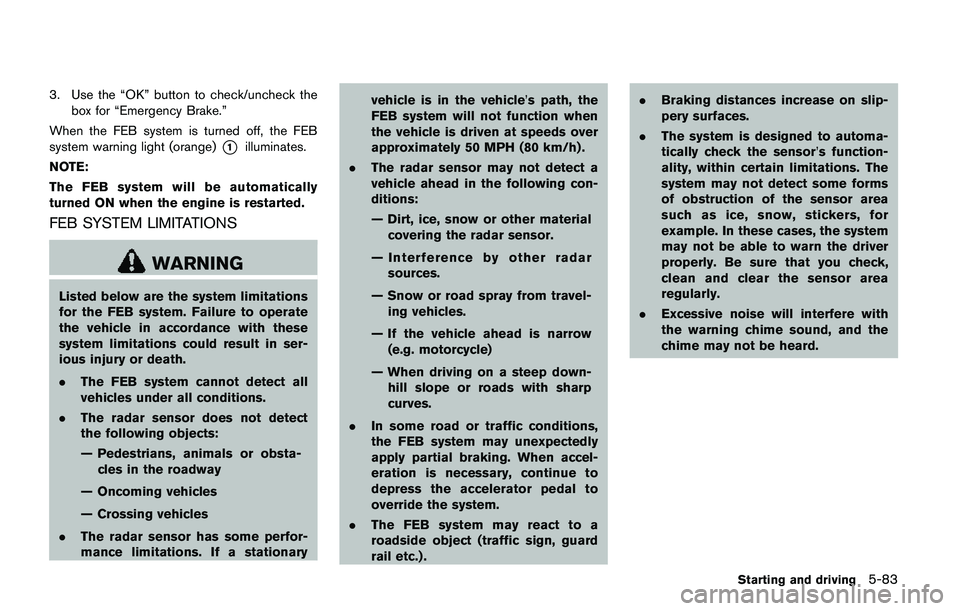
3. Use the “OK” button to check/uncheck the
box for “Emergency Brake.”
When the FEB system is turned off, the FEB
system warning light (orange)
*1illuminates.
NOTE:
The FEB system will be automatically
turned ON when the engine is restarted.
FEB SYSTEM LIMITATIONS
WARNING
Listed below are the system limitations
for the FEB system. Failure to operate
the vehicle in accordance with these
system limitations could result in ser-
ious injury or death.
.The FEB system cannot detect all
vehicles under all conditions.
.The radar sensor does not detect
the following objects:
— Pedestrians, animals or obsta-
cles in the roadway
— Oncoming vehicles
— Crossing vehicles
.The radar sensor has some perfor-
mance limitations. If a stationaryvehicle is in the vehicle’s path, the
FEB system will not function when
the vehicle is driven at speeds over
approximately 50 MPH (80 km/h) .
.The radar sensor may not detect a
vehicle ahead in the following con-
ditions:
— Dirt, ice, snow or other material
covering the radar sensor.
— Interference by other radar
sources.
— Snow or road spray from travel-
ing vehicles.
— If the vehicle ahead is narrow
(e.g. motorcycle)
— When driving on a steep down-
hill slope or roads with sharp
curves.
.In some road or traffic conditions,
the FEB system may unexpectedly
apply partial braking. When accel-
eration is necessary, continue to
depress the accelerator pedal to
override the system.
.The FEB system may react to a
roadside object (traffic sign, guard
rail etc.) ..Braking distances increase on slip-
pery surfaces.
.The system is designed to automa-
tically check the sensor’s function-
ality, within certain limitations. The
system may not detect some forms
of obstruction of the sensor area
such as ice, snow, stickers, for
example. In these cases, the system
may not be able to warn the driver
properly. Be sure that you check,
clean and clear the sensor area
regularly.
.Excessive noise will interfere with
the warning chime sound, and the
chime may not be heard.
Starting and driving5-83
Page 369 of 508
5-84Starting and driving
SSD0253
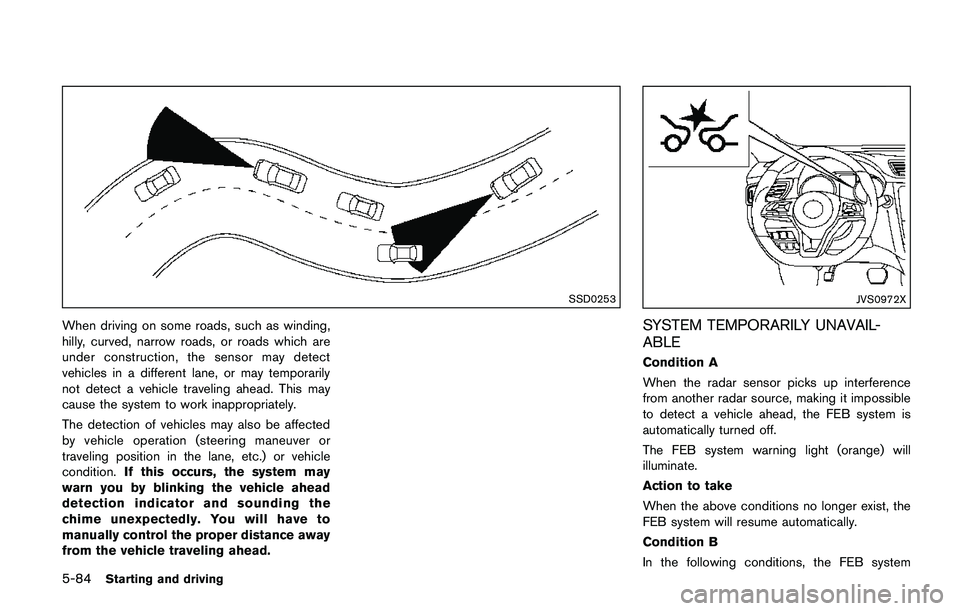
When driving on some roads, such as winding,
hilly, curved, narrow roads, or roads which are
under construction, the sensor may detect
vehicles in a different lane, or may temporarily
not detect a vehicle traveling ahead. This may
cause the system to work inappropriately.
The detection of vehicles may also be affected
by vehicle operation (steering maneuver or
traveling position in the lane, etc.) or vehicle
condition.If this occurs, the system may
warn you by blinking the vehicle ahead
detection indicator and sounding the
chime unexpectedly. You will have to
manually control the proper distance away
from the vehicle traveling ahead.
JVS0972X
SYSTEM TEMPORARILY UNAVAIL-
ABLE
Condition A
When the radar sensor picks up interference
from another radar source, making it impossible
to detect a vehicle ahead, the FEB system is
automatically turned off.
The FEB system warning light (orange) will
illuminate.
Action to take
When the above conditions no longer exist, the
FEB system will resume automatically.
Condition B
In the following conditions, the FEB system
Page 370 of 508
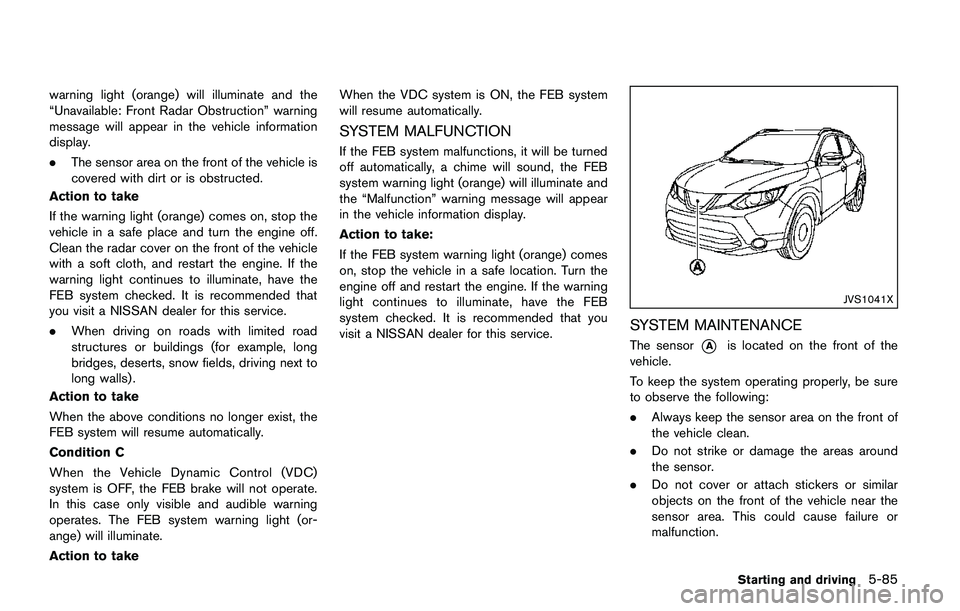
warning light (orange) will illuminate and the
“Unavailable: Front Radar Obstruction” warning
message will appear in the vehicle information
display.
.The sensor area on the front of the vehicle is
covered with dirt or is obstructed.
Action to take
If the warning light (orange) comes on, stop the
vehicle in a safe place and turn the engine off.
Clean the radar cover on the front of the vehicle
with a soft cloth, and restart the engine. If the
warning light continues to illuminate, have the
FEB system checked. It is recommended that
you visit a NISSAN dealer for this service.
.When driving on roads with limited road
structures or buildings (for example, long
bridges, deserts, snow fields, driving next to
long walls) .
Action to take
When the above conditions no longer exist, the
FEB system will resume automatically.
Condition C
When the Vehicle Dynamic Control (VDC)
system is OFF, the FEB brake will not operate.
In this case only visible and audible warning
operates. The FEB system warning light (or-
ange) will illuminate.
Action to takeWhen the VDC system is ON, the FEB system
will resume automatically.
SYSTEM MALFUNCTION
If the FEB system malfunctions, it will be turned
off automatically, a chime will sound, the FEB
system warning light (orange) will illuminate and
the “Malfunction” warning message will appear
in the vehicle information display.
Action to take:
If the FEB system warning light (orange) comes
on, stop the vehicle in a safe location. Turn the
engine off and restart the engine. If the warning
light continues to illuminate, have the FEB
system checked. It is recommended that you
visit a NISSAN dealer for this service.
JVS1041X
SYSTEM MAINTENANCE
The sensor*Ais located on the front of the
vehicle.
To keep the system operating properly, be sure
to observe the following:
.Always keep the sensor area on the front of
the vehicle clean.
.Do not strike or damage the areas around
the sensor.
.Do not cover or attach stickers or similar
objects on the front of the vehicle near the
sensor area. This could cause failure or
malfunction.
Starting and driving5-85
Page 372 of 508
JVS1042X
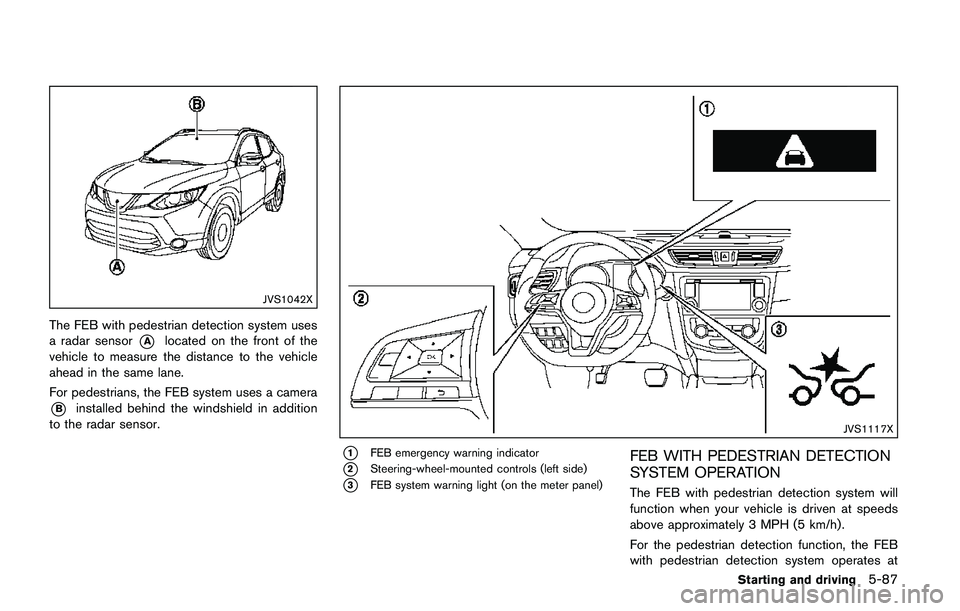
The FEB with pedestrian detection system uses
a radar sensor
*Alocated on the front of the
vehicle to measure the distance to the vehicle
ahead in the same lane.
For pedestrians, the FEB system uses a camera
*Binstalled behind the windshield in addition
to the radar sensor.
JVS1117X
*1FEB emergency warning indicator
*2Steering-wheel-mounted controls (left side)
*3FEB system warning light (on the meter panel)
FEB WITH PEDESTRIAN DETECTION
SYSTEM OPERATION
The FEB with pedestrian detection system will
function when your vehicle is driven at speeds
above approximately 3 MPH (5 km/h) .
For the pedestrian detection function, the FEB
with pedestrian detection system operates at
Starting and driving5-87