warning light NISSAN QASHQAI 2017 Owner´s Manual
[x] Cancel search | Manufacturer: NISSAN, Model Year: 2017, Model line: QASHQAI, Model: NISSAN QASHQAI 2017Pages: 508, PDF Size: 2.68 MB
Page 373 of 508
5-88Starting and driving
speeds between 6 – 37 MPH (10 – 60 km/h) .
If a risk of a forward collision is detected, the
FEB with pedestrian detection system will firstly
provide the warning to the driver by flashing the
warning (yellow) in the vehicle information dis-
play and providing an audible alert.
If the driver applies the brakes quickly and
forcefully after the warning, and the FEB with
pedestrian detection system detects that there
is still the possibility of a forward collision, the
system will automatically increase the braking
force.
If the driver does not take action, the FEB with
pedestrian detection system issues the second
visual (flashing) (red) and audible warning. If the
driver releases the accelerator pedal, then the
system applies partial braking.
If the risk of a collision becomes imminent, the
FEB with pedestrian detection system applies
harder braking automatically.
While the FEB with pedestrian detection system
is operating, you may hear the sound of brake
operation. This is normal and indicates that the
FEB with pedestrian detection system is oper-
ating properly.
NOTE:
The vehicle’s stop lights come on when
braking is performed by the FEB withpedestrian detection system.
Depending on vehicle speed and distance to the
vehicle or pedestrian ahead, as well as driving
and roadway conditions, the system may help
the driver avoid a forward collision or may help
mitigate the consequences of a collision should
one be unavoidable.
If the driver is handling the steering wheel,
accelerating or braking, the FEB with pedestrian
detection system will function later or will not
function.
The automatic braking will cease under the
following conditions:
.When the steering wheel is turned as far as
necessary to avoid a collision.
.When the accelerator pedal is depressed.
.When there is no longer a vehicle or
pedestrian detected ahead.
If the FEB with pedestrian detection system has
stopped the vehicle, the vehicle will remain at a
standstill for approximately 2 seconds before the
brakes are released.
Page 374 of 508
JVS0971X
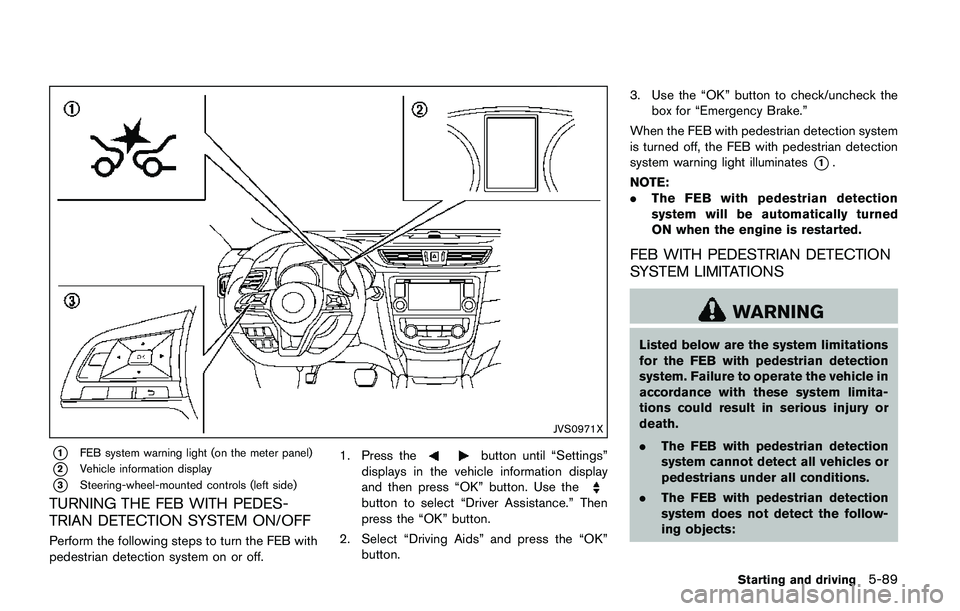
*1FEB system warning light (on the meter panel)
*2Vehicle information display
*3Steering-wheel-mounted controls (left side)
TURNING THE FEB WITH PEDES-
TRIAN DETECTION SYSTEM ON/OFF
Perform the following steps to turn the FEB with
pedestrian detection system on or off.1. Press the
button until “Settings”
displays in the vehicle information display
and then press “OK” button. Use the
button to select “Driver Assistance.” Then
press the “OK” button.
2. Select “Driving Aids” and press the “OK”
button.3. Use the “OK” button to check/uncheck the
box for “Emergency Brake.”
When the FEB with pedestrian detection system
is turned off, the FEB with pedestrian detection
system warning light illuminates
*1.
NOTE:
.The FEB with pedestrian detection
system will be automatically turned
ON when the engine is restarted.
FEB WITH PEDESTRIAN DETECTION
SYSTEM LIMITATIONS
WARNING
Listed below are the system limitations
for the FEB with pedestrian detection
system. Failure to operate the vehicle in
accordance with these system limita-
tions could result in serious injury or
death.
.The FEB with pedestrian detection
system cannot detect all vehicles or
pedestrians under all conditions.
.The FEB with pedestrian detection
system does not detect the follow-
ing objects:
Starting and driving5-89
Page 375 of 508
5-90Starting and driving
— Small pedestrians (including
small children) , animals and cy-
clists.
— Pedestrians in wheelchairs or
using mobile transport such as
scooters, child-operated toys, or
skateboards.
— Pedestrians who are seated or
otherwise not in a full upright
standing or walking position.
— Obstacles on the roadway
— Oncoming vehicles
— Crossing vehicles
— Obstacles on the roadside
.The FEB with pedestrian detection
system has some performance lim-
itations.
— If a stationary vehicle is in the
vehicle’s path, the FEB with
pedestrian detection system will
not function when the vehicle is
driven at speeds over approxi-
mately 50 MPH (80 km/h) .
— For pedestrian detection, the
FEB with pedestrian detection
system will not function whenthe vehicle is driven at speeds
over approximately 37 MPH (60
km/h) or below approximately 6
MPH (10 km/h) .
.The FEB with pedestrian detection
system may not function for pedes-
trians in darkness or in tunnels,
even if there is street lighting in
the area.
.For pedestrians, the FEB with pe-
destrian detection system will not
issue the first warning.
.The FEB with pedestrian detection
system may not function if the
vehicle ahead is narrow (for exam-
ple a motorcycle) .
.The FEB with pedestrian detection
system may not function if speed
difference between the two vehicles
is too small.
.The radar sensor may not function
properly or detect a vehicle ahead in
the following conditions:
— Poor visibility (conditions such
as rain, snow, fog, dust storms,
sandstorms, and road spray
from other vehicles)— Driving on a steep downhill
slope or roads with sharp
curves.
— Driving on a bumpy road sur-
face, such as an uneven dirt
road.
— If dirt, ice, snow or other materi-
al is covering the radar sensor
area.
— Interference by other radar
sources.
.The camera may not function prop-
erly or detect a vehicle ahead in the
following conditions:
— The camera area of windshield
is fogged up, or covered with
dirt, water drops, ice, snow, etc.
— Strong light (for example, sun-
light or high beams from on-
coming vehicles) enters the
front camera. Strong light
causes the area around the
pedestrian to be cast in a sha-
dow, making it difficult to see.
— A sudden change in brightness
occurs. (For example, when the
vehicle enters or exits a tunnel
Page 376 of 508
or a shaded area or lightning
flashes.)
— The poor contrast of a person to
the background, such as having
clothing color or pattern which
is similar to the background.
— The pedestrian’s profile is par-
tially obscured or unidentifiable
due to the pedestrian transport-
ing cargo, wearing bulky or very
loose-fitting clothing or acces-
sories.
.The system performance may de-
grade in the following conditions:
— The vehicle is driven on a slip-
pery road.
— The vehicle is driven on a slope.
— Excessively heavy baggage is
loaded in the rear seat or the
cargo area of your vehicle.
.The system is designed to automa-
tically check the sensor (radar and
camera)’s functionality, within cer-
tain limitations. The system may not
detect blockage of sensor areas
covered by ice, snow or stickers,
for example. In these cases, thesystem may not be able to warn
the driver properly. Be sure that you
check, clean and clear sensor areas
regularly.
.In some road and traffic conditions,
the FEB system may unexpectedly
apply partial braking. When accel-
eration is necessary, depress the
accelerator pedal to override the
system.
.The FEB system may react a road-
side object (traffic sign, guard rail
etc.)
.Braking distances increase on slip-
pery surfaces.
.Excessive noise will interfere with
the warning chime sound, and the
chime may not be heard.
Starting and driving5-91
Page 377 of 508
5-92Starting and driving
SSD0253
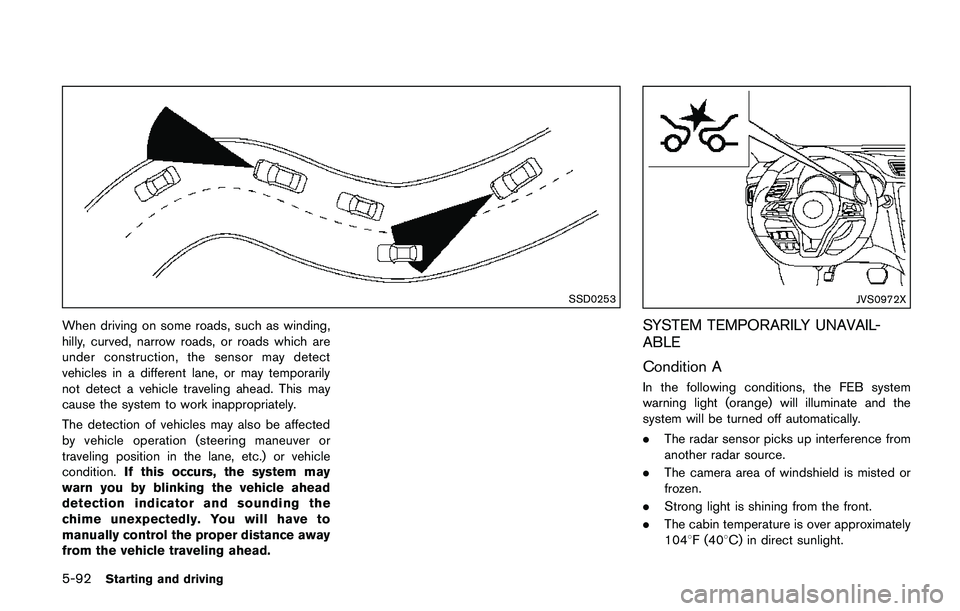
When driving on some roads, such as winding,
hilly, curved, narrow roads, or roads which are
under construction, the sensor may detect
vehicles in a different lane, or may temporarily
not detect a vehicle traveling ahead. This may
cause the system to work inappropriately.
The detection of vehicles may also be affected
by vehicle operation (steering maneuver or
traveling position in the lane, etc.) or vehicle
condition.If this occurs, the system may
warn you by blinking the vehicle ahead
detection indicator and sounding the
chime unexpectedly. You will have to
manually control the proper distance away
from the vehicle traveling ahead.
JVS0972X
SYSTEM TEMPORARILY UNAVAIL-
ABLE
Condition A
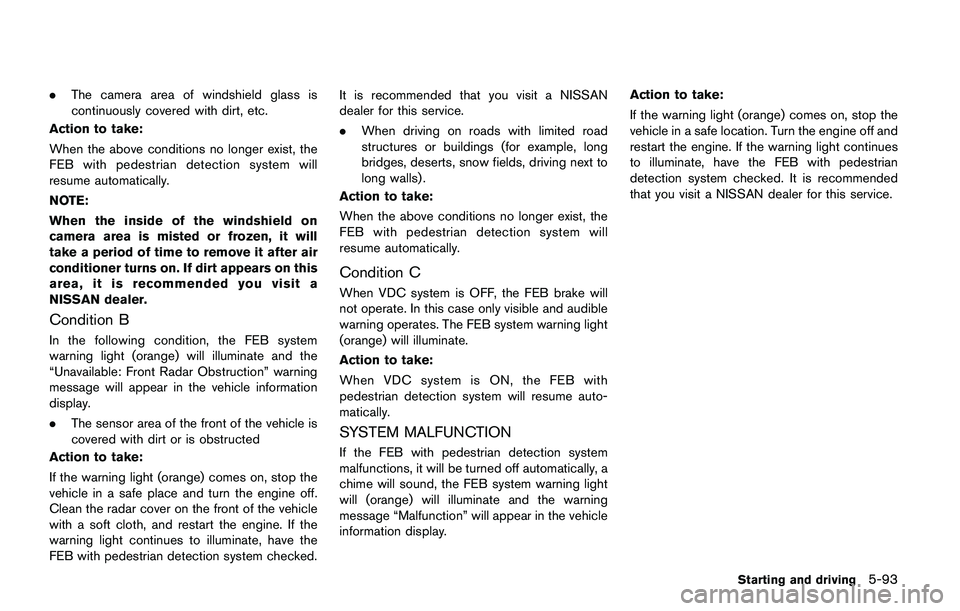
In the following conditions, the FEB system
warning light (orange) will illuminate and the
system will be turned off automatically.
.The radar sensor picks up interference from
another radar source.
.The camera area of windshield is misted or
frozen.
.Strong light is shining from the front.
.The cabin temperature is over approximately
1048F (408C) in direct sunlight.
Page 378 of 508
.The camera area of windshield glass is
continuously covered with dirt, etc.
Action to take:
When the above conditions no longer exist, the
FEB with pedestrian detection system will
resume automatically.
NOTE:
When the inside of the windshield on
camera area is misted or frozen, it will
take a period of time to remove it after air
conditioner turns on. If dirt appears on this
area, it is recommended you visit a
NISSAN dealer.
Condition B
In the following condition, the FEB system
warning light (orange) will illuminate and the
“Unavailable: Front Radar Obstruction” warning
message will appear in the vehicle information
display.
.The sensor area of the front of the vehicle is
covered with dirt or is obstructed
Action to take:
If the warning light (orange) comes on, stop the
vehicle in a safe place and turn the engine off.
Clean the radar cover on the front of the vehicle
with a soft cloth, and restart the engine. If the
warning light continues to illuminate, have the
FEB with pedestrian detection system checked.It is recommended that you visit a NISSAN
dealer for this service.
.When driving on roads with limited road
structures or buildings (for example, long
bridges, deserts, snow fields, driving next to
long walls) .
Action to take:
When the above conditions no longer exist, the
FEB with pedestrian detection system will
resume automatically.
Condition C
When VDC system is OFF, the FEB brake will
not operate. In this case only visible and audible
warning operates. The FEB system warning light
(orange) will illuminate.
Action to take:
When VDC system is ON, the FEB with
pedestrian detection system will resume auto-
matically.
SYSTEM MALFUNCTION
If the FEB with pedestrian detection system
malfunctions, it will be turned off automatically, a
chime will sound, the FEB system warning light
will (orange) will illuminate and the warning
message “Malfunction” will appear in the vehicle
information display.Action to take:
If the warning light (orange) comes on, stop the
vehicle in a safe location. Turn the engine off and
restart the engine. If the warning light continues
to illuminate, have the FEB with pedestrian
detection system checked. It is recommended
that you visit a NISSAN dealer for this service.
Starting and driving5-93
Page 379 of 508
5-94Starting and driving
JVS1042X
SYSTEM MAINTENANCE
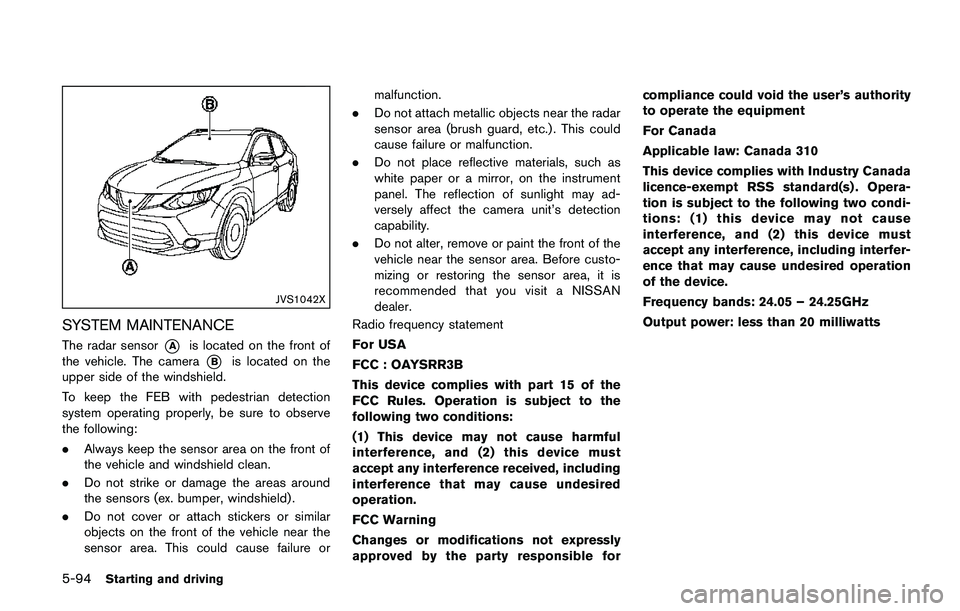
The radar sensor*Ais located on the front of
the vehicle. The camera
*Bis located on the
upper side of the windshield.
To keep the FEB with pedestrian detection
system operating properly, be sure to observe
the following:
.Always keep the sensor area on the front of
the vehicle and windshield clean.
.Do not strike or damage the areas around
the sensors (ex. bumper, windshield) .
.Do not cover or attach stickers or similar
objects on the front of the vehicle near the
sensor area. This could cause failure ormalfunction.
.Do not attach metallic objects near the radar
sensor area (brush guard, etc.) . This could
cause failure or malfunction.
.Do not place reflective materials, such as
white paper or a mirror, on the instrument
panel. The reflection of sunlight may ad-
versely affect the camera unit’s detection
capability.
.Do not alter, remove or paint the front of the
vehicle near the sensor area. Before custo-
mizing or restoring the sensor area, it is
recommended that you visit a NISSAN
dealer.
Radio frequency statement
For USA
FCC : OAYSRR3B
This device complies with part 15 of the
FCC Rules. Operation is subject to the
following two conditions:
(1) This device may not cause harmful
interference, and (2) this device must
accept any interference received, including
interference that may cause undesired
operation.
FCC Warning
Changes or modifications not expressly
approved by the party responsible forcompliance could void the user’s authority
to operate the equipment
For Canada
Applicable law: Canada 310
This device complies with Industry Canada
licence-exempt RSS standard(s) . Opera-
tion is subject to the following two condi-
tions: (1) this device may not cause
interference, and (2) this device must
accept any interference, including interfer-
ence that may cause undesired operation
of the device.
Frequency bands: 24.05 – 24.25GHz
Output power: less than 20 milliwatts
Page 383 of 508
5-98Starting and driving
ble. It is recommended that you visit
a NISSAN dealer for this service.
.If the “AWD Error” warning appears
while driving, there may be a mal-
function in the AWD system.
Reduce the vehicle speed and have
your vehicle checked as soon as
possible. It is recommended that
you visit a NISSAN dealer for this
service.
.Never drive on dry, hard surface
roads in the LOCK mode, as this
will overload the powertrain and
may cause a serious malfunction.
JVS1024X
AWD LOCK SWITCH OPERATIONS
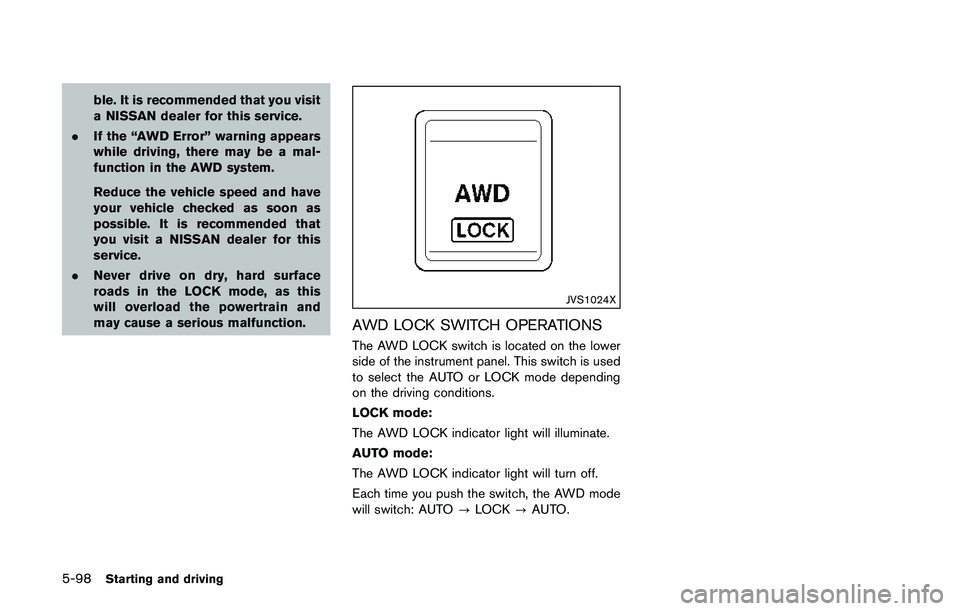
The AWD LOCK switch is located on the lower
side of the instrument panel. This switch is used
to select the AUTO or LOCK mode depending
on the driving conditions.
LOCK mode:
The AWD LOCK indicator light will illuminate.
AUTO mode:
The AWD LOCK indicator light will turn off.
Each time you push the switch, the AWD mode
will switch: AUTO?LOCK?AUTO.
Page 384 of 508
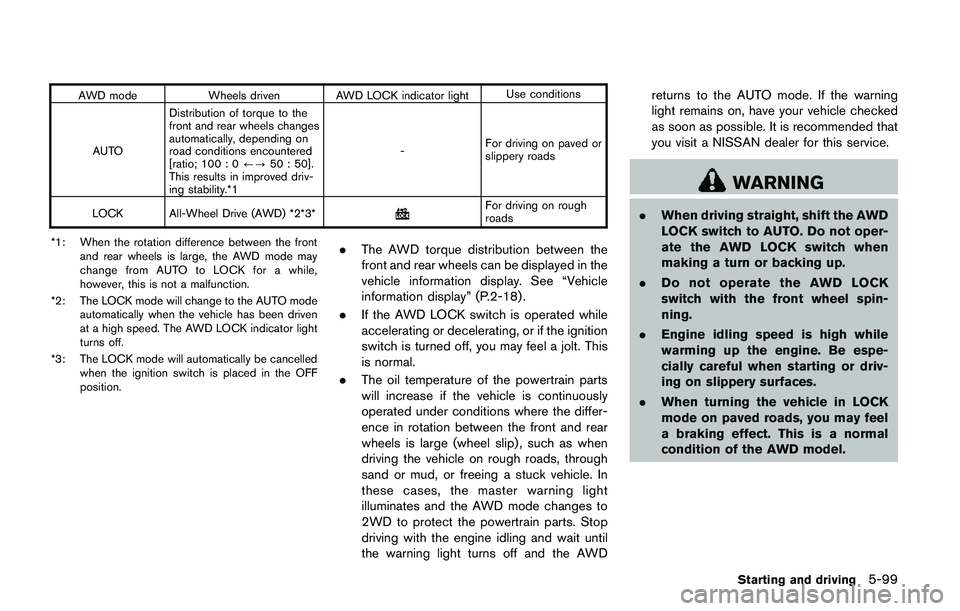
AWD mode Wheels driven AWD LOCK indicator lightUse conditions
AUTODistribution of torque to the
front and rear wheels changes
automatically, depending on
road conditions encountered
[ratio; 100 : 0/?50 : 50].
This results in improved driv-
ing stability.*1-For driving on paved or
slippery roads
LOCK All-Wheel Drive (AWD) *2*3*
For driving on rough
roads
*1: When the rotation difference between the front
and rear wheels is large, the AWD mode may
change from AUTO to LOCK for a while,
however, this is not a malfunction.
*2: The LOCK mode will change to the AUTO mode
automatically when the vehicle has been driven
at a high speed. The AWD LOCK indicator light
turns off.
*3: The LOCK mode will automatically be cancelled
when the ignition switch is placed in the OFF
position.
.The AWD torque distribution between the
front and rear wheels can be displayed in the
vehicle information display. See “Vehicle
information display” (P.2-18) .
.If the AWD LOCK switch is operated while
accelerating or decelerating, or if the ignition
switch is turned off, you may feel a jolt. This
is normal.
.The oil temperature of the powertrain parts
will increase if the vehicle is continuously
operated under conditions where the differ-
ence in rotation between the front and rear
wheels is large (wheel slip) , such as when
driving the vehicle on rough roads, through
sand or mud, or freeing a stuck vehicle. In
these cases, the master warning light
illuminates and the AWD mode changes to
2WD to protect the powertrain parts. Stop
driving with the engine idling and wait until
the warning light turns off and the AWDreturns to the AUTO mode. If the warning
light remains on, have your vehicle checked
as soon as possible. It is recommended that
you visit a NISSAN dealer for this service.
WARNING
.When driving straight, shift the AWD
LOCK switch to AUTO. Do not oper-
ate the AWD LOCK switch when
making a turn or backing up.
.Do not operate the AWD LOCK
switch with the front wheel spin-
ning.
.Engine idling speed is high while
warming up the engine. Be espe-
cially careful when starting or driv-
ing on slippery surfaces.
.When turning the vehicle in LOCK
mode on paved roads, you may feel
a braking effect. This is a normal
condition of the AWD model.
Starting and driving5-99
Page 386 of 508
wheel gently touches the curb.
.HEADED UPHILL WITH CURB:*2
Turn the wheels away from the curb and
move the vehicle back until the curb side
wheel gently touches the curb.
.HEADED UPHILL OR DOWNHILL, NO
CURB:
*3
Turn the wheels toward the side of the
road so the vehicle will move away from
the center of the road if it moves.
4.Models with Intelligent Key system:
Place the ignition switch in the OFF position.
Models without Intelligent Key system:
Place the ignition switch in the LOCK
position and remove the key.
WARNING
.If the engine is not running or is
turned off while driving, the power
assist for the steering will not work.
Steering will be harder to operate.
.When the electric power steering
warning light illuminates with the
engine running, the power assist for
the steering will cease operation.
You will still have control of the
vehicle but the steering will be
harder to operate.
The electric power steering is designed to
provide power assist while driving to operate
the steering wheel with light force.
When the steering wheel is operated repeatedly
or continuously while parking or driving at a very
low speed, the power assist for the steering
wheel will be reduced. This is to prevent
overheating of the electric power steering and
protect it from getting damaged. While the
power assist is reduced, steering wheel opera-
tion will become heavy. When the temperature
of the electric power steering goes down, the
power assist level will return to normal. Avoid
repeating such steering wheel operations thatcould cause the electric power steering to
overheat.
You may hear a noise when the steering wheel is
operated quickly. However, this is not a mal-
function.
If the electric power steering warning light
illuminates while the engine is running, it may
indicate the electric power steering is not
functioning properly and may need servicing.
Have the electric power steering checked. It is
recommended that you visit a NISSAN dealer for
this service. (See “Electric power steering
warning light” (P.2-12).)
When the electric power steering warning light
illuminates with the engine running, the power
assist for the steering will cease operation. You
will still have control of the vehicle. However,
greater steering effort is needed, especially in
sharp turns and at low speeds.
The mode of the Power Steering can be
changed to:
.NORMAL
.SPORT
For more information, see “Vehicle information
display” (P.2-18) .
Starting and driving5-101
ELECTRIC POWER STEERING