width NISSAN QASHQAI 2017 Owner´s Manual
[x] Cancel search | Manufacturer: NISSAN, Model Year: 2017, Model line: QASHQAI, Model: NISSAN QASHQAI 2017Pages: 508, PDF Size: 2.68 MB
Page 189 of 508
4-8Heater, air conditioner, audio and phone systems
HOW TO USE BRIGHTNESS CON-
TROL BUTTON
Push thebutton to change the display
brightness between the Auto mode and the
Night mode. The brightness control bar will also
be displayed. While the brightness control bar is
being displayed, the brightness can be adjusted
using the ENTER AUDIO/TUNE·SCROLL dial.
Push and hold the
button to turn the display
off. Push the button again to turn the display on.
HOW TO USE THE POWER/VOLUME
DIAL
Push the POWER/VOLUME dial to turn the
audio function on and off. Turn the POWER/
VOLUME dial to adjust the volume. (See “FM-
AM-SAT radio with Compact Disc (CD) player
(Type B)” (P.4-63)
HOW TO USE THE ENTER AUDIO/
TUNE·SCROLL DIAL
Turn the ENTER AUDIO/TUNE·SCROLL dial to
select items on the screen and to adjust the
levels of setting items. Push the dial to confirm
the selected item or setting. (See “FM-AM-SAT
radio with Compact Disc (CD) player (Type B)”
(P.4-63)
WARNING
.Failure to follow the warnings and
instructions for proper use of the
RearView Monitor could result in
serious injury or death.
.RearView Monitor is a convenience
feature and is not a substitute for
proper backing. Always turn and
look out the windows, and check
mirrors to be sure that it is safe to
move before operating the vehicle.
Always back up slowly.
.The system is designed as an aid to
the driver in showing large station-
ary objects directly behind the vehi-
cle, to help avoid damaging the
vehicle.
.The distance guide line and the
vehicle width line should be used
as a reference only when the vehicle
is on a level paved surface. The
distance viewed on the monitor is
for reference only and may be
different than the actual distance
between the vehicle and displayed
objects.
CAUTION
Do not scratch the camera lens when
cleaning dirt or snow from the front of
the camera.
The RearView Monitor system automatically
shows a rear view of the vehicle when the shift
lever is placed in the R (Reverse) position.
The radio can still be heard while the RearView
Monitor is active.
REARVIEW MONITOR (if so
equipped)
Page 190 of 508
JVH1585X
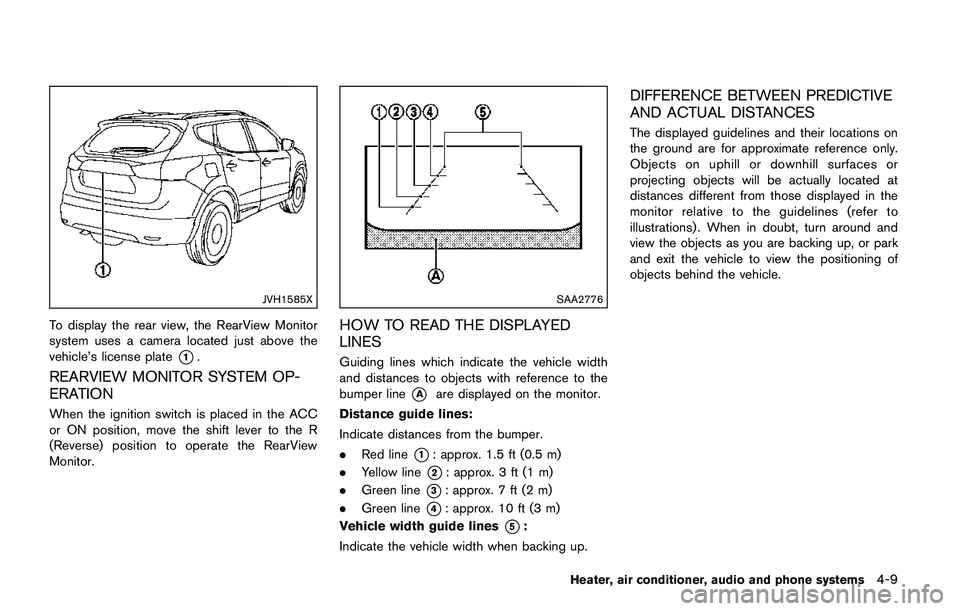
To display the rear view, the RearView Monitor
system uses a camera located just above the
vehicle’s license plate
*1.
REARVIEW MONITOR SYSTEM OP-
ERATION
When the ignition switch is placed in the ACC
or ON position, move the shift lever to the R
(Reverse) position to operate the RearView
Monitor.
SAA2776
HOW TO READ THE DISPLAYED
LINES
Guiding lines which indicate the vehicle width
and distances to objects with reference to the
bumper line
*Aare displayed on the monitor.
Distance guide lines:
Indicate distances from the bumper.
.Red line
*1: approx. 1.5 ft (0.5 m)
.Yellow line
*2: approx. 3 ft (1 m)
.Green line
*3: approx. 7 ft (2 m)
.Green line
*4: approx. 10 ft (3 m)
Vehicle width guide lines
*5:
Indicate the vehicle width when backing up.
DIFFERENCE BETWEEN PREDICTIVE
AND ACTUAL DISTANCES
The displayed guidelines and their locations on
the ground are for approximate reference only.
Objects on uphill or downhill surfaces or
projecting objects will be actually located at
distances different from those displayed in the
monitor relative to the guidelines (refer to
illustrations) . When in doubt, turn around and
view the objects as you are backing up, or park
and exit the vehicle to view the positioning of
objects behind the vehicle.
Heater, air conditioner, audio and phone systems4-9
Page 191 of 508
4-10Heater, air conditioner, audio and phone systems
JVH1159X
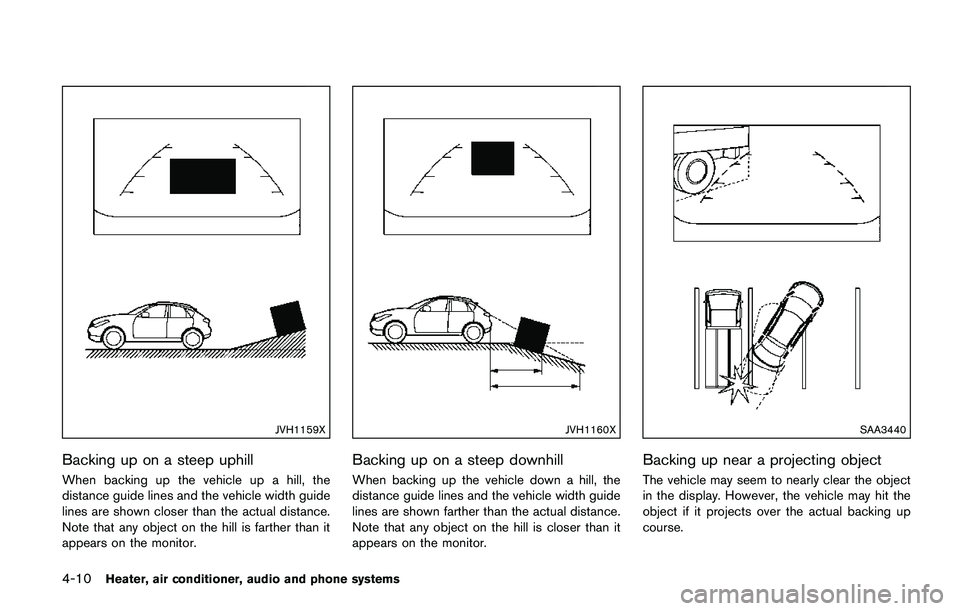
Backing up on a steep uphill
When backing up the vehicle up a hill, the
distance guide lines and the vehicle width guide
lines are shown closer than the actual distance.
Note that any object on the hill is farther than it
appears on the monitor.
JVH1160X
Backing up on a steep downhill
When backing up the vehicle down a hill, the
distance guide lines and the vehicle width guide
lines are shown farther than the actual distance.
Note that any object on the hill is closer than it
appears on the monitor.
SAA3440
Backing up near a projecting object
The vehicle may seem to nearly clear the object
in the display. However, the vehicle may hit the
object if it projects over the actual backing up
course.
Page 196 of 508
Available views:
.Bird’s-eye view
The surrounding views of the vehicle from
above.
.Front-side view
The view around and ahead of the front
passenger’s side wheel.
.Front view
An approximately 150–degree view of the
front of the vehicle.
.Rear view
An approximately 150–degree view of the
rear of the vehicle.
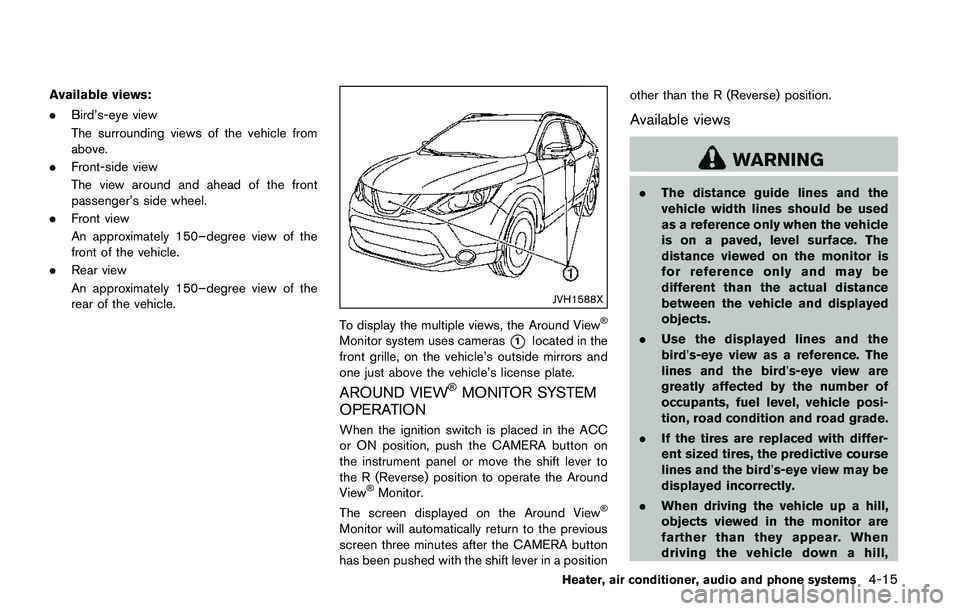
JVH1588X
To display the multiple views, the Around ViewŠ
Monitor system uses cameras*1located in the
front grille, on the vehicle’s outside mirrors and
one just above the vehicle’s license plate.
AROUND VIEWŠMONITOR SYSTEM
OPERATION
When the ignition switch is placed in the ACC
or ON position, push the CAMERA button on
the instrument panel or move the shift lever to
the R (Reverse) position to operate the Around
View
ŠMonitor.
The screen displayed on the Around ViewŠ
Monitor will automatically return to the previous
screen three minutes after the CAMERA button
has been pushed with the shift lever in a positionother than the R (Reverse) position.
Available views
WARNING
.The distance guide lines and the
vehicle width lines should be used
as a reference only when the vehicle
is on a paved, level surface. The
distance viewed on the monitor is
for reference only and may be
different than the actual distance
between the vehicle and displayed
objects.
.Use the displayed lines and the
bird’s-eye view as a reference. The
lines and the bird’s-eye view are
greatly affected by the number of
occupants, fuel level, vehicle posi-
tion, road condition and road grade.
.If the tires are replaced with differ-
ent sized tires, the predictive course
lines and the bird’s-eye view may be
displayed incorrectly.
.When driving the vehicle up a hill,
objects viewed in the monitor are
farther than they appear. When
driving the vehicle down a hill,
Heater, air conditioner, audio and phone systems4-15
Page 197 of 508
4-16Heater, air conditioner, audio and phone systems
objects viewed in the monitor are
closer than they appear.
.Objects in the monitor will appear
visually opposite compared to when
viewed in the rearview and outside
mirrors.
.Use the mirrors or actually look to
properly judge distances to other
objects.
.The distance between objects
viewed in the rear view differs from
actual distance because a wide-
angle lens is used.
.On a snow-covered or slippery road,
there may be a difference between
the predictive course line and the
actual course line.
.The vehicle width and predictive
course lines are wider than the
actual width and course.
.The displayed lines on the rear view
will appear slightly off to the right
because the rear view camera is not
installed in the rear center of the
vehicle.
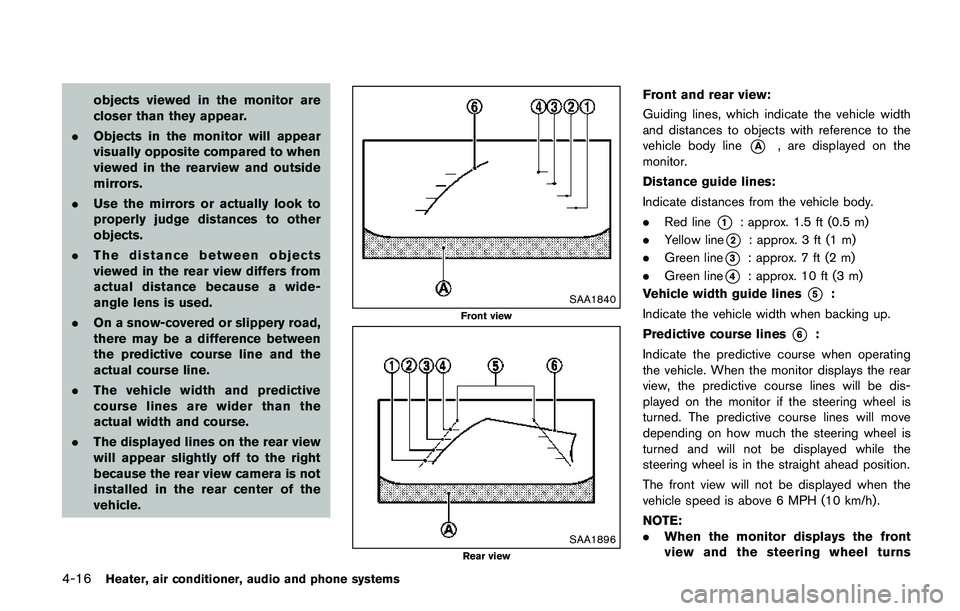
SAA1840
Front view
SAA1896Rear view
Front and rear view:
Guiding lines, which indicate the vehicle width
and distances to objects with reference to the
vehicle body line
*A, are displayed on the
monitor.
Distance guide lines:
Indicate distances from the vehicle body.
.Red line
*1: approx. 1.5 ft (0.5 m)
.Yellow line
*2: approx. 3 ft (1 m)
.Green line
*3: approx. 7 ft (2 m)
.Green line
*4: approx. 10 ft (3 m)
Vehicle width guide lines
*5:
Indicate the vehicle width when backing up.
Predictive course lines
*6:
Indicate the predictive course when operating
the vehicle. When the monitor displays the rear
view, the predictive course lines will be dis-
played on the monitor if the steering wheel is
turned. The predictive course lines will move
depending on how much the steering wheel is
turned and will not be displayed while the
steering wheel is in the straight ahead position.
The front view will not be displayed when the
vehicle speed is above 6 MPH (10 km/h) .
NOTE:
.When the monitor displays the front
view and the steering wheel turns
Page 199 of 508
4-18Heater, air conditioner, audio and phone systems
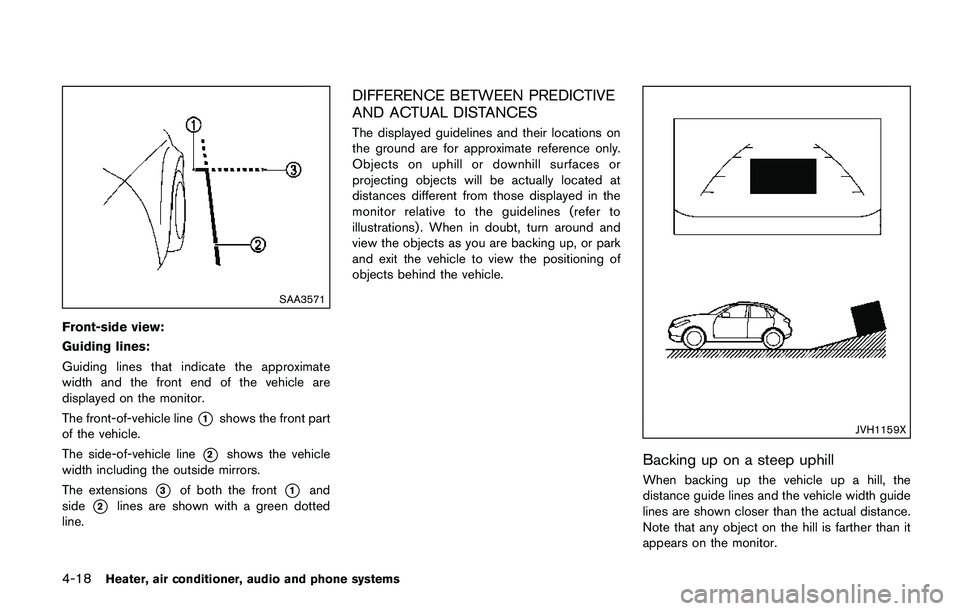
SAA3571
Front-side view:
Guiding lines:
Guiding lines that indicate the approximate
width and the front end of the vehicle are
displayed on the monitor.
The front-of-vehicle line
*1shows the front part
of the vehicle.
The side-of-vehicle line
*2shows the vehicle
width including the outside mirrors.
The extensions
*3of both the front*1and
side
*2lines are shown with a green dotted
line.
DIFFERENCE BETWEEN PREDICTIVE
AND ACTUAL DISTANCES
The displayed guidelines and their locations on
the ground are for approximate reference only.
Objects on uphill or downhill surfaces or
projecting objects will be actually located at
distances different from those displayed in the
monitor relative to the guidelines (refer to
illustrations) . When in doubt, turn around and
view the objects as you are backing up, or park
and exit the vehicle to view the positioning of
objects behind the vehicle.
JVH1159X
Backing up on a steep uphill
When backing up the vehicle up a hill, the
distance guide lines and the vehicle width guide
lines are shown closer than the actual distance.
Note that any object on the hill is farther than it
appears on the monitor.
Page 200 of 508
JVH1160X
Backing up on a steep downhill
When backing up the vehicle down a hill, the
distance guide lines and the vehicle width guide
lines are shown farther than the actual distance.
Note that any object on the hill is closer than it
appears on the monitor.
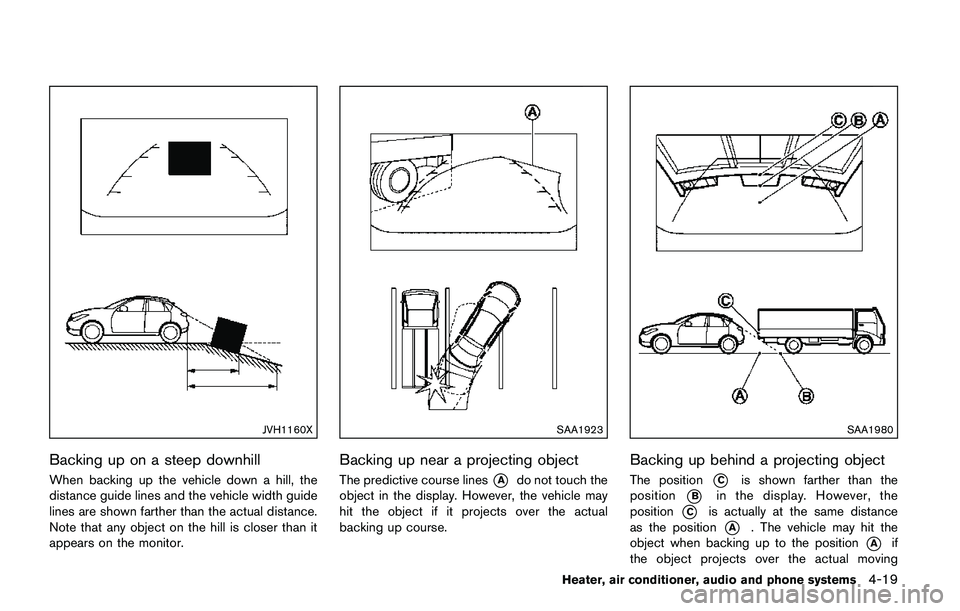
SAA1923
Backing up near a projecting object
The predictive course lines*Ado not touch the
object in the display. However, the vehicle may
hit the object if it projects over the actual
backing up course.
SAA1980
Backing up behind a projecting object
The position*Cis shown farther than the
position
*Bin the display. However, the
position
*Cis actually at the same distance
as the position
*A. The vehicle may hit the
object when backing up to the position
*Aif
the object projects over the actual moving
Heater, air conditioner, audio and phone systems4-19
Page 201 of 508
4-20Heater, air conditioner, audio and phone systems
course.
HOW TO PARK WITH PREDICTIVE
COURSE LINES
WARNING
.If the tires are replaced with differ-
ent sized tires, the predictive course
lines may be displayed incorrectly.
.On a snow-covered or slippery road,
there may be a difference between
the predictive course line and the
actual course line.
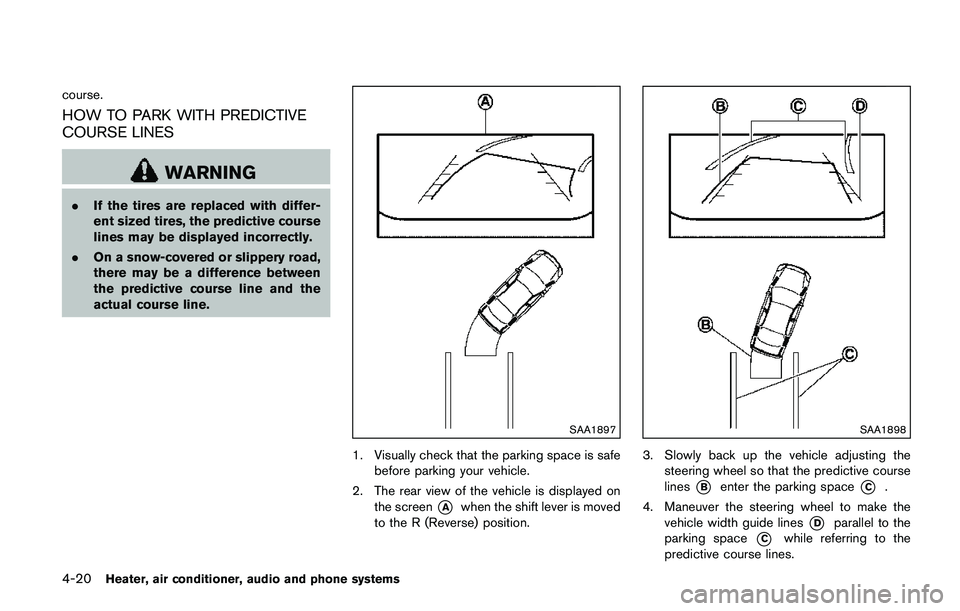
SAA1897
1. Visually check that the parking space is safe
before parking your vehicle.
2. The rear view of the vehicle is displayed on
the screen
*Awhen the shift lever is moved
to the R (Reverse) position.
SAA1898
3. Slowly back up the vehicle adjusting the
steering wheel so that the predictive course
lines
*Benter the parking space*C.
4. Maneuver the steering wheel to make the
vehicle width guide lines
*Dparallel to the
parking space
*Cwhile referring to the
predictive course lines.
Page 227 of 508

4-46Heater, air conditioner, audio and phone systems
Troubleshooting guide:
SymptomCause and Countermeasure
Cannot playCheck if the disc or USB device was inserted correctly.
Check if the disc is scratched or dirty.
Check if there is condensation inside the player. If there is, wait until the condensation is gone (about one hour) before using the
player.
If there is a temperature increase error, the CD player will play correctly after it returns to the normal temperature.
If there is a mixture of music CD files (CD-DA data) and MP3/WMA files on a CD, only the music CD files (CD-DA data) will be
played.
Files with extensions other than “.MP3”, “.WMA”, “.mp3” or “.wma” cannot be played. In addition, the character codes and number of
characters for folder names and file names should be in compliance with the specifications.
Check if the finalization process, such as session close and disc close, is done for the disc.
Check if the disc or USB device is protected by copyright.
Poor sound qualityCheck if the disc is scratched or dirty.
Bit rate may be too low.
It takes a relatively long time before
the music starts playing.If there are many folders or file levels on the MP3/WMA disc, or if it is a multisession disc, or USB device, some time may be required
before the music starts playing.
Music cuts off or skipsThe writing software and hardware combination might not match, or the writing speed, writing depth, writing width, etc., might not
match the specifications. Try using the slowest writing speed.
Skipping with high bit rate filesSkipping may occur with large quantities of data, such as for high bit rate data.
Move immediately to the next song
when playingWhen a non-MP3/WMA file has been given an extension of “.MP3”, “.WMA”, .“mp3” or “.wma”, or when play is prohibited by
copyright protection, there will be approximately five seconds of no sound and then the player will skip to the next song.
Songs do not play back in the
desired orderThe playback order is the order in which the files were written by the writing software. Therefore, the files might not play in the desired
order.
Page 319 of 508
5-34Starting and driving
3. Use thebuttons to navigate in the menu
and use the “OK” button to select or change
an item:
.Select “Lane” and press the “OK” button.
Use the “OK” button to check/uncheck
the box for “Warning”.
NOTE:
If you disable the LDW system, the system
will remain disabled the next time you start
the vehicle’s engine.
LDW SYSTEM LIMITATIONS
WARNING
Listed below are the system limitations
for the LDW system. Failure to follow
the warnings and instructions for prop-
er use of the LDW system could result in
serious injury or death.
.The system will not operate at
speeds below approximately 37
MPH (60 km/h) or if it cannot detect
lane markers.
.Excessive noise will interfere with
the warning chime sound, and the
chime may not be heard..Do not use the LDW system under
the following conditions as it may
not function properly:
— During bad weather (rain, fog,
snow, etc.) .
— When driving on slippery roads,
such as on ice or snow.
— When driving on winding or
uneven roads.
— When there is a lane closure due
to road repairs.
— When driving in a makeshift or
temporary lane.
— When driving on roads where
the lane width is too narrow.
— When driving without normal
tire conditions (for example, tire
wear, low tire pressure, installa-
tion of spare tire, tire chains,
non-standard wheels) .
— When the vehicle is equipped
with non-original brake parts or
suspension parts.
.The system may not function prop-
erly under the following conditions:— On roads where there are multi-
ple parallel lane markers; lane
markers that are faded or not
painted clearly; yellow painted
lane markers; non-standard lane
markers; or lane markers cov-
ered with water, dirt, snow, etc.
— On roads where discontinued
lane markers are still detect-
able.
— On roads where there are sharp
curves.
— On roads where there are shar-
ply contrasting objects, such as
shadows, snow, water, wheel
ruts, seams or lines remaining
after road repairs. (The LDW
system could detect these items
as lane markers.)
— On roads where the traveling
lane merges or separates.
— When the vehicle’s traveling di-
rection does not align with the
lane marker.
— When traveling close to the
vehicle in front of you, which
obstructs the lane camera unit