seat NISSAN QASHQAI 2019 Owner´s Manual
[x] Cancel search | Manufacturer: NISSAN, Model Year: 2019, Model line: QASHQAI, Model: NISSAN QASHQAI 2019Pages: 500, PDF Size: 2.38 MB
Page 256 of 500
5-28Starting and driving
automatic brake hold function.
The electronic parking brake is automati-
cally released as soon as the vehicle
starts while the accelerator pedal is
depressed.
WARNING
.The electronic parking brake will
not be automatically applied
when the engine is stopped with-
out using the ignition switch (for
example, by engine stalling).
Without the vehicle stationary,
the electronic parking brake will
not be automatically applied
even if the engine is turned off
with the ignition switch.
. Before leaving the vehicle, move
the shift lever to the 1 (1st) or R
(Reverse) position and check that
the electronic parking brake in-
dicator light is illuminated to
confirm that the electronic park-
ing brake is applied. The electro-
nic parking brake indicator light
will remain on for a period of time
after the driver’s door is locked.
CAUTION
When parking in an area where the
outside temperature is below 32°F
(0°C), do not apply the parking brake
to prevent it from freezing.
For safe parking, place the shift lever
in the 1 (1st) or R (Reverse) position
and securely block the wheels.
NOTE:
. To keep the electronic parking brake
released after the engine is turned
off, place the ignition switch in the
OFF position, depress the brake
pedal and push down the parking
brake switch before opening the
driver’s door.
. If a malfunction occurs in the elec-
tronic parking brake system (for
example, due to battery discharge),
it is recommended to contact a
NISSAN dealer.
. If the shift lever is moved to the P
(Park) position when the brake force
is maintained by the automatic
brake hold function, the electronic
parking brake will apply automati-
cally. .
If the driver’s seat belt is unfastened
when the brake force is maintained
by the automatic brake hold func-
tion, the electronic parking brake
will apply automatically.
. If the ignition switch is placed in the
OFF position when the brake force is
maintained by the automatic brake
hold function, the electronic parking
brake will apply automatically.
Manual operation
The electronic parking brake will not be
automatically applied if the engine is
stopped without using the ignition switch
(for example, by engine stalling). In such a
case, you have to apply the parking brake
manually.
To apply: Pull the switch up
. The
indicator lightwill illuminate.
To release: With the ignition switch in the
ON position, depress the brake pedal and
push the switch down
. The indicator
lightwill turn off.
Before driving, check that the electronic
parking brake indicator light
goes
out. For additional information, see
“Warning lights, indicator lights and audi-
ble reminders” (P.2-10).
Page 257 of 500
NOTE:
.A buzzer will sound if the vehicle is
driven without releasing the parking
brake. See “Audible reminders” (P.2-
18).
. While the electronic parking brake is
applied or released, an operating
sound is heard from the lower side
of the rear seat. This is normal and
does not indicate a malfunction.
. When the electronic parking brake is
frequently applied and released in a
short period of time, the parking
brake may not operate in order to
prevent the parking brake system
from overheating. If this occurs,
operate the electronic parking brake
switch again after waiting approxi-
mately 1 minute.
. If the electronic parking brake must
be applied while driving in an emer-
gency, pull up and hold the parking
brake switch. When you release the
parking brake switch, the parking
brake will be released.
. While pulling up the electronic park-
ing brake switch during driving, the
parking brake is applied and a chime
sounds. The electronic parking
brake indicator light in the meter
and in the parking brake switch
illuminate. This does not indicate a
malfunction. The electronic parking brake indicator light in the meter
and in the parking brake switch turn
off when the parking brake is re-
leased.
. When pulling the electronic parking
brake switch up with the ignition
switch in the OFF or ACC position,
the parking brake switch indicator
light will continue to illuminate for a
short period of time. The automatic brake hold function main-
tains the braking force without the driver
having to depress the brake pedal when
the vehicle is stopped at a traffic light or
intersection. As soon as the driver de-
presses the accelerator pedal again, the
automatic brake hold function is deacti-
vated and the braking force is released.
The operating status of the automatic
brake hold can be displayed on the
vehicle information display.
WARNING
.
The automatic brake hold func-
tion is not designed to hold the
vehicle on a steep hill or slippery
road. Never use the automatic
brake hold when the vehicle is
stopped on a steep hill or slippery
road. Failure to do so may cause
the vehicle to move.
. When the automatic brake hold
function is activated but fails to
maintain the vehicle at a stand-
still, depress the brake pedal to
stop the vehicle. If the vehicle
unexpectedly moves due to out-
side conditions, the chime may
sound and automatic brake hold
warning may illuminate in the
vehicle information display.
Starting and driving5-29
AUTOMATIC BRAKE HOLD (if so equipped)
Page 259 of 500
the following conditions need to be met.
.The driver’s seat belt is fastened.
. The electronic parking brake is re-
leased.
. The shift lever is not in the P (Park)
position.
. The vehicle is not parked on a steep
hill.
NOTE:
The automatic brake hold function re-
sets to OFF every time the ignition
switch is switched from the OFF posi-
tion to the ON position.
How to deactivate the automatic
brake hold function
While the automatic brake hold function
is activated, push the automatic brake
hold switch to turn off the automatic
brake hold indicator light and deactivate
the automatic brake hold function. To
deactivate the automatic brake hold
function while the brake force has been
maintained by the automatic brake hold
function, depress the brake pedal and
push the automatic brake hold switch.
WARNING
Make sure to firmly depress and hold
the brake pedal when turning off the
automatic brake hold function while
the brake force is applied. When the
automatic brake hold function is
deactivated, the brake force will be
released. This could cause the vehi-
cle to move or roll away unexpect-
edly.
Failure to prevent the vehicle from
rolling may result in serious personal
injury or property damage.
HOW TO USE THE AUTOMATIC
BRAKE HOLD FUNCTION
For additional information on using the
automatic brake hold function, refer to
the instructions outlined in this section.
To maintain braking force auto-
matically
With the automatic brake hold function
activated and the automatic brake hold
indicator light (white) illuminated on the
meter, depress the braking pedal to stop
the vehicle. The brake force is automati-
cally applied without your foot depressed
on the brake pedal. While the brake hold is maintained, the automatic brake hold
indicator light (green) illuminates on the
meter.
To start the vehicle from a stand-
still
With the shift lever not in the P (Park) or N
(Neutral) position, depress the accelerator
pedal while the brake force is maintained.
The brake force will automatically be
released to restart the vehicle. The auto-
matic brake hold indicator light (white) on
the meter illuminates and the automatic
brake hold returns to standby.
Parking
When the shift lever is in the P (Park)
position with the brake force maintained
by the automatic brake hold function, the
parking brake will automatically be ap-
plied and the brake force of the auto-
matic brake hold will be released. The
automatic brake hold indicator light turns
off. When the parking brake is applied
with the brake force maintained by the
automatic brake hold function, the brake
force of the automatic brake hold will be
released. The automatic brake hold in-
dicator light turns off.
NOTE:
.
Under the following conditions, the
parking brake will automatically be
Starting and driving5-31
Page 260 of 500
5-32Starting and driving
applied and the brake force of the
automatic brake hold will be re-
leased:
—The braking force is applied by
the automatic brake hold function
for 3 minutes or longer.
— The driver’s seat belt is unfas-
tened.
— The ignition switch is placed in
the OFF position.
— If a malfunction occurs in the
automatic brake hold function.
. When the vehicle stops, but the
brake force is not automatically
applied, depress the brake pedal
firmly until the automatic brake hold
indicator light (green) illuminates.
Automatic brake hold function dis-
play
The automatic brake hold function status
can be checked in the “Chassis Control”
mode in the vehicle information display.
For additional information, see “Trip com-
puter” (P.2-39).
JVS0185X
The ECO mode system helps to enhance
the fuel economy by controlling the
engine and CVT operation (for CVT mod-
els) automatically to avoid rapid accelera-
tion.
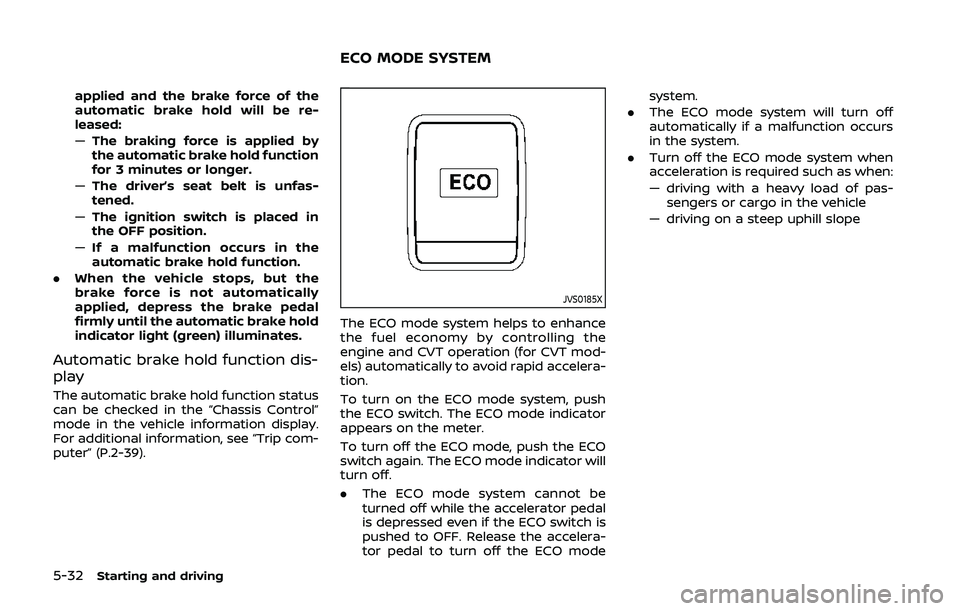
To turn on the ECO mode system, push
the ECO switch. The ECO mode indicator
appears on the meter.
To turn off the ECO mode, push the ECO
switch again. The ECO mode indicator will
turn off.
.The ECO mode system cannot be
turned off while the accelerator pedal
is depressed even if the ECO switch is
pushed to OFF. Release the accelera-
tor pedal to turn off the ECO mode system.
. The ECO mode system will turn off
automatically if a malfunction occurs
in the system.
. Turn off the ECO mode system when
acceleration is required such as when:
— driving with a heavy load of pas-
sengers or cargo in the vehicle
— driving on a steep uphill slope
ECO MODE SYSTEM
Page 306 of 500
5-78Starting and driving
which the sensor cannot detect the
signals:
.When the snow or road spray from
traveling vehicles reduces the sensor’s
visibility
. When excessively heavy baggage is
loaded in the rear seat or the cargo
area of your vehicle
The ICC system is designed to automati-
cally check the sensor’s operation within
the limitation of the system. When the
sensor is covered with dirt or is ob-
structed, the system will automatically
be canceled. If the sensor is covered with
ice, a transparent or translucent vinyl bag,
etc., the ICC system may not detect them.
In these instances, the vehicle-to-vehicle
distance control mode may not cancel
and may not be able to maintain the
selected following distance from the ve-
hicle ahead. Be sure to check and clean
the sensor regularly.
SSD0252
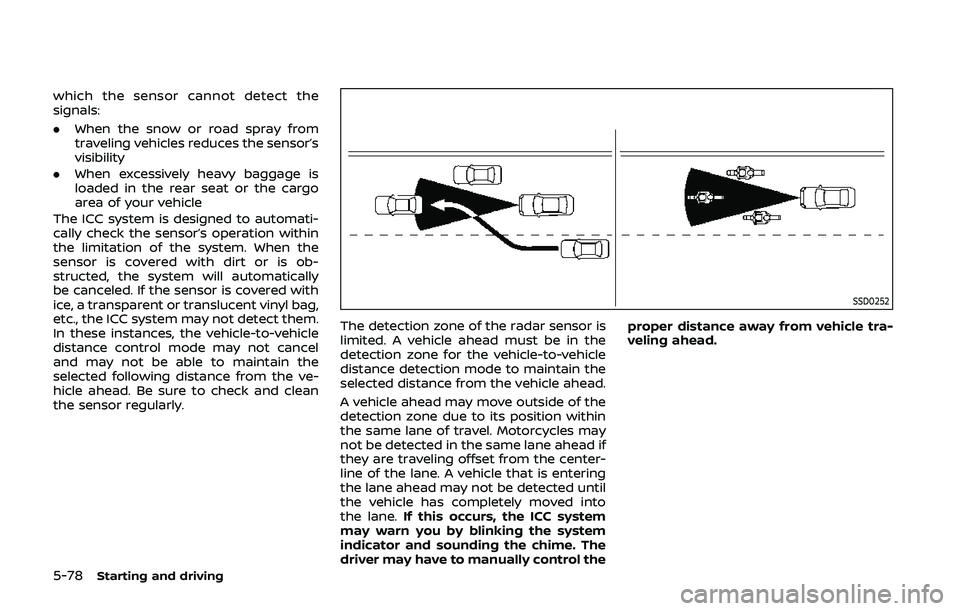
The detection zone of the radar sensor is
limited. A vehicle ahead must be in the
detection zone for the vehicle-to-vehicle
distance detection mode to maintain the
selected distance from the vehicle ahead.
A vehicle ahead may move outside of the
detection zone due to its position within
the same lane of travel. Motorcycles may
not be detected in the same lane ahead if
they are traveling offset from the center-
line of the lane. A vehicle that is entering
the lane ahead may not be detected until
the vehicle has completely moved into
the lane. If this occurs, the ICC system
may warn you by blinking the system
indicator and sounding the chime. The
driver may have to manually control the proper distance away from vehicle tra-
veling ahead.
Page 321 of 500
WAF0052X
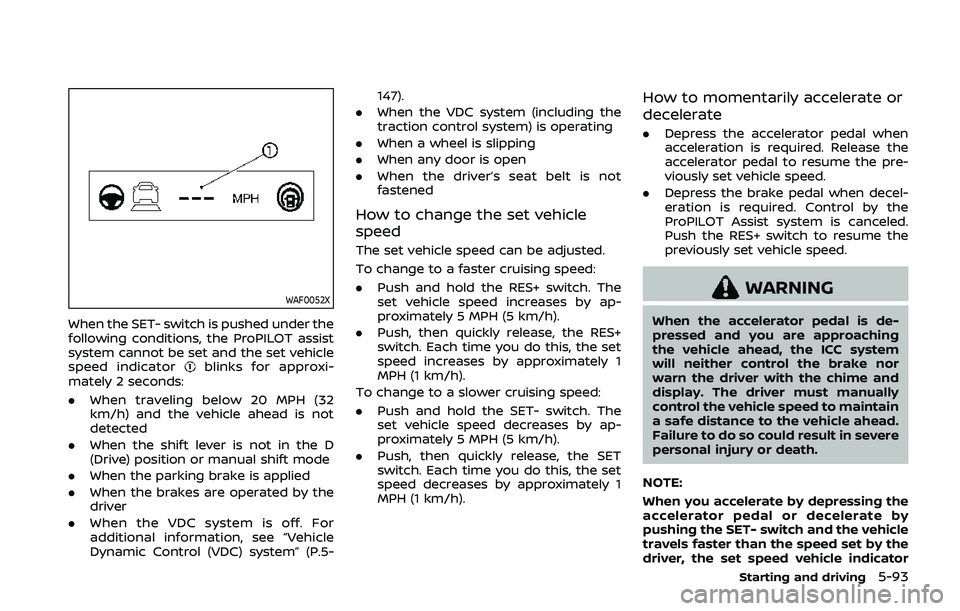
When the SET- switch is pushed under the
following conditions, the ProPILOT assist
system cannot be set and the set vehicle
speed indicator
blinks for approxi-
mately 2 seconds:
. When traveling below 20 MPH (32
km/h) and the vehicle ahead is not
detected
. When the shift lever is not in the D
(Drive) position or manual shift mode
. When the parking brake is applied
. When the brakes are operated by the
driver
. When the VDC system is off. For
additional information, see “Vehicle
Dynamic Control (VDC) system” (P.5- 147).
. When the VDC system (including the
traction control system) is operating
. When a wheel is slipping
. When any door is open
. When the driver’s seat belt is not
fastened
How to change the set vehicle
speed
The set vehicle speed can be adjusted.
To change to a faster cruising speed:
.Push and hold the RES+ switch. The
set vehicle speed increases by ap-
proximately 5 MPH (5 km/h).
. Push, then quickly release, the RES+
switch. Each time you do this, the set
speed increases by approximately 1
MPH (1 km/h).
To change to a slower cruising speed:
. Push and hold the SET- switch. The
set vehicle speed decreases by ap-
proximately 5 MPH (5 km/h).
. Push, then quickly release, the SET
switch. Each time you do this, the set
speed decreases by approximately 1
MPH (1 km/h).
How to momentarily accelerate or
decelerate
.Depress the accelerator pedal when
acceleration is required. Release the
accelerator pedal to resume the pre-
viously set vehicle speed.
. Depress the brake pedal when decel-
eration is required. Control by the
ProPILOT Assist system is canceled.
Push the RES+ switch to resume the
previously set vehicle speed.
WARNING
When the accelerator pedal is de-
pressed and you are approaching
the vehicle ahead, the ICC system
will neither control the brake nor
warn the driver with the chime and
display. The driver must manually
control the vehicle speed to maintain
a safe distance to the vehicle ahead.
Failure to do so could result in severe
personal injury or death.
NOTE:
When you accelerate by depressing the
accelerator pedal or decelerate by
pushing the SET- switch and the vehicle
travels faster than the speed set by the
driver, the set speed vehicle indicator
Starting and driving5-93
Page 330 of 500
5-102Starting and driving
mately 3 seconds. Be prepared to
stop your vehicle if necessary.
. Always pay attention to the op-
eration of the vehicle and be
ready to manually control the
proper following distance. The
ICC system may not be able to
maintain the selected distance
between vehicles (following dis-
tance) or selected vehicle speed
under some circumstances.
. The system may not detect the
vehicle in front of you in certain
road or weather conditions. To
avoid accidents, never use the ICC
system under the following con-
ditions:
— On roads with heavy, high-
speed traffic or sharp curves
— On slippery road surfaces such as on ice or snow, etc.
— During bad weather (rain, fog, snow, etc.)
— When rain, snow or dirt adhere to the bumper around the
distance sensor
— On steep downhill roads (the vehicle may go beyond the set
vehicle speed and frequent
braking may result in over- heating the brakes)
— On repeated uphill and down- hill roads
— When traffic conditions make it difficult to keep a proper
distance between vehicles be-
cause of frequent accelera-
tion or deceleration
— Interference by other radar sources.
. In some road or traffic conditions,
a vehicle or object can unexpect-
edly come into the sensor detec-
tion zone and cause automatic
braking. Always stay alert and
avoid using the ICC system where
not recommended in this warn-
ing section.
The ICC system will not detect the
following objects:
. Stationary or slow moving vehicles
. Pedestrians or objects in the roadway
. Oncoming vehicles in the same lane
. Motorcycles traveling offset in the
travel lane
The following are some conditions in
which the radar sensor cannot properly
detect a vehicle ahead and the system
may not operate properly: .
When the sensor detection is reduced
(conditions such as rain, snow, fog,
dust storms, sandstorms, and road
spray from other vehicles)
. Driving on a steep downhill slope or
roads with sharp curves
. Driving on a bumpy road surface, such
as an uneven dirt road
. If dirt, ice, snow or other material is
covering the radar sensor area
. A complicated-shaped vehicle such as
a car carrier trailer or flatbed truck/
trailer is near the vehicle ahead.
. Interference by other radar sources
. When excessively heavy baggage is
loaded in the rear seat or cargo area
of your vehicle.
The ICC system is designed to automati-
cally check the radar sensor’s operation
within the limitations of the system
The detection zone of the radar sensor is
limited. A vehicle ahead must be in the
detection zone for the ICC system to
maintain the selected distance from the
vehicle ahead. A vehicle ahead may move
outside of the detection zone due to its
position within the same lane of travel.
Motorcycles may not be detected in the
same lane ahead if they are traveling
offset from the center line of the lane. A
vehicle that is entering the lane ahead
may not be detected until the vehicle has
Page 332 of 500
5-104Starting and driving
When driving on some roads, such as
winding, hilly, curved, narrow roads, or
roads which are under construction, the
radar sensor may detect vehicles in a
different lane, or may temporarily not
detect a vehicle traveling ahead. This
may cause the ICC system to decelerate
or accelerate the vehicle.
The detection of vehicles may also be
affected by vehicle operation (steering
maneuver or traveling position in the
lane, etc.) or vehicle condition.
If this occurs, the ICC system may warn
you by blinking the system indicator and
sounding the chime unexpectedly. You
will have to manually control the proper
distance away from the vehicle traveling
ahead.
Automatic cancellation
The following are conditions in which the
ICC system may be temporarily unavail-
able. In these instances, the ICC system
may not cancel and may not be able to
maintain the selected following distance
from the vehicle ahead.Condition A:
Under the following conditions, the ICC
system is automatically canceled. A chime
will sound and the system will not be able
to be set:
. Any door is open.
. The driver’s seat belt is not fastened.
. The vehicle ahead is not detected and
your vehicle is traveling below the
speed of 15 MPH (24 km/h).
. Your vehicle has been stopped by the
ICC system for approximately 3 min-
utes or longer.
. The shift lever is not in the D (Drive)
position or manual shift mode.
. The electronic parking brake is ap-
plied.
. The VDC system is turned off.
. The AEB applies harder braking
. VDC (including the traction control
system) operates.
. A wheel slips.
. When distance measurement be-
comes impaired due to adhesion of
dirt or obstruction to the sensor.
. When the radar signal is temporarily
interrupted. Action to take:
When the conditions listed above are no
longer present, turn the system off using
the ProPILOT Assist switch. Turn the
ProPILOT Assist system back on to use
the system.
NOTE:
When the ICC system is canceled under
the following conditions at a standstill,
the electronic parking brake is automa-
tically activated:
.
Any door is open.
. The driver’s seat belt is not fastened.
. Your vehicle has been stopped by
the ICC system for approximately 3
minutes or longer.
. The shift lever is not in the D (Drive)
position or manual shift mode.
. The VDC system is turned off.
. When distance measurement be-
comes impaired due to adhesion of
dirt or obstruction to the sensor.
. When the radar signal is temporarily
interrupted.
Condition B:
When the radar sensor of the front
bumper is covered with dirt or is ob-
structed, the ICC system will automati-
cally be canceled.
The chime will sound and the “Unavail-
Page 338 of 500
5-110Starting and driving
tions (for example, tire wear,
abnormal tire pressure, instal-
lation of a spare tire, tire
chains, non-standard wheels)
— When the vehicle is equipped with non-original brake or
suspension parts
— When an object such as a sticker or cargo obstructs the
camera
— When excessively heavy bag- gage is loaded in the rear seat
or luggage area of your vehi-
cle
— When the vehicle load capa- city is exceeded
. Excessive noise will interfere with
the warning chime sound, and
the beep may not be heard.
. For the ProPILOT assist system to
operate properly, the windshield
in front of the camera must be
clean. Replace worn wiper blades.
The correct size wiper blades
must be used to help make sure
the windshield is kept clean. Only
use Genuine NISSAN wiper blades,
or equivalent wiper blades, that
are specifically designed for use
on your vehicle model and model year. It is recommended that you
visit your NISSAN dealer for the
correct parts for your vehicle.
Steering Assist temporary standby
Automatic standby due to driving op-
eration:
When the driver activates the turn signal,
the Steering Assist is temporarily placed
in a standby mode. (The Steering Assist
restarts automatically when the operat-
ing conditions are met again.)
Automatic standby:
In the following cases, a warning mes-
sage is displayed along with the chime,
and the Steering Assist is placed in a
temporary standby mode. (The Steering
Assist restarts automatically when the
operating conditions are met again.)
.
When lane markers on both sides are
no longer detected
. When a vehicle ahead is no longer
detected under approximately 37 MPH
(60 km/h)
Steering assist cancel
Under the following conditions, the steer-
ing assist cancels, and the steering assist
status indicator and the steering assist
indicator turn off:
.When unusual lane markers appear in
the traveling lane or when the lane
marker cannot be correctly detected
for some time due to certain condi-
tions (for example, a snow rut, the
reflection of light on a rainy day, the
presence of several unclear lane mar-
kers)
. When the windshield wiper operates
in the low or high speed operation
(the steering assist is disabled when
the wiper operates for more than
approximately 10 seconds)
Action to take:
Turn the ICC system off using the CANCEL
switch. When the conditions listed above
are no longer present, turn the ICC
system on again.
Steering assist malfunction
When the system malfunctions, it turns
off automatically. The steering assist
status warning (orange) illuminates. A
chime may sound depending on the
situation.
Page 355 of 500
AEB WITH PEDESTRIAN DETECTION
SYSTEM LIMITATIONS
WARNING
Listed below are the system limita-
tions for the AEB with pedestrian
detection system. Failure to operate
the vehicle in accordance with these
system limitations could result in
serious injury or death.
.The AEB with pedestrian detec-
tion system cannot detect all
vehicles or pedestrians under all
conditions.
. The AEB with pedestrian detec-
tion system does not detect the
following objects:
— Small pedestrians (including
small children), animals and
cyclists.
— Pedestrians in wheelchairs or using mobile transport such
as scooters, child-operated
toys, or skateboards.
— Pedestrians who are seated or otherwise not in a full upright
standing or walking position. — Obstacles on the roadway
— Oncoming vehicles
— Crossing vehicles
— Obstacles on the roadside
. The AEB with pedestrian detec-
tion system has some perfor-
mance limitations.
— If a stationary vehicle is in the
vehicle’s path, the AEB with
pedestrian detection system
will not function when the
vehicle is driven at speeds
over approximately 50 MPH
(80 km/h).
— For pedestrian detection, the AEB with pedestrian detection
system will not function when
the vehicle is driven at speeds
over approximately 37 MPH
(60 km/h) or below approxi-
mately 6 MPH (10 km/h).
. The AEB with pedestrian detec-
tion system may not function for
pedestrians in darkness or in
tunnels, even if there is street
lighting in the area.
. For pedestrians, the AEB with
pedestrian detection system will
not issue the first warning. .
The AEB with pedestrian detec-
tion system may not function if
the vehicle ahead is narrow (for
example a motorcycle).
. The AEB with pedestrian detec-
tion system may not function if
speed difference between the
two vehicles is too small.
. The radar sensor may not func-
tion properly or detect a vehicle
ahead in the following conditions:
— Poor visibility (conditions such
as rain, snow, fog, dust
storms, sandstorms, and road
spray from other vehicles)
— Driving on a steep downhill slope or roads with sharp
curves.
— Driving on a bumpy road sur- face, such as an uneven dirt
road.
— If dirt, ice, snow or other ma- terial is covering the radar
sensor area.
— Interference by other radar sources.
. The camera may not function
properly or detect a vehicle
ahead in the following conditions:
Starting and driving5-127