lane NISSAN QASHQAI 2019 Owner´s Manual
[x] Cancel search | Manufacturer: NISSAN, Model Year: 2019, Model line: QASHQAI, Model: NISSAN QASHQAI 2019Pages: 500, PDF Size: 2.38 MB
Page 137 of 500
the brakes to the left or right wheels
individually (for a short period of time). For
additional information, see “Intelligent
Lane Intervention (I-LI)” (P.5-40).
WAC0074X
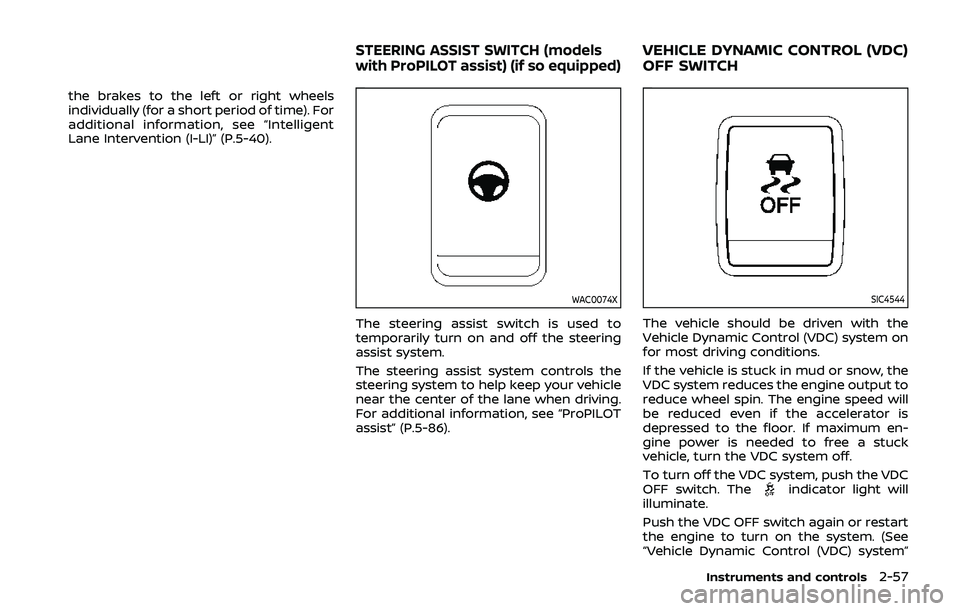
The steering assist switch is used to
temporarily turn on and off the steering
assist system.
The steering assist system controls the
steering system to help keep your vehicle
near the center of the lane when driving.
For additional information, see “ProPILOT
assist” (P.5-86).
SIC4544
The vehicle should be driven with the
Vehicle Dynamic Control (VDC) system on
for most driving conditions.
If the vehicle is stuck in mud or snow, the
VDC system reduces the engine output to
reduce wheel spin. The engine speed will
be reduced even if the accelerator is
depressed to the floor. If maximum en-
gine power is needed to free a stuck
vehicle, turn the VDC system off.
To turn off the VDC system, push the VDC
OFF switch. The
indicator light will
illuminate.
Push the VDC OFF switch again or restart
the engine to turn on the system. (See
“Vehicle Dynamic Control (VDC) system”
Instruments and controls2-57
STEERING ASSIST SWITCH (models
with ProPILOT assist) (if so equipped)VEHICLE DYNAMIC CONTROL (VDC)
OFF SWITCH
Page 168 of 500
3-8Pre-driving checks and adjustments
It is possible to lock/unlock all doors
(including the liftgate), and activate the
panic alarm by using the key fob from
outside the vehicle.
Before locking the doors, make sure the
key is not left in the vehicle.
The key fob can operate at a distance of
approximately 33 ft (10 m) from the
vehicle. (The effective distance depends
upon the conditions around the vehicle.)
As many as 4 key fobs can be used with
one vehicle. For information concerning
the purchase and use of additional key
fobs, contact a NISSAN dealer.
The key fob will not function:
.When the key fob is not within the
operational range.
. When the doors are open or not
closed securely.
. When the key is in the ignition switch.
. When the battery is discharged.
WARNING
The remote keyless entry key fob
transmits radio waves when the
buttons are pushed. The FAA advises
that the radio waves may affect
aircraft navigation and communica-
tion systems. Do not operate the key fob while on an airplane. Make sure
the buttons are not operated unin-
tentionally when the unit is stored
during a flight.
CAUTION
The following conditions or occur-
rences will damage the key fob.
. Do not allow the key fob to
become wet.
. Do not drop the key fob.
. Do not strike the key fob sharply
against another object.
. If the outside temperature is be-
low 14°F (-10°C) degrees, the bat-
tery of key fob may not function
properly.
. Do not place the key fob for an
extended period in an area where
temperatures exceed 140°F
(60°C).
If a key fob is lost or stolen, NISSAN
recommends erasing the ID code of
that key fob. This will prevent the key
fob from unauthorized use to unlock
the vehicle. For information regard-
ing the erasing procedure, it is re-
commended that you visit a NISSAN dealer.
For information regarding the replace-
ment of a battery, see “Key fob battery
replacement” (P.8-21).
REMOTE KEYLESS ENTRY SYSTEM
(if so equipped)
Page 171 of 500
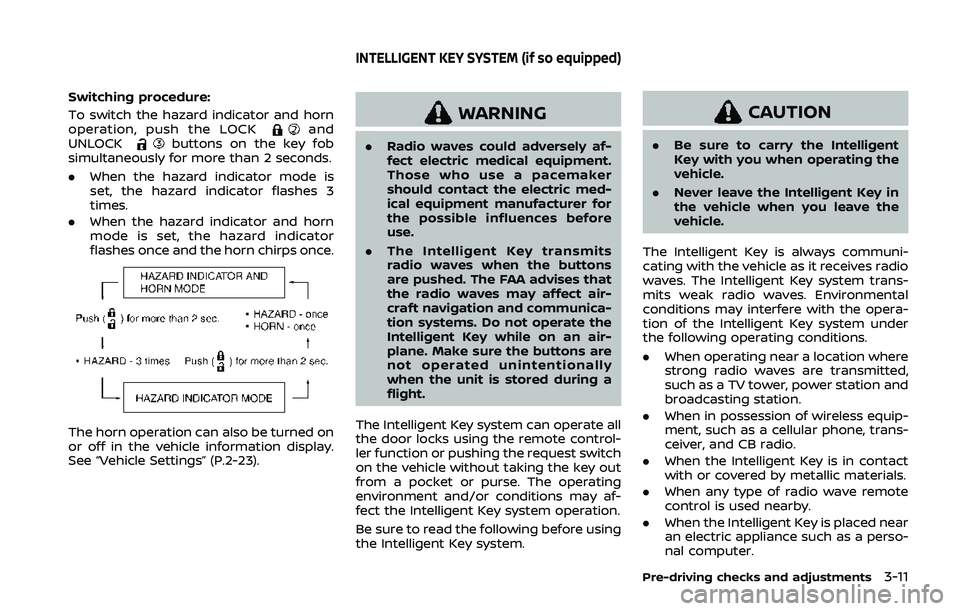
Switching procedure:
To switch the hazard indicator and horn
operation, push the LOCK
and
UNLOCKbuttons on the key fob
simultaneously for more than 2 seconds.
. When the hazard indicator mode is
set, the hazard indicator flashes 3
times.
. When the hazard indicator and horn
mode is set, the hazard indicator
flashes once and the horn chirps once.
The horn operation can also be turned on
or off in the vehicle information display.
See “Vehicle Settings” (P.2-23).
WARNING
.Radio waves could adversely af-
fect electric medical equipment.
Those who use a pacemaker
should contact the electric med-
ical equipment manufacturer for
the possible influences before
use.
. The Intelligent Key transmits
radio waves when the buttons
are pushed. The FAA advises that
the radio waves may affect air-
craft navigation and communica-
tion systems. Do not operate the
Intelligent Key while on an air-
plane. Make sure the buttons are
not operated unintentionally
when the unit is stored during a
flight.
The Intelligent Key system can operate all
the door locks using the remote control-
ler function or pushing the request switch
on the vehicle without taking the key out
from a pocket or purse. The operating
environment and/or conditions may af-
fect the Intelligent Key system operation.
Be sure to read the following before using
the Intelligent Key system.
CAUTION
. Be sure to carry the Intelligent
Key with you when operating the
vehicle.
. Never leave the Intelligent Key in
the vehicle when you leave the
vehicle.
The Intelligent Key is always communi-
cating with the vehicle as it receives radio
waves. The Intelligent Key system trans-
mits weak radio waves. Environmental
conditions may interfere with the opera-
tion of the Intelligent Key system under
the following operating conditions.
. When operating near a location where
strong radio waves are transmitted,
such as a TV tower, power station and
broadcasting station.
. When in possession of wireless equip-
ment, such as a cellular phone, trans-
ceiver, and CB radio.
. When the Intelligent Key is in contact
with or covered by metallic materials.
. When any type of radio wave remote
control is used nearby.
. When the Intelligent Key is placed near
an electric appliance such as a perso-
nal computer.
Pre-driving checks and adjustments3-11
INTELLIGENT KEY SYSTEM (if so equipped)
Page 179 of 500
HOW TO USE REMOTE KEYLESS
ENTRY FUNCTION
WARNING
.Radio waves could adversely af-
fect electric medical equipment.
Those who use a pacemaker
should contact the electric med-
ical equipment manufacturer for
the possible influences before
use.
. The Intelligent Key transmits
radio waves when the buttons
are pushed. The FAA advises that
the radio waves may affect air-
craft navigation and communica-
tion systems. Do not operate the
Intelligent Key while on an air-
plane. Make sure the buttons are
not operated unintentionally
when the unit is stored during a
flight.
CAUTION
.Do not allow the Intelligent Key,
which contains electrical compo-
nents, to come into contact with
water or salt water. This could affect the system function.
. Do not drop the Intelligent Key.
. Do not strike the Intelligent Key
sharply against another object.
. Do not change or modify the
Intelligent Key.
. Wetting may damage the Intelli-
gent Key. If the Intelligent Key
gets wet, immediately wipe until
it is completely dry.
. If the outside temperature is be-
low 14°F (-10°C) degrees, the bat-
tery of the Intelligent Key may not
function properly.
. Do not place the Intelligent Key
for an extended period in an area
where temperatures exceed
140°F (60°C).
. Do not attach the Intelligent Key
with a key holder that contains a
magnet.
. Do not place the Intelligent Key
near equipment that produces a
magnetic field, such as a TV,
audio equipment, personal com-
puters or cellular phone.
The remote keyless entry function can
operate all door locks using the remote
keyless entry function of the Intelligent Key. The remote keyless entry function
can operate at a distance of approxi-
mately 33 ft (10 m) from the vehicle. (The
operating distance depends upon the
conditions around the vehicle.)
The remote keyless entry function will not
operate:
.
When the Intelligent Key is not within
the operational range.
. When the doors are open or not
closed securely.
. When the Intelligent Key battery is
discharged.
The remote keyless entry function can
also operate the vehicle alarm.
Pre-driving checks and adjustments3-19
Page 229 of 500
5 Starting and driving
Precautions when starting and driving ...................... 5-4Exhaust gas (carbon monoxide) ................................ 5-4
Three-way catalyst ............................................................... 5-4
Tire Pressure Monitoring System (TPMS) ........... 5-5
Avoiding collision and rollover .................................... 5-8
On-pavement and off-road
driving precautions .............................................................. 5-8
Off-road recovery .................................................................. 5-9
Rapid air pressure loss ...................................................... 5-9
Drinking alcohol/drugs and driving ..................... 5-10
Driving safety precautions .......................................... 5-10
Ignition switch (models without Intelligent
Key system) ........................................................................\
............ 5-12
Continuously Variable
Transmission (CVT) ............................................................ 5-13
Manual Transmission (MT) ........................................... 5-13
Key positions ........................................................................\
.. 5-14
Push-button ignition switch (model with
Intelligent Key system) .......................................................... 5-14 Operating range for engine start function ...... 5-14
Push-button ignition switch operation ............. 5-15
Push-button ignition switch positions .............. 5-16
Emergency engine shut off ........................................ 5-16
Intelligent Key battery discharge ........................... 5-17
Before starting the engine ................................................. 5-17 Starting the engine (model without Intelligent
Key system) ........................................................................\
........... 5-18
Starting the engine (model with Intelligent
Key system) ........................................................................\
........... 5-19
Remote engine start (if so equipped) .............. 5-20
Driving the vehicle ................................................................... 5-20
Continuously Variable
Transmission (CVT) ......................................................... 5-20
Manual Transmission (MT) ........................................ 5-25
Parking brake ........................................................................\
....... 5-27
Pedal type ........................................................................\
....... 5-27
Switch type (models with electronic parking
brake system) ...................................................................... 5-27
Automatic brake hold (if so equipped) .................... 5-29 How to activate/deactivate the automatic
brake hold function ........................................................ 5-30
How to use the automatic brake
hold function ........................................................................\
5-31
ECO mode system ................................................................... 5-32 ECO Pedal Guide function ......................................... 5-33
Ambient ECO ........................................................................\
5-33
ECO Drive Report .............................................................. 5-34
Lane Departure Warning (LDW) (if
so equipped) ........................................................................\
......... 5-35 LDW system operation ................................................. 5-36
How to enable/disable the LDW system ....... 5-37
Page 230 of 500
LDW system limitations .................................................. 5-38
System temporarily unavailable ............................. 5-39
System malfunction .......................................................... 5-39
System maintenance ....................................................... 5-39
Intelligent Lane Intervention (I-LI) (if
so equipped) ........................................................................\
.......... 5-40 I-LI system operation ....................................................... 5-41
How to enable/disable the I-LI system ............. 5-42
I-LI system limitations ..................................................... 5-43
System temporarily unavailable ............................. 5-44
System malfunction .......................................................... 5-45
System maintenance ....................................................... 5-45
Blind Spot Warning (BSW) ................................................... 5-46 BSW system operation ................................................... 5-48
How to enable/disable the BSW system .......... 5-49
BSW system limitations .................................................. 5-50
BSW driving situations .................................................... 5-51
System temporarily unavailable ............................. 5-54
System malfunction .......................................................... 5-55
System maintenance ....................................................... 5-55
Rear Cross Traffic Alert (RCTA) ....................................... 5-56
RCTA system operation ................................................. 5-57
How to enable/disable the RCTA system ....... 5-59
RCTA system limitations ............................................... 5-60
System temporarily unavailable ............................. 5-63
System malfunction .......................................................... 5-63
System maintenance ....................................................... 5-63
Cruise control (if so equipped) ....................................... 5-64 Precautions on cruise control .................................. 5-65 Cruise control operations .......................................... 5-65
Intelligent Cruise Control (ICC) (models without
ProPILOT assist) (if so equipped) .................................. 5-66 How to select the cruise control mode ......... 5-68
Vehicle-to-vehicle distance
control mode ....................................................................... 5-68
Conventional (fixed speed) cruise
control mode ....................................................................... 5-82
ProPILOT assist (if so equipped) ................................... 5-86 ProPILOT assist system operation ..................... 5-88
ProPILOT assist switches ........................................... 5-89
ProPILOT assist system display
and indicators ..................................................................... 5-90
Turning the conventional (fixed speed)
cruise control mode ON ............................................. 5-91
Operating ProPILOT assist ........................................ 5-91
How to enable/disable the
steering assist ..................................................................... 5-95
How to cancel the ProPILOT
assist system ....................................................................... 5-97
Intelligent Cruise Control (ICC)
(models with ProPILOT assist) ............................... 5-97
Steering assist ................................................................ 5-106
Conventional (fixed speed) cruise
control mode ................................................................... 5-112
Automatic Emergency Braking (AEB) (if
so equipped) ........................................................................\
..... 5-115
AEB system operation .............................................. 5-116
Turning the AEB system ON/OFF ................... 5-118
AEB system limitations ............................................ 5-119
Page 237 of 500
maneuvers, particularly at high speeds. As
with other vehicles of this type, failure to
operate this vehicle correctly may result
in loss of control or vehicle rollover. Seat
belts help reduce the risk of injury in
collisions and rollovers. In a rollover crash,
an unbelted or improperly belted person
is significantly more likely to be injured or
killed than a person properly wearing a
seat belt.
Be sure to read “Driving safety precau-
tions” (P.5-10).
OFF-ROAD RECOVERY
If the right side or left side wheels leave
the road surface, maintain control of the
vehicle by following the procedure below.
Please note that this procedure is only a
general guide. The vehicle must be driven
as appropriate based on the conditions of
the vehicle, road and traffic.
1. Remain calm and do not overreact.
2. Do not apply the brakes.
3. Maintain a firm grip on the steeringwheel with both hands and try to hold
a straight course.
4. When appropriate, slowly release the accelerator pedal to gradually slow
the vehicle.
5. If there is nothing in the way, steer the vehicle to follow the road while the vehicle speed is reduced. Do not
attempt to drive the vehicle back onto
the road surface until vehicle speed is
reduced.
6. When it is safe to do so, gradually turn the steering wheel until both tires
return to the road surface. When all
tires are on the road surface, steer the
vehicle to stay in the appropriate
driving lane.
.If you decide that it is not safe to
return the vehicle to the road sur-
face based on vehicle, road or
traffic conditions, gradually slow
the vehicle to a stop in a safe place
off the road.
RAPID AIR PRESSURE LOSS
Rapid air pressure loss or a “blow-out” can
occur if the tire is punctured or is
damaged due to hitting a curb or pothole.
Rapid air pressure loss can also be caused
by driving on under-inflated tires.
Rapid air pressure loss can affect the
handling and stability of the vehicle,
especially at highway speeds.
Help prevent rapid air pressure loss by
maintaining the correct air pressure and
visually inspect the tires for wear and
damage. See “Wheels and tires” (P.8-29) of
this manual.
If a tire rapidly loses air pressure or “blows-out” while driving, maintain con-
trol of the vehicle by following the proce-
dure below. Please note that this
procedure is only a general guide. The
vehicle must be driven as appropriate
based on the conditions of the vehicle,
road and traffic.
WARNING
The following actions can increase
the chance of losing control of the
vehicle if there is a sudden loss of tire
air pressure. Losing control of the
vehicle may cause a collision and
result in personal injury.
.
The vehicle generally moves or
pulls in the direction of the flat
tire.
. Do not rapidly apply the brakes.
. Do not rapidly release the accel-
erator pedal.
. Do not rapidly turn the steering
wheel.
1. Remain calm and do not overreact.
2. Maintain a firm grip on the steering wheel with both hands and try to hold
a straight course.
Starting and driving5-9
Page 263 of 500
WARNING
Failure to follow the warnings and
instructions for proper use of the
LDW system could result in serious
injury or death.
.This system is only a warning
device to inform the driver of a
potential unintended lane depar-
ture. It will not steer the vehicle or
prevent loss of control. It is the
driver’s responsibility to stay
alert, drive safely, keep the vehi-
cle in the traveling lane, and be in
control of the vehicle at all times.
JVS1079X
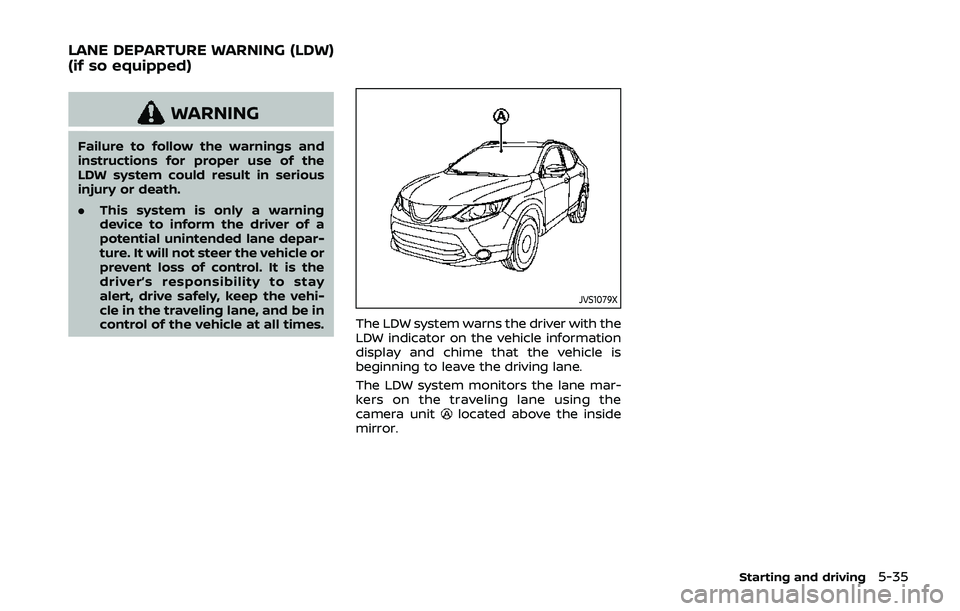
The LDW system warns the driver with the
LDW indicator on the vehicle information
display and chime that the vehicle is
beginning to leave the driving lane.
The LDW system monitors the lane mar-
kers on the traveling lane using the
camera unit
located above the inside
mirror.
Starting and driving5-35
LANE DEPARTURE WARNING (LDW)
(if so equipped)
Page 264 of 500
5-36Starting and driving
JVS1087X
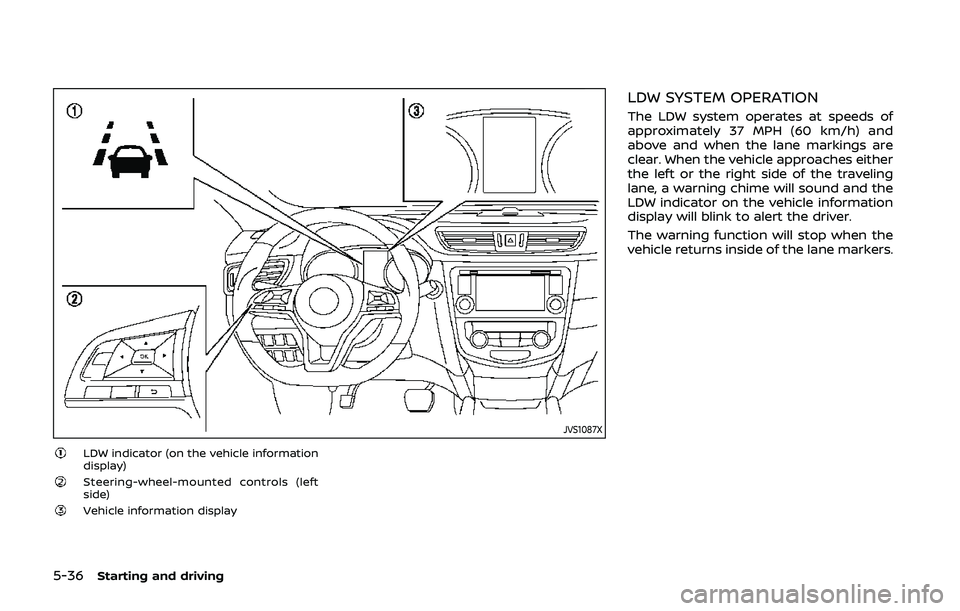
LDW indicator (on the vehicle information
display)
Steering-wheel-mounted controls (left
side)
Vehicle information display
LDW SYSTEM OPERATION
The LDW system operates at speeds of
approximately 37 MPH (60 km/h) and
above and when the lane markings are
clear. When the vehicle approaches either
the left or the right side of the traveling
lane, a warning chime will sound and the
LDW indicator on the vehicle information
display will blink to alert the driver.
The warning function will stop when the
vehicle returns inside of the lane markers.
Page 265 of 500
JVS1088X
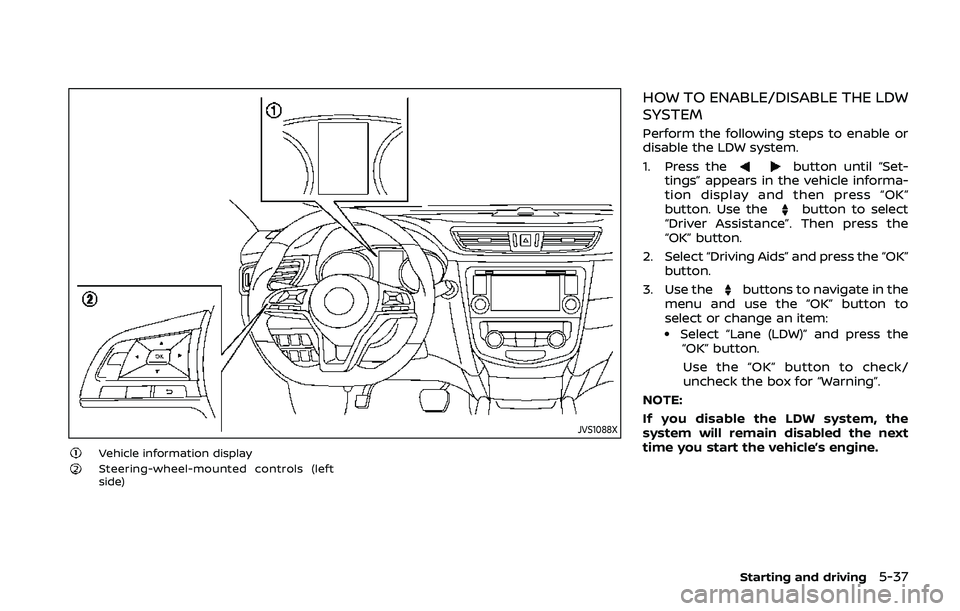
Vehicle information displaySteering-wheel-mounted controls (left
side)
HOW TO ENABLE/DISABLE THE LDW
SYSTEM
Perform the following steps to enable or
disable the LDW system.
1. Press the
button until “Set-
tings” appears in the vehicle informa-
tion display and then press “OK”
button. Use the
button to select
“Driver Assistance”. Then press the
“OK” button.
2. Select “Driving Aids” and press the “OK” button.
3. Use the
buttons to navigate in the
menu and use the “OK” button to
select or change an item:
.Select “Lane (LDW)” and press the “OK” button.
Use the “OK” button to check/
uncheck the box for “Warning”.
NOTE:
If you disable the LDW system, the
system will remain disabled the next
time you start the vehicle’s engine.
Starting and driving5-37