service NISSAN QASHQAI 2019 Owner´s Manual
[x] Cancel search | Manufacturer: NISSAN, Model Year: 2019, Model line: QASHQAI, Model: NISSAN QASHQAI 2019Pages: 500, PDF Size: 2.38 MB
Page 96 of 500
2-16Instruments and controls
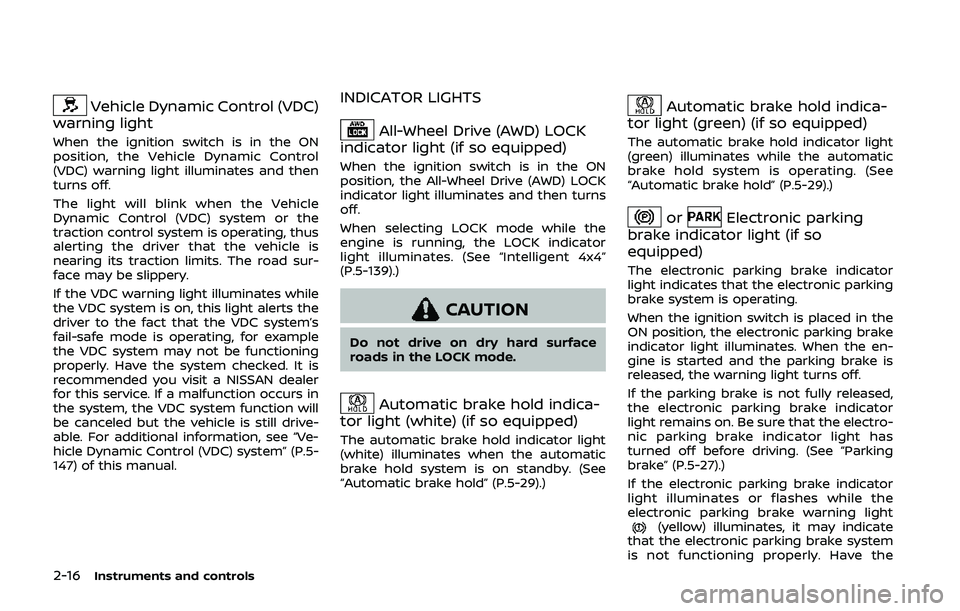
Vehicle Dynamic Control (VDC)
warning light
When the ignition switch is in the ON
position, the Vehicle Dynamic Control
(VDC) warning light illuminates and then
turns off.
The light will blink when the Vehicle
Dynamic Control (VDC) system or the
traction control system is operating, thus
alerting the driver that the vehicle is
nearing its traction limits. The road sur-
face may be slippery.
If the VDC warning light illuminates while
the VDC system is on, this light alerts the
driver to the fact that the VDC system’s
fail-safe mode is operating, for example
the VDC system may not be functioning
properly. Have the system checked. It is
recommended you visit a NISSAN dealer
for this service. If a malfunction occurs in
the system, the VDC system function will
be canceled but the vehicle is still drive-
able. For additional information, see “Ve-
hicle Dynamic Control (VDC) system” (P.5-
147) of this manual.
INDICATOR LIGHTS
All-Wheel Drive (AWD) LOCK
indicator light (if so equipped)
When the ignition switch is in the ON
position, the All-Wheel Drive (AWD) LOCK
indicator light illuminates and then turns
off.
When selecting LOCK mode while the
engine is running, the LOCK indicator
light illuminates. (See “Intelligent 4x4”
(P.5-139).)
CAUTION
Do not drive on dry hard surface
roads in the LOCK mode.
Automatic brake hold indica-
tor light (white) (if so equipped)
The automatic brake hold indicator light
(white) illuminates when the automatic
brake hold system is on standby. (See
“Automatic brake hold” (P.5-29).)
Automatic brake hold indica-
tor light (green) (if so equipped)
The automatic brake hold indicator light
(green) illuminates while the automatic
brake hold system is operating. (See
“Automatic brake hold” (P.5-29).)
orElectronic parking
brake indicator light (if so
equipped)
The electronic parking brake indicator
light indicates that the electronic parking
brake system is operating.
When the ignition switch is placed in the
ON position, the electronic parking brake
indicator light illuminates. When the en-
gine is started and the parking brake is
released, the warning light turns off.
If the parking brake is not fully released,
the electronic parking brake indicator
light remains on. Be sure that the electro-
nic parking brake indicator light has
turned off before driving. (See “Parking
brake” (P.5-27).)
If the electronic parking brake indicator
light illuminates or flashes while the
electronic parking brake warning light
(yellow) illuminates, it may indicate
that the electronic parking brake system
is not functioning properly. Have the
Page 97 of 500
system checked, and if necessary re-
paired. It is recommended you visit a
NISSAN dealer for this service.
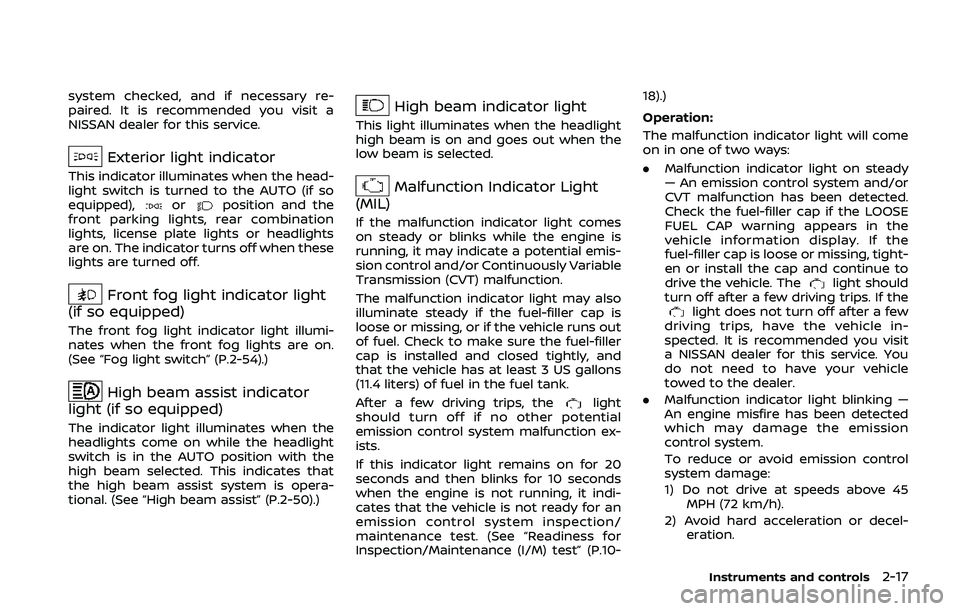
Exterior light indicator
This indicator illuminates when the head-
light switch is turned to the AUTO (if so
equipped),
orposition and the
front parking lights, rear combination
lights, license plate lights or headlights
are on. The indicator turns off when these
lights are turned off.
Front fog light indicator light
(if so equipped)
The front fog light indicator light illumi-
nates when the front fog lights are on.
(See “Fog light switch” (P.2-54).)
High beam assist indicator
light (if so equipped)
The indicator light illuminates when the
headlights come on while the headlight
switch is in the AUTO position with the
high beam selected. This indicates that
the high beam assist system is opera-
tional. (See “High beam assist” (P.2-50).)
High beam indicator light
This light illuminates when the headlight
high beam is on and goes out when the
low beam is selected.
Malfunction Indicator Light
(MIL)
If the malfunction indicator light comes
on steady or blinks while the engine is
running, it may indicate a potential emis-
sion control and/or Continuously Variable
Transmission (CVT) malfunction.
The malfunction indicator light may also
illuminate steady if the fuel-filler cap is
loose or missing, or if the vehicle runs out
of fuel. Check to make sure the fuel-filler
cap is installed and closed tightly, and
that the vehicle has at least 3 US gallons
(11.4 liters) of fuel in the fuel tank.
After a few driving trips, the
light
should turn off if no other potential
emission control system malfunction ex-
ists.
If this indicator light remains on for 20
seconds and then blinks for 10 seconds
when the engine is not running, it indi-
cates that the vehicle is not ready for an
emission control system inspection/
maintenance test. (See “Readiness for
Inspection/Maintenance (I/M) test” (P.10- 18).)
Operation:
The malfunction indicator light will come
on in one of two ways:
.
Malfunction indicator light on steady
— An emission control system and/or
CVT malfunction has been detected.
Check the fuel-filler cap if the LOOSE
FUEL CAP warning appears in the
vehicle information display. If the
fuel-filler cap is loose or missing, tight-
en or install the cap and continue to
drive the vehicle. The
light should
turn off after a few driving trips. If the
light does not turn off after a few
driving trips, have the vehicle in-
spected. It is recommended you visit
a NISSAN dealer for this service. You
do not need to have your vehicle
towed to the dealer.
. Malfunction indicator light blinking —
An engine misfire has been detected
which may damage the emission
control system.
To reduce or avoid emission control
system damage:
1) Do not drive at speeds above 45
MPH (72 km/h).
2) Avoid hard acceleration or decel- eration.
Instruments and controls2-17
Page 98 of 500
2-18Instruments and controls
3) Avoid steep uphill grades.
4) If possible, reduce the amount ofcargo being hauled or towed.
The malfunction indicator light may
stop blinking and remain on.
Have the vehicle inspected. It is re-
commended you visit a NISSAN dealer
for this service. You do not need to
have your vehicle towed to the dealer.
CAUTION
Continued vehicle operation without
having the emission control system
and/or CVT system checked and
repaired as necessary could lead to
poor driveability, reduced fuel econ-
omy, and possible damage to the
emission control system.
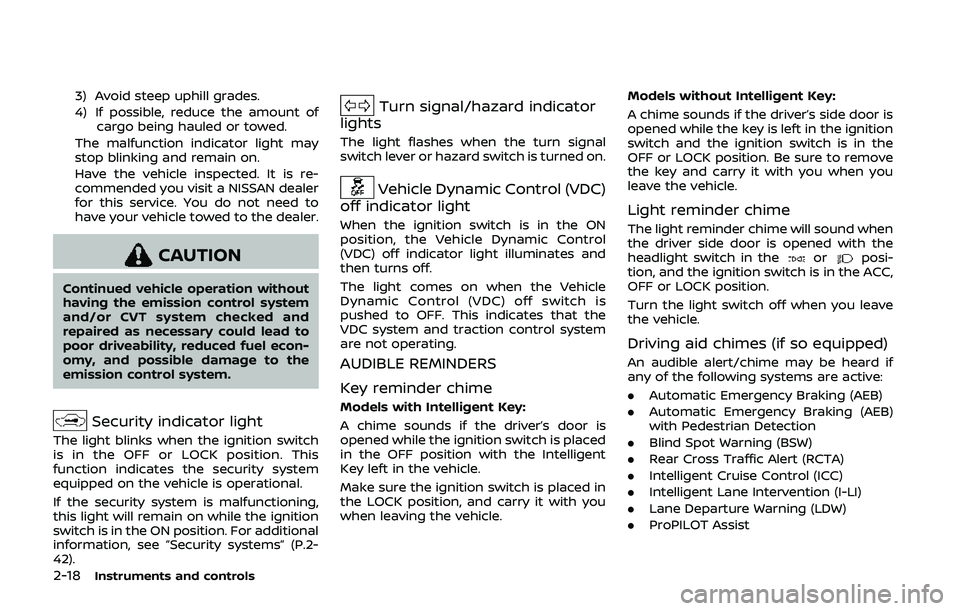
Security indicator light
The light blinks when the ignition switch
is in the OFF or LOCK position. This
function indicates the security system
equipped on the vehicle is operational.
If the security system is malfunctioning,
this light will remain on while the ignition
switch is in the ON position. For additional
information, see “Security systems” (P.2-
42).
Turn signal/hazard indicator
lights
The light flashes when the turn signal
switch lever or hazard switch is turned on.
Vehicle Dynamic Control (VDC)
off indicator light
When the ignition switch is in the ON
position, the Vehicle Dynamic Control
(VDC) off indicator light illuminates and
then turns off.
The light comes on when the Vehicle
Dynamic Control (VDC) off switch is
pushed to OFF. This indicates that the
VDC system and traction control system
are not operating.
AUDIBLE REMINDERS
Key reminder chime
Models with Intelligent Key:
A chime sounds if the driver’s door is
opened while the ignition switch is placed
in the OFF position with the Intelligent
Key left in the vehicle.
Make sure the ignition switch is placed in
the LOCK position, and carry it with you
when leaving the vehicle. Models without Intelligent Key:
A chime sounds if the driver’s side door is
opened while the key is left in the ignition
switch and the ignition switch is in the
OFF or LOCK position. Be sure to remove
the key and carry it with you when you
leave the vehicle.
Light reminder chime
The light reminder chime will sound when
the driver side door is opened with the
headlight switch in the
orposi-
tion, and the ignition switch is in the ACC,
OFF or LOCK position.
Turn the light switch off when you leave
the vehicle.
Driving aid chimes (if so equipped)
An audible alert/chime may be heard if
any of the following systems are active:
. Automatic Emergency Braking (AEB)
. Automatic Emergency Braking (AEB)
with Pedestrian Detection
. Blind Spot Warning (BSW)
. Rear Cross Traffic Alert (RCTA)
. Intelligent Cruise Control (ICC)
. Intelligent Lane Intervention (I-LI)
. Lane Departure Warning (LDW)
. ProPILOT Assist
Page 112 of 500
2-32Instruments and controls
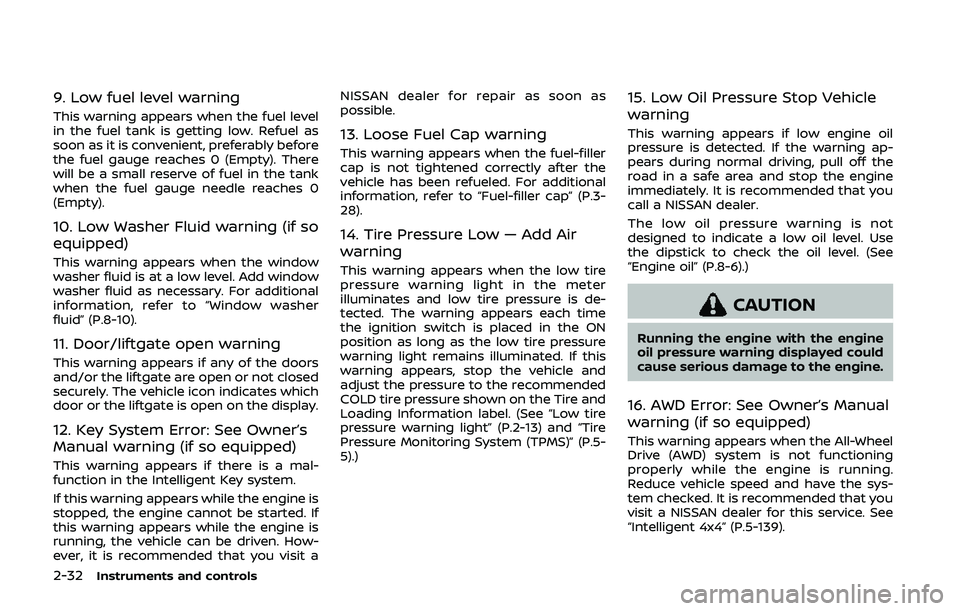
9. Low fuel level warning
This warning appears when the fuel level
in the fuel tank is getting low. Refuel as
soon as it is convenient, preferably before
the fuel gauge reaches 0 (Empty). There
will be a small reserve of fuel in the tank
when the fuel gauge needle reaches 0
(Empty).
10. Low Washer Fluid warning (if so
equipped)
This warning appears when the window
washer fluid is at a low level. Add window
washer fluid as necessary. For additional
information, refer to “Window washer
fluid” (P.8-10).
11. Door/liftgate open warning
This warning appears if any of the doors
and/or the liftgate are open or not closed
securely. The vehicle icon indicates which
door or the liftgate is open on the display.
12. Key System Error: See Owner’s
Manual warning (if so equipped)
This warning appears if there is a mal-
function in the Intelligent Key system.
If this warning appears while the engine is
stopped, the engine cannot be started. If
this warning appears while the engine is
running, the vehicle can be driven. How-
ever, it is recommended that you visit aNISSAN dealer for repair as soon as
possible.
13. Loose Fuel Cap warning
This warning appears when the fuel-filler
cap is not tightened correctly after the
vehicle has been refueled. For additional
information, refer to “Fuel-filler cap” (P.3-
28).
14. Tire Pressure Low — Add Air
warning
This warning appears when the low tire
pressure warning light in the meter
illuminates and low tire pressure is de-
tected. The warning appears each time
the ignition switch is placed in the ON
position as long as the low tire pressure
warning light remains illuminated. If this
warning appears, stop the vehicle and
adjust the pressure to the recommended
COLD tire pressure shown on the Tire and
Loading Information label. (See “Low tire
pressure warning light” (P.2-13) and “Tire
Pressure Monitoring System (TPMS)” (P.5-
5).)
15. Low Oil Pressure Stop Vehicle
warning
This warning appears if low engine oil
pressure is detected. If the warning ap-
pears during normal driving, pull off the
road in a safe area and stop the engine
immediately. It is recommended that you
call a NISSAN dealer.
The low oil pressure warning is not
designed to indicate a low oil level. Use
the dipstick to check the oil level. (See
“Engine oil” (P.8-6).)
CAUTION
Running the engine with the engine
oil pressure warning displayed could
cause serious damage to the engine.
16. AWD Error: See Owner’s Manual
warning (if so equipped)
This warning appears when the All-Wheel
Drive (AWD) system is not functioning
properly while the engine is running.
Reduce vehicle speed and have the sys-
tem checked. It is recommended that you
visit a NISSAN dealer for this service. See
“Intelligent 4x4” (P.5-139).
Page 113 of 500
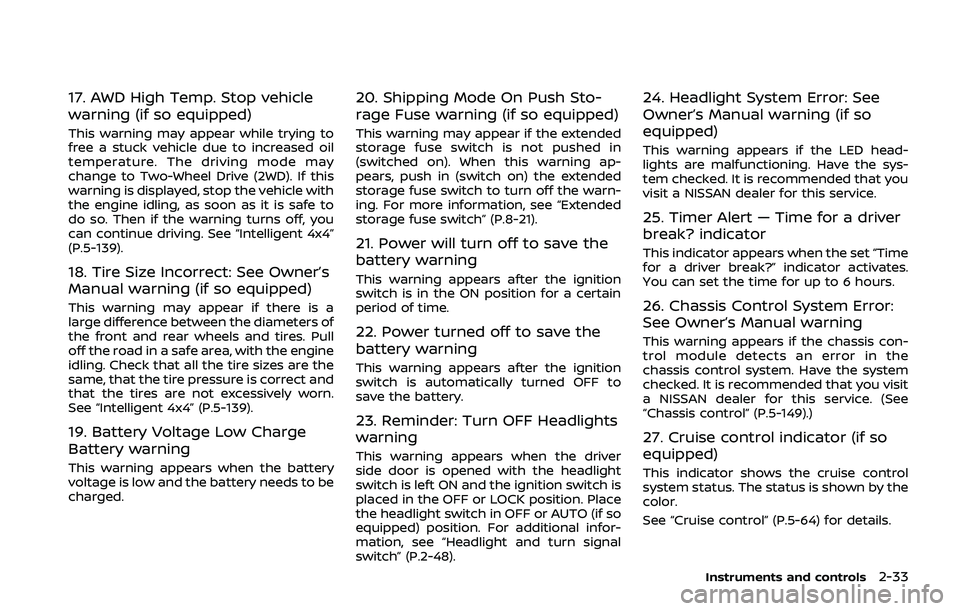
17. AWD High Temp. Stop vehicle
warning (if so equipped)
This warning may appear while trying to
free a stuck vehicle due to increased oil
temperature. The driving mode may
change to Two-Wheel Drive (2WD). If this
warning is displayed, stop the vehicle with
the engine idling, as soon as it is safe to
do so. Then if the warning turns off, you
can continue driving. See “Intelligent 4x4”
(P.5-139).
18. Tire Size Incorrect: See Owner’s
Manual warning (if so equipped)
This warning may appear if there is a
large difference between the diameters of
the front and rear wheels and tires. Pull
off the road in a safe area, with the engine
idling. Check that all the tire sizes are the
same, that the tire pressure is correct and
that the tires are not excessively worn.
See “Intelligent 4x4” (P.5-139).
19. Battery Voltage Low Charge
Battery warning
This warning appears when the battery
voltage is low and the battery needs to be
charged.
20. Shipping Mode On Push Sto-
rage Fuse warning (if so equipped)
This warning may appear if the extended
storage fuse switch is not pushed in
(switched on). When this warning ap-
pears, push in (switch on) the extended
storage fuse switch to turn off the warn-
ing. For more information, see “Extended
storage fuse switch” (P.8-21).
21. Power will turn off to save the
battery warning
This warning appears after the ignition
switch is in the ON position for a certain
period of time.
22. Power turned off to save the
battery warning
This warning appears after the ignition
switch is automatically turned OFF to
save the battery.
23. Reminder: Turn OFF Headlights
warning
This warning appears when the driver
side door is opened with the headlight
switch is left ON and the ignition switch is
placed in the OFF or LOCK position. Place
the headlight switch in OFF or AUTO (if so
equipped) position. For additional infor-
mation, see “Headlight and turn signal
switch” (P.2-48).
24. Headlight System Error: See
Owner’s Manual warning (if so
equipped)
This warning appears if the LED head-
lights are malfunctioning. Have the sys-
tem checked. It is recommended that you
visit a NISSAN dealer for this service.
25. Timer Alert — Time for a driver
break? indicator
This indicator appears when the set “Time
for a driver break?” indicator activates.
You can set the time for up to 6 hours.
26. Chassis Control System Error:
See Owner’s Manual warning
This warning appears if the chassis con-
trol module detects an error in the
chassis control system. Have the system
checked. It is recommended that you visit
a NISSAN dealer for this service. (See
“Chassis control” (P.5-149).)
27. Cruise control indicator (if so
equipped)
This indicator shows the cruise control
system status. The status is shown by the
color.
See “Cruise control” (P.5-64) for details.
Instruments and controls2-33
Page 114 of 500
2-34Instruments and controls
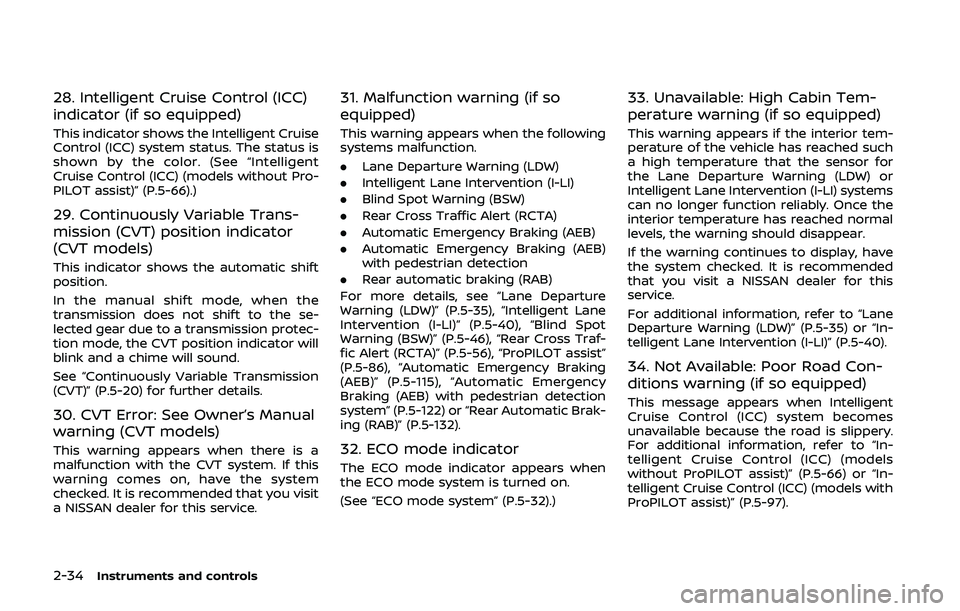
28. Intelligent Cruise Control (ICC)
indicator (if so equipped)
This indicator shows the Intelligent Cruise
Control (ICC) system status. The status is
shown by the color. (See “Intelligent
Cruise Control (ICC) (models without Pro-
PILOT assist)” (P.5-66).)
29. Continuously Variable Trans-
mission (CVT) position indicator
(CVT models)
This indicator shows the automatic shift
position.
In the manual shift mode, when the
transmission does not shift to the se-
lected gear due to a transmission protec-
tion mode, the CVT position indicator will
blink and a chime will sound.
See “Continuously Variable Transmission
(CVT)” (P.5-20) for further details.
30. CVT Error: See Owner’s Manual
warning (CVT models)
This warning appears when there is a
malfunction with the CVT system. If this
warning comes on, have the system
checked. It is recommended that you visit
a NISSAN dealer for this service.
31. Malfunction warning (if so
equipped)
This warning appears when the following
systems malfunction.
.Lane Departure Warning (LDW)
. Intelligent Lane Intervention (I-LI)
. Blind Spot Warning (BSW)
. Rear Cross Traffic Alert (RCTA)
. Automatic Emergency Braking (AEB)
. Automatic Emergency Braking (AEB)
with pedestrian detection
. Rear automatic braking (RAB)
For more details, see “Lane Departure
Warning (LDW)” (P.5-35), “Intelligent Lane
Intervention (I-LI)” (P.5-40), “Blind Spot
Warning (BSW)” (P.5-46), “Rear Cross Traf-
fic Alert (RCTA)” (P.5-56), “ProPILOT assist”
(P.5-86), “Automatic Emergency Braking
(AEB)” (P.5-115), “Automatic Emergency
Braking (AEB) with pedestrian detection
system” (P.5-122) or “Rear Automatic Brak-
ing (RAB)” (P.5-132).
32. ECO mode indicator
The ECO mode indicator appears when
the ECO mode system is turned on.
(See “ECO mode system” (P.5-32).)
33. Unavailable: High Cabin Tem-
perature warning (if so equipped)
This warning appears if the interior tem-
perature of the vehicle has reached such
a high temperature that the sensor for
the Lane Departure Warning (LDW) or
Intelligent Lane Intervention (I-LI) systems
can no longer function reliably. Once the
interior temperature has reached normal
levels, the warning should disappear.
If the warning continues to display, have
the system checked. It is recommended
that you visit a NISSAN dealer for this
service.
For additional information, refer to “Lane
Departure Warning (LDW)” (P.5-35) or “In-
telligent Lane Intervention (I-LI)” (P.5-40).
34. Not Available: Poor Road Con-
ditions warning (if so equipped)
This message appears when Intelligent
Cruise Control (ICC) system becomes
unavailable because the road is slippery.
For additional information, refer to “In-
telligent Cruise Control (ICC) (models
without ProPILOT assist)” (P.5-66) or “In-
telligent Cruise Control (ICC) (models with
ProPILOT assist)” (P.5-97).
Page 115 of 500
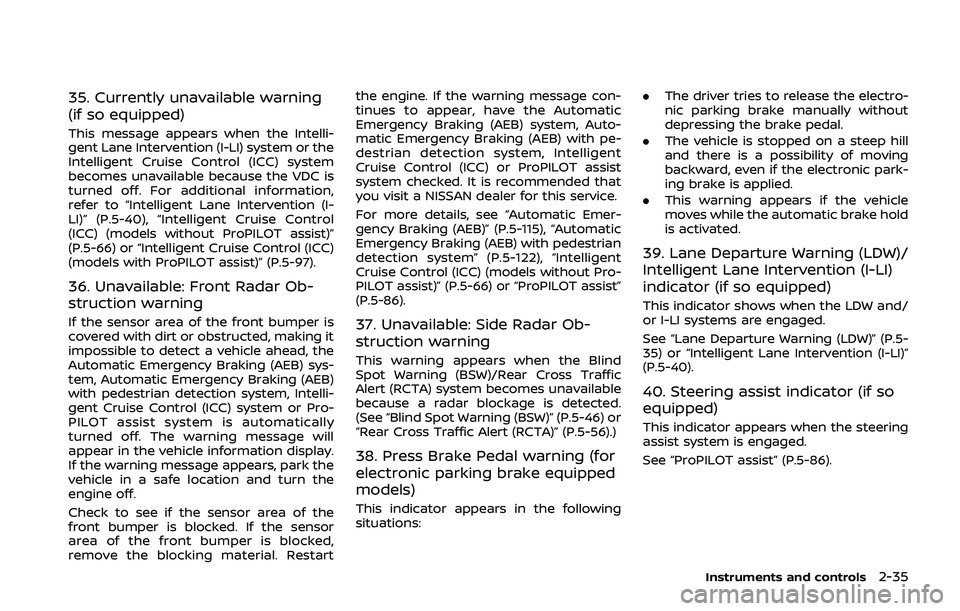
35. Currently unavailable warning
(if so equipped)
This message appears when the Intelli-
gent Lane Intervention (I-LI) system or the
Intelligent Cruise Control (ICC) system
becomes unavailable because the VDC is
turned off. For additional information,
refer to “Intelligent Lane Intervention (I-
LI)” (P.5-40), “Intelligent Cruise Control
(ICC) (models without ProPILOT assist)”
(P.5-66) or “Intelligent Cruise Control (ICC)
(models with ProPILOT assist)” (P.5-97).
36. Unavailable: Front Radar Ob-
struction warning
If the sensor area of the front bumper is
covered with dirt or obstructed, making it
impossible to detect a vehicle ahead, the
Automatic Emergency Braking (AEB) sys-
tem, Automatic Emergency Braking (AEB)
with pedestrian detection system, Intelli-
gent Cruise Control (ICC) system or Pro-
PILOT assist system is automatically
turned off. The warning message will
appear in the vehicle information display.
If the warning message appears, park the
vehicle in a safe location and turn the
engine off.
Check to see if the sensor area of the
front bumper is blocked. If the sensor
area of the front bumper is blocked,
remove the blocking material. Restartthe engine. If the warning message con-
tinues to appear, have the Automatic
Emergency Braking (AEB) system, Auto-
matic Emergency Braking (AEB) with pe-
destrian detection system, Intelligent
Cruise Control (ICC) or ProPILOT assist
system checked. It is recommended that
you visit a NISSAN dealer for this service.
For more details, see “Automatic Emer-
gency Braking (AEB)” (P.5-115), “Automatic
Emergency Braking (AEB) with pedestrian
detection system” (P.5-122), “Intelligent
Cruise Control (ICC) (models without Pro-
PILOT assist)” (P.5-66) or “ProPILOT assist”
(P.5-86).37. Unavailable: Side Radar Ob-
struction warning
This warning appears when the Blind
Spot Warning (BSW)/Rear Cross Traffic
Alert (RCTA) system becomes unavailable
because a radar blockage is detected.
(See “Blind Spot Warning (BSW)” (P.5-46) or
“Rear Cross Traffic Alert (RCTA)” (P.5-56).)
38. Press Brake Pedal warning (for
electronic parking brake equipped
models)
This indicator appears in the following
situations:
.
The driver tries to release the electro-
nic parking brake manually without
depressing the brake pedal.
. The vehicle is stopped on a steep hill
and there is a possibility of moving
backward, even if the electronic park-
ing brake is applied.
. This warning appears if the vehicle
moves while the automatic brake hold
is activated.
39. Lane Departure Warning (LDW)/
Intelligent Lane Intervention (I-LI)
indicator (if so equipped)
This indicator shows when the LDW and/
or I-LI systems are engaged.
See “Lane Departure Warning (LDW)” (P.5-
35) or “Intelligent Lane Intervention (I-LI)”
(P.5-40).
40. Steering assist indicator (if so
equipped)
This indicator appears when the steering
assist system is engaged.
See “ProPILOT assist” (P.5-86).
Instruments and controls2-35
Page 124 of 500
2-44Instruments and controls
equipment.
For Canada:
This device complies with Industry Ca-
nada licence-exempt RSS standard(s).
Operation is subject to the following
two conditions: (1) this device may not
cause interference, and (2) this device
must accept any interference, including
interference that may cause undesired
operation of the device.
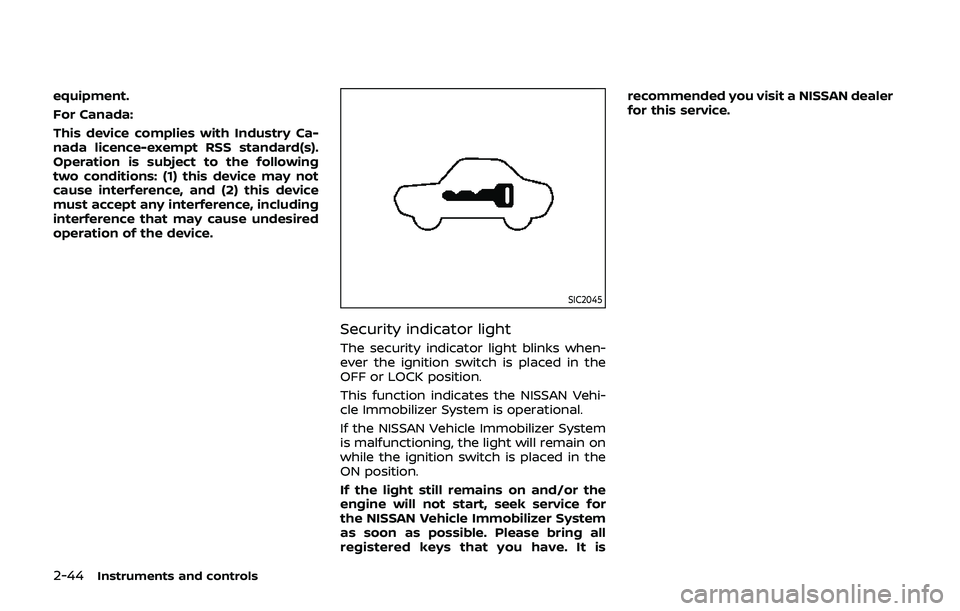
SIC2045
Security indicator light
The security indicator light blinks when-
ever the ignition switch is placed in the
OFF or LOCK position.
This function indicates the NISSAN Vehi-
cle Immobilizer System is operational.
If the NISSAN Vehicle Immobilizer System
is malfunctioning, the light will remain on
while the ignition switch is placed in the
ON position.
If the light still remains on and/or the
engine will not start, seek service for
the NISSAN Vehicle Immobilizer System
as soon as possible. Please bring all
registered keys that you have. It isrecommended you visit a NISSAN dealer
for this service.
Page 135 of 500
indicator light will turn off.
NOTE:
If the surface temperature of the steer-
ing wheel is above 68°F (20°C) when the
switch is turned on, the system will not
heat the steering wheel. This is not a
malfunction.
WARNING
Do not use or allow occupants to use
the seat heater if you or the occu-
pants cannot monitor elevated seat
temperatures or have an inability to
feel pain in body parts that contact
the seat. Use of the seat heater by
such people could result in serious
injury.
CAUTION
.The battery could run down if the
seat heater is operated while the
engine is not running.
. Do not use the seat heater for
extended periods or when no one
is using the seat.
. Do not put anything on the seat
which insulates heat, such as a
blanket, cushion, seat cover, etc.
Otherwise, the seat may become
overheated.
. Do not place anything hard or
heavy on the seat or pierce it with
a pin or similar object. This may
result in damage to the heater. .
Any liquid spilled on the heated
seat should be removed immedi-
ately with a dry cloth.
. When cleaning the seat, never use
gasoline, thinner, or any similar
materials.
. If any malfunctions are found or
the heated seat does not operate,
turn the switch off and have the
system checked. It is recom-
mended you visit a NISSAN dealer
for this service.
Instruments and controls2-55
HEATED SEATS (if so equipped)
Page 147 of 500
JVI1335X
CAUTION
Make sure the parcel shelf is care-
fully stored when not in use in order
to prevent any damage.
Installation
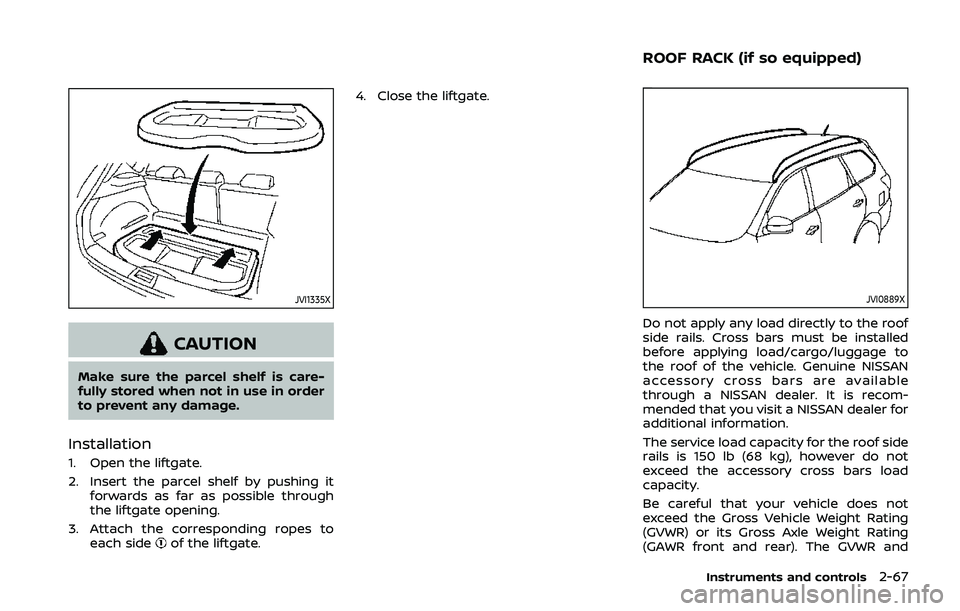
1. Open the liftgate.
2. Insert the parcel shelf by pushing itforwards as far as possible through
the liftgate opening.
3. Attach the corresponding ropes to each side
of the liftgate. 4. Close the liftgate.
JVI0889X
Do not apply any load directly to the roof
side rails. Cross bars must be installed
before applying load/cargo/luggage to
the roof of the vehicle. Genuine NISSAN
accessory cross bars are available
through a NISSAN dealer. It is recom-
mended that you visit a NISSAN dealer for
additional information.
The service load capacity for the roof side
rails is 150 lb (68 kg), however do not
exceed the accessory cross bars load
capacity.
Be careful that your vehicle does not
exceed the Gross Vehicle Weight Rating
(GVWR) or its Gross Axle Weight Rating
(GAWR front and rear). The GVWR and
Instruments and controls2-67
ROOF RACK (if so equipped)