model NISSAN QASHQAI 2019 Owner´s Manual
[x] Cancel search | Manufacturer: NISSAN, Model Year: 2019, Model line: QASHQAI, Model: NISSAN QASHQAI 2019Pages: 500, PDF Size: 2.38 MB
Page 3 of 500
safety features to all occupants
of the vehicle.
. ALWAYS review this Owner’s Man-
ual for important safety informa-
tion.
On-pavement and off-road
driving
This vehicle will handle and maneuver
differently from an ordinary passenger
car because it has a higher center of
gravity. As with other vehicles with
features of this type, failure to operate
this vehicle correctly may result in loss
of control or an accident. Be sure to
read “Avoiding collision and rollover”
and “Driving safety precautions” in the
“5. Starting and driving” section of this
manual.
MODIFICATION OF YOUR VEHI-
CLE
This vehicle should not be modified.
Modification could affect its perfor-
mance, safety or durability, and may
even violate governmental regula-
tions. In addition, damage or perfor-
mance problems resulting from
modification may not be covered un-
der NISSAN warranties.
WARNING
Installing an aftermarket On-Board
Diagnostic (OBD) plug-in device that
uses the port during normal driving,
for example remote insurance com-
pany monitoring, remote vehicle di-
agnostics, telematics or engine
reprogramming, may cause interfer-
ence or damage to vehicle systems.
We do not recommend or endorse
the use of any aftermarket OBD
plug-in devices, unless specifically
approved by NISSAN. The vehicle
warranty may not cover damage
caused by any aftermarket plug-in
device.
WHEN READING THE MANUAL
This manual includes information for all
features and equipment available on
this model. Features and equipment in
your vehicle may vary depending on
model, trim level, options selected, or-
der, date of production, region or avail-
ability. Therefore, you may find
information about features or equip-
ment that are not included or installed
on your vehicle.
All information, specifications and illustra-
tions in this manual are those in effect at
the time of printing. NISSAN reserves the
right to change specifications, perfor-
mance, design or component suppliers
without notice and without obligation.
From time to time, NISSAN may update
or revise this manual to provide Owners
with the most accurate information cur-
rently available. Please carefully read and
retain with this manual all revision up-
dates sent to you by NISSAN to ensure
you have access to accurate and up-to-
date information regarding your vehicle.
Current versions of vehicle Owner’s Man-
uals and any updates can also be found in
the Owner section of the NISSAN website
at https://owners.nissanusa.com/now-
ners/navigation/manualsGuide. If you
have questions concerning any informa-
tion in your Owner’s Manual, contact
Page 9 of 500
 ........................................................................\
............. 0-2
Exterior front ...")
0 Illustrated table of contents
Seats, seat belts and Supplemental Restraint
System (SRS) ........................................................................\
............. 0-2
Exterior front ........................................................................\
............ 0-3
Exterior rear ........................................................................\
.............. 0-4
Passenger compartment ....................................................... 0-5
Cockpit ........................................................................\
.......................... 0-6Instrument panel ........................................................................\
. 0-8
Meters and gauges .................................................................... 0-9
Engine compartment ............................................................ 0-10
MR20DD engine model ............................................... 0-10
Warning and indicator lights ........................................... 0-11
Page 14 of 500
0-6Illustrated table of contents
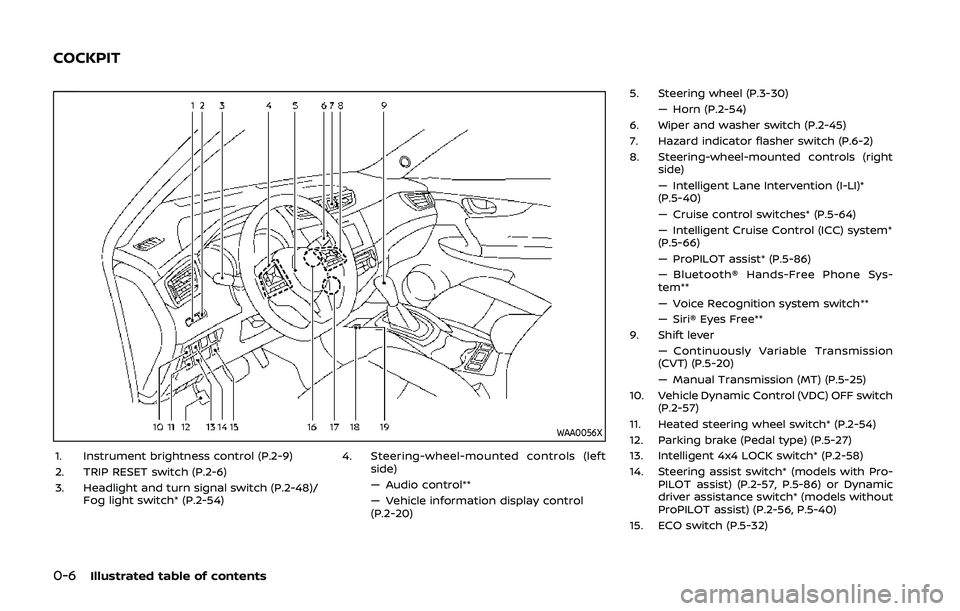
WAA0056X
1. Instrument brightness control (P.2-9)
2. TRIP RESET switch (P.2-6)
3. Headlight and turn signal switch (P.2-48)/Fog light switch* (P.2-54) 4. Steering-wheel-mounted controls (left
side)
— Audio control**
— Vehicle information display control
(P.2-20) 5. Steering wheel (P.3-30)
— Horn (P.2-54)
6. Wiper and washer switch (P.2-45)
7. Hazard indicator flasher switch (P.6-2)
8. Steering-wheel-mounted controls (right side)
— Intelligent Lane Intervention (I-LI)*
(P.5-40)
— Cruise control switches* (P.5-64)
— Intelligent Cruise Control (ICC) system*
(P.5-66)
— ProPILOT assist* (P.5-86)
— Bluetooth® Hands-Free Phone Sys-
tem**
— Voice Recognition system switch**
— Siri® Eyes Free**
9. Shift lever
— Continuously Variable Transmission
(CVT) (P.5-20)
— Manual Transmission (MT) (P.5-25)
10. Vehicle Dynamic Control (VDC) OFF switch (P.2-57)
11. Heated steering wheel switch* (P.2-54)
12. Parking brake (Pedal type) (P.5-27)
13. Intelligent 4x4 LOCK switch* (P.2-58)
14. Steering assist switch* (models with Pro- PILOT assist) (P.2-57, P.5-86) or Dynamic
driver assistance switch* (models without
ProPILOT assist) (P.2-56, P.5-40)
15. ECO switch (P.5-32)
COCKPIT
Page 15 of 500
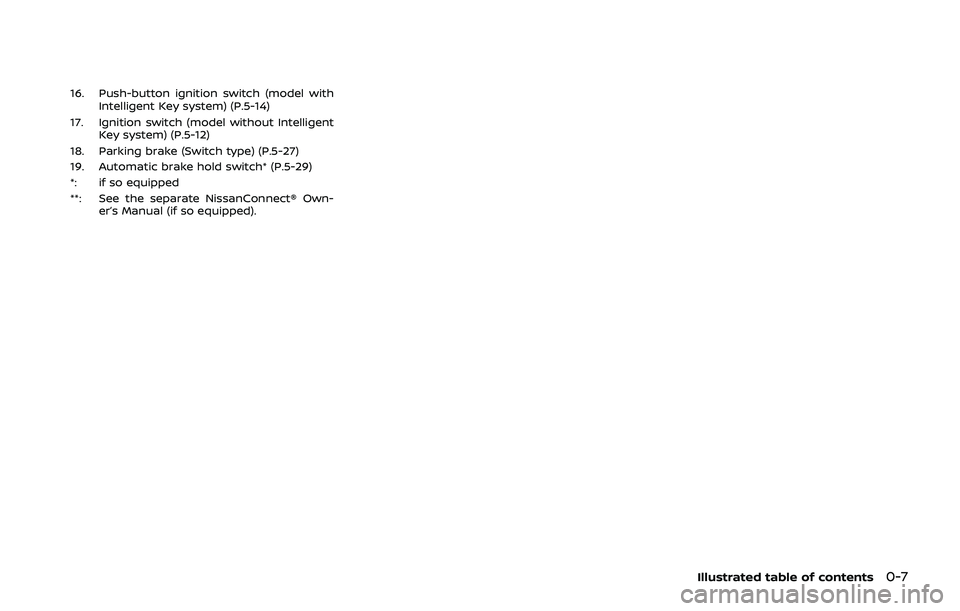
16. Push-button ignition switch (model withIntelligent Key system) (P.5-14)
17. Ignition switch (model without Intelligent Key system) (P.5-12)
18. Parking brake (Switch type) (P.5-27)
19. Automatic brake hold switch* (P.5-29)
*: if so equipped
**: See the separate NissanConnect® Own- er’s Manual (if so equipped).
Illustrated table of contents0-7
Page 18 of 500
0-10Illustrated table of contents
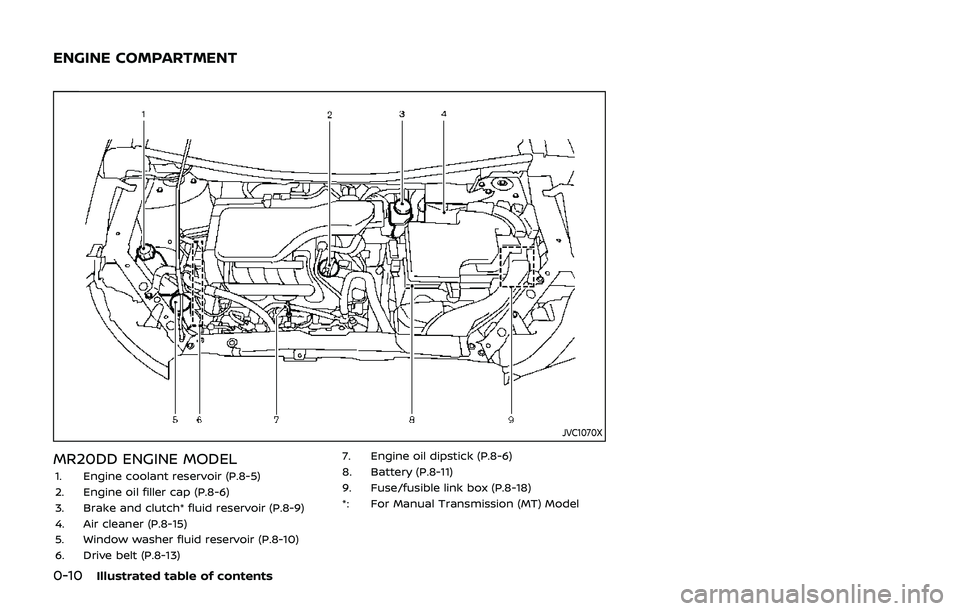
JVC1070X
MR20DD ENGINE MODEL1. Engine coolant reservoir (P.8-5)
2. Engine oil filler cap (P.8-6)
3. Brake and clutch* fluid reservoir (P.8-9)
4. Air cleaner (P.8-15)
5. Window washer fluid reservoir (P.8-10)
6. Drive belt (P.8-13)7. Engine oil dipstick (P.8-6)
8. Battery (P.8-11)
9. Fuse/fusible link box (P.8-18)
*: For Manual Transmission (MT) Model
ENGINE COMPARTMENT
Page 36 of 500
1-16Safety — Seats, seat belts and supplemental restraint system
.Grasp the shoulder belt and pull for-
ward quickly. The retractor should
lock and restrict further belt move-
ment.
If the retractor does not lock during this
check, get the system checked. It is
recommended you visit a NISSAN dealer
for this service, or to learn more about
seat belt operation.
SSS0351A
Shoulder belt height adjustment
(for front seats)
The shoulder belt anchor height should
be adjusted to the position best for you.
(See “Precautions on seat belt usage” (P.1-
11).)
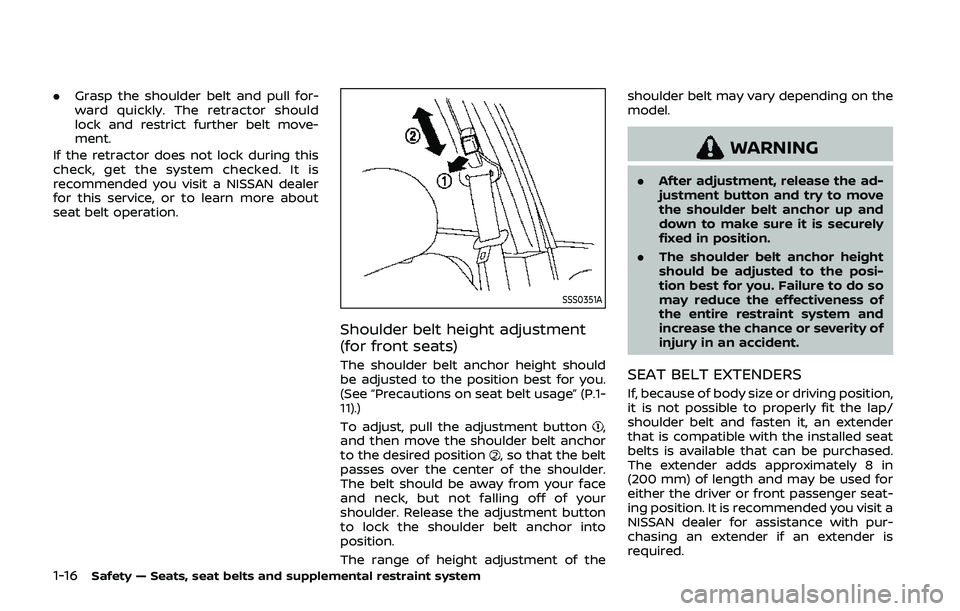
To adjust, pull the adjustment button
,
and then move the shoulder belt anchor
to the desired position
, so that the belt
passes over the center of the shoulder.
The belt should be away from your face
and neck, but not falling off of your
shoulder. Release the adjustment button
to lock the shoulder belt anchor into
position.
The range of height adjustment of the shoulder belt may vary depending on the
model.
WARNING
.
After adjustment, release the ad-
justment button and try to move
the shoulder belt anchor up and
down to make sure it is securely
fixed in position.
. The shoulder belt anchor height
should be adjusted to the posi-
tion best for you. Failure to do so
may reduce the effectiveness of
the entire restraint system and
increase the chance or severity of
injury in an accident.
SEAT BELT EXTENDERS
If, because of body size or driving position,
it is not possible to properly fit the lap/
shoulder belt and fasten it, an extender
that is compatible with the installed seat
belts is available that can be purchased.
The extender adds approximately 8 in
(200 mm) of length and may be used for
either the driver or front passenger seat-
ing position. It is recommended you visit a
NISSAN dealer for assistance with pur-
chasing an extender if an extender is
required.
Page 81 of 500

2 Instruments and controls
Cockpit ........................................................................\
.......................... 2-3
Instrument panel ........................................................................\
.. 2-4
Meters and gauges ..................................................................... 2-5Speedometer and odometer ........................................ 2-6
Tachometer ........................................................................\
........ 2-7
Engine coolant temperature gauge ....................... 2-7
Fuel gauge ........................................................................\
........... 2-8
Instrument brightness control .................................... 2-9
Continuously Variable Transmission (CVT)
position indicator (if so equipped) ........................... 2-9
Warning lights, indicator lights and
audible reminders ..................................................................... 2-10 Checking lights ..................................................................... 2-11
Warning lights ........................................................................\
2-11
Indicator lights ...................................................................... 2-16
Audible reminders .............................................................. 2-18
Vehicle information display ............................................... 2-19 How to use the vehicle
information display ........................................................... 2-20
Startup display ...................................................................... 2-20
Settings ........................................................................\
............... 2-21
Vehicle information display warnings
and indicators ........................................................................\
2-31
Trip computer ........................................................................\
2-39
Clock and outside air temperature ...................... 2-41 Security systems ....................................................................... 2-42
Vehicle Security System .............................................. 2-42
NISSAN Vehicle Immobilizer System ................. 2-43
Wiper and washer switch ................................................... 2-45 Windshield wiper and washer operation ...... 2-45
Rear window wiper and washer switch ................. 2-46
Rear window and outside mirror
defroster switch ........................................................................\
. 2-47
Headlight and turn signal switch ................................ 2-48 Headlight switch ............................................................... 2-48
Turn signal switch ........................................................... 2-53
Fog light switch (if so equipped) ......................... 2-54
Horn ........................................................................\
............................. 2-54
Heated steering wheel (if so equipped) .................. 2-54
Heated seats (if so equipped) ......................................... 2-55
Dynamic driver assistance switch (models
without ProPILOT assist) (if so equipped) ............. 2-56
Steering assist switch (models with ProPILOT
assist) (if so equipped) .......................................................... 2-57
Vehicle Dynamic Control (VDC) off switch ........... 2-57
Intelligent 4x4 LOCK switch (if so equipped) ...... 2-58
Rear door alert ........................................................................\
.... 2-58
ECO mode switch ..................................................................... 2-59
Power outlet ........................................................................\
......... 2-60 USB (Universal Serial Bus)
charging connector ........................................................ 2-61
Page 83 of 500
WAA0056X
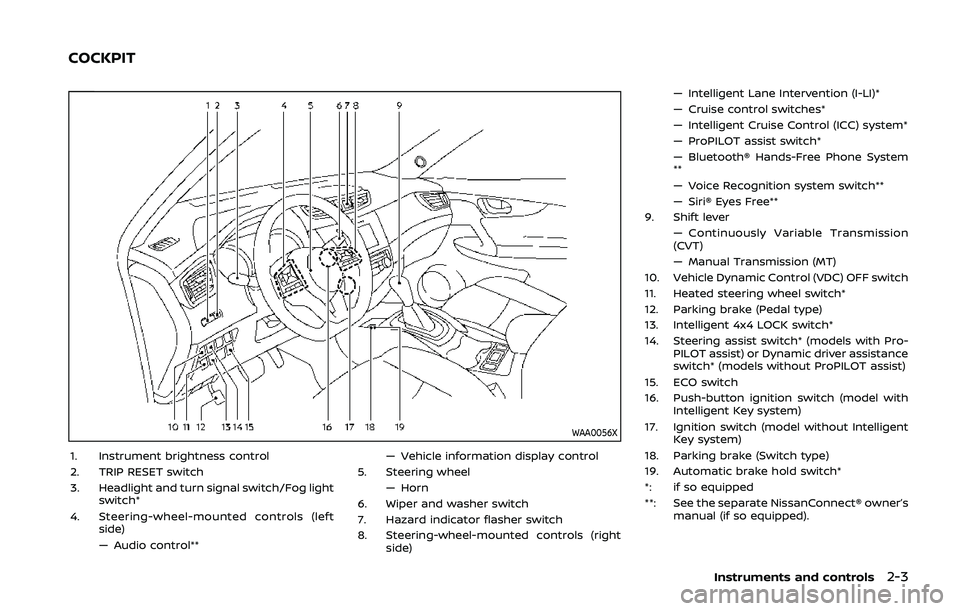
1. Instrument brightness control
2. TRIP RESET switch
3. Headlight and turn signal switch/Fog lightswitch*
4. Steering-wheel-mounted controls (left side)
— Audio control** — Vehicle information display control
5. Steering wheel — Horn
6. Wiper and washer switch
7. Hazard indicator flasher switch
8. Steering-wheel-mounted controls (right side) — Intelligent Lane Intervention (I-LI)*
— Cruise control switches*
— Intelligent Cruise Control (ICC) system*
— ProPILOT assist switch*
— Bluetooth® Hands-Free Phone System
**
— Voice Recognition system switch**
— Siri® Eyes Free**
9. Shift lever — Continuously Variable Transmission
(CVT)
— Manual Transmission (MT)
10. Vehicle Dynamic Control (VDC) OFF switch
11. Heated steering wheel switch*
12. Parking brake (Pedal type)
13. Intelligent 4x4 LOCK switch*
14. Steering assist switch* (models with Pro- PILOT assist) or Dynamic driver assistance
switch* (models without ProPILOT assist)
15. ECO switch
16. Push-button ignition switch (model with Intelligent Key system)
17. Ignition switch (model without Intelligent Key system)
18. Parking brake (Switch type)
19. Automatic brake hold switch*
*: if so equipped
**: See the separate NissanConnect® owner’s manual (if so equipped).
Instruments and controls2-3
COCKPIT
Page 91 of 500
CHECKING LIGHTS
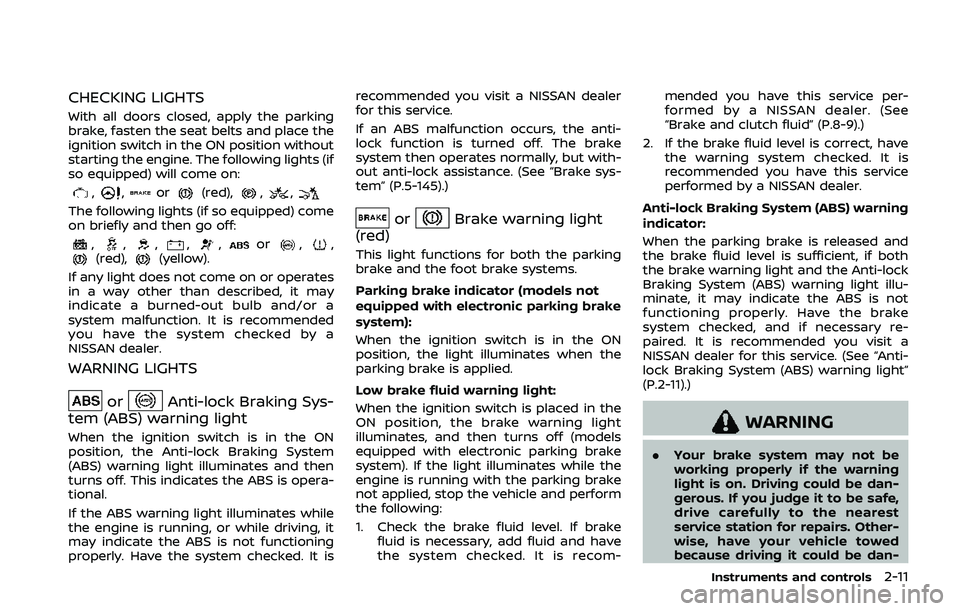
With all doors closed, apply the parking
brake, fasten the seat belts and place the
ignition switch in the ON position without
starting the engine. The following lights (if
so equipped) will come on:
,,or(red),,,
The following lights (if so equipped) come
on briefly and then go off:
,,,,,or,,(red),(yellow).
If any light does not come on or operates
in a way other than described, it may
indicate a burned-out bulb and/or a
system malfunction. It is recommended
you have the system checked by a
NISSAN dealer.
WARNING LIGHTS
orAnti-lock Braking Sys-
tem (ABS) warning light
When the ignition switch is in the ON
position, the Anti-lock Braking System
(ABS) warning light illuminates and then
turns off. This indicates the ABS is opera-
tional.
If the ABS warning light illuminates while
the engine is running, or while driving, it
may indicate the ABS is not functioning
properly. Have the system checked. It is recommended you visit a NISSAN dealer
for this service.
If an ABS malfunction occurs, the anti-
lock function is turned off. The brake
system then operates normally, but with-
out anti-lock assistance. (See “Brake sys-
tem” (P.5-145).)
orBrake warning light
(red)
This light functions for both the parking
brake and the foot brake systems.
Parking brake indicator (models not
equipped with electronic parking brake
system):
When the ignition switch is in the ON
position, the light illuminates when the
parking brake is applied.
Low brake fluid warning light:
When the ignition switch is placed in the
ON position, the brake warning light
illuminates, and then turns off (models
equipped with electronic parking brake
system). If the light illuminates while the
engine is running with the parking brake
not applied, stop the vehicle and perform
the following:
1. Check the brake fluid level. If brake fluid is necessary, add fluid and have
the system checked. It is recom- mended you have this service per-
formed by a NISSAN dealer. (See
“Brake and clutch fluid” (P.8-9).)
2. If the brake fluid level is correct, have the warning system checked. It is
recommended you have this service
performed by a NISSAN dealer.
Anti-lock Braking System (ABS) warning
indicator:
When the parking brake is released and
the brake fluid level is sufficient, if both
the brake warning light and the Anti-lock
Braking System (ABS) warning light illu-
minate, it may indicate the ABS is not
functioning properly. Have the brake
system checked, and if necessary re-
paired. It is recommended you visit a
NISSAN dealer for this service. (See “Anti-
lock Braking System (ABS) warning light”
(P.2-11).)
WARNING
. Your brake system may not be
working properly if the warning
light is on. Driving could be dan-
gerous. If you judge it to be safe,
drive carefully to the nearest
service station for repairs. Other-
wise, have your vehicle towed
because driving it could be dan-
Instruments and controls2-11
Page 94 of 500
2-14Instruments and controls
accident and could result in ser-
ious personal injury. Check the
tire pressure for all four tires.
Adjust the tire pressure to the
recommended COLD tire pressure
shown on the Tire and Loading
Information label to turn the low
tire pressure warning light OFF. If
the light still illuminates while
driving after adjusting the tire
pressure, a tire may be flat or
the TPMS may be malfunctioning.
If you have a flat tire, replace it
with a spare tire as soon as
possible. If no tire is flat and all
tires are properly inflated, it is
recommended you consult a
NISSAN dealer.
. Since the spare tire is not
equipped with the TPMS, when a
spare tire is mounted or a wheel
is replaced, the TPMS will not
function and the low tire pressure
warning light will flash for ap-
proximately 1 minute. The light
will remain on after 1 minute.
Have your tires replaced and/or
TPMS system reset as soon as
possible. It is recommended you
visit a NISSAN dealer for these
services. .
Replacing tires with those not
originally specified by NISSAN
could affect the proper operation
of the TPMS.
CAUTION
.The TPMS is not a substitute for
the regular tire pressure check.
Be sure to check the tire pressure
regularly.
. If the vehicle is being driven at
speeds of less than 16 MPH (25
km/h), the TPMS may not operate
correctly.
. Be sure to install the specified
size of tires to the four wheels
correctly.
Master warning light
When the ignition switch is in the ON
position, the master warning light illumi-
nates if any of the following are displayed
on the vehicle information display.
. No Key detected warning (if so
equipped)
. Shift to Park warning (Continuously
Variable Transmission (CVT) models) (if so equipped)
. Key battery low warning (if so
equipped)
. Engine start operation for Intelligent
Key system indicator (if so equipped)
. Key ID incorrect warning (if so
equipped)
. Release Parking Brake warning
. Low fuel level warning
. Low Washer Fluid (if so equipped)
. Door/liftgate open warning
. Key System Error: See Owner’s Manual
warning (if so equipped)
. Loose Fuel Cap
. Tire Pressure Low - Add Air warning
. Low oil pressure Stop vehicle warning
. AWD Error: See Owner’s Manual warn-
ing (if so equipped)
. AWD High Temp. Stop vehicle warning
(if so equipped)
. Tire Size Incorrect: See Owner’s Man-
ual warning (if so equipped)
. Battery Voltage Low Charge Battery
warning
. Shipping Mode On Push Storage Fuse
warning (if so equipped)
. Power will turn off to save the battery
warning
. Power turned off to save the battery
warning