rese NISSAN QASHQAI 2019 Owner´s Manual
[x] Cancel search | Manufacturer: NISSAN, Model Year: 2019, Model line: QASHQAI, Model: NISSAN QASHQAI 2019Pages: 500, PDF Size: 2.38 MB
Page 3 of 500
safety features to all occupants
of the vehicle.
. ALWAYS review this Owner’s Man-
ual for important safety informa-
tion.
On-pavement and off-road
driving
This vehicle will handle and maneuver
differently from an ordinary passenger
car because it has a higher center of
gravity. As with other vehicles with
features of this type, failure to operate
this vehicle correctly may result in loss
of control or an accident. Be sure to
read “Avoiding collision and rollover”
and “Driving safety precautions” in the
“5. Starting and driving” section of this
manual.
MODIFICATION OF YOUR VEHI-
CLE
This vehicle should not be modified.
Modification could affect its perfor-
mance, safety or durability, and may
even violate governmental regula-
tions. In addition, damage or perfor-
mance problems resulting from
modification may not be covered un-
der NISSAN warranties.
WARNING
Installing an aftermarket On-Board
Diagnostic (OBD) plug-in device that
uses the port during normal driving,
for example remote insurance com-
pany monitoring, remote vehicle di-
agnostics, telematics or engine
reprogramming, may cause interfer-
ence or damage to vehicle systems.
We do not recommend or endorse
the use of any aftermarket OBD
plug-in devices, unless specifically
approved by NISSAN. The vehicle
warranty may not cover damage
caused by any aftermarket plug-in
device.
WHEN READING THE MANUAL
This manual includes information for all
features and equipment available on
this model. Features and equipment in
your vehicle may vary depending on
model, trim level, options selected, or-
der, date of production, region or avail-
ability. Therefore, you may find
information about features or equip-
ment that are not included or installed
on your vehicle.
All information, specifications and illustra-
tions in this manual are those in effect at
the time of printing. NISSAN reserves the
right to change specifications, perfor-
mance, design or component suppliers
without notice and without obligation.
From time to time, NISSAN may update
or revise this manual to provide Owners
with the most accurate information cur-
rently available. Please carefully read and
retain with this manual all revision up-
dates sent to you by NISSAN to ensure
you have access to accurate and up-to-
date information regarding your vehicle.
Current versions of vehicle Owner’s Man-
uals and any updates can also be found in
the Owner section of the NISSAN website
at https://owners.nissanusa.com/now-
ners/navigation/manualsGuide. If you
have questions concerning any informa-
tion in your Owner’s Manual, contact
Page 4 of 500
NISSAN Consumer Affairs. See the NISSAN
CUSTOMER CARE PROGRAM page in this
Owner’s Manual for contact information.
IMPORTANT INFORMATION ABOUT
THIS MANUAL
You will see various symbols in this
manual. They are used in the following
ways:
WARNING
This is used to indicate the presence
of a hazard that could cause death or
serious personal injury. To avoid or
reduce the risk, the procedures must
be followed precisely.
CAUTION
This is used to indicate the presence
of a hazard that could cause minor
or moderate personal injury or da-
mage to your vehicle. To avoid or
reduce the risk, the procedures must
be followed carefully.
SIC0697
If you see the symbol above, it means“Do
not do this” or“Do not let this happen”.
If you see a symbol similar to those above
in an illustration, it means the arrow
points to the front of the vehicle.
Arrows in an illustration that are similar to
those above indicate movement or ac-
tion.
Arrows in an illustration that are similar to those above call attention to an item in
the illustration.
CALIFORNIA PERCHLORATE ADVI-
SORY
Some vehicle parts, such as lithium
batteries, may contain perchlorate ma-
terial. The following advisory is pro-
vided: “Perchlorate Material - special
handling may apply, see www.dtsc.ca.
gov/hazardouswaste/perchlorate.”
© 2018 NISSAN MOTOR CO., LTD.
All rights reserved. No part of this Owner’s
Manual may be reproduced or stored in a
retrieval system, or transmitted in any
form, or by any means, electronic, me-
chanical, photocopying, recording or
otherwise, without the prior written per-
mission of Nissan Motor Co., Ltd.
Page 14 of 500
0-6Illustrated table of contents
WAA0056X
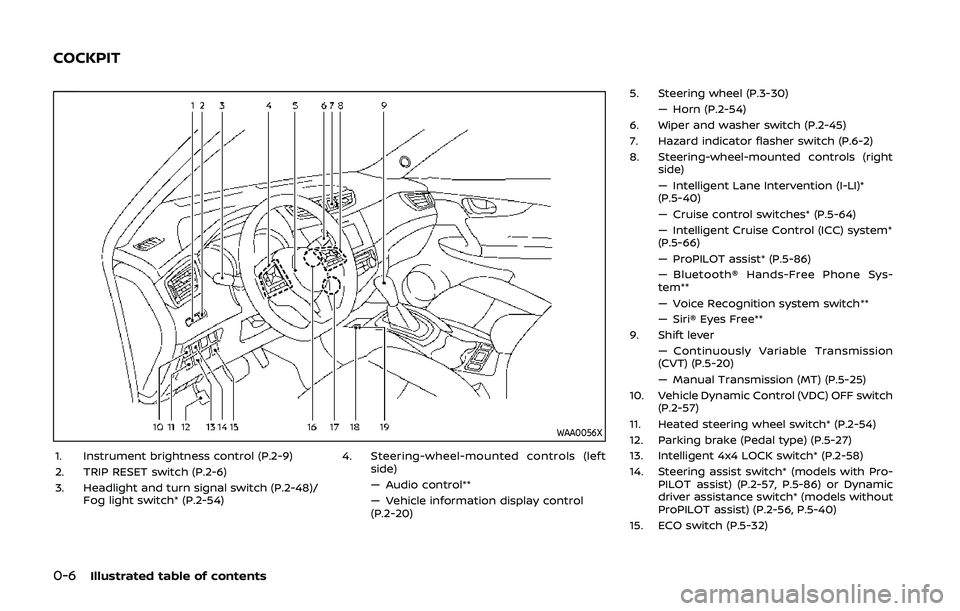
1. Instrument brightness control (P.2-9)
2. TRIP RESET switch (P.2-6)
3. Headlight and turn signal switch (P.2-48)/Fog light switch* (P.2-54) 4. Steering-wheel-mounted controls (left
side)
— Audio control**
— Vehicle information display control
(P.2-20) 5. Steering wheel (P.3-30)
— Horn (P.2-54)
6. Wiper and washer switch (P.2-45)
7. Hazard indicator flasher switch (P.6-2)
8. Steering-wheel-mounted controls (right side)
— Intelligent Lane Intervention (I-LI)*
(P.5-40)
— Cruise control switches* (P.5-64)
— Intelligent Cruise Control (ICC) system*
(P.5-66)
— ProPILOT assist* (P.5-86)
— Bluetooth® Hands-Free Phone Sys-
tem**
— Voice Recognition system switch**
— Siri® Eyes Free**
9. Shift lever
— Continuously Variable Transmission
(CVT) (P.5-20)
— Manual Transmission (MT) (P.5-25)
10. Vehicle Dynamic Control (VDC) OFF switch (P.2-57)
11. Heated steering wheel switch* (P.2-54)
12. Parking brake (Pedal type) (P.5-27)
13. Intelligent 4x4 LOCK switch* (P.2-58)
14. Steering assist switch* (models with Pro- PILOT assist) (P.2-57, P.5-86) or Dynamic
driver assistance switch* (models without
ProPILOT assist) (P.2-56, P.5-40)
15. ECO switch (P.5-32)
COCKPIT
Page 18 of 500
0-10Illustrated table of contents
JVC1070X
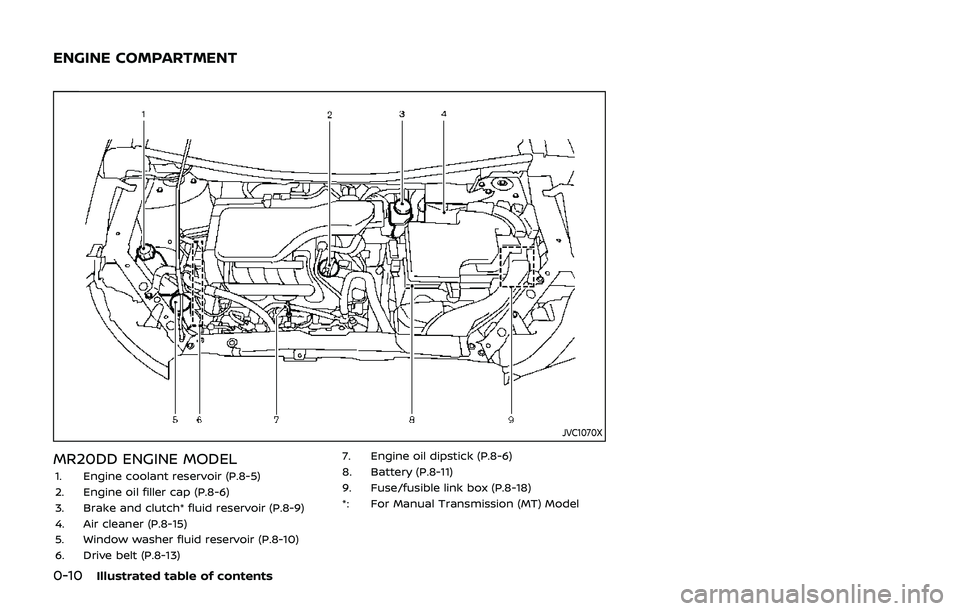
MR20DD ENGINE MODEL1. Engine coolant reservoir (P.8-5)
2. Engine oil filler cap (P.8-6)
3. Brake and clutch* fluid reservoir (P.8-9)
4. Air cleaner (P.8-15)
5. Window washer fluid reservoir (P.8-10)
6. Drive belt (P.8-13)7. Engine oil dipstick (P.8-6)
8. Battery (P.8-11)
9. Fuse/fusible link box (P.8-18)
*: For Manual Transmission (MT) Model
ENGINE COMPARTMENT
Page 24 of 500
1-4Safety — Seats, seat belts and supplemental restraint system
JVR0333X
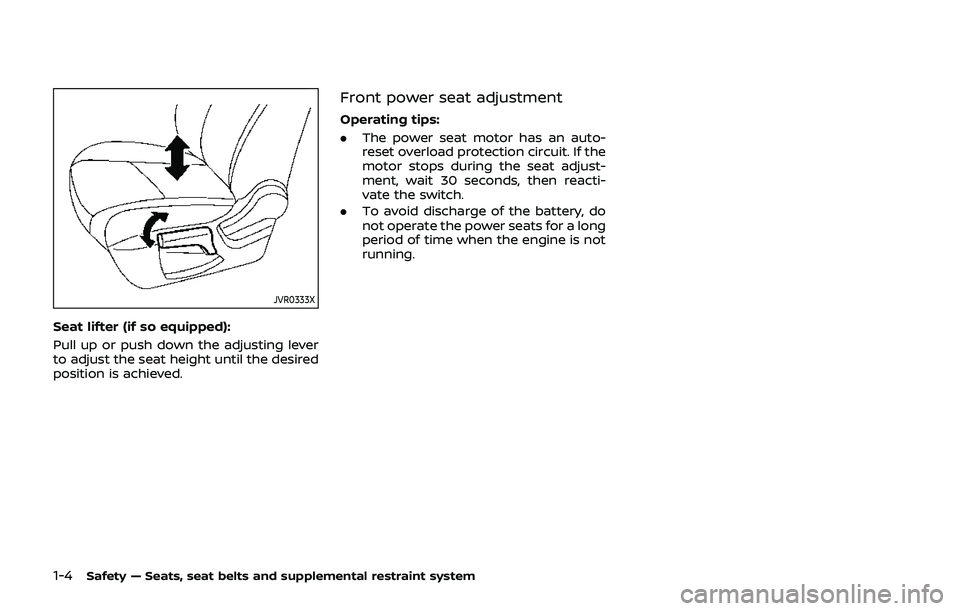
Seat lifter (if so equipped):
Pull up or push down the adjusting lever
to adjust the seat height until the desired
position is achieved.
Front power seat adjustment
Operating tips:
.The power seat motor has an auto-
reset overload protection circuit. If the
motor stops during the seat adjust-
ment, wait 30 seconds, then reacti-
vate the switch.
. To avoid discharge of the battery, do
not operate the power seats for a long
period of time when the engine is not
running.
Page 83 of 500
WAA0056X
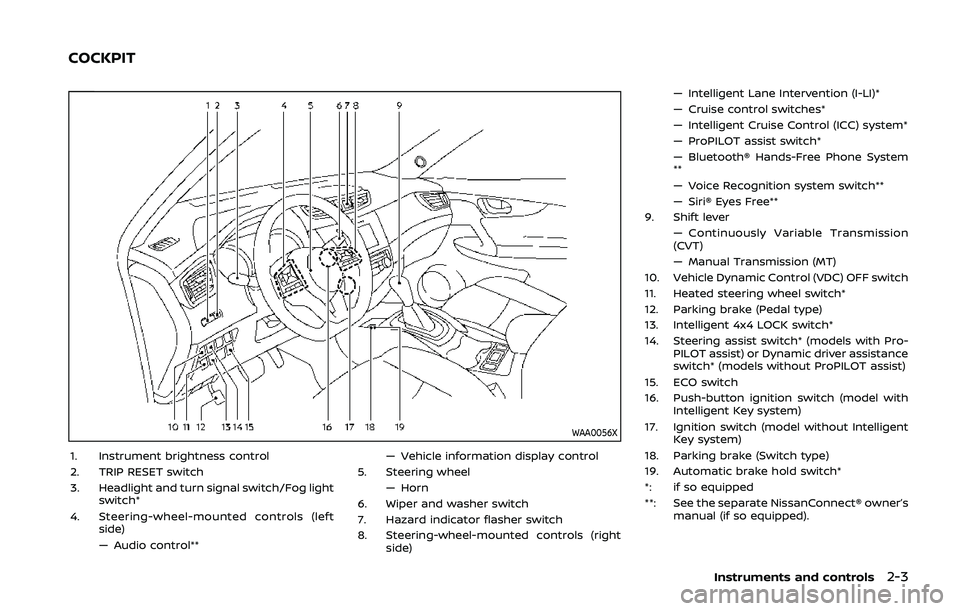
1. Instrument brightness control
2. TRIP RESET switch
3. Headlight and turn signal switch/Fog lightswitch*
4. Steering-wheel-mounted controls (left side)
— Audio control** — Vehicle information display control
5. Steering wheel — Horn
6. Wiper and washer switch
7. Hazard indicator flasher switch
8. Steering-wheel-mounted controls (right side) — Intelligent Lane Intervention (I-LI)*
— Cruise control switches*
— Intelligent Cruise Control (ICC) system*
— ProPILOT assist switch*
— Bluetooth® Hands-Free Phone System
**
— Voice Recognition system switch**
— Siri® Eyes Free**
9. Shift lever — Continuously Variable Transmission
(CVT)
— Manual Transmission (MT)
10. Vehicle Dynamic Control (VDC) OFF switch
11. Heated steering wheel switch*
12. Parking brake (Pedal type)
13. Intelligent 4x4 LOCK switch*
14. Steering assist switch* (models with Pro- PILOT assist) or Dynamic driver assistance
switch* (models without ProPILOT assist)
15. ECO switch
16. Push-button ignition switch (model with Intelligent Key system)
17. Ignition switch (model without Intelligent Key system)
18. Parking brake (Switch type)
19. Automatic brake hold switch*
*: if so equipped
**: See the separate NissanConnect® owner’s manual (if so equipped).
Instruments and controls2-3
COCKPIT
Page 86 of 500
2-6Instruments and controls
JVI1006XSpeedometer
SPEEDOMETER AND ODOMETER
Speedometer
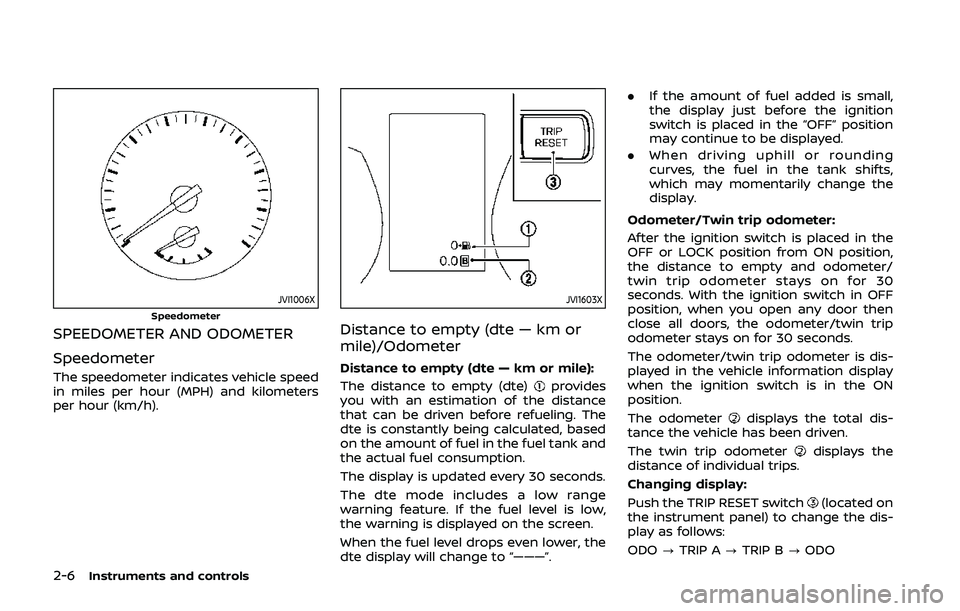
The speedometer indicates vehicle speed
in miles per hour (MPH) and kilometers
per hour (km/h).
JVI1603X
Distance to empty (dte — km or
mile)/Odometer
Distance to empty (dte — km or mile):
The distance to empty (dte)
provides
you with an estimation of the distance
that can be driven before refueling. The
dte is constantly being calculated, based
on the amount of fuel in the fuel tank and
the actual fuel consumption.
The display is updated every 30 seconds.
The dte mode includes a low range
warning feature. If the fuel level is low,
the warning is displayed on the screen.
When the fuel level drops even lower, the
dte display will change to “———”. .
If the amount of fuel added is small,
the display just before the ignition
switch is placed in the “OFF” position
may continue to be displayed.
. When driving uphill or rounding
curves, the fuel in the tank shifts,
which may momentarily change the
display.
Odometer/Twin trip odometer:
After the ignition switch is placed in the
OFF or LOCK position from ON position,
the distance to empty and odometer/
twin trip odometer stays on for 30
seconds. With the ignition switch in OFF
position, when you open any door then
close all doors, the odometer/twin trip
odometer stays on for 30 seconds.
The odometer/twin trip odometer is dis-
played in the vehicle information display
when the ignition switch is in the ON
position.
The odometer
displays the total dis-
tance the vehicle has been driven.
The twin trip odometer
displays the
distance of individual trips.
Changing display:
Push the TRIP RESET switch
(located on
the instrument panel) to change the dis-
play as follows:
ODO ?TRIP A ?TRIP B ?ODO
Page 87 of 500
Resetting twin trip odometer:
Push the TRIP RESET switch
for more
than 1 second to reset the trip odometer
to zero.
JVI0951X
TACHOMETER
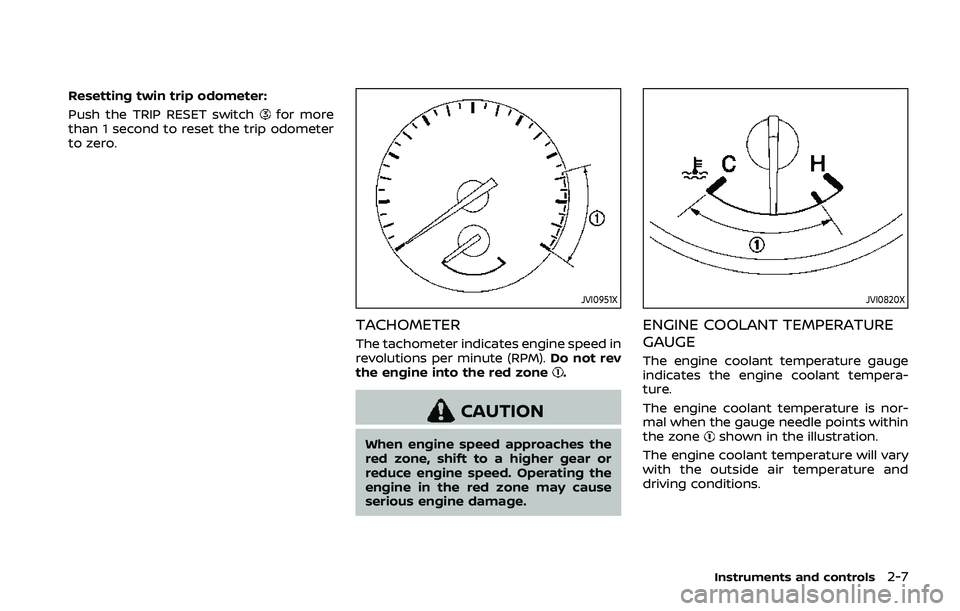
The tachometer indicates engine speed in
revolutions per minute (RPM). Do not rev
the engine into the red zone
.
CAUTION
When engine speed approaches the
red zone, shift to a higher gear or
reduce engine speed. Operating the
engine in the red zone may cause
serious engine damage.
JVI0820X
ENGINE COOLANT TEMPERATURE
GAUGE
The engine coolant temperature gauge
indicates the engine coolant tempera-
ture.
The engine coolant temperature is nor-
mal when the gauge needle points within
the zone
shown in the illustration.
The engine coolant temperature will vary
with the outside air temperature and
driving conditions.
Instruments and controls2-7
Page 88 of 500
2-8Instruments and controls
CAUTION
.If the gauge indicates the engine
coolant temperature is near the
hot (H) end of the normal range,
reduce vehicle speed to decrease
the temperature.
. If the gauge is over the normal
range, stop the vehicle as soon as
safely possible and let the engine
idle.
. If the engine is overheated, con-
tinued operation of the vehicle
may seriously damage the en-
gine. (See “If your vehicle over-
heats” (P.6-11) for immediate
action required.)
JVI0640X
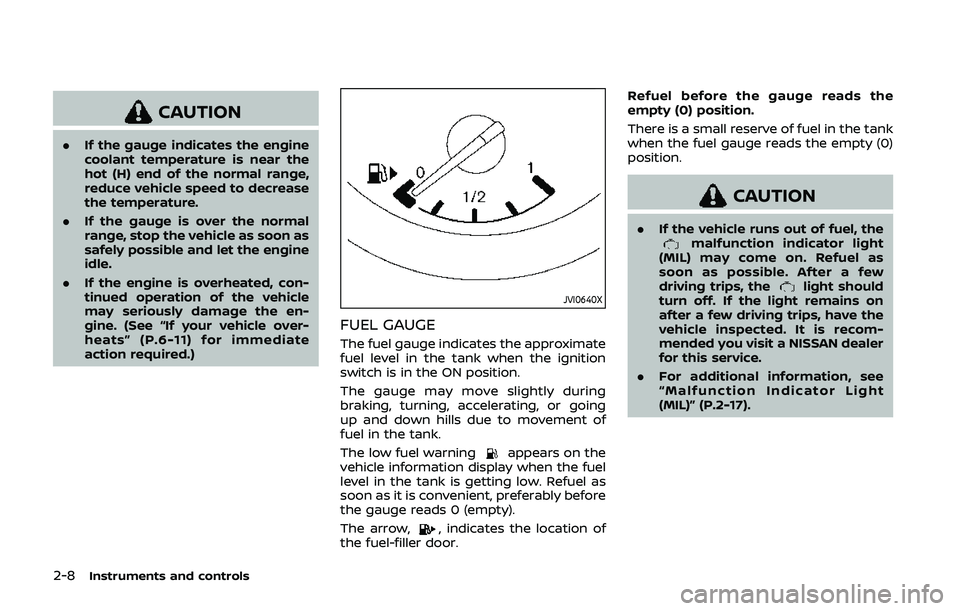
FUEL GAUGE
The fuel gauge indicates the approximate
fuel level in the tank when the ignition
switch is in the ON position.
The gauge may move slightly during
braking, turning, accelerating, or going
up and down hills due to movement of
fuel in the tank.
The low fuel warning
appears on the
vehicle information display when the fuel
level in the tank is getting low. Refuel as
soon as it is convenient, preferably before
the gauge reads 0 (empty).
The arrow,
, indicates the location of
the fuel-filler door. Refuel before the gauge reads the
empty (0) position.
There is a small reserve of fuel in the tank
when the fuel gauge reads the empty (0)
position.
CAUTION
.
If the vehicle runs out of fuel, themalfunction indicator light
(MIL) may come on. Refuel as
soon as possible. After a few
driving trips, the
light should
turn off. If the light remains on
after a few driving trips, have the
vehicle inspected. It is recom-
mended you visit a NISSAN dealer
for this service.
. For additional information, see
“Malfunction Indicator Light
(MIL)” (P.2-17).
Page 92 of 500
2-12Instruments and controls
gerous.
. Pressing the brake pedal with the
engine stopped and/or low brake
fluid level may increase your
stopping distance and braking
will require greater pedal effort
as well as pedal travel.
. If the brake fluid level is below the
minimum or MIN mark on the
brake fluid reservoir, do not drive
until the brake system has been
checked. It is recommended you
visit a NISSAN dealer for this
service.
Charge warning light
If the light illuminates while the engine is
running, it may indicate the charging
system is not functioning properly. Turn
the engine off and check the alternator
belt. If the belt is loose, broken, missing or
if the light remains on, have your vehicle
serviced immediately. It is recommended
you visit a NISSAN dealer for this service.
CAUTION
Do not continue driving if the alter-
nator belt is loose, broken or miss- ing.
Electric power steering warn-
ing light
When the ignition switch is in the ON
position, the electric power steering
warning light illuminates. After starting
the engine, the electric power steering
warning light turns off. This indicates the
electric power steering is operational.
If the electric power steering warning
light illuminates while the engine is run-
ning, it may indicate the electric power
steering is not functioning properly and
may need servicing. Have the system
checked. It is recommended that you visit
a NISSAN dealer for this service.
When the electric power steering warning
light illuminates with the engine running,
the power assist to the steering will cease
operation but you will still have control of
the vehicle. At this time, greater steering
efforts are required to operate the steer-
ing wheel, especially in sharp turns and at
low speeds.
(See “Electric power steering” (P.5-144).)
Electronic parking brake
warning light (yellow) (if so
equipped)
The electronic parking brake warning
light functions for the electronic parking
brake system. When the ignition switch is
placed in the ON position, the light
illuminates for a few seconds. If the
warning light illuminates at any other
time, it may indicate that the electronic
parking brake system is not functioning
properly. Have the brake system checked,
and, if necessary, repaired. It is recom-
mended that you visit a NISSAN dealer for
this service.
Automatic Emergency Braking
(AEB) system warning light
When the ignition switch is in the ON
position, the AEB system warning light
illuminates. After starting the engine, the
warning light turns off.
This light illuminates when the AEB sys-
tem is set to OFF on the vehicle informa-
tion display.
If the light illuminates when the AEB
system is ON, it may indicate that the
system is unavailable. See “Automatic
Emergency Braking (AEB)” (P.5-115) or
“Automatic Emergency Braking (AEB) with