light NISSAN QASHQAI 2020 Owner´s Manual
[x] Cancel search | Manufacturer: NISSAN, Model Year: 2020, Model line: QASHQAI, Model: NISSAN QASHQAI 2020Pages: 492, PDF Size: 2.02 MB
Page 140 of 492

2-58Instruments and controls
JVI1591X
TURN SIGNAL SWITCH
Turn signal
Move the lever up or down to signal the
turning direction. When the turn is com-
pleted, the turn signals cancel automati-
cally.
Lane change signal
Move the lever up or down until the turn
signal begins to flash, but the lever does
not latch, to signal a lane change. Hold
the lever until the lane change is com-
pleted.
Move the lever up or down until the turn
signal begins to flash, but the lever does
not latch, and release the lever. The turnsignal will automatically flash three times.
Choose the appropriate method to signal
a lane change based on road and traffic
conditions.
JVI0980X
FOG LIGHT SWITCH (if so equipped)
To turn the fog lights on, turn the head-
light switch to theposition, then turn
the fog light switch to theposition.
To turn the fog lights on with the head-
light switch in the AUTO position, the
headlights must be on, then turn the fog
light switch to the
position.
To turn them off, turn the fog light switch
to the OFF position.
The headlights must be on for the fog
lights to operate. The fog lights automa-
tically turn off when the high beam
headlights are selected.
Page 141 of 492

JVI1569X
To sound the horn, push the center pad
area of the steering wheel.
WARNING
Do not disassemble the horn. Doing
so could affect proper operation of
the supplemental front air bag sys-
tem. Tampering with the supple-
mental front air bag system may
result in serious personal injury.
JVI1592X
The heated steering wheel system is
designed to operate only when the sur-
face temperature of the steering wheel is
below 68°F (20°C).
Push the heated steering wheel switch to
warm the steering wheel after the engine
starts. The indicator light on the switch
will illuminate.
If the surface temperature of the steering
wheel is below 68°F (20°C), the system will
heat the steering wheel and cycle off and
on to maintain a temperature above 68°F
(20°C). The indicator light will remain on
as long as the system is on.
Push the switch again to turn the heated
steering wheel system off manually. Theindicator light will turn off.
NOTE:
If the surface temperature of the steer-
ing wheel is above 68°F (20°C) when the
switch is turned on, the system will not
heat the steering wheel. This is not a
malfunction.
Instruments and controls2-59
HORNHEATED STEERING WHEEL (if so equipped)
Page 142 of 492
2-60Instruments and controls
WARNING
Do not use or allow occupants to use
the seat heater if you or the occu-
pants cannot monitor elevated seat
temperatures or have an inability to
feel pain in body parts that contact
the seat. Use of the seat heater by
such people could result in serious
injury.
CAUTION
.The battery could run down if the
seat heater is operated while the
engine is not running.
. Do not use the seat heater for
extended periods or when no one
is using the seat.
. Do not put anything on the seat
which insulates heat, such as a
blanket, cushion, seat cover, etc.
Otherwise, the seat may become
overheated.
. Do not place anything hard or
heavy on the seat or pierce it with
a pin or similar object. This may
result in damage to the heater. .
Any liquid spilled on the heated
seat should be removed immedi-
ately with a dry cloth.
. When cleaning the seat, never use
gasoline, thinner, or any similar
materials.
. If any malfunctions are found or
the heated seat does not operate,
turn the switch off and have the
system checked. It is recom-
mended you visit a NISSAN dealer
for this service.
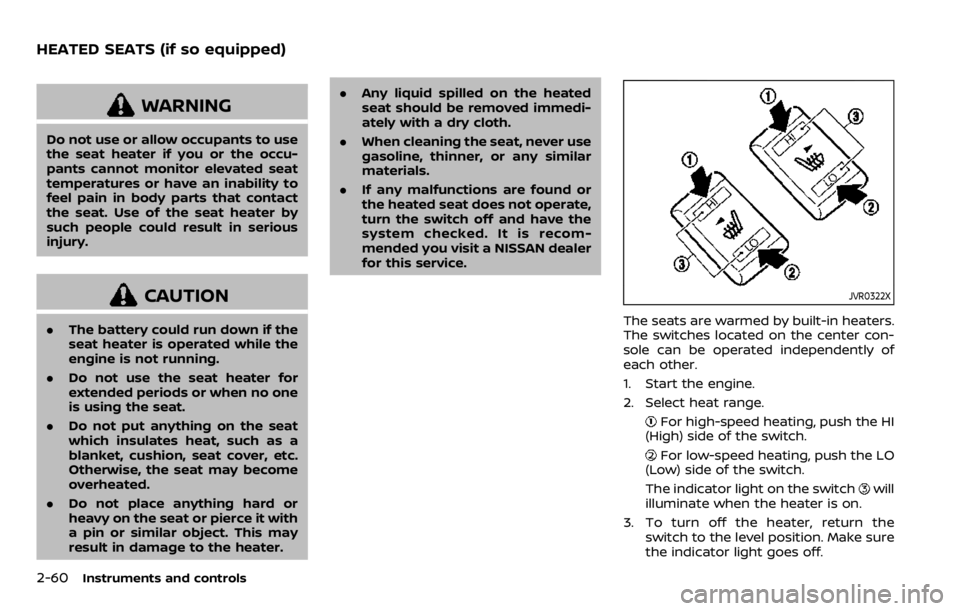
JVR0322X
The seats are warmed by built-in heaters.
The switches located on the center con-
sole can be operated independently of
each other.
1. Start the engine.
2. Select heat range.
For high-speed heating, push the HI
(High) side of the switch.
For low-speed heating, push the LO
(Low) side of the switch.
The indicator light on the switch
will
illuminate when the heater is on.
3. To turn off the heater, return the switch to the level position. Make sure
the indicator light goes off.
HEATED SEATS (if so equipped)
Page 143 of 492

The heater is controlled by a thermo-
stat, automatically turning the heater
on and off. The indicator light will
remain on as long as the switch is on.
When the vehicle’s interior is warmed,
or before you leave the vehicle, be
sure to turn off the switch.
JVI1593X
The dynamic driver assistance switch is
used to temporarily turn on and off the
Intelligent Lane Intervention (I-LI) system.
The I-LI system must be turned on with
the dynamic driver assistance switch
every time the ignition is placed in the
ON position.
When the dynamic driver assistance
switch is turned off, the indicator
on
the switch is off. The indicator will also be
off if the I-LI system is deactivated using
the vehicle information display.
The I-LI system warns the driver with an
indicator and a chime, and helps assist
the driver to return the vehicle to the
center of the traveling lane by applying the brakes to the left or right wheels
individually (for a short period of time). For
additional information, see “Intelligent
Lane Intervention (I-LI)” (P.5-40).
Instruments and controls2-61
DYNAMIC DRIVER ASSISTANCE SWITCH
(models without ProPILOT assist)
Page 144 of 492

2-62Instruments and controls
WAC0074X
The steering assist switch is used to
temporarily turn on and off the steering
assist system.
The steering assist system controls the
steering system to help keep your vehicle
near the center of the lane when driving.
For additional information, see “ProPILOT
assist” (P.5-66).
SIC4544
The vehicle should be driven with the
Vehicle Dynamic Control (VDC) system on
for most driving conditions.
If the vehicle is stuck in mud or snow, the
VDC system reduces the engine output to
reduce wheel spin. The engine speed will
be reduced even if the accelerator is
depressed to the floor. If maximum en-
gine power is needed to free a stuck
vehicle, turn the VDC system off.
To turn off the VDC system, push the VDC
OFF switch. The
indicator light will
illuminate.
Push the VDC OFF switch again or restart
the engine to turn on the system. (See
“Vehicle Dynamic Control (VDC) system” (P.5-129).)
STEERING ASSIST SWITCH (models
with ProPILOT assist)
VEHICLE DYNAMIC CONTROL (VDC)
OFF SWITCH
Page 145 of 492

JVI1595X
The Intelligent 4x4 LOCK switch is located
on the instrument panel. The AWD LOCK
indicator light will illuminate when the
switch is turned on. For additional infor-
mation, refer to “Intelligent 4x4” (P.5-121).
Each time you push the switch, the AWD
mode will switch: AUTO?LOCK ?AUTO.
The Rear Door Alert system functions
under certain conditions to indicate there
may be an object or passenger in the rear
seat(s). Check the seat(s) before exiting
the vehicle.
The Rear Door Alert system is initially
disabled. The driver can enable the sys-
tem using the vehicle information display.
For additional information, see “Vehicle
Settings” (P.2-23).
When the system is enabled:
. The system is activated when a rear
door is opened and closed within 10
minutes of the vehicle being driven.
When the vehicle is started and the
system is activated, a visual message
appears in the vehicle information
display. For additional information,
see “44. Rear Door Alert is activated”
(P.2-36).
. If a rear door is opened and closed but
the vehicle is not driven within ap-
proximately 10 minutes, the system
will not be activated. A rear door must
be opened and closed and the vehicle
is driven within 10 minutes for the
system to activate.
When the Rear Door Alert system is
activated and a driver exits the vehicle
after arriving at a destination: .
When the driver puts the vehicle in the
P (Park) position, a message appears
in the vehicle information display for
the driver to “Dismiss Message” or
“Disable Alert” if desired.
. With the system enabled, when the
driver exits the vehicle, an audible alert
(horn sound) will occur unless a rear
door is opened and closed within a
short time to deactivate the alert.
. If the doors are locked before the alert
is deactivated by opening a rear door,
the horn will sound.
. If the system is activated but the
liftgate is opened before opening a
rear door, the horn will be delayed
until after the liftgate is closed.
. If the audible horn alert occurs, a
message will also appear in the vehi-
cle information display that states,
“Check Back Seat for all articles”. For
additional information, see “45. Check
Back Seat For all articles” (P.2-36).
WARNING
.If the driver selects “Disable
Alert”, no audible alert will be
provided regardless of rear door
open/close status.
Instruments and controls2-63
INTELLIGENT 4X4 LOCK SWITCH (if
so equipped) REAR DOOR ALERT
Page 147 of 492
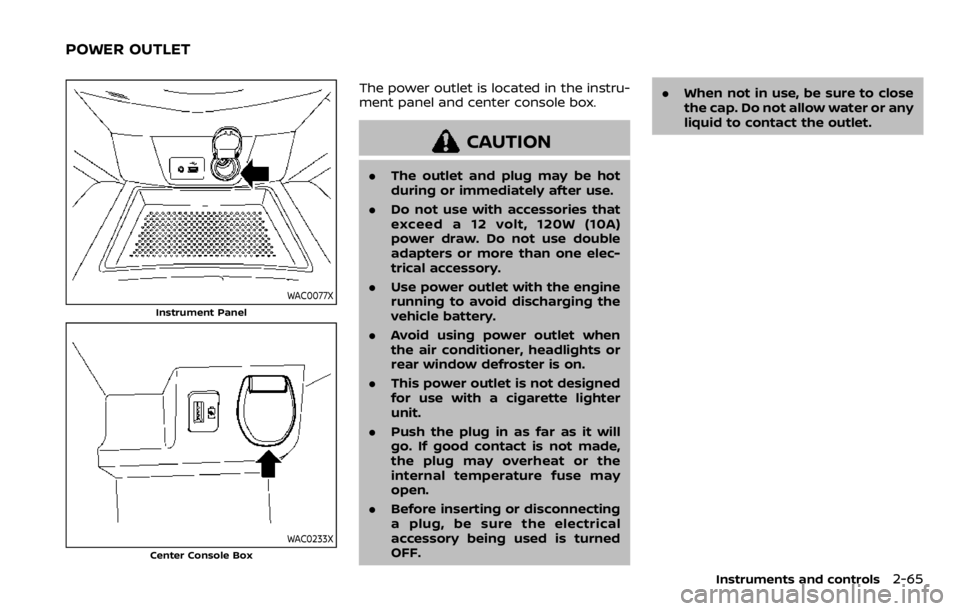
WAC0077X
Instrument Panel
WAC0233X
Center Console Box
The power outlet is located in the instru-
ment panel and center console box.
CAUTION
.The outlet and plug may be hot
during or immediately after use.
. Do not use with accessories that
exceed a 12 volt, 120W (10A)
power draw. Do not use double
adapters or more than one elec-
trical accessory.
. Use power outlet with the engine
running to avoid discharging the
vehicle battery.
. Avoid using power outlet when
the air conditioner, headlights or
rear window defroster is on.
. This power outlet is not designed
for use with a cigarette lighter
unit.
. Push the plug in as far as it will
go. If good contact is not made,
the plug may overheat or the
internal temperature fuse may
open.
. Before inserting or disconnecting
a plug, be sure the electrical
accessory being used is turned
OFF. .
When not in use, be sure to close
the cap. Do not allow water or any
liquid to contact the outlet.
Instruments and controls2-65
POWER OUTLET
Page 150 of 492
2-68Instruments and controls
may cause the luggage board to
be tilted, resulting in personal
injury.
. Do not handle the luggage board
forcibly as this may deform it.
. While in the upper position, do
not recline the seatbacks.
. Do not place cargo higher than
the seatbacks. In a sudden stop
or collision, unsecured cargo
could cause personal injury.
NOTE:
The diversity of the cargo area may be
restricted depending on the equipment
of each vehicle.
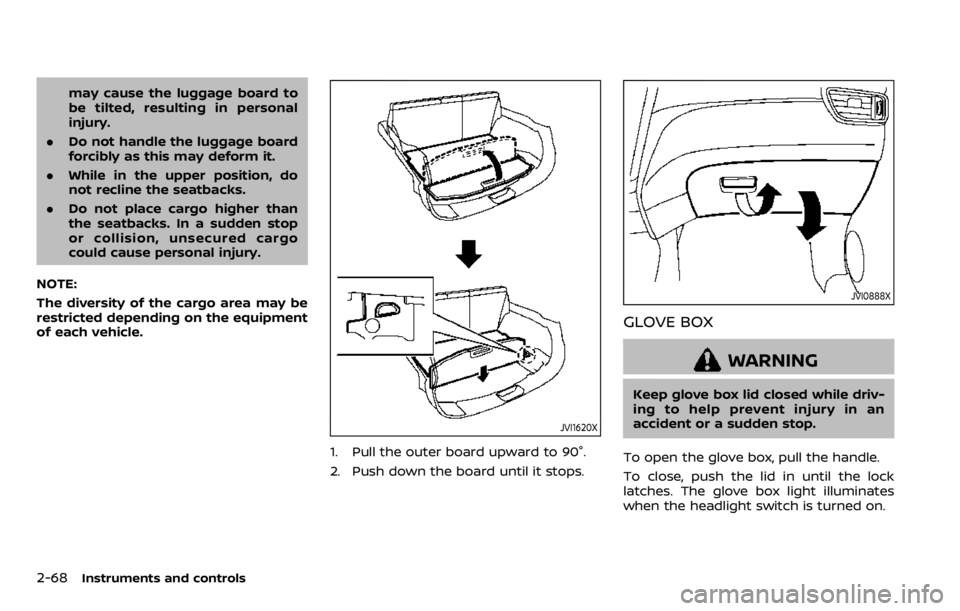
JVI1620X
1. Pull the outer board upward to 90°.
2. Push down the board until it stops.
JVI0888X
GLOVE BOX
WARNING
Keep glove box lid closed while driv-
ing to help prevent injury in an
accident or a sudden stop.
To open the glove box, pull the handle.
To close, push the lid in until the lock
latches. The glove box light illuminates
when the headlight switch is turned on.
Page 151 of 492
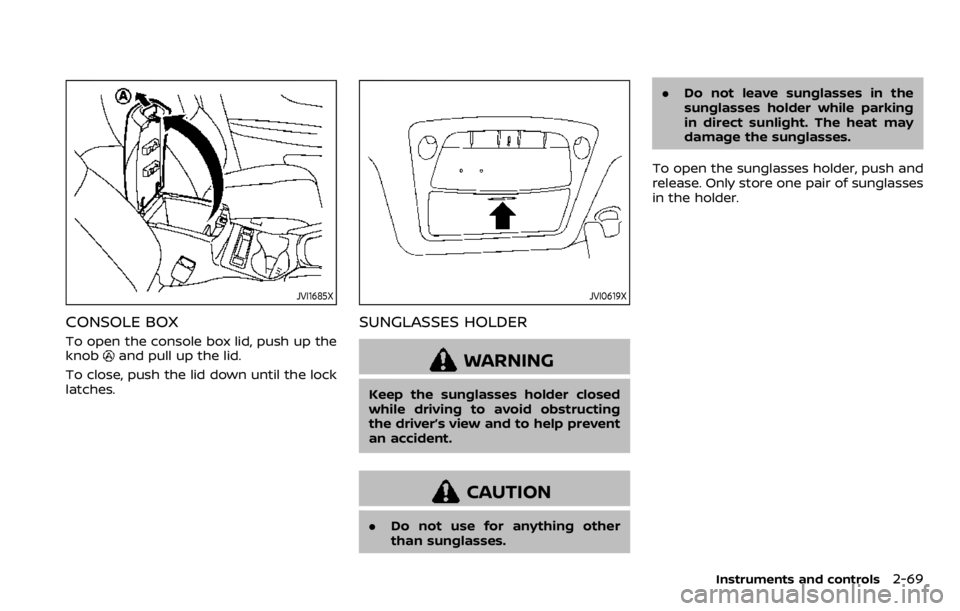
JVI1685X
CONSOLE BOX
To open the console box lid, push up the
knoband pull up the lid.
To close, push the lid down until the lock
latches.
JVI0619X
SUNGLASSES HOLDER
WARNING
Keep the sunglasses holder closed
while driving to avoid obstructing
the driver’s view and to help prevent
an accident.
CAUTION
. Do not use for anything other
than sunglasses. .
Do not leave sunglasses in the
sunglasses holder while parking
in direct sunlight. The heat may
damage the sunglasses.
To open the sunglasses holder, push and
release. Only store one pair of sunglasses
in the holder.
Instruments and controls2-69
Page 157 of 492
SIC4524
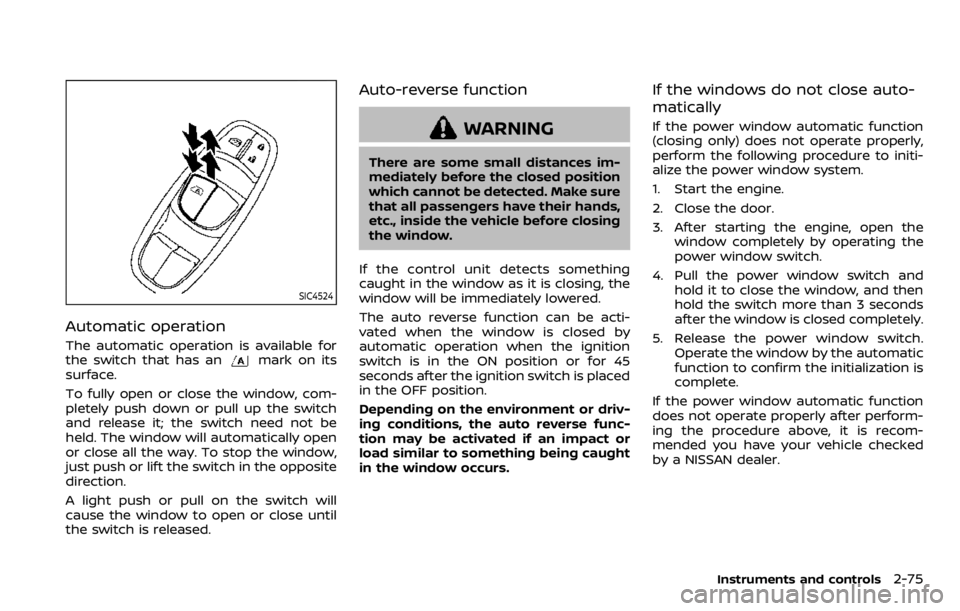
Automatic operation
The automatic operation is available for
the switch that has anmark on its
surface.
To fully open or close the window, com-
pletely push down or pull up the switch
and release it; the switch need not be
held. The window will automatically open
or close all the way. To stop the window,
just push or lift the switch in the opposite
direction.
A light push or pull on the switch will
cause the window to open or close until
the switch is released.
Auto-reverse function
WARNING
There are some small distances im-
mediately before the closed position
which cannot be detected. Make sure
that all passengers have their hands,
etc., inside the vehicle before closing
the window.
If the control unit detects something
caught in the window as it is closing, the
window will be immediately lowered.
The auto reverse function can be acti-
vated when the window is closed by
automatic operation when the ignition
switch is in the ON position or for 45
seconds after the ignition switch is placed
in the OFF position.
Depending on the environment or driv-
ing conditions, the auto reverse func-
tion may be activated if an impact or
load similar to something being caught
in the window occurs.
If the windows do not close auto-
matically
If the power window automatic function
(closing only) does not operate properly,
perform the following procedure to initi-
alize the power window system.
1. Start the engine.
2. Close the door.
3. After starting the engine, open the window completely by operating the
power window switch.
4. Pull the power window switch and hold it to close the window, and then
hold the switch more than 3 seconds
after the window is closed completely.
5. Release the power window switch. Operate the window by the automatic
function to confirm the initialization is
complete.
If the power window automatic function
does not operate properly after perform-
ing the procedure above, it is recom-
mended you have your vehicle checked
by a NISSAN dealer.
Instruments and controls2-75