USB port NISSAN QUEST 2017 RE52 / 4.G User Guide
[x] Cancel search | Manufacturer: NISSAN, Model Year: 2017, Model line: QUEST, Model: NISSAN QUEST 2017 RE52 / 4.GPages: 520, PDF Size: 2.5 MB
Page 288 of 520
the “OK” key.
The specified folder/file will be played.
. Display
To adjust the image quality of the screen,
select the preferred adjustment items.
. DRC
DRC (Dynamic Range Compression) auto-
matically adjusts the soundtrack volume
level to maintain a more even sound to the
speakers.
. Audio
Select the preferred language for audio.
. Subtitle
Select the preferred language for subtitle.
. Display Mode
Select the “Normal”, “Wide”, “Cinema” or
“Full” mode.
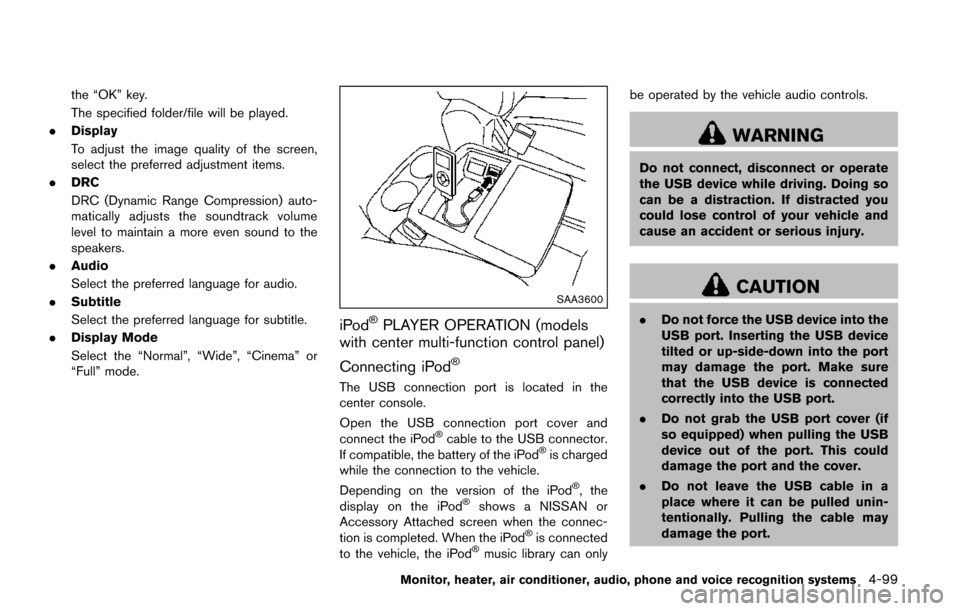
SAA3600
iPodŠPLAYER OPERATION (models
with center multi-function control panel)
Connecting iPod
Š
The USB connection port is located in the
center console.
Open the USB connection port cover and
connect the iPod
Šcable to the USB connector.
If compatible, the battery of the iPodŠis charged
while the connection to the vehicle.
Depending on the version of the iPod
Š, the
display on the iPodŠshows a NISSAN or
Accessory Attached screen when the connec-
tion is completed. When the iPod
Šis connected
to the vehicle, the iPodŠmusic library can only be operated by the vehicle audio controls.
WARNING
Do not connect, disconnect or operate
the USB device while driving. Doing so
can be a distraction. If distracted you
could lose control of your vehicle and
cause an accident or serious injury.
CAUTION
.
Do not force the USB device into the
USB port. Inserting the USB device
tilted or up-side-down into the port
may damage the port. Make sure
that the USB device is connected
correctly into the USB port.
. Do not grab the USB port cover (if
so equipped) when pulling the USB
device out of the port. This could
damage the port and the cover.
. Do not leave the USB cable in a
place where it can be pulled unin-
tentionally. Pulling the cable may
damage the port.
Monitor, heater, air conditioner, audio, phone and voice recognition systems4-99
Page 296 of 520
AUX Menu
When the “Menu” key on the display is selected
while in the AUX mode, the menu screen will be
displayed.
Display Mode:
Choose the display mode from the following
items.
.Normal
. Wide
. Cinema
Volume Settings (models with navigation
system):
Choose the volume setting from the following
items.
. Low
. Medium
. High
Display (models with navigation system):
Adjust the image quality of the screen, select the
preferred adjustment items.
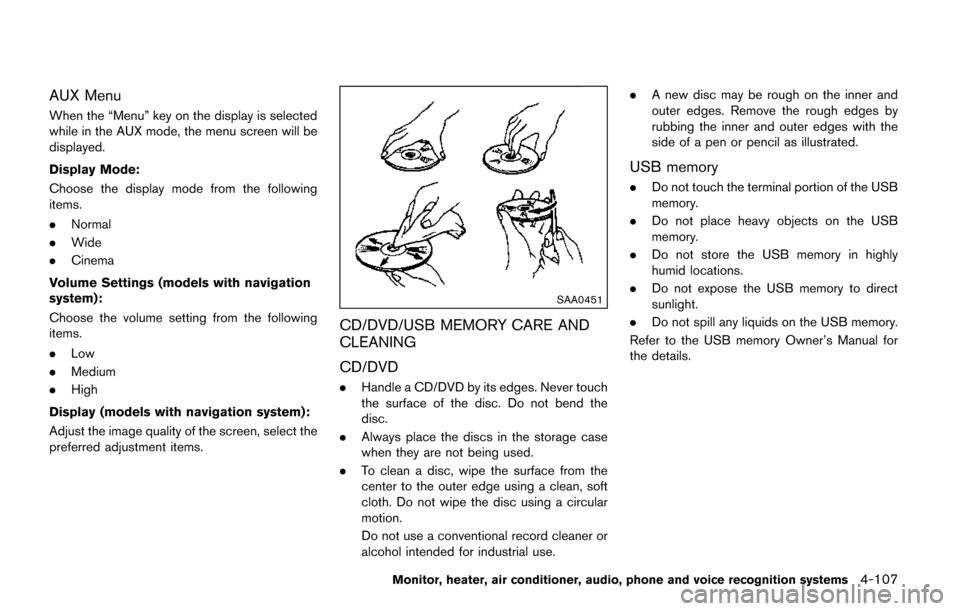
SAA0451
CD/DVD/USB MEMORY CARE AND
CLEANING
CD/DVD
. Handle a CD/DVD by its edges. Never touch
the surface of the disc. Do not bend the
disc.
. Always place the discs in the storage case
when they are not being used.
. To clean a disc, wipe the surface from the
center to the outer edge using a clean, soft
cloth. Do not wipe the disc using a circular
motion.
Do not use a conventional record cleaner or
alcohol intended for industrial use. .
A new disc may be rough on the inner and
outer edges. Remove the rough edges by
rubbing the inner and outer edges with the
side of a pen or pencil as illustrated.
USB memory
.Do not touch the terminal portion of the USB
memory.
. Do not place heavy objects on the USB
memory.
. Do not store the USB memory in highly
humid locations.
. Do not expose the USB memory to direct
sunlight.
. Do not spill any liquids on the USB memory.
Refer to the USB memory Owner’s Manual for
the details.
Monitor, heater, air conditioner, audio, phone and voice recognition systems4-107
Page 517 of 520
11-6
Turn signal switch ................................................ 2-38
Vehicle dynamic control (VDC) off switch .... 2-41
T
Tachometer ..................................................................... 2-7
Temperature display ................................................... 2-26
Temperature gauge, Engine coolant
temperature gauge ....................................................... 2-7
Theft (NISSAN Vehicle Immobilizer System) ,
Engine start .................................................................. 2-30
Three-way catalyst ....................................................... 5-3
Tilt/telescopic steering .............................................. 3-32
TirePressure, Low tire pressure warning light .... 2-14
Tire replacement indicator ................................. 2-23
Tires Flat tire ...................................................................... 6-3
Low tire pressure warning system ..................... 5-3
Tire and Loading Information label .... 8-29, 10-10
Tire chains ............................................................. 8-33
Tire dressing ............................................................ 7-4
Tire pressure ......................................................... 8-27
Tire pressure monitoring
system (TPMS) .............................................. 5-3, 6-3
Tire rotation ........................................................... 8-35
Types of tires ........................................................ 8-33
Uniform tire quality grading ............................. 10-24
Wheel/tire size ..................................................... 10-7
Wheels and tires ................................................. 8-27
Top tether strap child restraints .............................. 1-32
Touch screen system ................................................... 4-7
Towing Flat towing ........................................................... 10-23
Tow truck towing ................................................. 6-14
Towing a trailer ................................................... 10-15
Towing safety ...................................................... 10-20 TPMS, Tire pressure monitoring system ................ 5-3
TPMS with Easy Fill Tire Alert ............................ 5-6
TPMS, Tire pressure warning system ..................... 6-3
Trailer towing ............................................................ 10-15
Transceiver, HomeLink
ŠUniversal Transceiver .... 2-60
Transmission Continuously Variable Transmission
(CVT) fluid ................................................................ 8-8
Driving with CVT (Continuously
Variable Transmission) ....................................... 5-13
Transmission shift lever lock release .............. 5-16
Transmitter (See remote keyless
entry system) ............................................................... 3-21
Traveling or registering in another country........... 10-8
Trip computer .............................................................. 2-24
Trip odometer .............................................................. 2-25
Turn signal switch ....................................................... 2-38
U
Underbody cleaning ..................................................... 7-3
Uniform tire quality grading ................................... 10-24
USB (Universal Serial Bus)
connection port ............................................... 4-81, 4-94
V
Vanity mirror ................................................................. 3-36
Vanity mirror lights ...................................................... 2-59
Variable voltage control system .............................. 8-12
Vehicle Dimensions and weights ................................... 10-8
Identification number (VIN) ............................... 10-8
Loading information .......................................... 10-12
Recovery (freeing a stuck vehicle) .................. 6-15
Security system .................................................... 2-28
Vehicle dynamic control (VDC) off switch .... 2-41 Vehicle dynamic control (VDC) system ......... 5-32
Vehicle dynamic control (VDC)
warning light ......................................................... 2-16
Vehicle information display ....................................... 2-19
Ventilators ..................................................................... 4-46
Voice command (Bluetooth
ŠHands-Free
Phone System) ........................................................ 4-139
Voice command (NISSAN Voice
Recognition system) ................................. 4-160, 4-168
W
Warning Hazard warning flasher switch ............................ 6-2
Lights ...................................................................... 2-12
Tire pressure monitoring
system (TPMS) .............................................. 5-3, 6-3
Vehicle information display ................................ 2-19
Warning lights, indicator lights and
audible reminders ................................................ 2-11
Warning labels, Air bag warning labels ................ 1-63
Warning light
Air bag warning light ............................... 1-64, 2-15
Anti-lock braking system (ABS)
warning light ......................................................... 2-12
Brake warning light ............................................. 2-12
Intelligent Key system warning light ............... 2-14
Low tire pressure warning light ....................... 2-14
Seat belt warning light and chime .................. 2-15
Warranty, Emission control system warranty .... 10-25
Washer switch Rear window wiper and washer switch ........ 2-32
Wiper and washer switch ................................. 2-31
Washing .......................................................................... 7-2
Waxing ............................................................................ 7-2
Weights (See dimensions and weights) .............. 10-8
Wheel/tire size ............................................................ 10-7