door lock NISSAN QUEST 2017 RE52 / 4.G Owner's Manual
[x] Cancel search | Manufacturer: NISSAN, Model Year: 2017, Model line: QUEST, Model: NISSAN QUEST 2017 RE52 / 4.GPages: 520, PDF Size: 2.5 MB
Page 163 of 520
3-12Pre-driving checks and adjustments
The power sliding door system can be operated
when all of following conditions are satisfied.
.The vehicle is stopped.
. Battery voltage is normal.
. The sliding door is unlocked.
. The fuel-filler door is closed (for driver’s side
only) .
When the ignition switch is in the "ON" position,
the system can be operated in the above and
following conditions.
. Shift lever is set in the “P” (Park) position.
If the conditions are interrupted when the power
sliding door is being operated, the operation
could be stopped. In this case, meet the
conditions above and the power sliding door
operation will return to normal.
You can also switch the power liftgate between
power and manual operation using the power
door main switch. (See “Liftgate” (P.3-26).)
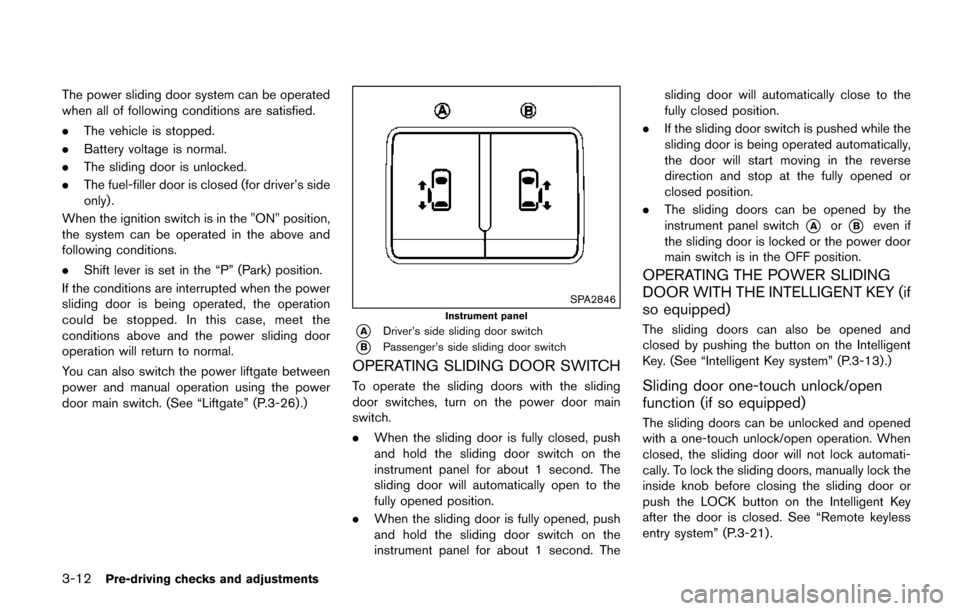
SPA2846
Instrument panel
*ADriver’s side sliding door switch
*BPassenger’s side sliding door switch
OPERATING SLIDING DOOR SWITCH
To operate the sliding doors with the sliding
door switches, turn on the power door main
switch.
. When the sliding door is fully closed, push
and hold the sliding door switch on the
instrument panel for about 1 second. The
sliding door will automatically open to the
fully opened position.
. When the sliding door is fully opened, push
and hold the sliding door switch on the
instrument panel for about 1 second. The sliding door will automatically close to the
fully closed position.
. If the sliding door switch is pushed while the
sliding door is being operated automatically,
the door will start moving in the reverse
direction and stop at the fully opened or
closed position.
. The sliding doors can be opened by the
instrument panel switch
*Aor*Beven if
the sliding door is locked or the power door
main switch is in the OFF position.
OPERATING THE POWER SLIDING
DOOR WITH THE INTELLIGENT KEY (if
so equipped)
The sliding doors can also be opened and
closed by pushing the button on the Intelligent
Key. (See “Intelligent Key system” (P.3-13).)
Sliding door one-touch unlock/open
function (if so equipped)
The sliding doors can be unlocked and opened
with a one-touch unlock/open operation. When
closed, the sliding door will not lock automati-
cally. To lock the sliding doors, manually lock the
inside knob before closing the sliding door or
push the LOCK button on the Intelligent Key
after the door is closed. See “Remote keyless
entry system” (P.3-21) .
Page 164 of 520
OPERATING SLIDING DOOR BY
POWER ASSIST
To operate, pull the inside or outside door
handle until you hear the buzzer, the door will
automatically open or close.
If the door handle is operated while the sliding
door is moving, the door will reverse directions
and stop at either the full open or closed
position.
SLIDING DOOR AUTO REVERSE
FUNCTION
If an obstacle is detected while the power
sliding door is being operated, the door will
reverse directions and return to the full open or
full closed position.
If you touch the sensor of the sliding door while
the sliding door is closing automatically, the door
will start moving in the reverse direction and
stop at the fully opened position.
WARNING
.Radio waves could adversely affect
electric medical equipment. Those
who use a pacemaker should con-
tact the electric medical equipment
manufacturer for the possible influ-
ences before use.
. The Intelligent Key transmits radio
waves when the buttons are
pushed. The FAA advises that radio
waves may affect aircraft navigation
and communication systems. Do not
operate the Intelligent Key while on
an airplane. Make sure the buttons
are not operated unintentionally
when the unit is stored for a flight.
The Intelligent Key system can operate all the
door locks (including the liftgate) using the
remote keyless function or pushing the request
switch on the vehicle without taking the key out
from a pocket or purse. The operating environ-
ment and/or conditions may affect the Intelligent
Key system operation.
Be sure to read the following before using the
Intelligent Key system.
CAUTION
. Be sure to carry the Intelligent Key
with you when operating the vehi-
cle.
. Never leave the Intelligent Key in
the vehicle when you leave the
vehicle.
The Intelligent Key is always communicating with
the vehicle as it receives radio waves. The
Intelligent Key system transmits weak radio
signals. Environmental conditions may interfere
with the operation of the Intelligent Key system
under the following operating conditions.
. When operating near a location where
strong radio signals are transmitted, such
as a TV tower, power station and broad-
casting station.
. When in possession of wireless equipment,
such as a cellular telephone, transceiver,
and CB radio.
. When the Intelligent Key is in contact with or
covered by metallic materials.
. When any type of radio wave remote control
is used nearby.
. When the Intelligent Key is placed near an
electric appliance such as a personal
Pre-driving checks and adjustments3-13
INTELLIGENT KEY SYSTEM
Page 166 of 520
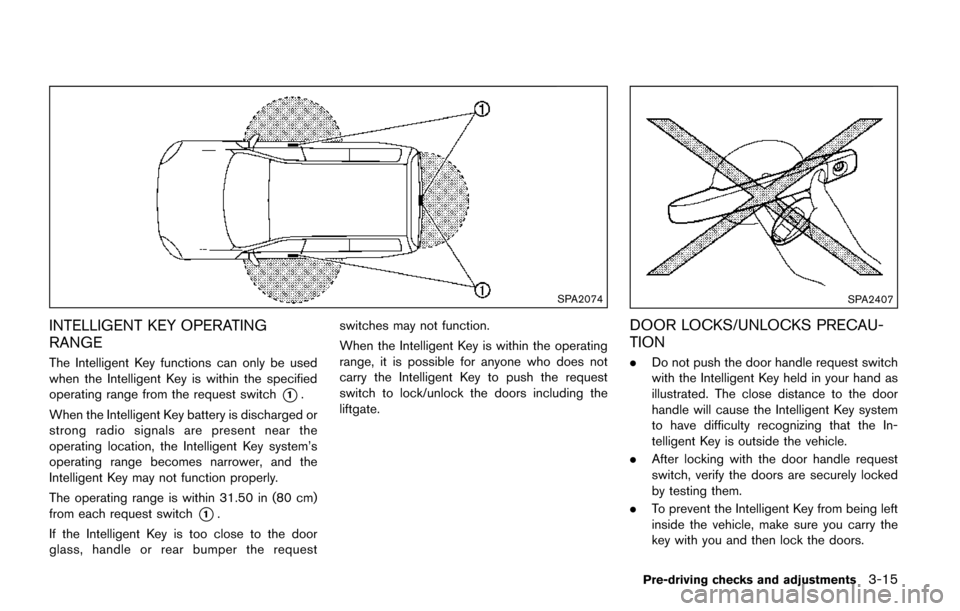
SPA2074
INTELLIGENT KEY OPERATING
RANGE
The Intelligent Key functions can only be used
when the Intelligent Key is within the specified
operating range from the request switch
*1.
When the Intelligent Key battery is discharged or
strong radio signals are present near the
operating location, the Intelligent Key system’s
operating range becomes narrower, and the
Intelligent Key may not function properly.
The operating range is within 31.50 in (80 cm)
from each request switch
*1.
If the Intelligent Key is too close to the door
glass, handle or rear bumper the request switches may not function.
When the Intelligent Key is within the operating
range, it is possible for anyone who does not
carry the Intelligent Key to push the request
switch to lock/unlock the doors including the
liftgate.
SPA2407
DOOR LOCKS/UNLOCKS PRECAU-
TION
.
Do not push the door handle request switch
with the Intelligent Key held in your hand as
illustrated. The close distance to the door
handle will cause the Intelligent Key system
to have difficulty recognizing that the In-
telligent Key is outside the vehicle.
. After locking with the door handle request
switch, verify the doors are securely locked
by testing them.
. To prevent the Intelligent Key from being left
inside the vehicle, make sure you carry the
key with you and then lock the doors.
Pre-driving checks and adjustments3-15
Page 167 of 520
3-16Pre-driving checks and adjustments
.Do not pull the door handle before pushing
the door handle request switch. The door
will be unlocked but will not open. Release
the door handle once and pull it again to
open the door.
. Models with center multi-function control
panel:
The Intelligent Key system (opening/closing
doors with the door handle request switch)
can be set to remain inactive. (See “Vehicle
information and settings (models with center
multi-function control panel)” (P.4-10) .)
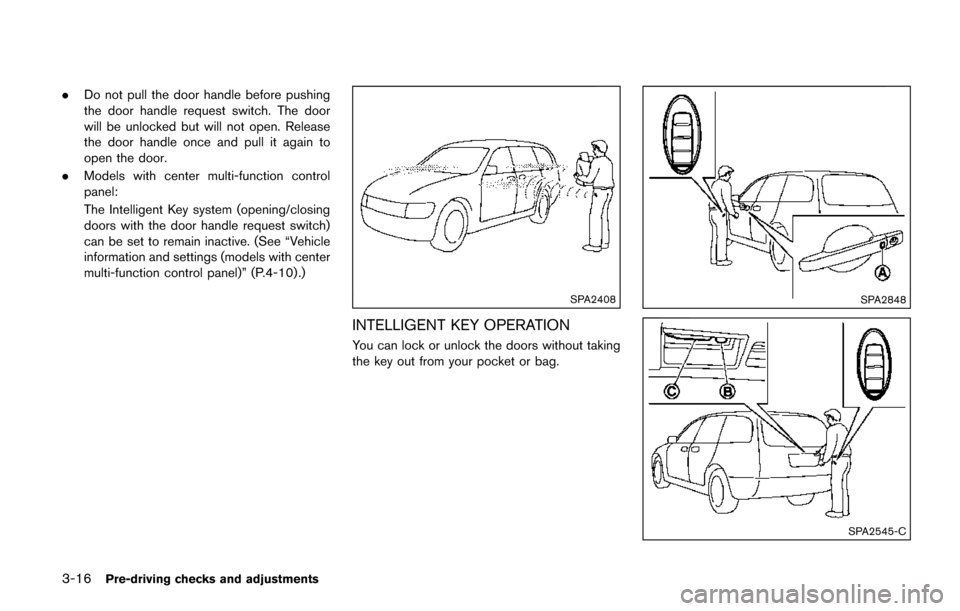
SPA2408
INTELLIGENT KEY OPERATION
You can lock or unlock the doors without taking
the key out from your pocket or bag.
SPA2848
SPA2545-C
Page 168 of 520
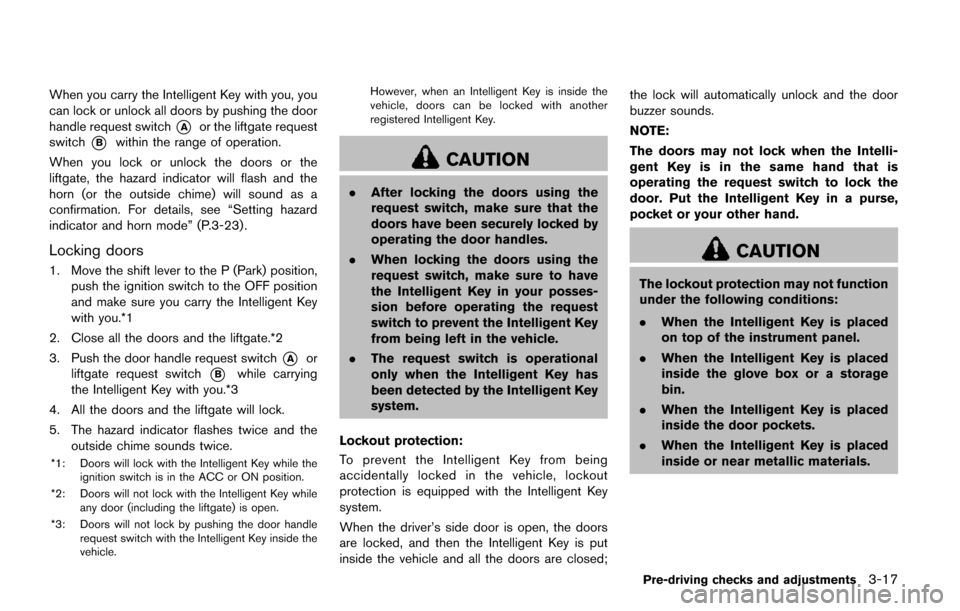
When you carry the Intelligent Key with you, you
can lock or unlock all doors by pushing the door
handle request switch
*Aor the liftgate request
switch
*Bwithin the range of operation.
When you lock or unlock the doors or the
liftgate, the hazard indicator will flash and the
horn (or the outside chime) will sound as a
confirmation. For details, see “Setting hazard
indicator and horn mode” (P.3-23) .
Locking doors
1. Move the shift lever to the P (Park) position, push the ignition switch to the OFF position
and make sure you carry the Intelligent Key
with you.*1
2. Close all the doors and the liftgate.*2
3. Push the door handle request switch
*Aor
liftgate request switch
*Bwhile carrying
the Intelligent Key with you.*3
4. All the doors and the liftgate will lock.
5. The hazard indicator flashes twice and the outside chime sounds twice.
*1: Doors will lock with the Intelligent Key while the
ignition switch is in the ACC or ON position.
*2: Doors will not lock with the Intelligent Key while any door (including the liftgate) is open.
*3: Doors will not lock by pushing the door handle request switch with the Intelligent Key inside the
vehicle. However, when an Intelligent Key is inside the
vehicle, doors can be locked with another
registered Intelligent Key.
CAUTION
.
After locking the doors using the
request switch, make sure that the
doors have been securely locked by
operating the door handles.
. When locking the doors using the
request switch, make sure to have
the Intelligent Key in your posses-
sion before operating the request
switch to prevent the Intelligent Key
from being left in the vehicle.
. The request switch is operational
only when the Intelligent Key has
been detected by the Intelligent Key
system.
Lockout protection:
To prevent the Intelligent Key from being
accidentally locked in the vehicle, lockout
protection is equipped with the Intelligent Key
system.
When the driver’s side door is open, the doors
are locked, and then the Intelligent Key is put
inside the vehicle and all the doors are closed; the lock will automatically unlock and the door
buzzer sounds.
NOTE:
The doors may not lock when the Intelli-
gent Key is in the same hand that is
operating the request switch to lock the
door. Put the Intelligent Key in a purse,
pocket or your other hand.
CAUTION
The lockout protection may not function
under the following conditions:
.
When the Intelligent Key is placed
on top of the instrument panel.
. When the Intelligent Key is placed
inside the glove box or a storage
bin.
. When the Intelligent Key is placed
inside the door pockets.
. When the Intelligent Key is placed
inside or near metallic materials.
Pre-driving checks and adjustments3-17
Page 169 of 520
3-18Pre-driving checks and adjustments
Unlocking doors
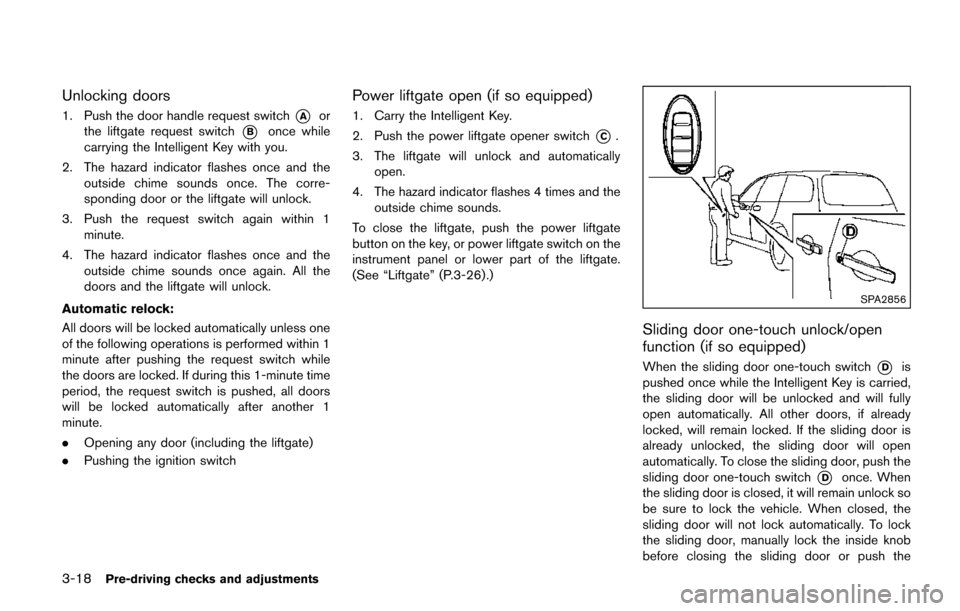
1. Push the door handle request switch*Aor
the liftgate request switch
*Bonce while
carrying the Intelligent Key with you.
2. The hazard indicator flashes once and the outside chime sounds once. The corre-
sponding door or the liftgate will unlock.
3. Push the request switch again within 1 minute.
4. The hazard indicator flashes once and the outside chime sounds once again. All the
doors and the liftgate will unlock.
Automatic relock:
All doors will be locked automatically unless one
of the following operations is performed within 1
minute after pushing the request switch while
the doors are locked. If during this 1-minute time
period, the request switch is pushed, all doors
will be locked automatically after another 1
minute.
. Opening any door (including the liftgate)
. Pushing the ignition switch
Power liftgate open (if so equipped)
1. Carry the Intelligent Key.
2. Push the power liftgate opener switch
*C.
3. The liftgate will unlock and automatically open.
4. The hazard indicator flashes 4 times and the outside chime sounds.
To close the liftgate, push the power liftgate
button on the key, or power liftgate switch on the
instrument panel or lower part of the liftgate.
(See “Liftgate” (P.3-26).)
SPA2856
Sliding door one-touch unlock/open
function (if so equipped)
When the sliding door one-touch switch*Dis
pushed once while the Intelligent Key is carried,
the sliding door will be unlocked and will fully
open automatically. All other doors, if already
locked, will remain locked. If the sliding door is
already unlocked, the sliding door will open
automatically. To close the sliding door, push the
sliding door one-touch switch
*Donce. When
the sliding door is closed, it will remain unlock so
be sure to lock the vehicle. When closed, the
sliding door will not lock automatically. To lock
the sliding door, manually lock the inside knob
before closing the sliding door or push the
Page 170 of 520
LOCK button on the Intelligent Key after the
door is closed. (See “Remote keyless entry
system” (P.3-21) .)
BATTERY SAVER SYSTEM
When all the following conditions are met for a
period of time, the battery saver system will cut
off the power supply to prevent battery dis-
charge.
.The ignition switch is in the ACC position,
and
. All doors are closed, and
. The shift lever is in the P (Park) position.
WARNING SIGNALS
To help prevent the vehicle from moving
unexpectedly by erroneous operation of the
Intelligent Key listed on the following chart or
to help prevent the vehicle from being stolen,
chime or beep sounds inside and outside the
vehicle and a warning displays in the vehicle
information display.
When a chime or beep sounds or the warning
displays, be sure to check the vehicle and
Intelligent Key.
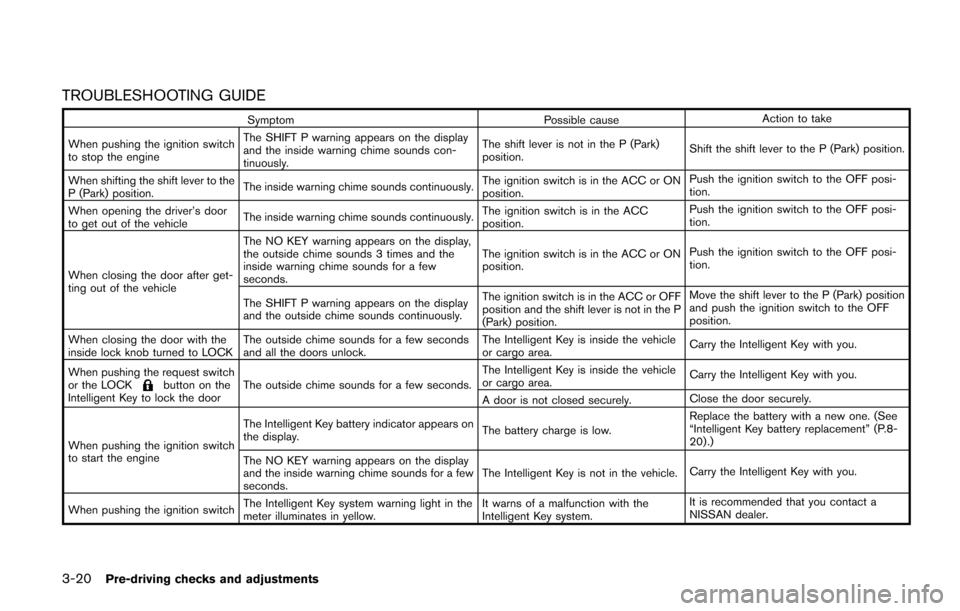
See “Troubleshooting guide” (P.3-20) and
“Vehicle information display” (P.2-19) .
Pre-driving checks and adjustments3-19
Page 171 of 520
3-20Pre-driving checks and adjustments
TROUBLESHOOTING GUIDE
SymptomPossible causeAction to take
When pushing the ignition switch
to stop the engine The SHIFT P warning appears on the display
and the inside warning chime sounds con-
tinuously.
The shift lever is not in the P (Park)
position.
Shift the shift lever to the P (Park) position.
When shifting the shift lever to the
P (Park) position. The inside warning chime sounds continuously.
The ignition switch is in the ACC or ON
position.Push the ignition switch to the OFF posi-
tion.
When opening the driver’s door
to get out of the vehicle The inside warning chime sounds continuously. The ignition switch is in the ACC
position.Push the ignition switch to the OFF posi-
tion.
When closing the door after get-
ting out of the vehicle The NO KEY warning appears on the display,
the outside chime sounds 3 times and the
inside warning chime sounds for a few
seconds.
The ignition switch is in the ACC or ON
position.
Push the ignition switch to the OFF posi-
tion.
The SHIFT P warning appears on the display
and the outside chime sounds continuously. The ignition switch is in the ACC or OFF
position and the shift lever is not in the P
(Park) position.Move the shift lever to the P (Park) position
and push the ignition switch to the OFF
position.
When closing the door with the
inside lock knob turned to LOCK The outside chime sounds for a few seconds
and all the doors unlock. The Intelligent Key is inside the vehicle
or cargo area.
Carry the Intelligent Key with you.
When pushing the request switch
or the LOCK
button on the
Intelligent Key to lock the door The outside chime sounds for a few seconds. The Intelligent Key is inside the vehicle
or cargo area.
Carry the Intelligent Key with you.
A door is not closed securely. Close the door securely.
When pushing the ignition switch
to start the engine The Intelligent Key battery indicator appears on
the display.
The battery charge is low.Replace the battery with a new one. (See
“Intelligent Key battery replacement” (P.8-
20) .)
The NO KEY warning appears on the display
and the inside warning chime sounds for a few
seconds. The Intelligent Key is not in the vehicle.
Carry the Intelligent Key with you.
When pushing the ignition switch The Intelligent Key system warning light in the
meter illuminates in yellow. It warns of a malfunction with the
Intelligent Key system.It is recommended that you contact a
NISSAN dealer.
Page 172 of 520
WARNING
The Intelligent Key transmits radio
waves when the buttons are pushed.
The FAA advises that radio waves may
affect aircraft navigation and commu-
nication systems. Do not operate the
Intelligent Key while on an airplane.
Make sure the buttons are not operated
unintentionally when the unit is stored
for a flight.
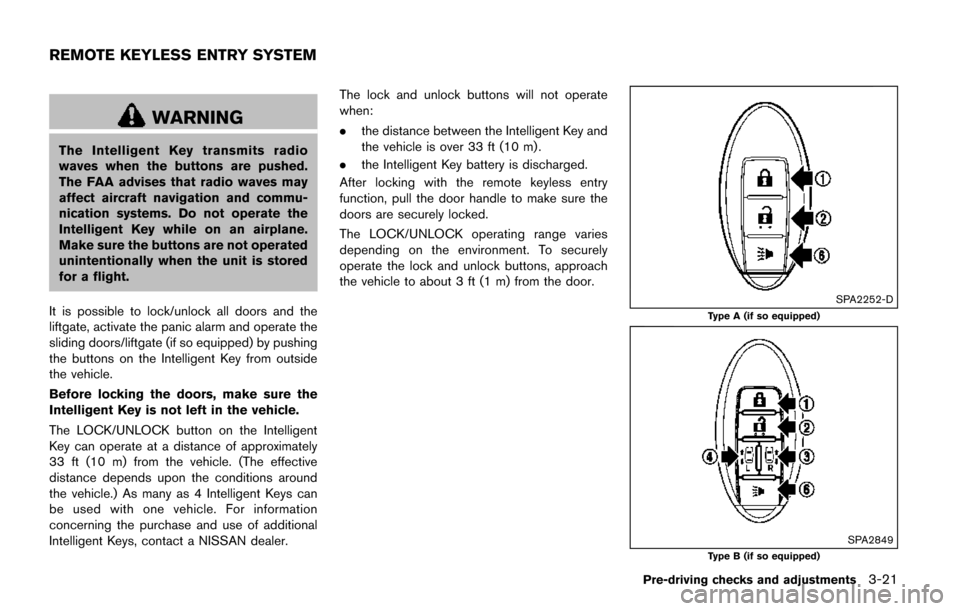
It is possible to lock/unlock all doors and the
liftgate, activate the panic alarm and operate the
sliding doors/liftgate (if so equipped) by pushing
the buttons on the Intelligent Key from outside
the vehicle.
Before locking the doors, make sure the
Intelligent Key is not left in the vehicle.
The LOCK/UNLOCK button on the Intelligent
Key can operate at a distance of approximately
33 ft (10 m) from the vehicle. (The effective
distance depends upon the conditions around
the vehicle.) As many as 4 Intelligent Keys can
be used with one vehicle. For information
concerning the purchase and use of additional
Intelligent Keys, contact a NISSAN dealer. The lock and unlock buttons will not operate
when:
.
the distance between the Intelligent Key and
the vehicle is over 33 ft (10 m) .
. the Intelligent Key battery is discharged.
After locking with the remote keyless entry
function, pull the door handle to make sure the
doors are securely locked.
The LOCK/UNLOCK operating range varies
depending on the environment. To securely
operate the lock and unlock buttons, approach
the vehicle to about 3 ft (1 m) from the door.
SPA2252-D
Type A (if so equipped)
SPA2849Type B (if so equipped)
Pre-driving checks and adjustments3-21
REMOTE KEYLESS ENTRY SYSTEM
Page 173 of 520
3-22Pre-driving checks and adjustments
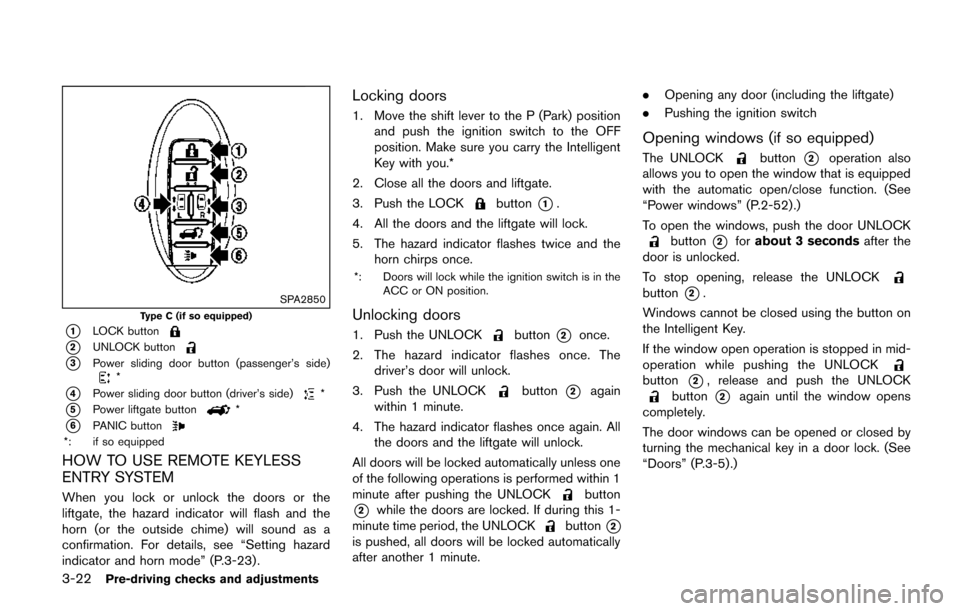
SPA2850
Type C (if so equipped)
*1LOCK button
*2UNLOCK button
*3Power sliding door button (passenger’s side)*
*4Power sliding door button (driver’s side)*
*5Power liftgate button*
*6PANIC button*: if so equipped
HOW TO USE REMOTE KEYLESS
ENTRY SYSTEM
When you lock or unlock the doors or the
liftgate, the hazard indicator will flash and the
horn (or the outside chime) will sound as a
confirmation. For details, see “Setting hazard
indicator and horn mode” (P.3-23) .
Locking doors
1. Move the shift lever to the P (Park) positionand push the ignition switch to the OFF
position. Make sure you carry the Intelligent
Key with you.*
2. Close all the doors and liftgate.
3. Push the LOCK
button*1.
4. All the doors and the liftgate will lock.
5. The hazard indicator flashes twice and the horn chirps once.
*: Doors will lock while the ignition switch is in the
ACC or ON position.
Unlocking doors
1. Push the UNLOCKbutton*2once.
2. The hazard indicator flashes once. The driver’s door will unlock.
3. Push the UNLOCK
button*2again
within 1 minute.
4. The hazard indicator flashes once again. All the doors and the liftgate will unlock.
All doors will be locked automatically unless one
of the following operations is performed within 1
minute after pushing the UNLOCK
button
*2while the doors are locked. If during this 1-
minute time period, the UNLOCKbutton*2
is pushed, all doors will be locked automatically
after another 1 minute. .
Opening any door (including the liftgate)
. Pushing the ignition switch
Opening windows (if so equipped)
The UNLOCKbutton*2operation also
allows you to open the window that is equipped
with the automatic open/close function. (See
“Power windows” (P.2-52).)
To open the windows, push the door UNLOCK
button*2for about 3 seconds after the
door is unlocked.
To stop opening, release the UNLOCK
button*2.
Windows cannot be closed using the button on
the Intelligent Key.
If the window open operation is stopped in mid-
operation while pushing the UNLOCK
button*2, release and push the UNLOCKbutton*2again until the window opens
completely.
The door windows can be opened or closed by
turning the mechanical key in a door lock. (See
“Doors” (P.3-5).)