phone NISSAN QUEST 2017 RE52 / 4.G Owners Manual
[x] Cancel search | Manufacturer: NISSAN, Model Year: 2017, Model line: QUEST, Model: NISSAN QUEST 2017 RE52 / 4.GPages: 520, PDF Size: 2.5 MB
Page 6 of 520
NISSAN CARES ...
Both NISSAN and your NISSAN dealer are dedicated to serving all your automotive needs. Your satisfaction with your vehicle and your NISSAN dealer are
our primary concerns. Your NISSAN dealer is always available to assist you with all your automobile sales and service needs.
We appreciate your interest in NISSAN and thank you for buying a quality NISSAN vehicle.
However, if there is something that your
NISSAN dealer cannot assist you with or you
would like to provide NISSAN directly with
comments or questions, please contact the
NISSAN Consumer Affairs Department using
our toll-free number:For U.S. customers1-800-NISSAN-1
(1-800-647-7261)
For Canadian customers 1-800-387-0122
The Consumer Affairs Department will ask for
the following information:
. Your name, address, and telephone number
. Vehicle identification number (attached to
the top of the instrument panel on the
driver’s side)
. Date of purchase
. Current odometer reading
. Your NISSAN dealer’s name
. Your comments or questions
OR You can write to NISSAN with the information at:
For U.S. customersNissan North America, Inc.
Consumer Affairs Department
P.O. Box 685003
Franklin, TN 37068-5003
or via e-mail at:
[email protected]
For Canadian customers Nissan Canada Inc.
5290 Orbitor Drive
Mississauga, Ontario L4W 4Z5
or via e-mail at:
information.centre@nissancanada.
com If you prefer, visit us at:
www.nissanusa.com(for U.S. customers) or
www.nissan.ca(for Canadian customers)
We appreciate your interest in NISSAN and
thank you for buying a quality NISSAN vehicle.
NISSAN CUSTOMER CARE
PROGRAM
Page 8 of 520
Illustrated table of contents0
Safety — Seats, seat belts and supplemental restraint system1
Instruments and controls
Pre-driving checks and adjustments
Monitor, heater, air conditioner, audio, phone and voice
recognition systems
Starting and driving
In case of emergency
Appearance and care
Do-it-yourself
Maintenance and schedules
Technical and consumer information
2
3
4
5
6
7
8
9
10
Table of
Contents
Index11
Page 15 of 520
0-6Illustrated table of contents
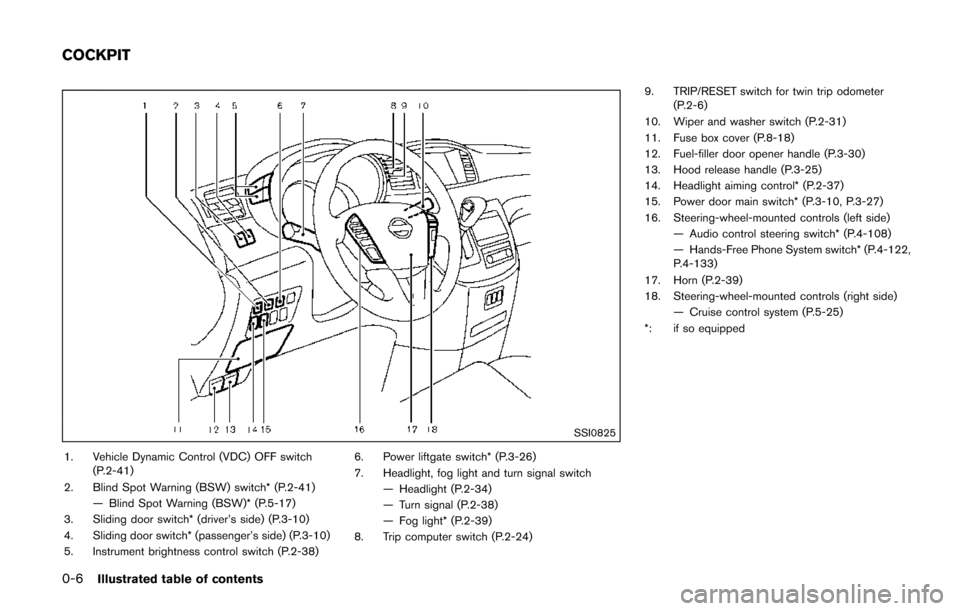
SSI0825
1. Vehicle Dynamic Control (VDC) OFF switch(P.2-41)
2. Blind Spot Warning (BSW) switch* (P.2-41) — Blind Spot Warning (BSW)* (P.5-17)
3. Sliding door switch* (driver’s side) (P.3-10)
4. Sliding door switch* (passenger’s side) (P.3-10)
5. Instrument brightness control switch (P.2-38) 6. Power liftgate switch* (P.3-26)
7. Headlight, fog light and turn signal switch
— Headlight (P.2-34)
— Turn signal (P.2-38)
— Fog light* (P.2-39)
8. Trip computer switch (P.2-24) 9. TRIP/RESET switch for twin trip odometer
(P.2-6)
10. Wiper and washer switch (P.2-31)
11. Fuse box cover (P.8-18)
12. Fuel-filler door opener handle (P.3-30)
13. Hood release handle (P.3-25)
14. Headlight aiming control* (P.2-37)
15. Power door main switch* (P.3-10, P.3-27)
16. Steering-wheel-mounted controls (left side) — Audio control steering switch* (P.4-108)
— Hands-Free Phone System switch* (P.4-122,
P.4-133)
17. Horn (P.2-39)
18. Steering-wheel-mounted controls (right side) — Cruise control system (P.5-25)
*: if so equipped
COCKPIT
Page 90 of 520
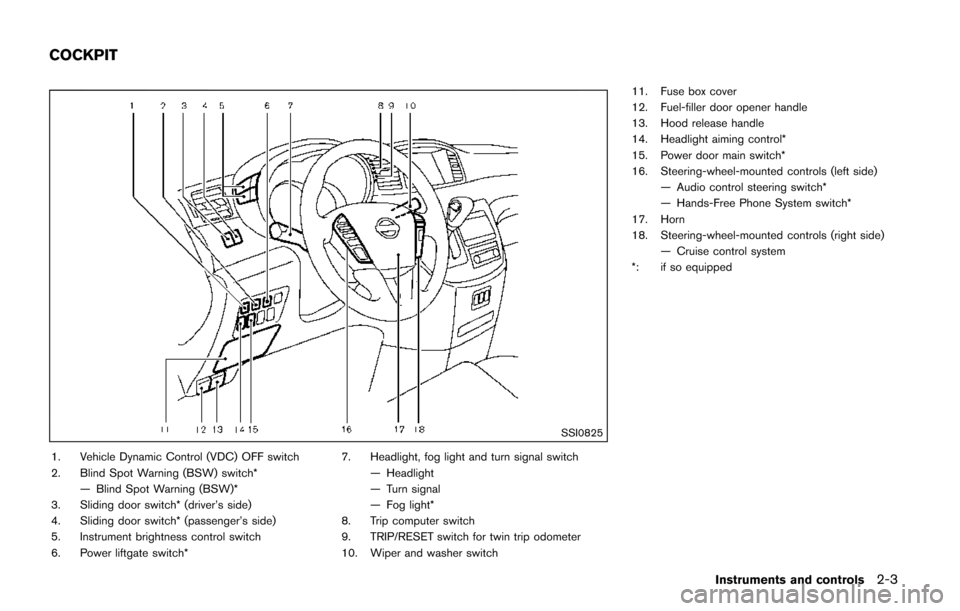
SSI0825
1. Vehicle Dynamic Control (VDC) OFF switch
2. Blind Spot Warning (BSW) switch*— Blind Spot Warning (BSW)*
3. Sliding door switch* (driver’s side)
4. Sliding door switch* (passenger’s side)
5. Instrument brightness control switch
6. Power liftgate switch* 7. Headlight, fog light and turn signal switch
— Headlight
— Turn signal
— Fog light*
8. Trip computer switch
9. TRIP/RESET switch for twin trip odometer
10. Wiper and washer switch 11. Fuse box cover
12. Fuel-filler door opener handle
13. Hood release handle
14. Headlight aiming control*
15. Power door main switch*
16. Steering-wheel-mounted controls (left side)
— Audio control steering switch*
— Hands-Free Phone System switch*
17. Horn
18. Steering-wheel-mounted controls (right side) — Cruise control system
*: if so equipped
Instruments and controls2-3
COCKPIT
Page 155 of 520
3-4Pre-driving checks and adjustments
nents when registering new keys, be sure to take
all Intelligent Keys that you have to the NISSAN
dealer.
CAUTION
.Be sure to carry the Intelligent Key
with you when driving. The Intelli-
gent Key is a precision device with a
built-in transmitter. To avoid dama-
ging it, please note the following.
— The Intelligent Key is water
resistant; however, wetting may
damage the Intelligent Key. If
the Intelligent Key gets wet,
immediately wipe until it is com-
pletely dry.
— Do not bend, drop or strike it against another object.
— If the outside temperature is below 148F (-108C) degrees, the
battery of the Intelligent Key
may not function properly.
— Do not place the Intelligent Key for an extended period in a
place where temperatures ex-
ceed 1408F (608C) . — Do not change or modify the
Intelligent Key.
— Do not use a magnet key holder.
— Do not place the Intelligent Key near an electric appliance such
as a television set, personal
computer or cellular phone.
— Do not allow the Intelligent Key to come into contact with water
or salt water, and do not wash it
in a washing machine. This
could affect the system function.
. If an Intelligent Key is lost or stolen,
NISSAN recommends erasing the ID
code of that Intelligent Key. This will
prevent the Intelligent Key from
unauthorized use to unlock the
vehicle. For information regarding
the erasing procedure, it is recom-
mended you visit a NISSAN dealer.
SPA2033
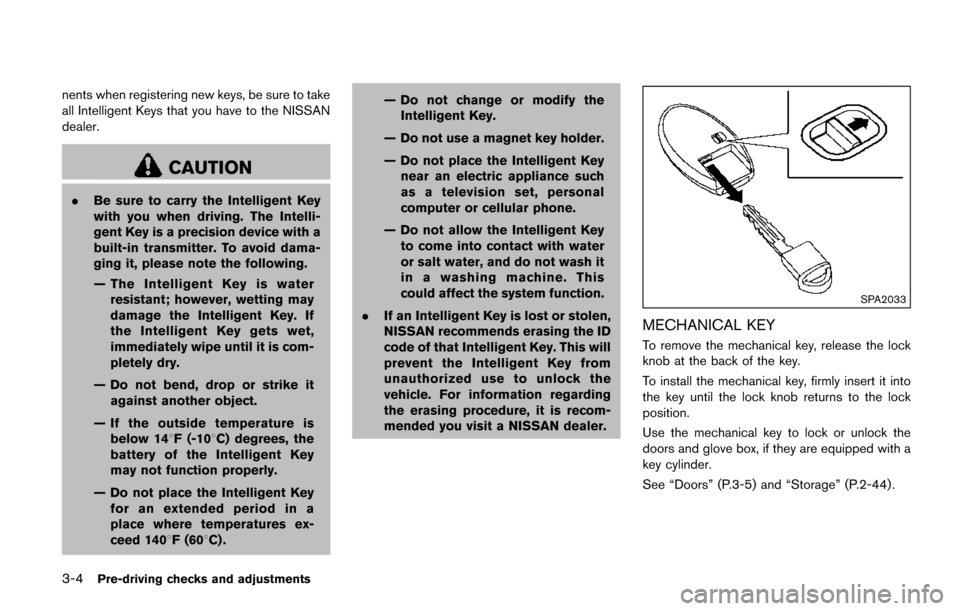
MECHANICAL KEY
To remove the mechanical key, release the lock
knob at the back of the key.
To install the mechanical key, firmly insert it into
the key until the lock knob returns to the lock
position.
Use the mechanical key to lock or unlock the
doors and glove box, if they are equipped with a
key cylinder.
See “Doors” (P.3-5) and “Storage” (P.2-44) .
Page 164 of 520
OPERATING SLIDING DOOR BY
POWER ASSIST
To operate, pull the inside or outside door
handle until you hear the buzzer, the door will
automatically open or close.
If the door handle is operated while the sliding
door is moving, the door will reverse directions
and stop at either the full open or closed
position.
SLIDING DOOR AUTO REVERSE
FUNCTION
If an obstacle is detected while the power
sliding door is being operated, the door will
reverse directions and return to the full open or
full closed position.
If you touch the sensor of the sliding door while
the sliding door is closing automatically, the door
will start moving in the reverse direction and
stop at the fully opened position.
WARNING
.Radio waves could adversely affect
electric medical equipment. Those
who use a pacemaker should con-
tact the electric medical equipment
manufacturer for the possible influ-
ences before use.
. The Intelligent Key transmits radio
waves when the buttons are
pushed. The FAA advises that radio
waves may affect aircraft navigation
and communication systems. Do not
operate the Intelligent Key while on
an airplane. Make sure the buttons
are not operated unintentionally
when the unit is stored for a flight.
The Intelligent Key system can operate all the
door locks (including the liftgate) using the
remote keyless function or pushing the request
switch on the vehicle without taking the key out
from a pocket or purse. The operating environ-
ment and/or conditions may affect the Intelligent
Key system operation.
Be sure to read the following before using the
Intelligent Key system.
CAUTION
. Be sure to carry the Intelligent Key
with you when operating the vehi-
cle.
. Never leave the Intelligent Key in
the vehicle when you leave the
vehicle.
The Intelligent Key is always communicating with
the vehicle as it receives radio waves. The
Intelligent Key system transmits weak radio
signals. Environmental conditions may interfere
with the operation of the Intelligent Key system
under the following operating conditions.
. When operating near a location where
strong radio signals are transmitted, such
as a TV tower, power station and broad-
casting station.
. When in possession of wireless equipment,
such as a cellular telephone, transceiver,
and CB radio.
. When the Intelligent Key is in contact with or
covered by metallic materials.
. When any type of radio wave remote control
is used nearby.
. When the Intelligent Key is placed near an
electric appliance such as a personal
Pre-driving checks and adjustments3-13
INTELLIGENT KEY SYSTEM
Page 165 of 520
3-14Pre-driving checks and adjustments
computer.
. When the vehicle is parked near a parking
meter.
In such cases, correct the operating conditions
before using the Intelligent Key function or use
the mechanical key.
Although the life of the battery varies depending
on the operating conditions, the battery’s life is
approximately 2 years. If the battery is dis-
charged, replace it with a new one.
Since the Intelligent Key is continuously receiv-
ing radio signals, if the key is left near equipment
which transmits strong radio signals such as
from a TV and personal computer, the battery life
may become shorter.
For information regarding replacement of a
battery, see “Intelligent Key battery replacement”
(P.8-20) .
As many as 4 Intelligent Keys can be registered
and used with one vehicle. For information about
the purchase and use of additional Intelligent
Keys, contact a NISSAN dealer.
CAUTION
. Do not allow the Intelligent Key,
which contains electrical compo-
nents, to come into contact with water or salt water. This could affect
the system function.
. Do not drop the Intelligent Key.
. Do not strike the Intelligent Key
sharply against another object.
. Do not change or modify the Intel-
ligent Key.
. Wetting may damage the Intelligent
Key. If the Intelligent Key gets wet,
immediately wipe until it is comple-
tely dry.
. If the outside temperature is below
148F( í108 C) , the battery of the
Intelligent Key may not function
properly.
. Do not place the Intelligent Key for
an extended period in an area where
temperatures exceed 1408F (608C) .
. Do not attach the Intelligent Key
with a key holder that contains a
magnet.
. Do not place the Intelligent Key near
equipment that produces a mag-
netic field, such as a TV, audio
equipment, personal computer or
cellular phone. If an Intelligent Key is lost or stolen, NISSAN
recommends erasing the ID code of that
Intelligent Key from the vehicle. This may prevent
the unauthorized use of the Intelligent Key to
operate the vehicle. For information regarding
the erasing procedure, it is recommended that
you contact a NISSAN dealer.
The Intelligent Key function can be disabled. For
information about disabling the Intelligent Key
function, it is recommended that you contact a
NISSAN dealer.
Page 190 of 520

4 Monitor, heater, air conditioner, audio, phoneand voice recognition systems
Safety note ........................................................................\
.......... 4-4
Center multi-function control panel (if so equipped) ...... 4-5
How to use multi-function controller .............................. 4-7
How to use touch screen (models with
navigation system) .............................................................. 4-7
Menu options (models with navigation system) .......... 4-9
How to select menus on the screen ........................... 4-10
Vehicle information and settings (models with center
multi-function control panel) ............................................... 4-10 How to use STATUS button .......................................... 4-10
How to use brightness control and display
ON/OFF button ................................................................ 4-10
How to use DISP button (models without
navigation system) ........................................................... 4-10
How to use ECON button (models without
navigation system) ........................................................... 4-11
How to use INFO button ............................................... 4-11
How to use SETTING button ....................................... 4-15
RearView Monitor (if so equipped) ................................... 4-25
RearView Monitor system operation .......................... 4-25
How to read the displayed lines .................................. 4-26
Difference between predictive and actual distances
(if so equipped) ................................................................ 4-26
How to park with predictive course lines
(models with center multi-function control panel) ..... 4-28
Adjusting the screen ....................................................... 4-29 Predictive course line settings (if so equipped) ..... 4-29
RearView Monitor system limitations ........................ 4-30
System maintenance ..................................................... 4-31
Around View
ŠMonitor (if so equipped) .......................... 4-32
Around ViewŠMonitor system operation ................. 4-33
How to adjust the screen view ................................... 4-39
Around View
ŠMonitor system limitations ................ 4-39
System maintenance ..................................................... 4-41
Moving Object Detection (MOD) (if so equipped) ...... 4-42 MOD system operation ................................................ 4-43
Turning on and off the MOD system ........................ 4-44
MOD system limitations ............................................... 4-44
System maintenance ..................................................... 4-45
Ventilators ........................................................................\
........ 4-46 Center ventilators ........................................................... 4-46
Side ventilators ............................................................... 4-46
Rear ventilators ............................................................... 4-47
Heater and air conditioner .................................................. 4-47 Operating tips (for automatic air conditioner) ........ 4-48
Manual air conditioner .................................................. 4-49
Automatic air conditioner ............................................. 4-54
Servicing air conditioner .............................................. 4-60
In-cabin microfilter ......................................................... 4-60
Audio system ........................................................................\
.. 4-61 Audio operation precautions ....................................... 4-61
Page 191 of 520
 player ......... 4-74
FM-AM-SAT radio with Compact Disc (CD) player
(Type A) ........................................................................\
...... 4-77
FM")
FM-AM radio with Compact Disc (CD) player ......... 4-74
FM-AM-SAT radio with Compact Disc (CD) player
(Type A) ........................................................................\
...... 4-77
FM-AM-SAT radio with Compact Disc (CD) player
(Type B) ........................................................................\
...... 4-87
DVD (Digital Versatile Disc) player operation (if
so equipped) ..................................................................... 4-91
USB (Universal Serial Bus) connection port
(models with center multi-function control panel) ..... 4-94
iPod
Šplayer operation (models with center
multi-function control panel) ......................................... 4-99
Bluetooth
Šstreaming audio (models with
navigation system) ........................................................ 4-101
Auxiliary input jacks (if so equipped) ....................... 4-106
CD/DVD/USB memory care and cleaning ............. 4-107
Steering-wheel-mounted controls for audio (if
so equipped) .................................................................. 4-108
Antenna ........................................................................\
.... 4-109
NISSAN Mobile Entertainment System (MES) (if
so equipped) ........................................................................\
4-110 Digital Versatile Disc (DVD)
system components ...................................................... 4-111
Before operating the DVD Mobile
Entertainment System .................................................. 4-116
Playing a DVD ................................................................ 4-117
Care and maintenance ................................................. 4-121
Car phone or CB radio ..................................................... 4-121
Bluetooth
Šhands-free phone system (Type A) (if
so equipped) ........................................................................\
4-122
Regulatory information ................................................. 4-123 Voice commands ......................................................... 4-124
Control buttons ............................................................ 4-124
Connecting procedure ............................................... 4-124
Phone selection ........................................................... 4-125
Quick Dial ..................................................................... 4-125
Making a call ................................................................ 4-128
Receiving a call ........................................................... 4-129
During a call ................................................................. 4-129
Phone setting ............................................................... 4-130
Troubleshooting guide ............................................... 4-132
Bluetooth
Šhands-free phone system (Type B) (if
so equipped) ....................................................................... 4-133
Regulatory information ............................................... 4-134
Using the system ........................................................ 4-135
Control buttons ............................................................ 4-137
Getting started ............................................................ 4-137
List of voice commands ............................................ 4-139
Speaker adaptation (SA) mode ............................... 4-142
Troubleshooting guide ............................................... 4-145
Bluetooth
Šhands-free phone system (Type C) (if
so equipped) ....................................................................... 4-146
Regulatory information ............................................... 4-147
Using the system ........................................................ 4-147
NISSAN Voice Recognition system (models with
navigation system) ............................................................. 4-154 NISSAN Voice Recognition standard mode ........ 4-155
Using the system ........................................................ 4-157
NISSAN Voice Recognition alternate
command mode ........................................................... 4-166
Page 193 of 520

4-4Monitor, heater, air conditioner, audio, phone and voice recognition systems
WARNING
.Do not disassemble or modify this
system. If you do, it may result in
accidents, fire, or electric shock.
. Do not use this system if you notice
any abnormality, such as a frozen
screen or lack of sound. Continued
use of the system may result in
accident, fire or electric shock.
. In case you notice any foreign
object in the system hardware, spill
liquid on it, or notice smoke or smell
coming from it, stop using the
system immediately. It is recom-
mended you visit a NISSAN dealer
for servicing. Ignoring such condi-
tions may lead to accidents, fire, or
electric shock.
. Park the vehicle in a safe location
and apply the parking brake to view
the images on the front center dis-
play screen.
Do not attempt to operate the system in
extreme temperature conditions [below
í 48F( í208 C) and above 1588 F (708C)].
Operating this system under these condi- tions may result in system malfunctions.
SAFETY NOTE