lock NISSAN ROGUE 2008 1.G Workshop Manual
[x] Cancel search | Manufacturer: NISSAN, Model Year: 2008, Model line: ROGUE, Model: NISSAN ROGUE 2008 1.GPages: 309, PDF Size: 4.38 MB
Page 132 of 309
Black plate (134,1)
Model "S35-D" EDITED: 2007/ 12/ 19
HOW TO USE REMOTE KEYLESS
ENTRY FUNCTIONThe remote keyless entry function can operate
all door locks using the remote keyless entry
function of the Intelligent Key. The remote
keyless entry function can operate at a distance
of approximately 33 ft (10 m) from the vehicle.
(The operating distance depends upon the
conditions around the vehicle.)
The remote keyless entry function will not
operate:
.When the Intelligent Key is not within the
operational range.
.When the doors are open or not closed
securely.
.When the Intelligent Key battery is dis-
charged.
The remote keyless entry function can also
operate the vehicle alarm.
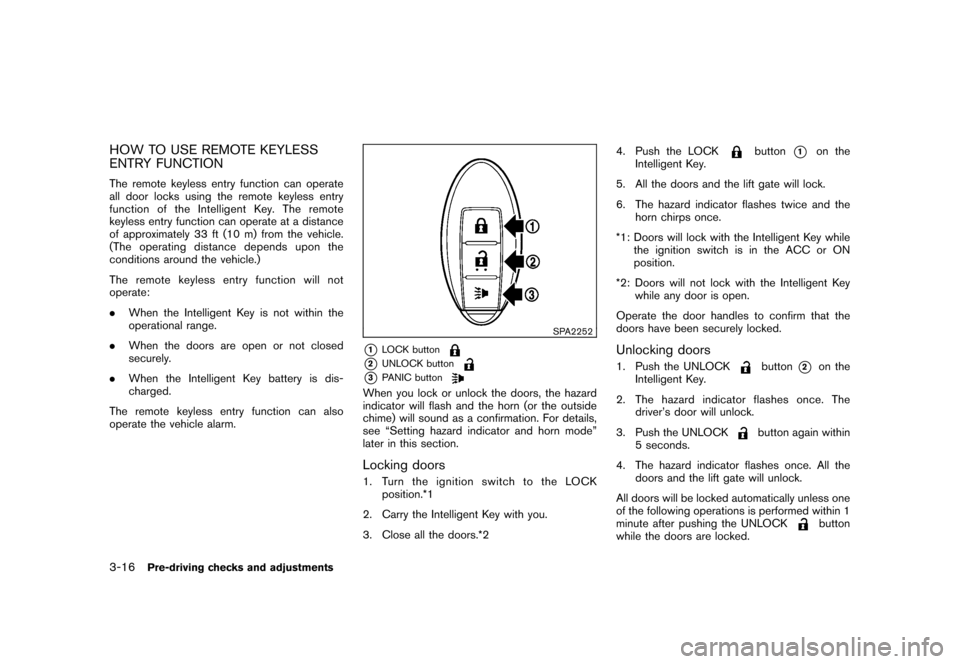
SPA2252
*1
LOCK button
*2
UNLOCK button
*3
PANIC button
When you lock or unlock the doors, the hazard
indicator will flash and the horn (or the outside
chime) will sound as a confirmation. For details,
see “Setting hazard indicator and horn mode”
later in this section.Locking doors1. Turn the ignition switch to the LOCK
position.*1
2. Carry the Intelligent Key with you.
3. Close all the doors.*24. Push the LOCK
button
*1
on the
Intelligent Key.
5. All the doors and the lift gate will lock.
6. The hazard indicator flashes twice and the
horn chirps once.
*1: Doors will lock with the Intelligent Key while
the ignition switch is in the ACC or ON
position.
*2: Doors will not lock with the Intelligent Key
while any door is open.
Operate the door handles to confirm that the
doors have been securely locked.
Unlocking doors1. Push the UNLOCK
button
*2
on the
Intelligent Key.
2. The hazard indicator flashes once. The
driver’s door will unlock.
3. Push the UNLOCK
button again within
5 seconds.
4. The hazard indicator flashes once. All the
doors and the lift gate will unlock.
All doors will be locked automatically unless one
of the following operations is performed within 1
minute after pushing the UNLOCK
button
while the doors are locked.
3-16
Pre-driving checks and adjustments
Page 133 of 309
Black plate (135,1)
Model "S35-D" EDITED: 2007/ 12/ 19
.Opening any doors.
.Pushing the ignition switch.
.Inserting the mechanical key into the ignition
switch.
During this 1-minute time period, if the UNLOCK
button is pushed, all doors will be locked
automatically after another 1 minute.
Using panic alarmIf you are near your vehicle and feel threatened,
you may activate the alarm to call attention as
follows:
1. Push the PANIC
button
*3
on the
Intelligent Key formore than 1 second.
2. The theft warning alarm and headlights will
stay on for 25 seconds.
3. The panic alarm stops when:
.It has run for 25 seconds, or
.Any of the buttons on the Intelligent Key
is pushed. (Note: Panic button must be
pushed for more than 1 second.)
Setting hazard indicator and horn modeThis vehicle is set in hazard indicator and horn
mode when you first receive the vehicle.
In hazard indicator and horn mode, when the
LOCK
button
*1
is pushed, the hazardindicator flashes twice and the horn chirps once.
When the UNLOCK
button
*2
is pushed,
the hazard indicator flashes once.
If horns are not necessary, the system can be
switched to the hazard indicator mode.
In hazard indicator mode, when the LOCK
button is pushed, the hazard indicator flashes
twice. When the UNLOCK
button is
pushed, neither the hazard indicator nor the
horn operates.
Pre-driving checks and adjustments
3-17
Page 134 of 309
Black plate (136,1)
Model "S35-D" EDITED: 2007/ 12/ 19
Hazard indicator and horn mode:
Operation
DOOR LOCK DOOR UNLOCK
Pushing door handle request switch
or lift gate request switchHAZARD -
twice
OUTSIDE CHIME -
twice
HAZARD -
once
OUTSIDE CHIME -
once
Pushing
or
buttonHAZARD -
twice
HORN -
once
HAZARD -
once
HORN - none
Hazard indicator mode:
Operation
DOOR LOCK DOOR UNLOCK
Pushing door handle request switch
or lift gate request switchHAZARD -
twice
HAZARD - none
Pushing
or
button HAZARD -
twice
HAZARD - none
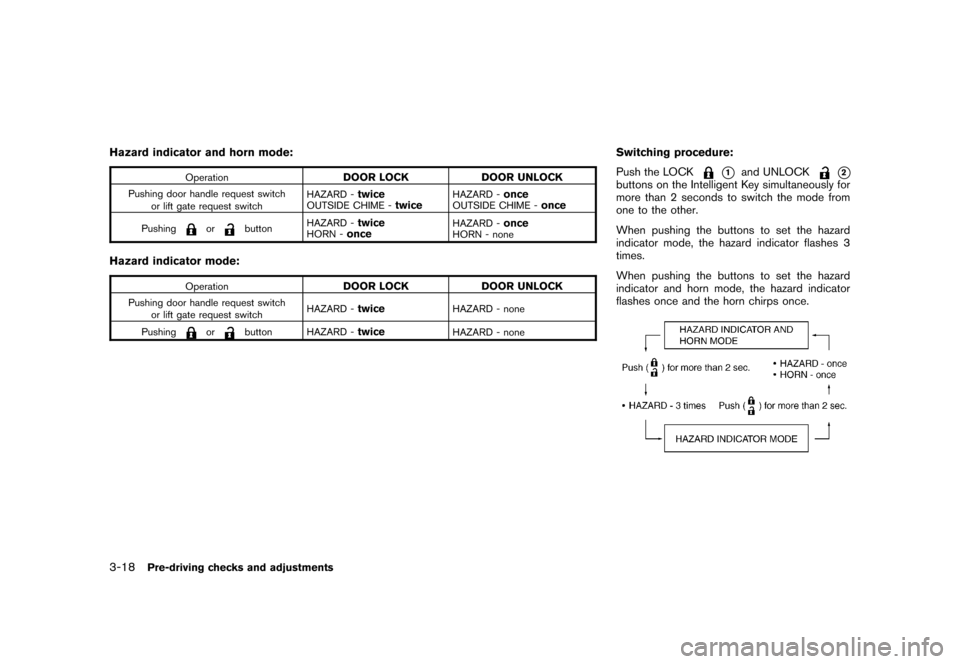
Switching procedure:
Push the LOCK
*1
and UNLOCK
*2
buttons on the Intelligent Key simultaneously for
more than 2 seconds to switch the mode from
one to the other.
When pushing the buttons to set the hazard
indicator mode, the hazard indicator flashes 3
times.
When pushing the buttons to set the hazard
indicator and horn mode, the hazard indicator
flashes once and the horn chirps once.
3-18
Pre-driving checks and adjustments
Page 135 of 309

Black plate (137,1)
Model "S35-D" EDITED: 2007/ 12/ 19
WARNING
.Make sure the hood is completely
closed and latched before driving.
Failure to do so could cause the
hood to fly open and result in an
accident.
.If you see steam or smoke coming
from the engine compartment, to
avoid injury do not open the hood.
SPA2412
When opening the hood:
1. Pull the hood release handle
*1
located
below the instrument panel; the hood will
then spring up slightly.
2. Pull the lever
*2
up at the front of the hood
with your fingertips.
3. Raise the hood.
4. Remove the support rod from the hood and
insert it into the slot
*3.
Hold the coated part
*A
when removing or
resetting the support rod. Avoid direct
contact with the metal parts, as they may
be hot immediately after the engine hasbeen stopped.
When closing the hood:
1. Return the support rod to its original
position.
2. Slowly move the hood down to latch the
lock.
3. Push the hood down to lock the hood
securely into place.
HOOD
Pre-driving checks and adjustments
3-19
Page 136 of 309
Black plate (138,1)
Model "S35-D" EDITED: 2007/ 12/ 19
WARNING
.Always be sure the lift gate has
been closed securely to prevent it
from opening while driving.
.Do not drive with the lift gate open.
This could allow dangerous exhaust
gases to be drawn into the vehicle.
See “EXHAUST GAS (carbon mon-
oxide)” in the “5. Starting and driv-
ing” section of this manual.
.Make sure that all passengers have
their hands, etc. inside the vehicle
before closing the lift gate.
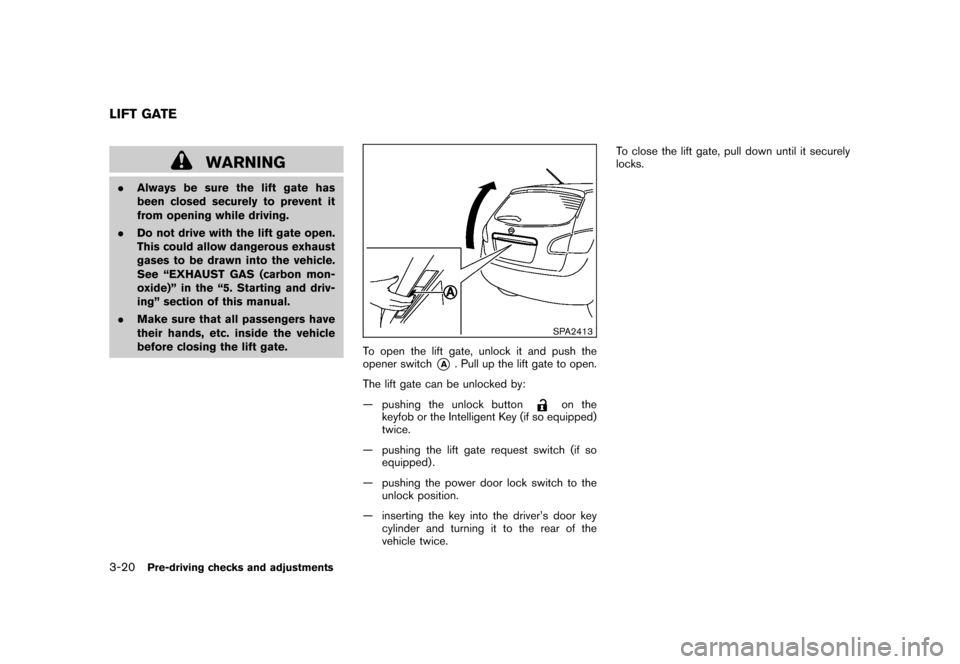
SPA2413
To open the lift gate, unlock it and push the
opener switch
*A
. Pull up the lift gate to open.
The lift gate can be unlocked by:
— pushing the unlock button
on the
keyfob or the Intelligent Key (if so equipped)
twice.
— pushing the lift gate request switch (if so
equipped) .
— pushing the power door lock switch to the
unlock position.
— inserting the key into the driver’s door key
cylinder and turning it to the rear of the
vehicle twice.To close the lift gate, pull down until it securely
locks.
LIFT GATE3-20
Pre-driving checks and adjustments
Page 137 of 309
Black plate (139,1)
Model "S35-D" EDITED: 2007/ 12/ 19
SPA2414
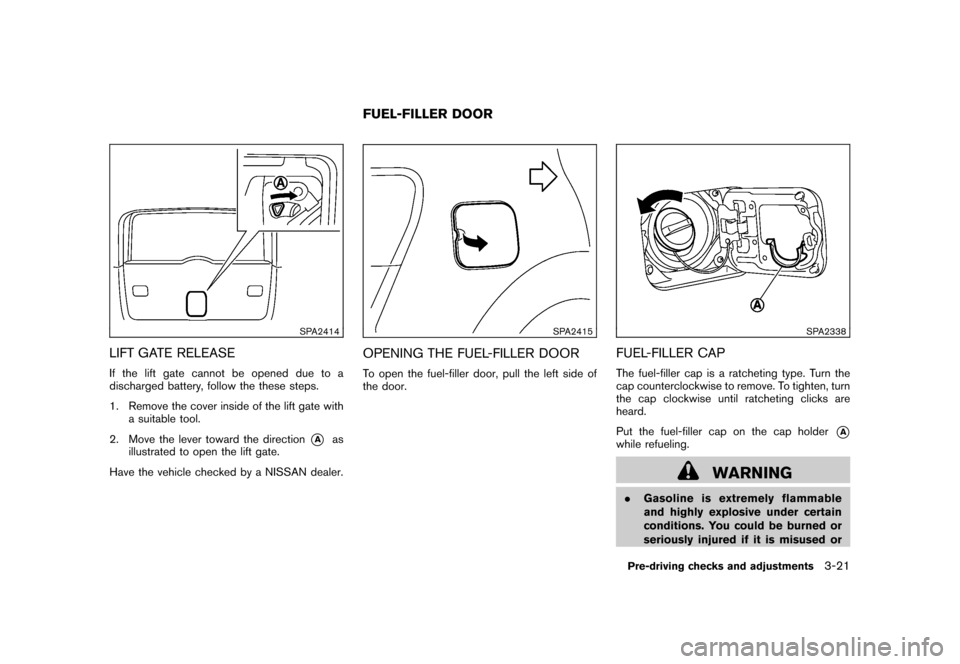
LIFT GATE RELEASEIf the lift gate cannot be opened due to a
discharged battery, follow the these steps.
1. Remove the cover inside of the lift gate with
a suitable tool.
2. Move the lever toward the direction
*A
as
illustrated to open the lift gate.
Have the vehicle checked by a NISSAN dealer.
SPA2415
OPENING THE FUEL-FILLER DOORTo open the fuel-filler door, pull the left side of
the door.
SPA2338
FUEL-FILLER CAPThe fuel-filler cap is a ratcheting type. Turn the
cap counterclockwise to remove. To tighten, turn
the cap clockwise until ratcheting clicks are
heard.
Put the fuel-filler cap on the cap holder
*A
while refueling.
WARNING
.Gasoline is extremely flammable
and highly explosive under certain
conditions. You could be burned or
seriously injured if it is misused or
FUEL-FILLER DOOR
Pre-driving checks and adjustments
3-21
Page 139 of 309
Black plate (141,1)
Model "S35-D" EDITED: 2007/ 12/ 19
WARNING
Do not adjust the steering wheel while
driving. You could lose control of your
vehicle and cause an accident.
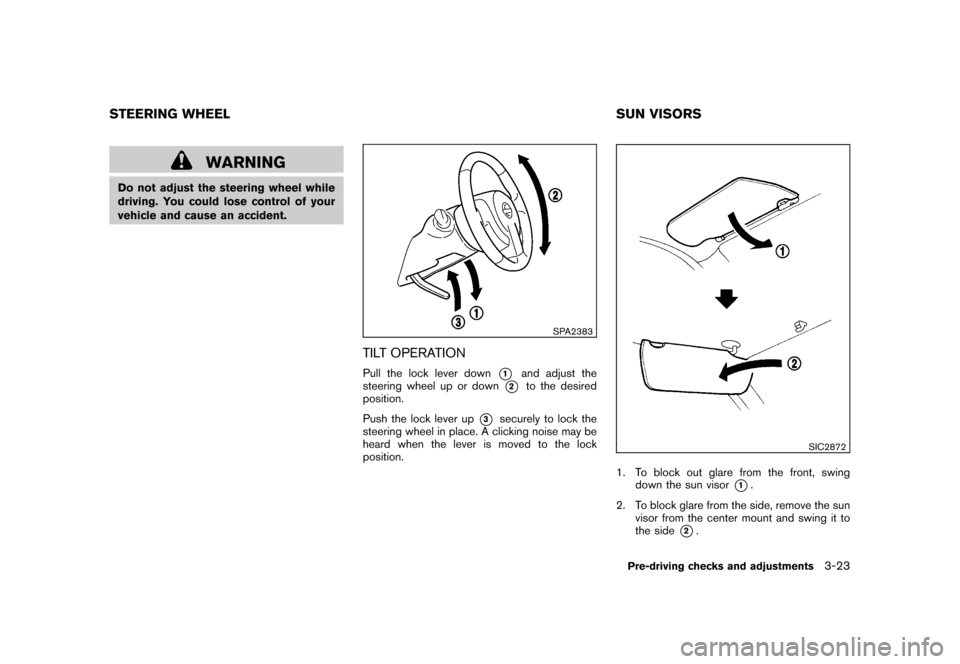
SPA2383
TILT OPERATIONPull the lock lever down
*1
and adjust the
steering wheel up or down
*2
to the desired
position.
Push the lock lever up
*3
securely to lock the
steering wheel in place. A clicking noise may be
heard when the lever is moved to the lock
position.
SIC2872
1. To block out glare from the front, swing
down the sun visor
*1.
2. To block glare from the side, remove the sun
visor from the center mount and swing it to
the side
*2.
STEERING WHEEL SUN VISORS
Pre-driving checks and adjustments
3-23
Page 145 of 309
Black plate (147,1)
Model "S35-D" EDITED: 2007/ 12/ 19
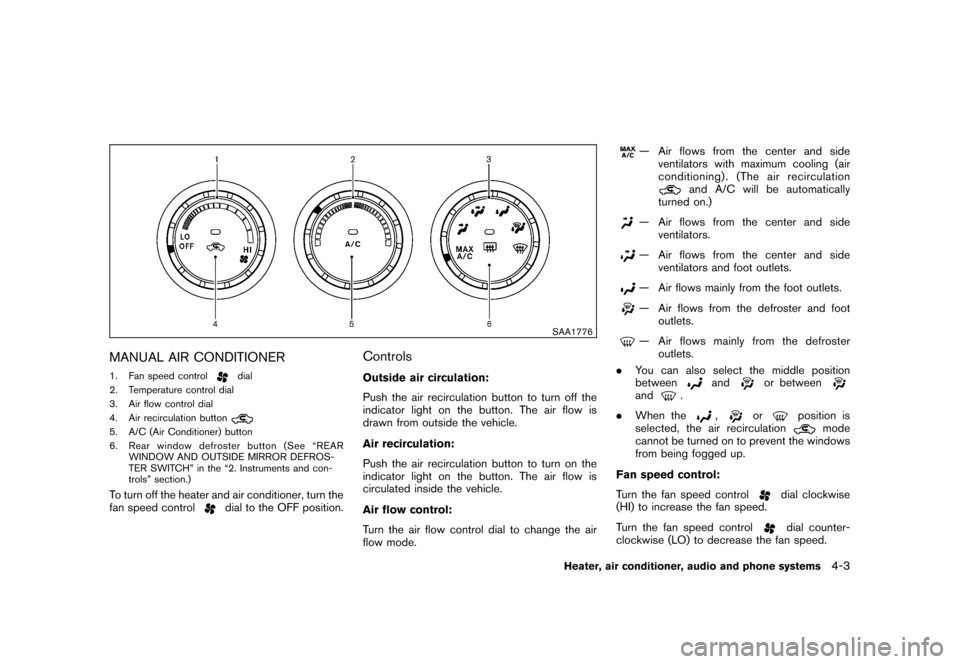
SAA1776
MANUAL AIR CONDITIONER1. Fan speed control
dial
2. Temperature control dial
3. Air flow control dial
4. Air recirculation button
5. A/C (Air Conditioner) button
6. Rear window defroster button (See “REAR
WINDOW AND OUTSIDE MIRROR DEFROS-
TER SWITCH” in the “2. Instruments and con-
trols” section.)To turn off the heater and air conditioner, turn the
fan speed control
dial to the OFF position.
ControlsOutside air circulation:
Push the air recirculation button to turn off the
indicator light on the button. The air flow is
drawn from outside the vehicle.
Air recirculation:
Push the air recirculation button to turn on the
indicator light on the button. The air flow is
circulated inside the vehicle.
Air flow control:
Turn the air flow control dial to change the air
flow mode.
— Air flows from the center and side
ventilators with maximum cooling (air
conditioning) . (The air recirculation
and A/C will be automatically
turned on.)
— Air flows from the center and side
ventilators.— Air flows from the center and side
ventilators and foot outlets.— Air flows mainly from the foot outlets.— Air flows from the defroster and foot
outlets.— Air flows mainly from the defroster
outlets.
.You can also select the middle position
between
and
or between
and
.
.When the
,
or
position is
selected, the air recirculation
mode
cannot be turned on to prevent the windows
from being fogged up.
Fan speed control:
Turn the fan speed control
dial clockwise
(HI) to increase the fan speed.
Turn the fan speed controldial counter-
clockwise (LO) to decrease the fan speed.
Heater, air conditioner, audio and phone systems
4-3
Page 149 of 309
Black plate (151,1)
Model "S35-D" EDITED: 2007/ 12/ 19
SAA0306
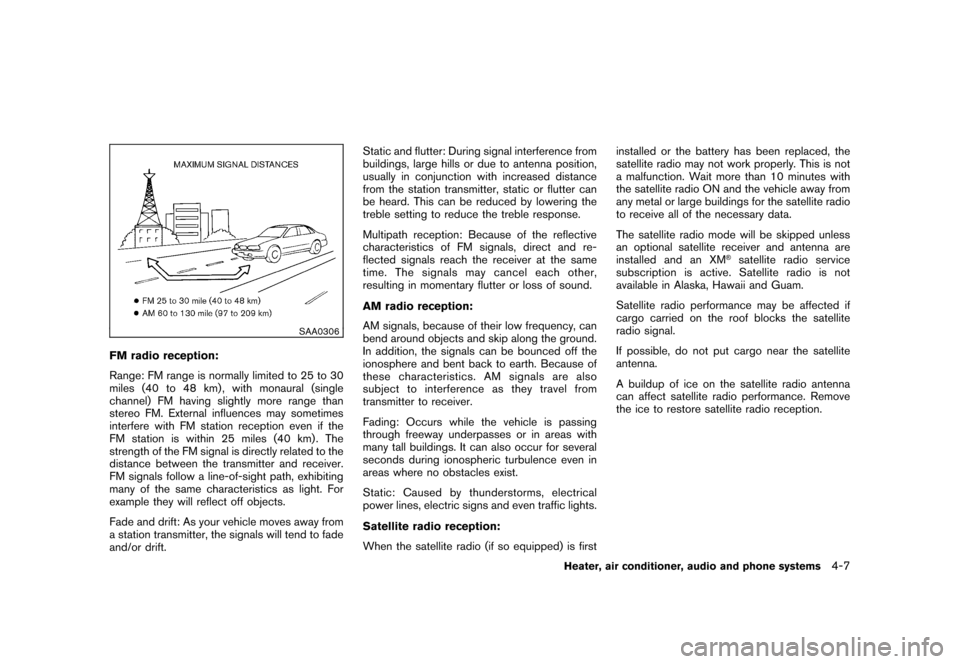
FM radio reception:
Range: FM range is normally limited to 25 to 30
miles (40 to 48 km) , with monaural (single
channel) FM having slightly more range than
stereo FM. External influences may sometimes
interfere with FM station reception even if the
FM station is within 25 miles (40 km). The
strength of the FM signal is directly related to the
distance between the transmitter and receiver.
FM signals follow a line-of-sight path, exhibiting
many of the same characteristics as light. For
example they will reflect off objects.
Fade and drift: As your vehicle moves away from
a station transmitter, the signals will tend to fade
and/or drift.Static and flutter: During signal interference from
buildings, large hills or due to antenna position,
usually in conjunction with increased distance
from the station transmitter, static or flutter can
be heard. This can be reduced by lowering the
treble setting to reduce the treble response.
Multipath reception: Because of the reflective
characteristics of FM signals, direct and re-
flected signals reach the receiver at the same
time. The signals may cancel each other,
resulting in momentary flutter or loss of sound.
AM radio reception:
AM signals, because of their low frequency, can
bend around objects and skip along the ground.
In addition, the signals can be bounced off the
ionosphere and bent back to earth. Because of
these characteristics. AM signals are also
subject to interference as they travel from
transmitter to receiver.
Fading: Occurs while the vehicle is passing
through freeway underpasses or in areas with
many tall buildings. It can also occur for several
seconds during ionospheric turbulence even in
areas where no obstacles exist.
Static: Caused by thunderstorms, electrical
power lines, electric signs and even traffic lights.
Satellite radio reception:
When the satellite radio (if so equipped) is firstinstalled or the battery has been replaced, the
satellite radio may not work properly. This is not
a malfunction. Wait more than 10 minutes with
the satellite radio ON and the vehicle away from
any metal or large buildings for the satellite radio
to receive all of the necessary data.
The satellite radio mode will be skipped unless
an optional satellite receiver and antenna are
installed and an XM
®satellite radio service
subscription is active. Satellite radio is not
available in Alaska, Hawaii and Guam.
Satellite radio performance may be affected if
cargo carried on the roof blocks the satellite
radio signal.
If possible, do not put cargo near the satellite
antenna.
A buildup of ice on the satellite radio antenna
can affect satellite radio performance. Remove
the ice to restore satellite radio reception.
Heater, air conditioner, audio and phone systems
4-7
Page 155 of 309
Black plate (157,1)
Model "S35-D" EDITED: 2007/ 12/ 19
SAA1777
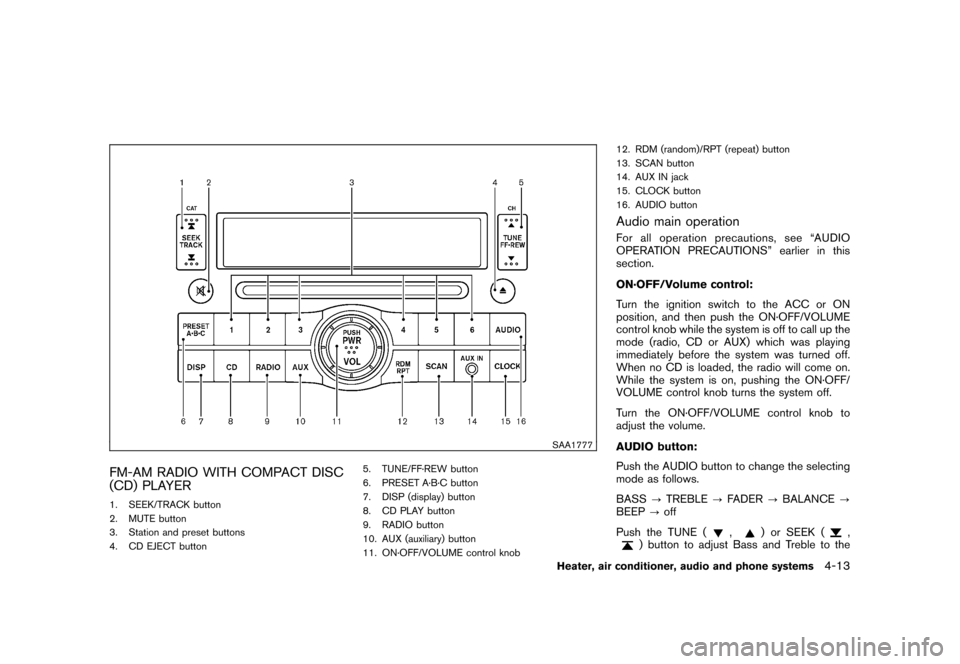
FM-AM RADIO WITH COMPACT DISC
(CD) PLAYER1. SEEK/TRACK button
2. MUTE button
3. Station and preset buttons
4. CD EJECT button5. TUNE/FF·REW button
6. PRESET A·B·C button
7. DISP (display) button
8. CD PLAY button
9. RADIO button
10. AUX (auxiliary) button
11. ON·OFF/VOLUME control knob12. RDM (random)/RPT (repeat) button
13. SCAN button
14. AUX IN jack
15. CLOCK button
16. AUDIO button
Audio main operationFor all operation precautions, see “AUDIO
OPERATION PRECAUTIONS” earlier in this
section.
ON·OFF/Volume control:
Turn the ignition switch to the ACC or ON
position, and then push the ON·OFF/VOLUME
control knob while the system is off to call up the
mode (radio, CD or AUX) which was playing
immediately before the system was turned off.
When no CD is loaded, the radio will come on.
While the system is on, pushing the ON·OFF/
VOLUME control knob turns the system off.
Turn the ON·OFF/VOLUME control knob to
adjust the volume.
AUDIO button:
Push the AUDIO button to change the selecting
mode as follows.
BASS?TREBLE?FADER?BALANCE?
BEEP?off
Push the TUNE (
,
) or SEEK (
,
) button to adjust Bass and Treble to the
Heater, air conditioner, audio and phone systems
4-13