door lock NISSAN ROGUE 2009 Owner´s Manual
[x] Cancel search | Manufacturer: NISSAN, Model Year: 2009, Model line: ROGUE, Model: NISSAN ROGUE 2009Pages: 316, PDF Size: 4.26 MB
Page 114 of 316
Black plate (112,1)
Model "S35-D" EDITED: 2008/ 7/ 24
.doors are unlocked by pushing the unlock
button
(on the keyfob or Intelligent Key)
or the request switch (Intelligent Key system
equipped model) , with the ignition switch in
the LOCK position
— remain on for about 15 seconds.
.any door is opened and then closed with the
ignition switch in the LOCK position
— remain on for about 15 seconds.
.any door is opened with the ignition switch
in the ACC or ON position
— remain on while the door is opened.
When the door is closed, the lights go off.
The light will turn off after 30 minutes
when the lights remain illuminated to
prevent the battery from becoming dis-
charged.
OFF positionWhen the switch is in the OFF position
*3, the
ceiling light will not illuminate, regardless of the
condition.
SIC2064
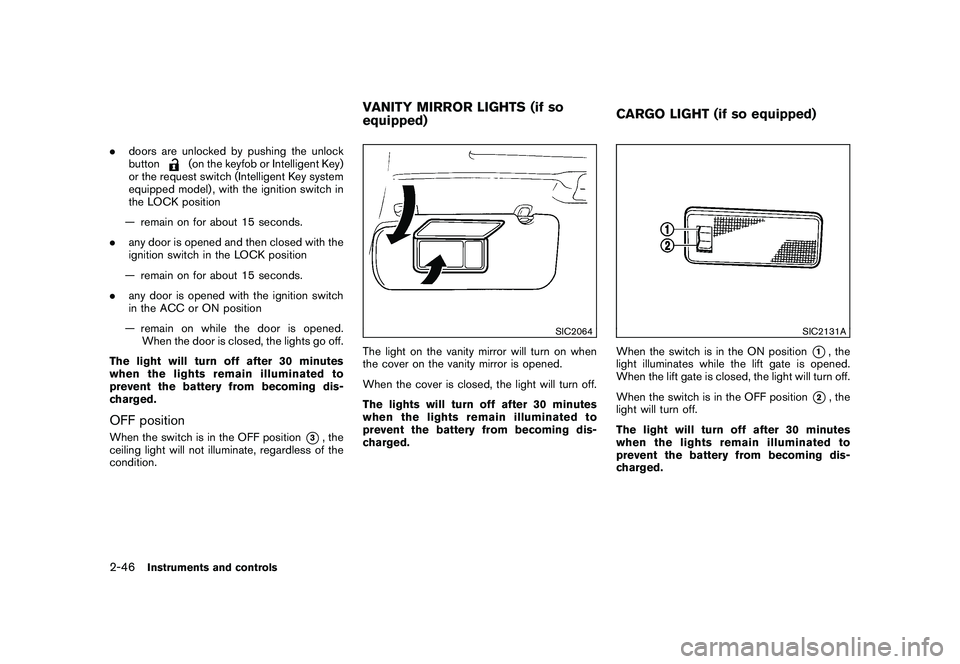
The light on the vanity mirror will turn on when
the cover on the vanity mirror is opened.
When the cover is closed, the light will turn off.
The lights will turn off after 30 minutes
when the lights remain illuminated to
prevent the battery from becoming dis-
charged.
SIC2131A
When the switch is in the ON position
*1, the
light illuminates while the lift gate is opened.
When the lift gate is closed, the light will turn off.
When the switch is in the OFF position
*2, the
light will turn off.
The light will turn off after 30 minutes
when the lights remain illuminated to
prevent the battery from becoming dis-
charged.
VANITY MIRROR LIGHTS (if so
equipped)CARGO LIGHT (if so equipped)
2-46
Instruments and controls
Page 115 of 316
Black plate (113,1)
Model "S35-D" EDITED: 2008/ 7/ 24
HomeLink
®Universal Transceiver provides a
convenient way to consolidate the functions of
up to three individual hand-held transmitters into
one built-in device.
HomeLink®Universal Transceiver:
.Will operate most Radio Frequency (RF)
devices such as garage doors, gates, home
and office lighting, entry door locks and
security systems.
.Is powered by your vehicle’s battery. No
separate batteries are required. If the
vehicle’s battery is discharged or is dis-
connected, HomeLink
®will retain all pro-
gramming.
Once HomeLink
®Universal Transceiver is
programmed, retain the original transmit-
ter for future programming procedures
(Example: new vehicle purchases) . Upon
sale of the vehicle, the programmed
HomeLink
®Universal Transceiver buttons
should be erased for security purposes.
For additional information, see “PRO-
GRAMMING HomeLink
®” later in this sec-
tion.
WARNING
.Do not use HomeLink
®Universal
Transceiver with any garage door
opener that lacks safety stop andreverse features as required by
federal safety standards. (These
standards became effective for
opener models manufactured after
April 1, 1982.) A garage door opener
which cannot detect an object in the
path of a closing garage door and
then automatically stop and reverse,
does not meet current federal safety
standards. Using a garage door
opener without these features in-
creases the risk of serious injury or
death.
.During programming procedure,
your garage door or security gate
may open or close. Make sure that
people and objects are clear of the
garage door, gate, etc. that you are
programming.
.Your vehicle’s engine should be
turned off while programming
HomeLink
®Universal Transceiver.
PROGRAMMING HomeLink
®
To program your HomeLink
®Transceiver to
operate a garage door, gate, or entry door
opener, home or office lighting, you need to be
at the same location as the device. Note:
Garage door openers (manufactured after1996) have “rolling code protection”. To pro-
gram a garage door opener equipped with
“rolling code protection”; you will need to use
a ladder to get up to the garage door opener
motor to be able to access the “smart or learn”
program button.
HomeLink
®UNIVERSAL
TRANSCEIVER (if so equipped)
Instruments and controls
2-47
Page 119 of 316
Black plate (10,1)
3 Pre-driving checks and adjustments
Model "S35-D" EDITED: 2008/ 6/ 3
Keys ............................................................... 3-2
NISSAN Vehicle Immobilizer System keys............ 3-2
Intelligent Keys (if so equipped)......................... 3-3
Doors.............................................................. 3-4
Locking with key............................................ 3-4
Locking with inside lock knob........................... 3-4
Locking with power door lock switch.................. 3-5
Automatic door locks...................................... 3-5
Child safety rear door lock............................... 3-6
Remote keyless entry system (if so equipped)........... 3-6
How to use remote keyless entry system............. 3-7
Intelligent Key system (if so equipped).................... 3-8
Intelligent Key operating range........................ 3-10
Door locks/unlocks precaution........................ 3-11
Intelligent Key operation................................. 3-11Warning lights and audible reminders............... 3-13
Troubleshooting guide................................... 3-14
How to use remote keyless entry function.......... 3-16
Hood............................................................ 3-20
Lift gate......................................................... 3-21
Lift gate release........................................... 3-22
Fuel-filler door................................................. 3-22
Opening the fuel-filler door............................. 3-22
Fuel-filler cap.............................................. 3-22
Steering wheel................................................ 3-24
Tilt operation............................................... 3-24
Sun visors...................................................... 3-24
Mirrors........................................................... 3-25
Inside mirror................................................ 3-25
Outside mirrors............................................ 3-26
Page 121 of 316
Black plate (119,1)
Model "S35-D" EDITED: 2008/ 7/ 24
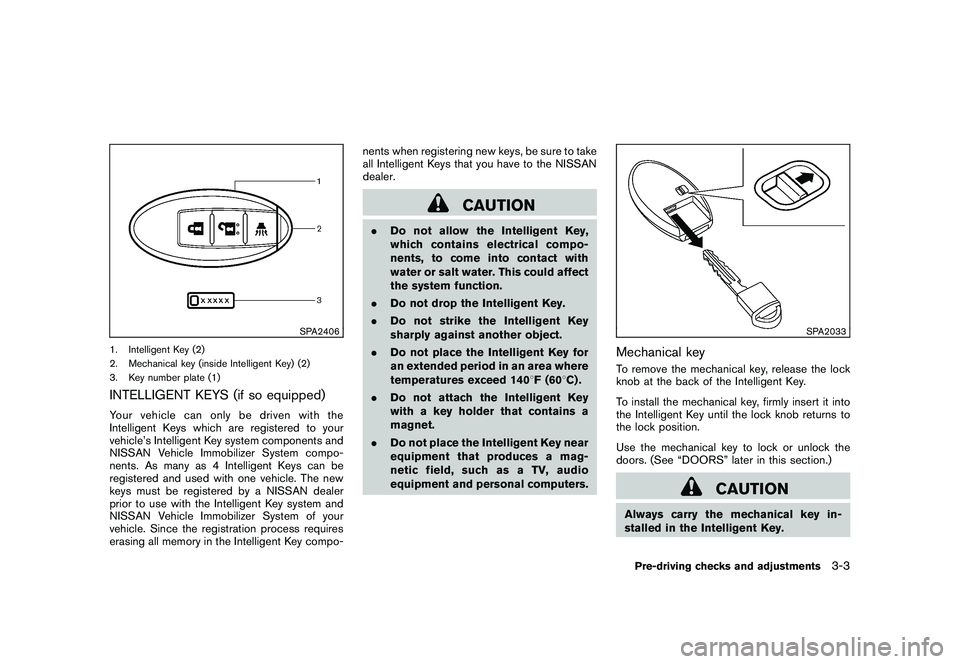
SPA2406
1. Intelligent Key (2)
2. Mechanical key (inside Intelligent Key) (2)
3. Key number plate (1)INTELLIGENT KEYS (if so equipped)Your vehicle can only be driven with the
Intelligent Keys which are registered to your
vehicle’s Intelligent Key system components and
NISSAN Vehicle Immobilizer System compo-
nents. As many as 4 Intelligent Keys can be
registered and used with one vehicle. The new
keys must be registered by a NISSAN dealer
prior to use with the Intelligent Key system and
NISSAN Vehicle Immobilizer System of your
vehicle. Since the registration process requires
erasing all memory in the Intelligent Key compo-nents when registering new keys, be sure to take
all Intelligent Keys that you have to the NISSAN
dealer.
CAUTION
.Do not allow the Intelligent Key,
which contains electrical compo-
nents, to come into contact with
water or salt water. This could affect
the system function.
.Do not drop the Intelligent Key.
.Do not strike the Intelligent Key
sharply against another object.
.Do not place the Intelligent Key for
an extended period in an area where
temperatures exceed 1408F (608C) .
.Do not attach the Intelligent Key
with a key holder that contains a
magnet.
.Do not place the Intelligent Key near
equipment that produces a mag-
netic field, such as a TV, audio
equipment and personal computers.
SPA2033
Mechanical keyTo remove the mechanical key, release the lock
knob at the back of the Intelligent Key.
To install the mechanical key, firmly insert it into
the Intelligent Key until the lock knob returns to
the lock position.
Use the mechanical key to lock or unlock the
doors. (See “DOORS” later in this section.)
CAUTION
Always carry the mechanical key in-
stalled in the Intelligent Key.Pre-driving checks and adjustments
3-3
Page 122 of 316
Black plate (120,1)
Model "S35-D" EDITED: 2008/ 7/ 24
WARNING
.Always have the doors locked while
driving. Along with the use of seat
belts, this provides greater safety in
the event of an accident by helping
to prevent persons from being
thrown from the vehicle. This also
helps keep children and others from
unintentionally opening the doors,
and will help keep out intruders.
.Before opening any door, always
look for and avoid oncoming traffic.
.Do not leave children unattended
inside the vehicle. They could un-
knowingly activate switches or con-
trols. Unattended children could
become involved in serious acci-
dents.
SPA2394
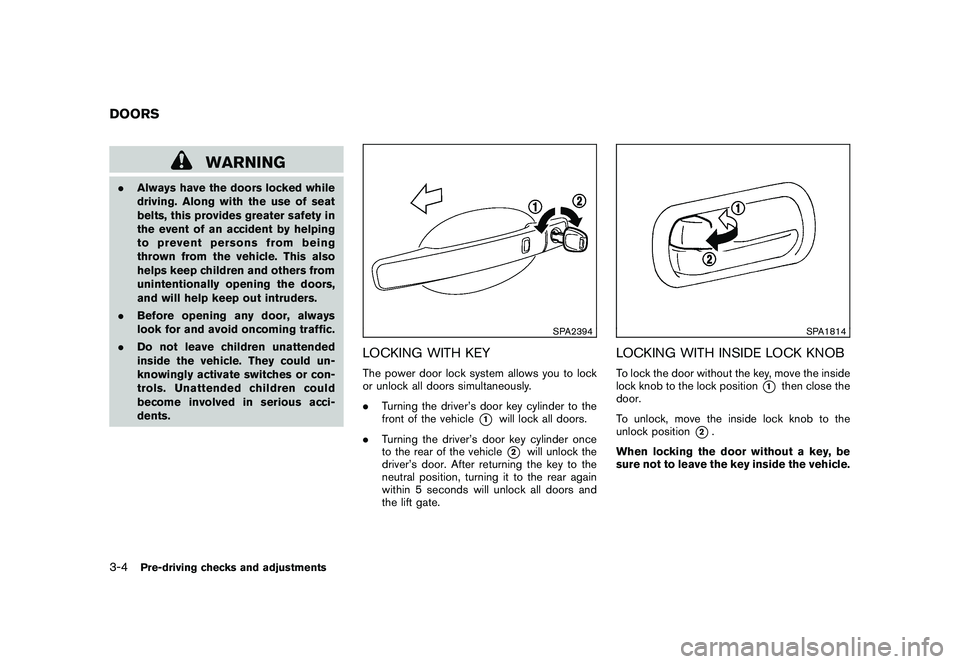
LOCKING WITH KEYThe power door lock system allows you to lock
or unlock all doors simultaneously.
.Turning the driver’s door key cylinder to the
front of the vehicle
*1
will lock all doors.
.Turning the driver’s door key cylinder once
to the rear of the vehicle*2
will unlock the
driver’s door. After returning the key to the
neutral position, turning it to the rear again
within 5 seconds will unlock all doors and
the lift gate.
SPA1814
LOCKING WITH INSIDE LOCK KNOBTo lock the door without the key, move the inside
lock knob to the lock position
*1
then close the
door.
To unlock, move the inside lock knob to the
unlock position
*2.
When locking the door without a key, be
sure not to leave the key inside the vehicle.
DOORS3-4
Pre-driving checks and adjustments
Page 123 of 316
Black plate (121,1)
Model "S35-D" EDITED: 2008/ 7/ 24
SPA2300
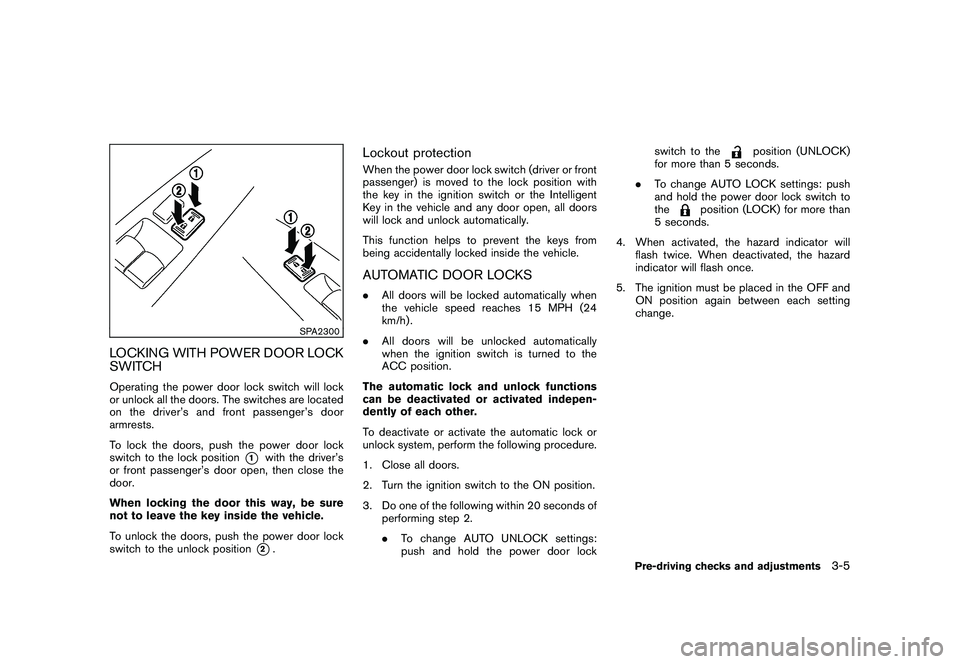
LOCKING WITH POWER DOOR LOCK
SWITCHOperating the power door lock switch will lock
or unlock all the doors. The switches are located
on the driver’s and front passenger’s door
armrests.
To lock the doors, push the power door lock
switch to the lock position
*1
with the driver’s
or front passenger’s door open, then close the
door.
When locking the door this way, be sure
not to leave the key inside the vehicle.
To unlock the doors, push the power door lock
switch to the unlock position*2.
Lockout protectionWhen the power door lock switch (driver or front
passenger) is moved to the lock position with
the key in the ignition switch or the Intelligent
Key in the vehicle and any door open, all doors
will lock and unlock automatically.
This function helps to prevent the keys from
being accidentally locked inside the vehicle.AUTOMATIC DOOR LOCKS.All doors will be locked automatically when
the vehicle speed reaches 15 MPH (24
km/h) .
.All doors will be unlocked automatically
when the ignition switch is turned to the
ACC position.
The automatic lock and unlock functions
can be deactivated or activated indepen-
dently of each other.
To deactivate or activate the automatic lock or
unlock system, perform the following procedure.
1. Close all doors.
2. Turn the ignition switch to the ON position.
3. Do one of the following within 20 seconds of
performing step 2.
.To change AUTO UNLOCK settings:
push and hold the power door lockswitch to the
position (UNLOCK)
for more than 5 seconds.
.To change AUTO LOCK settings: push
and hold the power door lock switch to
the
position (LOCK) for more than
5 seconds.
4. When activated, the hazard indicator will
flash twice. When deactivated, the hazard
indicator will flash once.
5. The ignition must be placed in the OFF and
ON position again between each setting
change.
Pre-driving checks and adjustments
3-5
Page 124 of 316
Black plate (122,1)
Model "S35-D" EDITED: 2008/ 7/ 24
SPA2037
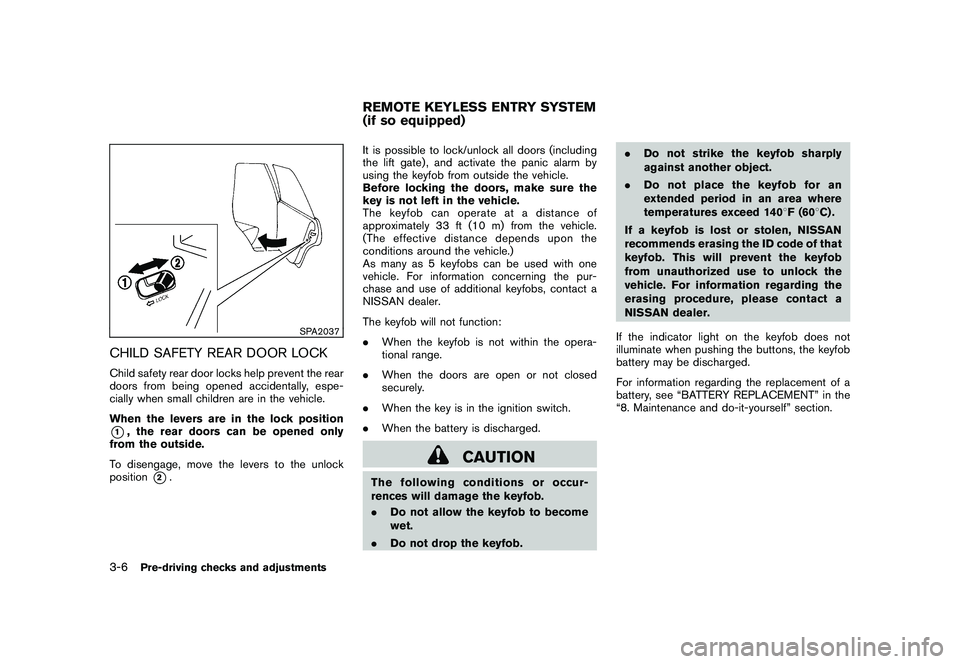
CHILD SAFETY REAR DOOR LOCKChild safety rear door locks help prevent the rear
doors from being opened accidentally, espe-
cially when small children are in the vehicle.
When the levers are in the lock position*1, the rear doors can be opened only
from the outside.
To disengage, move the levers to the unlock
position
*2.It is possible to lock/unlock all doors (including
the lift gate) , and activate the panic alarm by
using the keyfob from outside the vehicle.
Before locking the doors, make sure the
key is not left in the vehicle.
The keyfob can operate at a distance of
approximately 33 ft (10 m) from the vehicle.
(The effective distance depends upon the
conditions around the vehicle.)
As many as 5 keyfobs can be used with one
vehicle. For information concerning the pur-
chase and use of additional keyfobs, contact a
NISSAN dealer.
The keyfob will not function:
.When the keyfob is not within the opera-
tional range.
.When the doors are open or not closed
securely.
.When the key is in the ignition switch.
.When the battery is discharged.
CAUTION
The following conditions or occur-
rences will damage the keyfob.
.Do not allow the keyfob to become
wet.
.Do not drop the keyfob..Do not strike the keyfob sharply
against another object.
.Do not place the keyfob for an
extended period in an area where
temperatures exceed 1408F (608C) .
If a keyfob is lost or stolen, NISSAN
recommends erasing the ID code of that
keyfob. This will prevent the keyfob
from unauthorized use to unlock the
vehicle. For information regarding the
erasing procedure, please contact a
NISSAN dealer.
If the indicator light on the keyfob does not
illuminate when pushing the buttons, the keyfob
battery may be discharged.
For information regarding the replacement of a
battery, see “BATTERY REPLACEMENT” in the
“8. Maintenance and do-it-yourself” section.REMOTE KEYLESS ENTRY SYSTEM
(if so equipped)
3-6
Pre-driving checks and adjustments
Page 125 of 316
Black plate (123,1)
Model "S35-D" EDITED: 2008/ 7/ 24
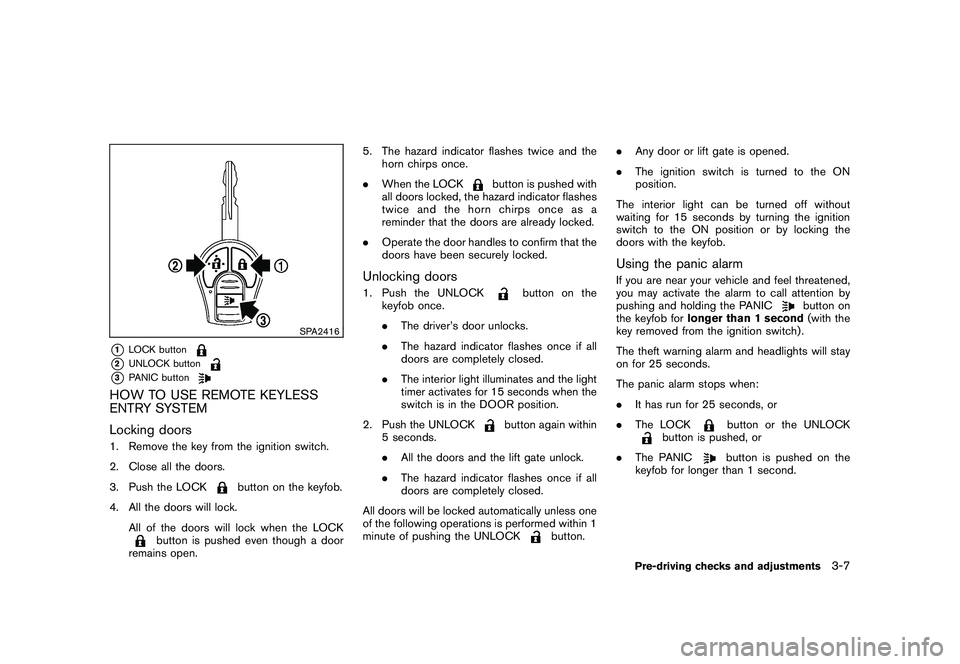
SPA2416
*1
LOCK button
*2
UNLOCK button
*3
PANIC button
HOW TO USE REMOTE KEYLESS
ENTRY SYSTEM
Locking doors1. Remove the key from the ignition switch.
2. Close all the doors.
3. Push the LOCK
button on the keyfob.
4. All the doors will lock.
All of the doors will lock when the LOCK
button is pushed even though a door
remains open.5. The hazard indicator flashes twice and the
horn chirps once.
.When the LOCK
button is pushed with
all doors locked, the hazard indicator flashes
twice and the horn chirps once as a
reminder that the doors are already locked.
.Operate the door handles to confirm that the
doors have been securely locked.
Unlocking doors1. Push the UNLOCK
button on the
keyfob once.
.The driver’s door unlocks.
.The hazard indicator flashes once if all
doors are completely closed.
.The interior light illuminates and the light
timer activates for 15 seconds when the
switch is in the DOOR position.
2. Push the UNLOCK
button again within
5 seconds.
.All the doors and the lift gate unlock.
.The hazard indicator flashes once if all
doors are completely closed.
All doors will be locked automatically unless one
of the following operations is performed within 1
minute of pushing the UNLOCK
button..Any door or lift gate is opened.
.The ignition switch is turned to the ON
position.
The interior light can be turned off without
waiting for 15 seconds by turning the ignition
switch to the ON position or by locking the
doors with the keyfob.
Using the panic alarmIf you are near your vehicle and feel threatened,
you may activate the alarm to call attention by
pushing and holding the PANIC
button on
the keyfob forlonger than 1 second(with the
key removed from the ignition switch) .
The theft warning alarm and headlights will stay
on for 25 seconds.
The panic alarm stops when:
.It has run for 25 seconds, or
.The LOCK
button or the UNLOCK
button is pushed, or
.The PANIC
button is pushed on the
keyfob for longer than 1 second.
Pre-driving checks and adjustments
3-7
Page 126 of 316
Black plate (124,1)
Model "S35-D" EDITED: 2008/ 7/ 24
SPA1260
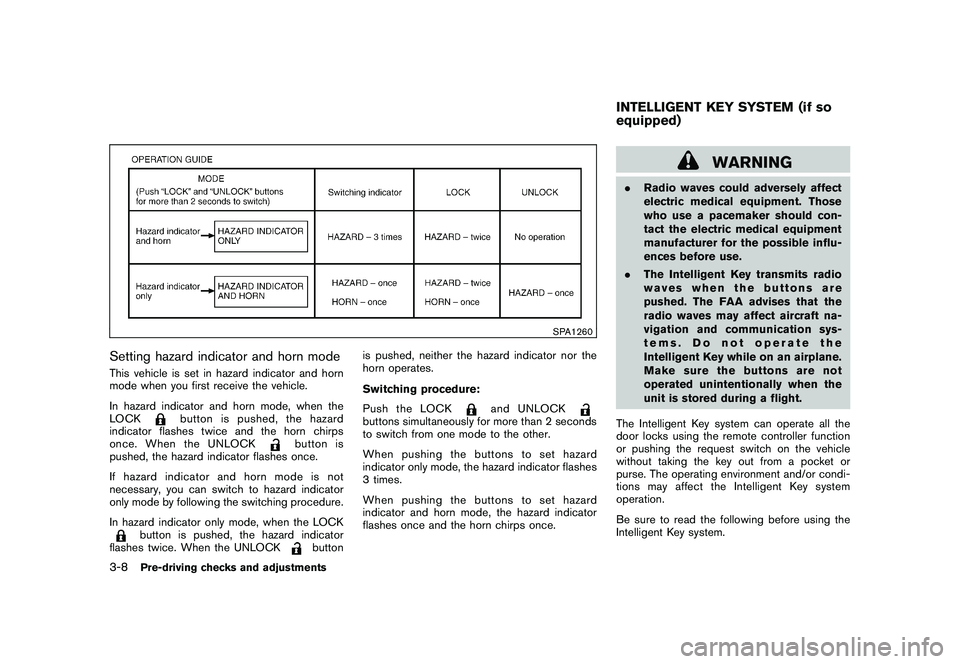
Setting hazard indicator and horn modeThis vehicle is set in hazard indicator and horn
mode when you first receive the vehicle.
In hazard indicator and horn mode, when the
LOCK
button is pushed, the hazard
indicator flashes twice and the horn chirps
once. When the UNLOCK
button is
pushed, the hazard indicator flashes once.
If hazard indicator and horn mode is not
necessary, you can switch to hazard indicator
only mode by following the switching procedure.
In hazard indicator only mode, when the LOCK
button is pushed, the hazard indicator
flashes twice. When the UNLOCK
buttonis pushed, neither the hazard indicator nor the
horn operates.
Switching procedure:
Push the LOCK
and UNLOCK
buttons simultaneously for more than 2 seconds
to switch from one mode to the other.
When pushing the buttons to set hazard
indicator only mode, the hazard indicator flashes
3 times.
When pushing the buttons to set hazard
indicator and horn mode, the hazard indicator
flashes once and the horn chirps once.
WARNING
.Radio waves could adversely affect
electric medical equipment. Those
who use a pacemaker should con-
tact the electric medical equipment
manufacturer for the possible influ-
ences before use.
.The Intelligent Key transmits radio
waves when the buttons are
pushed. The FAA advises that the
radio waves may affect aircraft na-
vigation and communication sys-
tems. Do not operate the
Intelligent Key while on an airplane.
Makesurethebuttonsarenot
operated unintentionally when the
unit is stored during a flight.
The Intelligent Key system can operate all the
door locks using the remote controller function
or pushing the request switch on the vehicle
without taking the key out from a pocket or
purse. The operating environment and/or condi-
tions may affect the Intelligent Key system
operation.
Be sure to read the following before using the
Intelligent Key system.INTELLIGENT KEY SYSTEM (if so
equipped)
3-8
Pre-driving checks and adjustments
Page 128 of 316
Black plate (126,1)
Model "S35-D" EDITED: 2008/ 7/ 24
the erasing procedure, contact a NISSAN deal-
er.
SPA2074
INTELLIGENT KEY OPERATING
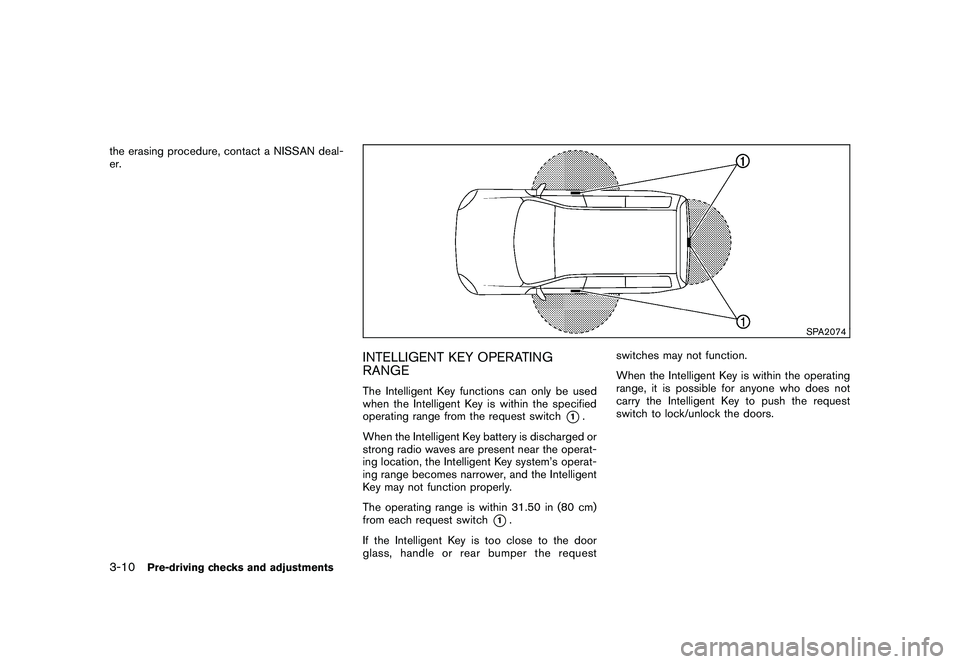
RANGEThe Intelligent Key functions can only be used
when the Intelligent Key is within the specified
operating range from the request switch
*1.
When the Intelligent Key battery is discharged or
strong radio waves are present near the operat-
ing location, the Intelligent Key system’s operat-
ing range becomes narrower, and the Intelligent
Key may not function properly.
The operating range is within 31.50 in (80 cm)
from each request switch
*1.
If the Intelligent Key is too close to the door
glass, handle or rear bumper the requestswitches may not function.
When the Intelligent Key is within the operating
range, it is possible for anyone who does not
carry the Intelligent Key to push the request
switch to lock/unlock the doors.
3-10
Pre-driving checks and adjustments