wheel NISSAN ROGUE 2009 Owner´s Manual
[x] Cancel search | Manufacturer: NISSAN, Model Year: 2009, Model line: ROGUE, Model: NISSAN ROGUE 2009Pages: 316, PDF Size: 4.26 MB
Page 80 of 316
Black plate (78,1)
Model "S35-D" EDITED: 2008/ 7/ 24
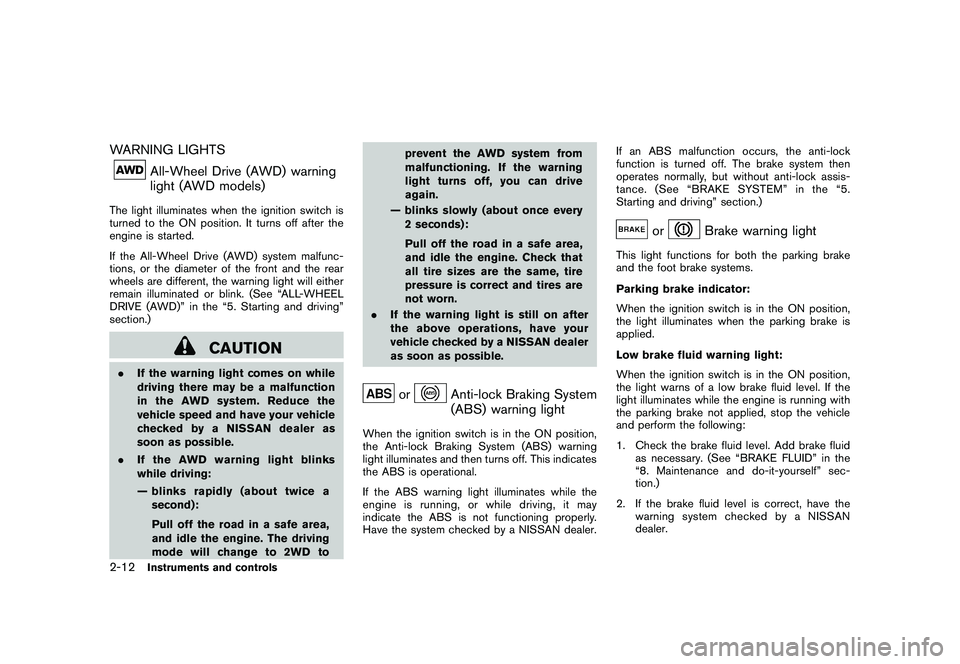
WARNING LIGHTS
All-Wheel Drive (AWD) warning
light (AWD models)
The light illuminates when the ignition switch is
turned to the ON position. It turns off after the
engine is started.
If the All-Wheel Drive (AWD) system malfunc-
tions, or the diameter of the front and the rear
wheels are different, the warning light will either
remain illuminated or blink. (See “ALL-WHEEL
DRIVE (AWD)” in the “5. Starting and driving”
section.)
CAUTION
.If the warning light comes on while
driving there may be a malfunction
in the AWD system. Reduce the
vehicle speed and have your vehicle
checked by a NISSAN dealer as
soon as possible.
.If the AWD warning light blinks
while driving:
— blinks rapidly (about twice a
second):
Pull off the road in a safe area,
and idle the engine. The driving
mode will change to 2WD toprevent the AWD system from
malfunctioning. If the warning
light turns off, you can drive
again.
— blinks slowly (about once every
2 seconds):
Pull off the road in a safe area,
and idle the engine. Check that
all tire sizes are the same, tire
pressure is correct and tires are
not worn.
.If the warning light is still on after
the above operations, have your
vehicle checked by a NISSAN dealer
as soon as possible.
or
Anti-lock Braking System
(ABS) warning light
When the ignition switch is in the ON position,
the Anti-lock Braking System (ABS) warning
light illuminates and then turns off. This indicates
the ABS is operational.
If the ABS warning light illuminates while the
engine is running, or while driving, it may
indicate the ABS is not functioning properly.
Have the system checked by a NISSAN dealer.If an ABS malfunction occurs, the anti-lock
function is turned off. The brake system then
operates normally, but without anti-lock assis-
tance. (See “BRAKE SYSTEM” in the “5.
Starting and driving” section.)
or
Brake warning light
This light functions for both the parking brake
and the foot brake systems.
Parking brake indicator:
When the ignition switch is in the ON position,
the light illuminates when the parking brake is
applied.
Low brake fluid warning light:
When the ignition switch is in the ON position,
the light warns of a low brake fluid level. If the
light illuminates while the engine is running with
the parking brake not applied, stop the vehicle
and perform the following:
1. Check the brake fluid level. Add brake fluid
as necessary. (See “BRAKE FLUID” in the
“8. Maintenance and do-it-yourself” sec-
tion.)
2. If the brake fluid level is correct, have the
warningsystemcheckedbyaNISSAN
dealer.
2-12
Instruments and controls
Page 81 of 316
Black plate (79,1)
Model "S35-D" EDITED: 2008/ 7/ 24
Anti-lock Braking System (ABS) warning
indicator:
When the parking brake is released and the
brake fluid level is sufficient, if both the brake
warning light and the Anti-lock Braking System
(ABS) warning light illuminate, it may indicate
the ABS is not functioning properly. Have the
brake system checked, and if necessary re-
paired, by a NISSAN dealer promptly. (See
“Anti-lock Braking System (ABS) warning light”
earlier in this section.)
WARNING
.Your brake system may not be
working properly if the warning light
is on. Driving could be dangerous. If
you judge it to be safe, drive care-
fully to the nearest service station
for repairs. Otherwise, have your
vehicle towed because driving it
could be dangerous.
.Pressing the brake pedal with the
engine stopped and/or low brake
fluid level may increase your stop-
ping distance and braking will re-
quire greater pedal effort as well as
pedal travel.
.If the brake fluid level is below theminimum or MIN mark on the brake
fluid reservoir, do not drive until the
brake system has been checked at a
NISSAN dealer.
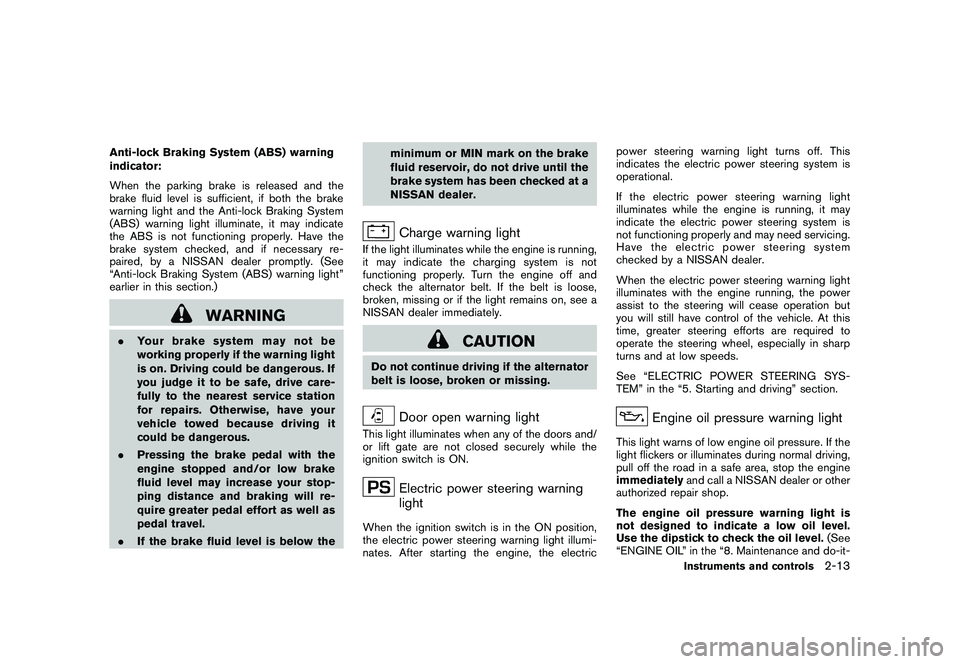
Charge warning light
If the light illuminates while the engine is running,
it may indicate the charging system is not
functioning properly. Turn the engine off and
check the alternator belt. If the belt is loose,
broken, missing or if the light remains on, see a
NISSAN dealer immediately.
CAUTION
Do not continue driving if the alternator
belt is loose, broken or missing.
Door open warning light
This light illuminates when any of the doors and/
or lift gate are not closed securely while the
ignition switch is ON.
Electric power steering warning
light
When the ignition switch is in the ON position,
the electric power steering warning light illumi-
nates. After starting the engine, the electricpower steering warning light turns off. This
indicates the electric power steering system is
operational.
If the electric power steering warning light
illuminates while the engine is running, it may
indicate the electric power steering system is
not functioning properly and may need servicing.
Have the electric power steering system
checked by a NISSAN dealer.
When the electric power steering warning light
illuminates with the engine running, the power
assist to the steering will cease operation but
you will still have control of the vehicle. At this
time, greater steering efforts are required to
operate the steering wheel, especially in sharp
turns and at low speeds.
See “ELECTRIC POWER STEERING SYS-
TEM” in the “5. Starting and driving” section.
Engine oil pressure warning light
This light warns of low engine oil pressure. If the
light flickers or illuminates during normal driving,
pull off the road in a safe area, stop the engine
immediatelyand call a NISSAN dealer or other
authorized repair shop.
The engine oil pressure warning light is
not designed to indicate a low oil level.
Use the dipstick to check the oil level.(See
“ENGINE OIL” in the “8. Maintenance and do-it-
Instruments and controls
2-13
Page 83 of 316
Black plate (81,1)
Model "S35-D" EDITED: 2008/ 7/ 24
the vehicle checked by a NISSAN
dealer as soon as possible.
.If the light illuminates while driving,
avoid sudden steering maneuvers or
abrupt braking, reduce vehicle
speed, pull off the road to a safe
location and stop the vehicle as
soon as possible. Driving with un-
der-inflated tires may permanently
damage the tires and increase the
likelihood of tire failure. Serious
vehicle damage could occur and
may lead to an accident and could
result in serious personal injury.
Check the tire pressure for all four
tires. Adjust the tire pressure to the
recommended COLD tire pressure
shownontheTireandLoading
Information label to turn the low
tire pressure warning light OFF. If
the light stays on after adjusting the
tire pressure and driving over 16
MPH (25 km/h) , have the system
checked by a NISSAN dealer. If you
have a flat tire, replace it with a
spare tire as soon as possible.
.When a spare tire is mounted or a
wheel is replaced, the TPMS will not
function and the low tire pressurewarning light will flash for approxi-
mately 1 minute. The light will
remain on after 1 minute. Contact
your NISSAN dealer as soon as
possible for tire replacement and/
or system resetting.
.Replacing tires with those not ori-
ginally specified by NISSAN could
affect the proper operation of the
TPMS.
CAUTION
.The TPMS is not a substitute for the
regular tire pressure check. Be sure
to check the tire pressure regularly.
.If the vehicle is being driven at
speeds of less than 16 MPH (25
km/h) , the TPMS may not operate
correctly.
.Be sure to install the specified size
of tires to the front and rear.
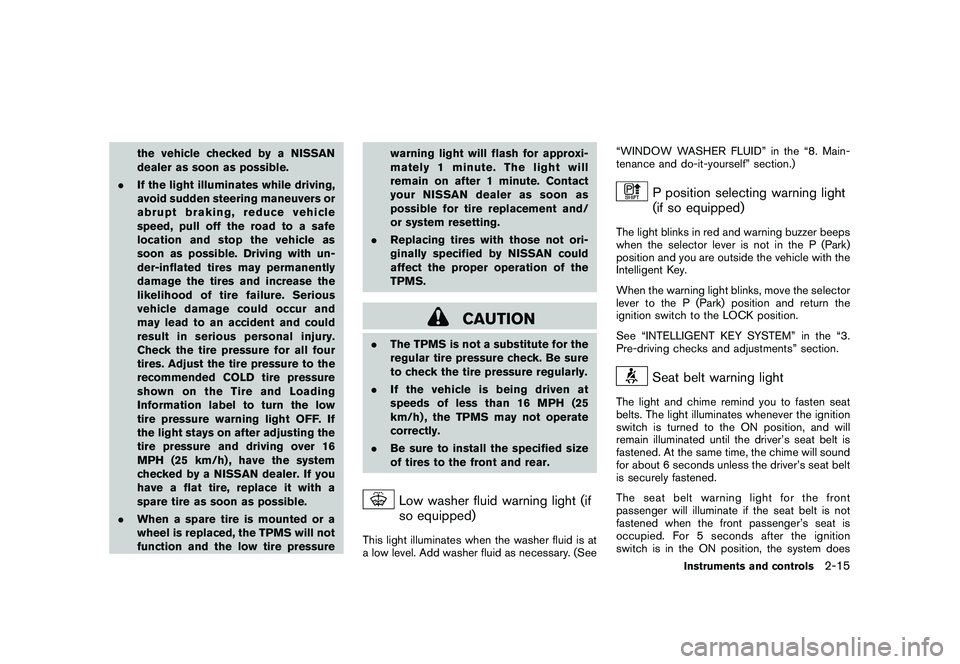
Low washer fluid warning light (if
so equipped)
This light illuminates when the washer fluid is at
a low level. Add washer fluid as necessary. (See“WINDOW WASHER FLUID” in the “8. Main-
tenance and do-it-yourself” section.)
P position selecting warning light
(if so equipped)
The light blinks in red and warning buzzer beeps
when the selector lever is not in the P (Park)
position and you are outside the vehicle with the
Intelligent Key.
When the warning light blinks, move the selector
lever to the P (Park) position and return the
ignition switch to the LOCK position.
See “INTELLIGENT KEY SYSTEM” in the “3.
Pre-driving checks and adjustments” section.
Seat belt warning light
The light and chime remind you to fasten seat
belts. The light illuminates whenever the ignition
switch is turned to the ON position, and will
remain illuminated until the driver’s seat belt is
fastened. At the same time, the chime will sound
for about 6 seconds unless the driver’s seat belt
is securely fastened.
The seat belt warning light for the front
passenger will illuminate if the seat belt is not
fastened when the front passenger’s seat is
occupied. For 5 seconds after the ignition
switch is in the ON position, the system does
Instruments and controls
2-15
Page 84 of 316
Black plate (82,1)
Model "S35-D" EDITED: 2008/ 7/ 24
not activate the warning light for the front
passenger.
See “SEAT BELTS” in the “1. Safety — Seats,
seat belts and supplemental restraint system”
section for precautions on seat belt usage.
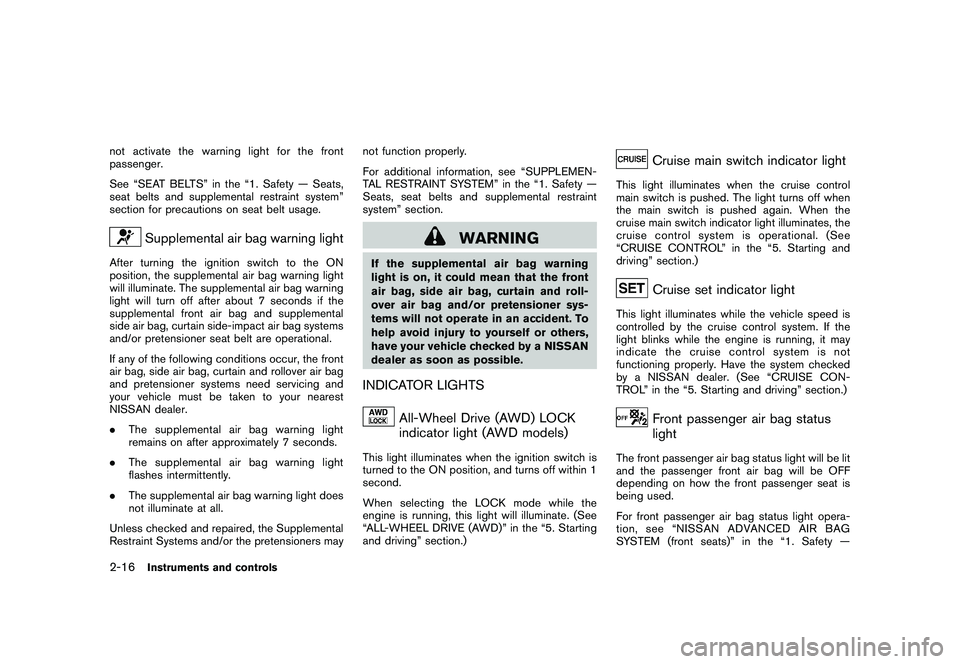
Supplemental air bag warning light
After turning the ignition switch to the ON
position, the supplemental air bag warning light
will illuminate. The supplemental air bag warning
light will turn off after about 7 seconds if the
supplemental front air bag and supplemental
side air bag, curtain side-impact air bag systems
and/or pretensioner seat belt are operational.
If any of the following conditions occur, the front
air bag, side air bag, curtain and rollover air bag
and pretensioner systems need servicing and
your vehicle must be taken to your nearest
NISSAN dealer.
.The supplemental air bag warning light
remains on after approximately 7 seconds.
.The supplemental air bag warning light
flashes intermittently.
.The supplemental air bag warning light does
not illuminate at all.
Unless checked and repaired, the Supplemental
Restraint Systems and/or the pretensioners maynot function properly.
For additional information, see “SUPPLEMEN-
TAL RESTRAINT SYSTEM” in the “1. Safety —
Seats, seat belts and supplemental restraint
system” section.
WARNING
If the supplemental air bag warning
light is on, it could mean that the front
air bag, side air bag, curtain and roll-
over air bag and/or pretensioner sys-
tems will not operate in an accident. To
help avoid injury to yourself or others,
have your vehicle checked by a NISSAN
dealer as soon as possible.INDICATOR LIGHTS
All-Wheel Drive (AWD) LOCK
indicator light (AWD models)
This light illuminates when the ignition switch is
turned to the ON position, and turns off within 1
second.
When selecting the LOCK mode while the
engine is running, this light will illuminate. (See
“ALL-WHEEL DRIVE (AWD)” in the “5. Starting
and driving” section.)
Cruise main switch indicator light
This light illuminates when the cruise control
main switch is pushed. The light turns off when
the main switch is pushed again. When the
cruise main switch indicator light illuminates, the
cruise control system is operational. (See
“CRUISE CONTROL” in the “5. Starting and
driving” section.)
Cruise set indicator light
This light illuminates while the vehicle speed is
controlled by the cruise control system. If the
light blinks while the engine is running, it may
indicate the cruise control system is not
functioning properly. Have the system checked
by a NISSAN dealer. (See “CRUISE CON-
TROL” in the “5. Starting and driving” section.)
Front passenger air bag status
light
The front passenger air bag status light will be lit
and the passenger front air bag will be OFF
depending on how the front passenger seat is
being used.
For front passenger air bag status light opera-
tion,see“NISSANADVANCEDAIRBAG
SYSTEM (front seats)” in the “1. Safety —
2-16
Instruments and controls
Page 98 of 316
Black plate (96,1)
Model "S35-D" EDITED: 2008/ 7/ 24
SIC3404
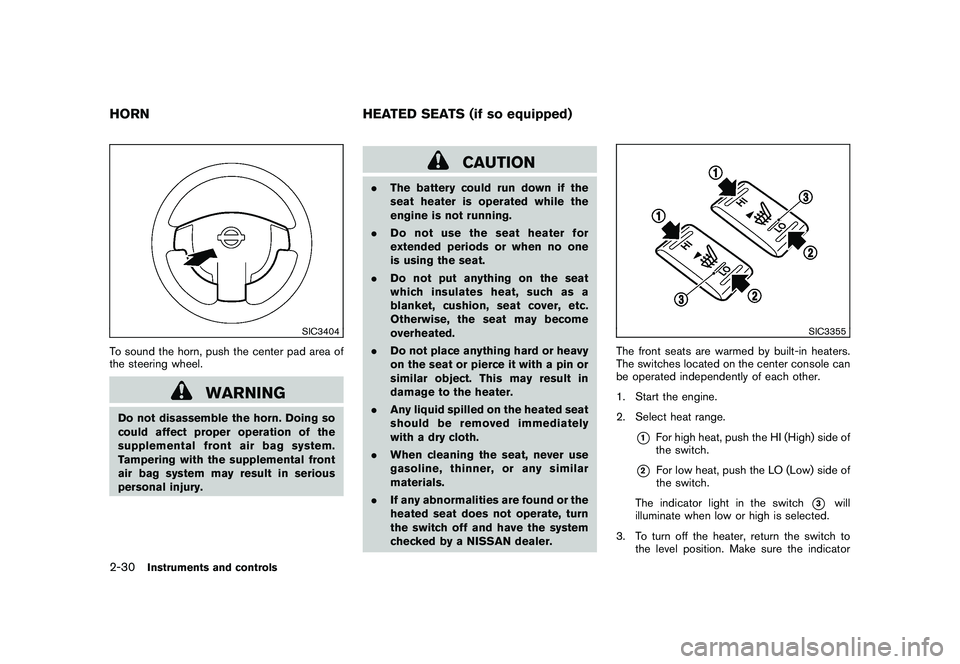
To sound the horn, push the center pad area of
the steering wheel.
WARNING
Do not disassemble the horn. Doing so
could affect proper operation of the
supplemental front air bag system.
Tampering with the supplemental front
air bag system may result in serious
personal injury.
CAUTION
.The battery could run down if the
seat heater is operated while the
engine is not running.
.Do not use the seat heater for
extended periods or when no one
is using the seat.
.Do not put anything on the seat
which insulates heat, such as a
blanket, cushion, seat cover, etc.
Otherwise, the seat may become
overheated.
.Do not place anything hard or heavy
on the seat or pierce it with a pin or
similar object. This may result in
damage to the heater.
.Any liquid spilled on the heated seat
should be removed immediately
with a dry cloth.
.When cleaning the seat, never use
gasoline, thinner, or any similar
materials.
.If any abnormalities are found or the
heated seat does not operate, turn
the switch off and have the system
checked by a NISSAN dealer.
SIC3355
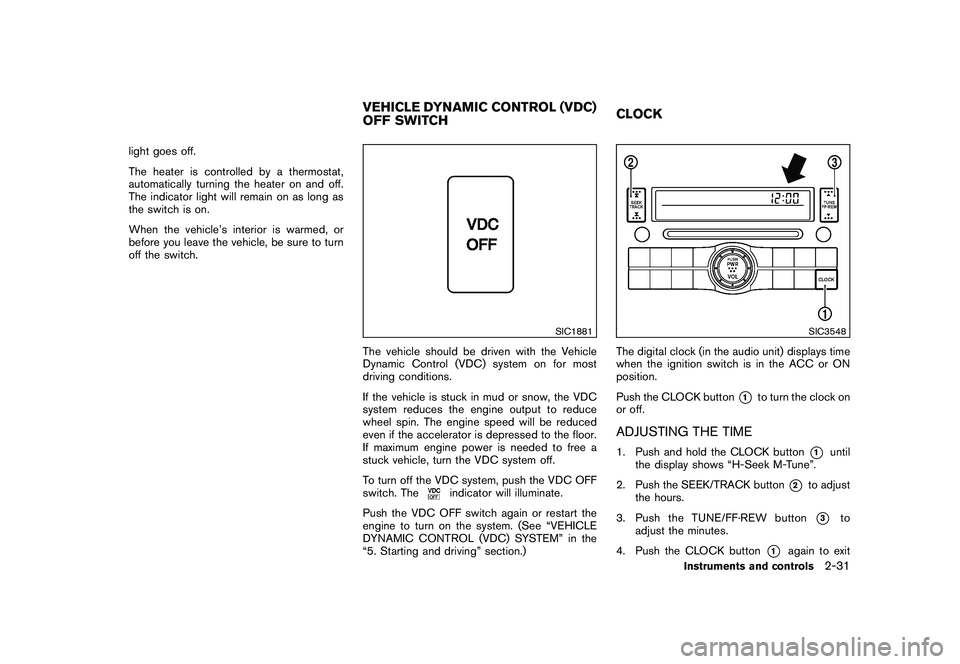
The front seats are warmed by built-in heaters.
The switches located on the center console can
be operated independently of each other.
1. Start the engine.
2. Select heat range.
*1
For high heat, push the HI (High) side of
the switch.
*2
For low heat, push the LO (Low) side of
the switch.
The indicator light in the switch
*3
will
illuminate when low or high is selected.
3. To turn off the heater, return the switch to
the level position. Make sure the indicator
HORN HEATED SEATS (if so equipped)2-30
Instruments and controls
Page 99 of 316
Black plate (97,1)
Model "S35-D" EDITED: 2008/ 7/ 24
light goes off.
The heater is controlled by a thermostat,
automatically turning the heater on and off.
The indicator light will remain on as long as
the switch is on.
When the vehicle’s interior is warmed, or
before you leave the vehicle, be sure to turn
off the switch.
SIC1881
The vehicle should be driven with the Vehicle
Dynamic Control (VDC) system on for most
driving conditions.
If the vehicle is stuck in mud or snow, the VDC
system reduces the engine output to reduce
wheel spin. The engine speed will be reduced
even if the accelerator is depressed to the floor.
If maximum engine power is needed to free a
stuck vehicle, turn the VDC system off.
To turn off the VDC system, push the VDC OFF
switch. The
indicator will illuminate.
Push the VDC OFF switch again or restart the
engine to turn on the system. (See “VEHICLE
DYNAMIC CONTROL (VDC) SYSTEM” in the
“5. Starting and driving” section.)
SIC3548
The digital clock (in the audio unit) displays time
when the ignition switch is in the ACC or ON
position.
Push the CLOCK button
*1
to turn the clock on
or off.
ADJUSTING THE TIME1. Push and hold the CLOCK button
*1
until
the display shows “H-Seek M-Tune”.
2. Push the SEEK/TRACK button
*2
to adjust
the hours.
3. Push the TUNE/FF·REW button*3
to
adjust the minutes.
4. Push the CLOCK button
*1
again to exit
VEHICLE DYNAMIC CONTROL (VDC)
OFF SWITCHCLOCK
Instruments and controls
2-31
Page 119 of 316
Black plate (10,1)
3 Pre-driving checks and adjustments
Model "S35-D" EDITED: 2008/ 6/ 3
Keys ............................................................... 3-2
NISSAN Vehicle Immobilizer System keys............ 3-2
Intelligent Keys (if so equipped)......................... 3-3
Doors.............................................................. 3-4
Locking with key............................................ 3-4
Locking with inside lock knob........................... 3-4
Locking with power door lock switch.................. 3-5
Automatic door locks...................................... 3-5
Child safety rear door lock............................... 3-6
Remote keyless entry system (if so equipped)........... 3-6
How to use remote keyless entry system............. 3-7
Intelligent Key system (if so equipped).................... 3-8
Intelligent Key operating range........................ 3-10
Door locks/unlocks precaution........................ 3-11
Intelligent Key operation................................. 3-11Warning lights and audible reminders............... 3-13
Troubleshooting guide................................... 3-14
How to use remote keyless entry function.......... 3-16
Hood............................................................ 3-20
Lift gate......................................................... 3-21
Lift gate release........................................... 3-22
Fuel-filler door................................................. 3-22
Opening the fuel-filler door............................. 3-22
Fuel-filler cap.............................................. 3-22
Steering wheel................................................ 3-24
Tilt operation............................................... 3-24
Sun visors...................................................... 3-24
Mirrors........................................................... 3-25
Inside mirror................................................ 3-25
Outside mirrors............................................ 3-26
Page 142 of 316
Black plate (140,1)
Model "S35-D" EDITED: 2008/ 7/ 24
WARNING
Do not adjust the steering wheel while
driving. You could lose control of your
vehicle and cause an accident.
SPA2383
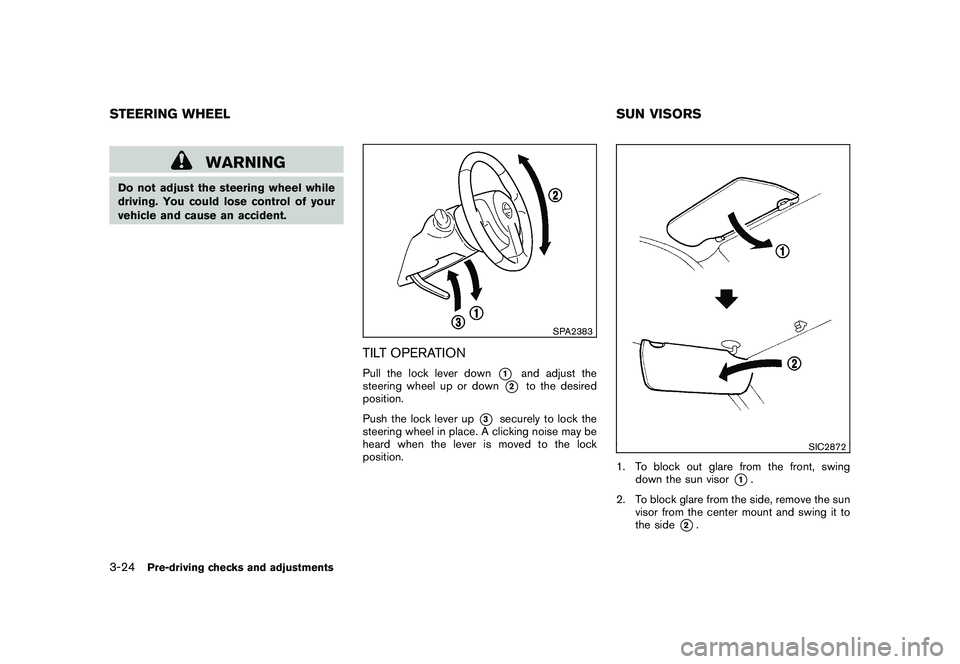
TILT OPERATIONPull the lock lever down
*1
and adjust the
steering wheel up or down
*2
to the desired
position.
Push the lock lever up
*3
securely to lock the
steering wheel in place. A clicking noise may be
heard when the lever is moved to the lock
position.
SIC2872
1. To block out glare from the front, swing
down the sun visor
*1.
2. To block glare from the side, remove the sun
visor from the center mount and swing it to
the side
*2.
STEERING WHEEL SUN VISORS3-24
Pre-driving checks and adjustments
Page 147 of 316
Black plate (13,1)
4 Heater, air conditioner, audio and phone
systems
Model "S35-D" EDITED: 2008/ 6/ 3
Ventilators........................................................ 4-2
Heater and air conditioner.................................... 4-2
Manual air conditioner..................................... 4-3
In-cabin microfilter.......................................... 4-5
Servicing air conditioner.................................. 4-5
Audio system.................................................... 4-6
Audio operation precautions............................. 4-6
FM-AM radio with Compact Disc (CD) player..... 4-13
FM-AM-SAT radio with Compact Disc (CD)
changer..................................................... 4-17CD care and cleaning................................... 4-22
Steering wheel switch for audio control
(if so equipped)........................................... 4-23
Antenna..................................................... 4-24
Car phone or CB radio...................................... 4-24
Bluetooth
®Hands-Free Phone System with
NISSAN voice recognition (if so equipped)............ 4-25
Using system.............................................. 4-27
Speaker Adaptation (SA) mode....................... 4-36
Troubleshooting guide................................... 4-39
Page 169 of 316
Black plate (167,1)
Model "S35-D" EDITED: 2008/ 7/ 24
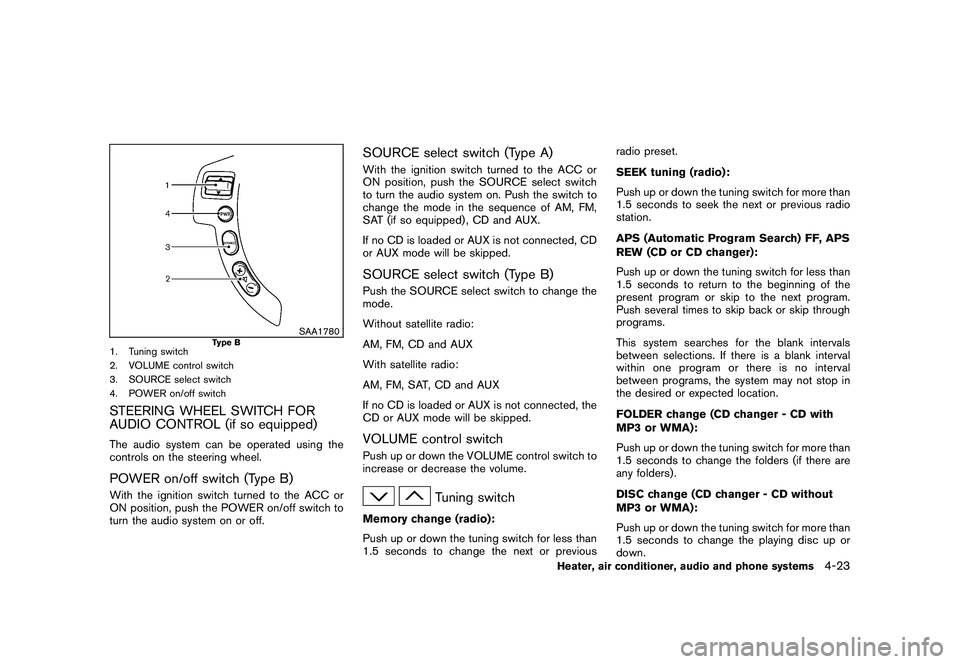
SAA1780
Type B
1. Tuning switch
2. VOLUME control switch
3. SOURCE select switch
4. POWER on/off switchSTEERING WHEEL SWITCH FOR
AUDIO CONTROL (if so equipped)The audio system can be operated using the
controls on the steering wheel.POWER on/off switch (Type B)With the ignition switch turned to the ACC or
ON position, push the POWER on/off switch to
turn the audio system on or off.
SOURCE select switch (Type A)With the ignition switch turned to the ACC or
ON position, push the SOURCE select switch
to turn the audio system on. Push the switch to
change the mode in the sequence of AM, FM,
SAT (if so equipped) , CD and AUX.
If no CD is loaded or AUX is not connected, CD
or AUX mode will be skipped.SOURCE select switch (Type B)Push the SOURCE select switch to change the
mode.
Without satellite radio:
AM, FM, CD and AUX
With satellite radio:
AM, FM, SAT, CD and AUX
If no CD is loaded or AUX is not connected, the
CD or AUX mode will be skipped.VOLUME control switchPush up or down the VOLUME control switch to
increase or decrease the volume.
Tuning switch
Memory change (radio):
Push up or down the tuning switch for less than
1.5 seconds to change the next or previousradio preset.
SEEK tuning (radio):
Push up or down the tuning switch for more than
1.5 seconds to seek the next or previous radio
station.
APS (Automatic Program Search) FF, APS
REW (CD or CD changer):
Push up or down the tuning switch for less than
1.5 seconds to return to the beginning of the
present program or skip to the next program.
Push several times to skip back or skip through
programs.
This system searches for the blank intervals
between selections. If there is a blank interval
within one program or there is no interval
between programs, the system may not stop in
the desired or expected location.
FOLDER change (CD changer - CD with
MP3 or WMA):
Push up or down the tuning switch for more than
1.5 seconds to change the folders (if there are
any folders) .
DISC change (CD changer - CD without
MP3 or WMA):
Push up or down the tuning switch for more than
1.5 seconds to change the playing disc up or
down.
Heater, air conditioner, audio and phone systems
4-23