wheel NISSAN ROGUE 2009 Owner´s Manual
[x] Cancel search | Manufacturer: NISSAN, Model Year: 2009, Model line: ROGUE, Model: NISSAN ROGUE 2009Pages: 316, PDF Size: 4.26 MB
Page 173 of 316
Black plate (171,1)
Model "S35-D" EDITED: 2008/ 7/ 24
battery power of the cellular phone may
discharge quicker than usual.
.If the Bluetooth
®Hands-Free Phone System
seems to be malfunctioning, please refer to
“Troubleshooting guide” later in this section.
You can also visit www.nissanusa.com/blue-
tooth for troubleshooting help.
.Some cellular phones or other devices may
cause interference or a buzzing noise to
come from the audio system speakers.
Storing the device in a different location
may reduce or eliminate the noise.
.Refer to the cellular phone Owner’s Manual
regarding the telephone charges, cellular
phone antenna and body, etc.
This device complies with Part 15 of the
FCC Rules. Operation is subject to the
following two conditions: (1) this device
may not cause harmful interference, and
(2) this device must accept any interfer-
ence received, including interference that
may cause undesired operation.
FCC Radiation Exposure Statement:
This equipment complies with FCC radiation
exposure limits set forth for an uncontrolled
environment. This equipment should be installed
and operated with minimum distance 8 in (20
cm) between the radiator and your body. This
Transmitter must not be co-located or operatingin conjunction with any other antenna or
transmitter.
USING SYSTEMThe NISSAN Voice Recognition system allows
hands-free operation of the Bluetooth
®Hands-
Free Phone System.
If the vehicle is in motion, some commands may
not be available so full attention may be given to
vehicle operation.
InitializationWhen the ignition switch is turned to the ON
position, NISSAN Voice Recognition is initia-
lized, which takes a few seconds. If thebutton is pushed before the initialization com-
pletes, the system will announce “Hands-free
phone system not ready” and will not react to
voice commands.Operating tipsTo get the best performance out of the NISSAN
Voice Recognition system, observe the follow-
ing:
.Keep the interior of the vehicle as quiet as
possible. Close the windows to eliminate
surrounding noises (traffic noises, vibration
sounds, etc.) , which may prevent the system
from recognizing voice commands correctly.
.Wait until the tone sounds before speaking acommand. Otherwise, the command will not
be received properly.
.Start speaking a command within 5 seconds
after the tone sounds.
.Speak in a natural voice without pausing
between words.
Giving voice commandsTo operate NISSAN Voice Recognition, push
and release the
button located on the
steering wheel. After the tone sounds, speak a
command.
Thecommandgivenispickedupbythe
microphone, and voice feedback is given when
the command is accepted.
.If you need to hear the available commands
for the current menu again, say “Help” and
the system will repeat them.
.If a command is not recognized, the system
announces, “Command not recognized.
Please try again.” Repeat the command in
a clear voice.
.If you want to go back to the previous
command, you can say “Go back” or
“Correction” anytime the system is waiting
for a response.
.You can cancel a command when the
system is waiting for a response by saying,
Heater, air conditioner, audio and phone systems
4-27
Page 174 of 316
Black plate (172,1)
Model "S35-D" EDITED: 2008/ 7/ 24
“Cancel” or “Quit.” The system announces
“Cancel” and ends the voice recognition
(VR) session. You can also push thebutton on the steering wheel at any time.
Whenever the VR session is canceled, a
double beep sounds to indicate you have
exited the system.
.If you want to adjust the volume of the voice
feedback, push the volume control switches
(+ or) on the steering wheel while being
provided with feedback. You can also use
the radio volume control knob.
How to say numbers:
NISSAN Voice Recognition requires a certain
way to speak numbers in voice commands.
Refer to the following rules and examples:
.Either “zero” or “oh” can be used for “0”.
Example: 1-800-662-6200
—“One eight oh oh six six two six two oh
oh”, or
—“One eight zero zero six six two six two oh
oh”
.Words can be used for the first 4 digits
places only.
Example: 1-800-662-6200
—“One eight hundred six six two six two ohoh”,
—NOT “One eight hundred six six two sixty
two hundred, and
—NOT “One eight oh oh six six two sixty two
hundred.
.Numbers can be spoken in small groups.
The system will prompt you to continuing
entering digits, if desired.
Example: 1-800-662-6200
—“One eight oh oh”
The system repeats the numbers and
prompts you to enter more.
—“six six two”
The system repeats the numbers and
prompts you to enter more.
—“six two oh oh”
.You can say “Star” for * and “Pound” for # at
anytime in any position of the phone number.
(Available only when using “Call Interna-
tional” command.)
Example: 1-555-1212 *123
—“One five five five one two one two star
one two three”NOTE:
For best results, say phone numbers as
single digits.
4-28
Heater, air conditioner, audio and phone systems
Page 175 of 316
Black plate (173,1)
Model "S35-D" EDITED: 2008/ 7/ 24
SAA1782
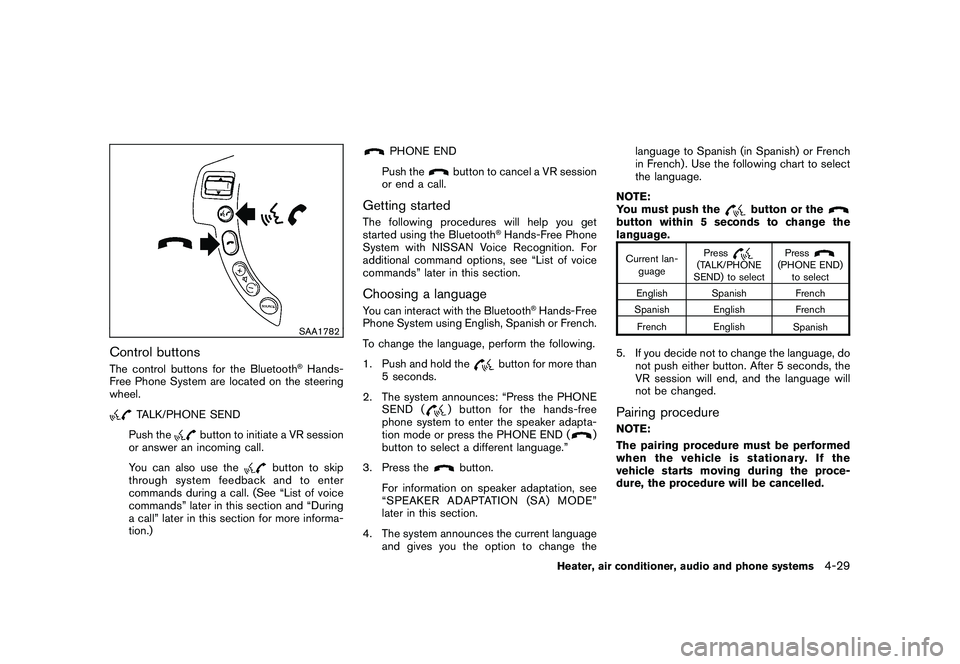
Control buttonsThe control buttons for the Bluetooth
®Hands-
Free Phone System are located on the steering
wheel.
TALK/PHONE SEND
Push the
button to initiate a VR session
or answer an incoming call.
You can also use the
button to skip
through system feedback and to enter
commands during a call. (See “List of voice
commands” later in this section and “During
a call” later in this section for more informa-
tion.)
PHONE END
Push the
button to cancel a VR session
or end a call.
Getting startedThe following procedures will help you get
started using the Bluetooth
®Hands-Free Phone
System with NISSAN Voice Recognition. For
additional command options, see “List of voice
commands” later in this section.
Choosing a languageYou can interact with the Bluetooth
®Hands-Free
Phone System using English, Spanish or French.
To change the language, perform the following.
1. Push and hold the
button for more than
5 seconds.
2. The system announces: “Press the PHONE
SEND (
) button for the hands-free
phone system to enter the speaker adapta-
tion mode or press the PHONE END (
)
button to select a different language.”
3. Press the
button.
For information on speaker adaptation, see
“SPEAKER ADAPTATION (SA) MODE”
later in this section.
4. The system announces the current language
and gives you the option to change thelanguage to Spanish (in Spanish) or French
in French) . Use the following chart to select
the language.
NOTE:
You must push the
button or the
button within 5 seconds to change the
language.Current lan-
guagePress
(TALK/PHONE
SEND) to selectPress
(PHONE END)
to select
English Spanish French
Spanish English French
French English
Spanish
5. If you decide not to change the language, do
not push either button. After 5 seconds, the
VR session will end, and the language will
not be changed.Pairing procedureNOTE:
The pairing procedure must be performed
when the vehicle is stationary. If the
vehicle starts moving during the proce-
dure, the procedure will be cancelled.
Heater, air conditioner, audio and phone systems
4-29
Page 176 of 316
Black plate (174,1)
Model "S35-D" EDITED: 2008/ 7/ 24
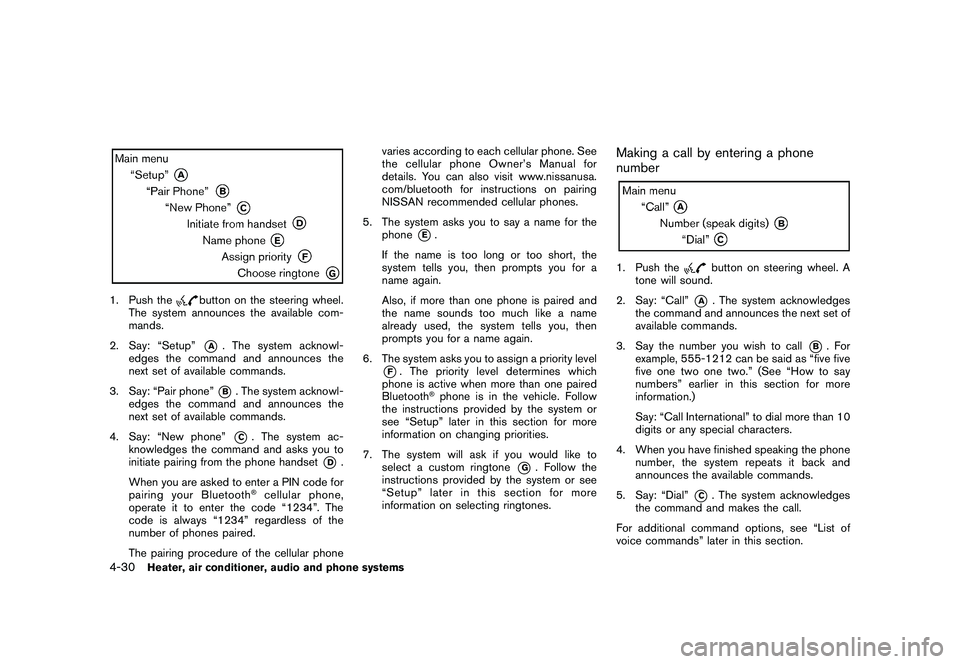
1. Push the
button on the steering wheel.
The system announces the available com-
mands.
2. Say: “Setup”*A
. The system acknowl-
edges the command and announces the
next set of available commands.
3. Say: “Pair phone”*B. The system acknowl-
edges the command and announces the
next set of available commands.
4. Say: “New phone”*C. The system ac-
knowledges the command and asks you to
initiate pairing from the phone handset
*D
.
When you are asked to enter a PIN code for
pairing your Bluetooth
®cellular phone,
operate it to enter the code “1234”. The
code is always “1234” regardless of the
number of phones paired.
The pairing procedure of the cellular phonevaries according to each cellular phone. See
the cellular phone Owner’s Manual for
details. You can also visit www.nissanusa.
com/bluetooth for instructions on pairing
NISSAN recommended cellular phones.
5. The system asks you to say a name for the
phone
*E.
If the name is too long or too short, the
system tells you, then prompts you for a
name again.
Also, if more than one phone is paired and
the name sounds too much like a name
already used, the system tells you, then
prompts you for a name again.
6. The system asks you to assign a priority level
*F. The priority level determines which
phone is active when more than one paired
Bluetooth
®phone is in the vehicle. Follow
the instructions provided by the system or
see “Setup” later in this section for more
information on changing priorities.
7. The system will ask if you would like to
select a custom ringtone
*G
. Follow the
instructions provided by the system or see
“Setup” later in this section for more
information on selecting ringtones.
Making a call by entering a phone
number1. Push the
button on steering wheel. A
tone will sound.
2. Say: “Call”
*A
. The system acknowledges
the command and announces the next set of
available commands.
3. Say the number you wish to call
*B
. For
example, 555-1212 can be said as “five five
five one two one two.” (See “How to say
numbers” earlier in this section for more
information.)
Say: “Call International” to dial more than 10
digits or any special characters.
4. When you have finished speaking the phone
number, the system repeats it back and
announces the available commands.
5. Say: “Dial”
*C. The system acknowledges
the command and makes the call.
For additional command options, see “List of
voice commands” later in this section.
4-30
Heater, air conditioner, audio and phone systems
Page 177 of 316
Black plate (175,1)
Model "S35-D" EDITED: 2008/ 7/ 24
Receiving a callWhen you hear the ringtone, push thebutton on the steering wheel.
Once the call has ended, push the
button
on the steering wheel.
NOTE:
If you do not wish to take the call when you
hear the ringtone, push the
button on
the steering wheel to reject the call.
For additional command options, see “List of
voice commands” later in this section.
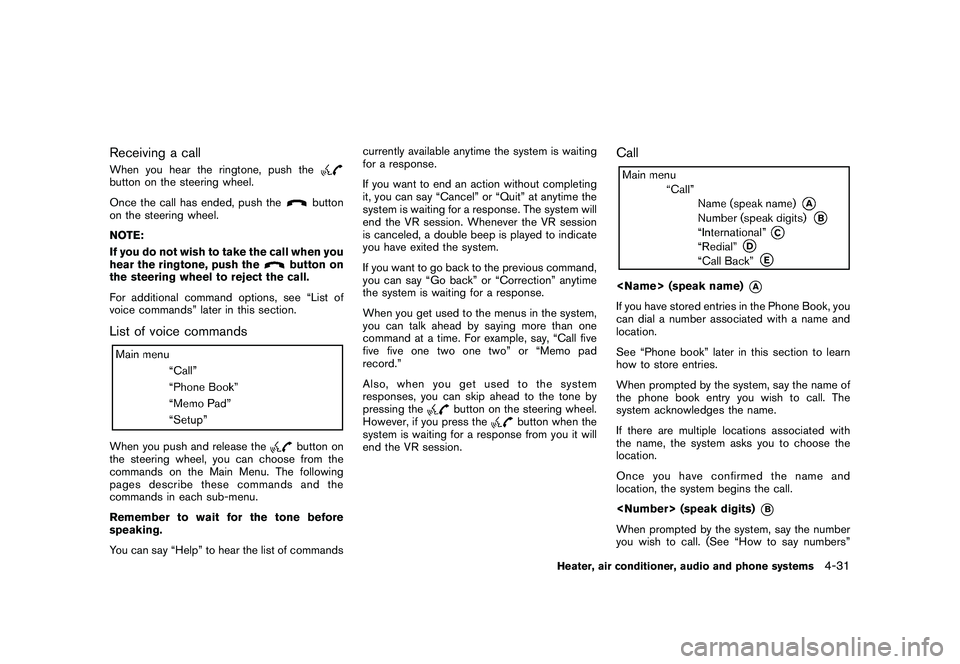
List of voice commandsWhen you push and release the
button on
the steering wheel, you can choose from the
commands on the Main Menu. The following
pages describe these commands and the
commands in each sub-menu.
Remember to wait for the tone before
speaking.
You can say “Help” to hear the list of commandscurrently available anytime the system is waiting
for a response.
If you want to end an action without completing
it, you can say “Cancel” or “Quit” at anytime the
system is waiting for a response. The system will
end the VR session. Whenever the VR session
is canceled, a double beep is played to indicate
you have exited the system.
If you want to go back to the previous command,
you can say “Go back” or “Correction” anytime
the system is waiting for a response.
When you get used to the menus in the system,
you can talk ahead by saying more than one
command at a time. For example, say, “Call five
five five one two one two” or “Memo pad
record.”
Also, when you get used to the system
responses, you can skip ahead to the tone by
pressing the
button on the steering wheel.
However, if you press the
button when the
system is waiting for a response from you it will
end the VR session.
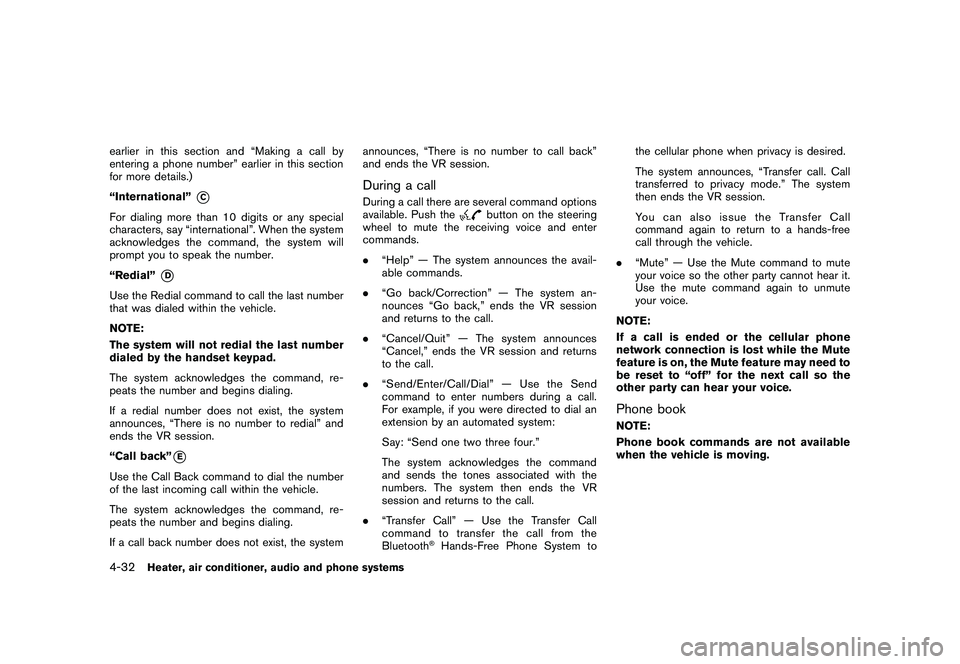
Call
*A
If you have stored entries in the Phone Book, you
can dial a number associated with a name and
location.
See “Phone book” later in this section to learn
how to store entries.
When prompted by the system, say the name of
the phone book entry you wish to call. The
system acknowledges the name.
If there are multiple locations associated with
the name, the system asks you to choose the
location.
Onceyouhaveconfirmedthenameand
location, the system begins the call.
*B
When prompted by the system, say the number
you wish to call. (See “How to say numbers”
Heater, air conditioner, audio and phone systems
4-31
Page 178 of 316
Black plate (176,1)
Model "S35-D" EDITED: 2008/ 7/ 24
earlier in this section and “Making a call by
entering a phone number” earlier in this section
for more details.)
“International”
*C
For dialing more than 10 digits or any special
characters, say “international”. When the system
acknowledges the command, the system will
prompt you to speak the number.
“Redial”
*D
Use the Redial command to call the last number
that was dialed within the vehicle.
NOTE:
The system will not redial the last number
dialed by the handset keypad.
The system acknowledges the command, re-
peats the number and begins dialing.
If a redial number does not exist, the system
announces, “There is no number to redial” and
ends the VR session.
“Call back”
*E
Use the Call Back command to dial the number
of the last incoming call within the vehicle.
The system acknowledges the command, re-
peats the number and begins dialing.
If a call back number does not exist, the systemannounces, “There is no number to call back”
and ends the VR session.
During a callDuring a call there are several command options
available. Push the
button on the steering
wheel to mute the receiving voice and enter
commands.
.“Help” — The system announces the avail-
able commands.
.“Go back/Correction” — The system an-
nounces “Go back,” ends the VR session
and returns to the call.
.“Cancel/Quit” — The system announces
“Cancel,” ends the VR session and returns
to the call.
.“Send/Enter/Call/Dial” — Use the Send
command to enter numbers during a call.
For example, if you were directed to dial an
extension by an automated system:
Say: “Send one two three four.”
The system acknowledges the command
and sends the tones associated with the
numbers. The system then ends the VR
session and returns to the call.
.“Transfer Call” — Use the Transfer Call
command to transfer the call from the
Bluetooth
®Hands-Free Phone System tothe cellular phone when privacy is desired.
The system announces, “Transfer call. Call
transferred to privacy mode.” The system
then ends the VR session.
You can also issue the Transfer Call
command again to return to a hands-free
call through the vehicle.
.“Mute” — Use the Mute command to mute
your voice so the other party cannot hear it.
Use the mute command again to unmute
your voice.
NOTE:
If a call is ended or the cellular phone
network connection is lost while the Mute
feature is on, the Mute feature may need to
be reset to “off” for the next call so the
other party can hear your voice.
Phone bookNOTE:
Phone book commands are not available
when the vehicle is moving.
4-32
Heater, air conditioner, audio and phone systems
Page 180 of 316
Black plate (178,1)
Model "S35-D" EDITED: 2008/ 7/ 24
To transfer a phone number stored in the cellular
phone’s memory (if so equipped):
Say “Transfer entry.” The system acknowledges
the command and asks you to initiate the
transfer from the phone handset. The new
contact phone number will be transferred from
the cellular phone via the Bluetooth
®commu-
nication link.
The transfer procedure varies according to each
cellular phone. See the cellular phone Owner’s
Manual for details. You can also visit www.
nissanusa.com/bluetooth for instructions on
transferring phone numbers from NISSAN re-
commended cellular phones.
The system repeats the number and prompts
you for the next command. When you have
finished entering numbers, choose “Store.”
The system confirms the name, location and
number, then announces that the entry has been
stored. The system then ends the VR session.
“Delete”
*C
Use the Delete command to erase one entry
from the phone book, all entries from the phone
book, the current redial number or the current
call back number.
To delete entries from the phone book, say a
name or “All entries” when prompted by the
system.The system acknowledges the command and
asks you to confirm the deletion.
To delete the current redial number or call back
number, say “redial number” or “call back
number” when prompted by the system.
If a redial number or a call back number exists,
the system deletes them without asking for
confirmation.
If there is no number for the entry you are trying
to delete, the system says so and ends the VR
session.
“List Names”
*D
Use the List Names command to hear all the
names and locations in the phone book.
The system recites the phone book entries but
does not include the actual phone numbers.
When the playback of the list is complete the
system returns to the main menu.
You can stop the playback of the list at any time
by pushing the
button on the steering
wheel. The system ends the VR session.
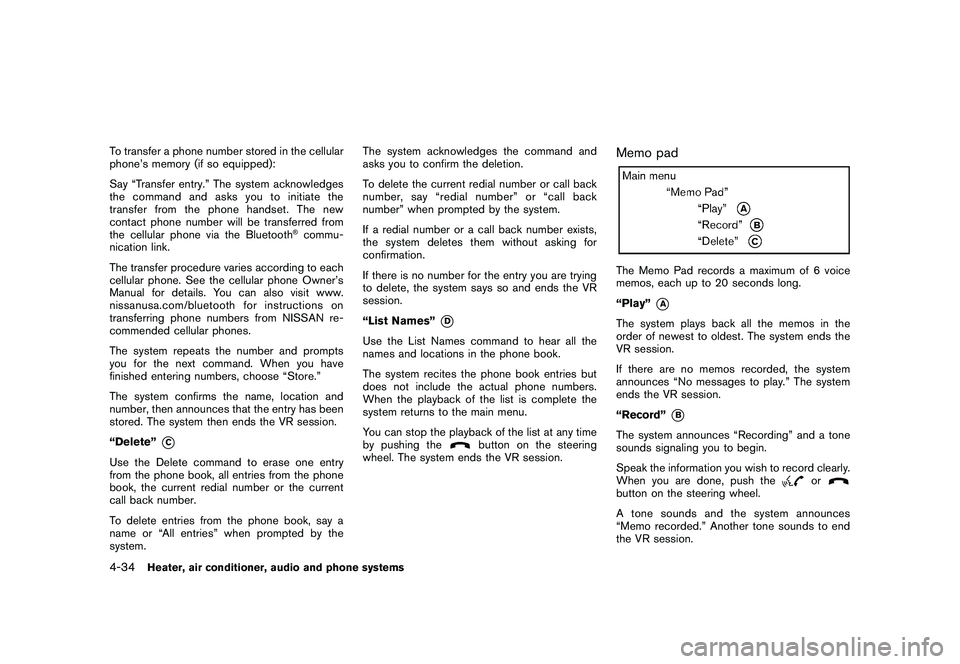
Memo padThe Memo Pad records a maximum of 6 voice
memos, each up to 20 seconds long.
“Play”
*A
The system plays back all the memos in the
order of newest to oldest. The system ends the
VR session.
If there are no memos recorded, the system
announces “No messages to play.” The system
ends the VR session.
“Record”
*B
The system announces “Recording” and a tone
sounds signaling you to begin.
Speak the information you wish to record clearly.
When you are done, push the
or
button on the steering wheel.
A tone sounds and the system announces
“Memo recorded.” Another tone sounds to end
the VR session.
4-34
Heater, air conditioner, audio and phone systems
Page 187 of 316
Black plate (16,1)
5 Starting and driving
Model "S35-D" EDITED: 2008/ 6/ 3
Precautions when starting and driving..................... 5-2
Exhaust gas (carbon monoxide)......................... 5-2
Three-way catalyst.......................................... 5-2
Tire Pressure Monitoring System (TPMS)............. 5-3
Avoiding collision and rollover........................... 5-5
On-pavement and off-road driving precautions...... 5-5
Off-road recovery........................................... 5-6
Rapid air pressure loss.................................... 5-6
Drinking alcohol/drugs and driving...................... 5-7
Driving safety precautions................................ 5-7
Ignition switch................................................... 5-9
Intelligent Key system (if so equipped)................ 5-9
Continuously Variable Transmission (CVT).......... 5-11
Steering lock............................................... 5-11
Key positions.............................................. 5-11
Before starting the engine.................................. 5-12
Starting the engine........................................... 5-12
Driving the vehicle............................................ 5-13
Continuously Variable Transmission (CVT).......... 5-13
Parking brake.................................................. 5-18
Cruise control................................................. 5-19
Precautions on cruise control.......................... 5-19Cruise control operations............................... 5-20
Break-in schedule............................................ 5-21
Increasing fuel economy.................................... 5-21
All-Wheel Drive (AWD) (if so equipped)................ 5-22
All-Wheel Drive (AWD) lock switch operations.... 5-22
AWD warning light....................................... 5-24
Parking/parking on hills...................................... 5-25
Electric power steering system............................ 5-26
Brake system.................................................. 5-26
Braking precautions...................................... 5-26
Parking brake break-in................................... 5-27
Anti-lock Braking System (ABS)...................... 5-27
Vehicle Dynamic Control (VDC) system................. 5-28
Cold weather driving......................................... 5-30
Freeing a frozen door lock.............................. 5-30
Anti-freeze.................................................. 5-30
Battery...................................................... 5-30
Draining of coolant water............................... 5-30
Tire equipment............................................ 5-30
Special winter equipment............................... 5-30
Driving on snow or ice.................................. 5-30
Engine block heater (if so equipped)................. 5-31
Page 189 of 316
Black plate (187,1)
Model "S35-D" EDITED: 2008/ 7/ 24
WARNING
.The exhaust gas and the exhaust
system are very hot. Keep people,
animals or flammable materials
away from the exhaust system com-
ponents.
.Do not stop or park the vehicle over
flammable materials such as dry
grass, waste paper or rags. They
may ignite and cause a fire.
CAUTION
.Do not use leaded gasoline. Depos-
its from leaded gasoline will ser-
iously reduce the three-way
catalyst’s ability to help reduce ex-
haust pollutants.
.Keep your engine tuned up. Mal-
functions in the ignition, fuel injec-
tion, or electrical systems can cause
overrich fuel flow into the three-way
catalyst, causing it to overheat. Do
not keep driving if the engine mis-
fires, or if noticeable loss of perfor-
mance or other unusual operating
conditions are detected. Have thevehicle inspected promptly by a
NISSAN dealer.
.Avoid driving with an extremely low
fuel level. Running out of fuel could
cause the engine to misfire, dama-
ging the three-way catalyst.
.Do not race the engine while warm-
ing it up.
.Do not push or tow your vehicle to
start the engine.
TIRE PRESSURE MONITORING SYS-
TEM (TPMS)Each tire, including the spare (if provided) ,
should be checked monthly when cold and
inflated to the inflation pressure recommended
by the vehicle manufacturer on the vehicle
placard or tire inflation pressure label. (If your
vehicle has tires of a different size than the size
indicated on the vehicle placard or tire inflation
pressure label, you should determine the proper
tire inflation pressure for those tires.)
As an added safety feature, your vehicle has
been equipped with a Tire Pressure Monitoring
System (TPMS) that illuminates a low tire
pressure telltale when one or more of your tires
is significantly under-inflated. Accordingly, when
the low tire pressure telltale illuminates, you
should stop and check your tires as soon aspossible, and inflate them to the proper pres-
sure. Driving on a significantly under-inflated tire
causes the tire to overheat and can lead to tire
failure. Under-inflation also reduces fuel effi-
ciency and tire tread life, and may affect the
vehicle’s handling and stopping ability.
Please note that the TPMS is not a substitute for
proper tire maintenance, and it is the driver’s
responsibility to maintain correct tire pressure,
even if under-inflation has not reached the level
to trigger illumination of the TPMS low tire
pressure telltale.
Your vehicle has also been equipped with a
TPMS malfunction indicator to indicate when the
system is not operating properly. The TPMS
malfunction indicator is combined with the low
tire pressure telltale. When the system detects a
malfunction, the telltale will flash for approxi-
mately one minute and then remain continuously
illuminated. This sequence will continue upon
subsequent vehicle start-ups as long as the
malfunction exists. When the malfunction indi-
cator is illuminated, the system may not be able
to detect or signal low tire pressure as intended.
TPMS malfunctions may occur for a variety of
reasons, including the installation of replace-
ment or alternate tires or wheels on the vehicle
that prevent the TPMS from functioning properly.
Always check the TPMS malfunction telltale
after replacing one or more tires or wheels on
your vehicle to ensure that the replacement or
Starting and driving
5-3
Page 190 of 316
Black plate (188,1)
Model "S35-D" EDITED: 2008/ 7/ 24
alternate tires and wheels allow the TPMS to
continue to function properly.Additional information.The TPMS does not monitor the tire
pressure of the spare tire.
.The TPMS will activate only when the
vehicle is driven at speeds above 16 MPH
(25 km/h) . Also, this system may not detect
a sudden drop in tire pressure (for example a
flat tire while driving) .
.The low tire pressure warning light does not
automatically turn off when the tire pressure
is adjusted. After the tire is inflated to the
recommended pressure, the vehicle must be
driven at speeds above 16 MPH (25 km/h)
to activate the TPMS and turn off the low tire
pressure warning light. Use a tire pressure
gauge to check the tire pressure.
.Tire pressure rises and falls depending on
the heat caused by the vehicle’s operation
and the outside temperature. Low outside
temperature can lower the temperature of
the air inside the tire which can cause a
lower tire inflation pressure. This may cause
the low tire pressure warning light to
illuminate. If the warning light illuminates in
low ambient temperature, check the tire
pressure for all four tires.
For additional information, see “Low tire pres-sure warning light” in the “2. Instruments and
controls” section and “TIRE PRESSURE MON-
ITORING SYSTEM (TPMS)” in the “6. In case of
emergency” section.
WARNING
.If the low tire pressure warning light
illuminates while driving, avoid sud-
den steering maneuvers or abrupt
braking, reduce vehicle speed, pull
off the road to a safe location and
stop the vehicle as soon as possi-
ble. Driving with under-inflated tires
may permanently damage the tires
and increase the likelihood of tire
failure. Serious vehicle damage
could occur and may lead to an
accident and could result in serious
personal injury. Check the tire pres-
sure for all four tires. Adjust the tire
pressure to the recommended COLD
tire pressure shown on the Tire and
Loading Information label to turn
the low tire pressure warning light
OFF. If you have a flat tire, replace it
with a spare tire as soon as possi-
ble. (See “FLAT TIRE” in the “6. In
case of emergency” section for
changing a flat tire.).When a spare tire is mounted or a
wheel is replaced, the TPMS will not
function and the low tire pressure
warning light will flash for approxi-
mately 1 minute. The light will
remain on after 1 minute. Contact
your NISSAN dealer as soon as
possible for tire replacement and/
or system resetting.
.Replacing tires with those not ori-
ginally specified by NISSAN could
affect the proper operation of the
TPMS.
.Do not inject any tire liquid or
aerosol tire sealant into the tires,
as this may cause a malfunction of
the tire pressure sensors.
CAUTION
.The TPMS may not function properly
when the wheels are equipped with
tire chains or the wheels are buried
in snow.
.Do not place metalized film or any
metal parts (antenna, etc.) on the
windows. This may cause poor re-
ception of the signals from the tire
5-4
Starting and driving