brake NISSAN ROGUE 2010 Owner´s Manual
[x] Cancel search | Manufacturer: NISSAN, Model Year: 2010, Model line: ROGUE, Model: NISSAN ROGUE 2010Pages: 328, PDF Size: 2.84 MB
Page 188 of 328
Black plate (188,1)
Model "S35-D" EDITED: 2009/ 9/ 4
phone and asks for a new priority level (1, 2, 3,
4, 5) .
If the new priority level is already being used for
another phone, the two phones will swap priority
levels.
For example, if the current priority levels are:Priority Level 1 = Phone A
Priority Level 2 = Phone B
Priority Level 3 = Phone C
and you change the priority level of Phone C to
Level 1, then:
Priority Level 1 = Phone C
Priority Level 2 = Phone B
Priority Level 3 = Phone A
“Delete Phone”
*E
Use the Delete Phone command to delete a
specific phone or all phones from the Bluetooth
®
Hands-Free Phone System.
The system announces the names of the phones
already paired with the system and their priority
level. The system then gives you the option to
delete a specific phone, all phones or listen to
the list again.
Once you chose to delete a phone or all phones,
the system asks you to confirm this action. NOTE:
When you delete a phone, the associated
phone book for that phone will also be
deleted.
“Select Ringtone”
*F
Use the Select Ringtone command to select the
tone heard in the vehicle when an incoming call
is received.
The system announces the name of the active
phoneandasksyoutochoosefromthe
following commands:
.
“Ringtone” — The system plays a ringtone
and asks if you would like to select that tone.
If you say no, the system plays the next
ringtone available and continues to cycle
through the ringtones until you select one or
quit.
. “Silent” — The system asks you to confirm
your wish to disable the ringtone.
“Bluetooth off”
*G
Use the Bluetooth
®Off command to turn off the
Bluetooth Hands-Free Phone System.
When Bluetooth
®Hands-Free Phone System is
off, you will not be able to make or receive calls
using NISSAN Voice Recognition. Also, you will
not have access to the Phone Book. You can still use the Memo Pad and access
Setup.
SPEAKER ADAPTATION (SA) MODESpeaker Adaptation allows up to two out-of
dialect users to train the system to improve
recognition accuracy. By repeating a number of
commands, the users can create a voice model
of their own voice that is stored in the system.
The system is capable of storing a different
speaker adaptation model for memory A and
memory B.
If memory A is available, the system will use
memory A to store the model. If memory A is in
use and memory B is available, the system will
use memory B to store the model. If both of the
memory locations are in use, the system will ask
the user to select which memory location should
be overwritten.Training procedureThe procedure for training a voice is as follows.
1. Position the vehicle in a reasonably quiet
outdoor location.
2. Sit in the driver’s seat with the engine running, the parking brake applied, and the
transmission in P (Park) position.
3. Push and hold the
button for more than
5 seconds.
4-36
Heater, air conditioner, audio and phone systems
Page 193 of 328
Black plate (16,1)
5 Starting and driving
Model "S35-D" EDITED: 2009/ 9/ 4
Precautions when starting and driving..................... 5-2
Exhaust gas (carbon monoxide) ......................... 5-2
Three-way catalyst .......................................... 5-2
Tire Pressure Monitoring System (TPMS) ............. 5-3
Avoiding collision and rollover ........................... 5-5
On-pavement and off-road driving precautions ...... 5-5
Off-road recovery ........................................... 5-6
Rapid air pressure loss .................................... 5-6
Drinking alcohol/drugs and driving ...................... 5-7
Driving safety precautions ................................ 5-7
Ignition switch ................................................... 5-9
Intelligent Key system (if so equipped) ................ 5-9
Continuously Variable Transmission (CVT) .......... 5-11
Key positions .............................................. 5-11
Before starting the engine .................................. 5-12
Starting the engine ........................................... 5-12
Driving the vehicle ............................................ 5-13
Continuously Variable Transmission (CVT) .......... 5-13
Parking brake .................................................. 5-18
Cruise control ................................................. 5-19
Precautions on cruise control .......................... 5-19
Cruise control operations ............................... 5-19 Break-in schedule
............................................ 5-21
Increasing fuel economy .................................... 5-21
All-Wheel Drive (AWD) (if so equipped) ................ 5-22
All-Wheel Drive (AWD) lock switch operations .... 5-22
AWD warning light ....................................... 5-23
Parking/parking on hills ...................................... 5-25
Electric power steering system ............................ 5-26
Brake system .................................................. 5-26
Braking precautions ...................................... 5-26
Parking brake break-in ................................... 5-27
Anti-lock Braking System (ABS) ...................... 5-27
Vehicle Dynamic Control (VDC) system ................. 5-28
Cold weather driving ......................................... 5-30
Freeing a frozen door lock .............................. 5-30
Anti-freeze .................................................. 5-30
Battery ...................................................... 5-30
Draining of coolant water ............................... 5-30
Tire equipment ............................................ 5-30
Special winter equipment ............................... 5-30
Driving on snow or ice .................................. 5-30
Engine block heater (if so equipped) ................. 5-31
Page 198 of 328
Black plate (198,1)
Model "S35-D" EDITED: 2009/ 9/ 4
OFF-ROAD RECOVERYWhile driving, the right side or left side wheels
may unintentionally leave the road surface. If this
occurs, maintain control of the vehicle by
following the procedure below. Please note that
this procedure is only a general guide. The
vehicle must be driven as appropriate based on
the conditions of the vehicle, road and traffic.
1. Remain calm and do not overreact.
2. Do not apply the brakes.
3. Maintain a firm grip on the steering wheelwith both hands and try to hold a straight
course.
4. When appropriate, slowly release the accel- erator pedal to gradually slow the vehicle.
5. If there is nothing in the way, steer the vehicle to follow the road while the vehicle
speed is reduced. Do not attempt to drive
the vehicle back onto the road surface until
vehicle speed is reduced.
6. When it is safe to do so, gradually turn the steering wheel until both tires return to the
road surface. When all tires are on the road
surface, steer the vehicle to stay in the
appropriate driving lane.
.If you decide that it is not safe to return
the vehicle to the road surface based on
vehicle, road or traffic conditions, gra- dually slow the vehicle to a stop in a safe
place off the road.
RAPID AIR PRESSURE LOSSRapid air pressure loss or a “blow-out” can
occur if the tire is punctured or is damaged due
to hitting a curb or pothole. Rapid air pressure
loss can also be caused by driving on under-
inflated tires.
Rapid air pressure loss can affect the handling
and stability of the vehicle, especially at highway
speeds.
Help prevent rapid air pressure loss by main-
taining the correct air pressure and visually
inspect the tires for wear and damage. See
“WHEELS AND TIRES” in the “8. Maintenance
and do-it-yourself” section of this manual.
If a tire rapidly loses air pressure or “blows-out”
while driving maintain control of the vehicle by
following the procedure below. Please note that
this procedure is only a general guide. The
vehicle must be driven as appropriate based on
the conditions of the vehicle, road and traffic.
WARNING
The following actions can increase the
chance of losing control of the vehicle if
there is a sudden loss of tire air
pressure. Losing control of the vehicle
may cause a collision and result in
personal injury.
.
The vehicle generally moves or pulls
in the direction of the flat tire.
. Do not rapidly apply the brakes.
. Do not rapidly release the accelera-
tor pedal.
. Do not rapidly turn the steering
wheel.
1. Remain calm and do not overreact.
2. Maintain a firm grip on the steering wheel with both hands and try to hold a straight
course.
3. When appropriate, slowly release the accel- erator pedal to gradually slow the vehicle.
4. Gradually steer the vehicle to a safe location off the road and away from traffic if possible.
5. Lightly apply the brake pedal to gradually stop the vehicle.
6. Turn on the hazard warning flashers and either contact a roadside emergency service
to change the tire or see “CHANGING A
FLAT TIRE” in the “6. In case of emergency”
section of this Owner’s Manual.
5-6
Starting and driving
Page 199 of 328
Black plate (199,1)
Model "S35-D" EDITED: 2009/ 9/ 4
DRINKING ALCOHOL/DRUGS AND
DRIVING
WARNING
Never drive under the influence of
alcohol or drugs. Alcohol in the blood-
stream reduces coordination, delays
reaction time and impairs judgement.
Driving after drinking alcohol increases
the likelihood of being involved in an
accident injuring yourself and others.
Additionally, if you are injured in an
accident, alcohol can increase the se-
verity of the injury.
NISSAN is committed to safe driving. However,
you must choose not to drive under the influence
of alcohol. Every year thousands of people are
injured or killed in alcohol-related accidents.
Although the local laws vary on what is
considered to be legally intoxicated, the fact is
that alcohol affects all people differently and
most people underestimate the effects of
alcohol.
Remember, drinking and driving don’t mix! And
that is true for drugs, too (over-the-counter,
prescription, and illegal drugs) . Don’t drive if
your ability to operate your vehicle is impaired by
alcohol, drugs, or some other physical condition.
DRIVING SAFETY PRECAUTIONSYour NISSAN is designed for both normal and
off-road use. However, avoid driving in deep
water or mud as your NISSAN is mainly
designed for leisure use, unlike a conventional
off-road vehicle.
Remember that Two-Wheel Drive (2WD) mod-
els are less capable than All-Wheel Drive
(AWD) models for rough road driving and
extrication when stuck in deep snow, mud, or
the like.
Please observe the following precautions:
WARNING
. Drive carefully when off the road
and avoid dangerous areas. Every
person who drives or rides in this
vehicle should be seated with their
seat belt fastened. This will keep
you and your passengers in position
when driving over rough terrain.
. Do not drive across steep slopes.
Instead drive either straight up or
straight down the slopes. Off-road
vehicles can tip over sideways much
more easily than they can forward or
backward. .
Many hills are too steep for any
vehicle. If you drive up them, you
may stall. If you drive down them,
you may not be able to control your
speed. If you drive across them, you
may roll over.
. Do not shift ranges while driving on
downhill grades as this could cause
loss of control of the vehicle.
. Stay alert when driving to the top of
a hill. At the top there could be a
drop-off or other hazard that could
cause an accident.
. If your engine stalls or you cannot
make it to the top of a steep hill,
never attempt to turn around. Your
vehicle could tip or roll over. Always
back straight down in R (Reverse)
range. Never back down in N (Neu-
tral) , using only the brake, as this
could cause loss of control.
. Heavy braking going down a hill
could cause your brakes to overheat
and fade, resulting in loss of control
and an accident. Apply brakes
lightly and use a low range to
control your speed.
Starting and driving
5-7
Page 201 of 328
Black plate (201,1)
Model "S35-D" EDITED: 2009/ 9/ 4
carefully.
. Be sure to check the brakes imme-
diately after driving in mud or water.
See “BRAKE SYSTEM” later in this
section for wet brakes.
. Avoid parking your vehicle on steep
hills. If you get out of the vehicle
and it rolls forward, backward or
sideways, you could be injured.
. Whenever you drive off-road
through sand, mud or water as deep
as the wheel hub, more frequent
maintenance may be required. See
the maintenance information in the
“NISSAN Service and Maintenance
Guide”.
. Spinning the front wheels on slip-
pery surfaces may cause the AWD
warning light to flash and the AWD
system to automatically switch from
the AWD mode to the 2WD mode.
This could reduce traction. Be espe-
cially careful when towing a trailer.
(AWD models)
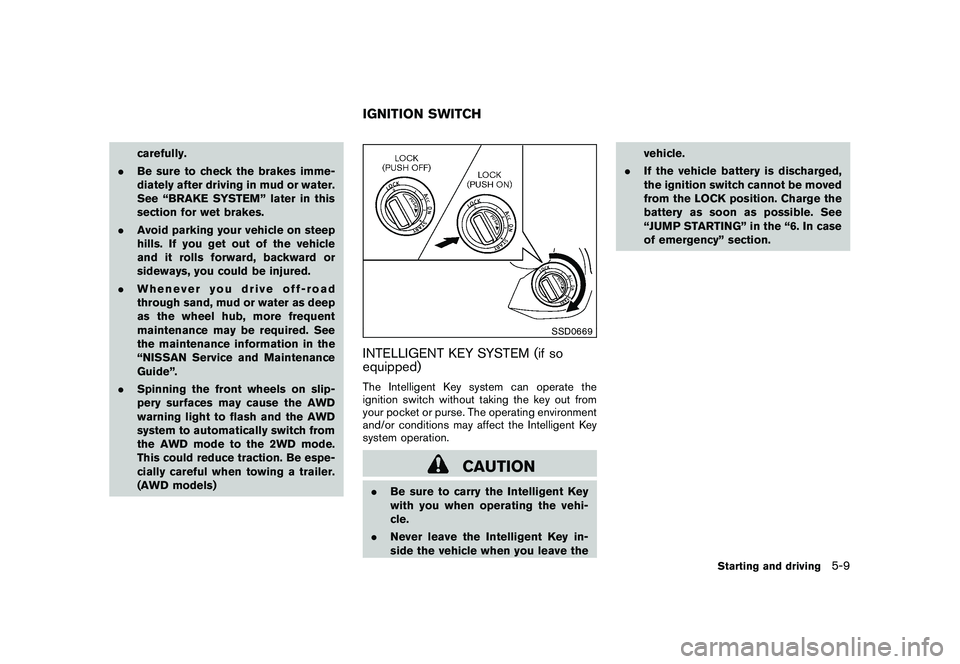
SSD0669
INTELLIGENT KEY SYSTEM (if so
equipped)The Intelligent Key system can operate the
ignition switch without taking the key out from
your pocket or purse. The operating environment
and/or conditions may affect the Intelligent Key
system operation.
CAUTION
.Be sure to carry the Intelligent Key
with you when operating the vehi-
cle.
. Never leave the Intelligent Key in-
side the vehicle when you leave the vehicle.
. If the vehicle battery is discharged,
the ignition switch cannot be moved
from the LOCK position. Charge the
battery as soon as possible. See
“JUMP STARTING” in the “6. In case
of emergency” section.IGNITION SWITCH
Starting and driving
5-9
Page 203 of 328
Black plate (203,1)
Model "S35-D" EDITED: 2009/ 9/ 4
CONTINUOUSLY VARIABLE TRANS-
MISSION (CVT)The ignition lock is designed so that the ignition
switch cannot be turned to the LOCK position
until the selector lever is moved to the P (Park)
position.
.When turning the ignition switch to the
LOCK position, make sure that the selector
lever is in the P (Park) position.
. When removing the key from the ignition
switch (if it is inserted) , make sure that the
selector lever is in the P (Park) position.
When the ignition switch cannot be turned to
the LOCK position:
1. Move the selector lever to the P (Park) position.
2. Turn the ignition switch slightly in the ON direction.
3. TurntheignitionswitchtotheLOCK position.
4. Remove the key, if it is inserted in the ignition switch.
If the ignition switch is turned to the LOCK
position, the selector lever cannot be moved
from the P (Park) position. The selector lever can
be moved if the ignition switch is in the ON
position with the foot brake pedal depressed. The OFF position
*1
is between the LOCK and
ACC positions, although it is not marked on the
ignition switch.
KEY POSITIONS
LOCK (0)Except for the Intelligent Key equipped
model:
The key can only be removed from the ignition
switch at this position.
For the Intelligent Key equipped model:
PUSH OFF - The ignition switch is locked at this position.
PUSH ON - The ignition switch will be unlocked while
carrying the Intelligent Key.OFF (1)The power supply is turned off.ACC (2)The electrical accessory power activates without
the engine turned on.ON (3)The ignition system and the electrical accessory
power activate without the engine turned on.
START (4)The engine starter activates and the engine will
start. The ignition switch, when released, will
automatically turn to the ON position.
CAUTION
As soon as the engine has started,
release the ignition switch immediately.
Starting and driving
5-11
Page 204 of 328
Black plate (204,1)
Model "S35-D" EDITED: 2009/ 9/ 4
.Make sure the area around the vehicle is
clear.
. Check fluid levels such as engine oil, cool-
ant, brake fluid, and window washer fluid as
frequently as possible, or at least whenever
you refuel.
. Check that all windows and lights are clean.
. Visually inspect tires for their appearance
and condition. Also check tires for proper
inflation.
. Lock all doors.
. Position seat and adjust head restraints.
. Adjust inside and outside mirrors.
. Fasten seat belts and ask all passengers to
do likewise.
. Check the operation of warning lights when
the ignition key is turned to the ON position.
(See “WARNING/INDICATOR LIGHTS
AND AUDIBLE REMINDERS” in the “2.
Instruments and controls” section.) 1. Apply the parking brake.
2. Move the selector lever to the P (Park) or N
(Neutral) position. (P is recommended.)
The starter is designed so that it does not
operate unless the selector lever is in either
of the above positions.
3. Crank the engine with your foot off the
accelerator pedal by turning the ignition
switch to START. Release the switch when
the engine starts. If the engine starts, but
fails to run, repeat the above procedure.
. If the engine is very hard to start in
extremely cold weather or when restart-
ing, depress the accelerator pedal a little
(approximately 1/3 to the floor) and hold
it and then crank the engine. Release the
accelerator pedal when the engine
starts.
. If the engine is very hard to start
because it is flooded, depress the
accelerator pedal all the way to the floor
and hold it. Crank the engine for 5 - 6
seconds. After cranking the engine,
release the accelerator pedal. Crank
the engine with your foot off the
accelerator pedal by turning the igni-
tion switch to START. Release the
ignition switch when the engine starts.
If the engine starts, but fails to run, repeat the above procedure.
CAUTION
Do not operate the starter for more
than 15 seconds at a time. If the engine
does not start, turn the ignition switch
off and wait 10 seconds before cranking
again, otherwise the starter could be
damaged.
4. Warm-up
Allow the engine to idle for at least 30
seconds after starting. Do not race the
engine while warming it up. Drive at
moderate speed for a short distance first,
especially in cold weather. In cold weather,
keep the engine running for a minimum of 2 -
3 minutes before shutting it off. Starting and
stopping the engine over a short period of
time may make the vehicle more difficult to
start.
BEFORE STARTING THE ENGINE STARTING THE ENGINE5-12
Starting and driving
Page 205 of 328
Black plate (205,1)
Model "S35-D" EDITED: 2009/ 9/ 4
CONTINUOUSLY VARIABLE TRANS-
MISSION (CVT)The Continuously Variable Transmission (CVT)
in your vehicle is electronically controlled to
produce maximum power and smooth operation.
The recommended operating procedures for this
transmission are shown on the following pages.
Follow these procedures for maximum vehicle
performance and driving enjoyment.
Engine power may be automatically re-
duced to protect the CVT if the engine
speed increases quickly when driving on
slippery roads or while being tested on
some dynamometers.Starting the vehicle1. After starting the engine, fully depress thefoot brake pedal before moving the selector
lever out of the P (Park) position.
This CVT is designed so that the foot
brake pedal must be depressed before
shifting from P (Park) to any driving
position while the ignition switch is in
the ON position.
The selector lever cannot be moved out
of the P (Park) position and into any of
the other positions if the ignition
switch is turned to the LOCK, OFF or
ACC position or if the key is removed. 2. Keep the foot brake pedal depressed, push
the selector lever button and move the
selector lever to a driving position.
3. Release the parking brake and foot brake pedal, and then gradually start the vehicle in
motion.
WARNING
.Do not depress the accelerator
pedal while shifting from P (Park)
or N (Neutral) to R (Reverse) , D
(Drive) , L (Low) or manual shift
mode. Always depress the brake
pedal until shifting is completed.
Failure to do so could cause you to
lose control and have an accident.
. Cold engine idle speed is high, so
use caution when shifting into a
forward or reverse gear before the
engine has warmed up.
. Never shift to P (Park) or R (Re-
verse) while vehicle is moving. Fail-
ure to do so could cause you to lose
control and have an accident.
CAUTION
.When stopping the vehicle on an
uphill grade, do not hold the vehicle
by depressing the accelerator pedal.
The foot brake should be used for
this purpose.
. Do not downshift abruptly on slip-
pery roads. This may cause a loss of
control.
DRIVING THE VEHICLE
Starting and driving
5-13
Page 206 of 328
Black plate (206,1)
Model "S35-D" EDITED: 2009/ 9/ 4
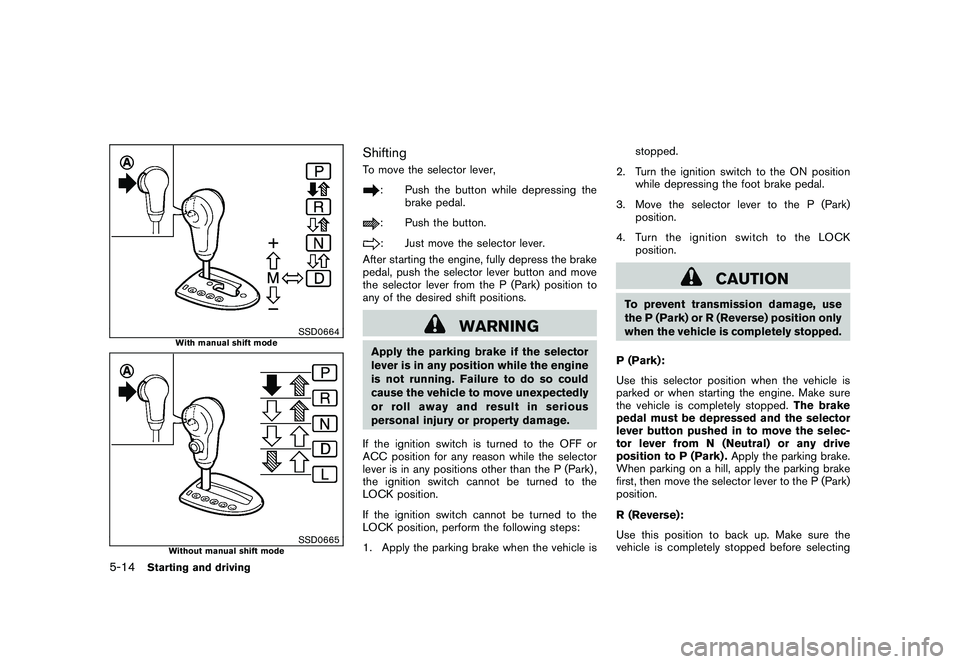
SSD0664
With manual shift mode
SSD0665
Without manual shift mode
ShiftingTo move the selector lever,
: Push the button while depressing thebrake pedal.: Push the button.: Just move the selector lever.
After starting the engine, fully depress the brake
pedal, push the selector lever button and move
the selector lever from the P (Park) position to
any of the desired shift positions.
WARNING
Apply the parking brake if the selector
lever is in any position while the engine
is not running. Failure to do so could
cause the vehicle to move unexpectedly
or roll away and result in serious
personal injury or property damage.
If the ignition switch is turned to the OFF or
ACC position for any reason while the selector
lever is in any positions other than the P (Park) ,
the ignition switch cannot be turned to the
LOCK position.
If the ignition switch cannot be turned to the
LOCK position, perform the following steps:
1. Apply the parking brake when the vehicle is stopped.
2. Turn the ignition switch to the ON position while depressing the foot brake pedal.
3. Move the selector lever to the P (Park) position.
4. Turn the ignition switch to the LOCK position.
CAUTION
To prevent transmission damage, use
the P (Park) or R (Reverse) position only
when the vehicle is completely stopped.
P (Park):
Use this selector position when the vehicle is
parked or when starting the engine. Make sure
the vehicle is completely stopped. The brake
pedal must be depressed and the selector
lever button pushed in to move the selec-
tor lever from N (Neutral) or any drive
position to P (Park) . Apply the parking brake.
When parking on a hill, apply the parking brake
first, then move the selector lever to the P (Park)
position.
R (Reverse):
Use this position to back up. Make sure the
vehicle is completely stopped before selecting
5-14
Starting and driving
Page 207 of 328
Black plate (207,1)
Model "S35-D" EDITED: 2009/ 9/ 4
the R (Reverse) position.The brake pedal
must be depressed and the selector lever
button pushed in to move the selector
lever from P (Park) , N (Neutral) or any
driving position to R (Reverse) .
N (Neutral):
Neither forward nor reverse gear is engaged.
The engine can be started in this position. You
may shift to N (Neutral) and restart a stalled
engine while the vehicle is moving.
D (Drive):
Use this position for all normal forward driving.
L (Low) (if so equipped):
Use this position for maximum engine braking on
steep downhill gradients/climbing steep slopes
and whenever approaching sharp bends. Do not
use the L position in any other circumstances.
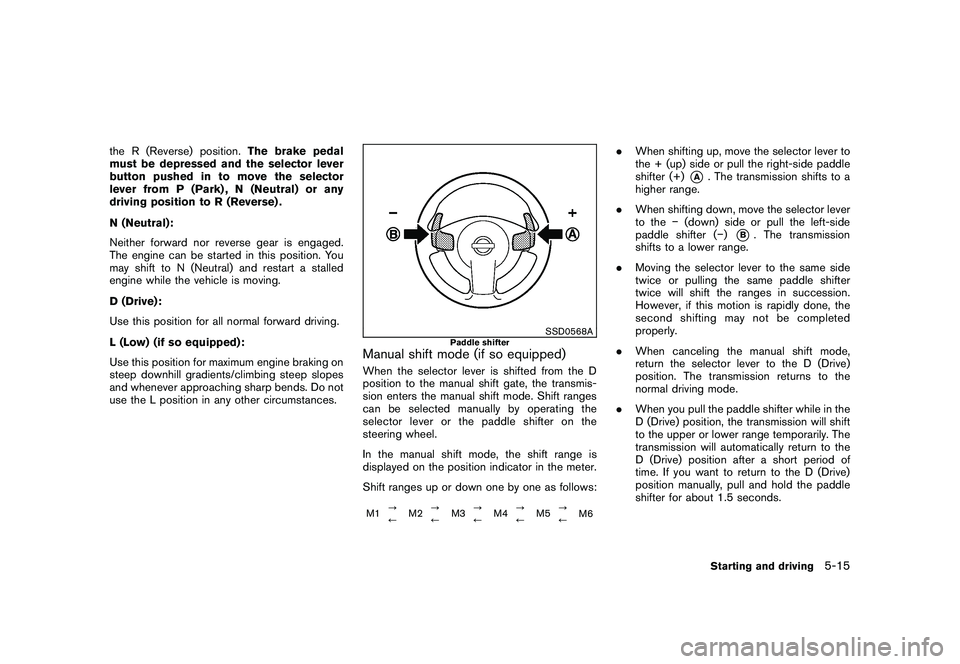
SSD0568A
Paddle shifter
Manual shift mode (if so equipped)When the selector lever is shifted from the D
position to the manual shift gate, the transmis-
sion enters the manual shift mode. Shift ranges
can be selected manually by operating the
selector lever or the paddle shifter on the
steering wheel.
In the manual shift mode, the shift range is
displayed on the position indicator in the meter.
Shift ranges up or down one by one as follows:M1 ?
/M2?
/ M3?
/M4?
/ M5?
/
M6
.
When shifting up, move the selector lever to
the + (up) side or pull the right-side paddle
shifter (+)
*A
. The transmission shifts to a
higher range.
. When shifting down, move the selector lever
to the (down) side or pull the left-side
paddle shifter ( )
*B. The transmission
shifts to a lower range.
. Moving the selector lever to the same side
twice or pulling the same paddle shifter
twice will shift the ranges in succession.
However, if this motion is rapidly done, the
second shifting may not be completed
properly.
. When canceling the manual shift mode,
return the selector lever to the D (Drive)
position. The transmission returns to the
normal driving mode.
. When you pull the paddle shifter while in the
D (Drive) position, the transmission will shift
to the upper or lower range temporarily. The
transmission will automatically return to the
D (Drive) position after a short period of
time. If you want to return to the D (Drive)
position manually, pull and hold the paddle
shifter for about 1.5 seconds.
Starting and driving
5-15