light NISSAN ROGUE 2010 Owner´s Manual
[x] Cancel search | Manufacturer: NISSAN, Model Year: 2010, Model line: ROGUE, Model: NISSAN ROGUE 2010Pages: 328, PDF Size: 2.84 MB
Page 103 of 328
Black plate (99,1)
Model "S35-D" EDITED: 2009/ 9/ 4
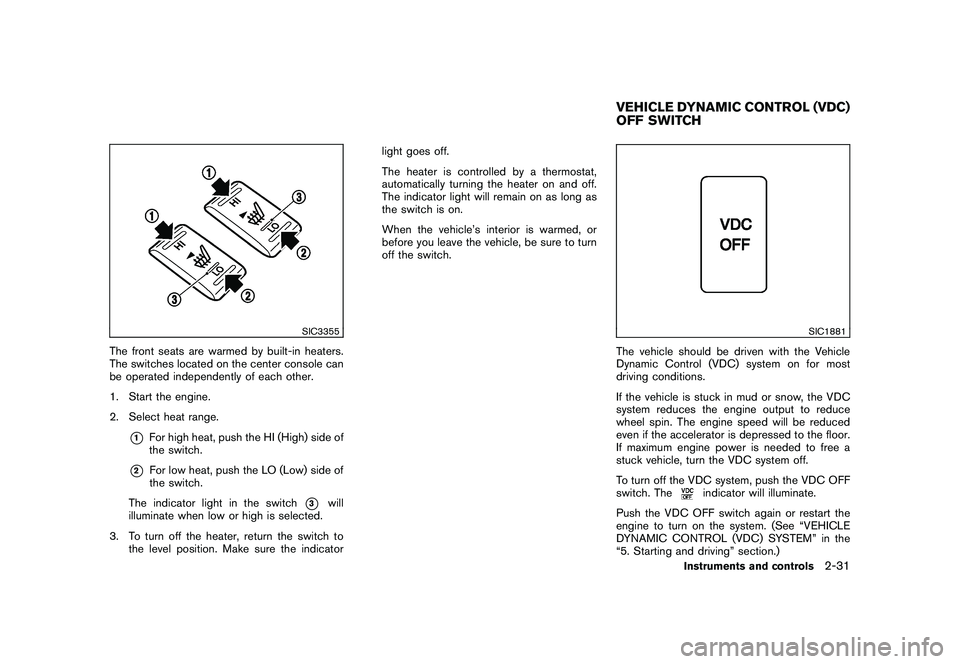
SIC3355
The front seats are warmed by built-in heaters.
The switches located on the center console can
be operated independently of each other.
1. Start the engine.
2. Select heat range.
*1
For high heat, push the HI (High) side of
the switch.
*2
For low heat, push the LO (Low) side of
the switch.
The indicator light in the switch
*3
will
illuminate when low or high is selected.
3. To turn off the heater, return the switch to the level position. Make sure the indicator light goes off.
The heater is controlled by a thermostat,
automatically turning the heater on and off.
The indicator light will remain on as long as
the switch is on.
When the vehicle’s interior is warmed, or
before you leave the vehicle, be sure to turn
off the switch.
SIC1881
The vehicle should be driven with the Vehicle
Dynamic Control (VDC) system on for most
driving conditions.
If the vehicle is stuck in mud or snow, the VDC
system reduces the engine output to reduce
wheel spin. The engine speed will be reduced
even if the accelerator is depressed to the floor.
If maximum engine power is needed to free a
stuck vehicle, turn the VDC system off.
To turn off the VDC system, push the VDC OFF
switch. The
indicator will illuminate.
Push the VDC OFF switch again or restart the
engine to turn on the system. (See “VEHICLE
DYNAMIC CONTROL (VDC) SYSTEM” in the
“5. Starting and driving” section.)
VEHICLE DYNAMIC CONTROL (VDC)
OFF SWITCH
Instruments and controls
2-31
Page 105 of 328
Black plate (101,1)
Model "S35-D" EDITED: 2009/ 9/ 4
The power outlet is located in the instrument
panel and the center console (if so equipped) .
CAUTION
.The outlet and plug may be hot
during or immediately after use.
. Do not use with accessories that
exceed a 12 volt, 120W (10A) power
draw. Do not use double adapters or
more than one electrical accessory.
. Use power outlet with the engine
running to avoid discharging the
vehicle battery.
. Avoid using power outlet when the
air conditioner, headlights or rear
window defroster is on.
. This power outlet is not designed
for use with a cigarette lighter unit.
. Push the plug in as far as it will go.
If good contact is not made, the plug
may overheat or the internal tem-
perature fuse may open.
. Before inserting or disconnecting a
plug, be sure the electrical acces-
sory being used is turned OFF.
. When not in use, be sure to close
the cap. Do not allow water to contact the outlet.
CUP HOLDERS
CAUTION
.
Avoid abrupt starting and braking
when the cup holder is being used
to prevent spilling the drink. If the
liquid is hot, it can scald you or your
passenger.
. Use only soft cups in the cup holder.
Hard objects can injure you in an
accident.STORAGE
Instruments and controls
2-33
Page 107 of 328
Black plate (103,1)
Model "S35-D" EDITED: 2009/ 9/ 4
direct sunlight. The heat may da-
mage the glasses.
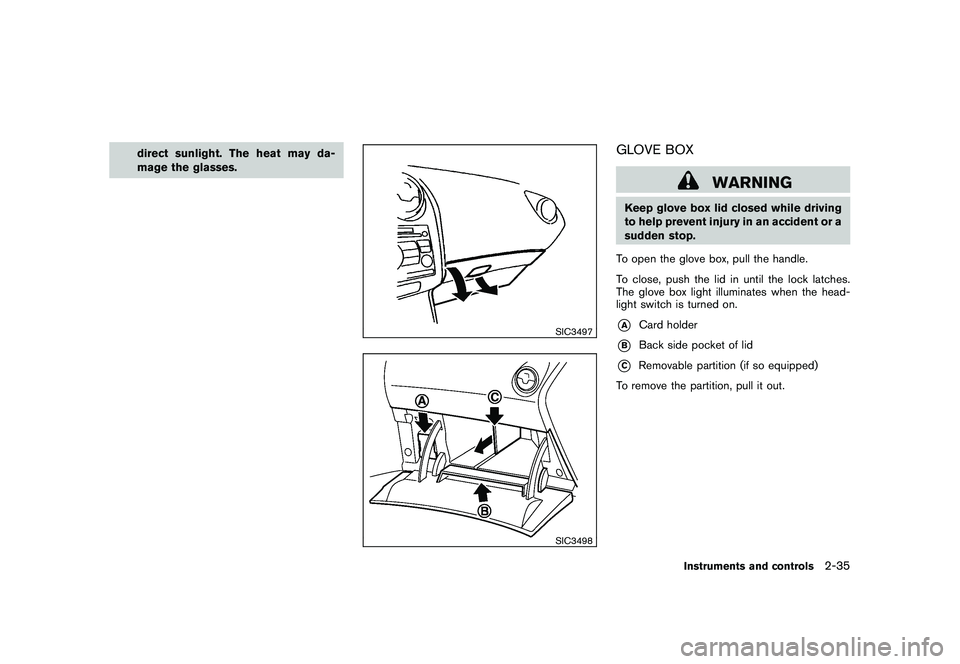
SIC3497SIC3498
GLOVE BOX
WARNING
Keep glove box lid closed while driving
to help prevent injury in an accident or a
sudden stop.
To open the glove box, pull the handle.
To close, push the lid in until the lock latches.
The glove box light illuminates when the head-
light switch is turned on.*A
Card holder
*B
Back side pocket of lid
*C
Removable partition (if so equipped)
To remove the partition, pull it out.
Instruments and controls
2-35
Page 114 of 328
Black plate (110,1)
Model "S35-D" EDITED: 2009/ 9/ 4
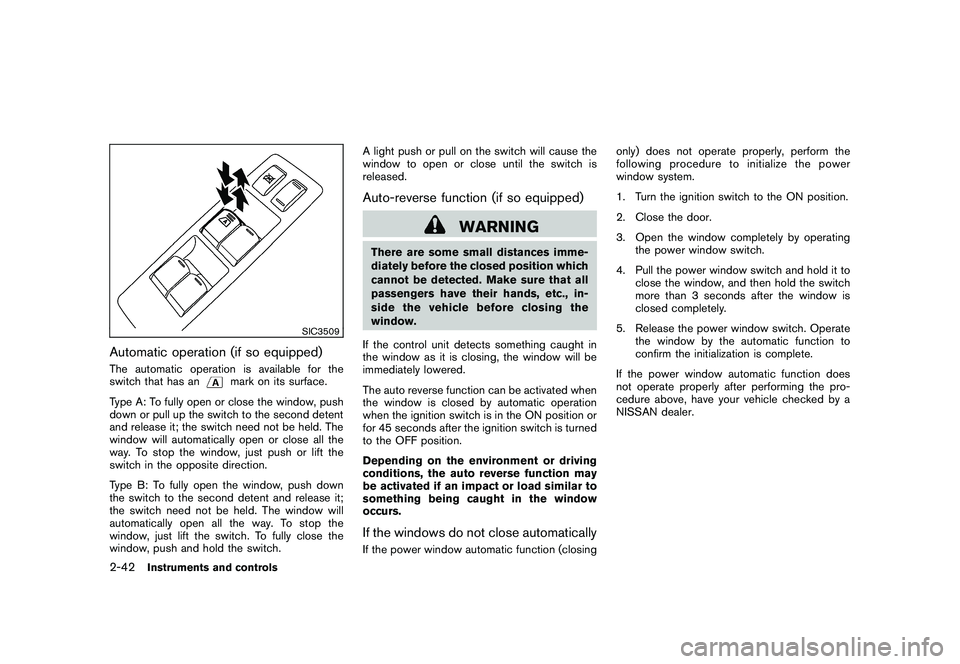
SIC3509
Automatic operation (if so equipped)The automatic operation is available for the
switch that has an
mark on its surface.
Type A: To fully open or close the window, push
down or pull up the switch to the second detent
and release it; the switch need not be held. The
window will automatically open or close all the
way. To stop the window, just push or lift the
switch in the opposite direction.
Type B: To fully open the window, push down
the switch to the second detent and release it;
the switch need not be held. The window will
automatically open all the way. To stop the
window, just lift the switch. To fully close the
window, push and hold the switch. A light push or pull on the switch will cause the
window to open or close until the switch is
released.
Auto-reverse function (if so equipped)
WARNING
There are some small distances imme-
diately before the closed position which
cannot be detected. Make sure that all
passengers have their hands, etc., in-
side the vehicle before closing the
window.
If the control unit detects something caught in
the window as it is closing, the window will be
immediately lowered.
The auto reverse function can be activated when
the window is closed by automatic operation
when the ignition switch is in the ON position or
for 45 seconds after the ignition switch is turned
to the OFF position.
Depending on the environment or driving
conditions, the auto reverse function may
be activated if an impact or load similar to
something being caught in the window
occurs.If the windows do not close automaticallyIf the power window automatic function (closing only) does not operate properly, perform the
following procedure to initialize the power
window system.
1. Turn the ignition switch to the ON position.
2. Close the door.
3. Open the window completely by operating
the power window switch.
4. Pull the power window switch and hold it to close the window, and then hold the switch
more than 3 seconds after the window is
closed completely.
5. Release the power window switch. Operate the window by the automatic function to
confirm the initialization is complete.
If the power window automatic function does
not operate properly after performing the pro-
cedure above, have your vehicle checked by a
NISSAN dealer.
2-42
Instruments and controls
Page 116 of 328
Black plate (112,1)
Model "S35-D" EDITED: 2009/ 9/ 4
Auto reverse function
WARNING
There are some small distances imme-
diately before the closed position which
cannot be detected. Make sure that all
passengers have their hands, etc., in-
side the vehicle before closing the
moonroof.
If the control unit detects something caught in
the moonroof when it is closing, the moonroof
will be immediately opened.
The auto reverse function can be activated when
the moonroof is closed by automatic operation
when the ignition switch is in the ON position or
for about 45 seconds after the ignition switch is
turned to the OFF position.
If the moonroof cannot be closed automatically
when the auto reverse function activates due to
a malfunction, push and hold the switch toward
*2.
Depending on the environment or driving
conditions, the auto reverse function may
be activated if an impact or load similar to
something being caught in the moonroof
occurs.
If the moonroof does not operateIf the moonroof does not operate properly,
perform the following procedure to initialize the
moonroof operation system.
1. If the moonroof is open, close it fully by repeatedly pushing the switch toward
*2.
2. Push and hold the switch toward
*2
to tilt the moonroof up.
3. Release the moonroof switch after the moonroof moves slightly up and down.
4. Push and hold the switch toward
*1
to fully tilt the moonroof down.
5. Check if the moonroof switch operates normally.
If the moonroof does not operate properly after
performing the procedure above, have your
vehicle checked by a NISSAN dealer.
CAUTION
Do not use for extended periods of time
with the engine stopped. This could
result in a discharged battery.INTERIOR LIGHTS
2-44
Instruments and controls
Page 117 of 328
Black plate (113,1)
Model "S35-D" EDITED: 2009/ 9/ 4
SIC3511
MAP LIGHTSPush the light lens to turn the map light on or off.
SIC3512
The map light control switch has three positions:
ON
*1, DOOR
*2
and OFF
*3.
The light
*4
(if so equipped) will illuminate
when the headlight switch is turned to the
or
position.
ON positionWhen the switch is in the ON position
*1, the
map lights will illuminate.
DOOR positionWhen the switch is in the DOOR position
*2,
the map lights will illuminate under the following
conditions:
. ignition switch is turned to the LOCK position
— remain on for about 15 seconds.
. doors are unlocked by pushing the unlock
button
(on the keyfob or Intelligent Key)
or the request switch (Intelligent Key system
equipped model) , with the ignition switch in
the LOCK position
— remain on for about 15 seconds.
. any door is opened and then closed with the
ignition switch in the LOCK position
— remain on for about 15 seconds.
. any door is opened with the ignition switch
in the ACC or ON position
— remain on while the door is opened. When the door is closed, the lights go off.
The lights will turn off after 30 minutes
when the lights remain illuminated to
prevent the battery from becoming dis-
charged.
OFF positionWhen the switch is in the OFF position
*3, the
map lights will not illuminate, regardless of the
condition.
Instruments and controls
2-45
Page 118 of 328
Black plate (114,1)
Model "S35-D" EDITED: 2009/ 9/ 4
SIC3513
CEILING LIGHTThe ceiling light switch has three positions: ON,
DOOR and OFF.ON positionWhen the switch is in the ON position
*1, the
ceiling light will illuminate.
DOOR positionWhen the switch is in the DOOR position
*2,
the ceiling light will illuminate under the following
conditions:
. ignition switch is turned to the LOCK
position
— remain on for about 15 seconds. .
doors are unlocked by pushing the unlock
button
(on the keyfob or Intelligent Key)
or the request switch (Intelligent Key system
equipped model) , with the ignition switch in
the LOCK position
— remain on for about 15 seconds.
. any door is opened and then closed with the
ignition switch in the LOCK position
— remain on for about 15 seconds.
. any door is opened with the ignition switch
in the ACC or ON position
— remain on while the door is opened. When the door is closed, the lights go off.
The light will turn off after 30 minutes
when the lights remain illuminated to
prevent the battery from becoming dis-
charged.
OFF positionWhen the switch is in the OFF position
*3, the
ceiling light will not illuminate, regardless of the
condition.
SIC2064
The light on the vanity mirror will turn on when
the cover on the vanity mirror is opened.
When the cover is closed, the light will turn off.
The lights will turn off after 30 minutes
when the lights remain illuminated to
prevent the battery from becoming dis-
charged.VANITY MIRROR LIGHTS (if so
equipped)
2-46
Instruments and controls
Page 119 of 328
Black plate (115,1)
Model "S35-D" EDITED: 2009/ 9/ 4
SIC2131A
When the switch is in the ON position
*1, the
light illuminates while the lift gate is opened.
When the lift gate is closed, the light will turn off.
When the switch is in the OFF position
*2, the
light will turn off.
The light will turn off after 30 minutes
when the lights remain illuminated to
prevent the battery from becoming dis-
charged. HomeLink
®Universal Transceiver provides a
convenient way to consolidate the functions of
up to three individual hand-held transmitters into
one built-in device.
HomeLink®Universal Transceiver:
. Will operate most Radio Frequency (RF)
devices such as garage doors, gates, home
and office lighting, entry door locks and
security systems.
. Is powered by your vehicle’s battery. No
separate batteries are required. If the
vehicle’s battery is discharged or is dis-
connected, HomeLink
®will retain all pro-
gramming.
Once HomeLink
®Universal Transceiver is
programmed, retain the original transmit-
ter for future programming procedures
(Example: new vehicle purchases) . Upon
sale of the vehicle, the programmed
HomeLink
®Universal Transceiver buttons
should be erased for security purposes.
For additional information, see “PRO-
GRAMMING HomeLink
®” later in this sec-
tion.
WARNING
. Do not use HomeLink
®Universal
Transceiver with any garage door
opener that lacks safety stop and reverse features as required by
federal safety standards. (These
standards became effective for
opener models manufactured after
April 1, 1982.) A garage door opener
which cannot detect an object in the
path of a closing garage door and
then automatically stop and reverse,
does not meet current federal safety
standards. Using a garage door
opener without these features in-
creases the risk of serious injury or
death.
. During programming procedure,
your garage door or security gate
may open or close. Make sure that
people and objects are clear of the
garage door, gate, etc. that you are
programming.
. Your vehicle’s engine should be
turned off while programming
HomeLink
®Universal Transceiver.
PROGRAMMING HomeLink
®
To program your HomeLink
®Transceiver to
operate a garage door, gate, or entry door
opener, home or office lighting, you need to be
at the same location as the device. Note:
Garage door openers (manufactured after
CARGO LIGHT (if so equipped) HomeLink
®UNIVERSAL
TRANSCEIVER (if so equipped)
Instruments and controls
2-47
Page 120 of 328
Black plate (116,1)
Model "S35-D" EDITED: 2009/ 9/ 4
1996) have “rolling code protection”. To pro-
gram a garage door opener equipped with
“rolling code protection”; you will need to use
a ladder to get up to the garage door opener
motor to be able to access the “smart or learn”
program button.
SIC3182
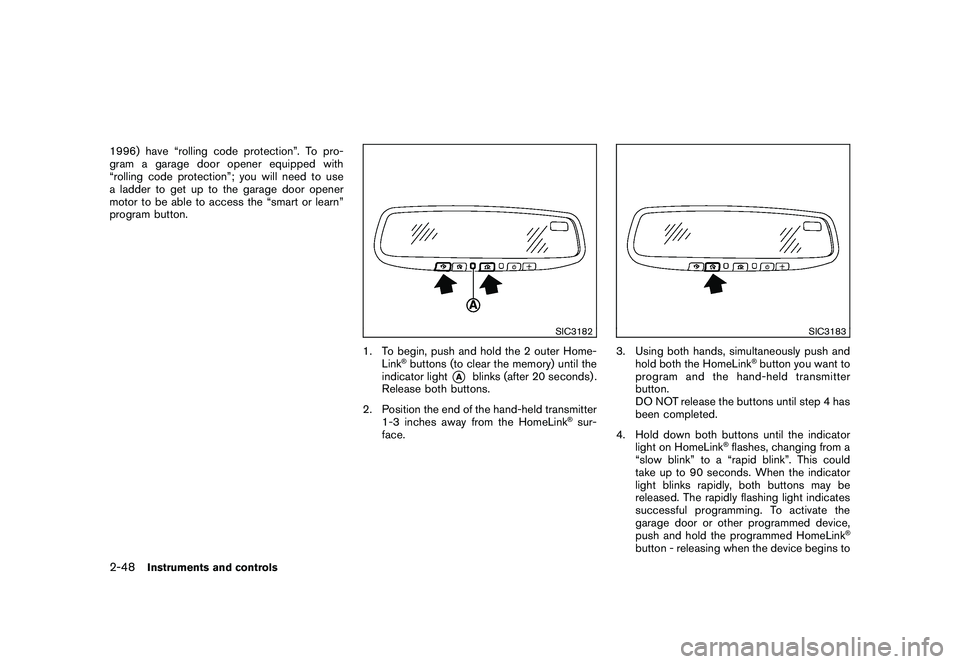
1. To begin, push and hold the 2 outer Home-Link
®buttons (to clear the memory) until the
indicator light
*A
blinks (after 20 seconds) .
Release both buttons.
2. Position the end of the hand-held transmitter 1-3 inches away from the HomeLink
®sur-
face.
SIC3183
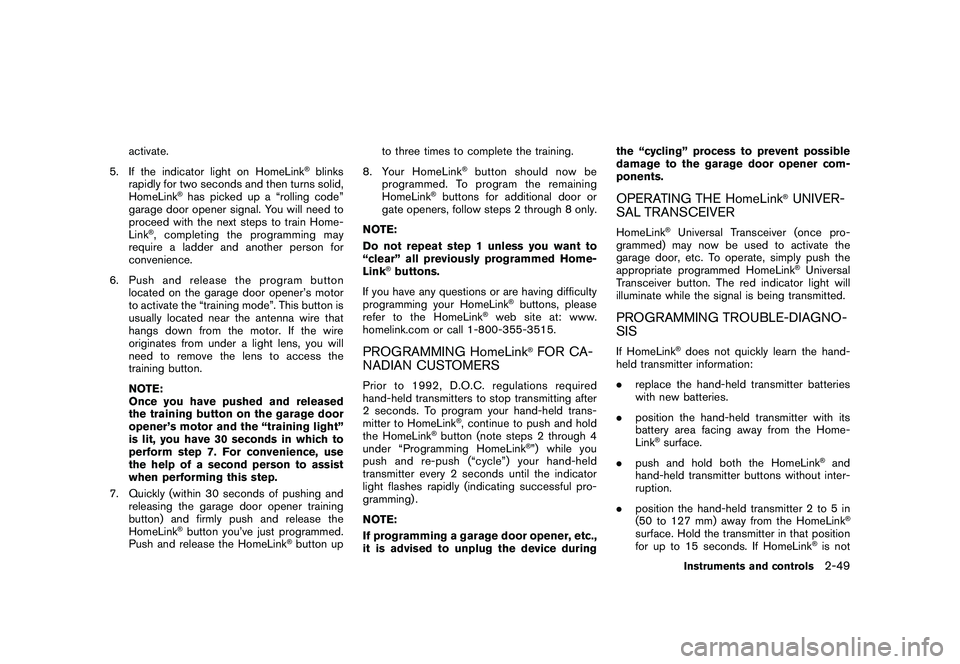
3. Using both hands, simultaneously push and hold both the HomeLink
®button you want to
program and the hand-held transmitter
button.
DO NOT release the buttons until step 4 has
been completed.
4. Hold down both buttons until the indicator light on HomeLink
®flashes, changing from a
“slow blink” to a “rapid blink”. This could
take up to 90 seconds. When the indicator
light blinks rapidly, both buttons may be
released. The rapidly flashing light indicates
successful programming. To activate the
garage door or other programmed device,
push and hold the programmed HomeLink
®
button - releasing when the device begins to
2-48
Instruments and controls
Page 121 of 328
Black plate (117,1)
Model "S35-D" EDITED: 2009/ 9/ 4
activate.
5. If the indicator light on HomeLink
®blinks
rapidly for two seconds and then turns solid,
HomeLink
®has picked up a “rolling code”
garage door opener signal. You will need to
proceed with the next steps to train Home-
Link
®, completing the programming may
require a ladder and another person for
convenience.
6. Push and release the program button located on the garage door opener’s motor
to activate the “training mode”. This button is
usually located near the antenna wire that
hangs down from the motor. If the wire
originates from under a light lens, you will
need to remove the lens to access the
training button.
NOTE:
Once you have pushed and released
the training button on the garage door
opener’s motor and the “training light”
is lit, you have 30 seconds in which to
perform step 7. For convenience, use
the help of a second person to assist
when performing this step.
7. Quickly (within 30 seconds of pushing and releasing the garage door opener training
button) and firmly push and release the
HomeLink
®button you’ve just programmed.
Push and release the HomeLink
®button up to three times to complete the training.
8. Your HomeLink
®button should now be
programmed. To prog ram the remaining
HomeLink
®buttons for additional door or
gate openers, follow steps 2 through 8 only.
NOTE:
Do not repeat step 1 unless you want to
“clear” all previously programmed Home-
Link
®buttons.
If you have any questions or are having difficulty
programming your HomeLink
®buttons, please
refer to the HomeLink
®web site at: www.
homelink.com or call 1-800-355-3515.
PROGRAMMING HomeLink
®FOR CA-
NADIAN CUSTOMERS
Prior to 1992, D.O.C. regulations required
hand-held transmitters to stop transmitting after
2 seconds. To program your hand-held trans-
mitter to HomeLink
®, continue to push and hold
the HomeLink
®button (note steps 2 through 4
under “Programming HomeLink
®”) while you
push and re-push (“cycle”) your hand-held
transmitter every 2 seconds until the indicator
light flashes rapidly (indicating successful pro-
gramming) .
NOTE:
If programming a garage door opener, etc.,
it is advised to unplug the device during the “cycling” process to prevent possible
damage to the garage door opener com-
ponents.
OPERATING THE HomeLink
®UNIVER-
SAL TRANSCEIVER
HomeLink
®Universal Transceiver (once pro-
grammed) may now be used to activate the
garage door, etc. To operate, simply push the
appropriate programmed HomeLink
®Universal
Transceiver button. The red indicator light will
illuminate while the signal is being transmitted.
PROGRAMMING TROUBLE-DIAGNO-
SISIf HomeLink
®does not quickly learn the hand-
held transmitter information:
. replace the hand-held transmitter batteries
with new batteries.
. position the hand-held transmitter with its
battery area facing away from the Home-
Link
®surface.
. push and hold both the HomeLink
®and
hand-held transmitter buttons without inter-
ruption.
. position the hand-held transmitter 2 to 5 in
(50 to 127 mm) away from the HomeLink®
surface. Hold the transmitter in that position
for up to 15 seconds. If HomeLink
®is not
Instruments and controls
2-49