air condition NISSAN ROGUE 2010 Owner´s Manual
[x] Cancel search | Manufacturer: NISSAN, Model Year: 2010, Model line: ROGUE, Model: NISSAN ROGUE 2010Pages: 328, PDF Size: 2.84 MB
Page 187 of 328
Black plate (187,1)
Model "S35-D" EDITED: 2009/ 9/ 4
If the memo pad is full, the system asks if you
wish to record over the oldest memo.
“Delete”
*C
The Delete command erases all memos. The
system asks you to confirm this action before
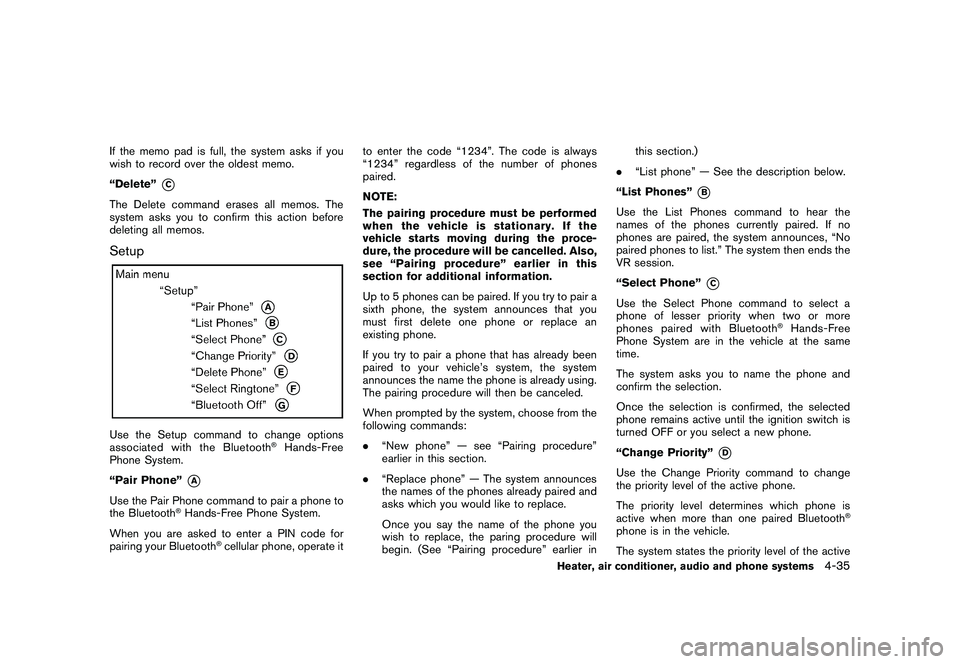
deleting all memos.SetupUse the Setup command to change options
associated with the Bluetooth
®Hands-Free
Phone System.
“Pair Phone”
*A
Use the Pair Phone command to pair a phone to
the Bluetooth
®Hands-Free Phone System.
When you are asked to enter a PIN code for
pairing your Bluetooth
®cellular phone, operate it to enter the code “1234”. The code is always
“1234” regardless of the number of phones
paired.
NOTE:
The pairing procedure must be performed
when the vehicle is stationary. If the
vehicle starts moving during the proce-
dure, the procedure will be cancelled. Also,
see “Pairing procedure” earlier in this
section for additional information.
Up to 5 phones can be paired. If you try to pair a
sixth phone, the system announces that you
must first delete one phone or replace an
existing phone.
If you try to pair a phone that has already been
paired to your vehicle’s system, the system
announces the name the phone is already using.
The pairing procedure will then be canceled.
When prompted by the system, choose from the
following commands:
.
“New phone” — see “Pairing procedure”
earlier in this section.
. “Replace phone” — The system announces
the names of the phones already paired and
asks which you would like to replace.
Once you say the name of the phone you
wish to replace, the paring procedure will
begin. (See “Pairing procedure” earlier in this section.)
. “List phone” — See the description below.
“List Phones”
*B
Use the List Phones command to hear the
names of the phones currently paired. If no
phones are paired, the system announces, “No
paired phones to list.” The system then ends the
VR session.
“Select Phone”
*C
Use the Select Phone command to select a
phone of lesser priority when two or more
phones paired with Bluetooth
®Hands-Free
Phone System are in the vehicle at the same
time.
The system asks you to name the phone and
confirm the selection.
Once the selection is confirmed, the selected
phone remains active until the ignition switch is
turned OFF or you select a new phone.
“Change Priority”
*D
Use the Change Priority command to change
the priority level of the active phone.
The priority level determines which phone is
active when more than one paired Bluetooth
®
phone is in the vehicle.
The system states the priority level of the active
Heater, air conditioner, audio and phone systems
4-35
Page 188 of 328
Black plate (188,1)
Model "S35-D" EDITED: 2009/ 9/ 4
phone and asks for a new priority level (1, 2, 3,
4, 5) .
If the new priority level is already being used for
another phone, the two phones will swap priority
levels.
For example, if the current priority levels are:Priority Level 1 = Phone A
Priority Level 2 = Phone B
Priority Level 3 = Phone C
and you change the priority level of Phone C to
Level 1, then:
Priority Level 1 = Phone C
Priority Level 2 = Phone B
Priority Level 3 = Phone A
“Delete Phone”
*E
Use the Delete Phone command to delete a
specific phone or all phones from the Bluetooth
®
Hands-Free Phone System.
The system announces the names of the phones
already paired with the system and their priority
level. The system then gives you the option to
delete a specific phone, all phones or listen to
the list again.
Once you chose to delete a phone or all phones,
the system asks you to confirm this action. NOTE:
When you delete a phone, the associated
phone book for that phone will also be
deleted.
“Select Ringtone”
*F
Use the Select Ringtone command to select the
tone heard in the vehicle when an incoming call
is received.
The system announces the name of the active
phoneandasksyoutochoosefromthe
following commands:
.
“Ringtone” — The system plays a ringtone
and asks if you would like to select that tone.
If you say no, the system plays the next
ringtone available and continues to cycle
through the ringtones until you select one or
quit.
. “Silent” — The system asks you to confirm
your wish to disable the ringtone.
“Bluetooth off”
*G
Use the Bluetooth
®Off command to turn off the
Bluetooth Hands-Free Phone System.
When Bluetooth
®Hands-Free Phone System is
off, you will not be able to make or receive calls
using NISSAN Voice Recognition. Also, you will
not have access to the Phone Book. You can still use the Memo Pad and access
Setup.
SPEAKER ADAPTATION (SA) MODESpeaker Adaptation allows up to two out-of
dialect users to train the system to improve
recognition accuracy. By repeating a number of
commands, the users can create a voice model
of their own voice that is stored in the system.
The system is capable of storing a different
speaker adaptation model for memory A and
memory B.
If memory A is available, the system will use
memory A to store the model. If memory A is in
use and memory B is available, the system will
use memory B to store the model. If both of the
memory locations are in use, the system will ask
the user to select which memory location should
be overwritten.Training procedureThe procedure for training a voice is as follows.
1. Position the vehicle in a reasonably quiet
outdoor location.
2. Sit in the driver’s seat with the engine running, the parking brake applied, and the
transmission in P (Park) position.
3. Push and hold the
button for more than
5 seconds.
4-36
Heater, air conditioner, audio and phone systems
Page 189 of 328
Black plate (189,1)
Model "S35-D" EDITED: 2009/ 9/ 4
4. The system announces: “Press the PHONESEND (
) button for the hands-free
phone system to enter the speaker adapta-
tion mode or press the PHONE END (
)
button to select a different language”.
5. Push the
button.
6. Voice memory A or memory B is selected automatically. If both memory locations are
already in use, the system will prompt you to
overwrite one. Follow the instructions pro-
vided by the system.
7. When preparation is complete and you are ready to begin, push the
button.
8. The SA mode will be explained. Follow the instructions provided by the system.
9. When training is finished, the system will tell you an adequate number of phrases have
been recorded.
10. The system will ask you to say your name. Follow the instructions to register your
name.
11. The system will announce that speaker adaptation has been completed and the
system is ready.
The SA mode will stop if:
. The
button is pushed for more than 5
seconds in SA mode. .
The vehicle is driven during SA mode.
. The ignition switch is turned to the OFF or
LOCK position.
Training phrasesDuring the SA mode, the system instructs you to
say the following phrases. (The system will
prompt you for each phrase.)
.phone book new entry
. dial three oh four two nine
. delete call back number
. setup pair phone
. memo pad play
. eight pause nine three two pause seven
. delete all entries
. call seven two four zero nine
. phone book delete entry
. memo pad record
. dial star two one seven oh
. Ye s
. No
. select ringtone
. dial eight five six nine two .
Bluetooth on
. setup change priority
. call three one nine oh two
. nine seven pause pause three oh eight
. Cancel
. call back number
. call star two zero nine five
. delete phone
. dial eight three zero five one
. Home
. four three pause two nine pause zero
. delete redial number
. phone book list names
. call eight oh five four one
. Correction
. setup change ringtone
. dial seven four oh one eight
. setup main menu
. Delete
. dial nine seven two six six
Heater, air conditioner, audio and phone systems
4-37
Page 190 of 328
Black plate (190,1)
Model "S35-D" EDITED: 2009/ 9/ 4
.memo pad delete
. call seven six three oh one
. go back
. call five six two eight zero
. dial six six four three seven4-38
Heater, air conditioner, audio and phone systems
Page 191 of 328
Black plate (191,1)
Model "S35-D" EDITED: 2009/ 9/ 4
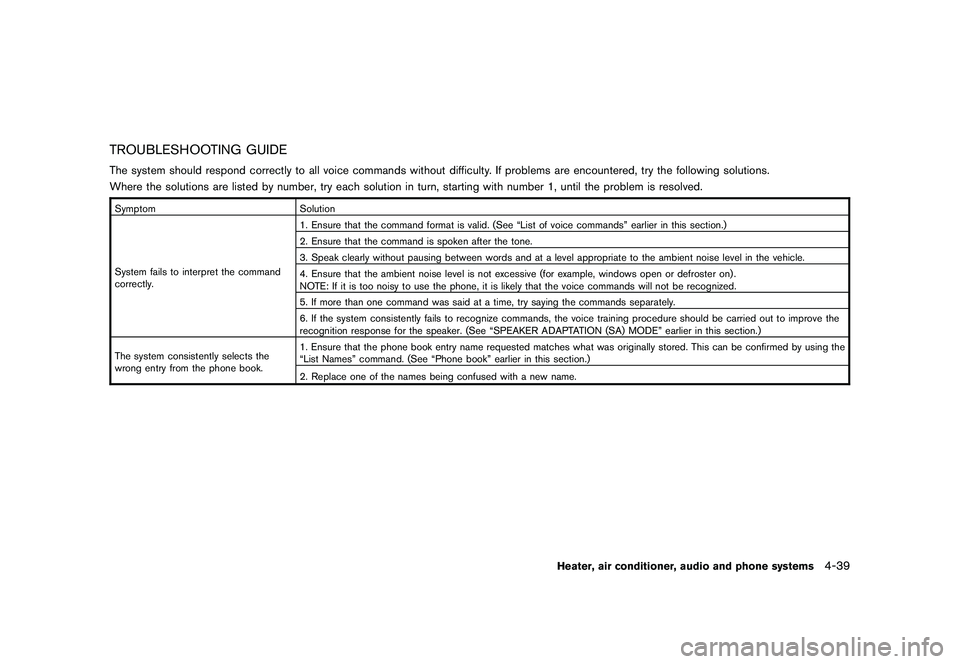
TROUBLESHOOTING GUIDEThe system should respond correctly to all voice commands without difficulty. If problems are encountered, try the following solutions.
Where the solutions are listed by number, try each solution in turn, starting with number 1, until the problem is resolved.SymptomSolution
System fails to interpret the command
correctly. 1. Ensure that the command format is valid. (See “List of voice commands” earlier in this section.)
2. Ensure that the command is spoken after the tone.
3. Speak clearly without pausing between words and at a level appropriate to the ambient noise level in the vehicle.
4. Ensure that the ambient noise level is not excessive (for example, windows open or defroster on) .
NOTE: If it is too noisy to use the phone, it is likely that the voice commands will not be recognized.
5. If more than one command was said at a time, try saying the commands separately.
6. If the system consistently fails to recognize commands, the voice training procedure should be carried out to improve the
recognition response for the speaker. (See “SPEAKER ADAPTATION (SA) MODE” earlier in this section.)
The system consistently selects the
wrong entry from the phone book. 1. Ensure that the phone book entry name requested matches what was originally stored. This can be confirmed by using the
“List Names” command. (See “Phone book” earlier in this section.)
2. Replace one of the names being confused with a new name.
Heater, air conditioner, audio and phone systems
4-39
Page 192 of 328
Black plate (192,1)
Model "S35-D" EDITED: 2009/ 9/ 4
MEMO4-40
Heater, air conditioner, audio and phone systems
Page 198 of 328
Black plate (198,1)
Model "S35-D" EDITED: 2009/ 9/ 4
OFF-ROAD RECOVERYWhile driving, the right side or left side wheels
may unintentionally leave the road surface. If this
occurs, maintain control of the vehicle by
following the procedure below. Please note that
this procedure is only a general guide. The
vehicle must be driven as appropriate based on
the conditions of the vehicle, road and traffic.
1. Remain calm and do not overreact.
2. Do not apply the brakes.
3. Maintain a firm grip on the steering wheelwith both hands and try to hold a straight
course.
4. When appropriate, slowly release the accel- erator pedal to gradually slow the vehicle.
5. If there is nothing in the way, steer the vehicle to follow the road while the vehicle
speed is reduced. Do not attempt to drive
the vehicle back onto the road surface until
vehicle speed is reduced.
6. When it is safe to do so, gradually turn the steering wheel until both tires return to the
road surface. When all tires are on the road
surface, steer the vehicle to stay in the
appropriate driving lane.
.If you decide that it is not safe to return
the vehicle to the road surface based on
vehicle, road or traffic conditions, gra- dually slow the vehicle to a stop in a safe
place off the road.
RAPID AIR PRESSURE LOSSRapid air pressure loss or a “blow-out” can
occur if the tire is punctured or is damaged due
to hitting a curb or pothole. Rapid air pressure
loss can also be caused by driving on under-
inflated tires.
Rapid air pressure loss can affect the handling
and stability of the vehicle, especially at highway
speeds.
Help prevent rapid air pressure loss by main-
taining the correct air pressure and visually
inspect the tires for wear and damage. See
“WHEELS AND TIRES” in the “8. Maintenance
and do-it-yourself” section of this manual.
If a tire rapidly loses air pressure or “blows-out”
while driving maintain control of the vehicle by
following the procedure below. Please note that
this procedure is only a general guide. The
vehicle must be driven as appropriate based on
the conditions of the vehicle, road and traffic.
WARNING
The following actions can increase the
chance of losing control of the vehicle if
there is a sudden loss of tire air
pressure. Losing control of the vehicle
may cause a collision and result in
personal injury.
.
The vehicle generally moves or pulls
in the direction of the flat tire.
. Do not rapidly apply the brakes.
. Do not rapidly release the accelera-
tor pedal.
. Do not rapidly turn the steering
wheel.
1. Remain calm and do not overreact.
2. Maintain a firm grip on the steering wheel with both hands and try to hold a straight
course.
3. When appropriate, slowly release the accel- erator pedal to gradually slow the vehicle.
4. Gradually steer the vehicle to a safe location off the road and away from traffic if possible.
5. Lightly apply the brake pedal to gradually stop the vehicle.
6. Turn on the hazard warning flashers and either contact a roadside emergency service
to change the tire or see “CHANGING A
FLAT TIRE” in the “6. In case of emergency”
section of this Owner’s Manual.
5-6
Starting and driving
Page 199 of 328
Black plate (199,1)
Model "S35-D" EDITED: 2009/ 9/ 4
DRINKING ALCOHOL/DRUGS AND
DRIVING
WARNING
Never drive under the influence of
alcohol or drugs. Alcohol in the blood-
stream reduces coordination, delays
reaction time and impairs judgement.
Driving after drinking alcohol increases
the likelihood of being involved in an
accident injuring yourself and others.
Additionally, if you are injured in an
accident, alcohol can increase the se-
verity of the injury.
NISSAN is committed to safe driving. However,
you must choose not to drive under the influence
of alcohol. Every year thousands of people are
injured or killed in alcohol-related accidents.
Although the local laws vary on what is
considered to be legally intoxicated, the fact is
that alcohol affects all people differently and
most people underestimate the effects of
alcohol.
Remember, drinking and driving don’t mix! And
that is true for drugs, too (over-the-counter,
prescription, and illegal drugs) . Don’t drive if
your ability to operate your vehicle is impaired by
alcohol, drugs, or some other physical condition.
DRIVING SAFETY PRECAUTIONSYour NISSAN is designed for both normal and
off-road use. However, avoid driving in deep
water or mud as your NISSAN is mainly
designed for leisure use, unlike a conventional
off-road vehicle.
Remember that Two-Wheel Drive (2WD) mod-
els are less capable than All-Wheel Drive
(AWD) models for rough road driving and
extrication when stuck in deep snow, mud, or
the like.
Please observe the following precautions:
WARNING
. Drive carefully when off the road
and avoid dangerous areas. Every
person who drives or rides in this
vehicle should be seated with their
seat belt fastened. This will keep
you and your passengers in position
when driving over rough terrain.
. Do not drive across steep slopes.
Instead drive either straight up or
straight down the slopes. Off-road
vehicles can tip over sideways much
more easily than they can forward or
backward. .
Many hills are too steep for any
vehicle. If you drive up them, you
may stall. If you drive down them,
you may not be able to control your
speed. If you drive across them, you
may roll over.
. Do not shift ranges while driving on
downhill grades as this could cause
loss of control of the vehicle.
. Stay alert when driving to the top of
a hill. At the top there could be a
drop-off or other hazard that could
cause an accident.
. If your engine stalls or you cannot
make it to the top of a steep hill,
never attempt to turn around. Your
vehicle could tip or roll over. Always
back straight down in R (Reverse)
range. Never back down in N (Neu-
tral) , using only the brake, as this
could cause loss of control.
. Heavy braking going down a hill
could cause your brakes to overheat
and fade, resulting in loss of control
and an accident. Apply brakes
lightly and use a low range to
control your speed.
Starting and driving
5-7
Page 209 of 328
Black plate (209,1)
Model "S35-D" EDITED: 2009/ 9/ 4
Accelerator downshift
— In D position —For passing or hill climbing, fully depress the
accelerator pedal to the floor. This shifts the
transmission down into a lower gear, depending
on the vehicle speed.High fluid temperature protection modeThis transmission has a high fluid temperature
protection mode. If the fluid temperature be-
comes too high (for example, when climbing
steep grades in high temperature with heavy
loads, such as when towing a trailer) , engine
power and, under some conditions, vehicle
speed will be decreased automatically to reduce
the chance of transmission damage. Vehicle
speed can be controlled with the accelerator
pedal, but the engine and vehicle speed may be
limited.Fail-safeIf the vehicle is driven under extreme
conditions, such as excessive wheel spin-
ning and subsequent hard braking, the
fail-safe system may be activated. The MIL
may illuminate to indicate the fail-safe
mode is activated. (See “Malfunction In-
dicator Light (MIL)” in the “2. Instruments
and controls” section.) This will occur even
if all electrical circuits are functioning
properly. In this case, turn the ignition
switch to the OFF position and wait for 10seconds. Then turn the switch back to the
ON position. The vehicle should return to
its normal operating condition. If it does
not return to its normal operating condi-
tion, have a NISSAN dealer check the
transmission and repair if necessary.
WARNING
When the high fluid temperature pro-
tection mode or fail-safe operation
occurs, vehicle speed may be gradually
reduced. The reduced speed may be
lower than other traffic, which could
increase the chance of a collision. Be
especially careful when driving. If ne-
cessary, pull to the side of the road at a
safe place and allow the transmission
to return to normal operation, or have it
repaired if necessary.
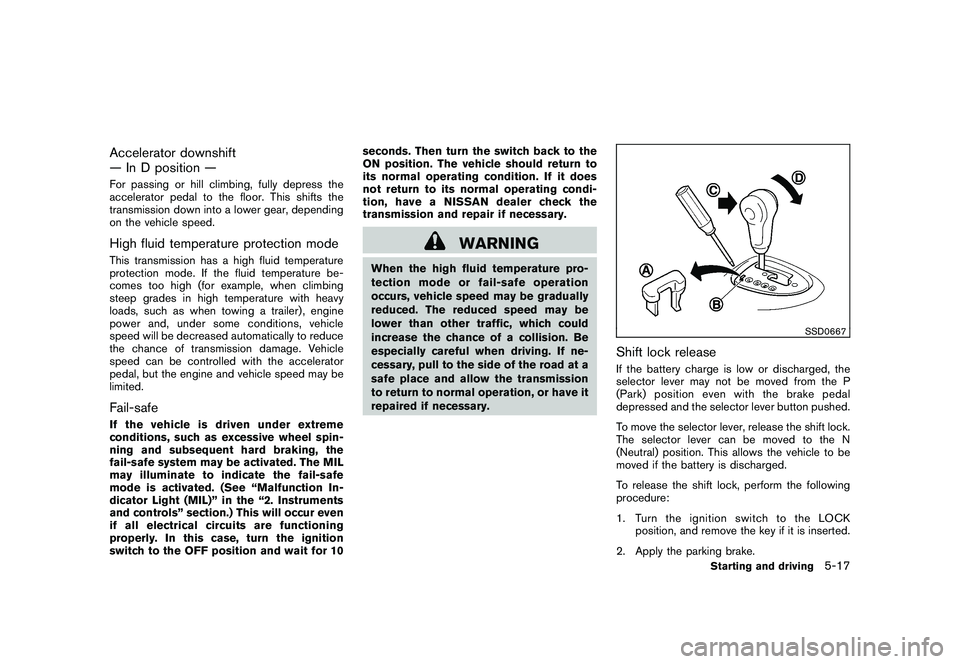
SSD0667
Shift lock releaseIf the battery charge is low or discharged, the
selector lever may not be moved from the P
(Park) position even with the brake pedal
depressed and the selector lever button pushed.
To move the selector lever, release the shift lock.
The selector lever can be moved to the N
(Neutral) position. This allows the vehicle to be
moved if the battery is discharged.
To release the shift lock, perform the following
procedure:
1. Turn the ignition switch to the LOCK
position, and remove the key if it is inserted.
2. Apply the parking brake.
Starting and driving
5-17
Page 213 of 328
Black plate (213,1)
Model "S35-D" EDITED: 2009/ 9/ 4
CAUTION
During the first 1,200 miles (2,000 km) ,
follow these recommendations to ob-
tain maximum engine performance and
ensure the future reliability and econo-
my of your new vehicle. Failure to
follow these recommendations may
result in shortened engine life and
reduced engine performance.
. Avoid driving for long periods at constant
speed, either fast or slow. Do not run the
engine over 4,000 rpm.
. Do not accelerate at full throttle in any gear.
. Avoid quick starts.
. Avoid hard braking as much as possible.
. Do not tow a trailer for the first 500 miles
(800 km) . Your engine, axle or other parts
could be damaged. .
Accelerate slowly and smoothly. Maintain
cruising speeds with a constant accelerator
position.
. Drive at moderate speeds on the highway.
Driving at high speed lowers fuel economy.
. Avoid unnecessary stopping and braking.
Keep a safe distance behind other vehicles.
. Select a gear range suitable to road condi-
tions.
. Avoid unnecessary engine idling.
. Keep your engine tuned up.
. Follow the recommended periodic mainte-
nance schedule.
. Keep the tires inflated to the correct
pressure. Low tire pressure increases tire
wear and lowers fuel economy.
. Keep the wheels in correct alignment.
Improper alignment increases tire wear and
lowers fuel economy.
. Air conditioner operation lowers fuel econ-
omy. Use the air conditioner only when
necessary.
. When cruising at highway speeds, it is more
economical to use the air conditioner and
leave the windows closed to reduce drag. .
Use the recommended viscosity engine oil.
(See “ENGINE OIL AND OIL FILTER
RECOMMENDATION” in the “9. Technical
and consumer information” section.)BREAK-IN SCHEDULE INCREASING FUEL ECONOMY
Starting and driving
5-21