air condition NISSAN ROGUE 2010 Owner´s Manual
[x] Cancel search | Manufacturer: NISSAN, Model Year: 2010, Model line: ROGUE, Model: NISSAN ROGUE 2010Pages: 328, PDF Size: 2.84 MB
Page 88 of 328
Black plate (84,1)
Model "S35-D" EDITED: 2009/ 9/ 4
not activate the warning light for the front
passenger.
See “SEAT BELTS” in the “1. Safety — Seats,
seat belts and supplemental restraint system”
section for precautions on seat belt usage.
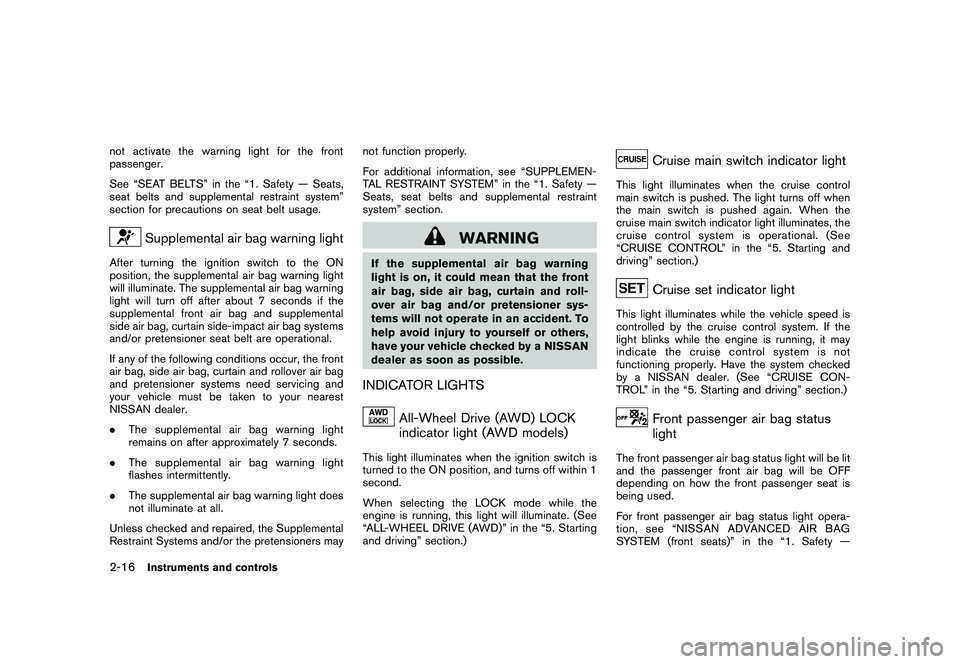
Supplemental air bag warning light
After turning the ignition switch to the ON
position, the supplemental air bag warning light
will illuminate. The supplemental air bag warning
light will turn off after about 7 seconds if the
supplemental front air bag and supplemental
side air bag, curtain side-impact air bag systems
and/or pretensioner seat belt are operational.
If any of the following conditions occur, the front
air bag, side air bag, curtain and rollover air bag
and pretensioner systems need servicing and
your vehicle must be taken to your nearest
NISSAN dealer.
.The supplemental air bag warning light
remains on after approximately 7 seconds.
. The supplemental air bag warning light
flashes intermittently.
. The supplemental air bag warning light does
not illuminate at all.
Unless checked and repaired, the Supplemental
Restraint Systems and/or the pretensioners may not function properly.
For additional information, see “SUPPLEMEN-
TAL RESTRAINT SYSTEM” in the “1. Safety —
Seats, seat belts and supplemental restraint
system” section.
WARNING
If the supplemental air bag warning
light is on, it could mean that the front
air bag, side air bag, curtain and roll-
over air bag and/or pretensioner sys-
tems will not operate in an accident. To
help avoid injury to yourself or others,
have your vehicle checked by a NISSAN
dealer as soon as possible.INDICATOR LIGHTS
All-Wheel Drive (AWD) LOCK
indicator light (AWD models)
This light illuminates when the ignition switch is
turned to the ON position, and turns off within 1
second.
When selecting the LOCK mode while the
engine is running, this light will illuminate. (See
“ALL-WHEEL DRIVE (AWD)” in the “5. Starting
and driving” section.)
Cruise main switch indicator light
This light illuminates when the cruise control
main switch is pushed. The light turns off when
the main switch is pushed again. When the
cruise main switch indicator light illuminates, the
cruise control system is operational. (See
“CRUISE CONTROL” in the “5. Starting and
driving” section.)
Cruise set indicator light
This light illuminates while the vehicle speed is
controlled by the cruise control system. If the
light blinks while the engine is running, it may
indicate the cruise control system is not
functioning properly. Have the system checked
by a NISSAN dealer. (See “CRUISE CON-
TROL” in the “5. Starting and driving” section.)
Front passenger air bag status
light
The front passenger air bag status light will be lit
and the passenger front air bag will be OFF
depending on how the front passenger seat is
being used.
For front passenger air bag status light opera-
tion,see“NISSANADVANCEDAIRBAG
SYSTEM (front seats)” in the “1. Safety —
2-16
Instruments and controls
Page 105 of 328
Black plate (101,1)
Model "S35-D" EDITED: 2009/ 9/ 4
The power outlet is located in the instrument
panel and the center console (if so equipped) .
CAUTION
.The outlet and plug may be hot
during or immediately after use.
. Do not use with accessories that
exceed a 12 volt, 120W (10A) power
draw. Do not use double adapters or
more than one electrical accessory.
. Use power outlet with the engine
running to avoid discharging the
vehicle battery.
. Avoid using power outlet when the
air conditioner, headlights or rear
window defroster is on.
. This power outlet is not designed
for use with a cigarette lighter unit.
. Push the plug in as far as it will go.
If good contact is not made, the plug
may overheat or the internal tem-
perature fuse may open.
. Before inserting or disconnecting a
plug, be sure the electrical acces-
sory being used is turned OFF.
. When not in use, be sure to close
the cap. Do not allow water to contact the outlet.
CUP HOLDERS
CAUTION
.
Avoid abrupt starting and braking
when the cup holder is being used
to prevent spilling the drink. If the
liquid is hot, it can scald you or your
passenger.
. Use only soft cups in the cup holder.
Hard objects can injure you in an
accident.STORAGE
Instruments and controls
2-33
Page 122 of 328
Black plate (118,1)
Model "S35-D" EDITED: 2009/ 9/ 4
programmed within that time, try holding the
transmitter in another position - keeping the
indicator light in view at all times.
If you continue to have programming difficulties,
please contact the NISSAN Consumer Affairs
Department. The phone numbers are located in
the Foreword of this Owner’s Manual.
CLEARING THE PROGRAMMED IN-
FORMATIONIndividual buttons cannot be cleared, however to
clear all programming, push and hold the two
outside buttons and release when the indicator
light begins to flash (in approximately 20
seconds) .REPROGRAMMING A SINGLE
HomeLink
®BUTTON
To reprogram a HomeLink
®Universal Transcei-
ver button, complete the following.
1. PushandholdthedesiredHomeLink
®
button. Do not release the button until step
4 has been completed.
2. When the indicator light begins to flash slowly (after 20 seconds), position the
hand-held transmitter 2 to 5 in (50 to 127
mm) away from the HomeLink
®surface.
3. Push and hold the hand-held transmitter button. 4. The HomeLink
®indicator light will flash, first
slowly and then rapidly. When the indicator
light begins to flash rapidly, release both
buttons.
The HomeLink
®Universal Transceiver button has
now been reprogrammed. The new device can
be activated by pushing the HomeLink
®button
that was just programmed. This procedure will
not affect any other programmed HomeLink
®
buttons.IF YOUR VEHICLE IS STOLENIf your vehicle is stolen, you should change the
codes of any non-rolling code device that has
been programmed into HomeLink
®. Consult the
Owner’s Manual of each device or call the
manufacturer or dealer of those devices for
additional information.
When your vehicle is recovered, you will
need to reprogram the HomeLink
®Univer-
sal Transceiver with your new transmitter
information.
FCC Notice:
This device complies with FCC rules part
15. Operation is subject to the following
two conditions: (1) This device may not
cause harmful interference and (2) This
device must accept any interference that
may be received, including interference
that may cause undesired operation. The transmitter has been tested and
complies with FCC and DOC/MDC rules.
Changes or modifications not expressly
approved by the party responsible for
compliance could void the user’s authority
to operate the device.
DOC: ISTC 1763K1313
FCC I.D.: CB2V67690
2-50
Instruments and controls
Page 128 of 328
Black plate (126,1)
Model "S35-D" EDITED: 2009/ 9/ 4
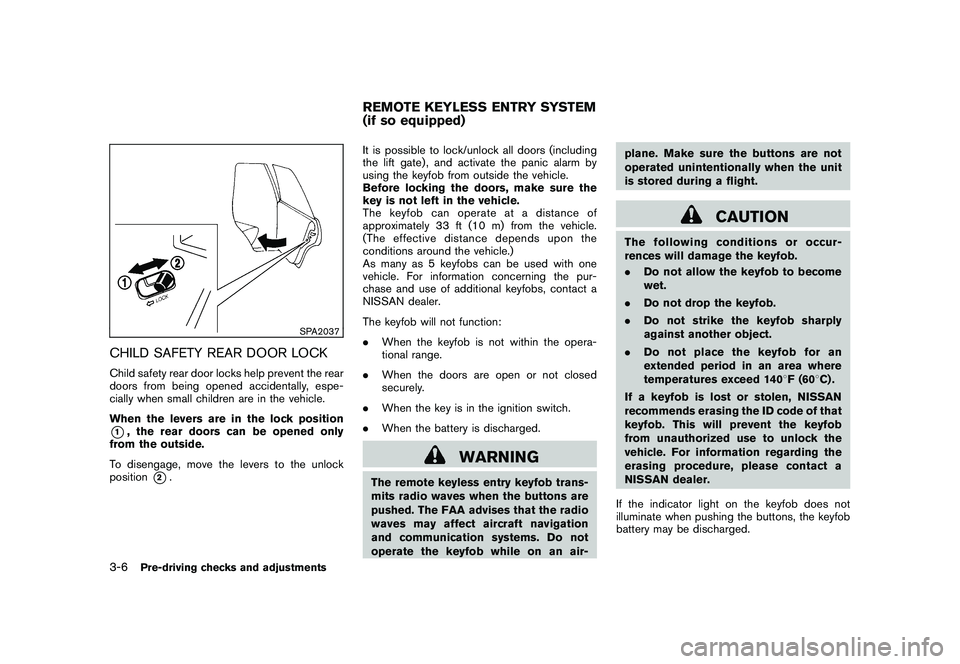
SPA2037
CHILD SAFETY REAR DOOR LOCKChild safety rear door locks help prevent the rear
doors from being opened accidentally, espe-
cially when small children are in the vehicle.
When the levers are in the lock position*1, the rear doors can be opened only
from the outside.
To disengage, move the levers to the unlock
position
*2. It is possible to lock/unlock all doors (including
the lift gate) , and activate the panic alarm by
using the keyfob from outside the vehicle.
Before locking the doors, make sure the
key is not left in the vehicle.
The keyfob can operate at a distance of
approximately 33 ft (10 m) from the vehicle.
(The effective distance depends upon the
conditions around the vehicle.)
As many as 5 keyfobs can be used with one
vehicle. For information concerning the pur-
chase and use of additional keyfobs, contact a
NISSAN dealer.
The keyfob will not function:
.
When the keyfob is not within the opera-
tional range.
. When the doors are open or not closed
securely.
. When the key is in the ignition switch.
. When the battery is discharged.
WARNING
The remote keyless entry keyfob trans-
mits radio waves when the buttons are
pushed. The FAA advises that the radio
waves may affect aircraft navigation
and communication systems. Do not
operate the keyfob while on an air- plane. Make sure the buttons are not
operated unintentionally when the unit
is stored during a flight.
CAUTION
The following conditions or occur-
rences will damage the keyfob.
.
Do not allow the keyfob to become
wet.
. Do not drop the keyfob.
. Do not strike the keyfob sharply
against another object.
. Do not place the keyfob for an
extended period in an area where
temperatures exceed 140 8F (60 8C) .
If a keyfob is lost or stolen, NISSAN
recommends erasing the ID code of that
keyfob. This will prevent the keyfob
from unauthorized use to unlock the
vehicle. For information regarding the
erasing procedure, please contact a
NISSAN dealer.
If the indicator light on the keyfob does not
illuminate when pushing the buttons, the keyfob
battery may be discharged.
REMOTE KEYLESS ENTRY SYSTEM
(if so equipped)
3-6
Pre-driving checks and adjustments
Page 132 of 328
Black plate (130,1)
Model "S35-D" EDITED: 2009/ 9/ 4
WARNING
.Radio waves could adversely affect
electric medical equipment. Those
who use a pacemaker should con-
tact the electric medical equipment
manufacturer for the possible influ-
ences before use.
. The Intelligent Key transmits radio
waves when the buttons are
pushed. The FAA advises that the
radio waves may affect aircraft na-
vigation and communication sys-
tems. Do not operate the
Intelligent Key while on an airplane.
Makesurethebuttonsarenot
operated unintentionally when the
unit is stored during a flight.
The Intelligent Key system can operate all the
door locks using the remote controller function
or pushing the request switch on the vehicle
without taking the key out from a pocket or
purse. The operating environment and/or condi-
tions may affect the Intelligent Key system
operation.
Be sure to read the following before using the
Intelligent Key system.
CAUTION
. Be sure to carry the Intelligent Key
with you when operating the vehi-
cle.
. Never leave the Intelligent Key in
the vehicle when you leave the
vehicle.
The Intelligent Key is always communicating with
the vehicle as it receives radio waves. The
Intelligent Key system transmits weak radio
waves. Environmental conditions may interfere
with the operation of the Intelligent Key system
under the following operating conditions.
. When operating near a location where
strong radio waves are transmitted, such
as a TV tower, power station and broad-
casting station.
. When in possession of wireless equipment,
such as a cellular telephone, transceiver,
and CB radio.
. When the Intelligent Key is in contact with or
covered by metallic materials.
. When any type of radio wave remote control
is used nearby.
. When the Intelligent Key is placed near an
electric appliance such as a personal computer.
. When the vehicle is parked near a parking
meter.
In such cases, correct the operating conditions
before using the Intelligent Key function or use
the mechanical key.
Although the life of the battery varies depending
on the operating conditions, the battery’s life is
approximately 2 years. If the battery is dis-
charged, replace it with a new one.
Since the Intelligent Key is continuously receiv-
ing radio waves, if the key is left near equipment
which transmits strong radio waves, such as
signals from a TV and personal computer, the
battery life may become shorter.
For information regarding replacement of a
battery, see “BATTERY REPLACEMENT” in
the “8. Maintenance and do-it-yourself” section.
As many as 4 Intelligent Keys can be registered
and used with one vehicle. For information about
the purchase and use of additional Intelligent
Keys, contact a NISSAN dealer.
CAUTION
. Do not allow the Intelligent Key,
which contains electrical compo-
nents, to come into contact with
INTELLIGENT KEY SYSTEM (if so
equipped)3-10
Pre-driving checks and adjustments
Page 140 of 328
Black plate (138,1)
Model "S35-D" EDITED: 2009/ 9/ 4
HOW TO USE REMOTE KEYLESS
ENTRY FUNCTION
WARNING
.Radio waves could adversely affect
electric medical equipment. Those
who use a pacemaker should con-
tact the electric medical equipment
manufacturer for the possible influ-
ences before use.
. The Intelligent Key transmits radio
waves when the buttons are
pushed. The FAA advises that the
radio waves may affect aircraft na-
vigation and communication sys-
tems. Do not operate the
Intelligent Key while on an airplane.
Makesurethebuttonsarenot
operated unintentionally when the
unit is stored during a flight.
CAUTION
.Do not allow the Intelligent Key,
which contains electrical compo-
nents, to come into contact with
water or salt water. This could affect
the system function. .
Do not drop the Intelligent Key.
. Do not strike the Intelligent Key
sharply against another object.
. Do not change or modify the Intel-
ligent Key.
. Wetting may damage the Intelligent
Key. If the Intelligent Key gets wet,
immediately wipe until it is comple-
tely dry.
. Do not place the Intelligent Key for
an extended period in an area where
temperatures exceed 140 8F (60 8C) .
. Do not attach the Intelligent Key
with a key holder that contains a
magnet.
. Do not place the Intelligent Key near
equipment that produces a mag-
netic field, such as a TV, audio
equipment, personal computers or
cellular phone.
The remote keyless entry function can operate
all door locks using the remote keyless entry
function of the Intelligent Key. The remote
keyless entry function can operate at a distance
of approximately 33 ft (10 m) from the vehicle.
(The operating distance depends upon the
conditions around the vehicle.) The remote keyless entry function will not
operate:
.
When the Intelligent Key is not within the
operational range.
. When the doors are open or not closed
securely.
. When the Intelligent Key battery is dis-
charged.
The remote keyless entry function can also
operate the vehicle alarm.3-18
Pre-driving checks and adjustments
Page 153 of 328
Black plate (13,1)
4 Heater, air conditioner, audio and phonesystems
Model "S35-D" EDITED: 2009/ 9/ 4
Ventilators ........................................................ 4-2
Heater and air conditioner .................................... 4-2
Manual air conditioner ..................................... 4-3
In-cabin microfilter .......................................... 4-5
Servicing air conditioner .................................. 4-5
Audio system .................................................... 4-6
Audio operation precautions ............................. 4-6
FM-AM radio with Compact Disc (CD) player ..... 4-13
FM-AM-SAT radio with Compact Disc (CD)
changer ..................................................... 4-17 CD care and cleaning
................................... 4-22
Steering wheel switch for audio control
(if so equipped) ........................................... 4-23
Antenna ..................................................... 4-24
Car phone or CB radio ...................................... 4-24
Bluetooth
®Hands-Free Phone System with
NISSAN voice recognition (if so equipped) ............ 4-25
Using system .............................................. 4-27
Speaker Adaptation (SA) mode ....................... 4-36
Troubleshooting guide ................................... 4-39
Page 154 of 328
Black plate (154,1)
Model "S35-D" EDITED: 2009/ 9/ 4
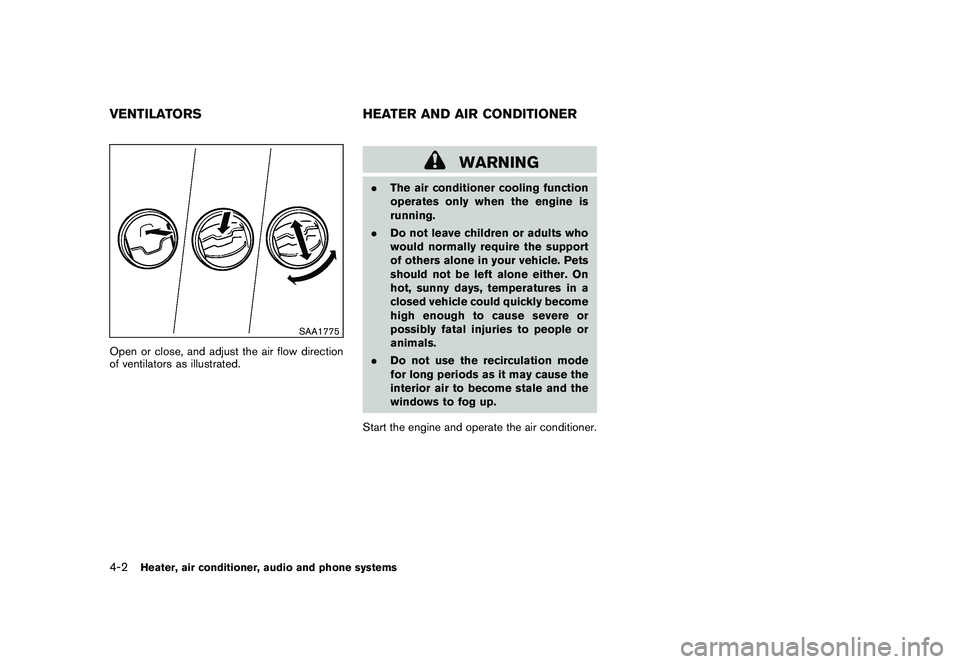
SAA1775
Open or close, and adjust the air flow direction
of ventilators as illustrated.
WARNING
.The air conditioner cooling function
operates only when the engine is
running.
. Do not leave children or adults who
would normally require the support
of others alone in your vehicle. Pets
should not be left alone either. On
hot, sunny days, temperatures in a
closed vehicle could quickly become
high enough to cause severe or
possibly fatal injuries to people or
animals.
. Do not use the recirculation mode
for long periods as it may cause the
interior air to become stale and the
windows to fog up.
Start the engine and operate the air conditioner.
VENTILATORS HEATER AND AIR CONDITIONER4-2
Heater, air conditioner, audio and phone systems
Page 155 of 328
Black plate (155,1)
Model "S35-D" EDITED: 2009/ 9/ 4
SAA1776
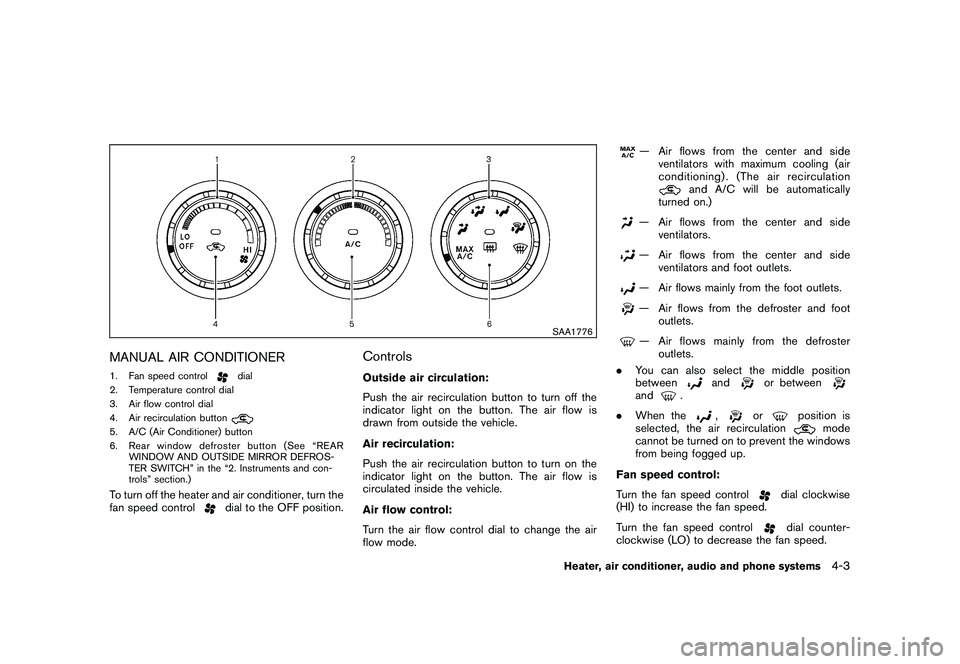
MANUAL AIR CONDITIONER1. Fan speed control
dial
2. Temperature control dial
3. Air flow control dial
4. Air recirculation button
5. A/C (Air Conditioner) button
6. Rear window defroster button (See “REAR WINDOW AND OUTSIDE MIRROR DEFROS-
TER SWITCH” in the “2. Instruments and con-
trols” section.)To turn off the heater and air conditioner, turn the
fan speed control
dial to the OFF position.
ControlsOutside air circulation:
Push the air recirculation button to turn off the
indicator light on the button. The air flow is
drawn from outside the vehicle.
Air recirculation:
Push the air recirculation button to turn on the
indicator light on the button. The air flow is
circulated inside the vehicle.
Air flow control:
Turn the air flow control dial to change the air
flow mode.
— Air flows from the center and side
ventilators with maximum cooling (air
conditioning) . (The air recirculation
and A/C will be automatically
turned on.)
— Air flows from the center and side ventilators.— Air flows from the center and side
ventilators and foot outlets.— Air flows mainly from the foot outlets.— Air flows from the defroster and footoutlets.— Air flows mainly from the defrosteroutlets.
. You can also select the middle position
between
and
or between
and
.
. When the
,
or
position is
selected, the air recirculation
mode
cannot be turned on to prevent the windows
from being fogged up.
Fan speed control:
Turn the fan speed control
dial clockwise
(HI) to increase the fan speed.
Turn the fan speed controldial counter-
clockwise (LO) to decrease the fan speed.
Heater, air conditioner, audio and phone systems
4-3
Page 156 of 328
Black plate (156,1)
Model "S35-D" EDITED: 2009/ 9/ 4
A/C (Air Conditioner) operation:
Push the A/C button to turn on or off the air
conditioner. When the air conditioner is on, the
A/C indicator light on the button illuminates.
Temperature control:
Turn the temperature control dial to set the
desired temperature. Turn the dial between the
middle and the right position to select the hot
temperature. Turn the dial between the middle
and the left position to select the cool tempera-
ture.Heater operationHeating:
This mode is used to direct heated air to the foot
outlets.
1. Push the air recirculation button
to the
OFF position. (The indicator light turns off.)
2. Turn the air flow control dial to the
position.
3. Turn the fan speed control
dial to the
desired position.
4. Turn the temperature control dial to the desired position between the middle and the
hot (right) position. Ventilation:
This mode directs outside air to the side and
center ventilators.
1. Push the air recirculation button
to the
OFF position. (The indicator light turns off.)
2. Turn the air flow control dial to the
position.
3. Turn the fan speed control
dial to the
desired position.
4. Turn the temperature control dial to the desired position.
Defrosting or defogging:
This mode directs the air to the defroster outlets
to defrost/defog the windows.
1. Turn the air flow control dial to the
position.
2. Turn the fan speed control
dial to the
desired position.
3. Turn the temperature control dial to the desired position between the middle and the
hot (right) position.
. To remove frost from the outside surface of
the windshield quickly, turn the temperature
control dial to the maximum hot position and
the fan speed control
dial to maximum
(HI) position. .
If it is difficult to defog the windshield, turn
the A/C button on.
Bi-level heating:
This mode directs cool air from the side and
center vents and warm air from the foot outlets.
When the temperature control dial is turned to
the maximum hot or cool position, the air
between the ventilators and the foot outlets is
the same temperature.
1. Push the air recirculation button
to the
OFF position. (The indicator light turns off.)
2. Turn the air flow control dial to the
position.
3. Turn the fan speed control
dial to the
desired position.
4. Turn the temperature control dial to the desired position.
Heating and defogging:
This mode heats the interior and defogs the
windows.
1. Turn the air flow control dial to the
position.
2. Turn the fan speed control
dial to the
desired position.
3. Turn the temperature control dial to the desired position.
4-4
Heater, air conditioner, audio and phone systems