Power window NISSAN ROGUE 2010 Owner´s Manual
[x] Cancel search | Manufacturer: NISSAN, Model Year: 2010, Model line: ROGUE, Model: NISSAN ROGUE 2010Pages: 328, PDF Size: 2.84 MB
Page 9 of 328
Black plate (5,1)
Model "S35-D" EDITED: 2009/ 9/ 4
SSI0349
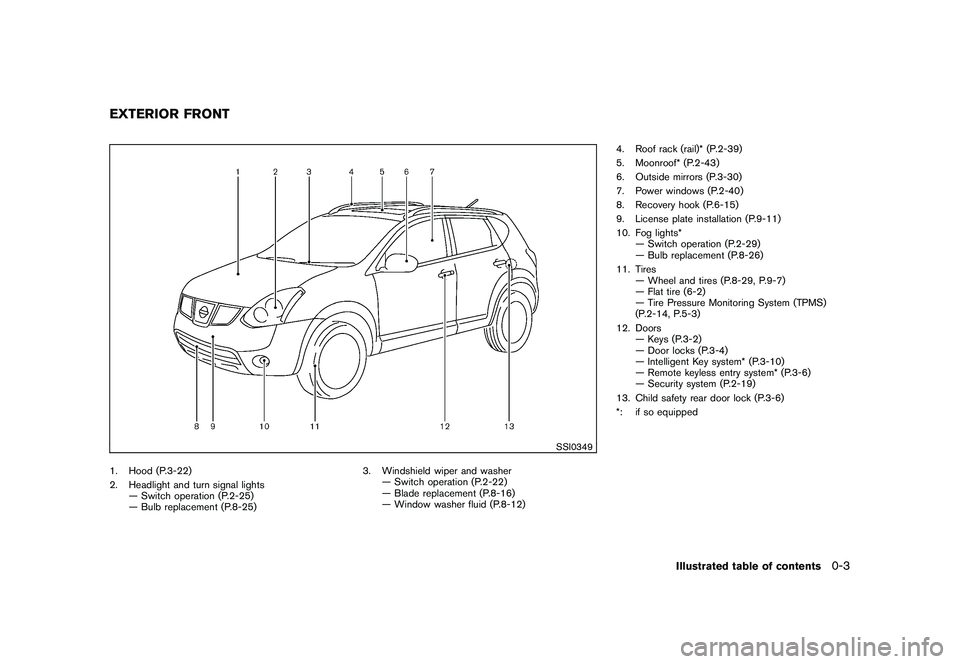
1. Hood (P.3-22)
2. Headlight and turn signal lights— Switch operation (P.2-25)
— Bulb replacement (P.8-25) 3. Windshield wiper and washer
— Switch operation (P.2-22)
— Blade replacement (P.8-16)
— Window washer fluid (P.8-12) 4. Roof rack (rail)* (P.2-39)
5. Moonroof* (P.2-43)
6. Outside mirrors (P.3-30)
7. Power windows (P.2-40)
8. Recovery hook (P.6-15)
9. License plate installation (P.9-11)
10. Fog lights*
— Switch operation (P.2-29)
— Bulb replacement (P.8-26)
11. Tires — Wheel and tires (P.8-29, P.9-7)
— Flat tire (6-2)
— Tire Pressure Monitoring System (TPMS)
(P.2-14, P.5-3)
12. Doors — Keys (P.3-2)
— Door locks (P.3-4)
— Intelligent Key system* (P.3-10)
— Remote keyless entry system* (P.3-6)
— Security system (P.2-19)
13. Child safety rear door lock (P.3-6)
*: if so equippedEXTERIOR FRONT
Illustrated table of contents
0-3
Page 12 of 328
Black plate (8,1)
Model "S35-D" EDITED: 2009/ 9/ 4
SSI0351
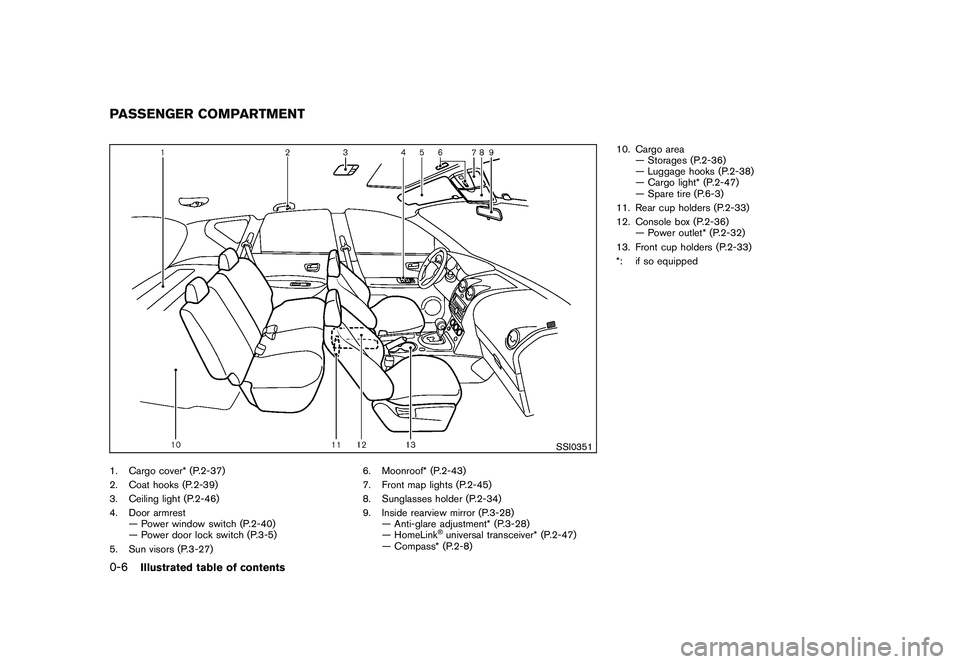
1. Cargo cover* (P.2-37)
2. Coat hooks (P.2-39)
3. Ceiling light (P.2-46)
4. Door armrest— Power window switch (P.2-40)
— Power door lock switch (P.3-5)
5. Sun visors (P.3-27) 6. Moonroof* (P.2-43)
7. Front map lights (P.2-45)
8. Sunglasses holder (P.2-34)
9. Inside rearview mirror (P.3-28)
— Anti-glare adjustment* (P.3-28)
— HomeLink
®universal transceiver* (P.2-47)
— Compass* (P.2-8) 10. Cargo area
— Storages (P.2-36)
— Luggage hooks (P.2-38)
— Cargo light* (P.2-47)
— Spare tire (P.6-3)
11. Rear cup holders (P.2-33)
12. Console box (P.2-36) — Power outlet* (P.2-32)
13. Front cup holders (P.2-33)
*: if so equipped
PASSENGER COMPARTMENT0-6
Illustrated table of contents
Page 13 of 328
Black plate (9,1)
Model "S35-D" EDITED: 2009/ 9/ 4
SIC3470
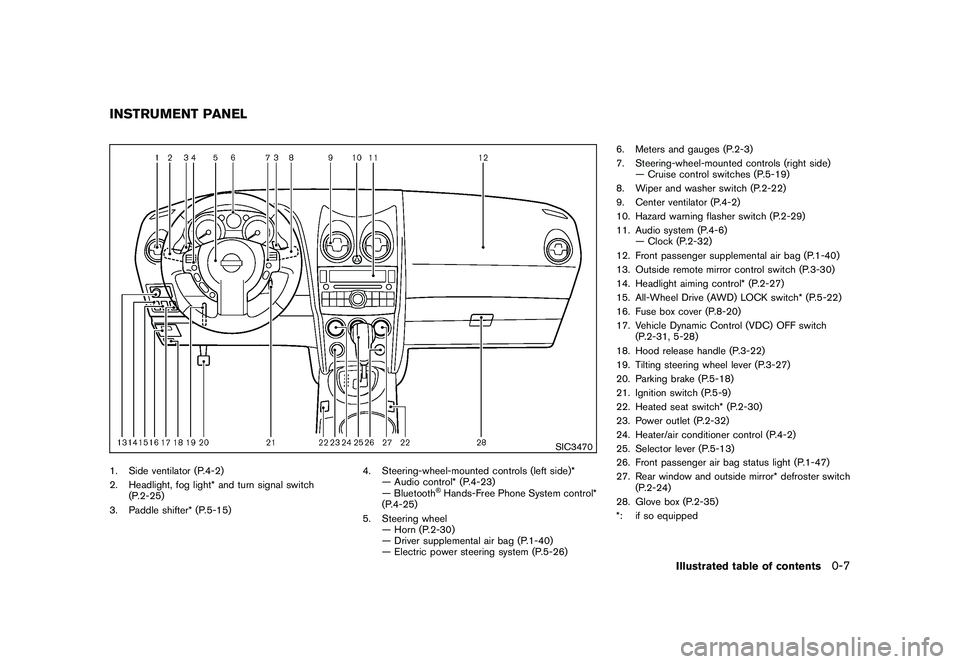
1. Side ventilator (P.4-2)
2. Headlight, fog light* and turn signal switch(P.2-25)
3. Paddle shifter* (P.5-15) 4. Steering-wheel-mounted controls (left side)*
— Audio control* (P.4-23)
— Bluetooth
®Hands-Free Phone System control*
(P.4-25)
5. Steering wheel — Horn (P.2-30)
— Driver supplemental air bag (P.1-40)
— Electric power steering system (P.5-26) 6. Meters and gauges (P.2-3)
7. Steering-wheel-mounted controls (right side)
— Cruise control switches (P.5-19)
8. Wiper and washer switch (P.2-22)
9. Center ventilator (P.4-2)
10. Hazard warning flasher switch (P.2-29)
11. Audio system (P.4-6) — Clock (P.2-32)
12. Front passenger supplemental air bag (P.1-40)
13. Outside remote mirror control switch (P.3-30)
14. Headlight aiming control* (P.2-27)
15. All-Wheel Drive (AWD) LOCK switch* (P.5-22)
16. Fuse box cover (P.8-20)
17. Vehicle Dynamic Control (VDC) OFF switch (P.2-31, 5-28)
18. Hood release handle (P.3-22)
19. Tilting steering wheel lever (P.3-27)
20. Parking brake (P.5-18)
21. Ignition switch (P.5-9)
22. Heated seat switch* (P.2-30)
23. Power outlet (P.2-32)
24. Heater/air conditioner control (P.4-2)
25. Selector lever (P.5-13)
26. Front passenger air bag status light (P.1-47)
27. Rear window and outside mirror* defroster switch (P.2-24)
28. Glove box (P.2-35)
*: if so equipped
INSTRUMENT PANEL
Illustrated table of contents
0-7
Page 72 of 328
Black plate (7,1)
2 Instruments and controls
Model "S35-D" EDITED: 2009/ 9/ 4
Instrument panel................................................ 2-2
Meters and gauges ............................................. 2-3
Speedometer and odometer ............................. 2-4
Tachometer ................................................... 2-5
Engine coolant temperature gauge ..................... 2-5
Fuel gauge ................................................... 2-6
Vehicle information display ................................ 2-6
Outside air temperature (if so equipped) .............. 2-6
Continuously Variable Transmission (CVT)
position indicator ............................................ 2-7
Trip computer (if so equipped) .......................... 2-7
Compass (if so equipped) .................................... 2-8
Zone variation change procedure ....................... 2-9
Warning/indicator lights and audible reminders ....... 2-11
Checking bulbs ........................................... 2-11
Warning lights ............................................. 2-12
Indicator lights ............................................. 2-16
Audible reminders ........................................ 2-18
Security systems .............................................. 2-19
Vehicle security system .................................. 2-19
NISSAN Vehicle Immobilizer System ................. 2-20
Windshield wiper and washer switch .................... 2-22
Rear window wiper and washer switch .................. 2-23
Rear window and outside mirror defroster switch ..... 2-24
Headlight and turn signal switch .......................... 2-25
Xenon headlights (if so equipped) .................... 2-25Headlight switch
.......................................... 2-26
Turn signal switch ........................................ 2-28
Fog light switch (if so equipped) ...................... 2-29
Hazard warning flasher switch ............................. 2-29
Horn ............................................................. 2-30
Heated seats (if so equipped) ............................. 2-30
Vehicle Dynamic Control (VDC) OFF switch ........... 2-31
Clock ............................................................ 2-32
Adjusting the time ........................................ 2-32
Power outlet ................................................... 2-32
Storage ......................................................... 2-33
Cup holders ................................................ 2-33
Sunglasses holder ........................................ 2-34
Glove box .................................................. 2-35
Console box ............................................... 2-36
Luggage floor box (if so equipped) ................... 2-36
Luggage side box ......................................... 2-37
Cargo cover (if so equipped) .......................... 2-37
Luggage hooks (if so equipped) ...................... 2-38
Coat hooks (if so equipped) ........................... 2-39
Utility hook ................................................. 2-39
Roof rack (if so equipped) .............................. 2-39
Windows ....................................................... 2-40
Power windows ........................................... 2-40
Moonroof (if so equipped) .................................. 2-43
Automatic moonroof ...................................... 2-43
Page 74 of 328
Black plate (70,1)
Model "S35-D" EDITED: 2009/ 9/ 4
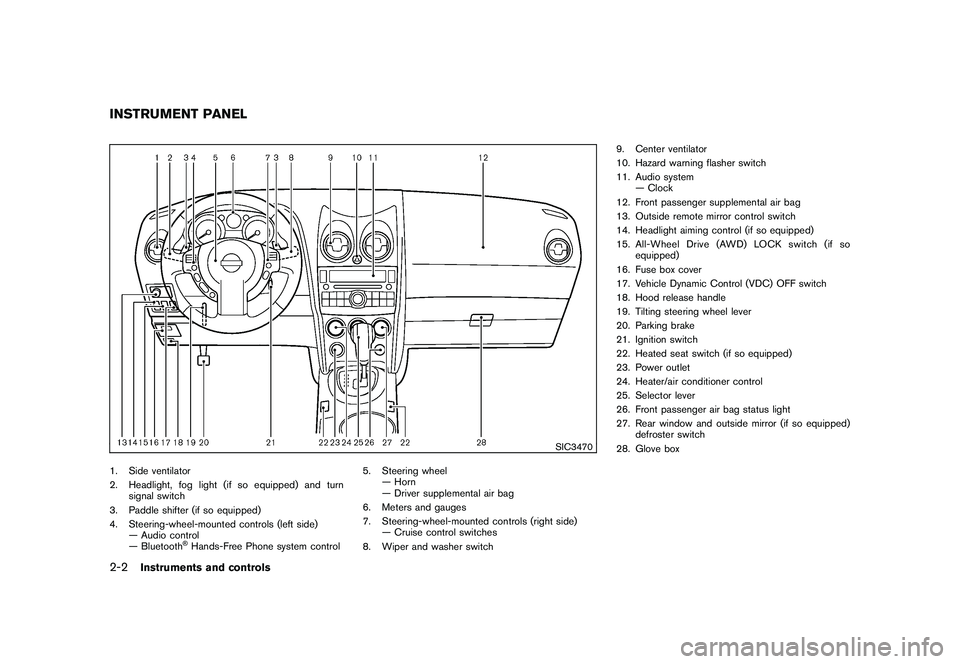
SIC3470
1. Side ventilator
2. Headlight, fog light (if so equipped) and turnsignal switch
3. Paddle shifter (if so equipped)
4. Steering-wheel-mounted controls (left side) — Audio control
— Bluetooth
®Hands-Free Phone system control 5. Steering wheel
— Horn
— Driver supplemental air bag
6. Meters and gauges
7. Steering-wheel-mounted controls (right side) — Cruise control switches
8. Wiper and washer switch 9. Center ventilator
10. Hazard warning flasher switch
11. Audio system
— Clock
12. Front passenger supplemental air bag
13. Outside remote mirror control switch
14. Headlight aiming control (if so equipped)
15. All-Wheel Drive (AWD) LOCK switch (if so equipped)
16. Fuse box cover
17. Vehicle Dynamic Control (VDC) OFF switch
18. Hood release handle
19. Tilting steering wheel lever
20. Parking brake
21. Ignition switch
22. Heated seat switch (if so equipped)
23. Power outlet
24. Heater/air conditioner control
25. Selector lever
26. Front passenger air bag status light
27. Rear window and outside mirror (if so equipped) defroster switch
28. Glove box
INSTRUMENT PANEL2-2
Instruments and controls
Page 92 of 328
Black plate (88,1)
Model "S35-D" EDITED: 2009/ 9/ 4
SIC2045
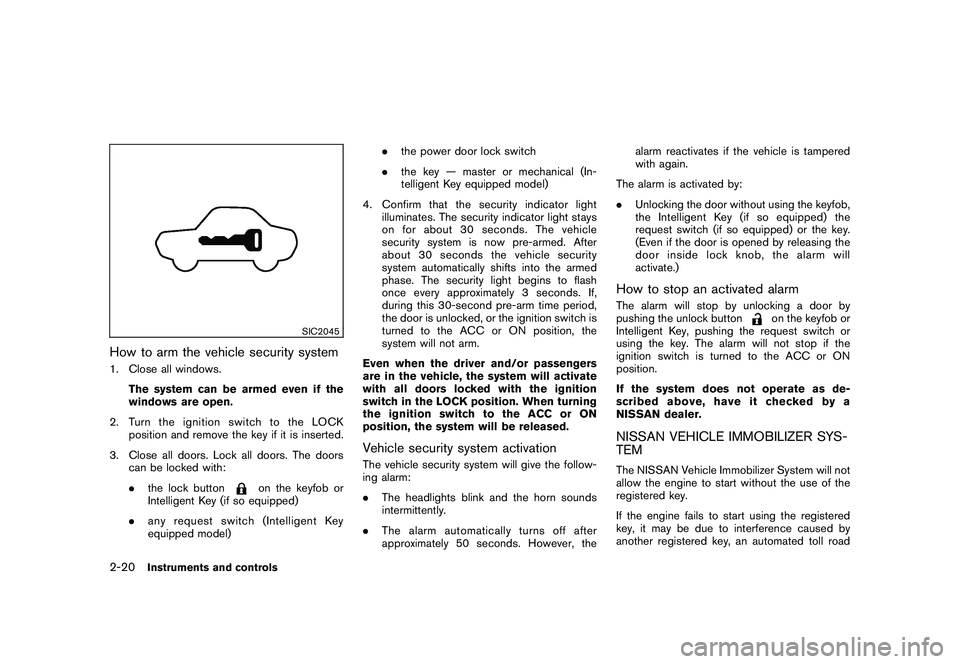
How to arm the vehicle security system1. Close all windows.The system can be armed even if the
windows are open.
2. TurntheignitionswitchtotheLOCK position and remove the key if it is inserted.
3. Close all doors. Lock all doors. The doors can be locked with:
.the lock button
on the keyfob or
Intelligent Key (if so equipped)
. any request switch (Intelligent Key
equipped model) .
the power door lock switch
. the key — master or mechanical (In-
telligent Key equipped model)
4. Confirm that the security indicator light illuminates. The security indicator light stays
on for about 30 seconds. The vehicle
security system is now pre-armed. After
about 30 seconds the vehicle security
system automatically shifts into the armed
phase. The security light begins to flash
once every approximately 3 seconds. If,
during this 30-second pre-arm time period,
the door is unlocked, or the ignition switch is
turned to the ACC or ON position, the
system will not arm.
Even when the driver and/or passengers
are in the vehicle, the system will activate
with all doors locked with the ignition
switch in the LOCK position. When turning
the ignition switch to the ACC or ON
position, the system will be released.
Vehicle security system activationThe vehicle security system will give the follow-
ing alarm:
. The headlights blink and the horn sounds
intermittently.
. The alarm automatica lly turns off after
approximately 50 seconds. However, the alarm reactivates if the vehicle is tampered
with again.
The alarm is activated by:
. Unlocking the door without using the keyfob,
the Intelligent Key (if so equipped) the
request switch (if so equipped) or the key.
(Even if the door is opened by releasing the
door inside lock knob, the alarm will
activate.)
How to stop an activated alarmThe alarm will stop by unlocking a door by
pushing the unlock button
on the keyfob or
Intelligent Key, pushing the request switch or
using the key. The alarm will not stop if the
ignition switch is turned to the ACC or ON
position.
If the system does not operate as de-
scribed above, have it checked by a
NISSAN dealer.
NISSAN VEHICLE IMMOBILIZER SYS-
TEMThe NISSAN Vehicle Immobilizer System will not
allow the engine to start without the use of the
registered key.
If the engine fails to start using the registered
key, it may be due to interference caused by
another registered key, an automated toll road
2-20
Instruments and controls
Page 105 of 328
Black plate (101,1)
Model "S35-D" EDITED: 2009/ 9/ 4
The power outlet is located in the instrument
panel and the center console (if so equipped) .
CAUTION
.The outlet and plug may be hot
during or immediately after use.
. Do not use with accessories that
exceed a 12 volt, 120W (10A) power
draw. Do not use double adapters or
more than one electrical accessory.
. Use power outlet with the engine
running to avoid discharging the
vehicle battery.
. Avoid using power outlet when the
air conditioner, headlights or rear
window defroster is on.
. This power outlet is not designed
for use with a cigarette lighter unit.
. Push the plug in as far as it will go.
If good contact is not made, the plug
may overheat or the internal tem-
perature fuse may open.
. Before inserting or disconnecting a
plug, be sure the electrical acces-
sory being used is turned OFF.
. When not in use, be sure to close
the cap. Do not allow water to contact the outlet.
CUP HOLDERS
CAUTION
.
Avoid abrupt starting and braking
when the cup holder is being used
to prevent spilling the drink. If the
liquid is hot, it can scald you or your
passenger.
. Use only soft cups in the cup holder.
Hard objects can injure you in an
accident.STORAGE
Instruments and controls
2-33
Page 112 of 328
Black plate (108,1)
Model "S35-D" EDITED: 2009/ 9/ 4
WARNING
.Drive extra carefully when the vehi-
cle is loaded at or near the cargo
carrying capacity, especially if the
significant portion of that load is
carried on the roof rack.
. Heavy loading of the roof rack has
the potential to affect the vehicle
stability and handling during sud-
den or unusual handling maneuvers.
. Roof rack load should be evenly
distributed.
. Do not exceed maximum roof rack
load weight capacity.
. Properly secure all cargo with ropes
or straps to help prevent it from
sliding or shifting. In a sudden stop
or collision, unsecured cargo could
cause personal injury.
CAUTION
Use care when placing or removing
items from the roof rack. If you cannot
comfortably lift the items onto the roof
rack from the ground, use a ladder or stool.
POWER WINDOWS
WARNING
.
Make sure that all passengers have
their hands, etc. inside the vehicle
while it is in motion and before
closing the windows. Use the win-
dow lock switch to prevent unex-
pected use of the power windows.
. Do not leave children unattended
inside the vehicle. They could un-
knowingly activate switches or con-
trols and become trapped in the
window. Unattended children could
become involved in serious acci-
dents.
The power windows operate when the ignition
switch is in the ON position, or for about 45
seconds after the ignition switch is turned to the
OFF position. If the driver’s or front passenger’s
door is opened during this period of about 45
seconds, power to the windows is canceled.WINDOWS
2-40
Instruments and controls
Page 113 of 328
Black plate (109,1)
Model "S35-D" EDITED: 2009/ 9/ 4
SIC3507
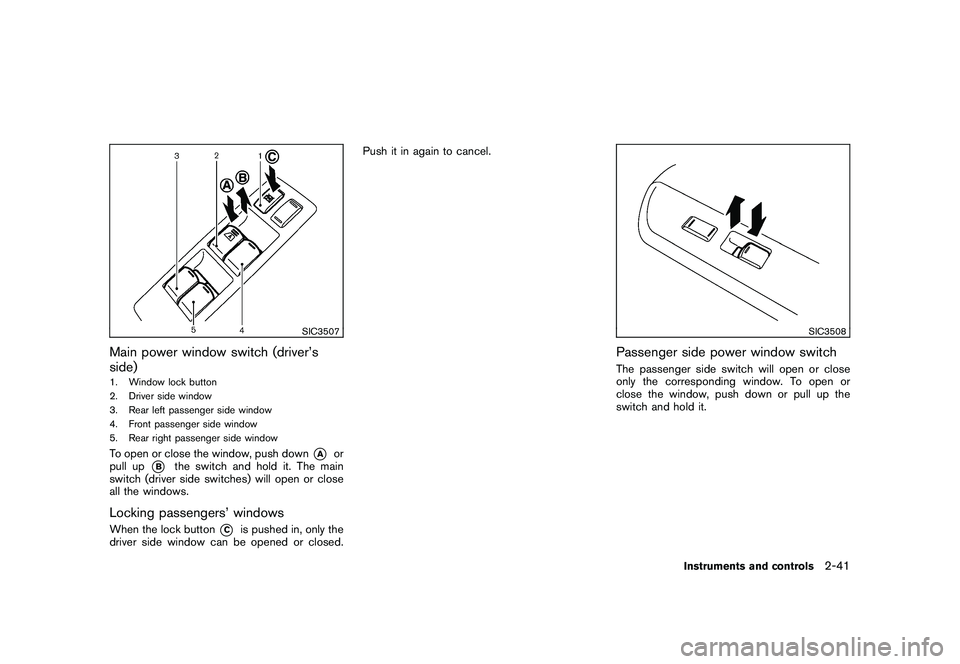
Main power window switch (driver’s
side)1. Window lock button
2. Driver side window
3. Rear left passenger side window
4. Front passenger side window
5. Rear right passenger side windowTo open or close the window, push down
*A
or
pull up
*B
the switch and hold it. The main
switch (driver side switches) will open or close
all the windows.
Locking passengers’ windowsWhen the lock button
*C
is pushed in, only the
driver side window can be opened or closed. Push it in again to cancel.
SIC3508
Passenger side power window switchThe passenger side switch will open or close
only the corresponding window. To open or
close the window, push down or pull up the
switch and hold it.
Instruments and controls
2-41
Page 114 of 328
Black plate (110,1)
Model "S35-D" EDITED: 2009/ 9/ 4
SIC3509
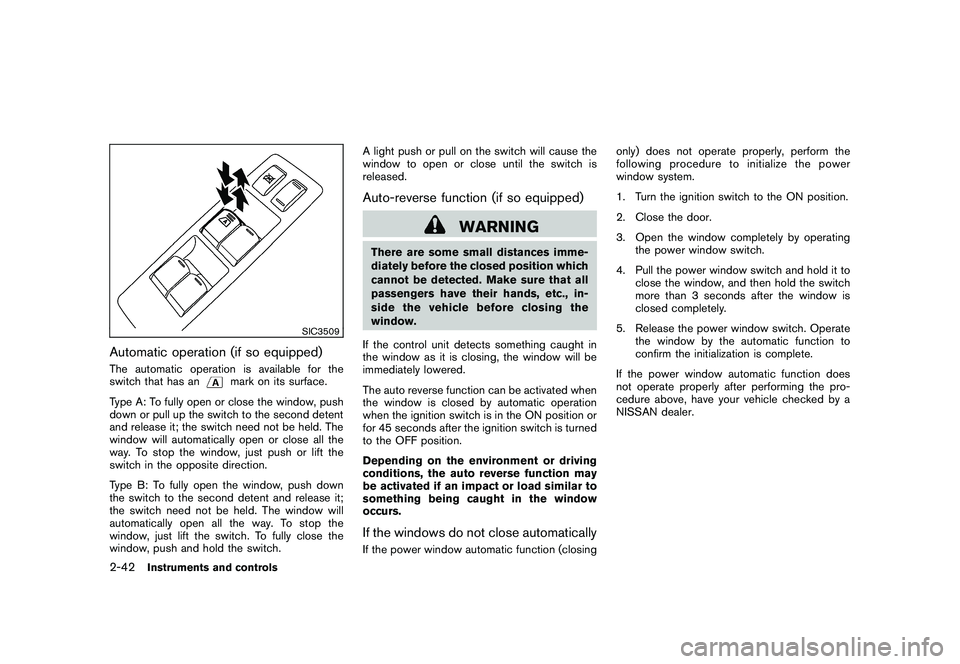
Automatic operation (if so equipped)The automatic operation is available for the
switch that has an
mark on its surface.
Type A: To fully open or close the window, push
down or pull up the switch to the second detent
and release it; the switch need not be held. The
window will automatically open or close all the
way. To stop the window, just push or lift the
switch in the opposite direction.
Type B: To fully open the window, push down
the switch to the second detent and release it;
the switch need not be held. The window will
automatically open all the way. To stop the
window, just lift the switch. To fully close the
window, push and hold the switch. A light push or pull on the switch will cause the
window to open or close until the switch is
released.
Auto-reverse function (if so equipped)
WARNING
There are some small distances imme-
diately before the closed position which
cannot be detected. Make sure that all
passengers have their hands, etc., in-
side the vehicle before closing the
window.
If the control unit detects something caught in
the window as it is closing, the window will be
immediately lowered.
The auto reverse function can be activated when
the window is closed by automatic operation
when the ignition switch is in the ON position or
for 45 seconds after the ignition switch is turned
to the OFF position.
Depending on the environment or driving
conditions, the auto reverse function may
be activated if an impact or load similar to
something being caught in the window
occurs.If the windows do not close automaticallyIf the power window automatic function (closing only) does not operate properly, perform the
following procedure to initialize the power
window system.
1. Turn the ignition switch to the ON position.
2. Close the door.
3. Open the window completely by operating
the power window switch.
4. Pull the power window switch and hold it to close the window, and then hold the switch
more than 3 seconds after the window is
closed completely.
5. Release the power window switch. Operate the window by the automatic function to
confirm the initialization is complete.
If the power window automatic function does
not operate properly after performing the pro-
cedure above, have your vehicle checked by a
NISSAN dealer.
2-42
Instruments and controls