audio NISSAN ROGUE 2014 2.G Owners Manual
[x] Cancel search | Manufacturer: NISSAN, Model Year: 2014, Model line: ROGUE, Model: NISSAN ROGUE 2014 2.GPages: 442, PDF Size: 5.19 MB
Page 281 of 442
BLUETOOTH® HANDS-FREE
PHONE SYSTEM VOICE
COMMANDS
To access the Bluetooth® Hands-Free Phone
System voice commands:1. Press the
button.
2.
Say “Call” and then a name in the vehicle
phonebook to call that entry. Otherwise, say
“Phone” to access various phone commands.
If the Bluetooth® has been set to “Off”, the
system announces: “Bluetooth® is off. Would
you like to turn Bluetooth® on?”
If no phone is connected to the system and the
vehicle is stationary, the system announces:
“There is no phone connected. Would you like to
connect a phone now?” Say “Yes” to connect a
phone. All further Bluetooth® Hands-Free Phone
System voice commands are only available if a
phone is connected.
If a phone is connected and Bluetooth® is set to
“On”, the following voice commands are avail-
able:
● Call (a name)
Speak the name of the contact in which you
are trying to call. System will confirm correct
contact. Say “Dial” to initiate dialing. ●
Dial Number
Allows for up to 24 digits to be dialed. After
the number is entered, say “Dial” to initiate
dialing. Say “Correction” to correct the num-
ber entered. Say “Go Back” to return to the
main menu.
● List Phonebook
Starting with the first alphabetical entry in
the vehicle phonebook, the system prompts
for an additional command. Say “Dial” to call
the number of the phonebook entry. Say
“Send Text” to send a text message to the
number of the phonebook entry. Say “Next
Entry” to skip to the next alphabetical entry in
the vehicle phonebook, where the same op-
tions will then be available.
● Recent Calls
The system prompts for an additional com-
mand. Say “Missed Calls”, “Incoming Calls”
or “Outgoing Calls” to display a list of such
calls on the screen.
Speak the number of the entry displayed on
the screen to dial that number or say “Next
Page” to view entries on the next page (if
available) .
● Redial
Redials the last called number. ●
Read Text
Reads an incoming text message. For more
information about text messaging with the
Bluetooth® Hands-Free Phone System, see
“Bluetooth® Hands-Free Phone System
with Navigation System” in this section.
● Send Text
Sends a text message. For more information
about text messaging with the Bluetooth®
Hands-Free Phone System, see
“Bluetooth® Hands-Free Phone System
with Navigation System” in this section.
● Select Phone
The system replies “Please use manual con-
trols to continue”. Use manual controls to
change the active phone from among the
listed phones connected to the vehicle.
For more information about the Bluetooth®
Hands-Free Phone System, see “Bluetooth®
Hands-Free Phone System with Navigation Sys-
tem” in this section.
4-100Monitor, climate, audio, phone and voice recognition systems
Page 282 of 442
NAVIGATION SYSTEM VOICE
COMMANDS
The following voice commands are available for
the Navigation System:● Street Address (address)
● Points of Interest (name)
● POI by Category
● Home
● Address Book
● Previous Destinations
● Enter Address in Steps
● Cancel Route
For additional information about these com-
mands, refer to the separate Navigation System
Owner’s Manual.
AUDIO SYSTEM VOICE
COMMANDS
To access the audio system voice commands: 1. Press the
button.
2. Say “Audio”
3. Speak a command from the following avail- able commands:
● Play (AM, FM, etc.)
Allows user to select radio band ●
Tune AM (number)
Allows user to tune directly to a desired AM
frequency
● Tune FM (number)
Allows user to tune directly to a desired FM
frequency
● SXM channel (number)
Allows user to tune directly to a desired
SXM station (if so equipped)
● CD Track (number)
Allows user to select track to be played
● Play Song (name)
Allows user to select song name to be
played
● Play Artist (name)
Allows user to select artist to be played
● Play Album (name)
Allows user to select album name to be
played
For more information about the audio system, see
“Audio system” in this section.
INFORMATION VOICE COMMANDS
The following voice commands are available for
the information functions of the Navigation Sys-
tem: ● Traffic
● Fuel Prices
● Stocks
● Movie Listings
● Current Weather
● Weather Map
● 5 — day Forecast
● 6 — hour Forecast
For additional information about these com-
mands, refer to the separate Navigation System
Owner’s Manual.
MY APPS VOICE COMMANDS
Many Apps can be accessed using this voice
command. See “NissanConnect™ App Smart-
phone Integration” in this section for more infor-
mation.
Monitor, climate, audio, phone and voice recognition systems4-101
Page 283 of 442
HELP VOICE COMMANDS
The following voice commands can be spoken to
have the system provide instructions and tips for
using the NISSAN Voice Recognition system.● List Commands
● What Can I Say?
● General Help
● Quit
● Exit
TROUBLESHOOTING GUIDE
The system should respond correctly to all voice
commands without difficulty. If problems are en-
countered, follow the solutions given in this guide
for the appropriate error. Where the solutions are
listed by number, try each solution in turn, starting
with number one, until the problem is resolved.
Symptom/error message Solution
The system responds “Command Not
Recognized” or the system fails to rec-
ognize the command correctly. 1. Ensure that the command format is valid. Use the “List Commands” or “What Can I Say?” command under the “Help” menu.
2. Speak clearly without pausing between words and at a level appropriate to the ambient noise level.
3. Ensure that the ambient noise level is not excessive (for example, with the windows open or the defroster on) .
NOTE:
If it is too noisy to use the phone, it is likely that voice commands will not be recognized.
4. If optional words of the command have been omitted, then the command should be tried with these in place.
4-102Monitor, climate, audio, phone and voice recognition systems
Page 284 of 442

MEMO
Monitor, climate, audio, phone and voice recognition systems4-103
Page 299 of 442
AUTO ACCESSORY:
With the vehicle in the P (Park) position, the
Intelligent key with you and the ignition placed
from ON to OFF, the radio can still be used for a
period of time, or until the driver’s door is opened.
After a period of time, functions such as radio,
navigation, and Bluetooth® Hands-Free Phone
System may be restarted by pressing the
“POWER button/ VOLUME control knob” (See
“Monitor, climate, audio, phone and voice recog-
nition systems” in this manual) or the keyfob
unlock button up to a total of 30 minutes.
EMERGENCY ENGINE SHUT OFF
To shut off the engine in an emergency situation
while driving, perform the following procedure:
– Rapidly push the push-button ignition switch 3consecutive times in less than 1.5 seconds, or
– Push and hold the push-button ignition switch for more than 2 seconds.NISSAN INTELLIGENT KEY®
BATTERY DISCHARGE
If the battery of the NISSAN Intelligent Key® is
discharged, or environmental conditions interfere
with the Intelligent Key operation, start the engine
according to the following procedure:
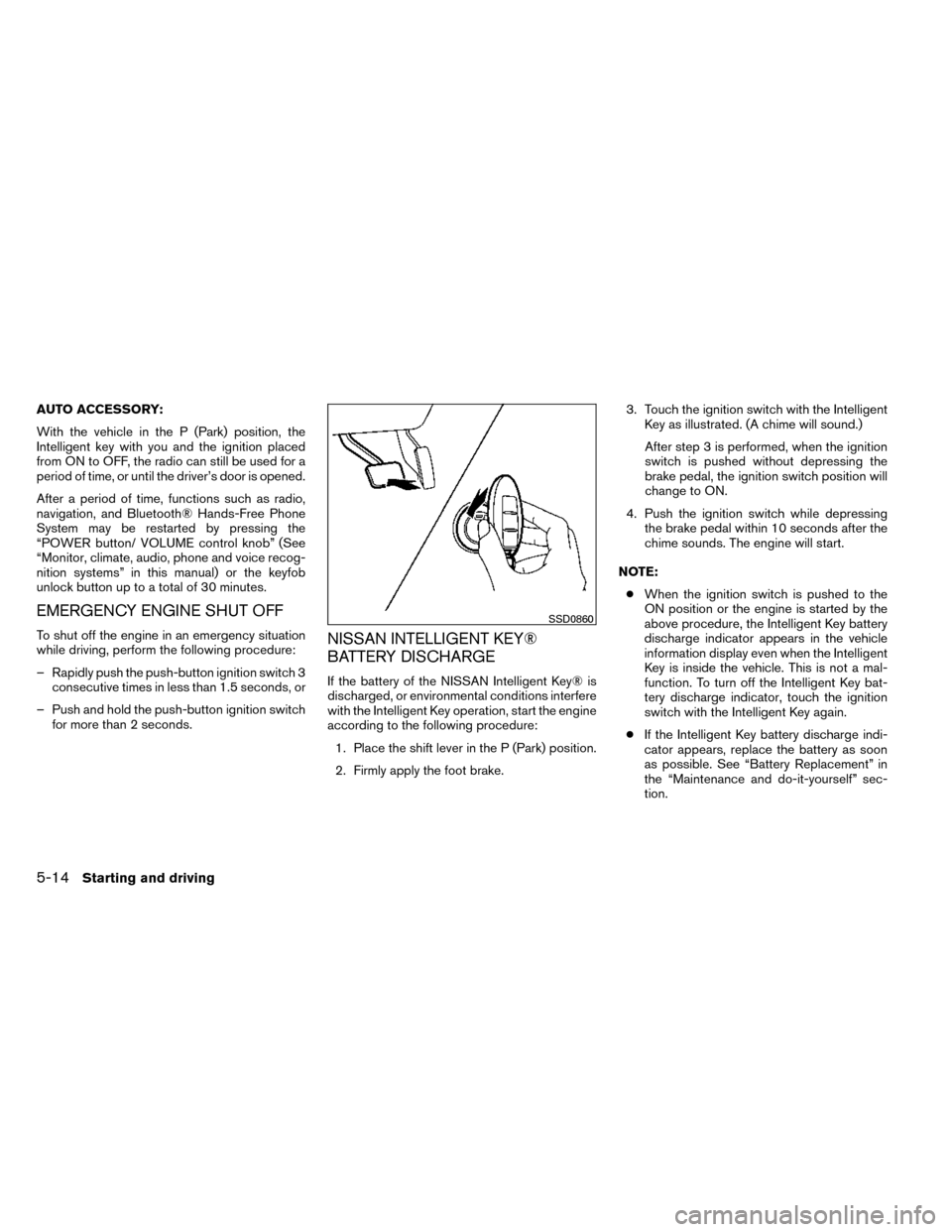
1. Place the shift lever in the P (Park) position.
2. Firmly apply the foot brake. 3. Touch the ignition switch with the Intelligent
Key as illustrated. (A chime will sound.)
After step 3 is performed, when the ignition
switch is pushed without depressing the
brake pedal, the ignition switch position will
change to ON.
4. Push the ignition switch while depressing the brake pedal within 10 seconds after the
chime sounds. The engine will start.
NOTE: ● When the ignition switch is pushed to the
ON position or the engine is started by the
above procedure, the Intelligent Key battery
discharge indicator appears in the vehicle
information display even when the Intelligent
Key is inside the vehicle. This is not a mal-
function. To turn off the Intelligent Key bat-
tery discharge indicator, touch the ignition
switch with the Intelligent Key again.
● If the Intelligent Key battery discharge indi-
cator appears, replace the battery as soon
as possible. See “Battery Replacement” in
the “Maintenance and do-it-yourself” sec-
tion.
SSD0860
5-14Starting and driving
Page 308 of 442
●The LDW system is only a warning de-
vice to help inform the driver of a poten-
tial unintended lane departure. It will
not steer the vehicle or prevent loss of
control. It is the driver’s responsibility to
stay alert, drive safely, keep the vehicle
in the traveling lane, and be in control of
the vehicle at all times.
● The camera unit may not function prop-
erly under the following conditions:
– When towing a trailer.
–
When strong light enters the camera
unit. (e.g. light directly shines on the
rear of the vehicle at sunrise or sunset.)
– When ambient brightness changes suddenly. (e.g. when the vehicle en-
ters or exits a tunnel or passes under
a bridge.)
● If the camera lens is excessively dirty,
the automatic washer may not be able
to completely clean the lens. This could
result in the camera not detecting ve-
hicles or lane markers.
● Excessive noise (e.g. audio system vol-
ume, open vehicle window) will inter-
fere with the chime sound, and it may
not be heard.BSW SYSTEM OPERATION
The BSW system operates above approximately
20 MPH (32 km/h).
When the camera unit detects vehicles in the
detection zone, the Blind spot indicator light lo-
cated inside the outside mirrors will illuminate. If
the turn signal is then activated, the system
chimes (twice) and the Blind spot indicator light
flashes to alert the driver.
The Blind spot indicator light continues to flash
until the detected vehicle(s) leave the detection
zone.
LSD2053
Blind spot warning light
LSD2105
Starting and driving5-23
Page 434 of 442
10 Index
A
Active Head Restraint ..............1-6
Air bag (See supplemental restraint
system) .....................1-41
Air bag system Front (See supplemental front impact
air bag system) ...............1-48
Air bag warning labels .............1-56
Airbagwarninglight...........1-56,2-13
Air cleaner housing filter ............8-17
Air conditioner Air conditioner operation ..........4-29
Air conditioner service ...........4-37
Air conditioner specification label .....9-12
Air conditioner system refrigerant and
oil recommendations .............9-7
Heater and air conditioner
controls................4-26,4-35
Servicing air conditioner ..........4-37
Airflowcharts..................4-30
Alarm system
(See vehicle security system) .........2-30
Anchor point locations .............1-26
Antenna .....................4-77
Anti-lock brake warning light .......2-9,2-10
Anti-lock Braking System (ABS) ........5-42
Armrests.....................1-12
Around View™ Monitor .............4-15
Audible reminders ...............2-16
Audio system ..................4-37
Bluetooth® audio ..........4-73,4-74 Compact disc (CD)
player
..........4-48,4-52,4-57,4-62
FM/AM/SAT radio with compact disc (CD)
player ..........4-46,4-50,4-54,4-60
Audio System iPod® Player .............4-68,4-70
Audio system Radio ....................4-37
USBinterface............4-64,4-66
Autolightswitch.................2-36
Automatic Automatic power window switch .....2-52
Automatic anti-glare inside mirror .......3-32
Automatic door locks ..............3-6
AUXjack ....................4-64
B
Battery......................8-13 Charge warning light ............2-10
Before starting the engine ...........5-15
Belt(Seedrivebelt) ..............8-16
Block heater Engine ....................5-51
Bluetooth® audio ............4-73,4-74
Bluetooth® hands-free phone
system ..................4-79,4-91
Booster seats ..................1-38
Brake Anti-lock Braking System (ABS) ......5-42
Brakelight(Seestoplight).........8-28
Brake system ................ 5-42Brakewarninglight.............2-10
Brake wear indicators
........2-16,8-20
Parking brake operation ..........5-21
Self-adjusting brakes ............8-20
Brakes ......................8-20
Break-in schedule ...............5-35
Brightness/contrast button ...........4-9
Brightness control Instrument panel ..............2-37
Bulb check/instrument panel ..........2-9
Bulb replacement ................8-28
C
Capacities
and recommended
fuel/lubricants ...................9-2
Cargolight ...................2-56
Cargo (See vehicle loading information) . . .9-14
Car phone or CB radio .............4-79
CD care and cleaning .............4-75
CD player (See audio system) .4-48, 4-52, 4-57, 4-62
Check tire pressure ...............2-28
Childrestraints.......1-20,1-21,1-22,1-24 Precautions on child
restraints........1-22,1-29,1-34,1-38
Top tether strap anchor point locations . .1-26
Childrestraintwithtoptetherstrap......1-26
Child safety rear door lock ............3-7
Chimes, audible reminders ...........2-16
Cleaning exterior and interior ..........7-2
C.M.V.S.S. certification label ..........9-11
Page 439 of 442
Headlight and turn signal switch......2-35
Headlight control switch ..........2-35
Hill descent control switch .........2-41
Ignition switch ................5-10
Power door lock switch ............3-6
Rear window and outside mirror defroster
switch.....................2-34
Rear window wiper and washer
switches ...................2-33
Turn signal switch ..............2-38
Vehicle dynamic control (VDC) off
switch.....................2-40
Windshield wiper and washer switch . . .2-32
T
Tachometer ....................2-4
Temperature gauge Engine coolant temperature gauge .....2-5
Theft (NISSAN vehicle immobilizer system) ,
engine start ..........2-31,3-4,5-11,5-15
Three-waycatalyst ................5-2
Tire Flat tire .....................6-3
Spare tire ...................6-5
Tire and Loading Information label .....9-12
Tire chains ..................8-39
Tire placard ..................9-12
Tire pressure .................8-31
Tirerotation..................8-40
Types of tires .................8-37
Uniform tire quality grading .........9-28
Wheels and tires ...............8-31
Wheel/tire size .................9-9 Tire pressure
Low tire pressure warning light .......2-11
Tire Pressure Monitoring System (TPMS) ....5-3
Toptetherstrapchildrestraint .........1-26
Towing Flattowing..................9-27
Towing load/specification ..........9-22
Towtrucktowing...............6-13
Trailertowing.................9-18
Transceiver HomeLink® Universal Transceiver .....2-57
Transmission Continuously Variable Transmission
(CVT) fluid ..................8-12
Driving with Continuously Variable
Transmission (CVT) .............5-17
Travel (See registering your vehicle in another
country) ......................9-10
Trip odometer ...................2-4
Turn signal switch ................2-38
U
Uniform tire quality grading ...........9-28
USB interface Audio file operation ..........4-65,4-67
V
Vanity mirror ...................3-31
Variable voltage control system .........8-16
Vehicle dimensions and weights .........9-9
Vehicle dynamic control (VDC) off switch . . .2-40 Vehicle dynamic control (VDC) system
.....5-44
Vehicle identification ...............9-10
Vehicle identification number (VIN)
(Chassis number) ................9-10
Vehicle identification number (VIN) plate ....9-10
Vehicle loading information ...........9-14
Vehicle recovery .................6-16
Vehicle security system .............2-30
Vehicle security system (NISSAN vehicle immobi-
lizer system) , engine start . .2-31, 3-4, 5-11, 5-15
Ventilators ....................4-25
Visors.......................3-30
Voice Prompt Interrupt ..........4-82,4-93
Voice recognition system ............4-98
W
W
arning Airbagwarninglight.........1-56,2-13
Anti-lock brake warning light .....2-9,2-10
Battery charge warning light ........2-10
Brakewarninglight .............2-10
Hazard warning flasher switch ........6-2
Lowfuelwarninglight ........2-12,2-28
Low tire pressure warning light .......2-11
Low windshield-washer fluid warning
light......................2-28
Passenger air bag and status light .....1-50
Seat belt warning light ............2-13
Vehicle security system ...........2-30
Warning/indicator lights and audible
reminders ...................2-9
Warning labels (for SRS) ..........1-56
Warninglights...................2-9
10-6