navigation NISSAN ROGUE 2016 Owner´s Manual
[x] Cancel search | Manufacturer: NISSAN, Model Year: 2016, Model line: ROGUE, Model: NISSAN ROGUE 2016Pages: 478, PDF Size: 5.94 MB
Page 188 of 478
4 Monitor, climate, audio, phone and voice
recognition systems
Control panel buttons — color screen with
Navigation System (if so equipped)..................4-4
How to use the touch-screen . . ..................4-5
How to use the
BACK button ..............4-7
How to use the [
] button ..................4-7
button...................................4-9
How to use the POWER button/VOLUME
control knob ...................................4-9
How to use the CAMERA button .................4-9
RearView Monitor (if so equipped) ..................4-10
RearView Monitor system operation .............4-11
How to read the displayed lines .................4-11
Difference between predicted and actual
distances ..................................... 4-12
Adjusting the screen ........................... 4-14
RearView Monitor system limitations .............4-14
System maintenance ........................... 4-15
Around View® Monitor (if so equipped) .............4-16
Around View® Monitor system operation .........4-17
Difference between predicted and actual
distances ..................................... 4-20
How to park with predicted course lines ..........4-22
How to switch the display ......................4-23Adjusting the screen
........................... 4-24
Around View® Monitor system limitations ........4-24
System maintenance ........................... 4-26
Moving Object Detection (MOD) (if so equipped) ....4-27
MOD system operation ......................... 4-28
Turning MOD on and off (if so equipped) .........4-29
MOD system limitations ........................ 4-29
System maintenance ........................... 4-30
Vents ........................................... 4-31
Heater and Air Conditioner (manual)
(if so equipped) .................................. 4-32
Controls ...................................... 4-33
Heater operation .............................. 4-33
Air conditioner operation .......................4-34
Air flow charts ................................. 4-36
Heater and Air Conditioner (automatic)
(if so equipped) .................................. 4-39
Automatic operation ........................... 4-40
Manual operation .............................. 4-41
Operating tips ................................. 4-41
Servicing air conditioner ........................... 4-42
Audio
system .................................... 4-42
Radio ........................................ 4-42
Page 189 of 478
FM radio reception............................ 4-42
AM radio reception ............................ 4-43
Satellite radio reception (if so equipped) .........4-43
Audio operation precautions ....................4-43
FM/AM/SAT radio with compact disc (CD)
player (Type A) (if so equipped) .................4-50
FM/AM/SAT radio with compact disc (CD)
player (Type B) (if so equipped) .................4-55
USB (Universal Serial Bus) Connection Port
(models without Navigation System)
(if so equipped) ............................... 4-61
USB (Universal Serial Bus) Connection Port
(models with Navigation System)
(if so equipped) ............................... 4-63
iPod®* player operation without Navigation
System (if so equipped) ........................ 4-65
iPod®* player operation with Navigation
System (if so equipped) ........................ 4-67
Bluetooth® streaming audio without
Navigation System (if so equipped) ..............4-70
Bluetooth® streaming audio with Navigation
System ....................................... 4-71
CD care and cleaning .......................... 4-72
Steering wheel switch for audio control ..........4-73 Antenna
...................................... 4-74
NissanConnectSMMobile Apps (if so equipped) .....4-74
Registering with NissanConnectSMMobile
Apps . ........................................ 4-74
Connect Phone ............................... 4-75
Application Download .......................... 4-75
NissanConnect
SMServices (if so equipped) . ........4-75
Siri® Eyes Free (if so equipped) ...................4-76
Requirements ................................. 4-76
Siri® Activation ............................... 4-76
Operating Siri® Eyes Free ......................4-77
Changing Siri® Eyes Free Settings
(models without navigation system) ..............4-77
Troubleshooting guide ......................... 4-78
Car phone or CB radio ............................ 4-79
Bluetooth® Hands-Free Phone System without
Navigation System (if so equipped) .................4-79
Regulatory Information ......................... 4-81
Using the system .............................. 4-81
Control buttons ............................... 4-83
Connecting procedure ......................... 4-84
Voice commands .............................. 4-85
Making a call . ................................. 4-86
Receiving a call ............................... 4-87
Page 190 of 478
During a call.................................. 4-87
Ending a call .................................. 4-87
Text messaging ................................ 4-88
Bluetooth® settings ........................... 4-90
Manual control ................................ 4-91
Troubleshooting guide ......................... 4-92
Bluetooth® Hands-Free Phone System with
Navigation System (if so equipped) .................4-93
Regulatory Information ......................... 4-94
Voice commands .............................. 4-95
Connecting Procedure ......................... 4-95
Vehicle phonebook ............................ 4-96
Making a call .................................. 4-96
Receiving a call ............................... 4-96
During a call .................................. 4-96
Ending a call .................................. 4-96Text messaging. .
.............................. 4-97
Bluetooth® settings ........................... 4-99
Phone settings ............................... 4-100
Troubleshooting guide ........................ 4-101
NISSAN Voice Recognition System
(if so equipped) ................................. 4-102
Using the system ............................. 4-102
System features .............................. 4-103
Bluetooth® Hands-Free Phone System
voice commands ............................. 4-104
Navigation System voice commands ............4-104
Audio system voice commands .................4-105
Information voice commands ...................4-105
My Apps Voice Commands ....................4-105
Help voice commands ........................ 4-105
Troubleshooting guide ........................ 4-106
Page 191 of 478
WARNING
●Positioning of the heating or air condi-
tioning controls and display controls
should not be done while driving in or-
der that full attention may be given to
the driving operation.
● Do not disassemble or modify this sys-
tem. If you do, it may result in accidents,
fire, or electrical shock.
● Do not use this system if you notice any
abnormality, such as a frozen screen or
lack of sound. Continued use of the
system may result in accident, fire or
electric shock.
● In case you notice any foreign object in
the system hardware, spill liquid on it,
or notice smoke or smell coming from it,
stop using the system immediately. Ig-
noring such conditions may lead to ac-
cidents, fire or electrical shock. It is rec-
ommended that you visit a NISSAN
dealer for servicing.
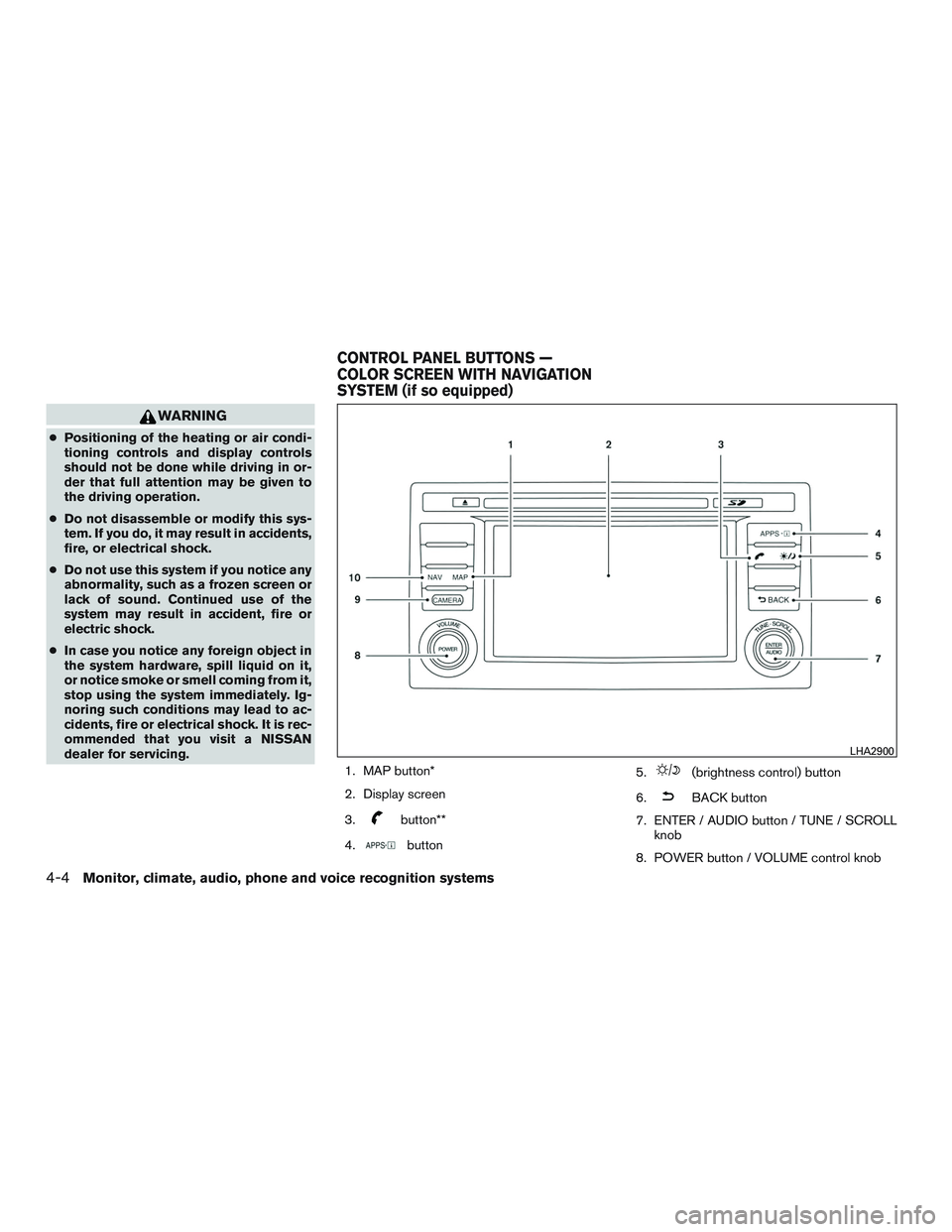
1. MAP button*
2. Display screen
3.
button**
4.
button 5.
(brightness control) button
6.
BACK button
7. ENTER / AUDIO button / TUNE / SCROLL knob
8. POWER button / VOLUME control knob
LHA2900
CONTROL PANEL BUTTONS —
COLOR SCREEN WITH NAVIGATION
SYSTEM (if so equipped)
4-4Monitor, climate, audio, phone and voice recognition systems
Page 192 of 478
9. CAMERA button
10. NAV button*
* For additional information, refer to the separate
Navigation System Owner’s Manual regarding
the Navigation system control buttons .
** For additional information, refer to “Bluetooth®
Hands-Free Phone System with Navigation Sys-
tem” in this section regarding the Bluetooth®
Hands-Free Phone System control button.
When you use this system, make sure the engine
is running.
If you use the system with the engine not
running (ignition ON or ACC) for a long
time, it will discharge the battery, and the
engine will not start.
Reference symbols:
“Example” — Words marked in quotes refer to a
key shown only on the display. These keys can be
selected by touching the screen.HOW TO USE THE TOUCH-
SCREEN
CAUTION
● The glass display screen may break if it
is hit with a hard or sharp object. If the
glass screen breaks, do not touch it.
Doing so could result in an injury.
● To clean the display, never use a rough
cloth, alcohol, benzine, thinner or any
kind of solvent or paper towel with a
chemical cleaning agent. They will
scratch or deteriorate the panel.
● Do not splash any liquid such as water
or car fragrance on the display. Contact
with liquid will cause the system to
malfunction.
To help ensure safe driving, some functions can-
not be operated while driving.
The on-screen functions that are not available
while driving will be “grayed out” or muted.
Park the vehicle in a safe location and then oper-
ate the navigation system.
WARNING
● ALWAYS give your full attention to
driving.
● Avoid using vehicle features that could
distract you. If distracted, you could
lose control of your vehicle and cause
an accident.
Monitor, climate, audio, phone and voice recognition systems4-5
Page 194 of 478
Touch-screen maintenance
If you clean the display screen, use a dry, soft
cloth. If additional cleaning is necessary, use a
small amount of neutral detergent with a soft
cloth. Never spray the screen with water or de-
tergent. Dampen the cloth first and then wipe the
screen.
HOW TO USE THEBACK
BUTTON
Press theBACK button to return to the
previous screen.
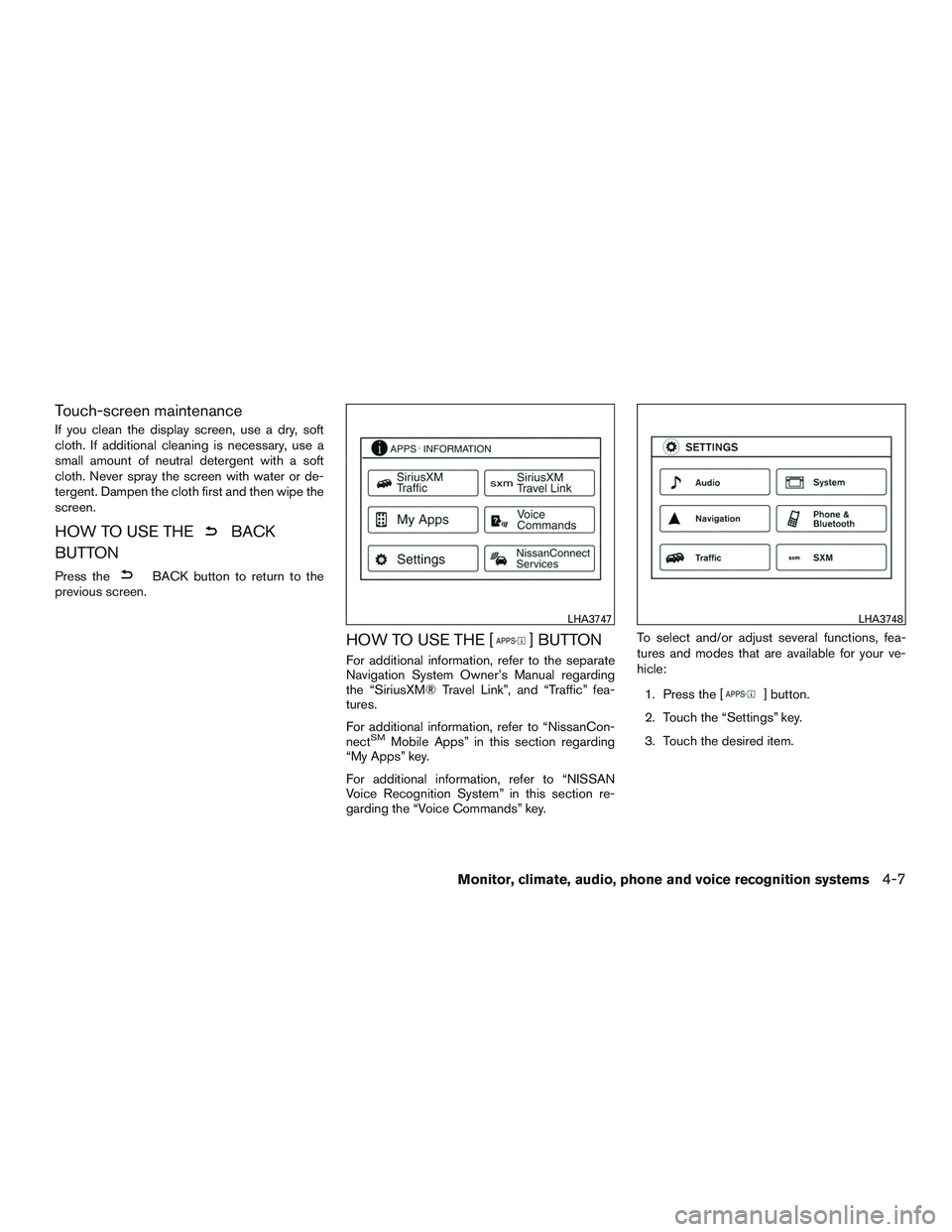
HOW TO USE THE [] BUTTON
For additional information, refer to the separate
Navigation System Owner’s Manual regarding
the “SiriusXM® Travel Link”, and “Traffic” fea-
tures.
For additional information, refer to “NissanCon-
nect
SMMobile Apps” in this section regarding
“My Apps” key.
For additional information, refer to “NISSAN
Voice Recognition System” in this section re-
garding the “Voice Commands” key. To select and/or adjust several functions, fea-
tures and modes that are available for your ve-
hicle:
1. Press the [
] button.
2. Touch the “Settings” key.
3. Touch the desired item.
LHA3747LHA3748
Monitor, climate, audio, phone and voice recognition systems4-7
Page 195 of 478
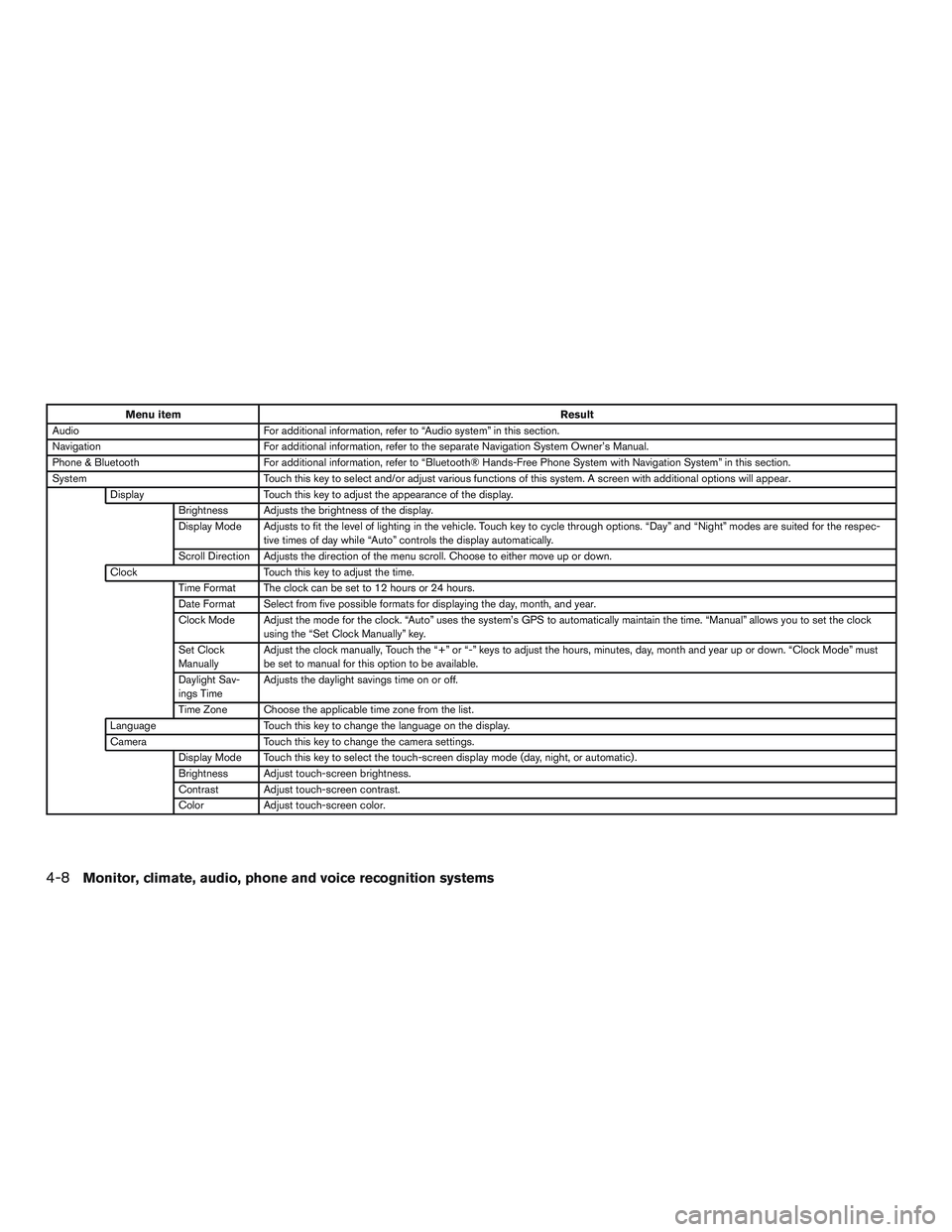
Menu itemResult
Audio For additional information, refer to “Audio system” in this section.
Navigation For additional information, refer to the separate Navigation System Owner’s Manual.
Phone & Bluetooth For additional information, refer to “Bluetooth® Hands-Free Phone System with Navigation System” in this section.
System Touch this key to select and/or adjust various functions of this system. A screen with additional options will appear.
Display Touch this key to adjust the appearance of the display.
Brightness Adjusts the brightness of the display.
Display Mode Adjusts to fit the level of lighting in the vehicle. Touch key to cycle through options. “Day” and “Night” modes are suited for the respec- tive times of day while “Auto” controls the display automatically.
Scroll Direction Adjusts the direction of the menu scroll. Choose to either move up or down.
Clock Touch this key to adjust the time.
Time Format The clock can be set to 12 hours or 24 hours.
Date Format Select from five possible formats for displaying the day, month, and year.
Clock Mode Adjust the mode for the clock. “Auto” uses the system’s GPS to automatically maintain the time. “Manual” allows you to set the clock using the “Set Clock Manually” key.
Set Clock
Manually Adjust the clock manually, Touch the “+” or “-” keys to adjust the hours, minutes, day, month and year up or down. “Clock Mode” must
be set to manual for this option to be available.
Daylight Sav-
ings Time Adjusts the daylight savings time on or off.
Time Zone Choose the applicable time zone from the list.
Language Touch this key to change the language on the display.
Camera Touch this key to change the camera settings.
Display Mode Touch this key to select the touch-screen display mode (day, night, or automatic) .
Brightness Adjust touch-screen brightness.
Contrast Adjust touch-screen contrast.
Color Adjust touch-screen color.
4-8Monitor, climate, audio, phone and voice recognition systems
Page 196 of 478
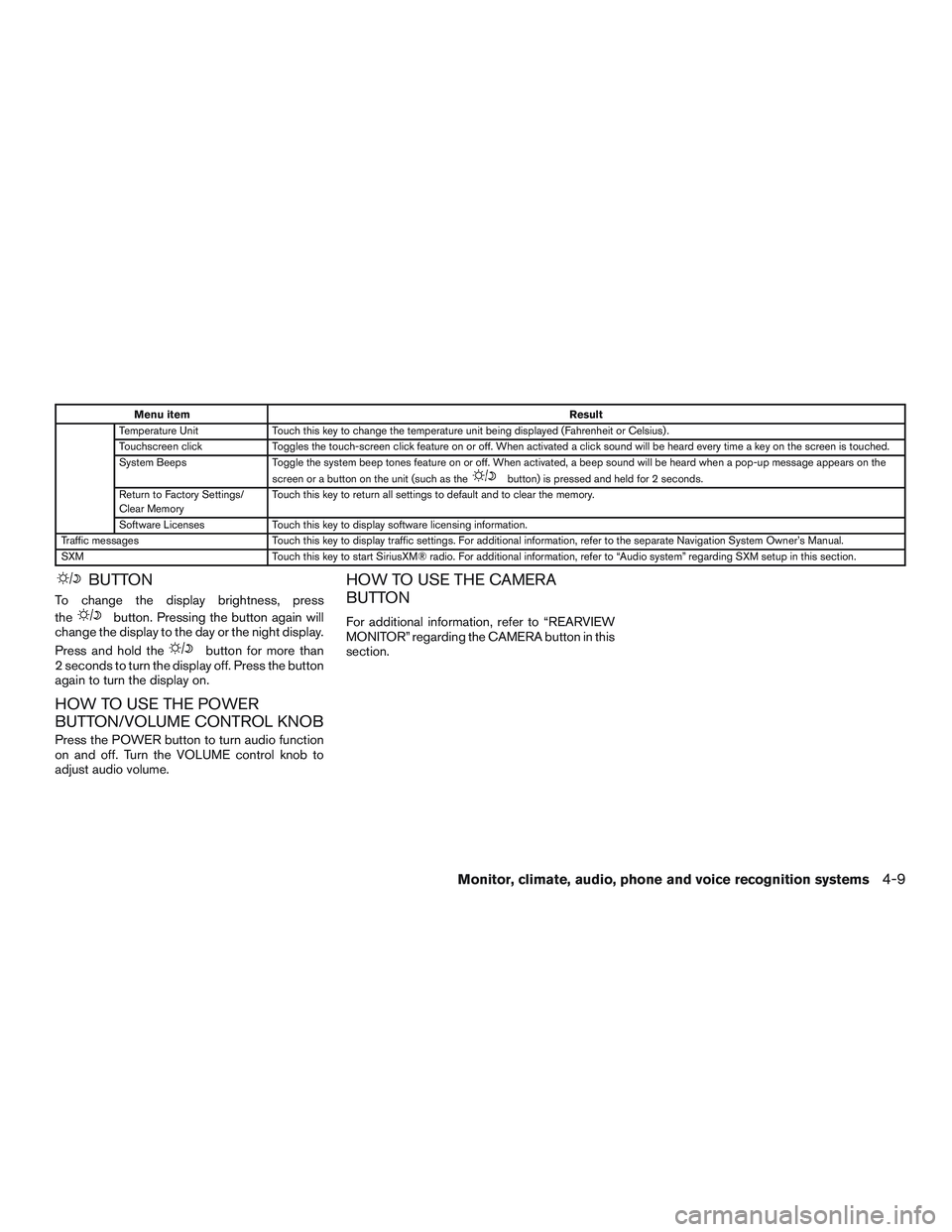
Menu itemResult
Temperature Unit Touch this key to change the temperature unit being displayed (Fahrenheit or Celsius) .
Touchscreen click Toggles the touch-screen click feature on or off. When activated a click sound will be heard every time a key on the screen is touched.
System Beeps Toggle the system beep tones feature on or off. When activated, a beep sound will be heard when a pop-up message appears on the
screen or a button on the unit (such as the
button) is pressed and held for 2 seconds.
Return to Factory Settings/
Clear Memory Touch this key to return all settings to default and to clear the memory.
Software Licenses Touch this key to display software licensing information.
Traffic messages Touch this key to display traffic settings. For additional information, refer to the separate Navigation System Owner’s Manual.
SXM Touch this key to start SiriusXM® radio. For additional information, refer to “Audio system” regarding SXM setup in this section.
BUTTON
To change the display brightness, press
the
button. Pressing the button again will
change the display to the day or the night display.
Press and hold the
button for more than
2 seconds to turn the display off. Press the button
again to turn the display on.
HOW TO USE THE POWER
BUTTON/VOLUME CONTROL KNOB
Press the POWER button to turn audio function
on and off. Turn the VOLUME control knob to
adjust audio volume.
HOW TO USE THE CAMERA
BUTTON
For additional information, refer to “REARVIEW
MONITOR” regarding the CAMERA button in this
section.
Monitor, climate, audio, phone and voice recognition systems4-9
Page 239 of 478
Apps button
Press the Apps button to launch the Smartphone
Integration Mode. For additional information, re-
fer to “NissanConnect
SMMobile Apps” in this
section regarding this feature.
For additional information, refer to “Bluetooth®
Hands-Free Phone system without Navigation” in
this section regarding connecting your phone.
FM/AM/SAT radio operation
FM·AM button
Press the FM·AM button to change the band as
follows:
AM →FM1 →FM2 →AM
If another audio source is playing when the
FM·AM button is pressed, the audio source play-
ing will automatically be turned off and the last
radio station played will begin playing.
The FM stereo indicator (STEREO) is shown on
the screen during FM stereo reception. When the
stereo broadcast signal is weak, the radio auto-
matically changes from stereo to monaural re-
ception. XM band select
Press the XM button to change the band as
follows:
XM1*
→XM2* →XM3* →XM1 (satellite, if so
equipped)
When the XM button is pressed while the ignition
switch is in the ACC or ON position, the radio will
come on at the station last played.
The last station played will also come on when
the VOL (volume)/(power) control
knob/button is pressed on.
*When the XM button is pressed, the satellite
radio reception will not be available unless an
optional satellite receiver and antenna are in-
stalled and a SiriusXM® Satellite Radio service
subscription is active. Satellite radio is not avail-
able in Alaska, Hawaii and Guam.
If a compact disc is playing when the XM button
is pressed, the compact disc will automatically be
turned off and the last radio station played will
come on.
TUNE/SCROLL knob (Tuning)
Turn the TUNE/SCROLL knob to the left or right
for manual tuning.
SEEK tuning
Press the
orSEEK buttons to tune
from low to high or high to low frequencies and to
stop at the next broadcasting station.
SCAN tuning
Press the SCAN button to stop at each broad-
casting station for 5 seconds. SCAN will appear
on the screen while the radio is scan tuning.
Pressing the button again during this 5 second
period will stop SCAN tuning and the radio will
remain tuned to that station. If the SCAN button is
not pressed within 5 seconds, SCAN tuning
moves to the next station.
1 to 6 Station memory operations
Six stations can be set for the AM band. Twelve
stations can be set for the FM band (six for FM1,
six for FM2) .
1. Choose the radio band AM, FM1 or FM2 using the FM·AM button.
2. Tune to the desired station using the
SEEK button or theTRACK button.
Press and hold any of the desired station
memory buttons (1 – 6) until the preset
number is updated on the display and a
beep is heard.
4-52Monitor, climate, audio, phone and voice recognition systems
Page 241 of 478
RDM (random) button
When the RDM (random) button is pressed while
a compact disc is playing, the play pattern can be
changed as follows:
CD:
1 Disc Random←→OFF
CD with MP3 or WMA:
1 Disc Random →1 Folder Random →OFF
1 Disc Random: all tracks on the disc will be
played randomly.
1 Folder Random: all tracks in the current folder
will be played randomly.
OFF: No random play pattern is applied. The
indicator on the display will turn off.
The current play pattern of the CD is displayed on
the screen unless no pattern is applied.CD EJECT button
When the
CD EJECT button is pressed
with a compact disc loaded, the compact disc
will eject and the last source will be played.
When the
CD EJECT button is pressed
twice with a compact disc loaded, the compact
disc will be ejected further for easier CD removal.
If the disc is not removed within 20 seconds, the
disc will reload.
Additional features
For additional information, refer to “iPod® player
operation without Navigation System” regarding
the iPod® player available with this system in this
section.
For additional information, refer to “USB (Univer-
sal Serial Bus) Connection Port (models without
Navigation System)” regarding the USB connec-
tion port available with this system in this section.
For additional information, refer to “Bluetooth®
streaming audio without Navigation System”
about the Bluetooth® audio interface available
with this system in this section.
4-54Monitor, climate, audio, phone and voice recognition systems