change wheel NISSAN ROGUE 2017 2.G User Guide
[x] Cancel search | Manufacturer: NISSAN, Model Year: 2017, Model line: ROGUE, Model: NISSAN ROGUE 2017 2.GPages: 547, PDF Size: 6.47 MB
Page 300 of 547
5. Initiate the connecting process from thehandset. The system will display the mes-
sage: “Is PIN XXXXXX displayed on your
Bluetooth device?”. If the PIN is displayed
on your Bluetooth® device, select “Yes” to
complete the pairing process.
For additional information, refer to the
Bluetooth® device’s Owner’s Manual.
VEHICLE PHONEBOOK
To access the vehicle phonebook:
1. Press the
button on the control panel.
2. Touch the “Phonebook” key.
3. Choose the desired entry from the displayed list.
4. The number of the entry will be displayed on the screen. Touch the number to initiate di-
aling.
NOTE:
To scroll quickly through the list, touch the
“A-Z” key in the upper right corner of the
screen. Turn the TUNE/SCROLL knob to
choose a letter or number and then press
ENTER. The list will move to the first entry
that begins with that number or letter.
MAKING A CALL
To make a call, follow the procedure below: 1. Press the
button on the control panel.
The “Phone” screen will appear on the dis-
play.
2. Select one of the following options to make a call:
● “Phonebook”: Select the name from an entry
stored in the vehicle phonebook.
● “Call Lists”: Select the name from the in-
coming, outgoing or missed.
● “Redial”: Dial the last outgoing call from the
vehicle.
● “
”: Input the phone number manually
using a keypad displayed on the screen. For
additional information, refer to “How to use
the touch-screen” in this section.
RECEIVING A CALL
When a call is placed to the connected phone,
the display will change to phone mode.
To accept the incoming call, either:
● Press the
button on the steering
wheel, or
● Touch the
icon on the screen. To reject the incoming call, either:
● Press the
button on the steering
wheel, or
● Touch the
icon on the screen.
DURING A CALL
While a call is active, the following options are
available on the screen:
● “Handset”
Select this option to switch control of the
phone call over to the handset.
● “Mute Mic.”
Select this option to mute the microphone.
Select again to unmute the microphone.
● Phone
icon
Select to end the phone call.
ENDING A CALL
To end a phone call, select the red phone
icon on the screen or press thebutton on
the steering wheel.
Monitor, climate, audio, phone and voice recognition systems4-97
Page 306 of 547
The NISSAN Voice Recognition System allows
hands-free operation of the systems equipped on
this vehicle, such as the phone and navigation
systems.
To operate NISSAN Voice Recognition, press
the
button located on the steering wheel.
When prompted, speak the command for the
system you wish to activate. The command given
is picked up by the microphone and performed
when it is properly recognized. NISSAN Voice
Recognition will provide a voice response as well
as a message in the center display to inform you
of the command results.
USING THE SYSTEM
Initialization
When the ignition switch is in the ON position,
NISSAN Voice Recognition is initialized, which
takes a few seconds. When completed, the sys-
tem is ready to accept voice commands. If
the
button is pressed before the initializa-
tion completes, the system will announce: “Voice
Recognition System not ready. Please wait.”
Giving voice commands
1. Press thebutton.
2. The system announces: “Please say a cat- egory like phone or a command like points of
interest followed by a brand name”. A list of
available commands is then spoken by the
system.
3. After the tone sounds and the face icon on the display changes, speak a command.
Available commands are discussed else-
where in this section. 4. Voice and display feedback are provided
when the command is accepted.
● Press the
button to return to the pre-
vious screen.
● If the command is not recognized, the sys-
tem announces provides a list of available
selections.
● If you want to cancel the command or go
back to the previous menu of commands,
press the
button. The system will an-
nounce: “Cancelling voice recognition” or
“Go back” depending on the current menu
level.
● Press the
button to move back
through the menus displayed on the screen.
● If you want to adjust the volume of the voice
feedback, use the volume control switches
on the steering wheel or the volume knob on
the control panel.
● The voice command screen can also be
accessed using the control panel display:
1. Press the [
] button.
2. Touch the “Voice Commands” key.
LHA4372
NISSAN VOICE RECOGNITION
SYSTEM (if so equipped)
Monitor, climate, audio, phone and voice recognition systems4-103
Page 321 of 547
6. When it is safe to do so, gradually turn thesteering wheel until both tires return to the
road surface. When all tires are on the road
surface, steer the vehicle to stay in the ap-
propriate driving lane.
● If you decide that it is not safe to return the
vehicle to the road surface based on ve-
hicle, road or traffic conditions, gradually
slow the vehicle to a stop in a safe place
off the road.
RAPID AIR PRESSURE LOSS
Rapid air pressure loss or a “blow-out” can occur
if the tire is punctured or is damaged due to
hitting a curb or pothole. Rapid air pressure loss
can also be caused by driving on under-inflated
tires.
Rapid air pressure loss can affect the handling
and stability of the vehicle, especially at highway
speeds.
Help prevent rapid air pressure loss by maintain-
ing the correct air pressure and visually inspect
the tires for wear and damage. For additional
information, refer to “Wheels and tires” in the
“Do-it-yourself” section of this manual. If a tire
rapidly loses air pressure or “blows-out” while
driving, maintain control of the vehicle by follow-
ing the procedure below. Please note that this
procedure is only a general guide. The vehicle must be driven as appropriate based on the con-
ditions of the vehicle, road and traffic.
WARNING
The following actions can increase the
chance of losing control of the vehicle if
there is a sudden loss of tire air pressure.
Losing control of the vehicle may cause a
collision and result in personal injury.
●
The vehicle generally moves or pulls in
the direction of the flat tire.
● Do not rapidly apply the brakes.
● Do not rapidly release the accelerator
pedal.
● Do not rapidly turn the steering wheel.
1. Remain calm and do not overreact.
2. Maintain a firm grip on the steering wheel with both hands and try to hold a straight
course.
3. When appropriate, slowly release the accel- erator pedal to gradually slow the vehicle.
4. Gradually steer the vehicle to a safe location off the road and away from traffic if possible.
5. Lightly apply the brake pedal to gradually stop the vehicle. 6. Turn on the hazard warning flashers and
contact a roadside emergency service to
change the tire. For additional information,
refer to “Changing a flat tire” in the “In case
of emergency” section of this manual.
DRINKING ALCOHOL/DRUGS AND
DRIVING
WARNING
Never drive under the influence of alcohol
or drugs. Alcohol in the bloodstream re-
duces coordination, delays reaction time
and impairs judgement. Driving after
drinking alcohol increases the likelihood
of being involved in an accident injuring
yourself and others. Additionally, if you
are injured in an accident, alcohol can
increase the severity of the injury.
NISSAN is committed to safe driving. However,
you must choose not to drive under the influence
of alcohol. Every year thousands of people are
injured or killed in alcohol-related collisions. Al-
though the local laws vary on what is considered
to be legally intoxicated, the fact is that alcohol
affects all people differently and most people
underestimate the effects of alcohol.
5-10Starting and driving
Page 340 of 547
HOW TO ENABLE/DISABLE THE
LDW SYSTEM
Perform the following steps to enable or disable
the LDW system.1. Press the
button until “Settings” dis-
plays in the vehicle information display and
then press the OK button. Use the
button to select “Driver Assistance”. Then
press the OK button.
2. Select “Driving Aids” and press the OK but- ton.
3. To set the LDW system to on or off, use the
buttons to navigate in the menu
and use the OK button to select or change
an item:
● Select “Lane” and press the OK button.
– To turn on the warning system, use the OK button to check the box for “Warn-
ing.”
LDW SYSTEM LIMITATIONS
WARNING
Listed below are the system limitations for
the LDW system. Failure to follow the
warnings and instructions for proper use
of the LDW system could result in serious
injury or death.
●The system will not operate at speeds
below approximately 37 mph (60 km/h)
or if it cannot detect lane markers.
● Excessive noise will interfere with the
warning chime sound, and the chime
may not be heard.
● Do not use the LDW system under the
following conditions as it may not func-
tion properly:
– During bad weather (rain, fog, snow, etc.) .
– When driving on slippery roads, such as on ice or snow.
– When driving on winding or uneven roads.
– When there is a lane closure due to road repairs. – When driving in a makeshift or tem-
porary lane.
– When driving on roads where the lane width is too narrow.
– When driving without normal tire conditions (for example, tire wear,
low tire pressure, installation of
spare tire, tire chains, nonstandard
wheels) .
– When the vehicle is equipped with non-original brake parts or suspen-
sion parts.
– When you are towing a trailer or other vehicle.
The system may not function properly un-
der the following conditions: – On roads where there are multiple parallel lane markers; lane markers
that are faded or not painted clearly;
yellow painted lane markers; non-
standard lane markers; or lane mark-
ers covered with water, dirt, snow,
etc.
– On roads where the discontinued lane markers are still detectable.
Starting and driving5-29
Page 341 of 547
– On roads where there are sharpcurves.
– On roads where there are sharply contrasting objects, such as shad-
ows, snow, water, wheel ruts, seams
or lines remaining after road repairs.
(The LDW system could detect these
items as lane markers.)
– On roads where the traveling lane merges or separates.
– When the vehicle’s traveling direc- tion does not align with the lane
marker.
– When traveling close to the vehicle in front of you, which obstructs the lane
camera unit detection range.
– When rain, snow, dirt or object ad- heres to the windshield in front of the
lane camera unit.
– When the headlights are not bright due to dirt on the lens or if the aiming
is not adjusted properly.
– When strong light enters the lane camera unit. (For example, the light
directly shines on the front of the
vehicle at sunrise or sunset.) – When a sudden change in brightness
occurs. (For example, when the ve-
hicle enters or exits a tunnel or under
a bridge.)
SYSTEM TEMPORARILY
UNAVAILABLE
If the vehicle is parked in direct sunlight under
high temperature conditions (over approximately
104°F (40°C)) and then started, the LDW system
may be deactivated automatically, the warning
systems ON indicator on the switch will flash and
the following message will appear in the vehicle
information display. - “Unavailable High Cabin
Temp.”
When the interior temperature is reduced, the
LDW system will resume operating automatically
and the warning systems ON indicator will stop
flashing.
The LDW system is not designed to warn under
the following conditions:
● When you operate the lane change signal
and change traveling lanes in the direction of
the signal. (The LDW system will become
operable again approximately 2 seconds af-
ter the lane change signal is turned off.)
● When the vehicle speed lowers to less than
approximately 37 mph (60 km/h). After the above conditions have finished and the
necessary operating conditions are satisfied, the
LDW functions will resume.
SYSTEM MALFUNCTION
If the LDW system malfunctions, it will cancel
automatically and “Malfunction: See Owner’s
Manual” will appear in the vehicle information
display. If “Malfunction: See Owner’s Manual”
appears in the vehicle information display, pull off
the road to a safe location and stop the vehicle.
Place shift lever in the P (Park) position and the
ignition switch to the OFF position and restart the
engine/motor. If “Malfunction: See Owner’s
Manual” continues to appear in the vehicle infor-
mation display, have the system checked. It is
recommended that you visit a NISSAN dealer for
this service.
5-30Starting and driving
Page 345 of 547
HOW TO ENABLE/DISABLE THE
LDP SYSTEM
Perform the following steps to enable or disable
the LDP system.1. Press the
button until “Settings” dis-
plays in the vehicle information display and
then press the OK button. Use the
button to select “Driver Assistance”. Then
press the OK button.
2. Select “Driving Aids” and press the OK but- ton.
3. To set the LDP system to on or off, use the
buttons to navigate in the menu
and use the OK button to select or change
an item:
● Select “Lane” and press the OK button.
– To turn on the assistance system, use the OK button to check the box for “Assist.”
LDP SYSTEM LIMITATIONS
WARNING
Listed below are the system limitations for
the LDP system. Failure to follow the
warnings and instructions for proper use
of the LDP system could result in serious
injury or death. ●
The LDP system may activate if you
change lanes without first activating
your turn signal or, for example, if a
construction zone directs traffic to
cross an existing lane marker. If this
occurs you may need to apply corrective
steering to complete your lane change.
● Because the LDP may not activate un-
der the road, weather, and lane marker
conditions described in this section, it
may not activate every time your vehicle
begins to leave its lane and you will
need to apply corrective steering.
● When the LDP system is operating,
avoid excessive or sudden steering ma-
neuvers. Otherwise, you could lose con-
trol of the vehicle.
● The LDP system will not operate at
speeds below approximately 37 mph
(60 km/h) or if it cannot detect lane
markers.
● Do not use the LDP system under the
following conditions as it may not func-
tion properly:
– During bad weather (rain, fog, snow, etc.) . – When driving on slippery roads, such
as on ice or snow.
– When driving on winding or uneven roads.
– When there is a lane closure due to road repairs.
– When driving in a makeshift or tem- porary lane.
– When driving on roads where the lane width is too narrow.
– When driving without normal tire conditions (for example, tire wear,
low tire pressure, installation of
spare tire, tire chains, non-standard
wheels) .
– When the vehicle is equipped with nonoriginal brake parts or suspen-
sion parts.
– When you are towing a trailer or other vehicle.
5-34Starting and driving
Page 346 of 547
– On roads where there are multipleparallel lane markers; lane markers
that are faded or not painted clearly;
yellow painted lane markers; non-
standard lane markers; or lane mark-
ers covered with water, dirt, snow,
etc.
– On roads where discontinued lane markers are still detectable.
– On roads where there are sharp curves.
– On roads where there are sharply contrasting objects, such as shad-
ows, snow, water, wheel ruts, seams
or lines remaining after road repairs.
(The LDP system could detect these
items as lane markers.)
– On roads where the traveling lane merges or separates.
– When the vehicle’s traveling direc- tion does not align with the lane
marker.
– When traveling close to the vehicle in front of you, which obstructs the lane
camera unit detection range. – When rain, snow or dirt adheres to
the windshield in front of the lane
camera unit.
– When the headlights are not bright due to dirt on the lens or if the aiming
is not adjusted properly.
– When strong light enters the lane camera unit. (For example, the light
directly shines on the front of the
vehicle at sunrise or sunset.)
– When a sudden change in brightness occurs. (For example, when the ve-
hicle enters or exits a tunnel or under
a bridge.)
● Excessive noise will interfere with the
warning chime sound, and the chime
may not be heard.
While the LDP system is operating, you may hear
a sound of brake operation. This is normal and
indicates that the LDP system is operating prop-
erly.SYSTEM TEMPORARILY
UNAVAILABLE
Condition A:
The warning and assist functions of the LDP
system are not designed to work under the fol-
lowing conditions: ● When you operate the lane change signal
and change the traveling lanes in the direc-
tion of the signal. (The LDP system will be
deactivated for approximately 2 seconds af-
ter the lane change signal is turned off.)
● When the vehicle speed lowers to less than
approximately 37 mph (60 km/h).
After the above conditions have finished and the
necessary operating conditions are satisfied, the
warning and assist functions will resume.
Condition B:
The assist function of the LDP system is not
designed to work under the following conditions
(warning is still functional): ● When the brake pedal is depressed.
● When the steering wheel is turned as far as
necessary for the vehicle to change lanes.
● When the vehicle is accelerated during LDP
system operation.
Starting and driving5-35
Page 373 of 547
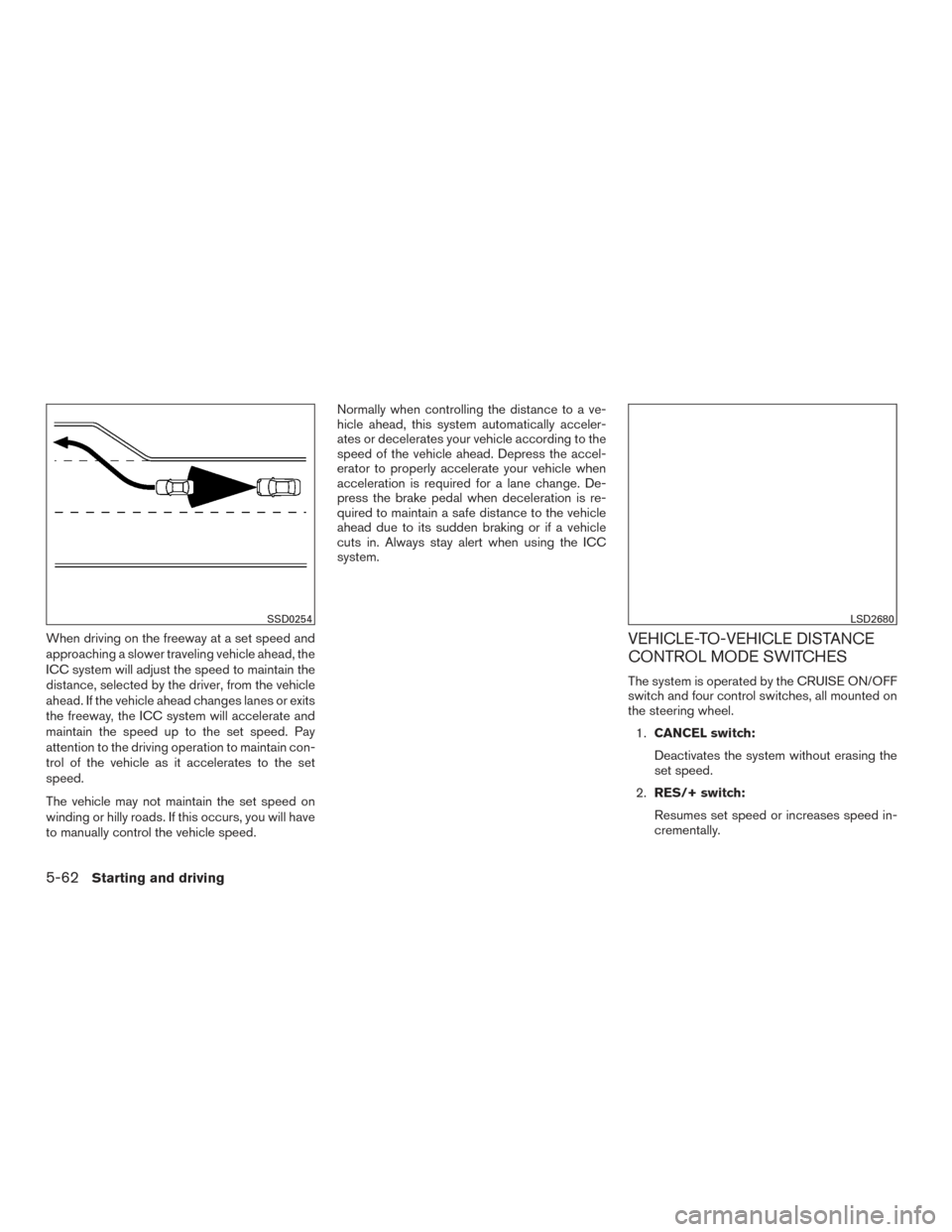
When driving on the freeway at a set speed and
approaching a slower traveling vehicle ahead, the
ICC system will adjust the speed to maintain the
distance, selected by the driver, from the vehicle
ahead. If the vehicle ahead changes lanes or exits
the freeway, the ICC system will accelerate and
maintain the speed up to the set speed. Pay
attention to the driving operation to maintain con-
trol of the vehicle as it accelerates to the set
speed.
The vehicle may not maintain the set speed on
winding or hilly roads. If this occurs, you will have
to manually control the vehicle speed.Normally when controlling the distance to a ve-
hicle ahead, this system automatically acceler-
ates or decelerates your vehicle according to the
speed of the vehicle ahead. Depress the accel-
erator to properly accelerate your vehicle when
acceleration is required for a lane change. De-
press the brake pedal when deceleration is re-
quired to maintain a safe distance to the vehicle
ahead due to its sudden braking or if a vehicle
cuts in. Always stay alert when using the ICC
system.VEHICLE-TO-VEHICLE DISTANCE
CONTROL MODE SWITCHES
The system is operated by the CRUISE ON/OFF
switch and four control switches, all mounted on
the steering wheel.
1. CANCEL switch:
Deactivates the system without erasing the
set speed.
2. RES/+ switch:
Resumes set speed or increases speed in-
crementally.
SSD0254LSD2680
5-62Starting and driving
Page 391 of 547

System temporarily unavailable
A chime sounds under the following conditions
and the control is automatically canceled:● When the vehicle slows down more than
8 mph (13 km/h) below the set speed
● When the shift lever is not in the D (Drive) or
manual shift mode
● When the parking brake is applied
● When the VDC operates (including the trac-
tion control system)
● When a wheel slips
When the system is not operating properly, the
chime sounds and the color of the cruise indica-
tor will change to orange.
Action to take
If the color of the cruise indicator changes to
orange, stop the vehicle in a safe place and place
the shift lever in the P (Park) position. Turn the
engine off, restart the engine, resume driving, and
then perform the setting again. If it is not possible to set or the indicator
stays on, it may indicate that the system is
malfunctioning. Although the vehicle is still
driveable under normal conditions, have
the vehicle checked. It is recommended
that you visit a NISSAN dealer for this ser-
vice.
WARNING
Failure to follow the warnings and instruc-
tions for proper use of the FEB system
could result in serious injury or death.
●
The FEB system is a supplemental aid
to the driver. It is not a replacement for
the driver’s attention to traffic condi-
tions or responsibility to drive safely. It
cannot prevent accidents due to care-
lessness or dangerous driving
techniques.
● The FEB system does not function in all
driving, traffic, weather and road
conditions.
The FEB system can assist the driver when there
is a risk of a forward collision with the vehicle
ahead in the traveling lane.
FORWARD EMERGENCY BRAKING
(FEB) (if so equipped)
5-80Starting and driving
Page 409 of 547
●Keep your engine tuned up.
● Follow the recommended scheduled main-
tenance.
● Keep the tires inflated to the correct pres-
sure. Low tire pressure increases tire wear
and lowers fuel economy.
● Keep all the wheels in correct alignment.
Improper alignment increases tire wear and
lowers fuel economy.
● Use the recommended viscosity engine oil.
For additional information, refer to “Engine
oil and oil filter recommendations” in the
“Technical and consumer information” sec-
tion of this manual. If any malfunction occurs in the AWD system
while the engine is running, the master warning
light will come on.
The master warning light may illuminate while
trying to free a stuck vehicle due to high pow-
ertrain oil temperature. The driving mode may
change to 2WD. AUTO mode may change to
LOCK mode before the warning light illuminates.
If the master warning light illuminates during op-
eration, stop the vehicle with the engine idling in a
safe place immediately.
Then if the light turns off after a while, you can
continue driving.
A large difference between the diameters of the
front and rear wheels will make the warning light
illuminate. Pull off the road in a safe area and idle
the engine. Check that all tire sizes are the same,
tire pressure is correct, and the tires are not worn.
CAUTION
●
If the warning light remains on after the
above operation, have your vehicle
checked as soon as possible. It is rec-
ommended that you visit a NISSAN
dealer for this service. ●
If the warning light comes on while driv-
ing, there may be a malfunction in the
AWD system.
Reduce the vehicle speed and have your
vehicle checked as soon as possible. It
is recommended that you visit a
NISSAN dealer for this service.
● The powertrain may be damaged if you
continue driving with the warning light
illuminated.
● Never drive on dry, hard surface roads in
the LOCK mode, as this will overload
the powertrain and may cause a serious
malfunction.
WARNING
● For AWD equipped vehicles, do not at-
tempt to raise two wheels off the
ground and shift the transmission to
any drive or reverse position with the
engine running. Doing so may result in
drivetrain damage or unexpected ve-
hicle movement which could result in
serious vehicle damage or personal
injury.
INCREASING FUEL ECONOMY ALL-WHEEL DRIVE (AWD) (if so
equipped)
5-98Starting and driving