turn signal NISSAN ROGUE 2017 Owner´s Manual
[x] Cancel search | Manufacturer: NISSAN, Model Year: 2017, Model line: ROGUE, Model: NISSAN ROGUE 2017Pages: 554, PDF Size: 6.44 MB
Page 385 of 554
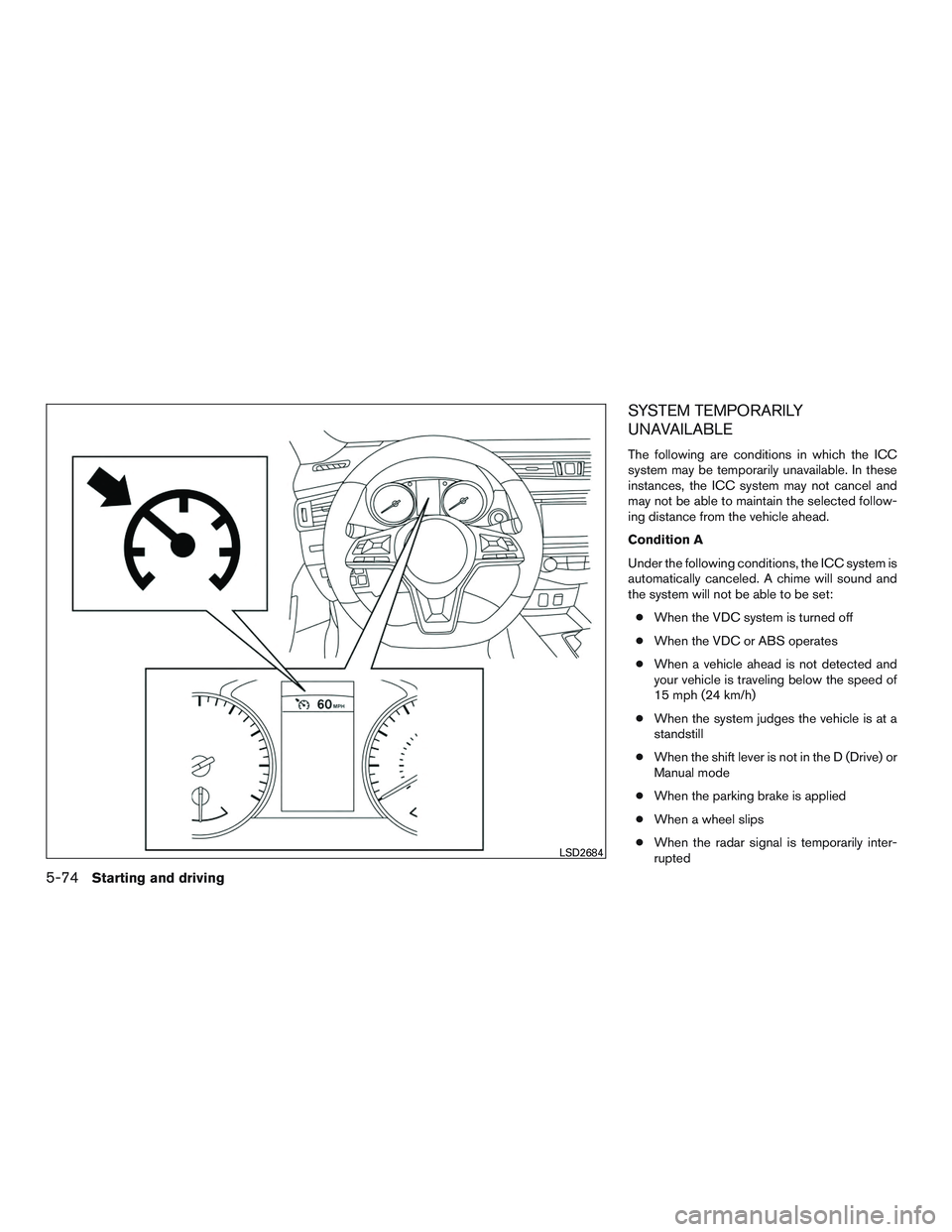
SYSTEM TEMPORARILY
UNAVAILABLE
The following are conditions in which the ICC
system may be temporarily unavailable. In these
instances, the ICC system may not cancel and
may not be able to maintain the selected follow-
ing distance from the vehicle ahead.
Condition A
Under the following conditions, the ICC system is
automatically canceled. A chime will sound and
the system will not be able to be set:● When the VDC system is turned off
● When the VDC or ABS operates
● When a vehicle ahead is not detected and
your vehicle is traveling below the speed of
15 mph (24 km/h)
● When the system judges the vehicle is at a
standstill
● When the shift lever is not in the D (Drive) or
Manual mode
● When the parking brake is applied
● When a wheel slips
● When the radar signal is temporarily inter-
rupted
LSD2684
5-74Starting and driving
Page 386 of 554
Action to take
When the conditions listed above are no longer
present, turn the system off using the ICC
CRUISE ON/OFF switch. Turn the ICC system
back on to use the system.
Condition B
When the radar sensor area of the front bumper
is covered with dirt or is obstructed, the ICC
system will automatically be canceled.
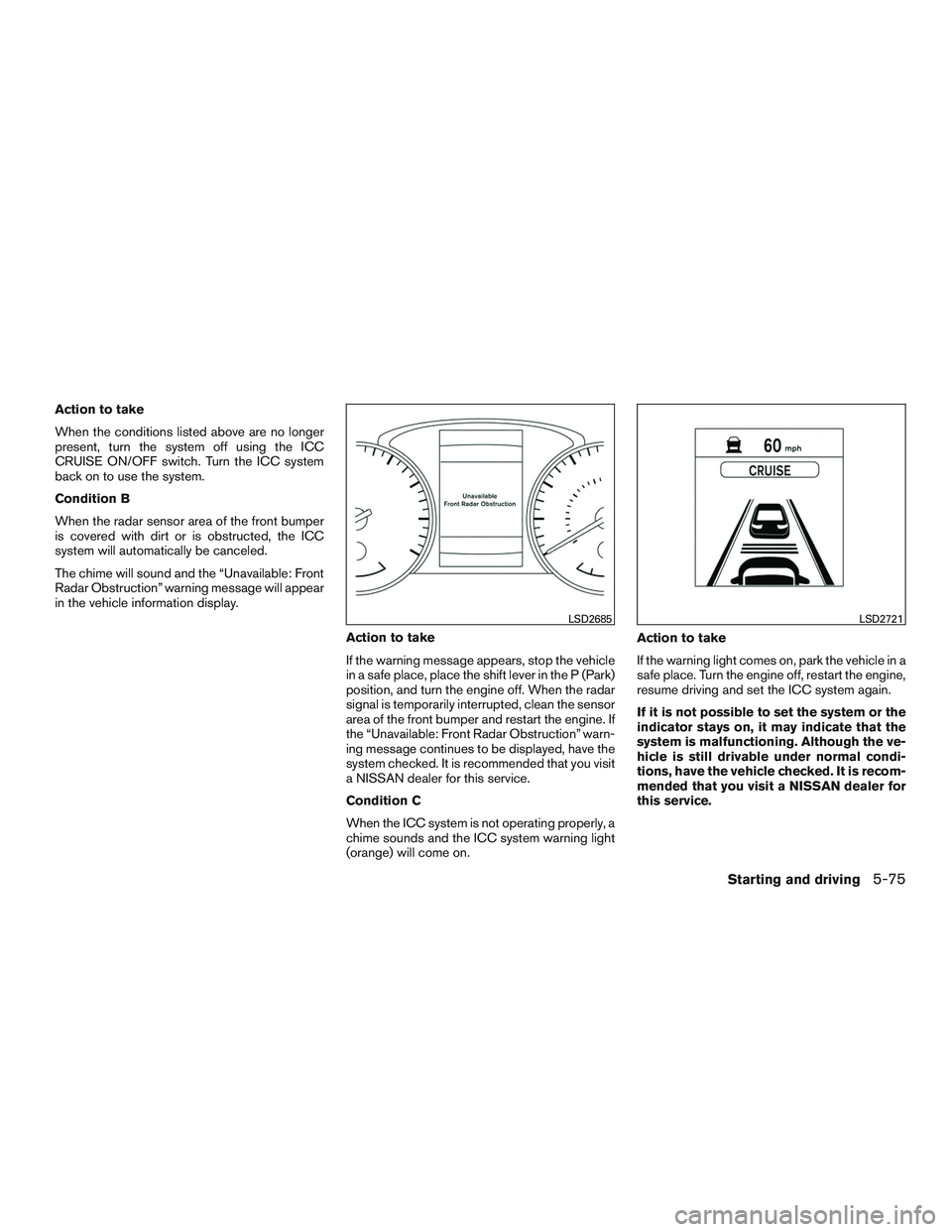
The chime will sound and the “Unavailable: Front
Radar Obstruction” warning message will appear
in the vehicle information display.Action to take
If the warning message appears, stop the vehicle
in a safe place, place the shift lever in the P (Park)
position, and turn the engine off. When the radar
signal is temporarily interrupted, clean the sensor
area of the front bumper and restart the engine. If
the “Unavailable: Front Radar Obstruction” warn-
ing message continues to be displayed, have the
system checked. It is recommended that you visit
a NISSAN dealer for this service.
Condition C
When the ICC system is not operating properly, a
chime sounds and the ICC system warning light
(orange) will come on.Action to take
If the warning light comes on, park the vehicle in a
safe place. Turn the engine off, restart the engine,
resume driving and set the ICC system again.
If it is not possible to set the system or the
indicator stays on, it may indicate that the
system is malfunctioning. Although the ve-
hicle is still drivable under normal condi-
tions, have the vehicle checked. It is recom-
mended that you visit a NISSAN dealer for
this service.
LSD2685LSD2721
Starting and driving5-75
Page 427 of 554
Push the switch on to warn other drivers when
you must stop or park under emergency condi-
tions. All turn signal lights flash.
WARNING
●If stopping for an emergency, be sure to
move the vehicle well off the road.
● Do not use the hazard warning flashers
while moving on the highway unless
unusual circumstances force you to
drive so slowly that your vehicle might
become a hazard to other traffic.
● Turn signals do not work when the haz-
ard warning flasher lights are on. The flashers will operate with the ignition switch
placed in any position.
Some jurisdictions may prohibit the use of
the hazard warning flasher switch while
driving.
To shut off the engine in an emergency situation
while driving, perform the following procedure:
● Rapidly push the push-button ignition
switch 3 consecutive times in less than
1.5 seconds, or
● Push and hold the push-button ignition
switch for more than 2 seconds.
LIC0394
HAZARD WARNING FLASHER
SWITCH EMERGENCY ENGINE SHUT OFF
(Push-button ignition models only)
6-2In case of emergency
Page 428 of 554
TIRE PRESSURE MONITORING
SYSTEM (TPMS)
This vehicle is equipped with TPMS. It monitors
tire pressure of all tires except the spare. When
the low tire pressure warning light is lit, and the
“Tire Pressure Low — Add Air” (“Flat Tire — Visit
Dealer” for vehicles equipped with run-flat tires)
warning appears in the vehicle information dis-
play, one or more of your tires is significantly
under-inflated. If equipped, the system also dis-
plays pressure of all tires (except the spare tire)
on the display screen by sending a signal from a
sensor that is installed in each wheel. If the ve-
hicle is being driven with low tire pressure, the
TPMS will activate and warn you of it by the low
tire pressure warning light. This system will acti-
vate only when the vehicle is driven at speeds
above 16 mph (25 km/h). For additional informa-
tion, refer to “Warning lights, indicator lights and
audible reminders” in the “Instruments and con-
trols” section and “Tire Pressure Monitoring Sys-
tem (TPMS)” in the “Starting and driving” section
of this manual.
WARNING
●Radio waves could adversely affect elec-
tric medical equipment. Those who use a
pacemaker should contact the electric
medical equipment manufacturer for the
possible influences before use.
●If the low tire pressure warning light illu-
minates while driving, avoid sudden
steering maneuvers or abrupt braking,
reduce vehicle speed, pull off the road to
a safe location and stop the vehicle as
soon as possible. Driving with under-
inflated tires may permanently damage
the tires and increase the likelihood of
tire failure. Serious vehicle damage could
occur and may lead to an accident and
could result in serious personal injury.
Check the tire pressure for all four tires.
Adjust the tire pressure to the recom-
mended COLD tire pressure shown on
the Tire and Loading Information label to
turn the low tire pressure warning light
OFF. If the light still illuminates while
driving after adjusting the tire pressure, a
tire may be flat or the TPMS may be
malfunctioning. If you have a flat tire,
replace it with a spare tire as soon as
possible. If no tire is flat and all tires are
properly inflated, have the vehicle
checked. It is recommended that you visit
a NISSAN dealer for this service.
● When replacing a wheel without the
TPMS, when a wheel is replaced, TPMS
will not function and the low tire pres-
sure warning light will flash for approxi-
mately 1 minute. The light will remain
on after 1 minute. Have your tires re-
placed and/or TPMS system reset as
soon as possible. It is recommended
that you visit a NISSAN dealer for these
services.
● Replacing tires with those not originally
specified by NISSAN could affect the
proper operation of the TPMS.
● Do not inject any tire liquid or aerosol
tire sealant into the tires, as this may
cause a malfunction of the tire pressure
sensors.
RUN-FLAT TIRES (if so equipped)
Run-flat tires are those tires that can be used
temporarily if they are punctured. For additional
information, refer to “Run-flat tires” in “Do-it-
yourself” section of this manual.
For additional information, refer to the tire safety
information in the Warranty Information Booklet.
FLAT TIRE
In case of emergency6-3
Page 429 of 554
WARNING
●Although you can continue driving with
a punctured run-flat tire, remember that
vehicle handling stability is reduced,
which could lead to an accident and
personal injury. Also, driving a long dis-
tance at high speeds may damage the
tires.
● Do not drive at speeds above 50 mph
(80 km/h) and do not drive more than
approximately 93 miles (150 km) with a
punctured run-flat tire. The actual dis-
tance the vehicle can be driven on a flat
tire depends on outside temperature,
vehicle load, road conditions and other
factors.
● Drive safely at reduced speeds. Avoid
hard cornering or braking, which may
cause you to lose control of the vehicle.
● If you detect any unusual sounds or
vibrations while driving with a punc-
tured run-flat tire, pull off the road to a
safe location and stop the vehicle as
soon as possible. The tire may be seri-
ously damaged and need to be
replaced.
CAUTION
● Never install tire chains on a punctured
run-flat tire, as this could damage your
vehicle.
● Avoid diving over any projection or pot-
hole, as the clearance between the ve-
hicle and the ground is smaller than
normal.
● Do not enter an automated car wash
with a punctured run-flat tire.
● Have the punctured tire inspected by a
NISSAN dealer or other authorized re-
pair shop. Replace the tire as soon as
possible if the tire is seriously
damaged.
CHANGING A FLAT TIRE
If you have a flat tire, follow the instructions be-
low:
Stopping the vehicle
1. Safely move the vehicle off the road and
away from traffic.
2. Turn on the hazard warning flashers.
3. Park on a level surface and apply the parking brake. Move the shift lever to P (Park) . 4. Turn off the engine.
5. Raise the hood to warn other traffic and to
signal professional road assistance person-
nel that you need assistance.
6. Have all passengers get out of the vehicle and stand in a safe place, away from traffic
and clear of the vehicle.
WARNING
●Make sure the parking brake is securely
applied and the shift lever is shifted into
P (Park) .
● Never change tires when the vehicle is
on a slope, ice or slippery areas. This is
hazardous.
● Never change tires if oncoming traffic is
close to your vehicle. Wait for profes-
sional road assistance.
6-4In case of emergency
Page 476 of 554
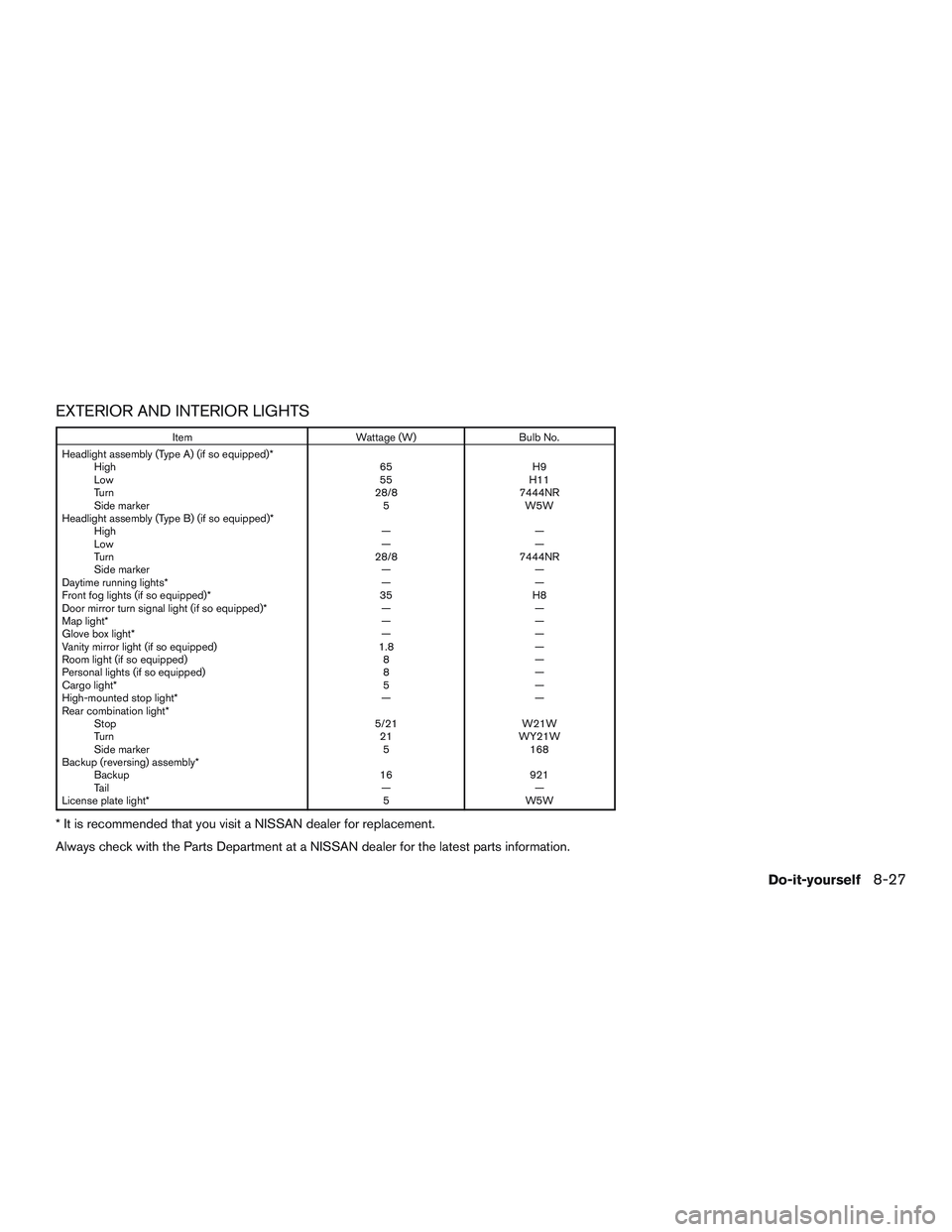
EXTERIOR AND INTERIOR LIGHTS
ItemWattage (W)Bulb No.
Headlight assembly (Type A) (if so equipped)* High 65H9
Low 55H11
Turn 28/87444NR
Side marker 5W5W
Headlight assembly (Type B) (if so equipped)* High ——
Low ——
Turn 28/87444NR
Side marker ——
Daytime running lights* ——
Front fog lights (if so equipped)* 35H8
Door mirror turn signal light (if so equipped)* ——
Map light* ——
Glove box light* ——
Vanity mirror light (if so equipped) 1.8—
Room light (if so equipped) 8—
Personal lights (if so equipped) 8—
Cargo light* 5—
High-mounted stop light* ——
Rear combination light* Stop 5/21W21W
Turn 21WY21W
Side marker 5168
Backup (reversing) assembly* Backup 16921
Ta i l ——
License plate light* 5W5W
* It is recommended that you visit a NISSAN dealer for replacement.
Always check with the Parts Department at a NISSAN dealer for the latest parts information.
Do-it-yourself8-27
Page 477 of 554
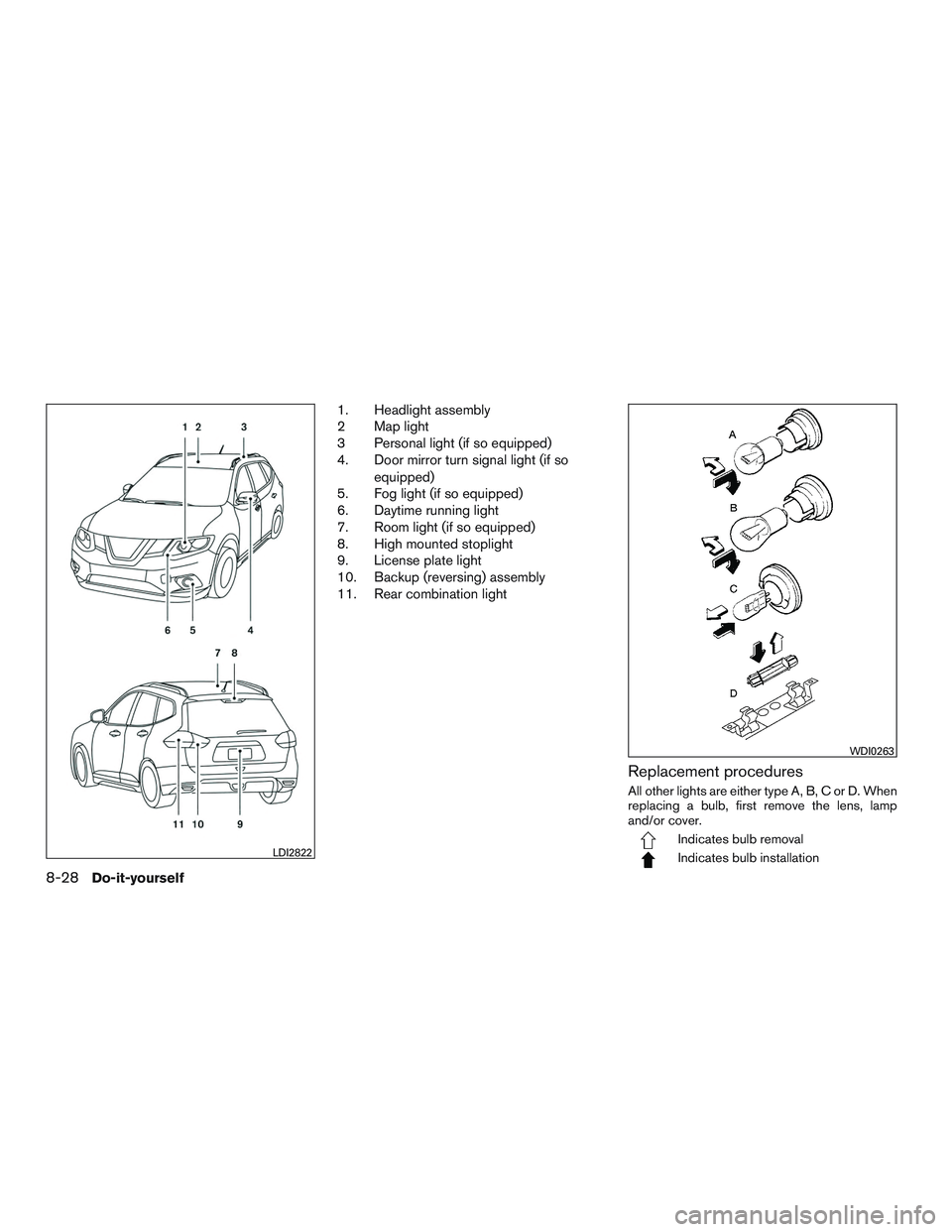
1. Headlight assembly
2 Map light
3 Personal light (if so equipped)
4. Door mirror turn signal light (if soequipped)
5. Fog light (if so equipped)
6. Daytime running light
7. Room light (if so equipped)
8. High mounted stoplight
9. License plate light
10. Backup (reversing) assembly
11. Rear combination light
Replacement procedures
All other lights are either type A, B, C or D. When
replacing a bulb, first remove the lens, lamp
and/or cover.
Indicates bulb removal
Indicates bulb installationLDI2822
WDI0263
8-28Do-it-yourself
Page 494 of 554
Make sure that the secondary latch keeps the
hood from opening when the primary latch is
released.
When driving in areas using road salt or other
corrosive materials, check lubrication frequently.
Lights*:Clean the headlights on a regular basis.
Make sure that the headlights, stop lights, tail
lights, turn signal lights, and other lights are all
operating properly and installed securely. Also
check headlight aim.
Road wheel nuts (lug nuts)*: When checking
the tires, make sure no wheel nuts are missing,
and check for any loose wheel nuts. Tighten if
necessary.
Tire rotation*: Tires should be rotated every
5,000 miles (8,000 km).
Tires*: Check the pressure with a gauge often
and always prior to long distance trips. If neces-
sary, adjust the pressure in all tires, including the
spare, to the pressure specified. Check carefully
for damage, cuts or excessive wear.
Tire Pressure Monitoring System (TPMS)
transmitter components: Replace the TPMS
transmitter grommet seal, valve core and cap
when the tires are replaced due to wear or age. Wheel alignment and balance:
If the vehicle
should pull to either side while driving on a
straight and level road, or if you detect uneven or
abnormal tire wear, there may be a need for wheel
alignment. If the steering wheel or seat vibrates at
normal highway speeds, wheel balancing may be
needed.
For additional information regarding tires, refer to
“Important Tire Safety Information” (US) or “Tire
Safety Information” (Canada) in the Warranty In-
formation Booklet.
Windshield: Clean the windshield on a regular
basis. Check the windshield at least every six
months for cracks or other damage. Have a dam-
aged windshield repaired by a qualified repair
facility.
Windshield wiper blades*: Check for cracks
or wear if they do not wipe properly.
Inside the vehicle
The maintenance items listed here should be
checked on a regular basis, such as when per-
forming scheduled maintenance, cleaning the ve-
hicle, etc.
Accelerator pedal: Check the pedal for smooth
operation and make sure the pedal does not
catch or require uneven effort. Keep the floor mat
away from the pedal. Brake pedal:
Check the pedal for smooth op-
eration. If the brake pedal suddenly goes down
further than normal, the pedal feels spongy or the
vehicle seems to take longer to stop, have your
vehicle checked immediately. It is recommended
that you visit a NISSAN dealer for this service.
Keep the floor mat away from the pedal.
Brakes: Check that the brakes do not pull the
vehicle to one side when applied.
Continuously Variable Transmission (CVT)
P (Park) position mechanism: On a fairly
steep hill check that the vehicle is held securely
with the shift lever in the P (Park) position without
applying any brakes.
Parking brake: Check the parking brake opera-
tion regularly. The vehicle should be securely held
on a fairly steep hill with only the parking brake
applied. If the parking brake needs adjustment, it
is recommended that you visit a NISSAN dealer
for this service.
Seats: Check seat position controls such as
seat adjusters, seatback recliner, etc., to ensure
they operate smoothly and all latches lock se-
curely in every position. Check that the head
restraints/headrests move up and down
smoothly and the locks (if so equipped) hold
securely in all latched positions.
Maintenance and schedules9-3
Page 529 of 554
Trailer lights
CAUTION
When splicing into the vehicle electrical
system, a commercially available power-
type module/converter must be used to
provide power for all trailer lighting. This
unit uses the vehicle battery as a direct
power source for all trailer lights while
using the vehicle tail light, stoplight and
turn signal circuits as a signal source. The
module/converter must draw no more that
15 milliamps from the stop and tail lamp
circuits. Using a module/converter that
exceeds these power requirements may
damage the vehicle’s electrical system. It
is recommended that you visit a reputable
trailer retailer to obtain the proper equip-
ment and to have it installed.
Trailer lights should comply with federal and/or
local regulations. For assistance in hooking up
trailer lights, contact a NISSAN dealer or repu-
table trailer retailer. Vehicles equipped with the
optional trailer tow package are equipped with a
7-pin trailer harness connector. If your trailer is
equipped with a flat 4-pin connector, an adapter
will be needed to connect the trailer lights to the
vehicle. Adapters are available at auto parts
stores and hitch retailers.
Pre-towing tips
● Be certain your vehicle maintains a level
position when a loaded and/or unloaded
trailer is hitched. Do not drive the vehicle if it
has an abnormal nose-up or nose-down
condition; check for improper tongue load,
overload, worn suspension or other possible
causes of either condition.
● Always secure items in the trailer to prevent
load shift while driving.
● Keep the cargo load as low as possible in
the trailer to keep the trailer center of gravity
low.
● Load the trailer so approximately 60% of the
trailer load is in the front half and 40% is in
the back half. Also make sure the load is
balanced side to side.
● Check your hitch, trailer tire pressure, ve-
hicle tire pressure, trailer light operation, and
trailer wheel lug nuts every time you attach a
trailer to the vehicle.
● Be certain your rearview mirrors conform to
all federal, state or local regulations. If not,
install any mirrors required for towing before
driving the vehicle. ●
Determine the overall height of the vehicle
and trailer so the required clearance is
known.
Trailer towing tips
In order to gain skill and an understanding of the
vehicle’s behavior, you should practice turning,
stopping and backing up in an area which is free
from traffic. Steering stability and braking perfor-
mance will be somewhat different than under
normal driving conditions.
● Always secure items in the trailer to prevent
load shift while driving.
● Lock the trailer hitch coupler with a pin or
lock to prevent the coupler from inadver-
tently becoming unlatched.
● Avoid abrupt starts, acceleration or stops.
● Avoid sharp turns or lane changes.
● Always drive your vehicle at a moderate
speed.
● When backing up, hold the bottom of the
steering wheel with one hand. Move your
hand in the direction in which you want the
trailer to go. Make small corrections and
back up slowly. If possible, have someone
guide you when you are backing up.
10-22Technical and consumer information
Page 540 of 554
Enterbutton....................4-4
Event Data recorders.............10-28
Exhaust gas (Carbon monoxide) .........5-4
Explanation of maintenance items ........9-2
Explanation of scheduled maintenance items . .9-5
Extendedstorageswitch ............2-53
Eyeglass case ..................2-55
F
Flashers (See hazard warning flasher switch) . .6-2
Flat tire .......................6-3
Floor mat positioning aid .............7-5
Fluid Brake fluid ...................8-9
Capacities and recommended
fuel/lubricants ................10-2
Continuously Variable Transmission (CVT)
fluid.......................8-9
Engine coolant .................8-4
Engine oil ...................8-6
Windshield-washerfluid...........8-10
F.M.V.S.S. certification label ..........10-10
Foglightswitch .................2-46
Forward Emergency Braking (FEB) .......2-13
Forward Emergency Braking (FEB) with Pedestrian
Detection system ................5-88
Front air bag system
(See supplemental restraint system) ......1-53
Front power seat adjustment ...........1-4
Frontseats.....................1-2
Fuel Capacities and recommended
fuel/lubricants ................10-2
Fuel economy ................5-99 Fuel-filler door and cap
...........3-35
Fuel gauge ...................2-7
Fuel octane rating ..............10-4
Fuel recommendation ............10-3
Loose fuel cap warning ...........2-31
Fuel efficient driving tips .............5-97
Fuel-filler door ...............3-34,3-34
Fuelgauge.....................2-7
Fuses.......................8-18
Fusiblelinks ...................8-19
G
Garage door opener, HomeLink® Universal
Transceiver ......2-69,2-70,2-71,2-72,2-72
Gascap .....................3-35
Gauge Engine coolant temperature gauge .....2-6
Fuel gauge ...................2-7
Odometer ...................2-5
Speedometer .................2-4
Tachometer ..................2-6
Trip odometer .................2-5
General maintenance ...............9-2
Glovebox.....................2-54
H
Hands-free phone system,
Bluetooth®................4-82,4-95
Hazard warning flasher switch ..........6-2
Headlight aiming control ............2-44
Headlight and turn signal switch ........2-39
Headlight control switch ............2-39 Headlights....................8-26
Headlights, aiming control
............2-44
Head restraints ..................1-10
Heated seats ...................2-47
Heated steering wheel switch .........2-48
Heater Heater and air conditioner
controls ................4-33,4-41
Heater operation ...........4-34,4-42
Hill start assist system .............5-111
HomeLink® Universal
T
ransceiver......2-69,2-70,2-71,2-72,2-72
Hood.......................3-26
Hook Luggage hook ................2-59
Horn .......................2-47
I
Ignition switch ..................5-13
Ignition Switch Push-Button Ignition Switch ........5-14
Immobilizer system .........2-35,5-14,5-17
Important vehicle information label ......10-10
In-cabin microfilter ................8-15
Increasing fuel economy .............5-99
Indicator lights and audible reminders
(See warning/indicator lights and audible
reminders).................2-12,2-17
Information display ................2-20
Inside automatic anti-glare mirror ........3-39
Instrument brightness control ..........2-45
Instrumentpanel...............0-6,2-2
Instrument panel dimmer switch ........2-45
Intelligent Cruise Control (ICC) .........5-58
11-3