steering wheel NISSAN ROGUE 2017 Owner´s Manual
[x] Cancel search | Manufacturer: NISSAN, Model Year: 2017, Model line: ROGUE, Model: NISSAN ROGUE 2017Pages: 554, PDF Size: 6.44 MB
Page 320 of 554
ON-PAVEMENT AND OFF-ROAD
DRIVING PRECAUTIONS
Utility vehicles have a significantly higher
rollover rate than other types of vehicles.
They have higher ground clearance than passen-
ger cars to make them capable of performing in a
variety of on-pavement and off-road applications.
This gives them a higher center of gravity than
ordinary vehicles. An advantage of higher ground
clearance is a better view of the road, allowing
you to anticipate problems. However, they are not
designed for cornering at the same speeds as
conventional 2-wheel drive vehicles any more
than low-slung sports cars are designed to per-
form satisfactorily under off-road conditions. If at
all possible, avoid sharp turns at high speeds. As
with other vehicles of this type, failure to operate
this vehicle correctly may result in loss of control
or vehicle rollover. In a rollover crash, an unbelted
person is significantly more likely to die than a
person wearing a seat belt.
For additional information, refer to “Driving safety
precautions” in this section.
AVOIDING COLLISION AND
ROLLOVER
WARNING
Failure to operate this vehicle in a safe
and prudent manner may result in loss of
control or an accident.
Be alert and drive defensively at all times. Obey
all traffic regulations. Avoid excessive speed,
high speed cornering, or sudden steering ma-
neuvers, because these driving practices could
cause you to lose control of your vehicle.
As with any vehicle, loss of control could
result in a collision with other vehicles or
objects or cause the vehicle to roll over,
particularly if the loss of control causes the
vehicle to slide sideways.
Be attentive at all times, and avoid driving when
tired. Never drive when under the influence of
alcohol or drugs (including prescription or over-
the-counter drugs which may cause drowsi-
ness) . Always wear your seat belt as outlined in
the “Safety – Seats, seat belts and supplemental
restraint system” section of this manual, and also
instruct your passengers to do so.
Seat belts help reduce the risk of injury in colli-
sions and rollovers. In a rollover crash, an
unbelted or improperly belted person is significantly more likely to be injured or
killed than a person properly wearing a
seat belt.
OFF-ROAD RECOVERY
While driving, the right side or left side wheels
may unintentionally leave the road surface. If this
occurs, maintain control of the vehicle by follow-
ing the procedure below. Please note that this
procedure is only a general guide. The vehicle
must be driven as appropriate based on the con-
ditions of the vehicle, road and traffic.
1. Remain calm and do not overreact.
2. Do not apply the brakes.
3. Maintain a firm grip on the steering wheel with both hands and try to hold a straight
course.
4. When appropriate, slowly release the accel- erator pedal to gradually slow the vehicle.
5. If there is nothing in the way, steer the ve- hicle to follow the road while vehicle speed
is reduced. Do not attempt to drive the ve-
hicle back onto the road surface until vehicle
speed is reduced.
6. When it is safe to do so, gradually turn the steering wheel until both tires return to the
Starting and driving5-9
Page 321 of 554
road surface. When all tires are on the road
surface, steer the vehicle to stay in the ap-
propriate driving lane.● If you decide that it is not safe to return the
vehicle to the road surface based on ve-
hicle, road or traffic conditions, gradually
slow the vehicle to a stop in a safe place
off the road.
RAPID AIR PRESSURE LOSS
Rapid air pressure loss or a “blow-out” can occur
if the tire is punctured or is damaged due to
hitting a curb or pothole. Rapid air pressure loss
can also be caused by driving on under-inflated
tires.
Rapid air pressure loss can affect the handling
and stability of the vehicle, especially at highway
speeds.
Help prevent rapid air pressure loss by maintain-
ing the correct air pressure and visually inspect
the tires for wear and damage. For additional
information, refer to “Wheels and tires” in the
“Do-it-yourself” section of this manual. If a tire
rapidly loses air pressure or “blows-out” while
driving, maintain control of the vehicle by follow-
ing the procedure below. Please note that this
procedure is only a general guide. The vehicle
must be driven as appropriate based on the con-
ditions of the vehicle, road and traffic.
WARNING
The following actions can increase the
chance of losing control of the vehicle if
there is a sudden loss of tire air pressure.
Losing control of the vehicle may cause a
collision and result in personal injury.
● The vehicle generally moves or pulls in
the direction of the flat tire.
● Do not rapidly apply the brakes.
● Do not rapidly release the accelerator
pedal.
● Do not rapidly turn the steering wheel.
1. Remain calm and do not overreact.
2. Maintain a firm grip on the steering wheel with both hands and try to hold a straight
course.
3. When appropriate, slowly release the accel- erator pedal to gradually slow the vehicle.
4. Gradually steer the vehicle to a safe location off the road and away from traffic if possible.
5. Lightly apply the brake pedal to gradually stop the vehicle.
6. Turn on the hazard warning flashers and contact a roadside emergency service to
change the tire. For additional information, refer to “Changing a flat tire” in the “In case
of emergency” section of this manual.DRINKING ALCOHOL/DRUGS AND
DRIVING
WARNING
Never drive under the influence of alcohol
or drugs. Alcohol in the bloodstream re-
duces coordination, delays reaction time
and impairs judgement. Driving after
drinking alcohol increases the likelihood
of being involved in an accident injuring
yourself and others. Additionally, if you
are injured in an accident, alcohol can
increase the severity of the injury.
NISSAN is committed to safe driving. However,
you must choose not to drive under the influence
of alcohol. Every year thousands of people are
injured or killed in alcohol-related collisions. Al-
though the local laws vary on what is considered
to be legally intoxicated, the fact is that alcohol
affects all people differently and most people
underestimate the effects of alcohol.
Remember, drinking and driving don’t mix! That is
true for drugs (over-the-counter, prescription)
and illegal drugs, too. Don’t drive if your ability to
operate your vehicle is impaired by alcohol,
drugs, or some other physical condition.
5-10Starting and driving
Page 322 of 554
DRIVING SAFETY PRECAUTIONS
Your NISSAN is designed for both normal and
off-road use. However, avoid driving in deep wa-
ter or mud as your NISSAN is mainly designed for
leisure use, unlike a conventional off-road ve-
hicle.
Remember that 2-wheel drive models are less
capable than all-wheel drive models for rough
road driving and extrication when stuck in deep
snow or mud, or the like.
Please observe the following precautions:
WARNING
●Spinning the front wheels on slippery
surface may cause the AWD warning
message to display and the AWD sys-
tem to automatically switch from the
AWD to the 2WD mode. This could re-
duce the traction. Be especially careful
when towing a trailer. (AWD models)
● Drive carefully when off the road and
avoid dangerous areas. Every person
who drives or rides in this vehicle
should be seated with their seat belt
fastened. This will keep you and your
passengers in position when driving
over rough terrain. ●
Do not drive across steep slopes. In-
stead drive either straight up or straight
down the slopes. Off-road vehicles can
tip over sideways much more easily
than they can forward or backward.
● Many hills are too steep for any vehicle.
If you drive up them, you may stall. If
you drive down them, you may not be
able to control your speed. If you drive
across them, you may roll over.
● Do not shift gears while driving on
downhill grades as this could cause
loss of control of the vehicle.
● Stay alert when driving to the top of a
hill. At the top there could be a drop-off
or other hazard that could cause an
accident.
● If your engine stalls or you cannot make
it to the top of a steep hill, never at-
tempt to turn around. Your vehicle could
tip or roll over. Always back straight
down in R (Reverse) gear and apply
brakes to control your speed.
● Heavy braking going down a hill could
cause your brakes to overheat and fade,
resulting in loss of control and an acci-
dent. Apply brakes lightly and use a low
gear to control your speed. ●
Unsecured cargo can be thrown around
when driving over rough terrain. Prop-
erly secure all cargo so it will not be
thrown forward and cause injury to you
or your passengers.
● To avoid raising the center of gravity
excessively, do not exceed the rated
capacity of the roof rack (if so equipped)
and evenly distribute the load.
● Secure heavy loads in the cargo area as
far forward and as low as possible. Do
not equip the vehicle with tires larger
than specified in this manual. This could
cause your vehicle to roll over.
● Do not grip the inside or spokes of the
steering wheel when driving off-road.
The steering wheel could move sud-
denly and injure your hands. Instead
drive with your fingers and thumbs on
the outside of the rim.
● Before operating the vehicle, ensure
that the driver and all passengers have
their seat belts fastened.
● Always drive with the floor mats in place
as the floor may become hot.
Starting and driving5-11
Page 323 of 554
●Lower your speed when encountering
strong crosswinds. With a higher center
of gravity, your NISSAN is more affected
by strong side winds. Slower speeds
ensure better vehicle control.
● Do not drive beyond the performance
capability of the tires, even with AWD
engaged.
● For AWD equipped vehicles, do not at-
tempt to raise two wheels off the
ground and shift the transmission to
any drive or reverse position with the
engine running. Doing so may result in
drivetrain damage or unexpected ve-
hicle movement which could result in
serious vehicle damage or personal
injury. ●
Do not attempt to test an AWD
equipped vehicle on a 2-wheel dyna-
mometer (such as the dynamometers
used by some states for emissions test-
ing) , or similar equipment even if the
other two wheels are raised off the
ground. Make sure you inform test facil-
ity personnel that your vehicle is
equipped with AWD before it is placed
on a dynamometer. Using the wrong
test equipment may result in drivetrain
damage or unexpected vehicle move-
ment which could result in serious ve-
hicle damage or personal injury.
● When a wheel is off the ground due to
an unlevel surface, do not spin the
wheel excessively.
● Accelerating quickly, sharp steering
maneuvers or sudden braking may
cause loss of control.
● If at all possible, avoid sharp turning
maneuvers, particularly at high speeds.
Your NISSAN vehicle has a higher cen-
ter of gravity than a passenger car. The
vehicle is not designed for cornering at
the same speeds as passenger cars. ●
Failure to operate this vehicle correctly
could result in loss of control and/or a
rollover accident.
● Always use tires of the same type, size,
brand, construction (bias, bias-belted,
or radial) , and tread pattern on all four
wheels. Install tire chains on the front
wheels when driving on slippery roads
and drive carefully.
● Be sure to check the brakes immedi-
ately after driving in mud or water. For
additional information, refer to “Brake
system” in this section for “Wet
brakes”.
● Avoid parking your vehicle on steep
hills. If you get out of the vehicle and it
rolls forward, backward or sideways,
you could be injured.
● Whenever you drive off-road through
sand, mud or water as deep as the
wheel hub, more frequent maintenance
may be required. For additional infor-
mation, refer to “Maintenance under se-
vere operating conditions” in the “Main-
tenance and schedules” section of this
manual.
5-12Starting and driving
Page 324 of 554
WARNING
Never remove or turn the key to the LOCK
position while driving. The steering wheel
will lock (for models with a steering lock
mechanism) . This may cause the driver to
lose control of the vehicle and could result
in serious vehicle damage or personal
injury.
CONTINUOUSLY VARIABLE
TRANSMISSION (CVT)
The ignition lock is designed so that the ignition
switch cannot be turned to the LOCK position
until the shift lever is moved to the P (Park)
position.● When moving the ignition switch to the
LOCK position, make sure the shift lever is in
the P (Park) position.
● When removing the key from the ignition
switch, make sure the shift lever is in the P
(Park) position. When the ignition switch cannot be turned to the
LOCK position:
1. Shift the shift lever to the P (Park) position.
2. Turn the ignition switch slightly in the ON direction.
3. Turn the ignition switch to the LOCK posi- tion.
4. Remove the key if it is inserted in the ignition switch.
If the ignition switch is turned to the LOCK posi-
tion, the shift lever cannot be moved from the P
(Park) position.
The shift lever can be moved if the ignition
switch is placed in the ON position and the
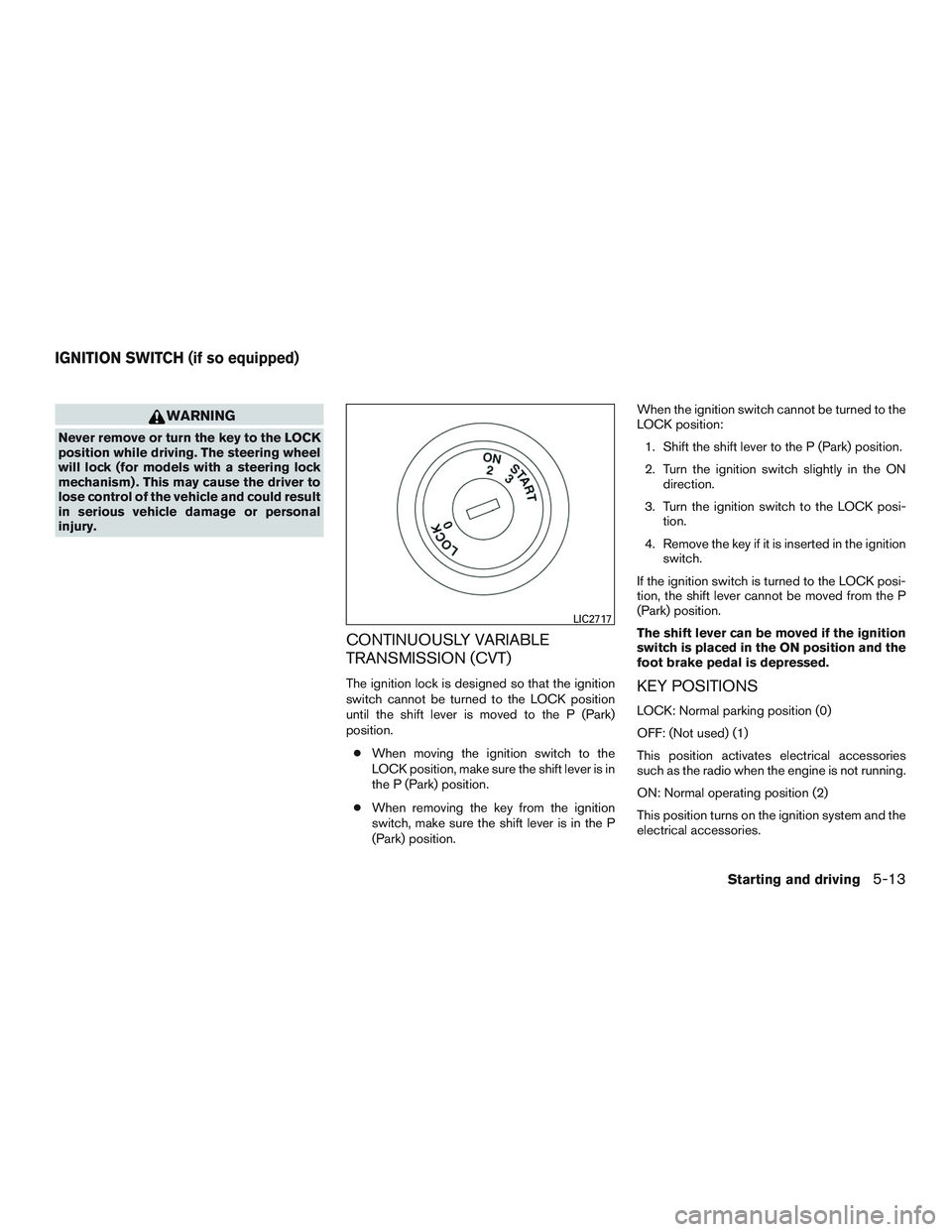
foot brake pedal is depressed.KEY POSITIONS
LOCK: Normal parking position (0)
OFF: (Not used) (1)
This position activates electrical accessories
such as the radio when the engine is not running.
ON: Normal operating position (2)
This position turns on the ignition system and the
electrical accessories.
LIC2717
IGNITION SWITCH (if so equipped)
Starting and driving5-13
Page 346 of 554
LDP SYSTEM LIMITATIONS
WARNING
Listed below are the system limitations for
the LDP system. Failure to follow the
warnings and instructions for proper use
of the LDP system could result in serious
injury or death.
●The LDP system may activate if you
change lanes without first activating
your turn signal or, for example, if a
construction zone directs traffic to
cross an existing lane marker. If this
occurs you may need to apply corrective
steering to complete your lane change.
● Because the LDP may not activate un-
der the road, weather, and lane marker
conditions described in this section, it
may not activate every time your vehicle
begins to leave its lane and you will
need to apply corrective steering.
● When the LDP system is operating,
avoid excessive or sudden steering ma-
neuvers. Otherwise, you could lose con-
trol of the vehicle. ●
The LDP system will not operate at
speeds below approximately 37 mph
(60 km/h) or if it cannot detect lane
markers.
● Do not use the LDP system under the
following conditions as it may not func-
tion properly:
– During bad weather (rain, fog, snow, etc.) .
– When driving on slippery roads, such as on ice or snow.
– When driving on winding or uneven roads.
– When there is a lane closure due to road repairs.
– When driving in a makeshift or tem- porary lane.
– When driving on roads where the lane width is too narrow.
– When driving without normal tire conditions (for example, tire wear,
low tire pressure, installation of
spare tire, tire chains, non-standard
wheels) . – When the vehicle is equipped with
nonoriginal brake parts or suspen-
sion parts.
– When you are towing a trailer or other vehicle.
– On roads where there are multiple parallel lane markers; lane markers
that are faded or not painted clearly;
yellow painted lane markers; non-
standard lane markers; or lane mark-
ers covered with water, dirt, snow,
etc.
– On roads where discontinued lane markers are still detectable.
– On roads where there are sharp curves.
– On roads where there are sharply contrasting objects, such as shad-
ows, snow, water, wheel ruts, seams
or lines remaining after road repairs.
(The LDP system could detect these
items as lane markers.)
– On roads where the traveling lane merges or separates.
– When the vehicle’s traveling direc- tion does not align with the lane
marker.
Starting and driving5-35
Page 347 of 554
– When traveling close to the vehicle infront of you, which obstructs the lane
camera unit detection range.
– When rain, snow or dirt adheres to the windshield in front of the lane
camera unit.
– When the headlights are not bright due to dirt on the lens or if the aiming
is not adjusted properly.
– When strong light enters the lane camera unit. (For example, the light
directly shines on the front of the
vehicle at sunrise or sunset.)
– When a sudden change in brightness occurs. (For example, when the ve-
hicle enters or exits a tunnel or under
a bridge.)
● Excessive noise will interfere with the
warning chime sound, and the chime
may not be heard.
While the LDP system is operating, you may hear
a sound of brake operation. This is normal and
indicates that the LDP system is operating prop-
erly.SYSTEM TEMPORARILY
UNAVAILABLE
Condition A:
The warning and assist functions of the LDP
system are not designed to work under the fol-
lowing conditions: ● When you operate the lane change signal
and change the traveling lanes in the direc-
tion of the signal. (The LDP system will be
deactivated for approximately 2 seconds af-
ter the lane change signal is turned off.)
● When the vehicle speed lowers to less than
approximately 37 mph (60 km/h).
After the above conditions have finished and the
necessary operating conditions are satisfied, the
warning and assist functions will resume.
Condition B:
The assist function of the LDP system is not
designed to work under the following conditions
(warning is still functional): ● When the brake pedal is depressed.
● When the steering wheel is turned as far as
necessary for the vehicle to change lanes.
● When the vehicle is accelerated during LDP
system operation. ●
When the Intelligent Cruise Control (ICC)
approach warning occurs.
● When the hazard warning flashers are oper-
ated.
● When driving on a curve at high speed.
After the above conditions have finished and the
necessary operating conditions are satisfied, the
LDP system application of the brakes will resume.
Condition C:
If the following messages appear in the vehicle
information display, a chime will sound and the
LDP system will be turned off automatically. ● “Unavailable Road is slippery”:
When the VDC system (except Traction
Control System (TCS) function) or ABS op-
erates.
● “Unavailable VDC OFF”:
When the VDC system is turned off.
Action to take:
When the above conditions no longer exist, turn
off the LDP system. Push the dynamic driver
assistance switch again to turn the LDP system
back on.
5-36Starting and driving
Page 375 of 554
Normally when controlling the distance to a ve-
hicle ahead, this system automatically acceler-
ates or decelerates your vehicle according to the
speed of the vehicle ahead. Depress the accel-
erator to properly accelerate your vehicle when
acceleration is required for a lane change. De-
press the brake pedal when deceleration is re-
quired to maintain a safe distance to the vehicle
ahead due to its sudden braking or if a vehicle
cuts in. Always stay alert when using the ICC
system.
VEHICLE-TO-VEHICLE DISTANCE
CONTROL MODE SWITCHES
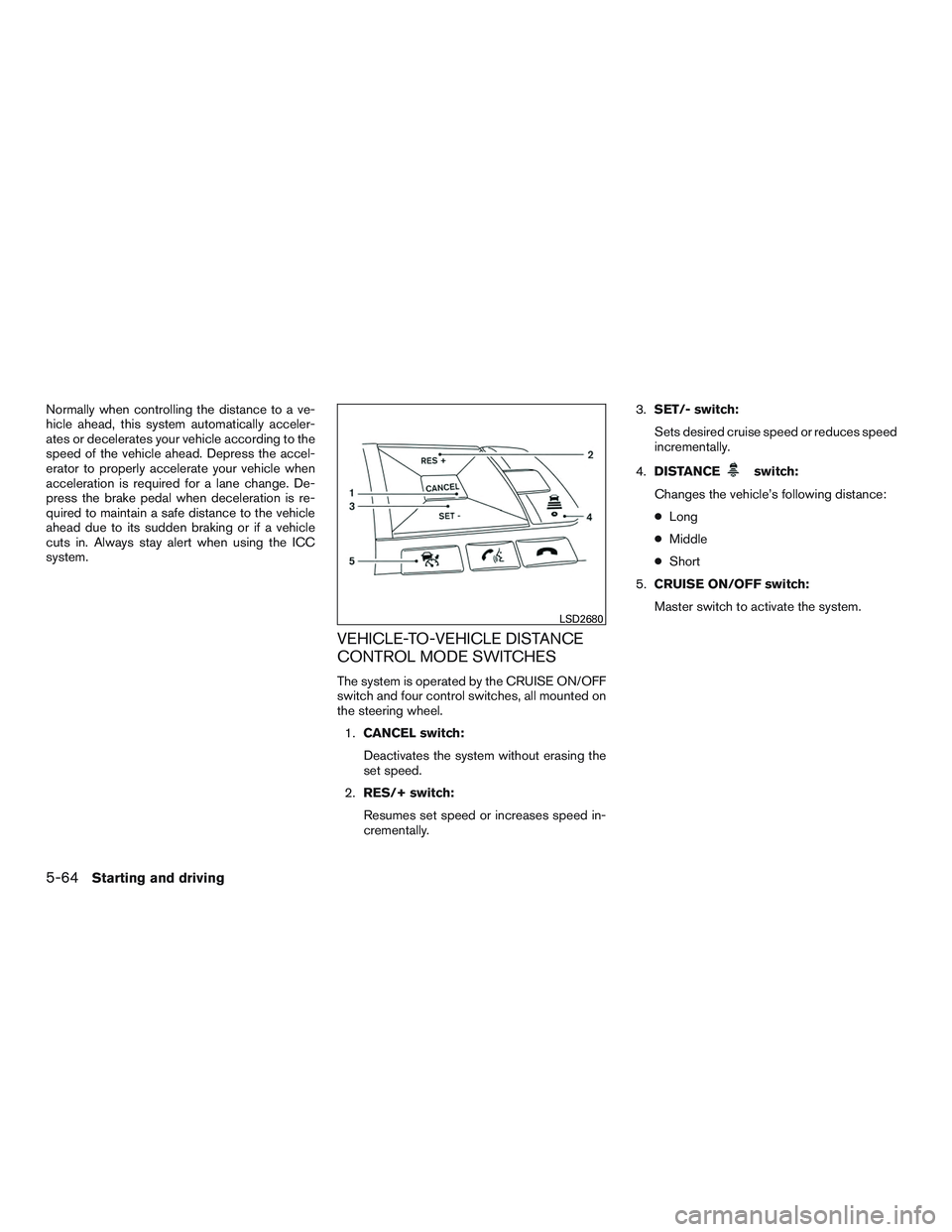
The system is operated by the CRUISE ON/OFF
switch and four control switches, all mounted on
the steering wheel.1. CANCEL switch:
Deactivates the system without erasing the
set speed.
2. RES/+ switch:
Resumes set speed or increases speed in-
crementally. 3.
SET/- switch:
Sets desired cruise speed or reduces speed
incrementally.
4. DISTANCE
switch:
Changes the vehicle’s following distance:
● Long
● Middle
● Short
5. CRUISE ON/OFF switch:
Master switch to activate the system.
LSD2680
5-64Starting and driving
Page 381 of 554
NOTE:
The approach warning chime may sound
and the system display may blink when the
ICC sensor detects objects on the side of
the vehicle or on the side of the road. This
may cause the ICC system to decelerate or
accelerate the vehicle. The ICC sensor may
detect these objects when the vehicle is
driven on winding roads, narrow roads, hilly
roads, or when entering or exiting a curve.
In these cases you will have to manually
control the proper distance ahead of your
vehicle.
Also, the sensor sensitivity can be affected by
vehicle operation (steering maneuver or driving
position in the lane) or traffic or vehicle condition
(for example, if a vehicle is being driven with some
damage) .
Automatic cancellation
A chime sounds under the following conditions
and the control is automatically canceled:● When the vehicle ahead is not detected and
your vehicle is traveling below the speed of
15 mph (24 km/h)
● When the system judges the vehicle is at a
standstill ●
When the shift lever is not in the D (Drive)
position or Manual mode
● When the parking brake system is applied
● When the VDC system is turned off
● When ABS or VDC operates
● When distance measurement becomes im-
paired due to adhesion of dirt or obstruction
to the sensor
● When a wheel slips
● When the radar signal is temporarily inter-
rupted
VEHICLE-TO-VEHICLE DISTANCE
CONTROL MODE LIMITATIONS
WARNING
Listed below are the system limitations for
the ICC system. Failure to operate the
vehicle in accordance with these system
limitations could result in serious injury or
death.
● The ICC system is primarily intended for
use on straight, dry, open roads with
light traffic. It is not advisable to use the
ICC system in city traffic or congested
areas. ●
The ICC system will not adapt automati-
cally to road conditions. This system
should be used in evenly flowing traffic.
Do not use the system on roads with
sharp curves, or on icy roads, in heavy
rain or in fog.
● As there is a performance limit to the
distance control function, never rely
solely on the ICC system. This system
does not correct careless, inattentive or
absentminded driving, or overcome
poor visibility in rain, fog, or other bad
weather. Decelerate the vehicle speed
by depressing the brake pedal, depend-
ing on the distance to the vehicle ahead
and the surrounding circumstances in
order to maintain a safe distance be-
tween vehicles.
● If the vehicle ahead comes to a stop, the
vehicle decelerates to a standstill
within the limitations of the system. The
system will cancel once it judges that
the vehicle has come to a standstill and
sound a warning chime. To prevent the
vehicle from moving, the driver must
depress the brake pedal.
5-70Starting and driving
Page 395 of 554
NOTE:
The vehicle’s brake lights come on when
braking is performed by the forward emer-
gency braking system.
Depending on vehicle speed and distance to the
vehicle ahead, as well as driving and roadway
conditions, the system may help the driver avoid a
forward collision or may help mitigate the conse-
quences of a collision, should one be unavoid-
able. If the driver is handling the steering wheel,
accelerating or braking, the FEB system will func-
tion later or will not function.
The automatic braking will cease under the fol-
lowing conditions:● When the steering wheel is turned as far as
necessary to avoid a collision.
● When the accelerator pedal is depressed.
● When there is no longer a vehicle detected
ahead.
If the FEB system has stopped the vehicle, the
vehicle will remain at a standstill for approximately
2 seconds before the brakes are released.
LSD2716
5-84Starting and driving