steering NISSAN ROGUE 2017 Owner´s Manual
[x] Cancel search | Manufacturer: NISSAN, Model Year: 2017, Model line: ROGUE, Model: NISSAN ROGUE 2017Pages: 554, PDF Size: 6.44 MB
Page 381 of 554
NOTE:
The approach warning chime may sound
and the system display may blink when the
ICC sensor detects objects on the side of
the vehicle or on the side of the road. This
may cause the ICC system to decelerate or
accelerate the vehicle. The ICC sensor may
detect these objects when the vehicle is
driven on winding roads, narrow roads, hilly
roads, or when entering or exiting a curve.
In these cases you will have to manually
control the proper distance ahead of your
vehicle.
Also, the sensor sensitivity can be affected by
vehicle operation (steering maneuver or driving
position in the lane) or traffic or vehicle condition
(for example, if a vehicle is being driven with some
damage) .
Automatic cancellation
A chime sounds under the following conditions
and the control is automatically canceled:● When the vehicle ahead is not detected and
your vehicle is traveling below the speed of
15 mph (24 km/h)
● When the system judges the vehicle is at a
standstill ●
When the shift lever is not in the D (Drive)
position or Manual mode
● When the parking brake system is applied
● When the VDC system is turned off
● When ABS or VDC operates
● When distance measurement becomes im-
paired due to adhesion of dirt or obstruction
to the sensor
● When a wheel slips
● When the radar signal is temporarily inter-
rupted
VEHICLE-TO-VEHICLE DISTANCE
CONTROL MODE LIMITATIONS
WARNING
Listed below are the system limitations for
the ICC system. Failure to operate the
vehicle in accordance with these system
limitations could result in serious injury or
death.
● The ICC system is primarily intended for
use on straight, dry, open roads with
light traffic. It is not advisable to use the
ICC system in city traffic or congested
areas. ●
The ICC system will not adapt automati-
cally to road conditions. This system
should be used in evenly flowing traffic.
Do not use the system on roads with
sharp curves, or on icy roads, in heavy
rain or in fog.
● As there is a performance limit to the
distance control function, never rely
solely on the ICC system. This system
does not correct careless, inattentive or
absentminded driving, or overcome
poor visibility in rain, fog, or other bad
weather. Decelerate the vehicle speed
by depressing the brake pedal, depend-
ing on the distance to the vehicle ahead
and the surrounding circumstances in
order to maintain a safe distance be-
tween vehicles.
● If the vehicle ahead comes to a stop, the
vehicle decelerates to a standstill
within the limitations of the system. The
system will cancel once it judges that
the vehicle has come to a standstill and
sound a warning chime. To prevent the
vehicle from moving, the driver must
depress the brake pedal.
5-70Starting and driving
Page 383 of 554
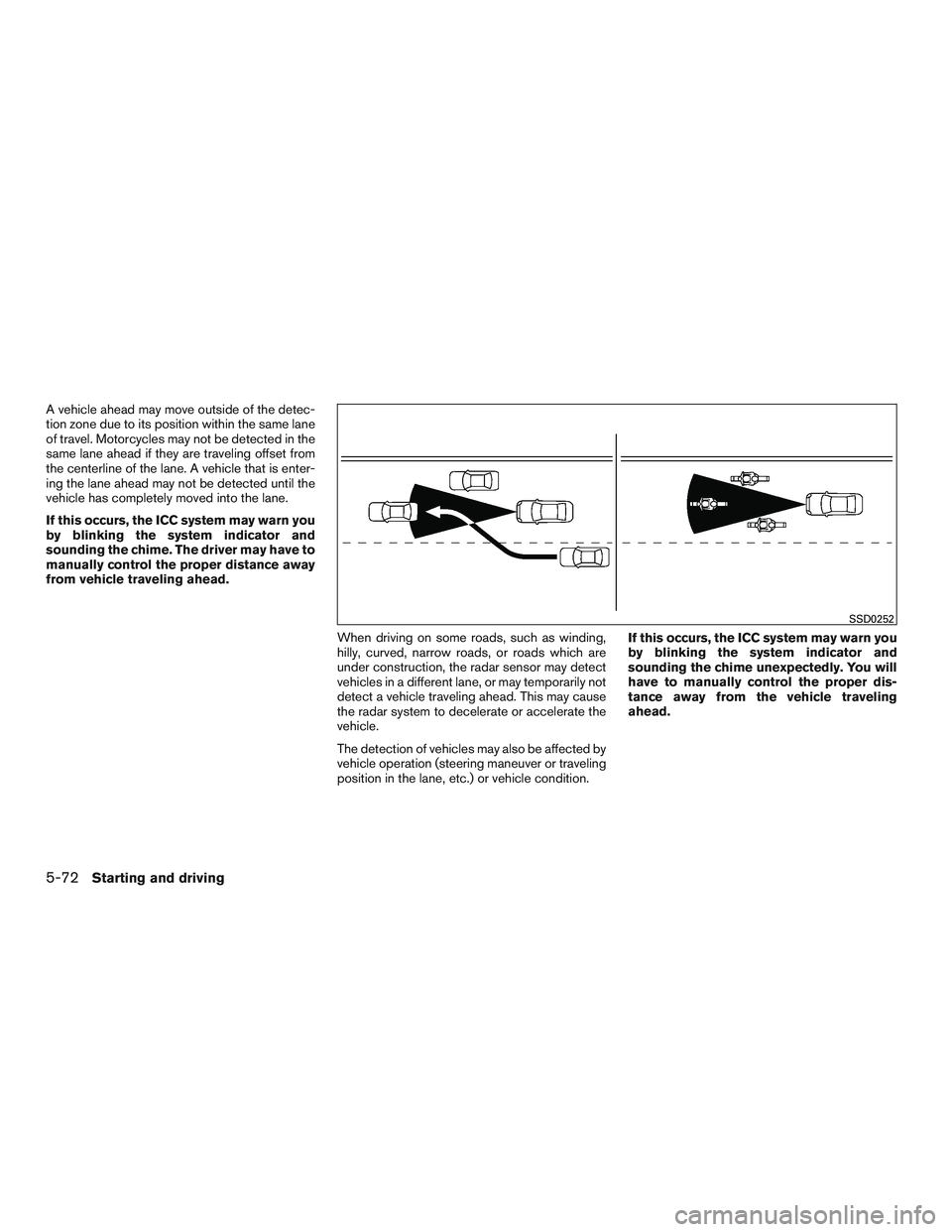
A vehicle ahead may move outside of the detec-
tion zone due to its position within the same lane
of travel. Motorcycles may not be detected in the
same lane ahead if they are traveling offset from
the centerline of the lane. A vehicle that is enter-
ing the lane ahead may not be detected until the
vehicle has completely moved into the lane.
If this occurs, the ICC system may warn you
by blinking the system indicator and
sounding the chime. The driver may have to
manually control the proper distance away
from vehicle traveling ahead.When driving on some roads, such as winding,
hilly, curved, narrow roads, or roads which are
under construction, the radar sensor may detect
vehicles in a different lane, or may temporarily not
detect a vehicle traveling ahead. This may cause
the radar system to decelerate or accelerate the
vehicle.
The detection of vehicles may also be affected by
vehicle operation (steering maneuver or traveling
position in the lane, etc.) or vehicle condition.If this occurs, the ICC system may warn you
by blinking the system indicator and
sounding the chime unexpectedly. You will
have to manually control the proper dis-
tance away from the vehicle traveling
ahead.
SSD0252
5-72Starting and driving
Page 395 of 554
NOTE:
The vehicle’s brake lights come on when
braking is performed by the forward emer-
gency braking system.
Depending on vehicle speed and distance to the
vehicle ahead, as well as driving and roadway
conditions, the system may help the driver avoid a
forward collision or may help mitigate the conse-
quences of a collision, should one be unavoid-
able. If the driver is handling the steering wheel,
accelerating or braking, the FEB system will func-
tion later or will not function.
The automatic braking will cease under the fol-
lowing conditions:● When the steering wheel is turned as far as
necessary to avoid a collision.
● When the accelerator pedal is depressed.
● When there is no longer a vehicle detected
ahead.
If the FEB system has stopped the vehicle, the
vehicle will remain at a standstill for approximately
2 seconds before the brakes are released.
LSD2716
5-84Starting and driving
Page 401 of 554
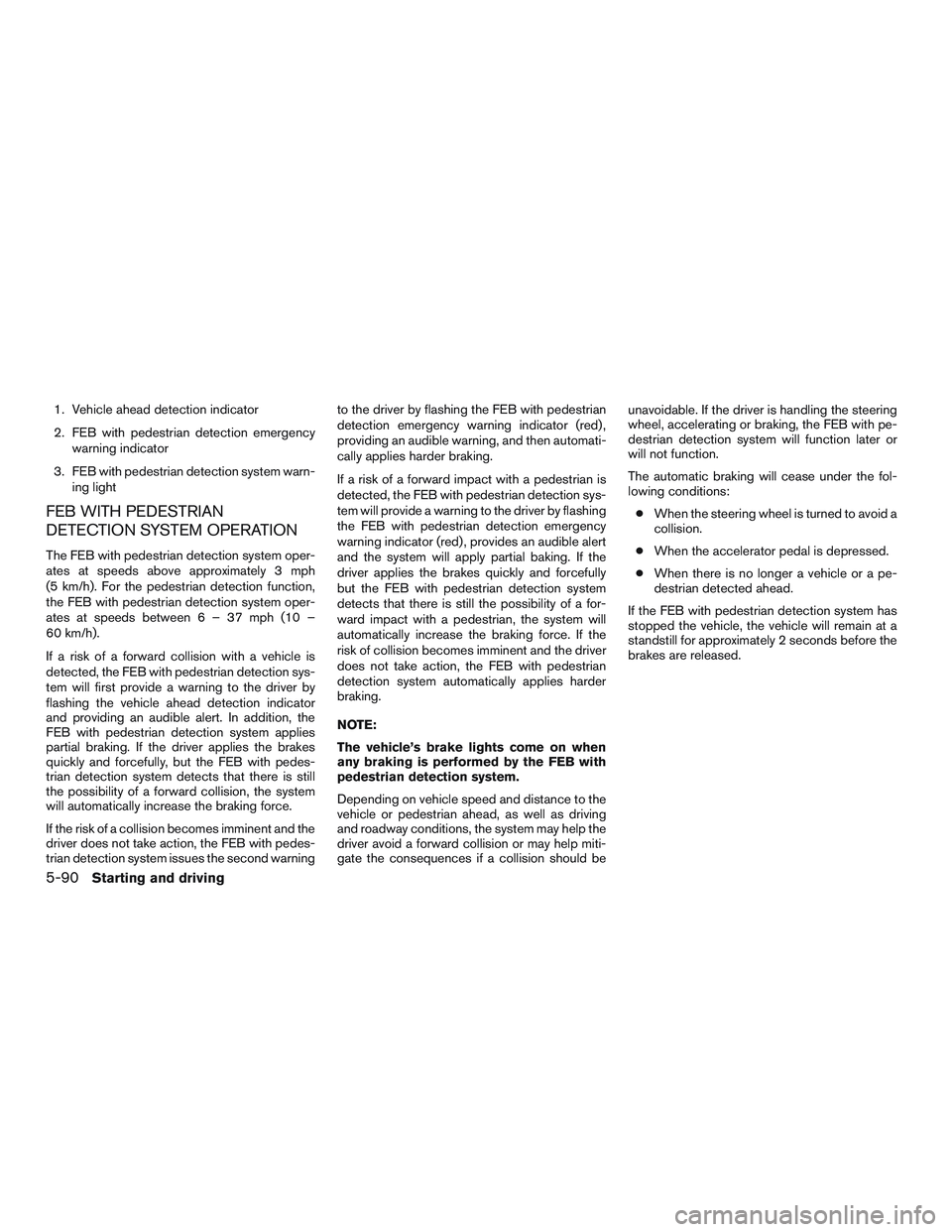
1. Vehicle ahead detection indicator
2. FEB with pedestrian detection emergencywarning indicator
3. FEB with pedestrian detection system warn- ing light
FEB WITH PEDESTRIAN
DETECTION SYSTEM OPERATION
The FEB with pedestrian detection system oper-
ates at speeds above approximately 3 mph
(5 km/h). For the pedestrian detection function,
the FEB with pedestrian detection system oper-
ates at speeds between6–37mph(10–
60 km/h).
If a risk of a forward collision with a vehicle is
detected, the FEB with pedestrian detection sys-
tem will first provide a warning to the driver by
flashing the vehicle ahead detection indicator
and providing an audible alert. In addition, the
FEB with pedestrian detection system applies
partial braking. If the driver applies the brakes
quickly and forcefully, but the FEB with pedes-
trian detection system detects that there is still
the possibility of a forward collision, the system
will automatically increase the braking force.
If the risk of a collision becomes imminent and the
driver does not take action, the FEB with pedes-
trian detection system issues the second warning to the driver by flashing the FEB with pedestrian
detection emergency warning indicator (red) ,
providing an audible warning, and then automati-
cally applies harder braking.
If a risk of a forward impact with a pedestrian is
detected, the FEB with pedestrian detection sys-
tem will provide a warning to the driver by flashing
the FEB with pedestrian detection emergency
warning indicator (red) , provides an audible alert
and the system will apply partial baking. If the
driver applies the brakes quickly and forcefully
but the FEB with pedestrian detection system
detects that there is still the possibility of a for-
ward impact with a pedestrian, the system will
automatically increase the braking force. If the
risk of collision becomes imminent and the driver
does not take action, the FEB with pedestrian
detection system automatically applies harder
braking.
NOTE:
The vehicle’s brake lights come on when
any braking is performed by the FEB with
pedestrian detection system.
Depending on vehicle speed and distance to the
vehicle or pedestrian ahead, as well as driving
and roadway conditions, the system may help the
driver avoid a forward collision or may help miti-
gate the consequences if a collision should beunavoidable. If the driver is handling the steering
wheel, accelerating or braking, the FEB with pe-
destrian detection system will function later or
will not function.
The automatic braking will cease under the fol-
lowing conditions:
● When the steering wheel is turned to avoid a
collision.
● When the accelerator pedal is depressed.
● When there is no longer a vehicle or a pe-
destrian detected ahead.
If the FEB with pedestrian detection system has
stopped the vehicle, the vehicle will remain at a
standstill for approximately 2 seconds before the
brakes are released.
5-90Starting and driving
Page 414 of 554
WARNING
●If the engine is not running or is turned
off while driving, the power assist for
the steering will not work. Steering will
be harder to operate.
● When the power steering warning light
illuminates with the engine running,
there will be no power assist for the
steering. You will still have control of
the vehicle, but the steering will be
much harder to operate. Have the power
steering system checked. It is recom-
mended that you visit a NISSAN dealer
for this service.
The power steering system is designed to pro-
vide power assistance while driving to operate
the steering wheel with light force.
When the steering wheel is operated repeatedly
or continuously while parking or driving at a very
low speed, the power assist for the steering
wheel will be reduced. This is to prevent over-
heating of the power steering system and protect
it from getting damaged. While the power assist
is reduced, steering wheel operation will become
heavy. If the steering wheel operation is still per-
formed, the power steering may stop and the
power steering warning light will illuminate. In a
safe location, stop the engine and push the igni- tion switch to the OFF position. The temperature
of the power steering system will go down after a
period of time and the power assist level will
return to normal after starting the engine. The
power steering warning light will go off. Avoid
repeating such steering wheel operations that
could cause the power steering system to over-
heat.
You may hear a noise from the front of the vehicle
when the steering wheel is operated. This is a
normal operational noise and is not a malfunction.
If the power steering warning light illuminates
while the engine is running, it may indicate the
power steering system is not functioning properly
and may need servicing. Have the power steering
system checked. It is recommended that you visit
a NISSAN dealer for this service.
When the power steering warning light illumi-
nates with the engine running, the power assist
for the steering will cease operation but you will
still have control of the vehicle. At this time,
greater steering efforts are required to operate
the steering wheel, especially in sharp turns and
at low speeds.
The brake system has two separate hydraulic
circuits. If one circuit malfunctions, you will still
have braking at two wheels.
BRAKE PRECAUTIONS
Vacuum assisted brakes
The brake booster aids braking by using engine
vacuum. If the engine stops, you can stop the
vehicle by depressing the brake pedal. However,
greater foot pressure on the brake pedal will be
required to stop the vehicle and stopping dis-
tance will be longer.
Using the brakes
Avoid resting your foot on the brake pedal while
driving. This will overheat the brakes, wear out the
brake pads faster, and reduce gas mileage.
To help reduce brake wear and to prevent the
brakes from overheating, reduce speed and
downshift to a lower gear before going down a
slope or long grade. Overheated brakes may
reduce braking performance and could result in
loss of vehicle control.
POWER STEERING
BRAKE SYSTEM
Starting and driving5-103
Page 415 of 554
WARNING
●While driving on a slippery surface, be
careful when braking, accelerating or
downshifting. Abrupt braking or accel-
erating could cause the wheels to skid
and result in an accident.
● If the engine is not running or is turned
off while driving, the power assist for
the brakes will not work. Braking will be
harder.
Wet brakes
When the vehicle is washed or driven through
water, the brakes may get wet. As a result, your
braking distance will be longer and the vehicle
may pull to one side during braking.
To dry the brakes, drive the vehicle at a safe
speed while lightly pressing the brake pedal to
heat up the brakes. Do this until the brakes return
to normal. Avoid driving the vehicle at high
speeds until the brakes function correctly.
Parking brake break-in
Break in the parking brake shoes whenever the
stopping effect of the parking brake is weakened
or whenever the parking brake shoes and/or
drums/rotors are replaced, in order to assure the
best braking performance. This procedure is described in the vehicle service
manual. It is recommended that you visit a
NISSAN dealer for this service.
ANTI-LOCK BRAKING SYSTEM
(ABS)
WARNING
●
The ABS is a sophisticated device, but it
cannot prevent accidents resulting from
careless or dangerous driving tech-
niques. It can help maintain vehicle con-
trol during braking on slippery surfaces.
Remember that stopping distances on
slippery surfaces will be longer than on
normal surfaces even with ABS. Stop-
ping distances may also be longer on
rough, gravel or snow covered roads, or
if you are using tire chains. Always
maintain a safe distance from the ve-
hicle in front of you. Ultimately, the
driver is responsible for safety.
● Tire type and condition may also affect
braking effectiveness.
– When replacing tires, install the specified size of tires on all four
wheels. – When installing a spare tire, make
sure that it is the proper size and type
as specified on the Tire and Loading
Information label. For additional in-
formation, refer to “Tire and Loading
Information label” in the “Technical
and consumer information” section
of this manual.
– For additional information, refer to “Wheels and tires” in the “Do-it-
yourself” section of this manual.
The ABS controls the brakes so the wheels do
not lock during hard braking or when braking on
slippery surfaces. The system detects the rota-
tion speed at each wheel and varies the brake
fluid pressure to prevent each wheel from locking
and sliding. By preventing each wheel from lock-
ing, the system helps the driver maintain steering
control and helps to minimize swerving and spin-
ning on slippery surfaces.
Using the system
Depress the brake pedal and hold it down. De-
press the brake pedal with firm steady pressure,
but do not pump the brakes. The ABS will oper-
ate to prevent the wheels from locking up. Steer
the vehicle to avoid obstacles.
5-104Starting and driving
Page 419 of 554
●If wheels or tires other than the NISSAN
recommended ones are used, the VDC
system may not operate properly and
the
indicator may flash or both
the
andindicator lights may
illuminate.
● The VDC system is not a substitute for
winter tires or tire chains on a snow
covered road. The chassis control is an electric control module
that includes the following functions:
● Active Trace Control
● Active Engine Brake
● Active Ride Control
ACTIVE TRACE CONTROL
This system senses driving based on the driver’s
steering and acceleration/braking patterns, and
controls brake pressure at individual wheels to
aid tracing at corners and help smooth vehicle
response.
The Active Trace Control can be set to ON (en-
abled) or OFF (disabled) through the vehicle
information display “Settings” page. For addi-
tional information, refer to “Vehicle information
display” in the “Instruments and controls” section
of this manual.
When the VDC OFF switch is used to turn off the
VDC system, the Active Trace Control is also
turned off.
CHASSIS CONTROL
5-108Starting and driving
Page 420 of 554
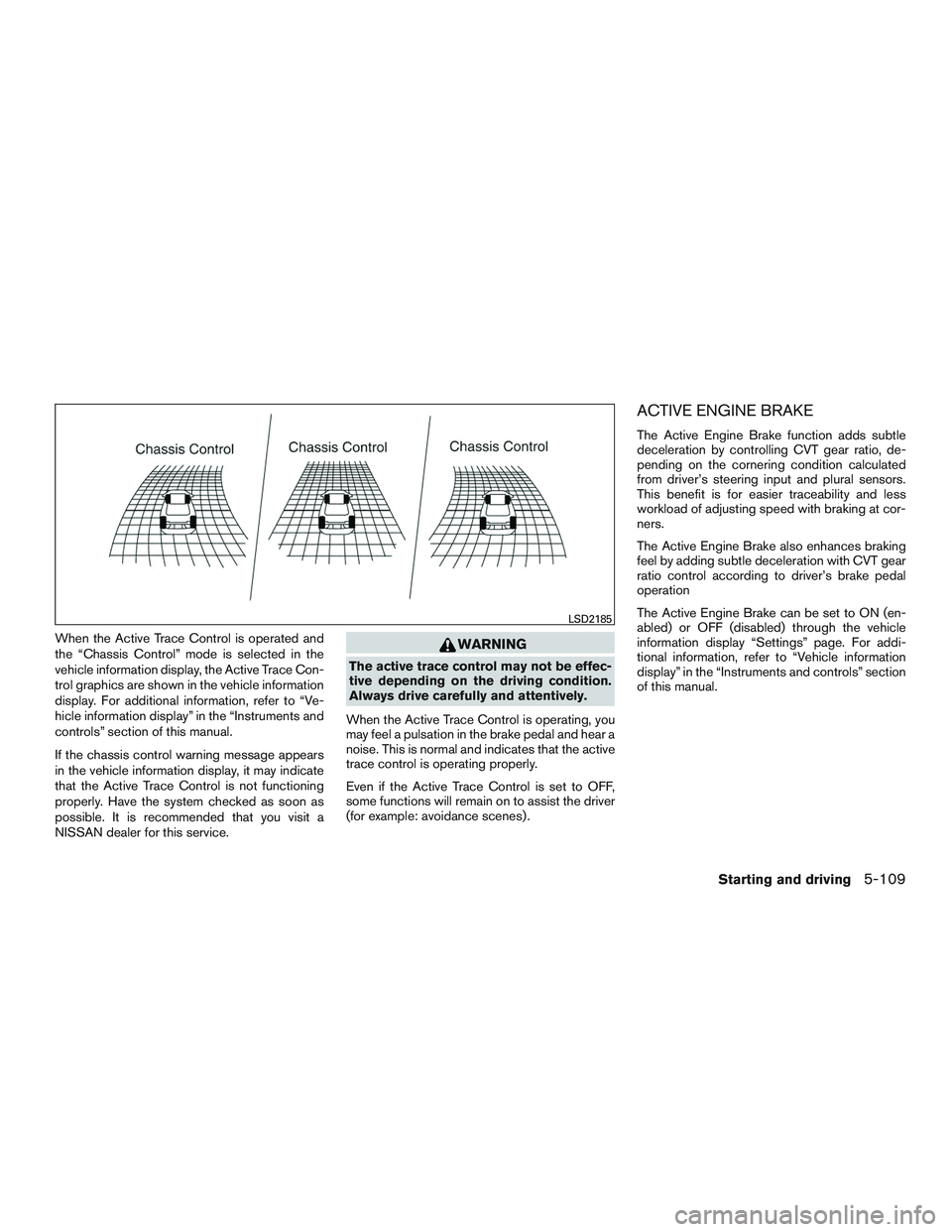
When the Active Trace Control is operated and
the “Chassis Control” mode is selected in the
vehicle information display, the Active Trace Con-
trol graphics are shown in the vehicle information
display. For additional information, refer to “Ve-
hicle information display” in the “Instruments and
controls” section of this manual.
If the chassis control warning message appears
in the vehicle information display, it may indicate
that the Active Trace Control is not functioning
properly. Have the system checked as soon as
possible. It is recommended that you visit a
NISSAN dealer for this service.WARNING
The active trace control may not be effec-
tive depending on the driving condition.
Always drive carefully and attentively.
When the Active Trace Control is operating, you
may feel a pulsation in the brake pedal and hear a
noise. This is normal and indicates that the active
trace control is operating properly.
Even if the Active Trace Control is set to OFF,
some functions will remain on to assist the driver
(for example: avoidance scenes) .
ACTIVE ENGINE BRAKE
The Active Engine Brake function adds subtle
deceleration by controlling CVT gear ratio, de-
pending on the cornering condition calculated
from driver’s steering input and plural sensors.
This benefit is for easier traceability and less
workload of adjusting speed with braking at cor-
ners.
The Active Engine Brake also enhances braking
feel by adding subtle deceleration with CVT gear
ratio control according to driver’s brake pedal
operation
The Active Engine Brake can be set to ON (en-
abled) or OFF (disabled) through the vehicle
information display “Settings” page. For addi-
tional information, refer to “Vehicle information
display” in the “Instruments and controls” section
of this manual.
LSD2185
Starting and driving5-109
Page 424 of 554
TIRE EQUIPMENT
1. SUMMER tires have a tread designed toprovide superior performance on dry pave-
ment. However, the performance of these
tires will be substantially reduced in snowy
and icy conditions. If you operate your ve-
hicle on snowy or icy roads, NISSAN recom-
mends the use of MUD & SNOW or ALL
SEASON TIRES on all four wheels. It is
recommended that you visit a NISSAN
dealer for the tire type, size, speed rating and
availability information.
2. For additional traction on icy roads, studded tires may be used. However, some U.S.
states and Canadian provinces prohibit their
use. Check local, state and provincial laws
before installing studded tires.
Skid and traction capabilities of studded
snow tires on wet or dry surfaces may be
poorer than that of non-studded snow tires. 3. Tire chains may be used. For additional in- formation, refer to “Tire chains” in the “Do-it-
yourself” section of this manual.
SPECIAL WINTER EQUIPMENT
It is recommended that the following items be
carried in the vehicle during winter:
● A scraper and stiff-bristled brush to remove
ice and snow from the windows and wiper
blades.
● A sturdy, flat board to be placed under the
jack to give it firm support.
● A shovel to dig the vehicle out of snowdrifts.
● Extra washer fluid to refill the windshield-
washer fluid reservoir.
DRIVING ON SNOW OR ICE
WARNING
● Wet ice (32°F, 0°C and freezing rain) ,
very cold snow or ice can be slick and
very hard to drive on. The vehicle will
have much less traction or “grip” under
these conditions. Try to avoid driving on
wet ice until the road is salted or
sanded.
● Whatever the condition, drive with cau-
tion. Accelerate and slow down with
care. If accelerating or downshifting too
fast, the drive wheels will lose even
more traction. ●
Allow more stopping distance under
these conditions. Braking should be
started sooner than on dry pavement.
● Allow greater following distances on
slippery roads.
● Watch for slippery spots (glare ice) .
These may appear on an otherwise
clear road in shaded areas. If a patch of
ice is seen ahead, brake before reach-
ing it. Try not to brake while on the ice,
and avoid any sudden steering
maneuvers.
● Do not use the cruise control on slip-
pery roads.
● Snow can trap dangerous exhaust
gases under your vehicle. Keep snow
clear of the exhaust pipe and from
around your vehicle.
Starting and driving5-113
Page 428 of 554
TIRE PRESSURE MONITORING
SYSTEM (TPMS)
This vehicle is equipped with TPMS. It monitors
tire pressure of all tires except the spare. When
the low tire pressure warning light is lit, and the
“Tire Pressure Low — Add Air” (“Flat Tire — Visit
Dealer” for vehicles equipped with run-flat tires)
warning appears in the vehicle information dis-
play, one or more of your tires is significantly
under-inflated. If equipped, the system also dis-
plays pressure of all tires (except the spare tire)
on the display screen by sending a signal from a
sensor that is installed in each wheel. If the ve-
hicle is being driven with low tire pressure, the
TPMS will activate and warn you of it by the low
tire pressure warning light. This system will acti-
vate only when the vehicle is driven at speeds
above 16 mph (25 km/h). For additional informa-
tion, refer to “Warning lights, indicator lights and
audible reminders” in the “Instruments and con-
trols” section and “Tire Pressure Monitoring Sys-
tem (TPMS)” in the “Starting and driving” section
of this manual.
WARNING
●Radio waves could adversely affect elec-
tric medical equipment. Those who use a
pacemaker should contact the electric
medical equipment manufacturer for the
possible influences before use.
●If the low tire pressure warning light illu-
minates while driving, avoid sudden
steering maneuvers or abrupt braking,
reduce vehicle speed, pull off the road to
a safe location and stop the vehicle as
soon as possible. Driving with under-
inflated tires may permanently damage
the tires and increase the likelihood of
tire failure. Serious vehicle damage could
occur and may lead to an accident and
could result in serious personal injury.
Check the tire pressure for all four tires.
Adjust the tire pressure to the recom-
mended COLD tire pressure shown on
the Tire and Loading Information label to
turn the low tire pressure warning light
OFF. If the light still illuminates while
driving after adjusting the tire pressure, a
tire may be flat or the TPMS may be
malfunctioning. If you have a flat tire,
replace it with a spare tire as soon as
possible. If no tire is flat and all tires are
properly inflated, have the vehicle
checked. It is recommended that you visit
a NISSAN dealer for this service.
● When replacing a wheel without the
TPMS, when a wheel is replaced, TPMS
will not function and the low tire pres-
sure warning light will flash for approxi-
mately 1 minute. The light will remain
on after 1 minute. Have your tires re-
placed and/or TPMS system reset as
soon as possible. It is recommended
that you visit a NISSAN dealer for these
services.
● Replacing tires with those not originally
specified by NISSAN could affect the
proper operation of the TPMS.
● Do not inject any tire liquid or aerosol
tire sealant into the tires, as this may
cause a malfunction of the tire pressure
sensors.
RUN-FLAT TIRES (if so equipped)
Run-flat tires are those tires that can be used
temporarily if they are punctured. For additional
information, refer to “Run-flat tires” in “Do-it-
yourself” section of this manual.
For additional information, refer to the tire safety
information in the Warranty Information Booklet.
FLAT TIRE
In case of emergency6-3