light NISSAN ROGUE 2018 Owner´s Manual
[x] Cancel search | Manufacturer: NISSAN, Model Year: 2018, Model line: ROGUE, Model: NISSAN ROGUE 2018Pages: 547, PDF Size: 6.42 MB
Page 108 of 547
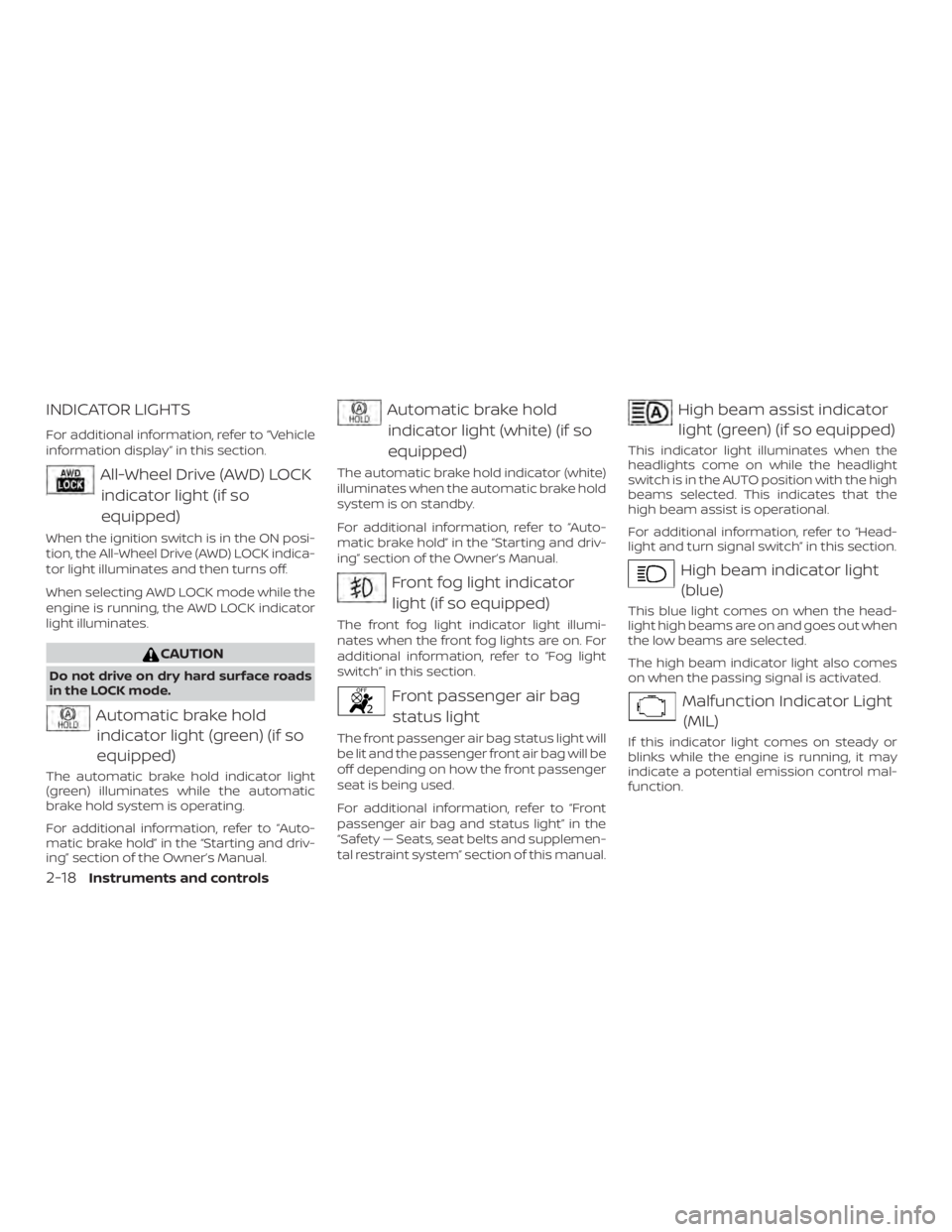
INDICATOR LIGHTS
For additional information, refer to “Vehicle
information display” in this section.
All-Wheel Drive (AWD) LOCKindicator light (if so
equipped)
When the ignition switch is in the ON posi-
tion, the All-Wheel Drive (AWD) LOCK indica-
tor light illuminates and then turns off.
When selecting AWD LOCK mode while the
engine is running, the AWD LOCK indicator
light illuminates.
CAUTION
Do not drive on dry hard surface roads
in the LOCK mode.
Automatic brake holdindicator light (green) (if so
equipped)
The automatic brake hold indicator light
(green) illuminates while the automatic
brake hold system is operating.
For additional information, refer to “Auto-
matic brake hold” in the “Starting and driv-
ing” section of the Owner’s Manual.
Automatic brake hold
indicator light (white) (if so
equipped)
The automatic brake hold indicator (white)
illuminates when the automatic brake hold
system is on standby.
For additional information, refer to “Auto-
matic brake hold” in the “Starting and driv-
ing” section of the Owner’s Manual.
Front fog light indicatorlight (if so equipped)
The front fog light indicator light illumi-
nates when the front fog lights are on. For
additional information, refer to “Fog light
switch” in this section.
Front passenger air bagstatus light
The front passenger air bag status light will
be lit and the passenger front air bag will be
off depending on how the front passenger
seat is being used.
For additional information, refer to “Front
passenger air bag and status light” in the
“Safety — Seats, seat belts and supplemen-
tal restraint system” section of this manual.
High beam assist indicatorlight (green) (if so equipped)
This indicator light illuminates when the
headlights come on while the headlight
switch is in the AUTO position with the high
beams selected. This indicates that the
high beam assist is operational.
For additional information, refer to “Head-
light and turn signal switch” in this section.
High beam indicator light(blue)
This blue light comes on when the head-
light high beams are on and goes out when
the low beams are selected.
The high beam indicator light also comes
on when the passing signal is activated.
Malfunction Indicator Light(MIL)
If this indicator light comes on steady or
blinks while the engine is running, it may
indicate a potential emission control mal-
function.
2-18Instruments and controls
Page 109 of 547
The MIL may also come on steady if the
fuel-filler cap is loose or missing, or if the
vehicle runs out of fuel. Check to make sure
the fuel-filler cap is installed and closed
tightly, and that the vehicle has at least
3 gallons (11.4 liters) of fuel in the fuel tank.
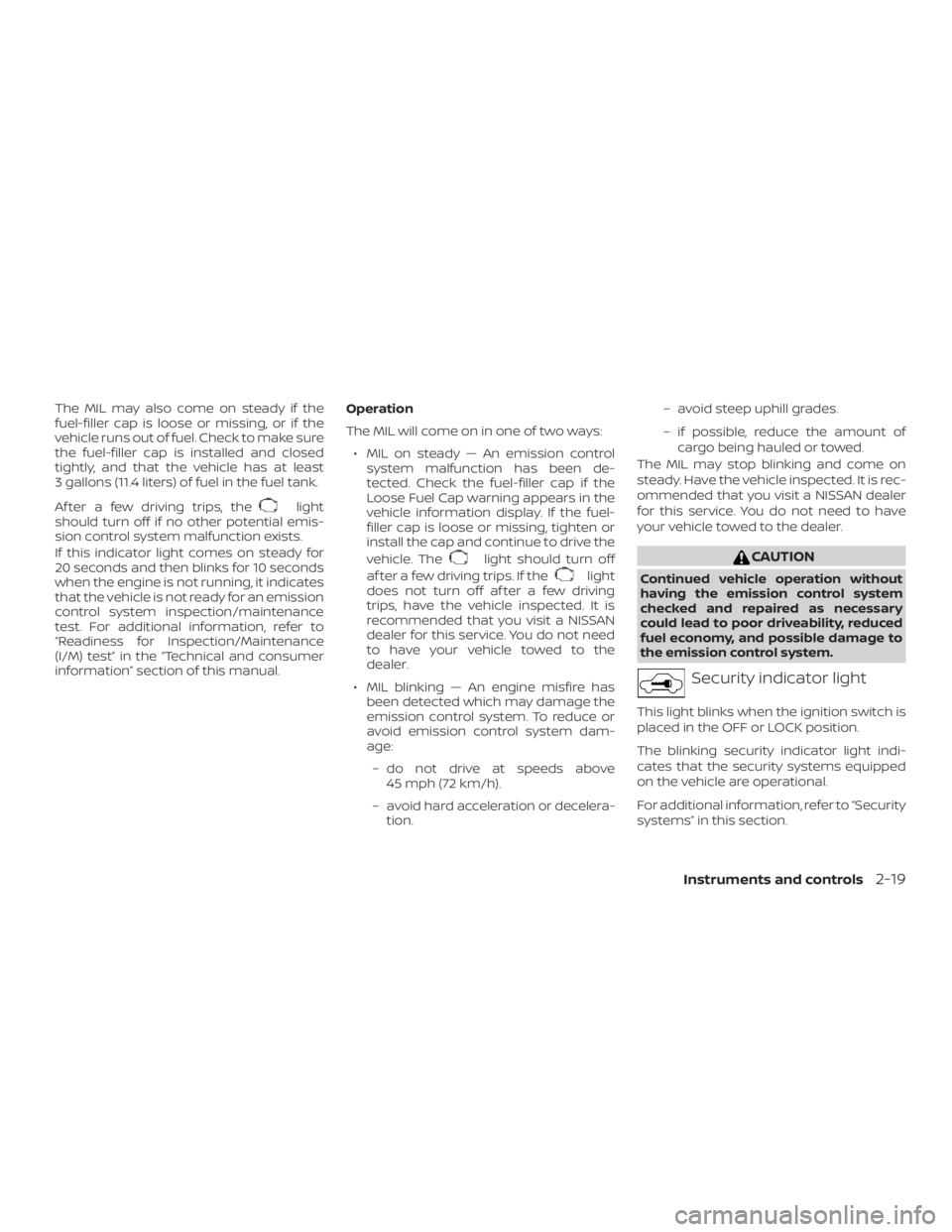
Af ter a few driving trips, the
light
should turn off if no other potential emis-
sion control system malfunction exists.
If this indicator light comes on steady for
20 seconds and then blinks for 10 seconds
when the engine is not running, it indicates
that the vehicle is not ready for an emission
control system inspection/maintenance
test. For additional information, refer to
“Readiness for Inspection/Maintenance
(I/M) test” in the “Technical and consumer
information” section of this manual. Operation
The MIL will come on in one of two ways:
∙ MIL on steady — An emission control system malfunction has been de-
tected. Check the fuel-filler cap if the
Loose Fuel Cap warning appears in the
vehicle information display. If the fuel-
filler cap is loose or missing, tighten or
install the cap and continue to drive the
vehicle. The
light should turn off
af ter a few driving trips. If the
light
does not turn off af ter a few driving
trips, have the vehicle inspected. It is
recommended that you visit a NISSAN
dealer for this service. You do not need
to have your vehicle towed to the
dealer.
∙ MIL blinking — An engine misfire has been detected which may damage the
emission control system. To reduce or
avoid emission control system dam-
age:
– do not drive at speeds above 45 mph (72 km/h).
– avoid hard acceleration or decelera- tion. – avoid steep uphill grades.
– if possible, reduce the amount of
cargo being hauled or towed.
The MIL may stop blinking and come on
steady. Have the vehicle inspected. It is rec-
ommended that you visit a NISSAN dealer
for this service. You do not need to have
your vehicle towed to the dealer.
CAUTION
Continued vehicle operation without
having the emission control system
checked and repaired as necessary
could lead to poor driveability, reduced
fuel economy, and possible damage to
the emission control system.
Security indicator light
This light blinks when the ignition switch is
placed in the OFF or LOCK position.
The blinking security indicator light indi-
cates that the security systems equipped
on the vehicle are operational.
For additional information, refer to “Security
systems” in this section.
Instruments and controls2-19
Page 110 of 547
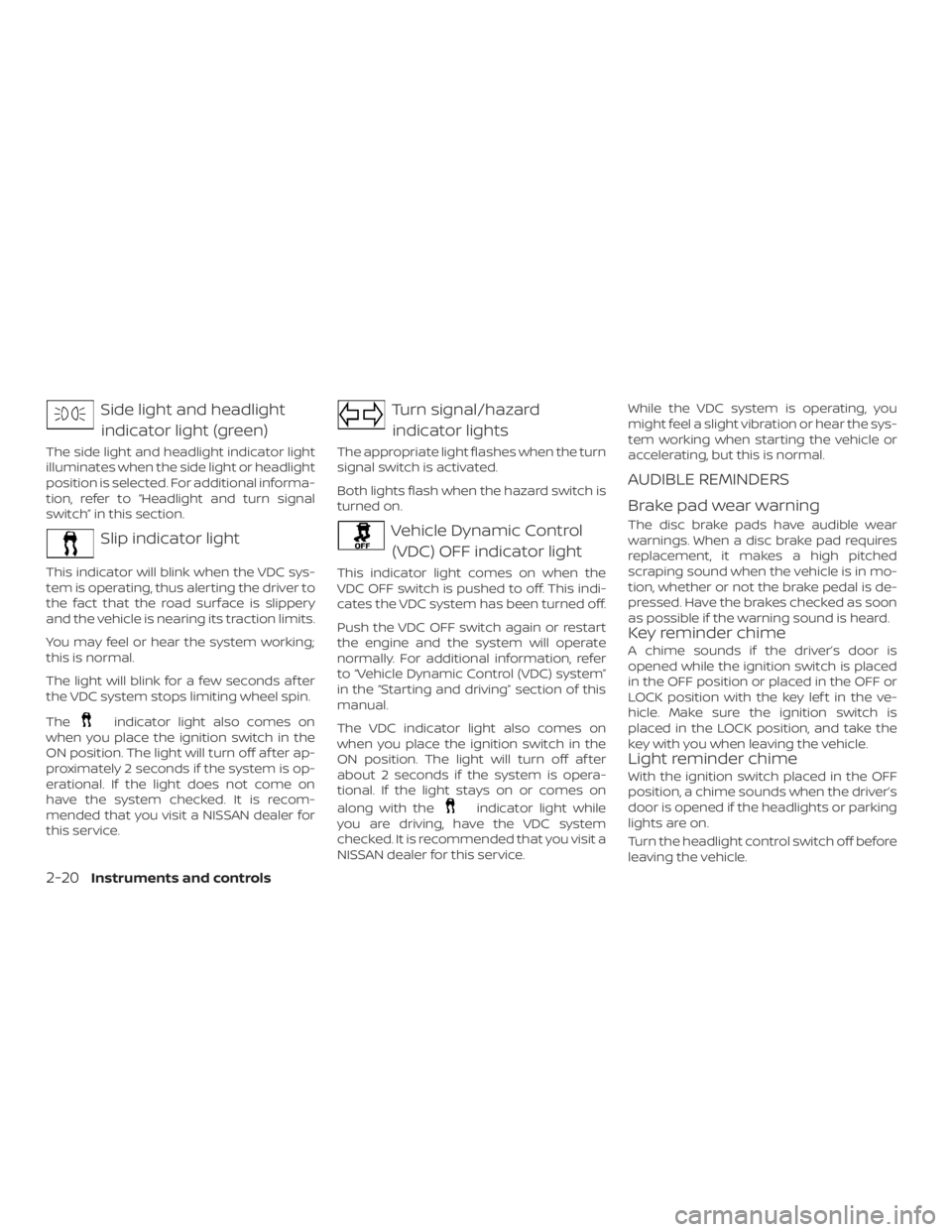
Side light and headlightindicator light (green)
The side light and headlight indicator light
illuminates when the side light or headlight
position is selected. For additional informa-
tion, refer to “Headlight and turn signal
switch” in this section.
Slip indicator light
This indicator will blink when the VDC sys-
tem is operating, thus alerting the driver to
the fact that the road surface is slippery
and the vehicle is nearing its traction limits.
You may feel or hear the system working;
this is normal.
The light will blink for a few seconds af ter
the VDC system stops limiting wheel spin.
The
indicator light also comes on
when you place the ignition switch in the
ON position. The light will turn off af ter ap-
proximately 2 seconds if the system is op-
erational. If the light does not come on
have the system checked. It is recom-
mended that you visit a NISSAN dealer for
this service.
Turn signal/hazard
indicator lights
The appropriate light flashes when the turn
signal switch is activated.
Both lights flash when the hazard switch is
turned on.
Vehicle Dynamic Control (VDC) OFF indicator light
This indicator light comes on when the
VDC OFF switch is pushed to off. This indi-
cates the VDC system has been turned off.
Push the VDC OFF switch again or restart
the engine and the system will operate
normally. For additional information, refer
to “Vehicle Dynamic Control (VDC) system”
in the “Starting and driving” section of this
manual.
The VDC indicator light also comes on
when you place the ignition switch in the
ON position. The light will turn off af ter
about 2 seconds if the system is opera-
tional. If the light stays on or comes on
along with the
indicator light while
you are driving, have the VDC system
checked. It is recommended that you visit a
NISSAN dealer for this service. While the VDC system is operating, you
might feel a slight vibration or hear the sys-
tem working when starting the vehicle or
accelerating, but this is normal.
AUDIBLE REMINDERS
Brake pad wear warning
The disc brake pads have audible wear
warnings. When a disc brake pad requires
replacement, it makes a high pitched
scraping sound when the vehicle is in mo-
tion, whether or not the brake pedal is de-
pressed. Have the brakes checked as soon
as possible if the warning sound is heard.
Key reminder chime
A chime sounds if the driver’s door is
opened while the ignition switch is placed
in the OFF position or placed in the OFF or
LOCK position with the key lef t in the ve-
hicle. Make sure the ignition switch is
placed in the LOCK position, and take the
key with you when leaving the vehicle.
Light reminder chime
With the ignition switch placed in the OFF
position, a chime sounds when the driver’s
door is opened if the headlights or parking
lights are on.
Turn the headlight control switch off before
leaving the vehicle.
2-20Instruments and controls
Page 115 of 547
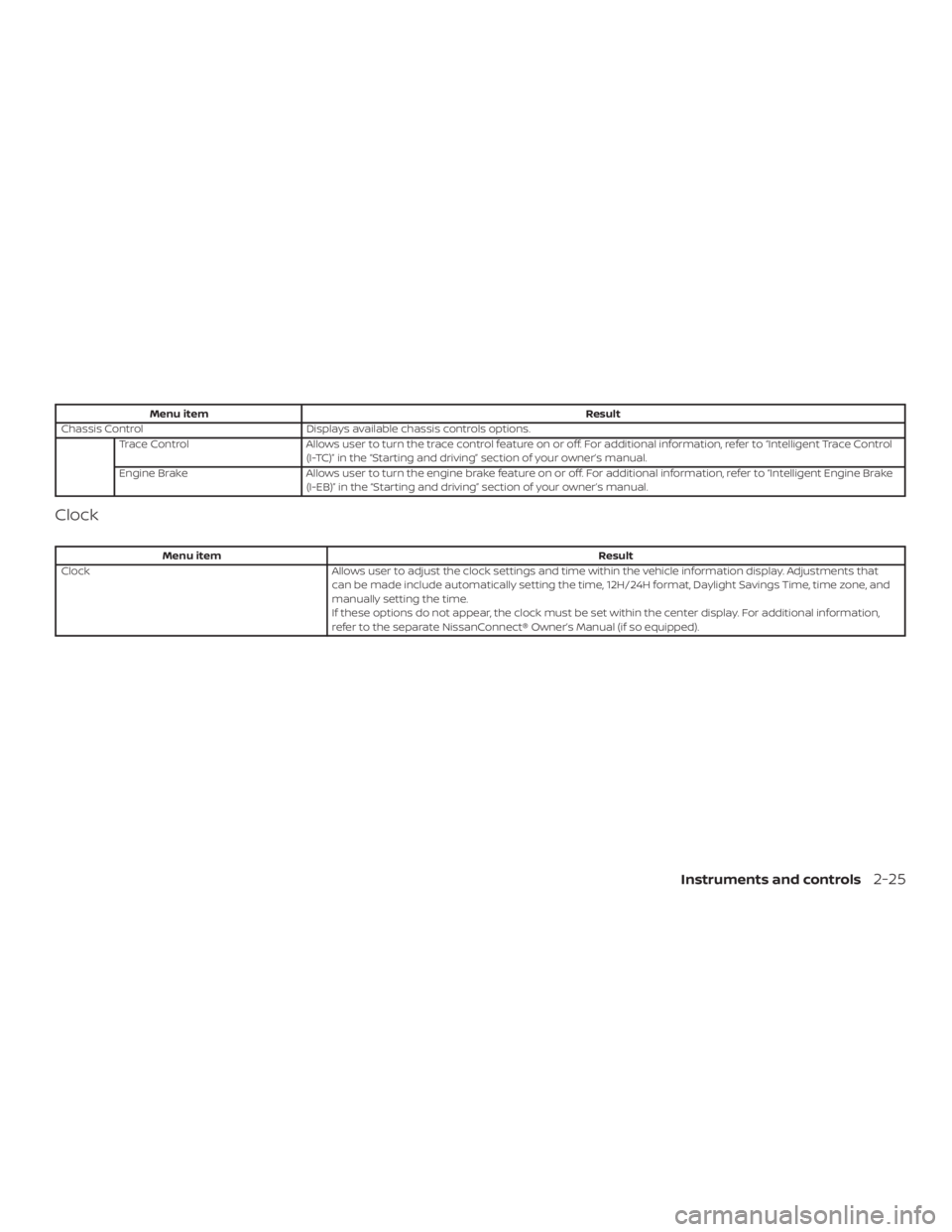
Menu itemResult
Chassis Control Displays available chassis controls options.
Trace Control Allows user to turn the trace control feature on or off. For additional information, refer to “Intelligent Trace Control
(I-TC)” in the “Starting and driving” section of your owner’s manual.
Engine Brake Allows user to turn the engine brake feature on or off. For additional information, refer to “Intelligent Engine Brake
(I-EB)” in the “Starting and driving” section of your owner’s manual.
Clock
Menu item Result
Clock Allows user to adjust the clock settings and time within the vehicle information display. Adjustments that
can be made include automatically setting the time, 12H/24H format, Daylight Savings Time, time zone, and
manually setting the time.
If these options do not appear, the clock must be set within the center display. For additional information,
refer to the separate NissanConnect® Owner’s Manual (if so equipped).
Instruments and controls2-25
Page 117 of 547
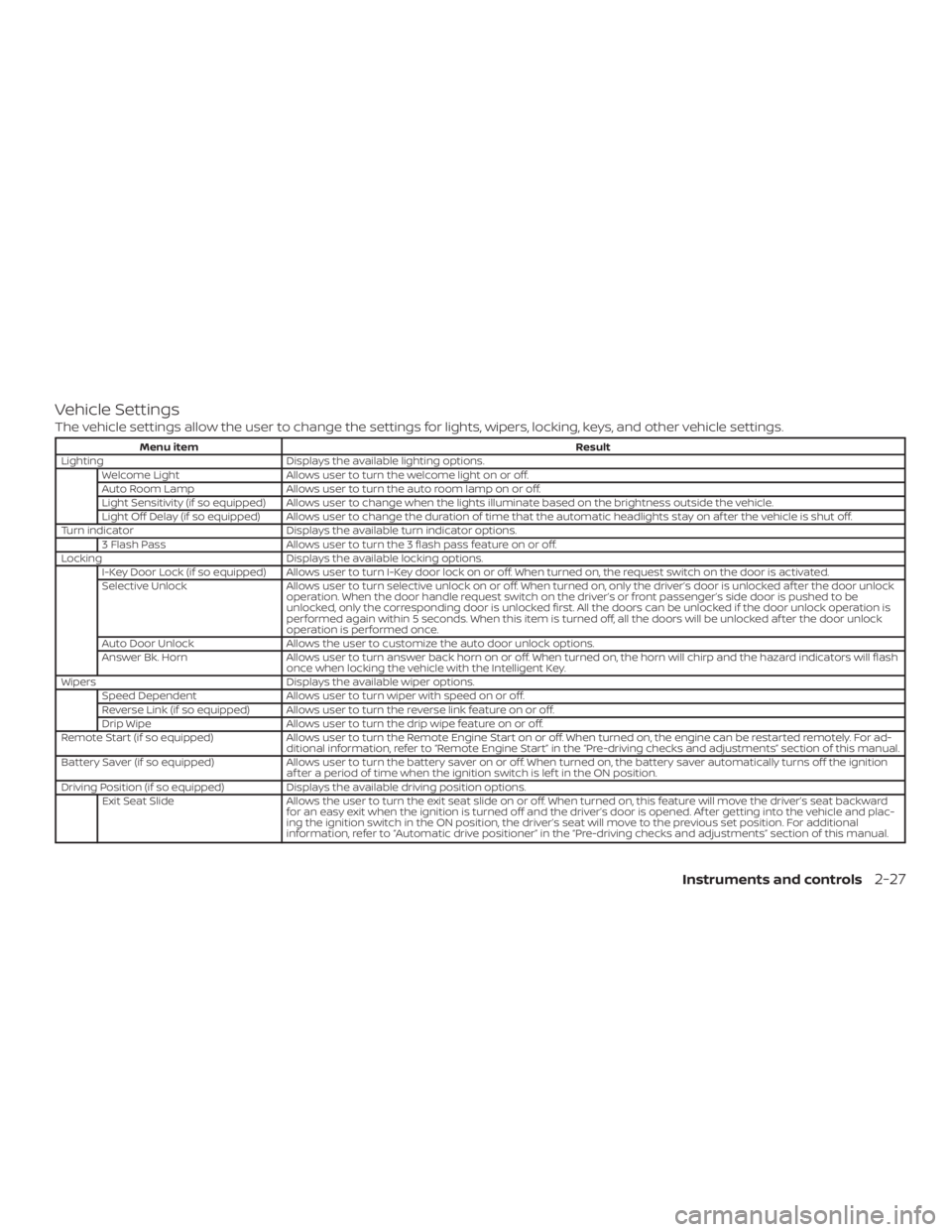
Vehicle Settings
The vehicle settings allow the user to change the settings for lights, wipers, locking, keys, and other vehicle settings.
Menu itemResult
Lighting Displays the available lighting options.
Welcome Light Allows user to turn the welcome light on or off.
Auto Room Lamp Allows user to turn the auto room lamp on or off.
Light Sensitivity (if so equipped) Allows user to change when the lights illuminate based on the brightness outside the vehicle.
Light Off Delay (if so equipped) Allows user to change the duration of time that the automatic headlights stay on af ter the vehicle is shut off.
Turn indicator Displays the available turn indicator options.
3 Flash Pass Allows user to turn the 3 flash pass feature on or off.
Locking Displays the available locking options.
I-Key Door Lock (if so equipped) Allows user to turn I-Key door lock on or off. When turned on, the request switch on the door is activated.
Selective Unlock Allows user to turn selective unlock on or off. When turned on, only the driver’s door is unlocked af ter the door unlock
operation. When the door handle request switch on the driver’s or front passenger’s side door is pushed to be
unlocked, only the corresponding door is unlocked first. All the doors can be unlocked if the door unlock operation is
performed again within 5 seconds. When this item is turned off, all the doors will be unlocked af ter the door unlock
operation is performed once.
Auto Door Unlock Allows the user to customize the auto door unlock options.
Answer Bk. Horn Allows user to turn answer back horn on or off. When turned on, the horn will chirp and the hazard indicators will flash
once when locking the vehicle with the Intelligent Key.
Wipers Displays the available wiper options.
Speed Dependent Allows user to turn wiper with speed on or off.
Reverse Link (if so equipped) Allows user to turn the reverse link feature on or off.
Drip Wipe Allows user to turn the drip wipe feature on or off.
Remote Start (if so equipped) Allows user to turn the Remote Engine Start on or off. When turned on, the engine can be restarted remotely. For ad-
ditional information, refer to “Remote Engine Start” in the “Pre-driving checks and adjustments” section of this manual.
Battery Saver (if so equipped) Allows user to turn the battery saver on or off. When turned on, the battery saver automatically turns off the ignition
af ter a period of time when the ignition switch is lef t in the ON position.
Driving Position (if so equipped) Displays the available driving position options.
Exit Seat Slide Allows the user to turn the exit seat slide on or off. When turned on, this feature will move the driver’s seat backward
for an easy exit when the ignition is turned off and the driver’s door is opened. Af ter getting into the vehicle and plac-
ing the ignition switch in the ON position, the driver’s seat will move to the previous set position. For additional
information, refer to “Automatic drive positioner” in the “Pre-driving checks and adjustments” section of this manual.
Instruments and controls2-27
Page 122 of 547
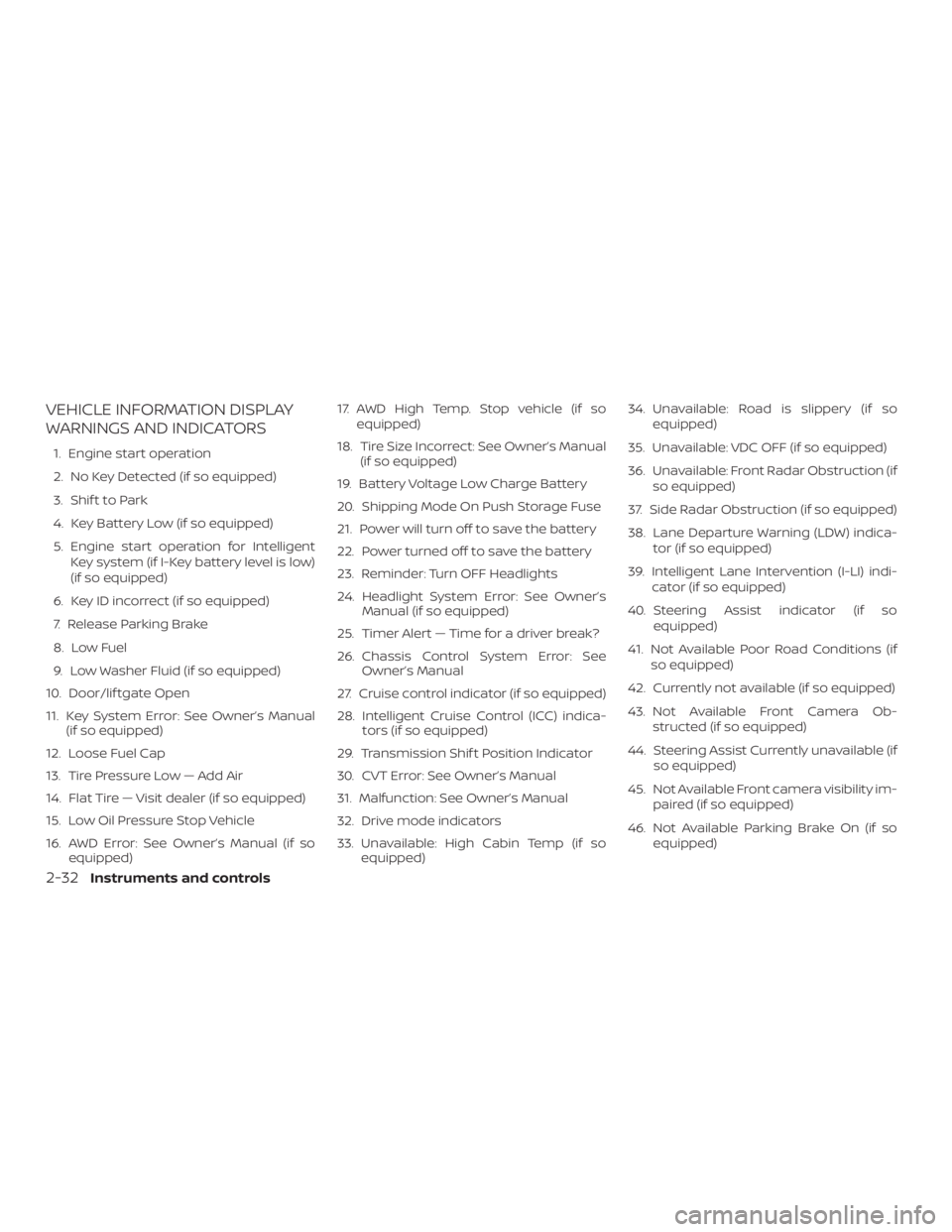
VEHICLE INFORMATION DISPLAY
WARNINGS AND INDICATORS
1. Engine start operation
2. No Key Detected (if so equipped)
3. Shif t to Park
4. Key Battery Low (if so equipped)
5. Engine start operation for IntelligentKey system (if I-Key battery level is low)
(if so equipped)
6. Key ID incorrect (if so equipped)
7. Release Parking Brake
8. Low Fuel
9. Low Washer Fluid (if so equipped)
10. Door/lif tgate Open
11. Key System Error: See Owner’s Manual (if so equipped)
12. Loose Fuel Cap
13. Tire Pressure Low — Add Air
14. Flat Tire — Visit dealer (if so equipped)
15. Low Oil Pressure Stop Vehicle
16. AWD Error: See Owner’s Manual (if so equipped) 17. AWD High Temp. Stop vehicle (if so
equipped)
18. Tire Size Incorrect: See Owner’s Manual (if so equipped)
19. Battery Voltage Low Charge Battery
20. Shipping Mode On Push Storage Fuse
21. Power will turn off to save the battery
22. Power turned off to save the battery
23. Reminder: Turn OFF Headlights
24. Headlight System Error: See Owner’s Manual (if so equipped)
25. Timer Alert — Time for a driver break?
26. Chassis Control System Error: See Owner’s Manual
27. Cruise control indicator (if so equipped)
28. Intelligent Cruise Control (ICC) indica- tors (if so equipped)
29. Transmission Shif t Position Indicator
30. CVT Error: See Owner’s Manual
31. Malfunction: See Owner’s Manual
32. Drive mode indicators
33. Unavailable: High Cabin Temp (if so equipped) 34. Unavailable: Road is slippery (if so
equipped)
35. Unavailable: VDC OFF (if so equipped)
36. Unavailable: Front Radar Obstruction (if so equipped)
37. Side Radar Obstruction (if so equipped)
38. Lane Departure Warning (LDW) indica- tor (if so equipped)
39. Intelligent Lane Intervention (I-LI) indi- cator (if so equipped)
40. Steering Assist indicator (if so equipped)
41. Not Available Poor Road Conditions (if so equipped)
42. Currently not available (if so equipped)
43. Not Available Front Camera Ob- structed (if so equipped)
44. Steering Assist Currently unavailable (if so equipped)
45. Not Available Front camera visibility im- paired (if so equipped)
46. Not Available Parking Brake On (if so equipped)
2-32Instruments and controls
Page 124 of 547
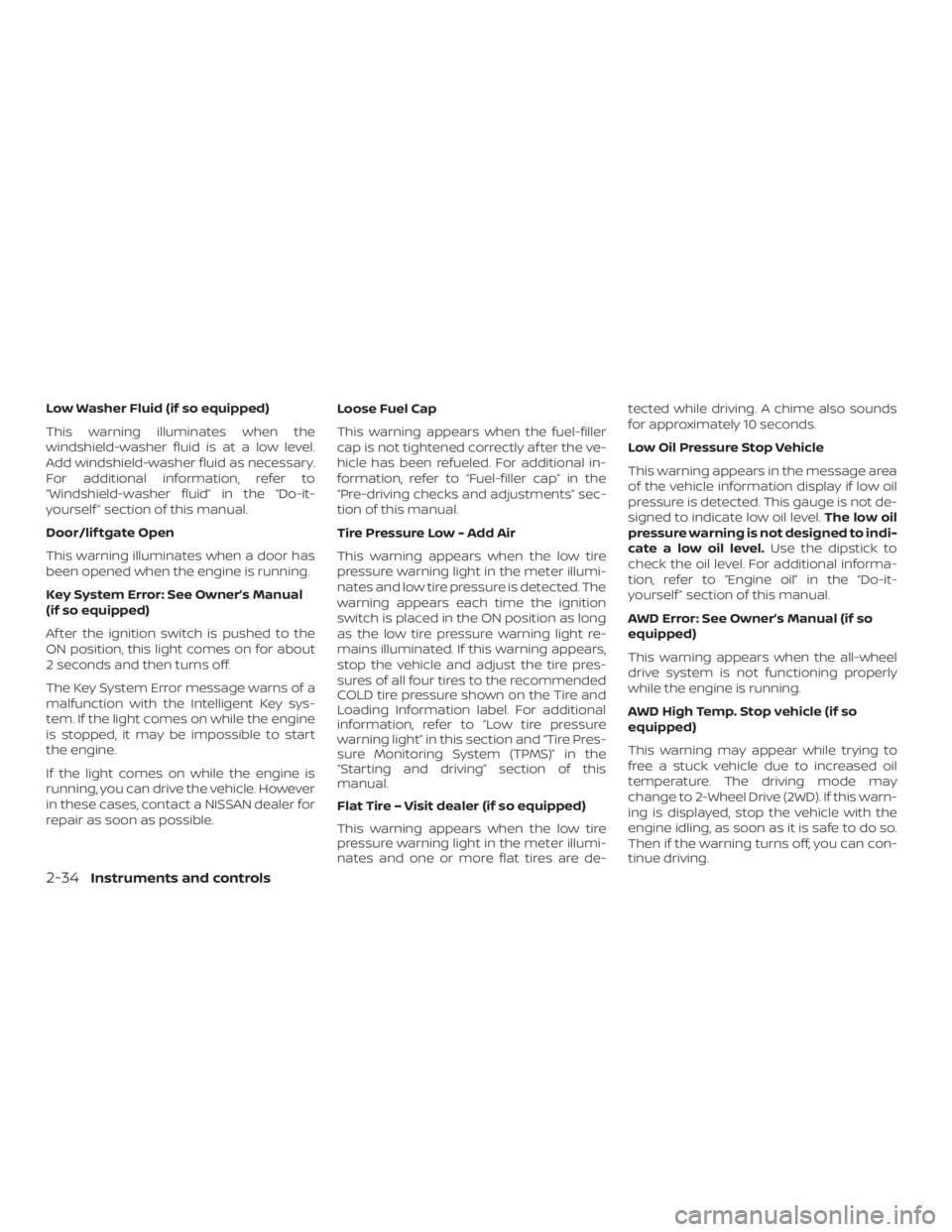
Low Washer Fluid (if so equipped)
This warning illuminates when the
windshield-washer fluid is at a low level.
Add windshield-washer fluid as necessary.
For additional information, refer to
“Windshield-washer fluid” in the “Do-it-
yourself ” section of this manual.
Door/lif tgate Open
This warning illuminates when a door has
been opened when the engine is running.
Key System Error: See Owner’s Manual
(if so equipped)
Af ter the ignition switch is pushed to the
ON position, this light comes on for about
2 seconds and then turns off.
The Key System Error message warns of a
malfunction with the Intelligent Key sys-
tem. If the light comes on while the engine
is stopped, it may be impossible to start
the engine.
If the light comes on while the engine is
running, you can drive the vehicle. However
in these cases, contact a NISSAN dealer for
repair as soon as possible.Loose Fuel Cap
This warning appears when the fuel-filler
cap is not tightened correctly af ter the ve-
hicle has been refueled. For additional in-
formation, refer to “Fuel-filler cap” in the
“Pre-driving checks and adjustments” sec-
tion of this manual.
Tire Pressure Low - Add Air
This warning appears when the low tire
pressure warning light in the meter illumi-
nates and low tire pressure is detected. The
warning appears each time the ignition
switch is placed in the ON position as long
as the low tire pressure warning light re-
mains illuminated. If this warning appears,
stop the vehicle and adjust the tire pres-
sures of all four tires to the recommended
COLD tire pressure shown on the Tire and
Loading Information label. For additional
information, refer to “Low tire pressure
warning light” in this section and “Tire Pres-
sure Monitoring System (TPMS)” in the
“Starting and driving” section of this
manual.
Flat Tire – Visit dealer (if so equipped)
This warning appears when the low tire
pressure warning light in the meter illumi-
nates and one or more flat tires are de-tected while driving. A chime also sounds
for approximately 10 seconds.
Low Oil Pressure Stop Vehicle
This warning appears in the message area
of the vehicle information display if low oil
pressure is detected. This gauge is not de-
signed to indicate low oil level.
The low oil
pressure warning is not designed to indi-
cate a low oil level. Use the dipstick to
check the oil level. For additional informa-
tion, refer to “Engine oil” in the “Do-it-
yourself ” section of this manual.
AWD Error: See Owner’s Manual (if so
equipped)
This warning appears when the all-wheel
drive system is not functioning properly
while the engine is running.
AWD High Temp. Stop vehicle (if so
equipped)
This warning may appear while trying to
free a stuck vehicle due to increased oil
temperature. The driving mode may
change to 2-Wheel Drive (2WD). If this warn-
ing is displayed, stop the vehicle with the
engine idling, as soon as it is safe to do so.
Then if the warning turns off, you can con-
tinue driving.
2-34Instruments and controls
Page 125 of 547
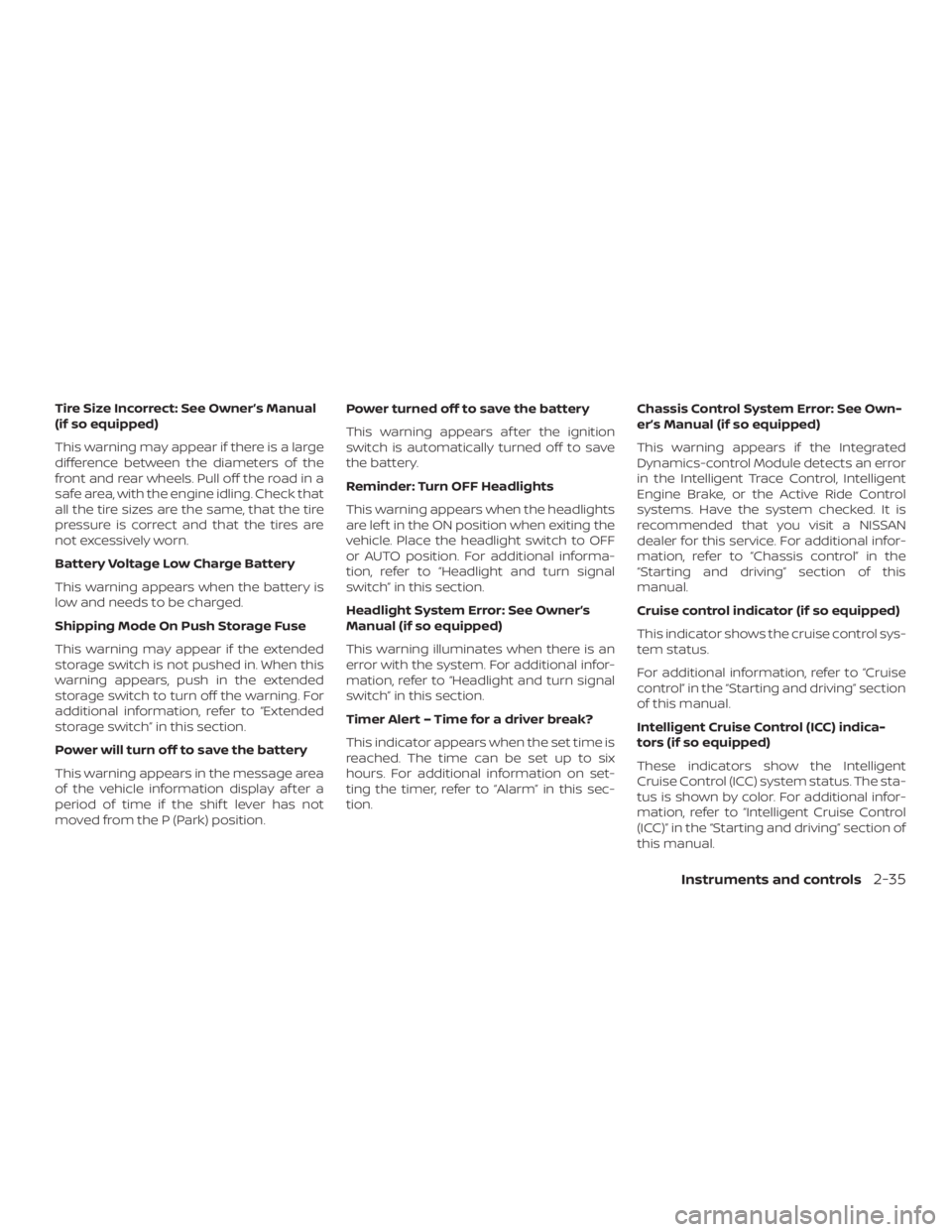
Tire Size Incorrect: See Owner’s Manual
(if so equipped)
This warning may appear if there is a large
difference between the diameters of the
front and rear wheels. Pull off the road in a
safe area, with the engine idling. Check that
all the tire sizes are the same, that the tire
pressure is correct and that the tires are
not excessively worn.
Battery Voltage Low Charge Battery
This warning appears when the battery is
low and needs to be charged.
Shipping Mode On Push Storage Fuse
This warning may appear if the extended
storage switch is not pushed in. When this
warning appears, push in the extended
storage switch to turn off the warning. For
additional information, refer to “Extended
storage switch” in this section.
Power will turn off to save the battery
This warning appears in the message area
of the vehicle information display af ter a
period of time if the shif t lever has not
moved from the P (Park) position.Power turned off to save the battery
This warning appears af ter the ignition
switch is automatically turned off to save
the battery.
Reminder: Turn OFF Headlights
This warning appears when the headlights
are lef t in the ON position when exiting the
vehicle. Place the headlight switch to OFF
or AUTO position. For additional informa-
tion, refer to “Headlight and turn signal
switch” in this section.
Headlight System Error: See Owner’s
Manual (if so equipped)
This warning illuminates when there is an
error with the system. For additional infor-
mation, refer to “Headlight and turn signal
switch” in this section.
Timer Alert – Time for a driver break?
This indicator appears when the set time is
reached. The time can be set up to six
hours. For additional information on set-
ting the timer, refer to “Alarm” in this sec-
tion.
Chassis Control System Error: See Own-
er’s Manual (if so equipped)
This warning appears if the Integrated
Dynamics-control Module detects an error
in the Intelligent Trace Control, Intelligent
Engine Brake, or the Active Ride Control
systems. Have the system checked. It is
recommended that you visit a NISSAN
dealer for this service. For additional infor-
mation, refer to “Chassis control” in the
“Starting and driving” section of this
manual.
Cruise control indicator (if so equipped)
This indicator shows the cruise control sys-
tem status.
For additional information, refer to “Cruise
control” in the “Starting and driving” section
of this manual.
Intelligent Cruise Control (ICC) indica-
tors (if so equipped)
These indicators show the Intelligent
Cruise Control (ICC) system status. The sta-
tus is shown by color. For additional infor-
mation, refer to “Intelligent Cruise Control
(ICC)” in the “Starting and driving” section of
this manual.
Instruments and controls2-35
Page 127 of 547

For additional information, refer to “Lane
Departure Warning (LDW) system” and “In-
telligent Lane Intervention (I-LI)” in the
“Starting and driving” section of this
manual.
Intelligent Lane Intervention (I-LI) indi-
cator (if so equipped)
This indicator shows when the I-LI system
is engaged.
For additional information, refer to “Dy-
namic driver assistance switch” in this sec-
tion and “Intelligent Lane Intervention (I-LI)”
in the “Starting and driving” section of this
manual.
Steering Assist indicator (if so
equipped)
This indicator appears when the Steering
Assist system is engaged.
For additional information, refer to “ProPI-
LOT Assist” in the “Starting and driving” sec-
tion of this manual.
Not Available Poor Road Conditions (if
so equipped)
This message may appear when the Intel-
ligent Cruise Control (ICC) (with ProPILOT
Assist) system or the ICC system is en-
gaged.Under the following conditions, the ICC
(with ProPILOT Assist) or the ICC system is
automatically canceled:
∙ When the VDC operates
∙ When a wheel slips
The above system cannot be used in some
situations (VDC operates and wheel slip.)
Currently not available (if so equipped)
This message may appear when the Intel-
ligent Cruise Control (ICC) (with ProPILOT
Assist) system or the ICC system is en-
gaged.
Under the following conditions, the ICC
(with ProPILOT Assist) or the ICC system is
automatically canceled: ∙ When the VDC operates
∙ When a wheel slips
∙ When the VDC system is turned off
The above system cannot be used in some
situations (VDC operates, wheel slip and
VDC system is off.) Not Available Front Camera Obstructed
(if so equipped)
This message may appear when the Intel-
ligent Cruise Control (ICC) (with ProPILOT
Assist) system is engaged.
Under the following conditions, the ICC
(with ProPILOT Assist) system is automati-
cally canceled:
∙ The camera area of the windshield is fogged up or covered with dirt, water,
drops, ice, snow, etc.
∙ Strong light, such as sunlight or high beams from oncoming vehicles, enter
the front camera
∙ When the wiper (HI) operates
The system will be available when the
above conditions no longer exist.
If the warning message continues to ap-
pear, stop the vehicle in a safe location, turn
the engine off and clean the windshield.
Steering Assist Currently unavailable (if
so equipped)
This message may appear when the Steer-
ing Assist system is engaged.
Instruments and controls2-37
Page 128 of 547
Under the following conditions, the Steer-
ing Assist system is automatically can-
celed:∙ When the wiper (LO) operates
∙ When lane markers in the traveling lane cannot be correctly detected for a pe-
riod of time due to such items as a
snow rut, reflection of light on a rainy
day or several unclear lane markers are
present
If you want to use the Steering Assist sys-
tem again, cancel the ProPILOT Assist sys-
tem and set it again when lane markers are
clearly visible.
Not Available Front camera visibility is
impaired (if so equipped)
This message may appear when the Intel-
ligent Cruise Control (ICC) (with ProPILOT
Assist) system is engaged.
Under the following conditions, the ICC
(with ProPILOT Assist) system is automati-
cally canceled: ∙ The camera area of the windshield is fogged up or covered with dirt, water,
drops, ice, snow, etc. ∙ Strong light, such as sunlight or high
beams from oncoming vehicles, enter
the front camera
∙ When the wiper (HI) operates
The system will be available when the
above conditions no longer exist.
If the warning message continues to ap-
pear, stop the vehicle in a safe location, turn
the engine off and clean the windshield.
Not Available Parking Brake On (if so
equipped)
This message may appear when the Intel-
ligent Cruise Control (ICC) (with ProPILOT
Assist) system is engaged.
Under the following condition, the ICC (with
ProPILOT Assist) system is automatically
canceled: ∙ The electronic parking brake is applied
The above system cannot be used when
the electric parking brake is activated. Not Available Seat Belt Not Fastened (if
so equipped)
This message may appear when the Intel-
ligent Cruise Control (ICC) (with ProPILOT
Assist) system is engaged.
Under the following condition, the ICC (with
ProPILOT Assist) system is automatically
canceled:
∙ When the driver’s seat belt is not fas- tened
The above system cannot be used when
the driver’s seat belt is not fastened.
Step on Brake Now (if so equipped)
This message may appear when the Intel-
ligent Cruise Control (ICC) (with ProPILOT
Assist) system is engaged.
It will be displayed under the following con-
dition: ∙ While the vehicle is stopped by the ICC (with ProPILOT Assist), the driver’s door
is opened but the electronic parking
brake was not activated.
Please step on the brake immediately.
2-38Instruments and controls